🎯 Learning Path:
- Complete REL-ID Initialization Flow Codelab
- Complete REL-ID Complete Activation & Login Flow Codelab
- You are here → Identity Verification MFA Activation Flow Implementation
Welcome to the REL-ID Identity Verification MFA Activation Flow codelab! This tutorial teaches you how to implement comprehensive identity verification during the user activation process using document scanning, facial recognition, and biometric authentication.
What You'll Build
In this codelab, you'll enhance your existing REL-ID MFA activation flow with integrated identity verification:
- 📱 Enhanced Activation Flow: Seamless IDV integration within MFA activation
- 📄 Document Scan Process: Automated document verification during user onboarding
- 📸 Document Details Confirmation: Interactive review of OCR-extracted identity information
- 🤳 Selfie Capture Process: Live selfie capture with liveness detection
- ✅ Selfie Biometric Verification: Face matching between document and live selfie
- 🔐 Biometric Consent Management: User consent for biometric template storage
- 🔑 Password Setup: Secure password creation after IDV completion
- 📊 Complete Event-Driven Architecture: Event handlers for all IDV workflows
Key Difference: IDV During Activation vs MFA Activation
This codelab demonstrates IDV integrated within MFA activation, where identity verification occurs immediately after the activation code and before password setup:
Standard MFA Activation Flow:
Activation Code → Password Setup → Dashboard

IDV MFA Activation Flow (This Codelab):
Activation Code → IDV (Document → Selfie → Consent) → Password Setup → Dashboard
What You'll Learn
- ✅ How to integrate IDV within MFA activation workflow
- ✅ Implementing REL-ID IDV APIs with proper event handling
- ✅ Document scanning and OCR data validation during onboarding
- ✅ Selfie capture with liveness detection and face matching
- ✅ Handling biometric consent and template storage
- ✅ Managing IDV workflow states and challenge modes
- ✅ Error handling and retry logic for IDV operations
- ✅ Completing activation flow after successful IDV verification
Prerequisites
- Completion of REL-ID Initialization codelab
- Completion of REL-ID MFA Activation & Login codelab
- Basic understanding of Cordova and JavaScript
- REL-ID SDK integration credentials
- Document scanning license (Regula)
- Test identity documents for scanning
Technology Stack
- Cordova: 12.x
- JavaScript: ES6+
- REL-ID SDK: cordova-plugin-rdna (Latest)
- Regula Document Reader: For document scanning and OCR
- Navigation: Custom NavigationService (SPA pattern)
IDV MFA Activation Flow Diagram
Understanding the complete flow is crucial before implementation:
1. SDK Initialization
   ↓ (rdnaService.initialize)

2. User Registration
   ↓ (CheckUserScreen → getUser event)

3. Activation Code Verification
   ↓ (ActivationCodeScreen → activation code validated)

4. 📄 IDV Document Scan Process
   ├─ getIDVDocumentScanProcessStartConfirmation event
   │  • challengeMode: 8 (activation)
   │  • idvWorkflow: 0 (RDNAIDVWorkflowActivation)
   ├─ setIDVDocumentScanProcessStartConfirmation(true, 0)
   ├─ Native Document Capture (Regula SDK)
   ├─ getIDVConfirmDocumentDetails event
   │  • challengeMode: 8
   │  • response_data: OCR-extracted document fields
   └─ setIDVConfirmDocumentDetails(true, challengeMode)
   ↓

5. 🤳 IDV Selfie Capture Process
   ├─ getIDVSelfieProcessStartConfirmation event
   │  • idvWorkflow: 0 (RDNAIDVWorkflowActivation)
   ├─ setIDVSelfieProcessStartConfirmation(true, false, 0)
   ├─ Native Selfie Capture (Liveness Detection)
   ├─ getIDVSelfieConfirmation event
   │  • challengeMode: 8
   │  • response_data: Biometric match results
   └─ setIDVSelfieConfirmation("true", challengeMode)
   ↓

6. 🔐 IDV Biometric Consent
   ├─ getIDVBiometricOptInConsent event
   │  • challengeMode: 8
   └─ setIDVBiometricOptInConsent(true, challengeMode)
   ↓

7. 🔑 Password Setup
   ↓ (SetPasswordScreen → getPassword event)

8. ✅ onUserLoggedIn Event
   ↓

9. Dashboard Navigation
IDV Workflow and Challenge Mode Values
For MFA activation flow, you'll use these specific values:
Parameter | Value | Description |
idvWorkflow |
|
|
challengeMode |
| Activation challenge mode |
Before You Begin
Ensure you have completed these requirements:
1. Previous Codelabs Completed
- ✅ REL-ID Initialization Flow
- ✅ REL-ID MFA Activation & Login Flow
2. Development Environment
# Required tools
Node.js >= 16
npm or yarn
Cordova CLI
Xcode (for iOS) or Android Studio (for Android)
3. REL-ID SDK Credentials
- Connection profile configuration
- Valid REL-ID SDK license
- Document scanning license (Regula)
Get the Code from GitHub
The code to get started can be found in a GitHub repository.
You can clone the repository using the following command:
git clone https://github.com/uniken-team/relid-codelab-cordova.git
Navigate to the relid-IDV-MFA-activation-flow folder in the repository you cloned earlier:
cd relid-codelab-cordova/relid-IDV-MFA-activation-flow
Project Structure
The IDV MFA Activation codelab follows this structure:
relid-IDV-MFA-activation-flow/
├── www/
│   ├── index.html                          # SPA root with all screen templates
│   ├── css/
│   │   └── index.css
│   ├── js/
│   │   ├── app.js                           # App bootstrap (deviceready handler)
│   │   └── index.js
│   └── src/
│       ├── uniken/
│       │   ├── AppInitializer.js            # Initialize SDK handlers
│       │   ├── services/
│       │   │   ├── rdnaService.js
│       │   │   ├── rdnaEventManager.js
│       │   │   └── idv/
│       │   │       ├── rdnaIDVService.js
│       │   │       └── rdnaIDVEventManager.js
│       │   ├── utils/
│       │   │   └── connectionProfileParser.js
│       │   ├── providers/
│       │   │   ├── SDKEventProvider.js
│       │   │   └── idv/SDKIDVEventProvider.js
│       │   └── cp/
│       │       └── agent_info.json
│       └── tutorial/
│           ├── navigation/
│           │   └── NavigationService.js
│           └── screens/
│               ├── idv/                    # IDV Screens (HTML templates in index.html, JS modules here)
│               │   ├── IDVDocumentProcessStartConfirmationScreen.js
│               │   ├── IDVConfirmDocumentDetailsScreen.js
│               │   ├── IDVSelfieProcessStartConfirmationScreen.js
│               │   ├── IDVSelfieConfirmationScreen.js
│               │   └── IDVBiometricOptInConsentScreen.js
│               └── mfa/
│                   ├── CheckUserScreen.js
│                   ├── ActivationCodeScreen.js
│                   └── SetPasswordScreen.js
├── config.xml
├── package.json
├── hooks/
│   └── after_prepare/
│       └── copy_idv_native_resources.js
└── idv-native-resources/
    ├── android/
    │   └── assets/
    │       └── Regula/
    │           ├── db.dat                             # Document recognition DB
    │           └── certificates/
    │               └── icaopkd-002-complete-000325.ldif
    └── ios/
        └── idv-artifacts/
            ├── db.dat                                 # Document recognition DB
            ├── regula.license
            └── Certificates.bundle/
                └── icaopkd-002-complete-000325.ldif
Installation
Step 1: Clone and Setup
# Navigate to the codelab folder
cd relid-IDV-MFA-activation-flow

# Install dependencies
npm install
Step 2: Add Cordova Plugin
# Add REL-ID plugin
cordova plugin add cordova-plugin-rdna

# Add file plugin
cordova plugin add cordova-plugin-file
Step 3: Configure IDV Assets
The following IDV assets need to be configured in your project at the specified paths:
Android Configuration:
Place the following files (provided by Uniken admin team) at these locations:
- 📄 Document Recognition Database:
idv-native-resources/android/assets/Regula/db.dat - 📄 ICAO PKD Certificates:
idv-native-resources/android/assets/Regula/certificates/icaopkd-002-complete-000325.ldif - 📄 Regula License:
android/app/src/main/res/raw/regula.license
iOS Configuration:
Place the following files (provided by Uniken admin team) at these locations:
- 📄 Document Recognition Database:
idv-native-resources/ios/idv-artifacts/db.dat - 📄 Regula License:
idv-native-resources/ios/idv-artifacts/regula.license - 📄 Certificate Bundle:
idv-native-resources/ios/idv-artifacts/Certificates.bundle/icaopkd-002-complete-000325.ldif
Step 4: Add Platforms
# Add iOS platform
cordova platform add ios

# Add Android platform
cordova platform add android
Step 5: Prepare Platforms
# Prepare both platforms (triggers hooks to copy IDV assets)
cordova prepare
Step 6: Run the Application
# Android
cordova run android

# iOS
cordova run ios
Architecture Overview: Code Isolation & Single Responsibility
This codelab implements IDV functionality using a clean, isolated architecture that follows single responsibility principles. All IDV-related code is separated into dedicated directories, making the codebase maintainable and scalable.
Key Architectural Benefits
- ✅ Code Isolation: All IDV code is isolated under
idv/subdirectories - ✅ Single Responsibility: Each file has one clear purpose
- ✅ Auto-Initialization: Event listeners registered before native events fire
- ✅ Centralized Event Management: Single source of truth for IDV event handling
- ✅ SPA Pattern: Single Page Application with dynamic screen loading
Complete IDV File Structure
The IDV implementation consists of 6 core files organized in 3 layers:
www/src/uniken/
├── services/idv/                          # SERVICE LAYER
│   ├── rdnaIDVService.js                  # IDV API wrapper (Promise-based)
│   └── rdnaIDVEventManager.js             # Native event manager (auto-init)
│
├── providers/idv/                         # PROVIDER LAYER
│   └── SDKIDVEventProvider.js             # Event provider (singleton)
│
www/src/tutorial/
└── screens/idv/                           # UI LAYER
    ├── IDVDocumentProcessStartConfirmationScreen.js
    ├── IDVConfirmDocumentDetailsScreen.js
    ├── IDVSelfieProcessStartConfirmationScreen.js
    ├── IDVSelfieConfirmationScreen.js
    └── IDVBiometricOptInConsentScreen.js
The 3-Layer Architecture Pattern
The IDV implementation follows a clear 3-layer pattern that separates concerns:
┌─────────────────────────────────────────────────────┐
│  LAYER 3: UI LAYER (JavaScript Modules)            │
│  • 5 IDV Screens (Document, Selfie, Consent)       │
│  • Display UI, handle user interactions            │
│  • HTML templates in index.html                    │
└─────────────────────────────────────────────────────┘
                        ↓
┌─────────────────────────────────────────────────────┐
│  LAYER 2: PROVIDER LAYER (Singleton)               │
│  • SDKIDVEventProvider.js                          │
│  • Connects events to navigation                   │
│  • Manages IDV state (current workflow)            │
└─────────────────────────────────────────────────────┘
                        ↓
┌─────────────────────────────────────────────────────┐
│  LAYER 1: SERVICE LAYER (Business Logic)           │
│  • rdnaIDVService.js → API calls (Promise-based)   │
│  • rdnaIDVEventManager.js → Native event handling  │
└─────────────────────────────────────────────────────┘
                        ↓
┌─────────────────────────────────────────────────────┐
│  NATIVE LAYER (REL-ID SDK)                          │
│  • cordova-plugin-rdna                              │
│  • Native document scanner (Regula)                 │
│  • Native selfie capture (Liveness)                │
└─────────────────────────────────────────────────────┘
How the Layers Connect: Event Flow Example
Here's how a document scan event flows through all layers:
// 1️⃣ NATIVE LAYER: SDK fires event
Native SDK → fires 'getIDVDocumentScanProcessStartConfirmation' event

// 2️⃣ SERVICE LAYER: Event Manager catches it
RdnaIDVEventManager.onGetDocumentScanStartConfirmation()
  → Parses JSON response
  → Calls registered handler

// 3️⃣ PROVIDER LAYER: Provider handles navigation
SDKIDVEventProvider.handleGetDocumentScanStartConfirmation()
  → Updates state (currentIDVWorkflow)
  → Calls NavigationService.navigate('IDVDocumentScanStart')

// 4️⃣ UI LAYER: Screen displays
IDVDocumentProcessStartConfirmationScreen
  → Shows guidelines
  → User clicks "Scan Document"
  → Calls rdnaIDVService.setIDVDocumentScanProcessStartConfirmation()

// 5️⃣ SERVICE LAYER: API call
rdnaIDVService.setIDVDocumentScanProcessStartConfirmation()
  → Wraps native API in Promise
  → Returns sync response

// 6️⃣ NATIVE LAYER: Opens camera
SDK opens Regula document scanner
  → User captures document
  → SDK fires next event (getIDVConfirmDocumentDetails)
  → Cycle continues...
Key Architectural Patterns
1. Singleton Pattern (Event Manager & Service)
Both the Event Manager and Service use singleton pattern for global state management:
// Event Manager - One instance for all IDV events
class RdnaIDVEventManager {
  constructor() {
    if (RdnaIDVEventManager.instance) {
      return RdnaIDVEventManager.instance;
    }

    this.registerEventListeners(); // ← Auto-init on module load!
    RdnaIDVEventManager.instance = this;
  }

  static getInstance() {
    if (!RdnaIDVEventManager.instance) {
      RdnaIDVEventManager.instance = new RdnaIDVEventManager();
    }
    return RdnaIDVEventManager.instance;
  }
}

// Auto-instantiate singleton
const rdnaIDVEventManager = RdnaIDVEventManager.getInstance();
Why? Ensures event listeners are registered once before any native events fire, preventing race conditions.
2. Event Provider Pattern (Navigation Manager)
The Event Provider uses a singleton pattern to manage IDV state and navigation:
// Provider manages state and navigation
const SDKIDVEventProvider = {
  _initialized: false,
  currentIDVWorkflow: null,

  initialize() {
    if (this._initialized) return;

    const eventManager = rdnaIDVService.getEventManager();

    // Register handlers
    eventManager.setGetDocumentScanStartConfirmationHandler(
      this.handleGetDocumentScanStartConfirmation.bind(this)
    );

    this._initialized = true;
  },

  handleGetDocumentScanStartConfirmation(data) {
    this.currentIDVWorkflow = data.idvWorkflow; // Update state
    NavigationService.navigate('IDVDocumentScanStart', {
      idvWorkflow: data.idvWorkflow
    });
  }
};
Why? Centralizes navigation logic and maintains IDV state across the application.
3. Promise-Based API Wrapper (Service)
The Service wraps callback-based native APIs with Promises for async/await:
// Native SDK uses callbacks
com.uniken.rdnaplugin.RdnaClient.setIDVDocumentScanProcessStartConfirmation(
  successCb, errorCb, [param1, param2]
);

// Service wraps in Promise for async/await
async setIDVDocumentScanProcessStartConfirmation(isConfirm, workflow) {
  return new Promise((resolve, reject) => {
    com.uniken.rdnaplugin.RdnaClient.setIDVDocumentScanProcessStartConfirmation(
      (response) => {
        const result = JSON.parse(response);
        resolve(result);
      },
      (error) => {
        const err = JSON.parse(error);
        reject(err);
      },
      [isConfirm, workflow]
    );
  });
}

// Screens can use async/await
await rdnaIDVService.setIDVDocumentScanProcessStartConfirmation(true, 0);
Why? Modern async/await syntax is cleaner and easier to handle than nested callbacks.
4. Screen Module Pattern (UI Components)
Screens are JavaScript objects with lifecycle methods:
// Screen module with state and methods
const IDVDocumentProcessStartConfirmationScreen = {
  state: {
    idvWorkflow: null,
    isProcessing: false,
    error: ''
  },

  onContentLoaded(params) {
    // Initialize state
    this.state.idvWorkflow = params.idvWorkflow;

    // Setup event listeners
    this.setupEventListeners();

    // Render content
    this.render();
  },

  setupEventListeners() {
    document.getElementById('scan-btn').onclick = () => {
      this.handleScan();
    };
  },

  async handleScan() {
    // Handle user action
  },

  cleanup() {
    // Remove listeners
  }
};

// Expose to global scope for NavigationService
window.IDVDocumentScanStartScreen = IDVDocumentProcessStartConfirmationScreen;
Why? Simple module pattern without framework overhead, perfect for Cordova's SPA architecture.
App Integration: Provider Initialization
The final piece is integrating SDKIDVEventProvider into your AppInitializer.js:
// AppInitializer.js - Initialize providers
const AppInitializer = {
  initialize() {
    console.log('AppInitializer - Starting initialization');

    // Initialize SDK Event Provider (MFA events)
    SDKEventProvider.initialize();

    // Initialize IDV Event Provider (IDV events)
    SDKIDVEventProvider.initialize();

    console.log('AppInitializer - All providers initialized');
  }
};

// Auto-initialize on module load
document.addEventListener('deviceready', () => {
  AppInitializer.initialize();
}, false);
Why this order?
deviceready event fires
    ↓
AppInitializer.initialize()
    ↓
SDKEventProvider.initialize()     → Handles: getUser, getPassword, onUserLoggedIn
    ↓
SDKIDVEventProvider.initialize()  → Handles: getIDVDocumentScan, getIDVSelfie
    ↓
App is ready for user interaction
Architecture Benefits Summary
1. Code Isolation
✅ All IDV code under idv/ subdirectories
✅ Easy to locate and modify IDV features
✅ No mixing of MFA and IDV code
✅ Clean separation of concerns
2. Single Responsibility
✅ rdnaIDVEventManager.js → Handles native events only
✅ rdnaIDVService.js → Handles API calls only
✅ SDKIDVEventProvider.js → Handles navigation only
✅ Screen modules → UI rendering only
3. Auto-Initialization
✅ Event manager initializes on module load
✅ Listeners registered before native events fire
✅ Prevents race conditions
✅ No manual initialization required
4. Centralized Event Management
✅ All navigation logic in SDKIDVEventProvider
✅ Single source of truth for event handling
✅ Consistent event-to-screen mapping
✅ Easy to debug and maintain
Overview
The rdnaIDVEventManager.js handles all native IDV events using Cordova's document.addEventListener pattern. It auto-initializes when the module loads to ensure event listeners are registered before any native events fire.
File Location
www/src/uniken/services/idv/rdnaIDVEventManager.js
Complete Implementation
/**
 * REL-ID IDV SDK Event Manager
 *
 * Manages Identity Verification (IDV) related SDK events in a centralized manner.
 * Provides a singleton pattern for consistent IDV event handling across the application.
 * Handles document scanning and validation events.
 *
 * **IMPORTANT:** This manager auto-initializes when the module loads to ensure native
 * event listeners are registered immediately, preventing race conditions.
 *
 * Supported IDV Events:
 *
 * **Document Scan Events:**
 * - getIDVDocumentScanProcessStartConfirmation: Pre-scan consent request
 * - getIDVConfirmDocumentDetails: Post-scan OCR data validation
 *
 * **Selfie Capture Events:**
 * - getIDVSelfieProcessStartConfirmation: Pre-selfie capture consent request
 * - getIDVSelfieConfirmation: Post-selfie biometric analysis validation
 *
 * **Biometric Consent Events:**
 * - getIDVBiometricOptInConsent: User consent for biometric template storage
 */
class RdnaIDVEventManager {
  constructor() {
    if (RdnaIDVEventManager.instance) {
      return RdnaIDVEventManager.instance;
    }

    console.log('RdnaIDVEventManager - Initializing event manager (auto-initialization on module load)');

    this._initialized = false;
    this.listeners = [];

    // Document Scan Event Handlers
    this.getDocumentScanStartConfirmationHandler = null;
    this.getConfirmDocumentDetailsHandler = null;

    // Selfie Capture Event Handlers
    this.getSelfieProcessStartConfirmationHandler = null;
    this.getSelfieConfirmationHandler = null;

    // Biometric Consent Event Handlers
    this.getBiometricOptInConsentHandler = null;

    RdnaIDVEventManager.instance = this;

    // Auto-register listeners on construction
    this.registerEventListeners();
  }

  static getInstance() {
    if (!RdnaIDVEventManager.instance) {
      RdnaIDVEventManager.instance = new RdnaIDVEventManager();
    }
    return RdnaIDVEventManager.instance;
  }

  /**
   * Registers native event listeners for IDV events
   *
   * Events are registered using document.addEventListener for Cordova.
   */
  registerEventListeners() {
    if (this._initialized) {
      console.log('RdnaIDVEventManager - Already initialized, skipping event listener registration');
      return;
    }

    console.log('RdnaIDVEventManager - Registering native IDV event listeners');

    // Document Scan Start Confirmation Event
    document.addEventListener(
      'getIDVDocumentScanProcessStartConfirmation',
      this.onGetDocumentScanStartConfirmation.bind(this),
      false
    );

    // Document Details Validation Event
    document.addEventListener(
      'getIDVConfirmDocumentDetails',
      this.onGetConfirmDocumentDetails.bind(this),
      false
    );

    // Selfie Process Start Confirmation Event
    document.addEventListener(
      'getIDVSelfieProcessStartConfirmation',
      this.onGetSelfieProcessStartConfirmation.bind(this),
      false
    );

    // Selfie Confirmation Event
    document.addEventListener(
      'getIDVSelfieConfirmation',
      this.onGetSelfieConfirmation.bind(this),
      false
    );

    // Biometric Opt-In Consent Event
    document.addEventListener(
      'getIDVBiometricOptInConsent',
      this.onGetBiometricOptInConsent.bind(this),
      false
    );

    this._initialized = true;
    console.log('RdnaIDVEventManager - Native IDV event listeners registered');
  }

  // ================================================================================================
  // DOCUMENT SCAN EVENT HANDLERS
  // ================================================================================================

  /**
   * Handles document scan process start confirmation request event
   *
   * This event is triggered before the SDK initiates document scanning.
   * Application should display informative message about requirements and get user consent.
   *
   * @param event Event object containing response data from native SDK
   */
  onGetDocumentScanStartConfirmation(event) {
    console.log('RdnaIDVEventManager - Get document scan start confirmation event received');

    try {
      const response = event.response || event.detail || event;
      console.log('RdnaIDVEventManager - onGetDocumentScanStartConfirmation response:', JSON.stringify(response, null, 2));

      const data = typeof response === 'string' ? JSON.parse(response) : response;
      console.log('RdnaIDVEventManager - IDV Workflow:', data.idvWorkflow);

      if (this.getDocumentScanStartConfirmationHandler) {
        this.getDocumentScanStartConfirmationHandler(data);
      }
    } catch (error) {
      console.error('RdnaIDVEventManager - Failed to parse document scan start confirmation:', error);
    }
  }

  /**
   * Handles document details validation event
   *
   * This event is triggered after the SDK completes document scanning and OCR processing.
   * Application should display extracted document information for user validation.
   *
   * @param event Event object containing OCR data and challengeMode from native SDK
   */
  onGetConfirmDocumentDetails(event) {
    console.log('RdnaIDVEventManager - Get confirm document details event received');

    try {
      const response = event.response || event.detail || event;
      console.log('RdnaIDVEventManager - onGetConfirmDocumentDetails response:', JSON.stringify(response, null, 2));

      const data = typeof response === 'string' ? JSON.parse(response) : response;
      console.log('RdnaIDVEventManager - Challenge Mode:', data.challengeMode);
      console.log('RdnaIDVEventManager - Document OCR Data:', JSON.stringify(data.response_data, null, 2));

      if (this.getConfirmDocumentDetailsHandler) {
        this.getConfirmDocumentDetailsHandler(data);
      }
    } catch (error) {
      console.error('RdnaIDVEventManager - Failed to parse confirm document details:', error);
    }
  }

  // ================================================================================================
  // SELFIE CAPTURE EVENT HANDLERS
  // ================================================================================================

  /**
   * Handles selfie process start confirmation request event
   *
   * This event is triggered before the SDK initiates selfie capture.
   * Application should display informative message about requirements and get user consent.
   *
   * @param event Event object containing workflow type from native SDK
   */
  onGetSelfieProcessStartConfirmation(event) {
    console.log('RdnaIDVEventManager - Get selfie process start confirmation event received');

    try {
      const response = event.response || event.detail || event;
      console.log('RdnaIDVEventManager - onGetSelfieProcessStartConfirmation response:', JSON.stringify(response, null, 2));

      const data = typeof response === 'string' ? JSON.parse(response) : response;
      console.log('RdnaIDVEventManager - IDV Workflow:', data.idvWorkflow);

      if (this.getSelfieProcessStartConfirmationHandler) {
        this.getSelfieProcessStartConfirmationHandler(data);
      }
    } catch (error) {
      console.error('RdnaIDVEventManager - Failed to parse selfie process start confirmation:', error);
    }
  }

  /**
   * Handles selfie confirmation request event
   *
   * This event is triggered after the SDK completes selfie capture and biometric analysis.
   * Application should display captured selfie, document photo, biometric scores for user validation.
   *
   * @param event Event object containing biometric analysis results from native SDK
   */
  onGetSelfieConfirmation(event) {
    console.log('RdnaIDVEventManager - Get selfie confirmation event received');

    try {
      const response = event.response || event.detail || event;
      console.log('RdnaIDVEventManager - onGetSelfieConfirmation response:', JSON.stringify(response, null, 2));

      const data = typeof response === 'string' ? JSON.parse(response) : response;
      console.log('RdnaIDVEventManager - User ID:', data.userID);
      console.log('RdnaIDVEventManager - Challenge Mode:', data.challengeMode);
      console.log('RdnaIDVEventManager - Face Match Score:', data.response_data?.response_data?.face_matcher_response?.score);
      console.log('RdnaIDVEventManager - Liveness Score:', data.response_data?.response_data?.analyze_liveness_response?.video?.liveness_result?.score);

      if (this.getSelfieConfirmationHandler) {
        this.getSelfieConfirmationHandler(data);
      }
    } catch (error) {
      console.error('RdnaIDVEventManager - Failed to parse selfie confirmation:', error);
    }
  }

  // ================================================================================================
  // BIOMETRIC CONSENT EVENT HANDLERS
  // ================================================================================================

  /**
   * Handles biometric opt-in consent request event
   *
   * This event is triggered when the SDK needs user permission to store biometric templates.
   * Application should display informative message explaining biometric data storage and
   * privacy implications, then get user consent decision.
   *
   * @param event Event object containing consent request from native SDK
   */
  onGetBiometricOptInConsent(event) {
    console.log('RdnaIDVEventManager - Get biometric opt-in consent event received');

    try {
      const response = event.response || event.detail || event;
      console.log('RdnaIDVEventManager - onGetBiometricOptInConsent response:', JSON.stringify(response, null, 2));

      const data = typeof response === 'string' ? JSON.parse(response) : response;
      console.log('RdnaIDVEventManager - User ID:', data.userID);
      console.log('RdnaIDVEventManager - Challenge Mode:', data.challengeMode);
      console.log('RdnaIDVEventManager - Attempts Left:', data.attemptsLeft);
      console.log('RdnaIDVEventManager - Status Code:', data.challengeResponse?.status?.statusCode);
      console.log('RdnaIDVEventManager - Status Message:', data.challengeResponse?.status?.statusMessage);
      console.log('RdnaIDVEventManager - Session ID:', data.challengeResponse?.session?.sessionID);
      console.log('RdnaIDVEventManager - Current Workflow:', data.challengeResponse?.additionalInfo?.currentWorkFlow);
      console.log('RdnaIDVEventManager - IDV User Role:', data.challengeResponse?.additionalInfo?.idvUserRole);

      if (this.getBiometricOptInConsentHandler) {
        this.getBiometricOptInConsentHandler(data);
      }
    } catch (error) {
      console.error('RdnaIDVEventManager - Failed to parse biometric opt-in consent:', error);
    }
  }

  // ================================================================================================
  // PUBLIC API - EVENT HANDLER SETTERS
  // ================================================================================================

  /**
   * Document Scan Event Handler Setters
   */

  setGetDocumentScanStartConfirmationHandler(callback) {
    this.getDocumentScanStartConfirmationHandler = callback;
  }

  setGetConfirmDocumentDetailsHandler(callback) {
    this.getConfirmDocumentDetailsHandler = callback;
  }

  /**
   * Selfie Capture Event Handler Setters
   */

  setGetSelfieProcessStartConfirmationHandler(callback) {
    this.getSelfieProcessStartConfirmationHandler = callback;
  }

  setGetSelfieConfirmationHandler(callback) {
    this.getSelfieConfirmationHandler = callback;
  }

  /**
   * Biometric Consent Event Handler Setters
   */

  setGetBiometricOptInConsentHandler(callback) {
    this.getBiometricOptInConsentHandler = callback;
  }

  /**
   * Cleans up all event listeners and handlers
   */
  cleanup() {
    console.log('RdnaIDVEventManager - Cleaning up event listeners and handlers');

    // Remove native event listeners
    document.removeEventListener('getIDVDocumentScanProcessStartConfirmation', this.onGetDocumentScanStartConfirmation.bind(this), false);
    document.removeEventListener('getIDVConfirmDocumentDetails', this.onGetConfirmDocumentDetails.bind(this), false);
    document.removeEventListener('getIDVSelfieProcessStartConfirmation', this.onGetSelfieProcessStartConfirmation.bind(this), false);
    document.removeEventListener('getIDVSelfieConfirmation', this.onGetSelfieConfirmation.bind(this), false);
    document.removeEventListener('getIDVBiometricOptInConsent', this.onGetBiometricOptInConsent.bind(this), false);

    // Clear document scan handlers
    this.getDocumentScanStartConfirmationHandler = null;
    this.getConfirmDocumentDetailsHandler = null;

    // Clear selfie capture handlers
    this.getSelfieProcessStartConfirmationHandler = null;
    this.getSelfieConfirmationHandler = null;

    // Clear biometric consent handlers
    this.getBiometricOptInConsentHandler = null;

    this._initialized = false;

    console.log('RdnaIDVEventManager - Cleanup completed');
  }
}

// Auto-instantiate singleton
const rdnaIDVEventManager = RdnaIDVEventManager.getInstance();
Key Features
1. Auto-Initialization
// Event manager auto-initializes when module loads
const rdnaIDVEventManager = RdnaIDVEventManager.getInstance();
// ↑ This runs immediately, registering listeners BEFORE native events fire
2. Singleton Pattern
constructor() {
  if (RdnaIDVEventManager.instance) {
    return RdnaIDVEventManager.instance;  // Return existing instance
  }
  // ... initialization code
  RdnaIDVEventManager.instance = this;
}
3. Document Event Listeners
// Register using document.addEventListener (Cordova pattern)
document.addEventListener(
  'getIDVDocumentScanProcessStartConfirmation',
  this.onGetDocumentScanStartConfirmation.bind(this),
  false
);
4. Flexible Response Parsing
// Handle different event formats from native SDK
const response = event.response || event.detail || event;
const data = typeof response === 'string' ? JSON.parse(response) : response;
Usage in Screens
Screens don't interact with Event Manager directly. They use the Service layer:
// ❌ Don't do this
rdnaIDVEventManager.setGetDocumentScanStartConfirmationHandler(...);

// ✅ Do this instead
const eventManager = rdnaIDVService.getEventManager();
eventManager.setGetDocumentScanStartConfirmationHandler(...);
Overview
The rdnaIDVService.js provides Promise-based wrappers around Cordova plugin APIs for IDV operations. It handles document scanning, selfie capture, and biometric consent operations.
File Location
www/src/uniken/services/idv/rdnaIDVService.js
Complete Implementation
/**
 * REL-ID IDV SDK Service
 *
 * Provides a singleton service for Identity Verification (IDV) related SDK operations.
 * Wraps the native RdnaClient IDV API with Promise-based interface.
 * Handles document scanning and validation operations.
 *
 * IDV APIs:
 *
 * **Document Scan APIs:**
 * - setIDVDocumentScanProcessStartConfirmation: Start/cancel document scan
 * - setIDVConfirmDocumentDetails: Confirm/reject scanned document OCR data
 *
 * **Selfie Capture APIs:**
 * - setIDVSelfieProcessStartConfirmation: Start/cancel selfie capture
 * - setIDVSelfieConfirmation: Confirm/reject selfie biometric results
 *
 * **Biometric Consent APIs:**
 * - setIDVBiometricOptInConsent: User consent for biometric template storage
 *
 * All methods follow the sync+async callback pattern:
 * 1. Success callback always resolves (SDK decides which callback to invoke)
 * 2. Error callback always rejects
 * 3. Asynchronous events deliver actual results through event handlers
 */
class RdnaIDVService {
  constructor() {
    if (RdnaIDVService.instance) {
      return RdnaIDVService.instance;
    }

    console.log('RdnaIDVService - Initializing service (auto-initialization on module load)');
    this.eventManager = rdnaIDVEventManager;
    console.log('RdnaIDVService - Service initialized, event listeners are ready');

    RdnaIDVService.instance = this;
  }

  static getInstance() {
    if (!RdnaIDVService.instance) {
      RdnaIDVService.instance = new RdnaIDVService();
    }
    return RdnaIDVService.instance;
  }

  /**
   * Gets the IDV event manager instance for external callback setup
   *
   * @returns {RdnaIDVEventManager} Event manager instance for registering event handlers
   */
  getEventManager() {
    return this.eventManager;
  }

  /**
   * Cleans up the service and event manager
   */
  cleanup() {
    console.log('RdnaIDVService - Cleaning up service');
    this.eventManager.cleanup();
  }

  // ================================================================================================
  // DOCUMENT SCAN APIs
  // ================================================================================================

  /**
   * Sets document scan process start confirmation
   *
   * This API must be invoked in response to getIDVDocumentScanProcessStartConfirmation event.
   * Initiates or cancels the document scan process during IDV workflows.
   *
   * Response Validation Logic:
   * 1. Check error.longErrorCode: 0 = success, > 0 = error
   * 2. If isConfirm=true: SDK starts document capture UI
   * 3. If isConfirm=false: IDV flow terminates, redirects to getUser (pre-login) or appropriate workflow event (post-login)
   * 4. Error code 146 = "IDV identity verification canceled by user"
   *
   * @param {boolean} isConfirm - true to start document scan, false to cancel IDV flow
   * @param {number} idvWorkflow - IDV workflow enum value from the event
   * @returns {Promise<Object>} Promise that resolves with sync response structure
   */
  async setIDVDocumentScanProcessStartConfirmation(isConfirm, idvWorkflow) {
    return new Promise((resolve, reject) => {
      console.log('RdnaIDVService - Setting document scan start confirmation:', JSON.stringify({
        isConfirm,
        idvWorkflow
      }, null, 2));

      com.uniken.rdnaplugin.RdnaClient.setIDVDocumentScanProcessStartConfirmation(
        (response) => {
          console.log('RdnaIDVService - SetIDVDocumentScanProcessStartConfirmation sync callback received');

          const result = JSON.parse(response);
          console.log('RdnaIDVService - setIDVDocumentScanProcessStartConfirmation sync response:', JSON.stringify({
            longErrorCode: result.error?.longErrorCode,
            shortErrorCode: result.error?.shortErrorCode,
            errorString: result.error?.errorString
          }, null, 2));
          resolve(result);
        },
        (error) => {
          console.error('RdnaIDVService - setIDVDocumentScanProcessStartConfirmation error callback');
          const result = JSON.parse(error);
          reject(result);
        },
        [isConfirm, idvWorkflow]
      );
    });
  }

  /**
   * Sets document details confirmation
   *
   * This API must be invoked in response to getIDVConfirmDocumentDetails event.
   * Confirms or rejects the OCR-extracted document information displayed to the user.
   *
   * Response Validation Logic:
   * 1. Check error.longErrorCode: 0 = success, > 0 = error
   * 2. If isConfirm=true: SDK proceeds with validated document data to next step in IDV workflow
   * 3. If isConfirm=false: SDK may allow document rescan or terminate based on workflow configuration
   * 4. challengeMode determines the operation context (biometric, document scan, etc.)
   *
   * @param {boolean} isConfirm - true to confirm document details, false to reject and possibly rescan
   * @param {number} challengeMode - Challenge operation mode enum value indicating the IDV operation context
   * @returns {Promise<Object>} Promise that resolves with sync response structure
   */
  async setIDVConfirmDocumentDetails(isConfirm, challengeMode) {
    return new Promise((resolve, reject) => {
      console.log('RdnaIDVService - Setting confirm document details:', JSON.stringify({
        isConfirm,
        challengeMode
      }, null, 2));

      com.uniken.rdnaplugin.RdnaClient.setIDVConfirmDocumentDetails(
        (response) => {
          console.log('RdnaIDVService - SetIDVConfirmDocumentDetails sync callback received');

          const result = JSON.parse(response);
          console.log('RdnaIDVService - setIDVConfirmDocumentDetails sync response:', JSON.stringify({
            longErrorCode: result.error?.longErrorCode,
            shortErrorCode: result.error?.shortErrorCode,
            errorString: result.error?.errorString
          }, null, 2));
          resolve(result);
        },
        (error) => {
          console.error('RdnaIDVService - setIDVConfirmDocumentDetails error callback');
          const result = JSON.parse(error);
          reject(result);
        },
        [isConfirm, challengeMode]
      );
    });
  }

  // ================================================================================================
  // SELFIE CAPTURE APIs
  // ================================================================================================

  /**
   * Sets selfie process start confirmation
   *
   * This API must be invoked in response to getIDVSelfieProcessStartConfirmation event.
   * Initiates or cancels the selfie capture process during IDV workflows.
   *
   * Response Validation Logic:
   * 1. Check error.longErrorCode: 0 = success, > 0 = error
   * 2. If isConfirm=true: SDK starts selfie capture UI with specified camera
   * 3. If isConfirm=false: IDV flow terminates, redirects to appropriate workflow event
   * 4. useDeviceBackCamera determines which camera to use (default: front camera)
   *
   * @param {boolean} isConfirm - true to start selfie capture, false to cancel IDV flow
   * @param {boolean} useDeviceBackCamera - true to use back camera, false to use front camera (default: false)
   * @param {number} idvWorkflow - IDV workflow enum value from the event
   * @returns {Promise<Object>} Promise that resolves with sync response structure
   */
  async setIDVSelfieProcessStartConfirmation(isConfirm, useDeviceBackCamera, idvWorkflow) {
    return new Promise((resolve, reject) => {
      console.log('RdnaIDVService - Setting selfie process start confirmation:', JSON.stringify({
        isConfirm,
        useDeviceBackCamera,
        idvWorkflow
      }, null, 2));

      com.uniken.rdnaplugin.RdnaClient.setIDVSelfieProcessStartConfirmation(
        (response) => {
          console.log('RdnaIDVService - SetIDVSelfieProcessStartConfirmation sync callback received');

          const result = JSON.parse(response);
          console.log('RdnaIDVService - setIDVSelfieProcessStartConfirmation sync response:', JSON.stringify({
            longErrorCode: result.error?.longErrorCode,
            shortErrorCode: result.error?.shortErrorCode,
            errorString: result.error?.errorString
          }, null, 2));
          resolve(result);
        },
        (error) => {
          console.error('RdnaIDVService - setIDVSelfieProcessStartConfirmation error callback');
          const result = JSON.parse(error);
          reject(result);
        },
        [isConfirm, useDeviceBackCamera, idvWorkflow]
      );
    });
  }

  /**
   * Sets selfie confirmation
   *
   * This API must be invoked in response to getIDVSelfieConfirmation event.
   * Confirms or rejects the captured selfie and biometric analysis results.
   *
   * Response Validation Logic:
   * 1. Check error.longErrorCode: 0 = success, > 0 = error
   * 2. If action=true/"true": SDK proceeds with validated selfie data to next step in IDV workflow
   * 3. If action=false/"false": SDK may allow selfie recapture or terminate based on workflow configuration
   * 4. challengeMode determines the operation context (biometric matching, liveness detection, etc.)
   *
   * @param {string} action - User confirmation action (typically "true" for accept, "false" for reject)
   * @param {number} challengeMode - Challenge operation mode enum value from the getIDVSelfieConfirmation event
   * @returns {Promise<Object>} Promise that resolves with sync response structure
   */
  async setIDVSelfieConfirmation(action, challengeMode) {
    return new Promise((resolve, reject) => {
      console.log('RdnaIDVService - Setting selfie confirmation:', JSON.stringify({
        action,
        challengeMode
      }, null, 2));

      com.uniken.rdnaplugin.RdnaClient.setIDVSelfieConfirmation(
        (response) => {
          console.log('RdnaIDVService - SetIDVSelfieConfirmation sync callback received');

          const result = JSON.parse(response);
          console.log('RdnaIDVService - setIDVSelfieConfirmation sync response:', JSON.stringify({
            longErrorCode: result.error?.longErrorCode,
            shortErrorCode: result.error?.shortErrorCode,
            errorString: result.error?.errorString
          }, null, 2));
          resolve(result);
        },
        (error) => {
          console.error('RdnaIDVService - setIDVSelfieConfirmation error callback');
          const result = JSON.parse(error);
          reject(result);
        },
        [action, challengeMode]
      );
    });
  }

  // ================================================================================================
  // BIOMETRIC CONSENT APIs
  // ================================================================================================

  /**
   * Sets biometric opt-in consent
   *
   * This API must be invoked in response to getIDVBiometricOptInConsent event.
   * Submits user's consent decision for biometric template storage during IDV workflows.
   *
   * Response Validation Logic:
   * 1. Check error.longErrorCode: 0 = success, > 0 = error
   * 2. If isOptIn=true: User consents to biometric template storage, SDK proceeds with IDV flow
   * 3. If isOptIn=false: User declines biometric storage, SDK may continue without storing template
   * 4. The IDV flow will continue to the next step
   * 5. Async events will be handled by event listeners
   *
   * @param {boolean} isOptIn - User consent decision (true = allow biometric storage, false = deny)
   * @param {number} challengeMode - Challenge mode from the getIDVBiometricOptInConsent event
   * @returns {Promise<Object>} Promise that resolves with sync response structure
   */
  async setIDVBiometricOptInConsent(isOptIn, challengeMode) {
    return new Promise((resolve, reject) => {
      console.log('RdnaIDVService - Setting biometric opt-in consent:', JSON.stringify({
        isOptIn,
        challengeMode
      }, null, 2));

      com.uniken.rdnaplugin.RdnaClient.setIDVBiometricOptInConsent(
        (response) => {
          console.log('RdnaIDVService - SetIDVBiometricOptInConsent sync callback received');

          const result = JSON.parse(response);
          console.log('RdnaIDVService - setIDVBiometricOptInConsent sync response:', JSON.stringify({
            longErrorCode: result.error?.longErrorCode,
            shortErrorCode: result.error?.shortErrorCode,
            errorString: result.error?.errorString
          }, null, 2));
          resolve(result);
        },
        (error) => {
          console.error('RdnaIDVService - setIDVBiometricOptInConsent error callback');
          const result = JSON.parse(error);
          reject(result);
        },
        [isOptIn, challengeMode]
      );
    });
  }
}

// Auto-instantiate singleton
const rdnaIDVService = RdnaIDVService.getInstance();
Key Features
1. Promise-Based API
All methods return Promises for clean async/await usage:
// Call API with async/await
try {
  const response = await rdnaIDVService.setIDVDocumentScanProcessStartConfirmation(true, 0);
  console.log('Success:', response);
} catch (error) {
  console.error('Error:', error);
}
2. JSON Parsing
All responses from Cordova plugin are JSON strings that need parsing:
com.uniken.rdnaplugin.RdnaClient.setIDVDocumentScanProcessStartConfirmation(
  (response) => {
    const result = JSON.parse(response);  // ← Parse JSON string
    resolve(result);
  },
  (error) => {
    const err = JSON.parse(error);  // ← Parse JSON string
    reject(err);
  },
  [isConfirm, idvWorkflow]
);
3. Event Manager Access
Service provides access to Event Manager for handler registration:
// Get event manager for registering handlers
const eventManager = rdnaIDVService.getEventManager();
eventManager.setGetDocumentScanStartConfirmationHandler((data) => {
  // Handle event
});
API Methods Overview
Method | Event Trigger | Purpose |
|
| Start/cancel document scan |
|
| Confirm/reject OCR data |
|
| Start/cancel selfie capture |
|
| Confirm/reject biometric results |
|
| Accept/deny biometric storage |
Understanding Service Auto-Initialization
Unlike React Native which uses ES6 imports, Cordova requires manual service initialization. The service and event manager use an auto-initialization pattern to ensure they're ready before any SDK events fire.
Auto-Initialization Pattern:
// rdnaIDVService.js
class RdnaIDVService {
  constructor() {
    if (RdnaIDVService.instance) {
      return RdnaIDVService.instance;
    }

    console.log('RdnaIDVService - Initializing service (auto-initialization on module load)');
    this.eventManager = rdnaIDVEventManager;
    RdnaIDVService.instance = this;
  }

  static getInstance() {
    if (!RdnaIDVService.instance) {
      RdnaIDVService.instance = new RdnaIDVService();
    }
    return RdnaIDVService.instance;
  }
}

// Auto-instantiate singleton when script loads
const rdnaIDVService = RdnaIDVService.getInstance();
Why Auto-Initialize?
- Race Condition Prevention: Event listeners register BEFORE SDK fires any events
- Singleton Pattern: Guarantees only one instance exists globally
- Immediate Availability: Service ready as soon as JavaScript loads
- No Manual Setup: Screens can use service immediately without initialization calls
Script Loading Order in index.html
Cordova uses synchronous script loading, so order is CRITICAL. Load scripts in the wrong order and you'll get ReferenceError: rdnaIDVService is not defined.
Correct Loading Order:
<!-- CRITICAL: Load in this exact order! -->

<!-- 1. Core Services (must load FIRST) -->
<script type="text/javascript" src="src/uniken/services/idv/rdnaIDVEventManager.js"></script>
<script type="text/javascript" src="src/uniken/services/idv/rdnaIDVService.js"></script>

<!-- 2. Global Providers (depends on services) -->
<script type="text/javascript" src="src/uniken/providers/idv/SDKIDVEventProvider.js"></script>

<!-- 3. App Initializer (initializes providers - MUST load before screens) -->
<script type="text/javascript" src="src/uniken/AppInitializer.js"></script>

<!-- 4. Screens (load LAST - they use services) -->
<script type="text/javascript" src="src/tutorial/screens/idv/IDVDocumentProcessStartConfirmationScreen.js"></script>
<script type="text/javascript" src="src/tutorial/screens/idv/IDVConfirmDocumentDetailsScreen.js"></script>
<!-- ... other IDV screens ... -->
Loading Order Rationale:
1. rdnaIDVEventManager.js loads
   → Registers document.addEventListener listeners
   → Auto-creates singleton instance

2. rdnaIDVService.js loads
   → Gets reference to event manager
   → Wraps SDK APIs in Promise-based methods
   → Auto-creates singleton instance

3. SDKIDVEventProvider.js loads
   → Accesses rdnaIDVService (already loaded)
   → Registers global event handlers
   → Auto-creates singleton instance

4. AppInitializer.js loads
   → Calls SDKIDVEventProvider.initialize()
   → Sets up navigation service references

5. Screen files load
   → Access rdnaIDVService (safe - already loaded)
   → Register screen-level event handlers
   → Export to window object
Overview
The SDKIDVEventProvider.js manages IDV event handling and navigation logic. It connects native events to screen navigation and maintains IDV state.
File Location
www/src/uniken/providers/idv/SDKIDVEventProvider.js
Complete Implementation
/**
 * SDK IDV Event Provider
 *
 * Centralized singleton for REL-ID IDV (Identity Verification) event handling in Cordova.
 * Manages IDV SDK events, state, and navigation logic.
 * Handles document scanning and validation events.
 *
 * Supported Events:
 * - getIDVDocumentScanProcessStartConfirmation: Document scan start confirmation
 * - getIDVConfirmDocumentDetails: Document details validation
 * - getIDVSelfieProcessStartConfirmation: Selfie capture start confirmation
 * - getIDVSelfieConfirmation: Selfie biometric analysis confirmation
 * - getIDVBiometricOptInConsent: Biometric template storage consent
 *
 * Usage:
 * ```javascript
 * // In AppInitializer.js
 * SDKIDVEventProvider.initialize();
 * ```
 */
const SDKIDVEventProvider = {
  // =============================================================================
  // INITIALIZATION STATE
  // =============================================================================

  _initialized: false,

  // =============================================================================
  // IDV STATE
  // =============================================================================

  // Current IDV workflow being executed
  currentIDVWorkflow: null,

  // =============================================================================
  // PUBLIC INITIALIZATION API
  // =============================================================================

  /**
   * Initializes the SDK IDV Event Provider
   *
   * Registers IDV event handlers with the event manager.
   * Safe to call multiple times (idempotent).
   * Should be called once during app initialization in AppInitializer.js
   */
  initialize() {
    if (this._initialized) {
      console.log('SDKIDVEventProvider - Already initialized, skipping');
      return;
    }

    console.log('SDKIDVEventProvider - Initializing IDV event provider');

    try {
      const eventManager = rdnaIDVService.getEventManager();

      // Register document scan event handlers
      eventManager.setGetDocumentScanStartConfirmationHandler(
        this.handleGetDocumentScanStartConfirmation.bind(this)
      );
      eventManager.setGetConfirmDocumentDetailsHandler(
        this.handleGetConfirmDocumentDetails.bind(this)
      );

      // Register selfie capture event handlers
      eventManager.setGetSelfieProcessStartConfirmationHandler(
        this.handleGetSelfieProcessStartConfirmation.bind(this)
      );
      eventManager.setGetSelfieConfirmationHandler(
        this.handleGetSelfieConfirmation.bind(this)
      );

      // Register biometric consent event handlers
      eventManager.setGetBiometricOptInConsentHandler(
        this.handleGetBiometricOptInConsent.bind(this)
      );

      this._initialized = true;
      console.log('SDKIDVEventProvider - IDV event handlers registered successfully');
    } catch (error) {
      console.error('SDKIDVEventProvider - Failed to initialize:', error);
      throw error;
    }
  },

  // =============================================================================
  // DOCUMENT SCAN EVENT HANDLERS
  // =============================================================================

  /**
   * Handles document scan process start confirmation request event
   *
   * Navigates to IDV document scan start screen where user can:
   * - View informative message about document requirements
   * - Start document scan or cancel IDV flow
   *
   * Screen name: IDVDocumentScanStart
   *
   * @param {Object} data - Event data containing idvWorkflow
   */
  handleGetDocumentScanStartConfirmation(data) {
    console.log('SDKIDVEventProvider - Document scan start confirmation requested');
    console.log('SDKIDVEventProvider - IDV Workflow:', data.idvWorkflow);

    // Store current workflow
    this.currentIDVWorkflow = data.idvWorkflow;

    // Navigate to document scan start screen
    NavigationService.navigate('IDVDocumentScanStart', {
      idvWorkflow: data.idvWorkflow,
      eventData: data
    });
  },

  /**
   * Handles document details confirmation request event
   *
   * Navigates to IDV confirm document details screen where user can:
   * - Review OCR-extracted document information
   * - View document validation status (OK, ERROR, WARNING)
   * - Confirm document details or recapture document
   *
   * Screen name: IDVConfirmDocumentDetails
   *
   * @param {Object} data - Event data containing challengeMode and response_data
   */
  handleGetConfirmDocumentDetails(data) {
    console.log('SDKIDVEventProvider - Document details confirmation requested');
    console.log('SDKIDVEventProvider - Challenge Mode:', data.challengeMode);
    console.log('SDKIDVEventProvider - Response Data:', JSON.stringify(data.response_data, null, 2));

    // Navigate to confirm document details screen
    NavigationService.navigate('IDVConfirmDocumentDetails', {
      challengeMode: data.challengeMode,
      eventData: data
    });
  },

  // =============================================================================
  // SELFIE CAPTURE EVENT HANDLERS
  // =============================================================================

  /**
   * Handles selfie process start confirmation request event
   *
   * Navigates to IDV selfie process start screen where user can:
   * - View selfie capture requirements and guidelines
   * - Select camera preference (front/back)
   * - Start selfie capture or cancel IDV flow
   *
   * Screen name: IDVSelfieProcessStart
   *
   * @param {Object} data - Event data containing idvWorkflow
   */
  handleGetSelfieProcessStartConfirmation(data) {
    console.log('SDKIDVEventProvider - Selfie process start confirmation requested');
    console.log('SDKIDVEventProvider - IDV Workflow:', data.idvWorkflow);

    // Navigate to selfie process start screen
    NavigationService.navigate('IDVSelfieProcessStart', {
      idvWorkflow: data.idvWorkflow,
      eventData: data
    });
  },

  /**
   * Handles selfie confirmation request event
   *
   * Navigates to IDV selfie confirmation screen where user can:
   * - View biometric match result between selfie and document photo
   * - Review face matching score and liveness score
   * - Confirm selfie results or recapture selfie
   * - View detailed biometric analysis
   *
   * Screen name: IDVSelfieConfirmation
   *
   * @param {Object} data - Event data containing userID, challengeMode, and biometric results
   */
  handleGetSelfieConfirmation(data) {
    console.log('SDKIDVEventProvider - Selfie confirmation requested');
    console.log('SDKIDVEventProvider - User ID:', data.userID);
    console.log('SDKIDVEventProvider - Challenge Mode:', data.challengeMode);

    // Navigate to selfie confirmation screen
    NavigationService.navigate('IDVSelfieConfirmation', {
      challengeMode: data.challengeMode,
      eventData: data
    });
  },

  // =============================================================================
  // BIOMETRIC CONSENT EVENT HANDLERS
  // =============================================================================

  /**
   * Handles biometric opt-in consent request event
   *
   * Navigates to IDV biometric opt-in consent screen where user can:
   * - View biometric template storage explanation
   * - Review consent information and privacy implications
   * - Accept or reject biometric template storage
   * - Understand the benefits of biometric storage
   *
   * Screen name: IDVBiometricOptInConsent
   *
   * @param {Object} data - Event data containing userID, challengeMode, and consent details
   */
  handleGetBiometricOptInConsent(data) {
    console.log('SDKIDVEventProvider - Biometric opt-in consent requested');
    console.log('SDKIDVEventProvider - User ID:', data.userID);
    console.log('SDKIDVEventProvider - Challenge Mode:', data.challengeMode);
    console.log('SDKIDVEventProvider - Current Workflow:', data.challengeResponse?.additionalInfo?.currentWorkFlow);

    // Navigate to biometric opt-in consent screen
    NavigationService.navigate('IDVBiometricOptInConsent', {
      challengeMode: data.challengeMode,
      eventData: data
    });
  },

  // =============================================================================
  // HELPER FUNCTIONS
  // =============================================================================

  /**
   * Clears all IDV state
   *
   * Resets all IDV-related state to initial values.
   * Call this after completing an IDV workflow or on logout.
   */
  clearIDVState() {
    console.log('SDKIDVEventProvider - Clearing IDV state');
    this.currentIDVWorkflow = null;
  },

  /**
   * Gets the current IDV workflow
   *
   * @returns {number|null} Current IDV workflow enum value or null if no workflow active
   */
  getCurrentIDVWorkflow() {
    return this.currentIDVWorkflow;
  }
};
Key Features
1. Singleton Pattern
Provider is a singleton object (not a class) for simplicity:
const SDKIDVEventProvider = {
  _initialized: false,
  currentIDVWorkflow: null,

  initialize() { /* ... */ }
};
2. Event Handler Registration
Registers handlers with Event Manager during initialization:
initialize() {
  const eventManager = rdnaIDVService.getEventManager();

  eventManager.setGetDocumentScanStartConfirmationHandler(
    this.handleGetDocumentScanStartConfirmation.bind(this)
  );

  // ... more handlers
}
3. Navigation Logic
Each handler navigates to the appropriate screen:
handleGetDocumentScanStartConfirmation(data) {
  this.currentIDVWorkflow = data.idvWorkflow;  // Update state

  NavigationService.navigate('IDVDocumentScanStart', {
    idvWorkflow: data.idvWorkflow,
    eventData: data
  });
}
4. State Management
Maintains current IDV workflow state:
// Store workflow when event received
this.currentIDVWorkflow = data.idvWorkflow;

// Clear when flow completes
this.clearIDVState();

// Get current workflow
const workflow = this.getCurrentIDVWorkflow();
Event-to-Screen Mapping
Event | Screen | Parameters |
|
|
|
|
|
|
|
|
|
|
|
|
|
|
|
Usage in AppInitializer
// AppInitializer.js
const AppInitializer = {
  initialize() {
    // Initialize MFA events
    SDKEventProvider.initialize();

    // Initialize IDV events
    SDKIDVEventProvider.initialize();  // ← Call this
  }
};

document.addEventListener('deviceready', () => {
  AppInitializer.initialize();
}, false);
Due to length constraints, I'll create the rest of the codelab in a separate message. Let me continue writing the complete transformation.
Overview
The UI Layer consists of 5 JavaScript screen modules that handle IDV user interactions. Each screen is a JavaScript object with state management, event handling, and DOM manipulation methods.
Screen Module Pattern
All IDV screens follow this pattern:
const ScreenName = {
  // State object
  state: {
    // Screen-specific properties
  },

  // Lifecycle method called by NavigationService
  onContentLoaded(params) {
    // Initialize state from params
    // Setup event listeners
    // Render content
  },

  // Event listener setup
  setupEventListeners() {
    // Attach click handlers to DOM elements
  },

  // Action handlers
  async handleAction() {
    // Call rdnaIDVService methods
  },

  // Cleanup
  cleanup() {
    // Remove event listeners
  }
};

// Expose to global scope
window.ScreenName = ScreenName;
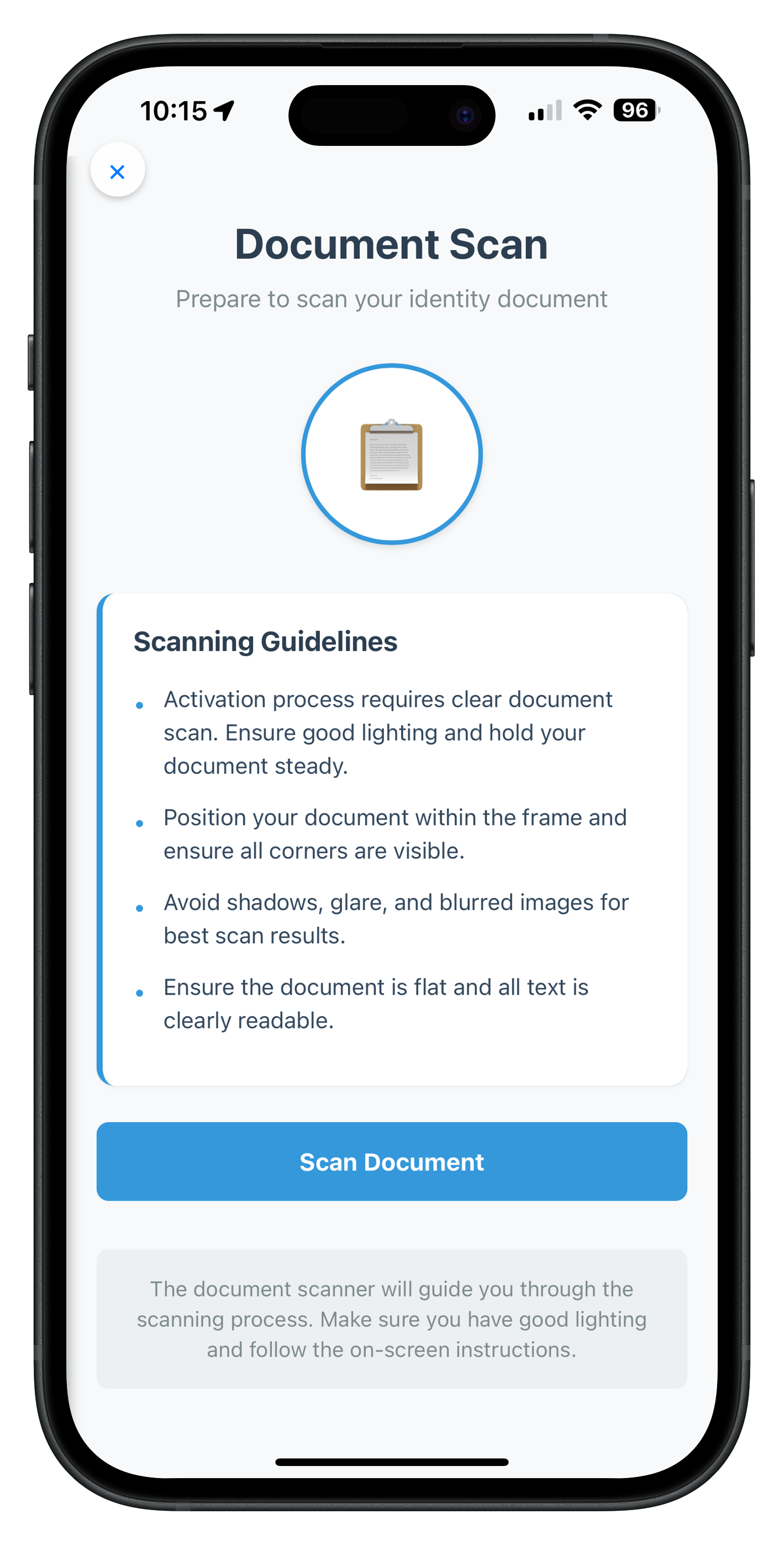
1. Document Scan Start Screen
File: www/src/tutorial/screens/idv/IDVDocumentProcessStartConfirmationScreen.js
Purpose: Display document scanning guidelines and start document capture process
Event Trigger: getIDVDocumentScanProcessStartConfirmation
Key Features:
- Workflow-specific guidelines (16 different workflows)
- Start document scan button
- Cancel/close button
- Loading states
- Error handling
Complete Implementation:
/**
 * IDV Document Scan Start Screen
 *
 * This screen handles the IDV document scan process start confirmation event.
 * It provides information about document scanning requirements and allows users
 * to either start the scan process or cancel.
 *
 * Key Features:
 * - Display document scan guidelines and requirements
 * - Start document scanning process
 * - Cancel/close the IDV flow
 * - Loading states during API calls
 * - Error handling with user feedback
 *
 * Event Flow:
 * 1. Receives getIDVDocumentScanProcessStartConfirmation event
 * 2. Displays scan requirements and guidelines
 * 3. User clicks "Scan Document" -> calls setIDVDocumentScanProcessStartConfirmation(true, idvWorkflow)
 * 4. User clicks close button -> calls setIDVDocumentScanProcessStartConfirmation(false, idvWorkflow)
 *
 * Usage:
 * NavigationService.navigate('IDVDocumentScanStart', {
 *   idvWorkflow: 0,
 *   eventData: data,
 * });
 */

const IDVDocumentProcessStartConfirmationScreen = {
  // Screen state
  state: {
    idvWorkflow: null,
    eventData: null,
    isProcessing: false,
    error: ''
  },

  /**
   * Called when NavigationService.navigate('IDVDocumentScanStart', params)
   * Replaces React componentDidMount / useEffect
   *
   * @param {Object} params - Navigation parameters
   * @param {number} params.idvWorkflow - IDV workflow enum value
   * @param {Object} params.eventData - Event data from SDK
   */
  onContentLoaded(params) {
    console.log('IDVDocumentScanStart - Screen loaded with params:', JSON.stringify(params, null, 2));

    // Initialize state
    this.state = {
      idvWorkflow: params.idvWorkflow,
      eventData: params.eventData,
      isProcessing: false,
      error: ''
    };

    // Setup event listeners
    this.setupEventListeners();

    // Update workflow-specific content
    this.updateWorkflowGuideline();

    // Clear any previous errors
    this.hideError();
  },

  /**
   * Setup event listeners (DOM + keyboard)
   */
  setupEventListeners() {
    // Scan Document button
    const scanButton = document.getElementById('idv-scan-document-btn');
    if (scanButton) {
      scanButton.onclick = () => this.handleScanDocument();
    }

    // Close button
    const closeButton = document.getElementById('idv-doc-scan-close-btn');
    if (closeButton) {
      closeButton.onclick = () => this.handleClose();
    }
  },

  /**
   * Get workflow-specific guideline text
   * Based on the IDV workflow type
   *
   * @returns {string} Workflow-specific guideline text
   */
  getWorkflowGuideline() {
    const workflow = this.state.idvWorkflow;

    switch (workflow) {
      case 0: // IDV_ACTIVATION
        return 'Activation process requires clear document scan. Ensure good lighting and hold your document steady.';
      case 1: // IDV_ACTIVATION_WITH_TEMPLATE
        return 'Activation with biometric template. Position document within frame for verification.';
      case 2: // IDV_ADDITIONAL_DEVICE_WITH_TEMPLATE
        return 'Additional device activation requires clear document scan. Position document within frame.';
      case 3: // IDV_ADDITIONAL_DEVICE_WITHOUT_TEMPLATE
        return 'Additional device setup. Scan your identity document clearly for verification.';
      case 4: // IDV_ACCOUNT_RECOVERY_WITH_TEMPLATE
        return 'Account recovery process. Scan your identity document clearly for verification.';
      case 5: // IDV_ACCOUNT_RECOVERY_WITHOUT_TEMPLATE
        return 'Account recovery requires document verification. Ensure all text is visible and document is flat.';
      case 6: // IDV_POSTLOGIN_KYC
        return 'KYC verification process. Hold document steady and avoid glare for best results.';
      case 13: // IDV_POSTLOGIN_AGENT_KYC
        return 'Agent-assisted KYC process. Scan customer document clearly with proper lighting.';
      default:
        return 'Ensure you have good lighting and hold your document steady for the verification process.';
    }
  },

  /**
   * Update workflow-specific guideline in the UI
   */
  updateWorkflowGuideline() {
    const guidelineEl = document.getElementById('idv-workflow-guideline');
    if (guidelineEl) {
      guidelineEl.textContent = this.getWorkflowGuideline();
    }
  },

  /**
   * Handle Scan Document Button
   * Calls setIDVDocumentScanProcessStartConfirmation with isConfirm=true
   */
  async handleScanDocument() {
    const workflow = this.state.idvWorkflow;

    if (workflow === null && workflow !== 0) {
      this.showError('Invalid workflow. Unable to start document scan.');
      return;
    }

    this.setProcessing(true);
    this.hideError();

    try {
      console.log('IDVDocumentScanStart - Starting document scan process with workflow:', workflow);

      // Call API to start document scan
      const response = await rdnaIDVService.setIDVDocumentScanProcessStartConfirmation(
        true, // isConfirm = true to start scan
        workflow
      );

      console.log('IDVDocumentScanStart - Document scan started successfully:', JSON.stringify(response, null, 2));

      // SDK will now open native document scanner UI
      // Async events will be handled by SDKIDVEventProvider

    } catch (error) {
      console.error('IDVDocumentScanStart - Failed to start document scan:', JSON.stringify(error, null, 2));
      const errorMessage = error?.error?.errorString || 'Failed to start document scan. Please try again.';
      this.showError(errorMessage);
    } finally {
      this.setProcessing(false);
    }
  },

  /**
   * Handle Close Button
   * Calls setIDVDocumentScanProcessStartConfirmation with isConfirm=false
   */
  async handleClose() {
    const workflow = this.state.idvWorkflow;

    if (workflow === null && workflow !== 0) {
      console.warn('IDVDocumentScanStart - No workflow available, skipping cancel API call');
      return;
    }

    this.setProcessing(true);
    this.hideError();

    try {
      console.log('IDVDocumentScanStart - Cancelling document scan process');

      // Call API to cancel document scan
      await rdnaIDVService.setIDVDocumentScanProcessStartConfirmation(
        false, // isConfirm = false to cancel
        workflow
      );

      console.log('IDVDocumentScanStart - Document scan cancelled successfully');

      // SDK will handle navigation back to getUser or previous screen

    } catch (error) {
      console.error('IDVDocumentScanStart - Failed to cancel document scan:', JSON.stringify(error, null, 2));
      const errorMessage = error?.error?.errorString || 'Failed to cancel. Please try again.';
      this.showError(errorMessage);
    } finally {
      this.setProcessing(false);
    }
  },

  /**
   * Set processing state and update UI
   *
   * @param {boolean} isProcessing - Whether operation is in progress
   */
  setProcessing(isProcessing) {
    this.state.isProcessing = isProcessing;

    // Update button state
    const scanButton = document.getElementById('idv-scan-document-btn');
    if (scanButton) {
      scanButton.disabled = isProcessing;
      scanButton.textContent = isProcessing ? 'Starting Scan...' : 'Scan Document';
      if (isProcessing) {
        scanButton.classList.add('loading');
      } else {
        scanButton.classList.remove('loading');
      }
    }

    // Update close button state
    const closeButton = document.getElementById('idv-doc-scan-close-btn');
    if (closeButton) {
      closeButton.disabled = isProcessing;
    }
  },

  /**
   * Show error message
   *
   * @param {string} message - Error message to display
   */
  showError(message) {
    this.state.error = message;

    const errorDiv = document.getElementById('idv-doc-scan-error');
    if (errorDiv) {
      errorDiv.textContent = message;
      errorDiv.style.display = 'block';
    }
  },

  /**
   * Hide error message
   */
  hideError() {
    this.state.error = '';

    const errorDiv = document.getElementById('idv-doc-scan-error');
    if (errorDiv) {
      errorDiv.style.display = 'none';
      errorDiv.textContent = '';
    }
  }
};

// Expose to global scope for NavigationService
window.IDVDocumentScanStartScreen = IDVDocumentProcessStartConfirmationScreen;
The following image showcases the screen from the sample application:
2. Confirm Document Details Screen
File: www/src/tutorial/screens/idv/IDVConfirmDocumentDetailsScreen.js
Purpose: Display OCR-extracted document information for user validation
Event Trigger: getIDVConfirmDocumentDetails
Key Features:
- Personal info header with portrait and signature
- Document images (front/back pages)
- Overall document validation status
- Extracted identity data display
- Detailed validation checks with status
- Error and warning lists
- NFC scan status
- Confirm/Recapture buttons
Complete Implementation:
/**
 * IDV Confirm Document Details Screen
 *
 * This screen displays OCR-extracted document information for user validation.
 * It handles the getIDVConfirmDocumentDetails event and allows users to confirm
 * or reject the scanned document data.
 *
 * Key Features:
 * - Display all document details
 * - Portrait and signature images
 * - Document images (front/back pages)
 * - Extracted identity data with validation status
 * - Detailed checks performed with results
 * - Error and warning lists
 * - NFC scan status information
 * - Overall document validation status
 * - Allow user to confirm or recapture document
 * - Close button to reset authentication state
 *
 * Event Flow:
 * 1. Receives getIDVConfirmDocumentDetails event with OCR data
 * 2. Displays ALL extracted information for user review
 * 3. User clicks "Confirm" -> calls setIDVConfirmDocumentDetails(true, challengeMode)
 * 4. User clicks "Recapture" -> calls setIDVConfirmDocumentDetails(false, challengeMode)
 * 5. User clicks close button -> calls resetAuthState() to cancel IDV flow
 *
 * Usage:
 * NavigationService.navigate('IDVConfirmDocumentDetails', {
 *   challengeMode: 8,
 *   eventData: data,
 * });
 */

const IDVConfirmDocumentDetailsScreen = {
  // Screen state
  state: {
    challengeMode: null,
    eventData: null,
    responseData: null,
    isProcessing: false,
    error: ''
  },

  /**
   * Called when NavigationService.navigate('IDVConfirmDocumentDetails', params)
   *
   * @param {Object} params - Navigation parameters
   * @param {number} params.challengeMode - Challenge operation mode
   * @param {Object} params.eventData - Event data with response_data
   */
  onContentLoaded(params) {
    console.log('IDVConfirmDocumentDetails - Screen loaded with params:', JSON.stringify(params, null, 2));

    // Initialize state
    this.state = {
      challengeMode: params.challengeMode,
      eventData: params.eventData,
      responseData: params.eventData?.response_data,
      isProcessing: false,
      error: ''
    };

    // Setup event listeners
    this.setupEventListeners();

    // Render all document data
    this.renderAllContent();

    // Clear any previous errors
    this.hideError();
  },

  /**
   * Setup event listeners
   */
  setupEventListeners() {
    // Confirm button
    const confirmButton = document.getElementById('idv-confirm-btn');
    if (confirmButton) {
      confirmButton.onclick = () => this.handleConfirm();
    }

    // Recapture button
    const recaptureButton = document.getElementById('idv-recapture-btn');
    if (recaptureButton) {
      recaptureButton.onclick = () => this.handleRecapture();
    }

    // Close button
    const closeButton = document.getElementById('idv-confirm-close-btn');
    if (closeButton) {
      closeButton.onclick = () => this.handleClose();
    }
  },

  /**
   * Render all content sections
   */
  renderAllContent() {
    this.renderPersonalInfoHeader();
    this.renderDocumentImages();
    this.renderDocumentStatus();
    this.renderIdentityData();
    this.renderChecksPerformed();
    this.renderErrorList();
    this.renderWarningList();
    this.renderNFCStatus();
  },

  /**
   * Get status color based on status value
   *
   * @param {string} status - Status value
   * @returns {string} Color hex code
   */
  getStatusColor(status) {
    switch (status) {
      case 'OK': return '#27ae60';
      case 'ERROR': return '#e74c3c';
      case 'WARNING': return '#f39c12';
      case 'NOT DONE': return '#f39c12';
      default: return '#7f8c8d';
    }
  },

  /**
   * Render personal info header with portrait and signature
   */
  renderPersonalInfoHeader() {
    const responseData = this.state.responseData;
    if (!responseData) return;

    const fullName = responseData.identity_data?.['Surname and given names'] ||
                     `${responseData.identity_data?.['Given name'] || ''} ${responseData.identity_data?.Surname || ''}`.trim();
    const portraitImage = responseData.document_info?.document_images?.portrait_image;
    const signatureImage = responseData.document_info?.document_images?.signature_image;

    const container = document.getElementById('idv-personal-info-header');
    if (!container) return;

    if (!fullName && !portraitImage && !signatureImage) {
      container.style.display = 'none';
      return;
    }

    let html = '<div class="personal-info-content">';

    // Text and signature column
    html += '<div class="personal-info-text">';
    if (fullName) {
      html += `<div class="name-text">${fullName}</div>`;
    }
    if (signatureImage) {
      html += '<div class="signature-container">';
      html += '<div class="image-label">Signature</div>';
      html += `<img src="data:image/jpg;base64,${signatureImage}" class="signature-image" />`;
      html += '</div>';
    }
    html += '</div>';

    // Portrait column
    if (portraitImage) {
      html += '<div class="portrait-container">';
      html += `<img src="data:image/jpg;base64,${portraitImage}" class="portrait-image" />`;
      html += '</div>';
    }

    html += '</div>';
    container.innerHTML = html;
    container.style.display = 'block';
  },

  /**
   * Render document images (front and back pages)
   */
  renderDocumentImages() {
    const responseData = this.state.responseData;
    if (!responseData) return;

    const frontPage = responseData.document_info?.document_images?.front_page;
    const backPage = responseData.document_info?.document_images?.back_page;

    const container = document.getElementById('idv-document-images');
    if (!container) return;

    if (!frontPage && !backPage) {
      container.style.display = 'none';
      return;
    }

    let html = '<div class="section-title">Document Images</div>';

    if (frontPage) {
      html += '<div class="document-image-container">';
      html += '<div class="image-label">Front Page</div>';
      html += `<img src="data:image/jpg;base64,${frontPage}" class="document-image" />`;
      html += '</div>';
    }

    if (backPage) {
      html += '<div class="document-image-container">';
      html += '<div class="image-label">Back Page</div>';
      html += `<img src="data:image/jpg;base64,${backPage}" class="document-image" />`;
      html += '</div>';
    }

    container.innerHTML = html;
    container.style.display = 'block';
  },

  /**
   * Render overall document status
   */
  renderDocumentStatus() {
    const responseData = this.state.responseData;
    if (!responseData) return;

    const overallStatus = responseData.document_status?.overall_document_status;
    const container = document.getElementById('idv-document-status');
    if (!container) return;

    if (!overallStatus) {
      container.style.display = 'none';
      return;
    }

    const statusColor = this.getStatusColor(overallStatus);

    let html = '<div class="status-header">';
    html += '<span class="status-label">Document Status</span>';
    html += `<span class="status-value" style="color: ${statusColor}">${overallStatus}</span>`;
    html += '</div>';

    if (overallStatus === 'ERROR') {
      html += '<div class="status-hint">Document validation failed. You can recapture or proceed anyway.</div>';
    } else if (overallStatus === 'WARNING') {
      html += '<div class="status-hint">Document has warnings. Review details below.</div>';
    }

    container.innerHTML = html;
    container.style.display = 'block';
  },

  /**
   * Render identity data fields
   */
  renderIdentityData() {
    const responseData = this.state.responseData;
    if (!responseData) return;

    const identityData = responseData.identity_data;
    const container = document.getElementById('idv-identity-data');
    if (!container) return;

    if (!identityData || Object.keys(identityData).length === 0) {
      container.style.display = 'none';
      return;
    }

    let html = '<div class="section-title">Extracted Information</div>';
    html += '<div class="data-container">';

    Object.entries(identityData).forEach(([key, value]) => {
      html += '<div class="data-row">';
      html += `<span class="data-label">${key}</span>`;
      html += `<span class="data-value">${String(value)}</span>`;
      html += '</div>';
    });

    html += '</div>';
    container.innerHTML = html;
    container.style.display = 'block';
  },

  /**
   * Render detailed checks performed
   * Shows ALL validation details without truncation
   */
  renderChecksPerformed() {
    const responseData = this.state.responseData;
    if (!responseData) return;

    const checksPerformed = responseData.document_status?.checks_performed;
    const container = document.getElementById('idv-checks-performed');
    if (!container) return;

    if (!checksPerformed || checksPerformed.length === 0) {
      container.style.display = 'none';
      return;
    }

    let html = '<div class="section-title">Validation Checks</div>';
    html += '<div class="checks-container">';

    checksPerformed.forEach((check, index) => {
      const checkStatusColor = this.getStatusColor(check.check_status);

      html += '<div class="check-group">';
      html += '<div class="check-header">';
      html += `<span class="check-name">${check.check_name}</span>`;
      html += `<span class="check-status" style="color: ${checkStatusColor}">${check.check_status}</span>`;
      html += '</div>';
      html += `<div class="check-category">Category: ${check.check_category}</div>`;

      if (check.check_detail && check.check_detail.length > 0) {
        html += '<div class="check-details-container">';
        check.check_detail.forEach((detail, detailIndex) => {
          const detailStatusColor = this.getStatusColor(detail.status);
          html += '<div class="check-detail">';
          html += `<span class="check-detail-element">${detail.element || 'Check'}</span>`;
          html += `<span class="check-detail-status" style="color: ${detailStatusColor}">${detail.status}</span>`;
          html += '</div>';
        });
        html += '</div>';
      }

      html += '</div>';
    });

    html += '</div>';
    container.innerHTML = html;
    container.style.display = 'block';
  },

  /**
   * Render error list
   */
  renderErrorList() {
    const responseData = this.state.responseData;
    if (!responseData) return;

    const errorList = responseData.document_status?.error_list;
    const container = document.getElementById('idv-error-list');
    if (!container) return;

    if (!errorList || errorList.length === 0) {
      container.style.display = 'none';
      return;
    }

    let html = '<div class="section-title" style="color: #e74c3c">Validation Errors</div>';
    html += '<div class="list-container" style="border-left-color: #e74c3c">';

    errorList.forEach((error, index) => {
      html += '<div class="list-item">';
      html += '<span class="list-bullet">•</span>';
      html += `<span class="list-text">${error}</span>`;
      html += '</div>';
    });

    html += '</div>';
    container.innerHTML = html;
    container.style.display = 'block';
  },

  /**
   * Render warning list
   */
  renderWarningList() {
    const responseData = this.state.responseData;
    if (!responseData) return;

    const warningList = responseData.document_status?.warning_list;
    const container = document.getElementById('idv-warning-list');
    if (!container) return;

    if (!warningList || warningList.length === 0) {
      container.style.display = 'none';
      return;
    }

    let html = '<div class="section-title" style="color: #f39c12">Warnings</div>';
    html += '<div class="list-container" style="border-left-color: #f39c12">';

    warningList.forEach((warning, index) => {
      html += '<div class="list-item">';
      html += '<span class="list-bullet">•</span>';
      html += `<span class="list-text">${warning}</span>`;
      html += '</div>';
    });

    html += '</div>';
    container.innerHTML = html;
    container.style.display = 'block';
  },

  /**
   * Render NFC scan status
   */
  renderNFCStatus() {
    const responseData = this.state.responseData;
    if (!responseData) return;

    const documentStatus = responseData.document_status;
    const container = document.getElementById('idv-nfc-status');
    if (!container) return;

    if (!documentStatus) {
      container.style.display = 'none';
      return;
    }

    const hasNFCInfo = documentStatus.is_nfc_document !== undefined ||
                       documentStatus.nfc_scan_status ||
                       documentStatus.nfc_scan_status_reason;

    if (!hasNFCInfo) {
      container.style.display = 'none';
      return;
    }

    let html = '<div class="section-title">NFC Scan Information</div>';
    html += '<div class="data-container">';

    if (documentStatus.is_nfc_document !== undefined) {
      html += '<div class="data-row">';
      html += '<span class="data-label">Is NFC Document</span>';
      html += `<span class="data-value">${documentStatus.is_nfc_document ? 'Yes' : 'No'}</span>`;
      html += '</div>';
    }

    if (documentStatus.nfc_scan_status) {
      html += '<div class="data-row">';
      html += '<span class="data-label">NFC Scan Status</span>';
      html += `<span class="data-value">${documentStatus.nfc_scan_status}</span>`;
      html += '</div>';
    }

    if (documentStatus.nfc_scan_status_reason) {
      html += '<div class="data-row">';
      html += '<span class="data-label">Reason</span>';
      html += `<span class="data-value">${documentStatus.nfc_scan_status_reason}</span>`;
      html += '</div>';
    }

    html += '</div>';
    container.innerHTML = html;
    container.style.display = 'block';
  },

  /**
   * Handle Close Button
   * Calls resetAuthState to cancel entire IDV flow
   */
  async handleClose() {
    this.setProcessing(true);
    this.hideError();

    try {
      console.log('IDVConfirmDocumentDetails - Calling resetAuthState to cancel IDV flow');
      await rdnaService.resetAuthState();
      console.log('IDVConfirmDocumentDetails - ResetAuthState successful');
    } catch (error) {
      console.error('IDVConfirmDocumentDetails - ResetAuthState error:', JSON.stringify(error, null, 2));
      const errorMessage = error?.error?.errorString || 'Failed to cancel. Please try again.';
      this.showError(errorMessage);
    } finally {
      this.setProcessing(false);
    }
  },

  /**
   * Handle Recapture Button
   * Calls setIDVConfirmDocumentDetails with isConfirm=false to reject and rescan
   */
  async handleRecapture() {
    const challengeMode = this.state.challengeMode;

    if (challengeMode === null && challengeMode !== 0) {
      this.showError('Invalid challenge mode. Unable to recapture document.');
      return;
    }

    this.setProcessing(true);
    this.hideError();

    try {
      console.log('IDVConfirmDocumentDetails - Rejecting document details for recapture');

      await rdnaIDVService.setIDVConfirmDocumentDetails(
        false, // isConfirm = false to reject and rescan
        challengeMode
      );

      console.log('IDVConfirmDocumentDetails - Document recapture requested successfully');

      // SDK will handle navigation back to document scan or appropriate screen

    } catch (error) {
      console.error('IDVConfirmDocumentDetails - Failed to request recapture:', JSON.stringify(error, null, 2));
      const errorMessage = error?.error?.errorString || 'Failed to request recapture. Please try again.';
      this.showError(errorMessage);
    } finally {
      this.setProcessing(false);
    }
  },

  /**
   * Handle Confirm Button
   * Calls setIDVConfirmDocumentDetails with isConfirm=true to proceed
   */
  async handleConfirm() {
    const challengeMode = this.state.challengeMode;

    if (challengeMode === null && challengeMode !== 0) {
      this.showError('Invalid challenge mode. Unable to confirm document.');
      return;
    }

    this.setProcessing(true);
    this.hideError();

    try {
      console.log('IDVConfirmDocumentDetails - Confirming document details');

      await rdnaIDVService.setIDVConfirmDocumentDetails(
        true, // isConfirm = true to proceed
        challengeMode
      );

      console.log('IDVConfirmDocumentDetails - Document details confirmed successfully');

      // SDK will proceed to next step in IDV workflow

    } catch (error) {
      console.error('IDVConfirmDocumentDetails - Failed to confirm document:', JSON.stringify(error, null, 2));
      const errorMessage = error?.error?.errorString || 'Failed to confirm document. Please try again.';
      this.showError(errorMessage);
    } finally {
      this.setProcessing(false);
    }
  },

  /**
   * Set processing state and update UI
   *
   * @param {boolean} isProcessing - Whether operation is in progress
   */
  setProcessing(isProcessing) {
    this.state.isProcessing = isProcessing;

    // Update confirm button
    const confirmButton = document.getElementById('idv-confirm-btn');
    if (confirmButton) {
      confirmButton.disabled = isProcessing;
      confirmButton.textContent = isProcessing ? 'Confirming...' : 'Confirm';
      if (isProcessing) {
        confirmButton.classList.add('loading');
      } else {
        confirmButton.classList.remove('loading');
      }
    }

    // Update recapture button
    const recaptureButton = document.getElementById('idv-recapture-btn');
    if (recaptureButton) {
      recaptureButton.disabled = isProcessing;
      recaptureButton.textContent = isProcessing ? 'Processing...' : 'Recapture';
      if (isProcessing) {
        recaptureButton.classList.add('loading');
      } else {
        recaptureButton.classList.remove('loading');
      }
    }

    // Update close button
    const closeButton = document.getElementById('idv-confirm-close-btn');
    if (closeButton) {
      closeButton.disabled = isProcessing;
    }
  },

  /**
   * Show error message
   *
   * @param {string} message - Error message to display
   */
  showError(message) {
    this.state.error = message;

    const errorDiv = document.getElementById('idv-confirm-error');
    if (errorDiv) {
      errorDiv.textContent = message;
      errorDiv.style.display = 'block';
    }
  },

  /**
   * Hide error message
   */
  hideError() {
    this.state.error = '';

    const errorDiv = document.getElementById('idv-confirm-error');
    if (errorDiv) {
      errorDiv.style.display = 'none';
      errorDiv.textContent = '';
    }
  }
};

// Expose to global scope for NavigationService
window.IDVConfirmDocumentDetailsScreen = IDVConfirmDocumentDetailsScreen;
The following images showcase the screen from the sample application:
Document Details Screen |
Document Details Screen |
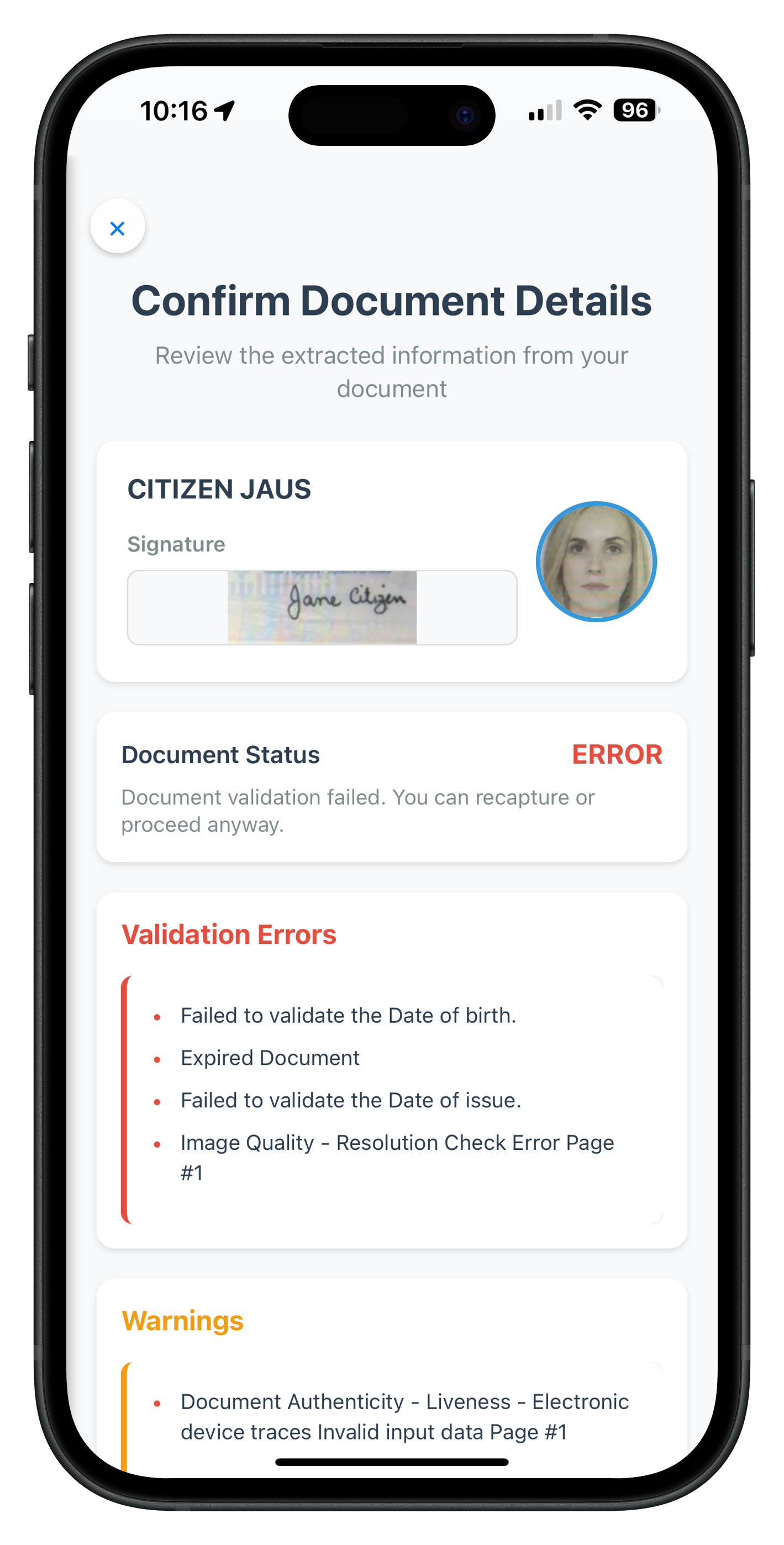
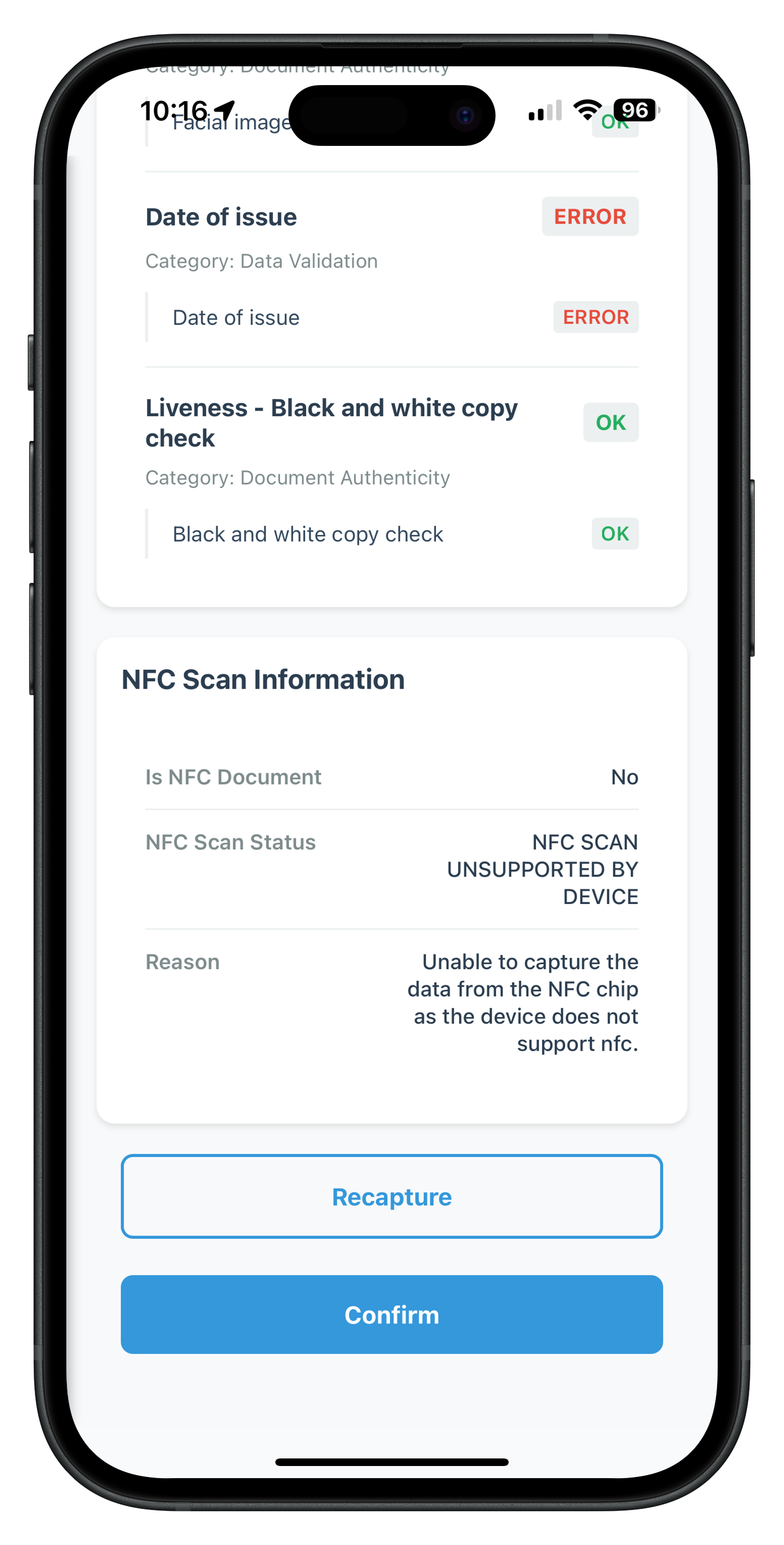
3. Selfie Process Start Screen
File: www/src/tutorial/screens/idv/IDVSelfieProcessStartConfirmationScreen.js
Purpose: Display selfie capture guidelines and start selfie capture process
Event Trigger: getIDVSelfieProcessStartConfirmation
Key Features:
- Workflow-specific guidelines (16 different workflows)
- Camera selection (front/back camera)
- Start selfie capture button
- Cancel/close button
- Loading states
- Error handling
Complete Implementation:
/**
 * IDV Selfie Process Start Confirmation Screen
 *
 * This screen handles the IDV selfie capture process start confirmation event.
 * It provides information about selfie capture requirements and allows users
 * to either start the capture process or cancel.
 *
 * Key Features:
 * - Display selfie capture guidelines and requirements
 * - Camera selection option (front/back camera)
 * - Start selfie capture process
 * - Cancel/close the IDV flow
 * - Loading states during API calls
 * - Error handling with user feedback
 * - Workflow-specific guidelines
 *
 * Event Flow:
 * 1. Receives getIDVSelfieProcessStartConfirmation event
 * 2. Displays capture requirements and guidelines
 * 3. User selects camera preference (front/back)
 * 4. User clicks "Capture Selfie" -> calls setIDVSelfieProcessStartConfirmation(true, useBackCamera, idvWorkflow)
 * 5. User clicks close button -> calls setIDVSelfieProcessStartConfirmation(false, false, idvWorkflow)
 *
 * Usage:
 * NavigationService.navigate('IDVSelfieProcessStart', {
 *   idvWorkflow: 0,
 *   eventData: data,
 * });
 */

const IDVSelfieProcessStartConfirmationScreen = {
  // Screen state
  state: {
    idvWorkflow: null,
    eventData: null,
    isProcessing: false,
    error: '',
    useBackCamera: false
  },

  /**
   * Called when NavigationService.navigate('IDVSelfieProcessStart', params)
   *
   * @param {Object} params - Navigation parameters
   * @param {number} params.idvWorkflow - IDV workflow enum value
   * @param {Object} params.eventData - Event data from SDK
   */
  onContentLoaded(params) {
    console.log('IDVSelfieProcessStart - Screen loaded with params:', JSON.stringify(params, null, 2));

    // Initialize state
    this.state = {
      idvWorkflow: params.idvWorkflow,
      eventData: params.eventData,
      isProcessing: false,
      error: '',
      useBackCamera: false
    };

    // Setup event listeners
    this.setupEventListeners();

    // Update workflow-specific guidelines
    this.updateWorkflowGuidelines();

    // Clear any previous errors
    this.hideError();
  },

  /**
   * Setup event listeners
   */
  setupEventListeners() {
    // Capture Selfie button
    const captureButton = document.getElementById('idv-capture-selfie-btn');
    if (captureButton) {
      captureButton.onclick = () => this.handleCaptureSelfie();
    }

    // Close button
    const closeButton = document.getElementById('idv-selfie-start-close-btn');
    if (closeButton) {
      closeButton.onclick = () => this.handleClose();
    }

    // Camera selection checkbox
    const cameraCheckbox = document.getElementById('idv-use-back-camera');
    if (cameraCheckbox) {
      cameraCheckbox.onchange = (e) => {
        this.state.useBackCamera = e.target.checked;
      };
    }
  },

  /**
   * Get workflow-specific guideline texts
   * Based on the IDV workflow type (16 different workflows)
   *
   * @returns {Object} Object with text1, text2, text3 guideline texts
   */
  getWorkflowGuidelines() {
    const workflow = this.state.idvWorkflow;

    switch (workflow) {
      case 0: // IDV_ACTIVATION
        return {
          text1: 'Ensure good lighting and position your face clearly in the frame for IDV activation process.',
          text2: 'Remove any sunglasses, hats, or face coverings for clear facial recognition.',
          text3: 'Look directly at the camera and follow any on-screen prompts during capture.'
        };
      case 1: // IDV_ACTIVATION_WITH_TEMPLATE
        return {
          text1: 'Position your face clearly for IDV activation with template verification.',
          text2: 'Ensure your face matches the document photo for identity verification.',
          text3: 'Maintain steady position and good lighting throughout the capture process.'
        };
      case 2: // IDV_ADDITIONAL_DEVICE_WITH_TEMPLATE
        return {
          text1: 'Additional device activation requires clear selfie capture for verification.',
          text2: 'Position your face within the frame and ensure good lighting conditions.',
          text3: 'Face will be matched with your existing biometric template for verification.'
        };
      case 3: // IDV_ADDITIONAL_DEVICE_WITHOUT_TEMPLATE
        return {
          text1: 'Additional device without template requires new biometric enrollment.',
          text2: 'Position your face clearly for initial biometric template creation.',
          text3: 'Follow capture guidelines for successful template generation.'
        };
      case 4: // IDV_ACCOUNT_RECOVERY_WITH_TEMPLATE
        return {
          text1: 'Account recovery with template - verify your identity using existing biometric data.',
          text2: 'Position your face clearly for comparison with stored template.',
          text3: 'Ensure good lighting and stable positioning for successful verification.'
        };
      case 5: // IDV_ACCOUNT_RECOVERY_WITHOUT_TEMPLATE
        return {
          text1: 'Account recovery without template - create new biometric profile.',
          text2: 'Position your face clearly for new biometric template creation.',
          text3: 'Follow capture instructions for successful profile establishment.'
        };
      case 6: // IDV_POSTLOGIN_KYC
        return {
          text1: 'Post-login KYC process - capture selfie for identity verification.',
          text2: 'Ensure your face is clearly visible and well-lit for verification.',
          text3: 'Face will be compared with document photo for identity confirmation.'
        };
      case 8: // IDV_POSTLOGIN_SELFIE_BIOMETRIC
        return {
          text1: 'Post-login selfie biometric - capture selfie for biometric authentication.',
          text2: 'Position your face clearly for biometric template verification.',
          text3: 'Ensure stable positioning and good lighting for accurate capture.'
        };
      case 9: // IDV_STEP_UP_AUTHENTICATION
        return {
          text1: 'Step-up authentication - additional verification through selfie capture.',
          text2: 'Position your face clearly for enhanced security verification.',
          text3: 'Face will be verified against your existing biometric profile.'
        };
      case 10: // IDV_BIOMETRIC_OPT_IN
        return {
          text1: 'Biometric opt-in process - capture selfie for biometric enrollment.',
          text2: 'Position your face clearly for initial biometric template creation.',
          text3: 'This will enable biometric authentication for future logins.'
        };
      case 13: // IDV_POSTLOGIN_AGENT_KYC
        return {
          text1: 'Agent KYC process - capture customer selfie for identity verification.',
          text2: 'Ensure customer face is clearly visible and well-positioned.',
          text3: 'Face will be compared with document photo for customer verification.'
        };
      case 15: // IDV_LOGIN_SELFIE_BIOMETRIC
        return {
          text1: 'Login selfie biometric - verify identity through selfie capture.',
          text2: 'Position your face clearly for biometric authentication.',
          text3: 'Face will be matched with your stored biometric template.'
        };
      default:
        return {
          text1: 'Ensure good lighting and position your face clearly in the frame.',
          text2: 'Remove any sunglasses, hats, or face coverings for clear facial recognition.',
          text3: 'Look directly at the camera and follow any on-screen prompts during capture.'
        };
    }
  },

  /**
   * Update workflow-specific guidelines in the UI
   */
  updateWorkflowGuidelines() {
    const guidelines = this.getWorkflowGuidelines();

    const guideline1 = document.getElementById('idv-selfie-guideline-1');
    const guideline2 = document.getElementById('idv-selfie-guideline-2');
    const guideline3 = document.getElementById('idv-selfie-guideline-3');

    if (guideline1) guideline1.textContent = guidelines.text1;
    if (guideline2) guideline2.textContent = guidelines.text2;
    if (guideline3) guideline3.textContent = guidelines.text3;
  },

  /**
   * Handle Capture Selfie Button
   * Calls setIDVSelfieProcessStartConfirmation with isConfirm=true and selected camera
   */
  async handleCaptureSelfie() {
    const workflow = this.state.idvWorkflow;

    if (workflow === null && workflow !== 0) {
      this.showError('Invalid workflow. Unable to start selfie capture.');
      return;
    }

    this.setProcessing(true);
    this.hideError();

    try {
      console.log('IDVSelfieProcessStart - Starting selfie capture process with workflow:', workflow);
      console.log('IDVSelfieProcessStart - Use back camera:', this.state.useBackCamera);

      // Call API to start selfie capture
      const response = await rdnaIDVService.setIDVSelfieProcessStartConfirmation(
        true, // isConfirm = true to start capture
        this.state.useBackCamera, // camera preference
        workflow
      );

      console.log('IDVSelfieProcessStart - Selfie capture started successfully:', JSON.stringify(response, null, 2));

      // SDK will now open native selfie capture UI
      // Async events will be handled by SDKIDVEventProvider

    } catch (error) {
      console.error('IDVSelfieProcessStart - Failed to start selfie capture:', JSON.stringify(error, null, 2));
      const errorMessage = error?.error?.errorString || 'Failed to start selfie capture. Please try again.';
      this.showError(errorMessage);
    } finally {
      this.setProcessing(false);
    }
  },

  /**
   * Handle Close Button
   * Calls setIDVSelfieProcessStartConfirmation with isConfirm=false
   */
  async handleClose() {
    const workflow = this.state.idvWorkflow;

    if (workflow === null && workflow !== 0) {
      console.warn('IDVSelfieProcessStart - No workflow available, skipping cancel API call');
      return;
    }

    this.setProcessing(true);
    this.hideError();

    try {
      console.log('IDVSelfieProcessStart - Cancelling selfie capture process');

      // Call API to cancel selfie capture
      await rdnaIDVService.setIDVSelfieProcessStartConfirmation(
        false, // isConfirm = false to cancel
        false, // camera preference doesn't matter for cancel
        workflow
      );

      console.log('IDVSelfieProcessStart - Selfie capture cancelled successfully');

      // SDK will handle navigation back to previous screen

    } catch (error) {
      console.error('IDVSelfieProcessStart - Failed to cancel selfie capture:', JSON.stringify(error, null, 2));
      const errorMessage = error?.error?.errorString || 'Failed to cancel. Please try again.';
      this.showError(errorMessage);
    } finally {
      this.setProcessing(false);
    }
  },

  /**
   * Set processing state and update UI
   *
   * @param {boolean} isProcessing - Whether operation is in progress
   */
  setProcessing(isProcessing) {
    this.state.isProcessing = isProcessing;

    // Update capture button
    const captureButton = document.getElementById('idv-capture-selfie-btn');
    if (captureButton) {
      captureButton.disabled = isProcessing;
      captureButton.textContent = isProcessing ? 'Starting Capture...' : 'Capture Selfie';
      if (isProcessing) {
        captureButton.classList.add('loading');
      } else {
        captureButton.classList.remove('loading');
      }
    }

    // Update close button
    const closeButton = document.getElementById('idv-selfie-start-close-btn');
    if (closeButton) {
      closeButton.disabled = isProcessing;
    }

    // Update camera checkbox
    const cameraCheckbox = document.getElementById('idv-use-back-camera');
    if (cameraCheckbox) {
      cameraCheckbox.disabled = isProcessing;
    }
  },

  /**
   * Show error message
   *
   * @param {string} message - Error message to display
   */
  showError(message) {
    this.state.error = message;

    const errorDiv = document.getElementById('idv-selfie-start-error');
    if (errorDiv) {
      errorDiv.textContent = message;
      errorDiv.style.display = 'block';
    }
  },

  /**
   * Hide error message
   */
  hideError() {
    this.state.error = '';

    const errorDiv = document.getElementById('idv-selfie-start-error');
    if (errorDiv) {
      errorDiv.style.display = 'none';
      errorDiv.textContent = '';
    }
  }
};

// Expose to global scope for NavigationService
window.IDVSelfieProcessStartScreen = IDVSelfieProcessStartConfirmationScreen;
The following image showcases the screen from the sample application:
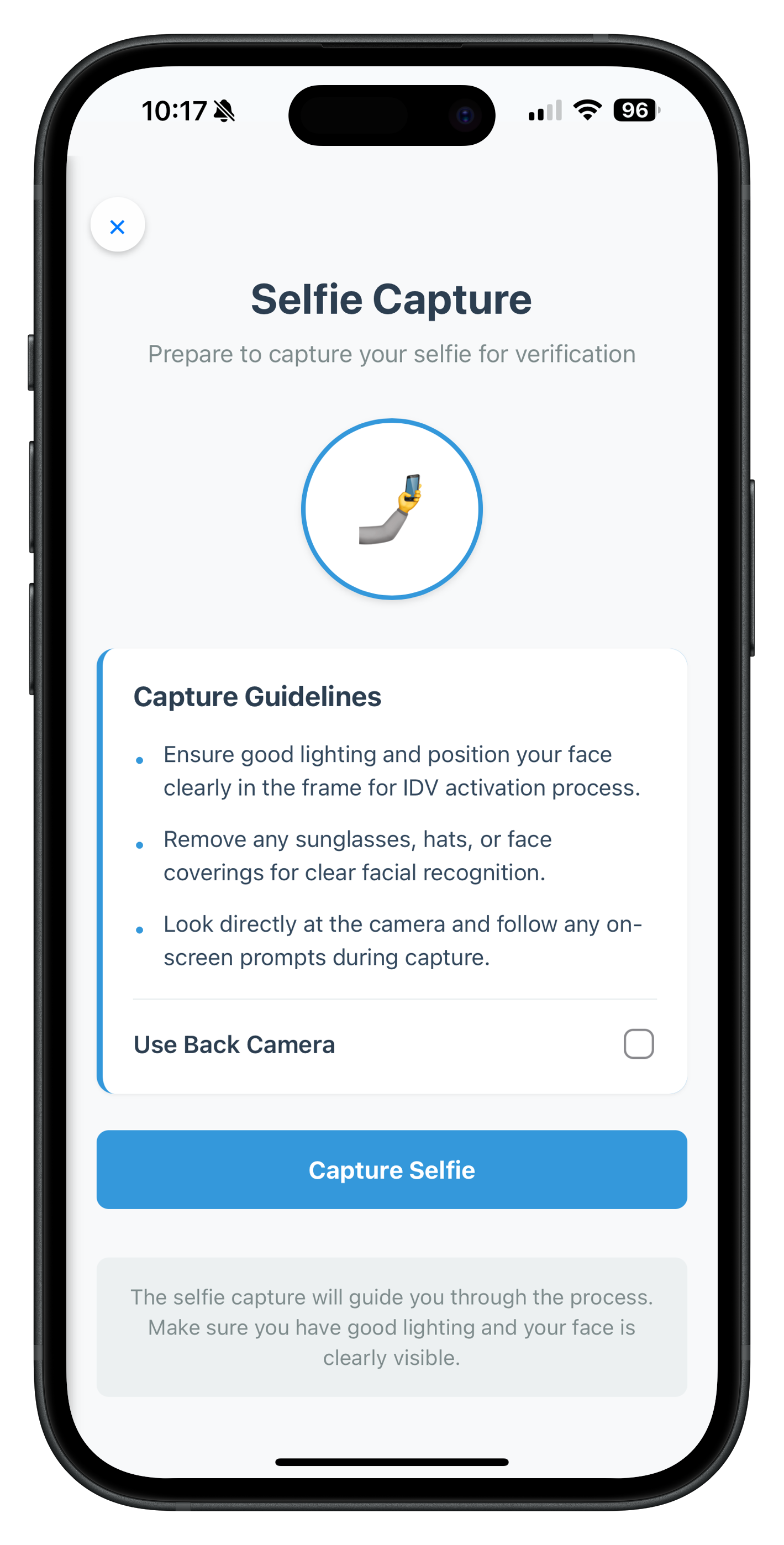
4. Selfie Confirmation Screen
File: www/src/tutorial/screens/idv/IDVSelfieConfirmationScreen.js
Purpose: Display biometric match results between document photo and captured selfie
Event Trigger: getIDVSelfieConfirmation
Key Features:
- Side-by-side image comparison (document photo vs selfie)
- Biometric match result with icon
- Face matching score display
- Liveness score display
- Dynamic action buttons based on match result
- Close button to cancel
Complete Implementation:
/**
 * IDV Selfie Confirmation Screen
 *
 * This screen displays the biometric match result between document image and captured selfie.
 * It handles the getIDVSelfieConfirmation event and allows users to confirm or reject
 * the selfie biometric results.
 *
 * Key Features:
 * - Side-by-side image comparison (document photo vs selfie)
 * - Biometric match result with icon and scores
 * - Face matching score and liveness score display
 * - Dynamic action buttons based on match result
 * - Close button to reset authentication state
 *
 * Event Flow:
 * 1. Receives getIDVSelfieConfirmation event with biometric analysis data
 * 2. Displays selfie image, document photo, and match results
 * 3. User clicks action button -> calls setIDVSelfieConfirmation(action, challengeMode)
 * 4. User clicks close button -> calls resetAuthState() to cancel IDV flow
 *
 * Usage:
 * NavigationService.navigate('IDVSelfieConfirmation', {
 *   challengeMode: 8,
 *   eventData: data,
 * });
 */

const IDVSelfieConfirmationScreen = {
  // Screen state
  state: {
    challengeMode: null,
    eventData: null,
    responseData: null,
    isProcessing: false,
    error: ''
  },

  /**
   * Called when NavigationService.navigate('IDVSelfieConfirmation', params)
   *
   * @param {Object} params - Navigation parameters
   * @param {number} params.challengeMode - Challenge operation mode
   * @param {Object} params.eventData - Event data with biometric results
   */
  onContentLoaded(params) {
    console.log('IDVSelfieConfirmation - Screen loaded with params:', JSON.stringify(params, null, 2));

    // Initialize state
    this.state = {
      challengeMode: params.challengeMode,
      eventData: params.eventData,
      responseData: params.eventData?.response_data,
      isProcessing: false,
      error: ''
    };

    // Setup event listeners
    this.setupEventListeners();

    // Render all content
    this.renderAllContent();

    // Clear any previous errors
    this.hideError();
  },

  /**
   * Setup event listeners
   */
  setupEventListeners() {
    // Close button
    const closeButton = document.getElementById('idv-selfie-confirm-close-btn');
    if (closeButton) {
      closeButton.onclick = () => this.handleClose();
    }

    // Dynamic action buttons will be set up in renderActionButtons()
  },

  /**
   * Render all content sections
   */
  renderAllContent() {
    this.renderImageComparison();
    this.renderMatchResult();
    this.renderActionButtons();
  },

  /**
   * Render image comparison section (side-by-side)
   */
  renderImageComparison() {
    const responseData = this.state.responseData;
    if (!responseData) return;

    const portraitImage = responseData.response_data?.document_detail?.document_info?.portrait_image;
    const selfieImage = responseData.response_data?.analyze_liveness_response?.video?.autocapture_result?.selfie_image;

    const container = document.getElementById('idv-image-comparison');
    if (!container) return;

    let html = '';

    // Document Photo
    html += '<div class="image-container">';
    html += '<div class="image-label">Document Photo</div>';
    if (portraitImage) {
      html += `<img src="data:image/jpg;base64,${portraitImage}" class="comparison-image" />`;
    } else {
      html += '<div class="placeholder-image">No Image</div>';
    }
    html += '</div>';

    // Selfie Photo
    html += '<div class="image-container">';
    html += '<div class="image-label">Selfie Photo</div>';
    if (selfieImage) {
      html += `<img src="data:image/jpg;base64,${selfieImage}" class="comparison-image" />`;
    } else {
      html += '<div class="placeholder-image">No Image</div>';
    }
    html += '</div>';

    container.innerHTML = html;
  },

  /**
   * Render biometric match result with icon and scores
   */
  renderMatchResult() {
    const responseData = this.state.responseData;
    if (!responseData) return;

    const biometricResult = responseData.response_data?.biometric_result;
    const faceMatchScore = responseData.response_data?.face_matcher_response?.score;
    const livenessScore = responseData.response_data?.analyze_liveness_response?.video?.liveness_result?.score;
    const resultCriteria = biometricResult?.result_criteria;

    const container = document.getElementById('idv-match-result');
    if (!container) return;

    if (!biometricResult) {
      container.style.display = 'none';
      return;
    }

    const isMatched = biometricResult.display_text === 'MATCHED';
    const matchIcon = isMatched ? '✓' : '✗';
    const matchColor = isMatched ? '#27ae60' : '#e74c3c';
    const matchText = isMatched
      ? 'Selfie matches with document image'
      : 'Selfie does not match with document image';

    let html = '<div class="match-header">';
    html += `<span class="match-icon" style="color: ${matchColor}">${matchIcon}</span>`;
    html += '<div class="match-text-container">';
    html += `<div class="match-text" style="color: ${matchColor}">${matchText}</div>`;
    html += `<div class="match-status">Status: ${biometricResult.display_text}</div>`;
    html += '</div>';
    html += '</div>';

    // Scores Display
    html += '<div class="scores-container">';

    if (faceMatchScore !== undefined) {
      html += '<div class="score-row">';
      html += '<span class="score-label">Face Match Score:</span>';
      html += `<span class="score-value">${(faceMatchScore * 100).toFixed(2)}%</span>`;
      html += '</div>';
    }

    if (livenessScore !== undefined) {
      html += '<div class="score-row">';
      html += '<span class="score-label">Liveness Score:</span>';
      html += `<span class="score-value">${livenessScore}%</span>`;
      html += '</div>';
    }

    if (resultCriteria) {
      html += '<div class="score-row">';
      html += '<span class="score-label">Criteria:</span>';
      html += `<span class="score-value">${resultCriteria}</span>`;
      html += '</div>';
    }

    html += '</div>';

    container.innerHTML = html;
    container.style.display = 'block';
  },

  /**
   * Render dynamic action buttons based on match result
   */
  renderActionButtons() {
    const responseData = this.state.responseData;
    if (!responseData) return;

    const actionButtons = responseData.action_buttons;
    const biometricResult = responseData.response_data?.biometric_result;

    const container = document.getElementById('idv-action-buttons');
    if (!container) return;

    // Determine which buttons to show based on match result
    const isMatched = biometricResult?.display_text === 'MATCHED';
    const buttons = isMatched ? actionButtons?.success_button : actionButtons?.failure_button;

    if (!buttons || buttons.length === 0) {
      // Fallback buttons if no action buttons provided
      let html = '<div class="button-group">';
      html += '<button id="idv-action-recapture" class="secondary-button">Recapture Selfie</button>';
      html += '<button id="idv-action-continue" class="primary-button">Continue</button>';
      html += '</div>';
      container.innerHTML = html;

      // Set up event listeners for fallback buttons
      const recaptureBtn = document.getElementById('idv-action-recapture');
      const continueBtn = document.getElementById('idv-action-continue');
      if (recaptureBtn) recaptureBtn.onclick = () => this.handleAction('reinit-idv-selfie');
      if (continueBtn) continueBtn.onclick = () => this.handleAction('continue-flow');

      return;
    }

    // Generate dynamic buttons based on count
    let html = '';

    if (buttons.length === 1) {
      // Single button - full width
      html += '<div class="button-group">';
      html += `<button id="idv-action-btn-0" class="primary-button">${buttons[0].button_text}</button>`;
      html += '</div>';
    } else if (buttons.length === 2) {
      // Two buttons - side by side
      html += '<div class="button-group">';
      buttons.forEach((button, index) => {
        const btnClass = button.button_text.toLowerCase().includes('continue') ? 'primary-button' : 'secondary-button';
        html += `<button id="idv-action-btn-${index}" class="${btnClass}">${button.button_text}</button>`;
      });
      html += '</div>';
    } else if (buttons.length === 3) {
      // Three buttons - 2 in first row, 1 full-width below
      html += '<div class="button-group">';
      for (let i = 0; i < 2; i++) {
        const btnClass = buttons[i].button_text.toLowerCase().includes('continue') ? 'primary-button' : 'secondary-button';
        html += `<button id="idv-action-btn-${i}" class="${btnClass}">${buttons[i].button_text}</button>`;
      }
      const btnClass3 = buttons[2].button_text.toLowerCase().includes('continue') ? 'primary-button' : 'secondary-button';
      html += `<button id="idv-action-btn-2" class="${btnClass3}">${buttons[2].button_text}</button>`;
      html += '</div>';
    } else {
      // More than three buttons - stacked layout
      html += '<div class="button-group">';
      buttons.forEach((button, index) => {
        const btnClass = button.button_text.toLowerCase().includes('continue') ? 'primary-button' : 'secondary-button';
        html += `<button id="idv-action-btn-${index}" class="${btnClass}">${button.button_text}</button>`;
      });
      html += '</div>';
    }

    container.innerHTML = html;

    // Set up event listeners for all generated buttons
    buttons.forEach((button, index) => {
      const btn = document.getElementById(`idv-action-btn-${index}`);
      if (btn) {
        btn.onclick = () => this.handleAction(button.key);
      }
    });
  },

  /**
   * Handle Close Button
   * Calls resetAuthState to cancel entire IDV flow
   */
  async handleClose() {
    this.setProcessing(true);
    this.hideError();

    try {
      console.log('IDVSelfieConfirmation - Calling resetAuthState to cancel IDV flow');
      await rdnaService.resetAuthState();
      console.log('IDVSelfieConfirmation - ResetAuthState successful');
    } catch (error) {
      console.error('IDVSelfieConfirmation - ResetAuthState error:', JSON.stringify(error, null, 2));
      const errorMessage = error?.error?.errorString || 'Failed to cancel. Please try again.';
      this.showError(errorMessage);
    } finally {
      this.setProcessing(false);
    }
  },

  /**
   * Handle Action Button
   * Calls setIDVSelfieConfirmation with selected action key
   *
   * @param {string} actionKey - Action key from button
   */
  async handleAction(actionKey) {
    const challengeMode = this.state.challengeMode;

    if (challengeMode === null && challengeMode !== 0) {
      this.showError('Invalid challenge mode. Unable to process action.');
      return;
    }

    this.setProcessing(true);
    this.hideError();

    try {
      console.log('IDVSelfieConfirmation - Processing action:', actionKey);

      await rdnaIDVService.setIDVSelfieConfirmation(
        actionKey,
        challengeMode
      );

      console.log('IDVSelfieConfirmation - Action processed successfully. actionKey:', actionKey);

      // SDK will handle navigation to next step or previous screen

    } catch (error) {
      console.error('IDVSelfieConfirmation - Failed to process action:', JSON.stringify(error, null, 2));
      const errorMessage = error?.error?.errorString || 'Failed to process action. Please try again.';
      this.showError(errorMessage);
    } finally {
      this.setProcessing(false);
    }
  },

  /**
   * Set processing state and update UI
   *
   * @param {boolean} isProcessing - Whether operation is in progress
   */
  setProcessing(isProcessing) {
    this.state.isProcessing = isProcessing;

    // Update all action buttons
    const container = document.getElementById('idv-action-buttons');
    if (container) {
      const buttons = container.querySelectorAll('button');
      buttons.forEach(btn => {
        btn.disabled = isProcessing;
        if (isProcessing && !btn.textContent.includes('Processing')) {
          btn.setAttribute('data-original-text', btn.textContent);
          btn.textContent = 'Processing...';
          btn.classList.add('loading');
        } else if (!isProcessing && btn.hasAttribute('data-original-text')) {
          btn.textContent = btn.getAttribute('data-original-text');
          btn.removeAttribute('data-original-text');
          btn.classList.remove('loading');
        }
      });
    }

    // Update close button
    const closeButton = document.getElementById('idv-selfie-confirm-close-btn');
    if (closeButton) {
      closeButton.disabled = isProcessing;
    }
  },

  /**
   * Show error message
   *
   * @param {string} message - Error message to display
   */
  showError(message) {
    this.state.error = message;

    const errorDiv = document.getElementById('idv-selfie-confirm-error');
    if (errorDiv) {
      errorDiv.textContent = message;
      errorDiv.style.display = 'block';
    }
  },

  /**
   * Hide error message
   */
  hideError() {
    this.state.error = '';

    const errorDiv = document.getElementById('idv-selfie-confirm-error');
    if (errorDiv) {
      errorDiv.style.display = 'none';
      errorDiv.textContent = '';
    }
  }
};

// Expose to global scope for NavigationService
window.IDVSelfieConfirmationScreen = IDVSelfieConfirmationScreen;
The following image showcases the screen from the sample application:
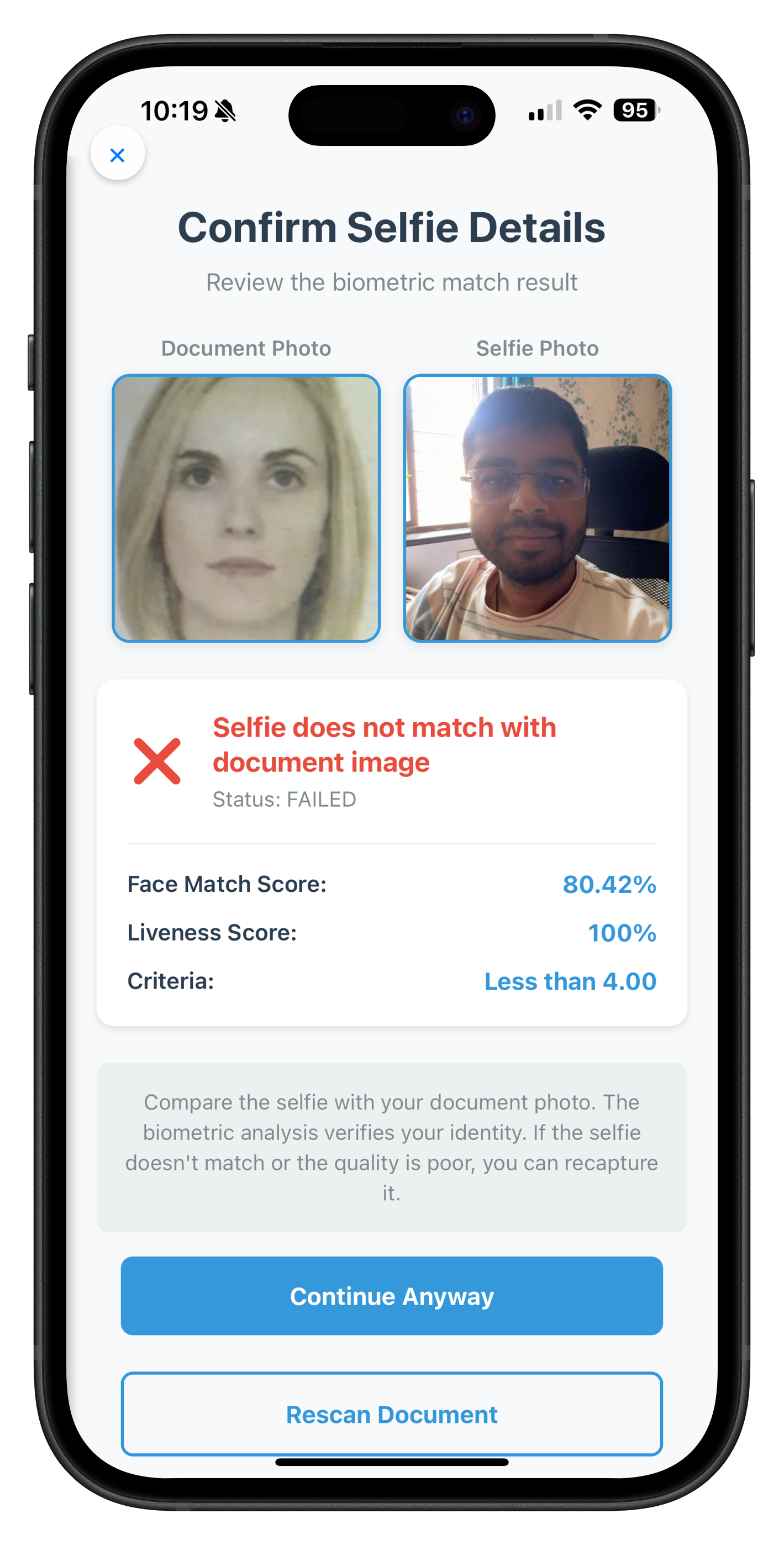
5. Biometric Opt-In Consent Screen
File: www/src/tutorial/screens/idv/IDVBiometricOptInConsentScreen.js
Purpose: Request user consent for biometric template storage
Event Trigger: getIDVBiometricOptInConsent
Key Features:
- Challenge mode specific consent description
- Approve/Reject buttons
- Close button to cancel
- Loading states
- Error handling
Complete Implementation:
/**
 * IDV Biometric Opt-In Consent Screen
 *
 * This screen displays biometric template storage consent options and allows users to accept or deny.
 * Triggered by the getIDVBiometricOptInConsent event during IDV workflows.
 *
 * Key Features:
 * - Biometric consent explanation with challenge mode specific messaging
 * - Accept/Reject consent options
 * - Real-time error handling and loading states
 * - Challenge mode based consent text variations
 *
 * Usage:
 * NavigationService.navigate('IDVBiometricOptInConsent', {
 *   challengeMode: 8,
 *   eventData: data
 * });
 */

const IDVBiometricOptInConsentScreen = {
  // Screen state
  state: {
    challengeMode: null,
    eventData: null,
    isProcessing: false,
    error: ''
  },

  /**
   * Called when NavigationService.navigate('IDVBiometricOptInConsent', params)
   *
   * @param {Object} params - Navigation parameters
   * @param {number} params.challengeMode - Challenge operation mode
   * @param {Object} params.eventData - Event data from SDK
   */
  onContentLoaded(params) {
    console.log('IDVBiometricOptInConsent - Screen loaded with params:', JSON.stringify(params, null, 2));

    // Initialize state
    this.state = {
      challengeMode: params.challengeMode,
      eventData: params.eventData,
      isProcessing: false,
      error: ''
    };

    // Setup event listeners
    this.setupEventListeners();

    // Update consent description based on challenge mode
    this.updateConsentDescription();

    // Clear any previous errors
    this.hideError();
  },

  /**
   * Setup event listeners
   */
  setupEventListeners() {
    // Approve button
    const approveButton = document.getElementById('idv-consent-approve-btn');
    if (approveButton) {
      approveButton.onclick = () => this.handleConsentAction(true);
    }

    // Reject button
    const rejectButton = document.getElementById('idv-consent-reject-btn');
    if (rejectButton) {
      rejectButton.onclick = () => this.handleConsentAction(false);
    }

    // Close button
    const closeButton = document.getElementById('idv-consent-close-btn');
    if (closeButton) {
      closeButton.onclick = () => this.handleClose();
    }
  },

  /**
   * Get consent description based on challenge mode
   *
   * @returns {string} Consent description text
   */
  getConsentDescription() {
    const mode = this.state.challengeMode || 8;

    switch (mode) {
      case 10:
        return 'Your biometric template will be used for enhanced security verification. This allows for faster and more secure authentication in future sessions.';
      default:
        return 'Your selfie biometric template will be securely stored for identity verification. This enables faster authentication and enhanced security for your account.';
    }
  },

  /**
   * Update consent description in the UI
   */
  updateConsentDescription() {
    const descriptionEl = document.getElementById('idv-consent-description');
    if (descriptionEl) {
      descriptionEl.textContent = this.getConsentDescription();
    }
  },

  /**
   * Handle Close Button
   * Calls resetAuthState to cancel entire IDV flow
   */
  async handleClose() {
    if (this.state.isProcessing) return;

    this.setProcessing(true);
    this.hideError();

    try {
      console.log('IDVBiometricOptInConsent - Calling resetAuthState to cancel IDV flow');
      await rdnaService.resetAuthState();
      console.log('IDVBiometricOptInConsent - ResetAuthState successful');
    } catch (error) {
      console.error('IDVBiometricOptInConsent - ResetAuthState error:', JSON.stringify(error, null, 2));
      const errorMessage = error?.error?.errorString || 'Failed to cancel. Please try again.';
      this.showError(errorMessage);
    } finally {
      this.setProcessing(false);
    }
  },

  /**
   * Handle Consent Action (Approve or Reject)
   *
   * @param {boolean} isOptIn - true for approve, false for reject
   */
  async handleConsentAction(isOptIn) {
    const challengeMode = this.state.challengeMode;

    if (challengeMode === null && challengeMode !== 0) {
      this.showError('Invalid challenge mode. Unable to process consent.');
      return;
    }

    this.setProcessing(true);
    this.hideError();

    try {
      console.log('IDVBiometricOptInConsent - Processing biometric opt-in consent:', isOptIn);

      await rdnaIDVService.setIDVBiometricOptInConsent(
        isOptIn,
        challengeMode
      );

      console.log('IDVBiometricOptInConsent - Consent processed successfully');

      // SDK will handle navigation to next step

    } catch (error) {
      console.error('IDVBiometricOptInConsent - Failed to process consent:', JSON.stringify(error, null, 2));
      const errorMessage = error?.error?.errorString || 'Failed to process consent. Please try again.';
      this.showError(errorMessage);
    } finally {
      this.setProcessing(false);
    }
  },

  /**
   * Set processing state and update UI
   *
   * @param {boolean} isProcessing - Whether operation is in progress
   */
  setProcessing(isProcessing) {
    this.state.isProcessing = isProcessing;

    // Update approve button
    const approveButton = document.getElementById('idv-consent-approve-btn');
    if (approveButton) {
      approveButton.disabled = isProcessing;
      approveButton.textContent = isProcessing ? 'Processing...' : 'Approve';
      if (isProcessing) {
        approveButton.classList.add('loading');
      } else {
        approveButton.classList.remove('loading');
      }
    }

    // Update reject button
    const rejectButton = document.getElementById('idv-consent-reject-btn');
    if (rejectButton) {
      rejectButton.disabled = isProcessing;
      rejectButton.textContent = isProcessing ? 'Processing...' : 'Reject';
      if (isProcessing) {
        rejectButton.classList.add('loading');
      } else {
        rejectButton.classList.remove('loading');
      }
    }

    // Update close button
    const closeButton = document.getElementById('idv-consent-close-btn');
    if (closeButton) {
      closeButton.disabled = isProcessing;
    }
  },

  /**
   * Show error message
   *
   * @param {string} message - Error message to display
   */
  showError(message) {
    this.state.error = message;

    const errorDiv = document.getElementById('idv-consent-error');
    if (errorDiv) {
      errorDiv.textContent = message;
      errorDiv.style.display = 'block';
    }
  },

  /**
   * Hide error message
   */
  hideError() {
    this.state.error = '';

    const errorDiv = document.getElementById('idv-consent-error');
    if (errorDiv) {
      errorDiv.style.display = 'none';
      errorDiv.textContent = '';
    }
  }
};

// Expose to global scope for NavigationService
window.IDVBiometricOptInConsentScreen = IDVBiometricOptInConsentScreen;
The following image showcases the screen from the sample application:
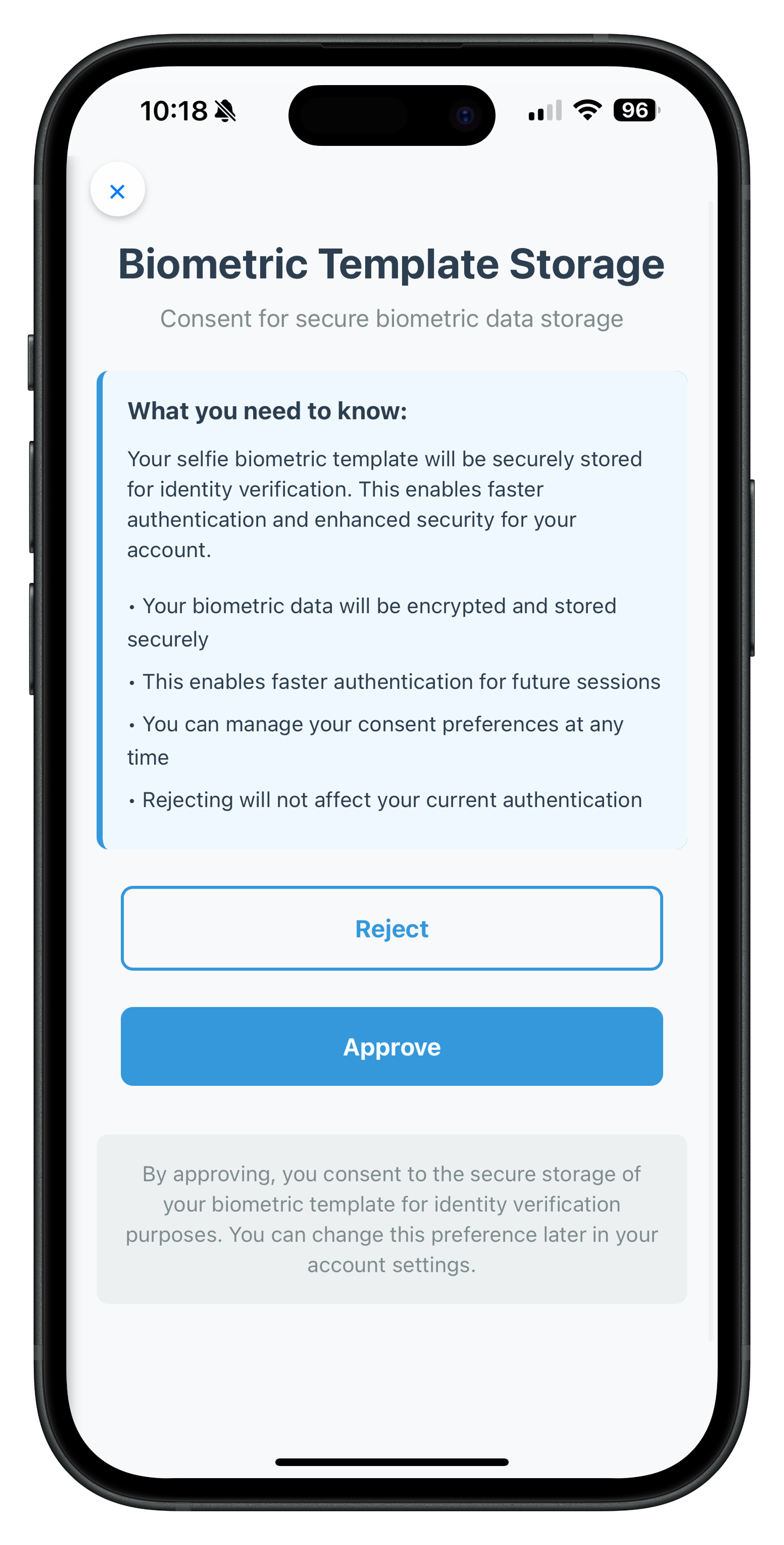
Common Screen Patterns
All screens share these patterns:
1. State Management
state: {
  eventData: null,
  challengeMode: null,
  isProcessing: false,
  error: ''
}
2. Parameter Handling
onContentLoaded(params) {
  this.state.eventData = params.eventData;
  this.state.challengeMode = params.challengeMode;
  // ... initialize other state
}
3. DOM Event Listeners
setupEventListeners() {
  const btn = document.getElementById('button-id');
  if (btn) {
    btn.onclick = () => this.handleAction();
  }
}
4. Loading States
setProcessing(isProcessing) {
  this.state.isProcessing = isProcessing;

  const btn = document.getElementById('button-id');
  if (btn) {
    btn.disabled = isProcessing;
    btn.textContent = isProcessing ? 'Processing...' : 'Button Text';
    if (isProcessing) {
      btn.classList.add('loading');
    } else {
      btn.classList.remove('loading');
    }
  }
}
5. Error Handling
showError(message) {
  this.state.error = message;
  const errorDiv = document.getElementById('error-div-id');
  if (errorDiv) {
    errorDiv.textContent = message;
    errorDiv.style.display = 'block';
  }
}

hideError() {
  this.state.error = '';
  const errorDiv = document.getElementById('error-div-id');
  if (errorDiv) {
    errorDiv.style.display = 'none';
    errorDiv.textContent = '';
  }
}
6. API Calls
async handleAction() {
  this.setProcessing(true);
  this.hideError();

  try {
    const response = await rdnaIDVService.methodName(param1, param2);
    console.log('Success:', response);
    // SDK handles next navigation
  } catch (error) {
    console.error('Error:', error);
    const errorMessage = error?.error?.errorString || 'Default error message';
    this.showError(errorMessage);
  } finally {
    this.setProcessing(false);
  }
}
The Complete IDV MFA Activation Journey
Let's trace a complete user journey through the IDV MFA activation flow, showing every event, screen, and API call.
Step 1: User Enters Activation Code
Screen: ActivationCodeScreen
// User enters activation code and clicks "Activate"
await rdnaService.setActivationCode(activationCode);
Result: SDK validates code and determines IDV is required for this user.
Step 2: Document Scan Start Confirmation
Event: getIDVDocumentScanProcessStartConfirmation
// Event data
{
  idvWorkflow: 0  // RDNAIDVWorkflowActivation
}
Navigation: → IDVDocumentScanStart screen
Screen Displays:
- Document scanning guidelines
- Workflow-specific instructions
- "Scan Document" button
- "Close" button
User Action: User clicks "Scan Document"
API Call:
await rdnaIDVService.setIDVDocumentScanProcessStartConfirmation(
  true,  // isConfirm = true to start scan
  0      // idvWorkflow from event
);
Result: Native Regula document scanner opens
Step 3: Document Capture
Native Process: Regula SDK captures document
User Actions:
- Position document in frame
- SDK auto-captures when document is detected
- SDK performs OCR and validation
- SDK processes document images
Result: SDK fires next event with OCR data
Step 4: Confirm Document Details
Event: getIDVConfirmDocumentDetails
// Event data
{
  challengeMode: 8,  // Activation mode
  response_data: {
    identity_data: {
      "Surname and given names": "John Doe",
      "Date of birth": "01/01/1990",
      "Document number": "AB123456",
      // ... more fields
    },
    document_status: {
      overall_document_status: "OK",  // or "ERROR", "WARNING"
      checks_performed: [
        {
          check_name: "MRZ Check",
          check_status: "OK",
          check_category: "DATA_VALIDATION"
        }
        // ... more checks
      ],
      error_list: [],
      warning_list: []
    },
    document_info: {
      document_images: {
        portrait_image: "base64...",
        signature_image: "base64...",
        front_page: "base64...",
        back_page: "base64..."
      }
    }
  }
}
Navigation: → IDVConfirmDocumentDetails screen
Screen Displays:
- Personal info header (name + portrait + signature)
- Document images (front/back)
- Overall document status
- All extracted identity data
- Detailed validation checks
- Errors and warnings (if any)
- NFC status (if applicable)
- "Confirm" and "Recapture" buttons
User Action: User reviews data and clicks "Confirm"
API Call:
await rdnaIDVService.setIDVConfirmDocumentDetails(
  true,  // isConfirm = true to proceed
  8      // challengeMode from event
);
Result: SDK proceeds to selfie capture
Step 5: Selfie Process Start Confirmation
Event: getIDVSelfieProcessStartConfirmation
// Event data
{
  idvWorkflow: 0  // RDNAIDVWorkflowActivation
}
Navigation: → IDVSelfieProcessStart screen
Screen Displays:
- Selfie capture guidelines
- Workflow-specific instructions
- Camera selection checkbox (front/back)
- "Capture Selfie" button
- "Close" button
User Action: User selects camera preference and clicks "Capture Selfie"
API Call:
await rdnaIDVService.setIDVSelfieProcessStartConfirmation(
  true,   // isConfirm = true to start capture
  false,  // useBackCamera = false (front camera)
  0       // idvWorkflow from event
);
Result: Native selfie capture UI opens
Step 6: Selfie Capture
Native Process: Aware Face Capture SDK captures selfie
User Actions:
- Position face in frame
- Follow on-screen instructions
- SDK performs liveness detection
- SDK auto-captures when liveness confirmed
SDK Processing:
- Analyzes liveness (anti-spoofing)
- Extracts facial biometric template
- Compares selfie with document photo
- Calculates match score
Result: SDK fires next event with biometric results
Step 7: Selfie Confirmation
Event: getIDVSelfieConfirmation
// Event data
{
  userID: "user@example.com",
  challengeMode: 8,
  response_data: {
    response_data: {
      biometric_result: {
        display_text: "MATCHED",  // or "NOT_MATCHED"
        result_criteria: "FACE_MATCH_SCORE"
      },
      face_matcher_response: {
        score: 0.95  // 95% match (0-1 range)
      },
      analyze_liveness_response: {
        video: {
          liveness_result: {
            score: 92  // 92% liveness (0-100 range)
          },
          autocapture_result: {
            selfie_image: "base64..."  // Captured selfie
          }
        }
      },
      document_detail: {
        document_info: {
          portrait_image: "base64..."  // Document photo
        }
      }
    },
    action_buttons: {
      success_button: [
        { button_text: "Continue", key: "continue-flow" }
      ],
      failure_button: [
        { button_text: "Recapture Selfie", key: "reinit-idv-selfie" },
        { button_text: "Continue Anyway", key: "continue-flow" }
      ]
    }
  }
}
Navigation: → IDVSelfieConfirmation screen
Screen Displays:
- Side-by-side comparison (document photo vs selfie)
- Match result icon (✓ or ✗)
- Match status text
- Face match score (95%)
- Liveness score (92%)
- Dynamic action buttons based on result
User Action: User clicks action button (e.g., "Continue")
API Call:
await rdnaIDVService.setIDVSelfieConfirmation(
  "continue-flow",  // action key from button
  8                 // challengeMode from event
);
Result: SDK proceeds to biometric consent
Step 8: Biometric Opt-In Consent
Event: getIDVBiometricOptInConsent
// Event data
{
  userID: "user@example.com",
  challengeMode: 8,
  attemptsLeft: 3,
  challengeResponse: {
    status: {
      statusCode: 0,
      statusMessage: "Success"
    },
    session: {
      sessionID: "sess_abc123"
    },
    additionalInfo: {
      currentWorkFlow: "IDV_ACTIVATION",
      idvUserRole: "PRIMARY_USER"
    }
  },
  error: {
    longErrorCode: 0,
    shortErrorCode: 0,
    errorString: ""
  },
  biometricTemplate: {
    templateType: "FACE_BIOMETRIC"
  }
}
Navigation: → IDVBiometricOptInConsent screen
Screen Displays:
- Biometric consent explanation
- Challenge mode specific messaging
- "Approve" and "Reject" buttons
- "Close" button
User Action: User clicks "Approve"
API Call:
await rdnaIDVService.setIDVBiometricOptInConsent(
  true,  // isOptIn = true to approve
  8      // challengeMode from event
);
Result: SDK completes IDV process and proceeds to password setup
Step 9: Password Setup
Event: getPassword
Navigation: → SetPasswordScreen
Screen Displays:
- Password input fields
- Password policy requirements
- "Set Password" button
User Action: User enters and confirms password
API Call:
await rdnaService.setPassword(password);
Result: Account activation completes successfully
Step 10: Login Success
Event: onUserLoggedIn
Navigation: → Dashboard screen
Flow Complete: User is now activated with IDV verification and logged in
Flow Diagram Summary
┌──────────────────────────────────────┐
│  Step 1: Activation Code Entry       │
│  Screen: ActivationCodeScreen        │
│  Action: setActivationCode()         │
└─────────────┬────────────────────────┘
              ↓
┌──────────────────────────────────────┐
│  Step 2: Document Scan Start         │
│  Event: getIDVDocumentScanStart...   │
│  Screen: IDVDocumentScanStart        │
│  Action: setIDVDocumentScan...(true) │
└─────────────┬────────────────────────┘
              ↓
┌──────────────────────────────────────┐
│  Step 3: Native Document Capture     │
│  Process: Regula SDK scans document  │
└─────────────┬────────────────────────┘
              ↓
┌──────────────────────────────────────┐
│  Step 4: Confirm Document Details    │
│  Event: getIDVConfirmDocumentDetails │
│  Screen: IDVConfirmDocumentDetails   │
│  Action: setIDVConfirmDocument...(true)
└─────────────┬────────────────────────┘
              ↓
┌──────────────────────────────────────┐
│  Step 5: Selfie Process Start        │
│  Event: getIDVSelfieProcessStart...  │
│  Screen: IDVSelfieProcessStart       │
│  Action: setIDVSelfieProcess...(true)│
└─────────────┬────────────────────────┘
              ↓
┌──────────────────────────────────────┐
│  Step 6: Native Selfie Capture       │
│  Process: Aware SDK captures selfie  │
└─────────────┬────────────────────────┘
              ↓
┌──────────────────────────────────────┐
│  Step 7: Selfie Confirmation         │
│  Event: getIDVSelfieConfirmation     │
│  Screen: IDVSelfieConfirmation       │
│  Action: setIDVSelfieConfirm...()    │
└─────────────┬────────────────────────┘
              ↓
┌──────────────────────────────────────┐
│  Step 8: Biometric Consent           │
│  Event: getIDVBiometricOptInConsent  │
│  Screen: IDVBiometricOptInConsent    │
│  Action: setIDVBiometricOptIn...(true)
└─────────────┬────────────────────────┘
              ↓
┌──────────────────────────────────────┐
│  Step 9: Password Setup              │
│  Event: getPassword                  │
│  Screen: SetPasswordScreen           │
│  Action: setPassword()               │
└─────────────┬────────────────────────┘
              ↓
┌──────────────────────────────────────┐
│  Step 10: Login Success              │
│  Event: onUserLoggedIn               │
│  Screen: Dashboard                   │
│  Flow Complete!                      │
└──────────────────────────────────────┘
Prerequisites for Testing
Before testing, ensure you have:
- ✅ Valid REL-ID SDK credentials
- ✅ Document scanning license (Regula)
- ✅ Test identity documents (passport, driver's license, etc.)
- ✅ IDV assets configured in
idv-native-resources/ - ✅ App built and installed on device (physical device recommended)
Testing Checklist
Phase 1: Initial Setup Verification
# 1. Verify plugin installation
cordova plugin list
# Should show: cordova-plugin-rdna

# 2. Verify IDV assets are copied
cordova prepare
# Check logs for: "Copying IDV resources..."

# 3. Verify app builds successfully
cordova build ios
cordova build android
Phase 2: Document Scan Testing
Test Case 1: Start Document Scan
- Navigate through activation flow to IDV
- Verify "IDV Document Scan Start" screen appears
- Verify workflow-specific guidelines display
- Click "Scan Document" button
- Expected: Native Regula scanner opens
Test Case 2: Cancel Document Scan
- On "IDV Document Scan Start" screen
- Click "Close" button
- Expected: Returns to activation code screen (SDK handles navigation)
Test Case 3: Capture Document
- Position test document in frame
- Wait for auto-capture
- Expected: SDK processes document and fires
getIDVConfirmDocumentDetails
Test Case 4: Confirm Document Details
- Verify all OCR data displays correctly:
- Personal info header (name, portrait, signature)
- Document images (front/back)
- Overall document status
- Extracted identity fields
- Validation checks
- Errors/warnings (if any)
- Click "Confirm" button
- Expected: Proceeds to selfie capture
Test Case 5: Recapture Document
- On "IDV Confirm Document Details" screen
- Click "Recapture" button
- Expected: Returns to document scanner
Phase 3: Selfie Capture Testing
Test Case 6: Start Selfie Capture
- Verify "IDV Selfie Process Start" screen appears
- Verify workflow-specific guidelines display
- Select camera preference (front/back)
- Click "Capture Selfie" button
- Expected: Native selfie capture UI opens
Test Case 7: Capture Selfie
- Position face in frame
- Follow liveness detection prompts
- Wait for auto-capture
- Expected: SDK processes selfie and fires
getIDVSelfieConfirmation
Test Case 8: Selfie Match - Success
- Verify biometric match result displays:
- Side-by-side image comparison
- Match icon (✓)
- Face match score
- Liveness score
- "Continue" button
- Click "Continue" button
- Expected: Proceeds to biometric consent
Test Case 9: Selfie Match - Failure
- Use different person's document or poor lighting
- Verify mismatch result displays:
- Match icon (✗)
- Low match score
- "Recapture Selfie" and "Continue Anyway" buttons
- Click "Recapture Selfie"
- Expected: Returns to selfie capture
Phase 4: Biometric Consent Testing
Test Case 10: Approve Biometric Consent
- Verify "IDV Biometric Opt-In Consent" screen appears
- Verify consent description displays
- Click "Approve" button
- Expected: Proceeds to password setup
Test Case 11: Reject Biometric Consent
- On "IDV Biometric Opt-In Consent" screen
- Click "Reject" button
- Expected: Proceeds to password setup (without storing template)
Phase 5: Complete Flow Testing
Test Case 12: End-to-End Activation with IDV
- Start from app launch
- Complete getUser → activation code → IDV → password setup
- Verify each step transitions correctly
- Expected: Successful login to dashboard
Common Testing Issues & Solutions
Issue 1: Document Scanner Doesn't Open
Symptoms: Clicking "Scan Document" does nothing
Solutions:
- Check Regula license file is present
- Verify
db.datis copied to platform directory - Check console for error messages
- Ensure physical device (not simulator for document scan)
Issue 2: OCR Data Not Displaying
Symptoms: "IDV Confirm Document Details" screen is blank
Solutions:
- Check event data in console logs
- Verify
response_datastructure is parsed correctly - Check DOM element IDs match screen code
Issue 3: Selfie Capture Fails
Symptoms: Liveness detection fails repeatedly
Solutions:
- Ensure good lighting conditions
- Remove glasses/hat/face coverings
- Position face fully in frame
- Try front camera instead of back camera
Issue 4: Events Not Firing
Symptoms: Screens don't navigate after API calls
Solutions:
- Verify
SDKIDVEventProvider.initialize()is called - Check event manager is registered before SDK operations
- Verify
devicereadyevent fired before initialization - Check console for event logs
Testing Best Practices
- Use Real Devices: IDV features (camera, biometrics) work best on physical devices
- Test Multiple Document Types: Passport, driver's license, national ID
- Test Different Lighting: Indoor, outdoor, low light
- Test Edge Cases: Expired documents, damaged documents, poor image quality
- Monitor Console Logs: Watch for SDK errors and event flow
- Test Network Conditions: Online, offline, poor connectivity
Debug Logging
Enable debug logging to trace issues:
// In rdnaIDVService.js, add verbose logging
console.log('RdnaIDVService - API Call:', methodName, params);

// In rdnaIDVEventManager.js, log all event data
console.log('RdnaIDVEventManager - Event received:', eventName, JSON.stringify(data, null, 2));

// In screens, log lifecycle
console.log('ScreenName - onContentLoaded:', params);
console.log('ScreenName - Action triggered:', actionName);
Error 1: Document Database Missing
Error Message:
Error 143: Document database not found
Cause: db.dat file missing or not copied
Solution:
# 1. Verify file exists
ls -la idv-native-resources/android/assets/Regula/db.dat
ls -la idv-native-resources/ios/idv-artifacts/db.dat

# 2. Run prepare hook
cordova prepare

# 3. Verify file copied
# Android:
ls -la platforms/android/app/src/main/assets/Regula/db.dat

# iOS:
ls -la platforms/ios/[ProjectName]/Resources/idv-artifacts/db.dat
Error 2: Invalid License
Error Message:
Error 142: Invalid Regula license
Cause: License file missing, expired, or incorrect
Solution:
- Contact Uniken admin team for valid license
- Ensure license file matches your app bundle ID
- Verify license not expired
Error 3: Event Not Firing
Symptoms: Screen doesn't navigate after API call
Cause: Event provider not initialized
Solution:
// Verify in AppInitializer.js
document.addEventListener('deviceready', () => {
  SDKEventProvider.initialize();      // MFA events
  SDKIDVEventProvider.initialize();   // IDV events ← Must be called
}, false);
Error 4: IDV Flow Terminates Unexpectedly
Error Message:
Error 146: IDV identity verification canceled by user
Cause: User clicked cancel or API called with isConfirm=false
Solution: This is expected behavior. SDK returns to getUser event.
Error 5: Biometric Match Fails
Symptoms: Always shows "NOT_MATCHED" even with correct document
Possible Causes:
- Poor lighting conditions
- Different person in document vs selfie
- Significant time gap between document photo and selfie (aging)
- Low quality document photo
- Glasses/facial hair changes
Solutions:
- Improve lighting (natural daylight is best)
- Ensure same person in both photos
- Use recent ID document
- Remove glasses for selfie if not wearing in document photo
- Try multiple captures
SDK Error Codes Reference
Error Code | Description | Solution |
0 | Success | No action needed |
142 | Invalid Regula license | Contact admin for valid license |
143 | Document database not found | Verify |
144 | Document scan failed | Retry with better lighting |
145 | Selfie capture failed | Retry liveness detection |
146 | IDV canceled by user | Expected - user clicked cancel |
147 | Network error during IDV | Check network connection |
148 | Invalid document type | Use supported document types |
Platform-Specific Issues
iOS Specific
Issue: Camera permission not requested
Solution: Add to config.xml:
<platform name="ios">
  <edit-config target="NSCameraUsageDescription" file="*-Info.plist" mode="merge">
    <string>Camera required for identity verification</string>
  </edit-config>
</platform>
Issue: Document scanner crashes on simulator
Solution: IDV features require physical device (camera access)
Android Specific
Issue: Camera permission denied
Solution: Add to config.xml:
<platform name="android">
  <uses-permission android:name="android.permission.CAMERA" />
</platform>
Issue: Assets not found at runtime
Solution: Verify assets copied to correct path:
# Should exist:
platforms/android/app/src/main/assets/Regula/db.dat
platforms/android/app/src/main/assets/Regula/certificates/
Network & Backend Issues
Issue: IDV succeeds locally but fails on server
Possible Causes:
- Server-side document validation stricter than client
- Server requires additional document fields
- Network timeout during large image upload
Solutions:
- Check server logs for specific validation errors
- Ensure backend IDV endpoints are configured
- Increase network timeout values
Debugging Tools
1. Enable Verbose Logging
// In rdnaIDVService.js
const DEBUG = true;  // Set to true for verbose logs

if (DEBUG) {
  console.log('API Request:', JSON.stringify(params, null, 2));
  console.log('API Response:', JSON.stringify(response, null, 2));
}
2. Chrome DevTools Remote Debugging
# Android
chrome://inspect

# iOS
Safari > Develop > [Device Name] > [WebView]
3. Event Flow Logging
// In SDKIDVEventProvider.js
handleGetDocumentScanStartConfirmation(data) {
  console.log('=== IDV EVENT FLOW ===');
  console.log('Event: getIDVDocumentScanProcessStartConfirmation');
  console.log('Data:', JSON.stringify(data, null, 2));
  console.log('Navigating to: IDVDocumentScanStart');
  console.log('=====================');

  // ... rest of handler
}
Getting Help
If issues persist:
- Check Console Logs: Look for error codes and stack traces
- Review Event Flow: Verify events fire in correct order
- Test Basic MFA: Ensure non-IDV flow works first
- Contact Support: Provide:
- Error codes and messages
- Console logs
- Steps to reproduce
- Platform (iOS/Android)
- SDK version
- Document type being used
Code Organization
1. Keep IDV Code Isolated
✅ DO: Organize under idv/ subdirectories
www/src/uniken/services/idv/
www/src/uniken/providers/idv/
www/src/tutorial/screens/idv/

❌ DON'T: Mix IDV and MFA code
www/src/uniken/services/rdnaIDVMFAService.js  ← Bad
2. Use Descriptive Screen Names
✅ DO: Clear, specific names
IDVDocumentProcessStartConfirmationScreen.js
IDVConfirmDocumentDetailsScreen.js

❌ DON'T: Generic names
DocumentScreen.js
ConfirmScreen.js
3. Maintain State Consistently
// ✅ DO: Use consistent state structure
state: {
  eventData: null,
  challengeMode: null,
  isProcessing: false,
  error: ''
}

// ❌ DON'T: Mix state patterns
state: { data: null }
this.loading = false;  // ← Inconsistent
Event Handling
1. Always Use Event Data Values
// ✅ DO: Use values from event
const workflow = data.idvWorkflow;
await rdnaIDVService.setIDVDocumentScanProcessStartConfirmation(true, workflow);

// ❌ DON'T: Hardcode values
await rdnaIDVService.setIDVDocumentScanProcessStartConfirmation(true, 0);  // ← Bad
2. Handle All Event Scenarios
// ✅ DO: Handle success and cancel
setupEventListeners() {
  // Start scan
  document.getElementById('scan-btn').onclick = () => this.handleScan();

  // Cancel scan
  document.getElementById('close-btn').onclick = () => this.handleCancel();
}

// ❌ DON'T: Only handle happy path
setupEventListeners() {
  document.getElementById('scan-btn').onclick = () => this.handleScan();
  // Missing cancel handler ← Bad
}
3. Provide User Feedback
// ✅ DO: Show loading states and errors
async handleAction() {
  this.setProcessing(true);
  this.hideError();

  try {
    await rdnaIDVService.method();
  } catch (error) {
    this.showError(error?.error?.errorString || 'An error occurred');
  } finally {
    this.setProcessing(false);
  }
}

// ❌ DON'T: Silent failures
async handleAction() {
  await rdnaIDVService.method();  // No error handling ← Bad
}
Error Handling
1. Parse Error Responses
// ✅ DO: Extract meaningful error messages
catch (error) {
  const errorMessage = error?.error?.errorString || 'Failed to process request';
  const errorCode = error?.error?.longErrorCode;
  console.error(`Error ${errorCode}: ${errorMessage}`);
  this.showError(errorMessage);
}

// ❌ DON'T: Generic error messages
catch (error) {
  this.showError('Error occurred');  // ← Not helpful
}
2. Validate Before API Calls
// ✅ DO: Validate required data
async handleConfirm() {
  const challengeMode = this.state.challengeMode;

  if (challengeMode === null && challengeMode !== 0) {
    this.showError('Invalid challenge mode. Unable to confirm.');
    return;
  }

  await rdnaIDVService.setIDVConfirmDocumentDetails(true, challengeMode);
}

// ❌ DON'T: Assume data exists
async handleConfirm() {
  await rdnaIDVService.setIDVConfirmDocumentDetails(true, this.state.challengeMode);
  // ← Could be null
}
Performance
1. Cleanup Event Listeners
// ✅ DO: Remove listeners in cleanup
cleanup() {
  const btn = document.getElementById('button-id');
  if (btn) {
    btn.onclick = null;  // Remove handler
  }
}

// ❌ DON'T: Leave listeners attached
// (Can cause memory leaks in SPA)
2. Avoid Unnecessary Re-renders
// ✅ DO: Only update what changed
renderDocumentStatus() {
  const container = document.getElementById('status-container');
  if (!container) return;

  if (!this.state.responseData) {
    container.style.display = 'none';  // Hide if no data
    return;
  }

  // Only render if there's data
  container.innerHTML = this.buildStatusHTML();
  container.style.display = 'block';
}

// ❌ DON'T: Render empty containers
renderDocumentStatus() {
  document.getElementById('status-container').innerHTML = '';  // ← Always updates
}
Security
1. Never Log Sensitive Data
// ✅ DO: Log structure, not content
console.log('Document details received:', {
  challengeMode: data.challengeMode,
  fieldCount: Object.keys(data.response_data.identity_data || {}).length
});

// ❌ DON'T: Log PII (Personally Identifiable Information)
console.log('Document data:', data.response_data.identity_data);
// ← Contains name, DOB, document number, etc.
2. Clear Sensitive State on Cleanup
// ✅ DO: Clear biometric and document data
cleanup() {
  this.state.eventData = null;
  this.state.responseData = null;  // Contains images and PII
  // ... remove listeners
}
User Experience
1. Provide Clear Instructions
// ✅ DO: Workflow-specific guidelines
getWorkflowGuideline() {
  switch (this.state.idvWorkflow) {
    case 0: return 'Activation process requires clear document scan...';
    case 6: return 'KYC verification process. Hold document steady...';
    default: return 'Ensure good lighting and hold document steady...';
  }
}

// ❌ DON'T: Generic instructions for all workflows
getWorkflowGuideline() {
  return 'Scan your document';  // ← Not helpful
}
2. Display All Relevant Information
// ✅ DO: Show complete OCR data for user validation
renderAllContent() {
  this.renderPersonalInfoHeader();
  this.renderDocumentImages();
  this.renderDocumentStatus();
  this.renderIdentityData();
  this.renderChecksPerformed();
  this.renderErrorList();
  this.renderWarningList();
  this.renderNFCStatus();
}

// ❌ DON'T: Hide important validation details
renderAllContent() {
  this.renderIdentityData();  // Only show extracted data ← Bad
  // Missing status, errors, warnings
}
3. Handle Dynamic Action Buttons
// ✅ DO: Render buttons from SDK response
renderActionButtons() {
  const buttons = this.state.responseData.action_buttons;
  const isMatched = this.state.responseData.biometric_result?.display_text === 'MATCHED';

  const buttonList = isMatched ? buttons.success_button : buttons.failure_button;

  // Render dynamic buttons with action keys
  buttonList.forEach(button => {
    // Create button with button.button_text
    // Set onclick to handleAction(button.key)
  });
}

// ❌ DON'T: Hardcode button actions
renderActionButtons() {
  // Always show same buttons ← Bad
  html += '<button>Continue</button>';
}
Testing
1. Test All Workflows
// ✅ DO: Test different IDV workflows
// Test activation (workflow 0)
// Test KYC (workflow 6)
// Test account recovery (workflows 4, 5)
// Test step-up auth (workflow 9)

// ❌ DON'T: Only test activation workflow
2. Test Error Scenarios
// ✅ DO: Test error cases
// Test document validation errors
// Test biometric mismatch
// Test network failures
// Test user cancellation

// ❌ DON'T: Only test happy path
What You've Learned
Congratulations! You've successfully learned how to implement the complete IDV MFA Activation Flow in a Cordova application. Here's what you accomplished:
1. Architecture Understanding
- ✅ 3-layer architecture (Service → Provider → UI)
- ✅ Singleton pattern for event management
- ✅ Promise-based API wrappers
- ✅ SPA navigation pattern
2. Service Layer Implementation
- ✅ Auto-initializing Event Manager
- ✅ Promise-based IDV Service
- ✅ Cordova plugin integration
- ✅ Event-to-handler mapping
3. Provider Layer Implementation
- ✅ Centralized event handling
- ✅ Navigation logic
- ✅ State management
- ✅ Provider initialization
4. UI Layer Implementation
- ✅ 5 IDV screen modules
- ✅ Document scan start and confirmation
- ✅ Selfie capture start and confirmation
- ✅ Biometric consent handling
- ✅ Dynamic UI rendering
5. Complete Flow Integration
- ✅ End-to-end activation flow with IDV
- ✅ Event-driven navigation
- ✅ Error handling and retry logic
- ✅ User feedback and loading states
Key Takeaways
Architecture Benefits
✅ Code Isolation: IDV code in idv/ subdirectories
✅ Single Responsibility: Each file has one clear purpose
✅ Auto-Initialization: Events registered before SDK fires them
✅ Type Safety: Promise-based APIs for clean async/await
✅ Centralized Navigation: All routing in SDKIDVEventProvider
Cordova-Specific Patterns
✅ Plugin Access: Global namespace (com.uniken.rdnaplugin.RdnaClient)
✅ Event Handling: document.addEventListener for native events
✅ JSON Parsing: All responses are JSON strings requiring parse
✅ SPA Pattern: Screen modules with lifecycle methods
✅ Asset Management: Hooks for automatic resource copying
Additional Resources
Documentation
Sample Apps
Final Notes
Happy Coding! 🚀