🎯 Learning Path:
Welcome to the REL-ID IDV Post-Login Server Biometric Opt-In & Opt-Out Flow codelab! This tutorial teaches you how to implement secure biometric template creation and deletion workflows with LDA (Local Device Authentication) fallback and password validation for activated customers.
In this codelab, you'll implement two complete biometric template management workflows:
Biometric Opt-In Flow (Template Creation):
Biometric Opt-Out Flow (Template Deletion):
This codelab demonstrates two distinct flows for biometric template management:
Opt-In Flow (Workflow 10, Challenge Mode 6):
LDA/Password → Selfie Capture → Confirm Frame → Create Template
(Creates NEW biometric template on server)

Opt-Out Flow (Workflow 11, Challenge Mode 7):
LDA/Password → Delete Template → Show Status
(Deletes EXISTING biometric template from server)
Critical Differences:
Understanding the complete opt-in flow is crucial before implementation:
1. BiometricOptInScreen loads
   └─> checkTemplateStatus() checks if template exists on server

2. User clicks "Start Opt-In" button
   └─> state.isOptingIn = true
   └─> rdnaIDVService.initiateIDVBiometricOptIn()

3. SDK checks LDA (Local Device Authentication) availability

   A. LDA AVAILABLE
      └─> Shows LDA prompt (fingerprint/face/PIN)

      → If LDA SUCCESS: Proceeds to step 4

      → If LDA CANCELLED: Fallback to password dialog
         └─> Shows PasswordValidationDialog
         └─> User enters password and submits
         └─> Proceeds to step 4

   B. LDA NOT AVAILABLE
      └─> Fallback to password dialog
      └─> Shows PasswordValidationDialog
      └─> User enters password and submits
      └─> Proceeds to step 4

4. SDK validates authentication (LDA or password)
   └─> EVENT: getPassword (challengeMode: 6, idvWorkflow: 10)
   └─> If valid: SDK initiates selfie capture
   └─> If invalid: Shows error, stays on dialog

5. SDK starts selfie process
   └─> EVENT: getIDVSelfieProcessStartConfirmation (idvWorkflow: 10)
   └─> Password dialog closes automatically (if open)
   └─> Navigate to IDVSelfieProcessStart screen

6. User captures selfie on native screen

7. SDK sends captured frame for confirmation
   └─> EVENT: onIDVOptInCapturedFrameConfirmation
   └─> data.capturedImage (base64)
   └─> Navigate back to BiometricOptIn screen with captured frame
   └─> Shows CapturedImageModal with preview

8. User reviews captured image and chooses action:

   A. APPROVE (action: 0)
      └─> Modal closes immediately
      └─> rdnaIDVService.setIDVBiometricOptInConfirmation(0)
      └─> SDK processes opt-in on server

   B. RECAPTURE (action: 1)
      └─> Modal STAYS OPEN
      └─> rdnaIDVService.setIDVBiometricOptInConfirmation(1)
      └─> SDK re-opens selfie screen
      └─> Returns to step 6 (new capture updates modal)

   C. CANCEL (action: 2)
      └─> Modal closes immediately
      └─> rdnaIDVService.setIDVBiometricOptInConfirmation(2)
      └─> SDK aborts opt-in process

9. SDK returns final status
   └─> EVENT: onIDVBiometricOptInStatus (challengeMode: 6)
   └─> Navigate back to BiometricOptIn screen with result
   └─> data.idvResponse.status_code & status_message
   └─> state.isOptInFlowActive = false

10. Show result to user:
    └─> If status_code === 100: "Opt-In Successful"
    └─> Else: "Opt-In Failed" with message
    └─> checkTemplateStatus() to refresh UI state
1. BiometricOptOutScreen loads
   └─> checkTemplateStatus() checks if template exists on server
   └─> Only shows opt-out button if template exists

2. User clicks "Start Opt-Out" button
   └─> state.isOptingOut = true
   └─> rdnaIDVService.initiateIDVBiometricOptOut()

3. SDK checks LDA (Local Device Authentication) availability

   A. LDA AVAILABLE
      └─> Shows LDA prompt (fingerprint/face/PIN)

      → If LDA SUCCESS: Proceeds to step 4

      → If LDA CANCELLED: Fallback to password dialog
         └─> Shows PasswordValidationDialog
         └─> User enters password and submits
         └─> Proceeds to step 4

   B. LDA NOT AVAILABLE
      └─> Fallback to password dialog
      └─> Shows PasswordValidationDialog
      └─> User enters password and submits
      └─> Proceeds to step 4

4. SDK validates authentication (LDA or password)
   └─> EVENT: getPassword (challengeMode: 7, idvWorkflow: 11)
   └─> Password dialog closes automatically
   └─> If valid: SDK directly processes opt-out (deletes template from server)
   └─> If invalid: Shows error, stays on dialog

5. SDK returns final status
   └─> EVENT: onIDVBiometricOptOutStatus (challengeMode: 7)
   └─> Navigate back to BiometricOptOut screen with result
   └─> data.idvResponse.status_code & status_message

6. Show result to user:
   └─> If status_code === 100: "Opt-Out Successful - Template deleted"
   └─> Else: "Opt-Out Failed" with message
   └─> checkTemplateStatus() to refresh UI state
For biometric opt-in and opt-out, you'll use these specific values:
Flow | Workflow | Challenge Mode | Events |
Opt-In |
|
| getPassword (mode 6, workflow 10) |
Opt-Out |
|
| getPassword (mode 7, workflow 11) |
Comparison with Other IDV Flows:
Aspect | KYC Flow | Server Biometric Auth | Opt-In Flow | Opt-Out Flow |
Workflow | 6 | 8 | 10 | 11 |
Challenge Mode | 9 | 25 | 6 | 7 |
Template Check | No | Yes (required) | Yes (optional) | Yes (required) |
Document Scan | Yes | No | No | No |
Selfie Capture | Yes | Yes | Yes | No |
Template Operation | Create new | Use existing | Create new | Delete existing |
LDA Support | No | No | Yes | Yes |
Password Fallback | No | No | Yes | Yes |
Ensure you have completed these requirements:
# Required tools
Node.js >= 16
npm or yarn
Cordova CLI >= 12.0.0
Xcode (for iOS) or Android Studio (for Android)
If you haven't installed Cordova CLI, install it globally:
npm install -g cordova
The code to get started can be found in a GitHub repository.
You can clone the repository using the following command:
git clone https://github.com/uniken-team/relid-codelab-cordova.git
Navigate to the relid-IDV-post-login-server-biometric-optin-optout folder:
cd relid-codelab-cordova/relid-IDV-post-login-server-biometric-optin-optout
The project uses an automated Cordova hook for IDV asset management, but server biometric opt-in/opt-out does not require document scanning assets. Unlike document scanning flows (Additional Document Scan, KYC), this flow only needs the Aware FaceCapture library for biometric verification.
Document Scanner Assets (Not Required):
regula.license - Document reader license (only for document scanning)db.dat - 110.5MB Regula document recognition database (only for document scanning)Certificates.bundle/ - ICAO PKD certificates (only for document scanning)idv-native-resources/ folder - Not needed for biometric template managementKey Difference: This codelab demonstrates post-login server biometric template management which only uses selfie capture with liveness detection for opt-in. It does NOT scan identity documents, so document scanner assets are not required.
Biometric Capture Library (Pre-configured):
cordova-plugin-rdna plugin If you're building a document scanning flow (like KYC or Additional Document Scan), you'll need the automated hook structure:
your-cordova-project/
├── idv-native-resources/          # Only needed for document scanning flows
│   ├── common/                    # Shared files (regula.license, db.dat)
│   ├── ios/                       # iOS certificates
│   └── android/                   # Android certificates
├── hooks/
│   └── after_prepare/
│       └── copy_idv_native_resources.js   # Automated hook script
Hook Script: hooks/after_prepare/copy_idv_native_resources.js
When you run cordova prepare or cordova build, this hook automatically copies assets to platform-specific directories.
For This Server Biometric Opt-In/Opt-Out Codelab:
idv-native-resources/ folder is optional (can be empty or omitted)This codelab uses a local plugin for the REL-ID SDK, not a remote npm package.
Before installing the plugin, verify the plugin directory exists:
# Check if RdnaClient directory exists
ls -la RdnaClient

# You should see the plugin structure:
# - plugin.xml
# - src/ (native code)
# - www/ (JavaScript bridge)
Install the local plugin:
cordova plugin add ./RdnaClient
Verify installation:
cordova plugin list

# Should show:
# cordova-plugin-rdna-client X.X.X "RdnaClient"
Add iOS and/or Android platforms:
# For iOS
cordova platform add ios

# For Android
cordova platform add android
The biometric opt-in & opt-out codelab follows this structure:
relid-IDV-post-login-server-biometric-optin-optout/
├── www/
│   ├── index.html                                      # Main HTML with screen templates
│   ├── css/
│   │   └── styles.css                                  # Application styles
│   ├── src/
│   │   ├── tutorial/
│   │   │   ├── screens/
│   │   │   │   ├── idv/                                # IDV Screens
│   │   │   │   │   ├── biometricOptIn/                 # 🆕 Opt-In Flow
│   │   │   │   │   │   └── BiometricOptInScreen.js   # Template creation
│   │   │   │   │   ├── biometricOptOut/                # 🆕 Opt-Out Flow
│   │   │   │   │   │   └── BiometricOptOutScreen.js  # Template deletion
│   │   │   │   │   ├── IDVSelfieProcessStartConfirmationScreen.js  # ♻️ Reused
│   │   │   │   │   └── index.js
│   │   │   │   ├── mfa/                                # MFA Screens
│   │   │   │   │   ├── DashboardScreen.js
│   │   │   │   │   └── ...
│   │   │   └── navigation/
│   │   │       └── NavigationService.js                # SPA navigation
│   │   └── uniken/
│   │       ├── components/
│   │       │   └── modals/
│   │       │       └── PasswordValidationDialog.js     # 🆕 Reusable password dialog
│   │       ├── services/
│   │       │   └── idv/
│   │       │       ├── rdnaIDVService.js               # 🆕 Opt-in/opt-out APIs
│   │       │       │                                  # - initiateIDVBiometricOptIn()
│   │       │       │                                  # - initiateIDVBiometricOptOut()
│   │       │       │                                  # - setIDVBiometricOptInConfirmation()
│   │       │       └── rdnaIDVEventManager.js          # 🆕 Event handlers
│   │       │                                          # - onBiometricOptInStatus
│   │       │                                          # - onBiometricOptOutStatus
│   │       └── cp/
│   │           └── agent_info.json                     # Connection profile
│   └── app.js                                          # App initialization
├── RdnaClient/                                         # 🆕 Local plugin
│   ├── plugin.xml
│   ├── src/
│   │   ├── ios/
│   │   └── android/
│   └── www/
│       └── RdnaClient.js
└── config.xml                                          # Cordova configuration
The project includes pre-configured Aware FaceCapture library for opt-in:
Before diving into implementation, it's essential to understand how Cordova loads plugins and when they become available.
All Cordova APIs, including the RdnaClient plugin, are only available after the deviceready event fires:
document.addEventListener('deviceready', onDeviceReady, false);

function onDeviceReady() {
  console.log('Cordova plugins are now ready!');
  // ✅ Safe to call RdnaClient APIs here

  // Initialize services that depend on plugins
  rdnaService.initialize();
  rdnaIDVService.initialize();
}
The Cordova codelab uses this loading pattern in index.html:
<!-- 1. Cordova automatically injects cordova.js -->
<script src="cordova.js"></script>

<!-- 2. Load plugin bridges (available after cordova.js) -->
<!-- Plugin JavaScript is auto-injected by Cordova -->

<!-- 3. Load your JavaScript files -->
<script src="src/uniken/services/rdnaService.js"></script>
<script src="src/uniken/services/idv/rdnaIDVEventManager.js"></script>
<script src="src/uniken/services/idv/rdnaIDVService.js"></script>
<script src="src/uniken/components/modals/PasswordValidationDialog.js"></script>
<script src="src/tutorial/screens/idv/biometricOptIn/BiometricOptInScreen.js"></script>
<script src="src/tutorial/screens/idv/biometricOptOut/BiometricOptOutScreen.js"></script>
<script src="src/tutorial/navigation/NavigationService.js"></script>

<!-- 4. Initialize app (sets up deviceready listener) -->
<script src="app.js"></script>
Always verify plugin availability before use:
function checkPluginAvailability() {
  if (typeof com === 'undefined' ||
      typeof com.uniken === 'undefined' ||
      typeof com.uniken.rdnaplugin === 'undefined') {
    console.error('RdnaClient plugin is not available!');
    return false;
  }
  console.log('RdnaClient plugin is available');
  return true;
}

// Use in app.js
function onDeviceReady() {
  if (checkPluginAvailability()) {
    // Initialize services
    rdnaService.initialize();
  }
}
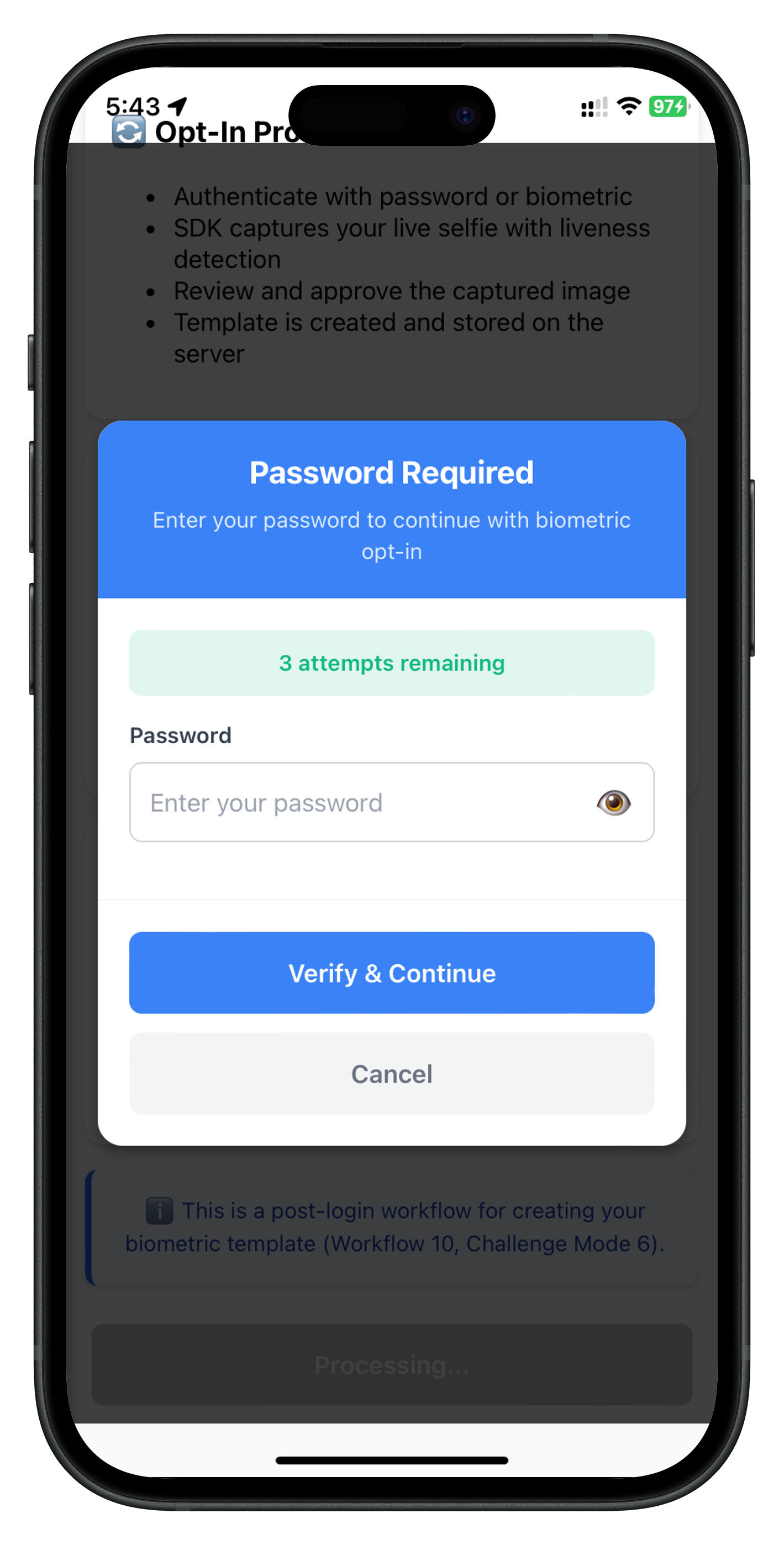
Before implementing the opt-in and opt-out flows, create a reusable PasswordValidationDialog component for LDA fallback authentication. This component is used by both flows when LDA is unavailable or cancelled.
Create PasswordValidationDialog.js:
// www/src/uniken/components/modals/PasswordValidationDialog.js
/**
* Password Validation Dialog Component
*
* Reusable modal dialog for password authentication during biometric opt-in/opt-out flows.
* Handles password collection when LDA (Local Device Authentication) is unavailable or cancelled.
*
* Features:
* - Password input with visibility toggle
* - Attempts left counter with color coding (green → orange → red)
* - Error message display
* - Loading state during authentication
* - Auto-focus on password field
* - Generic title and message (reusable across different flows)
* - Auto-clear password field on error
*
* Usage:
* ```javascript
* PasswordValidationDialog.show({
* title: "Password Required",
* message: "Enter your password to continue with biometric opt-in",
* attemptsLeft: 3,
* errorMessage: "",
* onSubmit: (password) => handlePasswordSubmit(password),
* onCancel: () => handleCancel()
* });
* ```
*
* The modal is embedded in index.html as a persistent div, shown/hidden via CSS display property.
*/
const PasswordValidationDialog = {
// Modal state
visible: false,
title: 'Password Required',
message: '',
attemptsLeft: 3,
errorMessage: '',
isSubmitting: false,
showPassword: false,
// Callbacks
onSubmit: null,
onCancel: null,
/**
* Initializes the modal (sets up event listeners)
* Called once when app loads
*/
initialize() {
console.log('PasswordValidationDialog - Initializing');
// Button handlers will be attached when modal is shown
// This ensures handlers are attached to the correct elements
console.log('PasswordValidationDialog - Initialized');
},
/**
* Shows the modal with the specified configuration
*
* @param {Object} config
* @param {string} [config.title] - Modal title (default: "Password Required")
* @param {string} [config.message] - Instruction message to display
* @param {number} [config.attemptsLeft] - Remaining authentication attempts (default: 3)
* @param {string} [config.errorMessage] - Error message to display (if any)
* @param {Function} config.onSubmit - Callback when password is submitted
* @param {Function} config.onCancel - Callback when user cancels
*/
show(config) {
console.log('PasswordValidationDialog - Showing modal with config:', JSON.stringify({
title: config.title,
hasMessage: !!config.message,
attemptsLeft: config.attemptsLeft,
hasError: !!config.errorMessage
}, null, 2));
this.visible = true;
this.title = config.title || 'Password Required';
this.message = config.message || '';
this.attemptsLeft = config.attemptsLeft !== undefined ? config.attemptsLeft : 3;
this.errorMessage = config.errorMessage || '';
this.isSubmitting = false;
this.showPassword = false;
this.onSubmit = config.onSubmit;
this.onCancel = config.onCancel;
// Render modal content
this.render();
// Show modal
const modalElement = document.getElementById('password-validation-modal');
if (modalElement) {
modalElement.style.display = 'flex';
}
// Auto-focus password input after a short delay
setTimeout(() => {
const passwordInput = document.getElementById('password-validation-input');
if (passwordInput) {
passwordInput.value = ''; // Clear field
passwordInput.focus();
}
}, 300);
},
/**
* Updates the modal state (useful for showing errors after submission)
*
* @param {Object} updates
* @param {string} [updates.errorMessage] - New error message
* @param {number} [updates.attemptsLeft] - Updated attempts left
*/
update(updates) {
console.log('PasswordValidationDialog - Updating modal:', JSON.stringify(updates, null, 2));
if (updates.errorMessage !== undefined) {
this.errorMessage = updates.errorMessage;
}
if (updates.attemptsLeft !== undefined) {
this.attemptsLeft = updates.attemptsLeft;
}
this.isSubmitting = false;
// Re-render to reflect updates
this.render();
// Clear password field on error
if (this.errorMessage) {
const passwordInput = document.getElementById('password-validation-input');
if (passwordInput) {
passwordInput.value = '';
passwordInput.focus();
}
}
},
/**
* Hides the modal
*/
hide() {
console.log('PasswordValidationDialog - Hiding modal');
this.visible = false;
this.isSubmitting = false;
this.errorMessage = '';
this.showPassword = false;
const modalElement = document.getElementById('password-validation-modal');
if (modalElement) {
modalElement.style.display = 'none';
}
// Clear password field
const passwordInput = document.getElementById('password-validation-input');
if (passwordInput) {
passwordInput.value = '';
}
},
/**
* Renders the modal content
* Updates the DOM with current state
*/
render() {
const contentElement = document.getElementById('password-validation-modal-content');
if (!contentElement) {
console.error('PasswordValidationDialog - Modal content element not found');
return;
}
const attemptsColor = this.getAttemptsColor();
contentElement.innerHTML = `
<!-- Header -->
<div class="stepup-modal-header">
<div class="stepup-modal-title">${this.escapeHtml(this.title)}</div>
${this.message ? `<div class="stepup-modal-subtitle">${this.escapeHtml(this.message)}</div>` : ''}
</div>
<!-- Body -->
<div class="stepup-modal-body">
<!-- Attempts Counter -->
${this.attemptsLeft <= 3 ? `
<div class="stepup-attempts-container" style="background-color: ${attemptsColor}20;">
<div class="stepup-attempts-text" style="color: ${attemptsColor};">
${this.attemptsLeft} attempt${this.attemptsLeft !== 1 ? 's' : ''} remaining
</div>
</div>
` : ''}
<!-- Error Message -->
${this.errorMessage ? `
<div class="stepup-error-container">
<div class="stepup-error-text">${this.escapeHtml(this.errorMessage)}</div>
</div>
` : ''}
<!-- Password Input -->
<div class="stepup-input-container">
<label class="stepup-input-label">Password</label>
<div class="stepup-password-wrapper">
<input
type="${this.showPassword ? 'text' : 'password'}"
id="password-validation-input"
class="stepup-password-input"
placeholder="Enter your password"
autocapitalize="none"
autocorrect="off"
${this.isSubmitting ? 'disabled' : ''}
/>
<button
id="password-validation-toggle-visibility"
class="stepup-visibility-button"
type="button"
${this.isSubmitting ? 'disabled' : ''}
>
<span class="stepup-visibility-icon">${this.showPassword ? '🙈' : '👁️'}</span>
</button>
</div>
</div>
</div>
<!-- Footer Buttons -->
<div class="stepup-modal-footer">
<button
id="password-validation-submit-btn"
class="stepup-verify-button"
${this.isSubmitting ? 'disabled' : ''}
>
${this.isSubmitting ? `
<span class="stepup-button-loading">
<span class="spinner-small"></span>
<span>Verifying...</span>
</span>
` : 'Verify & Continue'}
</button>
<button
id="password-validation-cancel-btn"
class="stepup-cancel-button"
${this.isSubmitting ? 'disabled' : ''}
>
Cancel
</button>
</div>
`;
// Attach event listeners after rendering
this.attachEventListeners();
},
/**
* Attaches event listeners to interactive elements
* Called after each render
*/
attachEventListeners() {
// Submit button
const submitBtn = document.getElementById('password-validation-submit-btn');
if (submitBtn) {
submitBtn.onclick = () => this.handleSubmit();
}
// Cancel button
const cancelBtn = document.getElementById('password-validation-cancel-btn');
if (cancelBtn) {
cancelBtn.onclick = () => this.handleCancel();
}
// Password visibility toggle
const toggleBtn = document.getElementById('password-validation-toggle-visibility');
if (toggleBtn) {
toggleBtn.onclick = () => this.togglePasswordVisibility();
}
// Password input - Enter key to submit
const passwordInput = document.getElementById('password-validation-input');
if (passwordInput) {
passwordInput.onkeypress = (e) => {
if (e.key === 'Enter' && !this.isSubmitting) {
this.handleSubmit();
}
};
}
// Modal overlay click to cancel
const modalElement = document.getElementById('password-validation-modal');
if (modalElement) {
modalElement.onclick = (e) => {
// Only close if clicking directly on modal background
if (e.target === modalElement) {
this.handleCancel();
}
};
}
},
/**
* Handles password submission
*/
handleSubmit() {
if (this.isSubmitting) {
return;
}
const passwordInput = document.getElementById('password-validation-input');
if (!passwordInput) {
console.error('PasswordValidationDialog - Password input not found');
return;
}
const password = passwordInput.value.trim();
if (!password) {
console.log('PasswordValidationDialog - Password is empty');
this.errorMessage = 'Password cannot be empty';
this.render();
return;
}
console.log('PasswordValidationDialog - Submitting password');
this.isSubmitting = true;
this.errorMessage = '';
this.render();
if (this.onSubmit) {
this.onSubmit(password);
}
},
/**
* Handles cancel action
*/
handleCancel() {
if (this.isSubmitting) {
return;
}
console.log('PasswordValidationDialog - User cancelled');
this.hide();
if (this.onCancel) {
this.onCancel();
}
},
/**
* Toggles password visibility
*/
togglePasswordVisibility() {
this.showPassword = !this.showPassword;
this.render();
// Re-focus input
setTimeout(() => {
const passwordInput = document.getElementById('password-validation-input');
if (passwordInput) {
passwordInput.focus();
}
}, 0);
},
/**
* Gets color for attempts left counter based on remaining attempts
*
* @returns {string} CSS color value
*/
getAttemptsColor() {
if (this.attemptsLeft === 1) {
return '#dc2626'; // Red
} else if (this.attemptsLeft === 2) {
return '#f59e0b'; // Orange
} else {
return '#10b981'; // Green
}
},
/**
* Escapes HTML to prevent XSS
*
* @param {string} unsafe - Unsafe string
* @returns {string} Escaped string
*/
escapeHtml(unsafe) {
if (!unsafe) return '';
return unsafe
.replace(/&/g, '&')
.replace(/</g, '<')
.replace(/>/g, '>')
.replace(/"/g, '"')
.replace(/'/g, ''');
}
};
Add the password validation modal container to your index.html (before the closing
<!-- Password Validation Modal (persistent, shown/hidden via CSS) -->
<div id="password-validation-modal" class="modal-overlay" style="display: none;">
  <div id="password-validation-modal-content" class="modal-content-container">
    <!-- Content dynamically rendered by PasswordValidationDialog.render() -->
  </div>
</div>
Add styles for the password validation modal:
/* Password Validation Modal */
.stepup-modal-header {
  background-color: #3b82f6;
  padding: 20px;
  border-top-left-radius: 16px;
  border-top-right-radius: 16px;
  text-align: center;
}

.stepup-modal-title {
  font-size: 20px;
  font-weight: bold;
  color: #ffffff;
  margin-bottom: 8px;
}

.stepup-modal-subtitle {
  font-size: 14px;
  color: #dbeafe;
  line-height: 1.5;
}

.stepup-modal-body {
  padding: 20px;
}

.stepup-attempts-container {
  border-radius: 8px;
  padding: 12px;
  margin-bottom: 16px;
  text-align: center;
}

.stepup-attempts-text {
  font-size: 14px;
  font-weight: 600;
}

.stepup-error-container {
  background-color: #fef2f2;
  border-radius: 8px;
  padding: 12px;
  margin-bottom: 16px;
  border-left: 4px solid #dc2626;
}

.stepup-error-text {
  font-size: 14px;
  color: #7f1d1d;
  line-height: 1.5;
  text-align: center;
}

.stepup-input-container {
  margin-bottom: 16px;
}

.stepup-input-label {
  font-size: 14px;
  font-weight: 600;
  color: #374151;
  margin-bottom: 8px;
  display: block;
}

.stepup-password-wrapper {
  display: flex;
  align-items: center;
  border: 1px solid #d1d5db;
  border-radius: 8px;
  background-color: #ffffff;
}

.stepup-password-input {
  flex: 1;
  padding: 12px;
  font-size: 16px;
  color: #1f2937;
  border: none;
  outline: none;
  background: transparent;
}

.stepup-visibility-button {
  padding: 12px;
  background: transparent;
  border: none;
  cursor: pointer;
}

.stepup-visibility-icon {
  font-size: 20px;
}

.stepup-modal-footer {
  padding: 20px;
  border-top: 1px solid #f3f4f6;
}

.stepup-verify-button {
  width: 100%;
  background-color: #3b82f6;
  color: #ffffff;
  padding: 16px;
  border-radius: 8px;
  font-size: 16px;
  font-weight: 600;
  border: none;
  cursor: pointer;
  margin-bottom: 12px;
}

.stepup-verify-button:hover {
  background-color: #2563eb;
}

.stepup-verify-button:disabled {
  opacity: 0.6;
  cursor: not-allowed;
}

.stepup-cancel-button {
  width: 100%;
  background-color: #f3f4f6;
  color: #6b7280;
  padding: 16px;
  border-radius: 8px;
  font-size: 16px;
  font-weight: 600;
  border: none;
  cursor: pointer;
}

.stepup-cancel-button:hover {
  background-color: #e5e7eb;
}

.stepup-cancel-button:disabled {
  opacity: 0.6;
  cursor: not-allowed;
}

.stepup-button-loading {
  display: flex;
  align-items: center;
  justify-content: center;
  gap: 8px;
}

.spinner-small {
  width: 16px;
  height: 16px;
  border: 2px solid rgba(255, 255, 255, 0.3);
  border-top-color: #ffffff;
  border-radius: 50%;
  animation: spin 0.8s linear infinite;
}

@keyframes spin {
  to { transform: rotate(360deg); }
}
The PasswordValidationDialog shows password input field, attempts counter with color coding (green/orange/red), error messages, and action buttons for verify and cancel.
Add JSDoc type definitions for opt-in and opt-out status events. These events are triggered by the Cordova plugin after template operations complete. While Cordova uses JavaScript (not TypeScript), well-documented JSDoc types improve code maintainability and IDE support.
For better code documentation, you can add JSDoc type definitions to your event handling code:
// www/src/uniken/services/idv/rdnaIDVEventManager.js

/**
 * @typedef {Object} RDNAIDVBiometricOptInStatusData
 * RDNA IDV Biometric Opt-In Status Event Data
 * Response event triggered after biometric opt-in process completes
 *
 * This event is triggered when:
 * 1. User approves captured selfie and opt-in completes (success or failure)
 * 2. User cancels opt-in flow
 * 3. Backend returns an error during opt-in processing
 *
 * Challenge Mode: 6 (biometric opt-in)
 *
 * Response Structure:
 * - error: SDK error information
 *   - longErrorCode: 0 = success, others = errors
 * - idvResponse: Backend response object
 *   - status_code: 100 = success (template created), others = failure
 *   - status_message: Human-readable status message
 *
 * Validation Pattern:
 * 1. Check error.longErrorCode first (0 = OK)
 * 2. Then check idvResponse.status_code (100 = template created successfully)
 *
 * Application should:
 * - Display success message when status_code === 100
 * - Show error message for other status codes
 * - Reset flow state after processing
 *
 * @property {string} userId - User ID
 * @property {number} attemptsLeft - Remaining attempts
 * @property {number} challengeMode - Challenge mode: 6 (biometric opt-in)
 * @property {Object} idvResponse - Backend response object containing status information
 * @property {number} idvResponse.status_code - Status code: 100 = Success (template created)
 * @property {string} idvResponse.status_message - Status message
 * @property {number} [idvResponse.il_status_code] - IL status code
 * @property {string} [idvResponse.user_id] - User ID
 * @property {string|null} [idvResponse.for_user_id] - For user ID
 * @property {string} [idvResponse.orchestration_use_case] - Orchestration use case
 * @property {boolean} [idvResponse.result] - Result boolean
 * @property {Object} [idvResponse.idv_audit_info] - IDV audit information
 * @property {Object} [idvResponse.error] - Error information
 * @property {Object} error - SDK error information
 * @property {number} error.longErrorCode - Error code: 0 = success, others = errors
 */

/**
 * Event handler for biometric opt-in status
 * @param {RDNAIDVBiometricOptInStatusData} data - Opt-in status event data
 */
function onBiometricOptInStatus(data) {
  // Implementation...
}
Add JSDoc type definitions for opt-out events:
/**
 * @typedef {Object} RDNAIDVBiometricOptOutStatusData
 * RDNA IDV Biometric Opt-Out Status Event Data
 * Response event triggered after biometric opt-out process completes
 *
 * This event is triggered when:
 * 1. Template deletion completes (success or failure)
 * 2. Backend returns an error during opt-out processing
 *
 * Challenge Mode: 7 (biometric opt-out)
 *
 * Response Structure:
 * - error: SDK error information
 *   - longErrorCode: 0 = success, others = errors
 * - idvResponse: Backend response object
 *   - status_code: 100 = success (template deleted), others = failure
 *   - status_message: Human-readable status message
 *
 * Validation Pattern:
 * 1. Check error.longErrorCode first (0 = OK)
 * 2. Then check idvResponse.status_code (100 = template deleted successfully)
 *
 * Application should:
 * - Display success message when status_code === 100
 * - Show error message for other status codes
 * - Call checkTemplateStatus() to refresh UI after opt-out
 *
 * @property {string} userId - User ID
 * @property {number} attemptsLeft - Remaining attempts
 * @property {number} challengeMode - Challenge mode: 7 (biometric opt-out)
 * @property {Object} idvResponse - Backend response object containing status information
 * @property {number} idvResponse.status_code - Status code: 100 = Success (template deleted)
 * @property {string} idvResponse.status_message - Status message
 * @property {number} [idvResponse.il_status_code] - IL status code
 * @property {string|null} [idvResponse.user_id] - User ID
 * @property {string|null} [idvResponse.for_user_id] - For user ID
 * @property {string|null} [idvResponse.orchestration_use_case] - Orchestration use case
 * @property {boolean} [idvResponse.result] - Result boolean
 * @property {Object} [idvResponse.error] - Error information
 * @property {Object} error - SDK error information
 * @property {number} error.longErrorCode - Error code: 0 = success, others = errors
 */

/**
 * Event handler for biometric opt-out status
 * @param {RDNAIDVBiometricOptOutStatusData} data - Opt-out status event data
 */
function onBiometricOptOutStatus(data) {
  // Implementation...
}
Both opt-in and opt-out flows use the same getPassword event for password validation:
/**
 * @typedef {Object} RDNAIDVGetPasswordData
 * RDNA IDV Get Password Event Data
 * This event is triggered when the SDK requires password validation during IDV workflows
 * Occurs when LDA is cancelled or unavailable
 *
 * @property {string} userId - User ID
 * @property {number} attemptsLeft - Remaining password attempts
 * @property {number} challengeMode - Challenge mode (6 for opt-in, 7 for opt-out)
 * @property {number} idvWorkflow - IDV workflow (10 for opt-in, 11 for opt-out)
 * @property {string} [errorMessage] - Error message if password was incorrect
 */

/**
 * Event handler for password verification
 * @param {RDNAIDVGetPasswordData} data - Password event data
 */
function handleGetPassword(data) {
  // Implementation...
}
Using JSDoc type definitions in Cordova projects provides:
Implement biometric opt-in and opt-out APIs in the IDV service layer. These APIs handle template creation and deletion workflows with LDA fallback.
The opt-in flow uses three main APIs:
Add these methods to rdnaIDVService.js:
// www/src/uniken/services/idv/rdnaIDVService.js

/**
 * Checks if user biometric template exists on server
 *
 * Response Flow:
 * 1. This method returns sync validation response immediately
 * 2. SDK fires onIDVCheckUserBiometricTemplateStatus event with template status
 * 3. Screen-level handler processes result and updates UI accordingly
 *
 * Status Codes in idvResponse:
 * - 100: Template exists on server (result = true)
 * - 600: Template does not exist (result = false)
 * - 400: Unable to process request
 * - 500: Server error
 *
 * @returns {Promise<Object>} Promise that resolves with sync response structure
 */
async checkIDVUserBiometricTemplateStatus() {
  return new Promise((resolve, reject) => {
    console.log('RdnaIDVService - Checking user biometric template status');

    com.uniken.rdnaplugin.RdnaClient.checkIDVUserBiometricTemplateStatus(
      (response) => {
        console.log('RdnaIDVService - CheckIDVUserBiometricTemplateStatus sync callback received');

        const result = JSON.parse(response);
        console.log('RdnaIDVService - checkIDVUserBiometricTemplateStatus sync response:', JSON.stringify({
          longErrorCode: result.error?.longErrorCode,
          shortErrorCode: result.error?.shortErrorCode,
          errorString: result.error?.errorString
        }, null, 2));
        resolve(result);
      },
      (error) => {
        console.error('RdnaIDVService - checkIDVUserBiometricTemplateStatus error callback');
        const result = JSON.parse(error);
        reject(result);
      },
      []
    );
  });
}

/**
 * Initiates biometric template opt-in workflow
 *
 * Response Flow:
 * 1. This method returns sync validation response immediately
 * 2. SDK authenticates user (LDA if available, password fallback if LDA unavailable/cancelled)
 * 3. If LDA unavailable/cancelled, SDK fires getPassword event (challengeMode 6)
 * 4. SDK captures live selfie with liveness detection via native UI
 * 5. SDK fires onIDVOptInCapturedFrameConfirmation event with captured image (base64)
 * 6. Screen shows modal with image for user review (Approve/Recapture/Cancel)
 * 7. User selects action → screen calls setIDVBiometricOptInConfirmation()
 * 8. If Recapture: SDK captures new selfie, repeats from step 5
 * 9. If Approve: SDK sends template to server
 * 10. SDK fires onIDVBiometricOptInStatus event with final result
 *
 * Event Handlers Required:
 * - getPassword (challengeMode 6): Handle LDA fallback password dialog
 * - getIDVSelfieProcessStartConfirmation (workflow 10): Handle selfie start confirmation
 * - onIDVOptInCapturedFrameConfirmation: Display captured image for user review
 * - onIDVBiometricOptInStatus: Display opt-in result (success/failure)
 *
 * @returns {Promise<Object>} Promise that resolves with sync response structure
 */
async initiateIDVBiometricOptIn() {
  return new Promise((resolve, reject) => {
    console.log('RdnaIDVService - Initiating biometric opt-in');

    com.uniken.rdnaplugin.RdnaClient.initiateIDVBiometricOptIn(
      (response) => {
        console.log('RdnaIDVService - InitiateIDVBiometricOptIn sync callback received');

        const result = JSON.parse(response);
        console.log('RdnaIDVService - initiateIDVBiometricOptIn sync response:', JSON.stringify({
          longErrorCode: result.error?.longErrorCode,
          shortErrorCode: result.error?.shortErrorCode,
          errorString: result.error?.errorString
        }, null, 2));
        resolve(result);
      },
      (error) => {
        console.error('RdnaIDVService - initiateIDVBiometricOptIn error callback');
        const result = JSON.parse(error);
        reject(result);
      },
      []
    );
  });
}

/**
 * Submits user action for captured biometric frame during opt-in flow
 *
 * Response Flow:
 * 1. This method returns sync validation response immediately
 * 2. If status=1 (Recapture): SDK captures new selfie, fires onIDVOptInCapturedFrameConfirmation again
 * 3. If status=0 (Approve): SDK sends template to server, fires onIDVBiometricOptInStatus event
 * 4. If status=2 (Cancel): SDK cancels opt-in, fires onIDVBiometricOptInStatus with cancellation result
 *
 * Status Values (matches RdnaClient constants):
 * - 0 (RDNA_IDV_APPROVED): Approve captured image, proceed with template creation
 * - 1 (RDNA_IDV_RECAPTURE): Recapture selfie (modal stays open, new image shown)
 * - 2 (RDNA_IDV_CANCEL): Cancel opt-in flow
 *
 * @param {number} status - User action (0=Approve, 1=Recapture, 2=Cancel)
 * @returns {Promise<Object>} Promise that resolves with sync response structure
 */
async setIDVBiometricOptInConfirmation(status) {
  return new Promise((resolve, reject) => {
    console.log('RdnaIDVService - Setting biometric opt-in confirmation:', JSON.stringify({
      status,
      statusLabel: status === 0 ? 'APPROVE' : status === 1 ? 'RECAPTURE' : 'CANCEL'
    }, null, 2));

    com.uniken.rdnaplugin.RdnaClient.setIDVBiometricOptInConfirmation(
      (response) => {
        console.log('RdnaIDVService - SetIDVBiometricOptInConfirmation sync callback received');

        const result = JSON.parse(response);
        console.log('RdnaIDVService - setIDVBiometricOptInConfirmation sync response:', JSON.stringify({
          longErrorCode: result.error?.longErrorCode,
          shortErrorCode: result.error?.shortErrorCode,
          errorString: result.error?.errorString
        }, null, 2));
        resolve(result);
      },
      (error) => {
        console.error('RdnaIDVService - setIDVBiometricOptInConfirmation error callback');
        const result = JSON.parse(error);
        reject(result);
      },
      [status]
    );
  });
}
The opt-out flow uses two main APIs:
Add this method to rdnaIDVService.js:
/**
 * Initiates biometric template opt-out workflow
 *
 * Response Flow:
 * 1. This method returns sync validation response immediately
 * 2. SDK authenticates user (LDA if available, password fallback if LDA unavailable/cancelled)
 * 3. If LDA unavailable/cancelled, SDK fires getPassword event (challengeMode 7)
 * 4. SDK sends template deletion request to server
 * 5. SDK fires onIDVBiometricOptOutStatus event with final result
 *
 * Event Handlers Required:
 * - getPassword (challengeMode 7): Handle LDA fallback password dialog
 * - onIDVBiometricOptOutStatus: Display opt-out result (success/failure)
 *
 * Important Notes:
 * - No selfie capture in opt-out flow (unlike opt-in)
 * - LDA is attempted first; password dialog shown only if LDA unavailable/cancelled
 * - Simpler flow than opt-in: authenticate → delete template → show status
 *
 * @returns {Promise<Object>} Promise that resolves with sync response structure
 */
async initiateIDVBiometricOptOut() {
  return new Promise((resolve, reject) => {
    console.log('RdnaIDVService - Initiating biometric opt-out');

    com.uniken.rdnaplugin.RdnaClient.initiateIDVBiometricOptOut(
      (response) => {
        console.log('RdnaIDVService - InitiateIDVBiometricOptOut sync callback received');

        const result = JSON.parse(response);
        console.log('RdnaIDVService - initiateIDVBiometricOptOut sync response:', JSON.stringify({
          longErrorCode: result.error?.longErrorCode,
          shortErrorCode: result.error?.shortErrorCode,
          errorString: result.error?.errorString
        }, null, 2));
        resolve(result);
      },
      (error) => {
        console.error('RdnaIDVService - initiateIDVBiometricOptOut error callback');
        const result = JSON.parse(error);
        reject(result);
      },
      []
    );
  });
}
com.uniken.rdnaplugin.RdnaClient namespaceThe IDV Event Manager handles events for both opt-in and opt-out workflows. These events are already implemented in rdnaIDVEventManager.js. Let's review the key event handlers.
The opt-in flow triggers three specific events:
These handlers are already implemented in rdnaIDVEventManager.js:
// www/src/uniken/services/idv/rdnaIDVEventManager.js

/**
 * Handles biometric opt-in captured frame confirmation event
 *
 * This event is triggered during the biometric opt-in flow after the SDK captures
 * a live selfie frame with liveness detection. The event provides the captured
 * image as base64 data for user review and confirmation.
 *
 * Application should:
 * - Display the captured image in a modal for user review
 * - Provide three action buttons: Approve, Recapture, Cancel
 * - Call setIDVBiometricOptInConfirmation() with user's selected action
 * - Keep modal open if recapture selected (prevents UI flickering)
 *
 * @param event Event object containing captured frame data from native SDK
 */
onOptInCapturedFrameConfirmation(event) {
  console.log('RdnaIDVEventManager - Opt-in captured frame confirmation event received');

  try {
    const response = event.response || event.detail || event;
    console.log('RdnaIDVEventManager - onOptInCapturedFrameConfirmation response received');

    // Response is direct base64 string (not JSON-wrapped)
    const data = {
      capturedImage: typeof response === 'string' ? response : response.capturedImage || response.response
    };

    console.log('RdnaIDVEventManager - Captured image data length:', data.capturedImage?.length || 0);

    if (this.optInCapturedFrameConfirmationHandler) {
      this.optInCapturedFrameConfirmationHandler(data);
    }
  } catch (error) {
    console.error('RdnaIDVEventManager - Failed to parse opt-in captured frame confirmation:', error);
  }
}

/**
 * Handles biometric opt-in status event
 *
 * This event is triggered after the biometric opt-in process completes, indicating
 * whether the template was successfully created and stored on the server.
 *
 * Application should:
 * - Check error.longErrorCode for API errors
 * - Parse idvResponse JSON string for detailed status
 * - Check status_code: 100 = template created successfully
 * - Display success/failure modal to user
 *
 * @param event Event object containing opt-in status from native SDK
 */
onBiometricOptInStatus(event) {
  console.log('RdnaIDVEventManager - Biometric opt-in status event received');

  try {
    const response = event.response || event.detail || event;
    console.log('RdnaIDVEventManager - onBiometricOptInStatus response:', JSON.stringify(response, null, 2));

    const data = typeof response === 'string' ? JSON.parse(response) : response;
    console.log('RdnaIDVEventManager - User ID:', data.userID);
    console.log('RdnaIDVEventManager - Challenge Mode:', data.challengeMode);
    console.log('RdnaIDVEventManager - Error Code:', data.error?.longErrorCode);

    // Parse idvResponse JSON string
    if (data.idvResponse) {
      try {
        const idvData = JSON.parse(data.idvResponse);
        console.log('RdnaIDVEventManager - Opt-In Status Code:', idvData.status_code);
        console.log('RdnaIDVEventManager - Opt-In Status Message:', idvData.status_message);
      } catch (parseError) {
        console.error('RdnaIDVEventManager - Failed to parse idvResponse JSON:', parseError);
      }
    }

    if (this.biometricOptInStatusHandler) {
      this.biometricOptInStatusHandler(data);
    }
  } catch (error) {
    console.error('RdnaIDVEventManager - Failed to parse biometric opt-in status:', error);
  }
}
The opt-out flow triggers one specific event:
This handler is already implemented in rdnaIDVEventManager.js:
/**
 * Handles biometric opt-out status event
 *
 * This event is triggered after the biometric opt-out process completes, indicating
 * whether the template was successfully deleted from the server.
 *
 * Application should:
 * - Check error.longErrorCode for API errors
 * - Parse idvResponse JSON string for detailed status
 * - Check status_code: 100 = template deleted successfully
 * - Display success/failure modal to user
 *
 * @param event Event object containing opt-out status from native SDK
 */
onBiometricOptOutStatus(event) {
  console.log('RdnaIDVEventManager - Biometric opt-out status event received');

  try {
    const response = event.response || event.detail || event;
    console.log('RdnaIDVEventManager - onBiometricOptOutStatus response:', JSON.stringify(response, null, 2));

    const data = typeof response === 'string' ? JSON.parse(response) : response;
    console.log('RdnaIDVEventManager - User ID:', data.userID);
    console.log('RdnaIDVEventManager - Challenge Mode:', data.challengeMode);
    console.log('RdnaIDVEventManager - Error Code:', data.error?.longErrorCode);

    // Parse idvResponse JSON string
    if (data.idvResponse) {
      try {
        const idvData = JSON.parse(data.idvResponse);
        console.log('RdnaIDVEventManager - Opt-Out Status Code:', idvData.status_code);
        console.log('RdnaIDVEventManager - Opt-Out Status Message:', idvData.status_message);
      } catch (parseError) {
        console.error('RdnaIDVEventManager - Failed to parse idvResponse JSON:', parseError);
      }
    }

    if (this.biometricOptOutStatusHandler) {
      this.biometricOptOutStatusHandler(data);
    }
  } catch (error) {
    console.error('RdnaIDVEventManager - Failed to parse biometric opt-out status:', error);
  }
}
All IDV events are registered in the registerEventListeners() method:
registerEventListeners() {
  if (this._initialized) {
    console.log('RdnaIDVEventManager - Already initialized, skipping event listener registration');
    return;
  }

  console.log('RdnaIDVEventManager - Registering native IDV event listeners');

  // ... other event listeners ...

  // Biometric Opt-In Captured Frame Confirmation Event
  document.addEventListener(
    'onIDVOptInCapturedFrameConfirmation',
    this.onOptInCapturedFrameConfirmation.bind(this),
    false
  );

  // Biometric Opt-In Status Event
  document.addEventListener(
    'onIDVBiometricOptInStatus',
    this.onBiometricOptInStatus.bind(this),
    false
  );

  // Biometric Opt-Out Status Event
  document.addEventListener(
    'onIDVBiometricOptOutStatus',
    this.onBiometricOptOutStatus.bind(this),
    false
  );

  this._initialized = true;
  console.log('RdnaIDVEventManager - Native IDV event listeners registered');
}
Screens register their handlers using setter methods:
// Biometric Opt-In/Opt-Out Event Handler Setters

setOptInCapturedFrameConfirmationHandler(callback) {
  this.optInCapturedFrameConfirmationHandler = callback;
}

setBiometricOptInStatusHandler(callback) {
  this.biometricOptInStatusHandler = callback;
}

setBiometricOptOutStatusHandler(callback) {
  this.biometricOptOutStatusHandler = callback;
}
The BiometricOptInScreen handles the complete template creation workflow, including template status checking, LDA fallback, selfie capture, and captured frame confirmation.
The screen uses a state object to track the opt-in flow:
// Screen state
state: {
  isCheckingStatus: true,     // Loading state for template status check
  templateStatus: {
    exists: false,
    statusCode: null,
    statusMessage: ''
  },
  isOptingIn: false,
  isOptInFlowActive: false,   // Prevents duplicate status checks during flow
  capturedImageModal: {
    visible: false,
    imageData: ''
  },
  showPasswordDialog: false,
  passwordAttempts: 3,
  passwordError: '',
  currentChallengeMode: null
}
Create BiometricOptInScreen.js with the complete implementation from the Cordova reference app:
// www/src/tutorial/screens/idv/biometricOptIn/BiometricOptInScreen.js
/**
* Biometric Opt-In Screen
*
* Allows users to create a biometric template on the server for future authentication.
*
* Flow (Workflow 10, Challenge Mode 6):
* 1. Screen loads → checks if template already exists
* 2. If exists (status 100): Show message, disable button
* 3. If doesn't exist (status 600): Enable opt-in button
* 4. User taps "Start Opt-In" → initiateIDVBiometricOptIn() called
* 5. SDK authenticates user (LDA first, password fallback if needed)
* 6. If password needed: Show PasswordValidationDialog (challengeMode 6)
* 7. SDK captures live selfie with liveness detection
* 8. SDK fires onIDVOptInCapturedFrameConfirmation with base64 image
* 9. Screen shows modal with image and action buttons (Approve/Recapture/Cancel)
* 10. User selects action → setIDVBiometricOptInConfirmation() called
* 11. If Recapture: SDK captures new selfie, repeats from step 8
* 12. If Approve: SDK sends template to server
* 13. SDK fires onIDVBiometricOptInStatus with final result
* 14. Screen shows success/failure modal
*/
const BiometricOptInScreen = {
// Screen state
state: {
isCheckingStatus: true,
templateStatus: {
exists: false,
statusCode: null,
statusMessage: ''
},
isOptingIn: false,
isOptInFlowActive: false,
capturedImageModal: {
visible: false,
imageData: ''
},
showPasswordDialog: false,
passwordAttempts: 3,
passwordError: '',
currentChallengeMode: null
},
// Stored original handlers (for chaining)
originalGetPasswordHandler: null,
originalGetSelfieProcessStartConfirmationHandler: null,
/**
* Called when screen content is loaded into #app-content
* This is the ONLY entry point for screen initialization
*
* @param {Object} params - Navigation parameters (if any)
* @param {Object} params.optInResult - Opt-in completion result (if returning from workflow)
* @param {string} params.capturedFrame - Captured frame image data (if returning from selfie capture)
*/
onContentLoaded(params) {
console.log('BiometricOptInScreen - Content loaded with params:', JSON.stringify(params, null, 2));
// Reset state
this.state = {
isCheckingStatus: !params.optInResult && !params.capturedFrame,
templateStatus: {
exists: false,
statusCode: null,
statusMessage: ''
},
isOptingIn: !!params.capturedFrame,
isOptInFlowActive: !!params.capturedFrame,
capturedImageModal: {
visible: false,
imageData: params.capturedFrame || ''
},
showPasswordDialog: false,
passwordAttempts: 3,
passwordError: '',
currentChallengeMode: null,
optInResult: params.optInResult || null
};
// Setup event listeners
this.setupEventListeners();
// Register IDV event handlers
this.registerIDVEventHandlers();
// Hide password dialog if visible
if (this.state.showPasswordDialog) {
PasswordValidationDialog.hide();
this.state.showPasswordDialog = false;
}
// Handle different navigation scenarios
if (this.state.optInResult) {
// Returning with opt-in completion result
this.displayOptInResult(this.state.optInResult);
} else if (params.capturedFrame) {
// Returning with captured frame - show modal
console.log('BiometricOptInScreen - Showing captured frame modal');
this.showCapturedFrameModal();
} else {
// Normal screen load - check template status
this.checkTemplateStatus();
}
},
/**
* Setup event listeners for UI interactions
*/
setupEventListeners() {
// Menu button
const menuButton = document.getElementById('optin-menu-btn');
if (menuButton) {
menuButton.onclick = () => {
console.log('BiometricOptInScreen - Menu button clicked, opening drawer');
NavigationService.openDrawer();
};
}
// Start Opt-In button
const startButton = document.getElementById('optin-start-btn');
if (startButton) {
startButton.onclick = () => this.handleStartOptIn();
}
// Captured frame modal actions
const approveBtn = document.getElementById('frame-approve-btn');
if (approveBtn) {
approveBtn.onclick = () => this.handleCapturedFrameAction(0); // APPROVE
}
const recaptureBtn = document.getElementById('frame-recapture-btn');
if (recaptureBtn) {
recaptureBtn.onclick = () => this.handleCapturedFrameAction(1); // RECAPTURE
}
const cancelBtn = document.getElementById('frame-cancel-btn');
if (cancelBtn) {
cancelBtn.onclick = () => this.handleCapturedFrameAction(2); // CANCEL
}
},
/**
* Register IDV event handlers with chaining
*/
registerIDVEventHandlers() {
const eventManager = rdnaIDVService.getEventManager();
// Template status handler
eventManager.setCheckUserBiometricTemplateStatusHandler(
this.handleCheckUserBiometricTemplateStatusResponse.bind(this)
);
// Opt-in captured frame handler
eventManager.setOptInCapturedFrameConfirmationHandler(
this.handleOptInCapturedFrameConfirmation.bind(this)
);
// Opt-in status handler
eventManager.setBiometricOptInStatusHandler(
this.handleBiometricOptInStatusResponse.bind(this)
);
// Store original getPassword handler and wrap it (for chaining)
const rdnaEventManager = rdnaService.getEventManager();
this.originalGetPasswordHandler = rdnaEventManager.getPasswordHandler;
rdnaEventManager.setGetPasswordHandler(
this.handleGetPassword.bind(this)
);
// Store original getSelfieProcessStartConfirmation handler and wrap it
this.originalGetSelfieProcessStartConfirmationHandler = eventManager.getSelfieProcessStartConfirmationHandler;
eventManager.setGetSelfieProcessStartConfirmationHandler(
this.handleGetSelfieProcessStartConfirmation.bind(this)
);
},
/**
* Cleanup event handlers when navigating away
*/
cleanup() {
console.log('BiometricOptInScreen - Cleaning up event handlers');
const eventManager = rdnaIDVService.getEventManager();
// Clear IDV event handlers
eventManager.setCheckUserBiometricTemplateStatusHandler(null);
eventManager.setOptInCapturedFrameConfirmationHandler(null);
eventManager.setBiometricOptInStatusHandler(null);
eventManager.setGetSelfieProcessStartConfirmationHandler(this.originalGetSelfieProcessStartConfirmationHandler);
// Restore original getPassword handler
const rdnaEventManager = rdnaService.getEventManager();
rdnaEventManager.setGetPasswordHandler(this.originalGetPasswordHandler);
// Hide password dialog if visible
if (this.state.showPasswordDialog) {
PasswordValidationDialog.hide();
}
// Hide captured frame modal if visible
if (this.state.capturedImageModal.visible) {
this.hideCapturedFrameModal();
}
},
/**
* Check biometric template status on server
*/
async checkTemplateStatus() {
console.log('BiometricOptInScreen - Checking template status');
this.state.isCheckingStatus = true;
this.updateUI();
try {
await rdnaIDVService.checkIDVUserBiometricTemplateStatus();
console.log('BiometricOptInScreen - Template status check initiated');
} catch (error) {
console.error('BiometricOptInScreen - Template status check failed:', JSON.stringify(error, null, 2));
this.state.isCheckingStatus = false;
this.showError('Failed to check template status: ' + (error.error?.errorString || 'Unknown error'));
this.updateUI();
}
},
/**
* Handle template status response
*/
handleCheckUserBiometricTemplateStatusResponse(data) {
console.log('BiometricOptInScreen - Template status response:', JSON.stringify(data, null, 2));
// Clear loading state
this.state.isCheckingStatus = false;
const errorCode = data.error?.longErrorCode;
const errorString = data.error?.errorString || 'Unknown error';
if (errorCode !== 0) {
console.error('BiometricOptInScreen - Template status error:', errorString);
this.state.templateStatus = {
exists: false,
statusCode: null,
statusMessage: errorString
};
this.showError('Error checking template status: ' + errorString);
this.updateUI();
return;
}
// Parse idvResponse to get status
let statusCode = null;
let statusMessage = '';
if (data.idvResponse) {
try {
const idvData = JSON.parse(data.idvResponse);
statusCode = idvData.status_code;
statusMessage = idvData.status_message || '';
console.log('BiometricOptInScreen - Status code:', statusCode);
console.log('BiometricOptInScreen - Status message:', statusMessage);
} catch (parseError) {
console.error('BiometricOptInScreen - Failed to parse idvResponse:', parseError);
}
}
if (statusCode === 100) {
// Template exists - user already opted in
this.state.templateStatus = {
exists: true,
statusCode,
statusMessage: statusMessage || 'You have already created a biometric template'
};
} else if (statusCode === 600) {
// Template doesn't exist - user can opt in
this.state.templateStatus = {
exists: false,
statusCode,
statusMessage: statusMessage || 'No biometric template found. You can create one.'
};
} else {
// Other status code
this.state.templateStatus = {
exists: false,
statusCode,
statusMessage: statusMessage || 'Unknown template status'
};
}
this.updateUI();
},
/**
* Handle getPassword event (challengeMode 6 for opt-in)
* This wraps the original handler to enable chaining
*/
handleGetPassword(data) {
console.log('BiometricOptInScreen - getPassword event:', JSON.stringify(data, null, 2));
// Only handle challengeMode 6 (biometric opt-in)
if (data.challengeMode !== 6) {
console.log('BiometricOptInScreen - Not challengeMode 6, passing to original handler');
if (this.originalGetPasswordHandler) {
this.originalGetPasswordHandler(data);
}
return;
}
// Check for errors in the getPassword event data
const errorCode = data.error?.longErrorCode || data.error?.shortErrorCode;
const errorString = data.error?.errorString;
let statusCode = null;
let statusMessage = '';
// Check challengeResponse.status (this is where status info is nested)
if (data.challengeResponse?.status) {
statusCode = data.challengeResponse.status.statusCode;
statusMessage = data.challengeResponse.status.statusMessage || '';
}
// Determine if there's an error to display
let initialError = '';
if (errorCode && errorCode !== 0) {
// SDK error (errorCode != 0)
initialError = errorString || 'Authentication error';
} else if (statusCode && statusCode !== 100 && statusCode !== 0) {
// Backend status error (statusCode != 100 and != 0)
initialError = statusMessage || 'Authentication error';
}
console.log('BiometricOptInScreen - getPassword validation:', JSON.stringify({
errorCode,
errorString,
statusCode,
statusMessage,
initialError
}, null, 2));
// Handle password dialog for opt-in
console.log('BiometricOptInScreen - Showing password dialog for opt-in');
this.state.currentChallengeMode = data.challengeMode;
this.state.passwordAttempts = data.attemptsLeft || 3;
this.state.passwordError = initialError;
this.state.showPasswordDialog = true;
PasswordValidationDialog.show({
title: 'Password Required',
message: 'Enter your password to continue with biometric opt-in',
attemptsLeft: this.state.passwordAttempts,
errorMessage: this.state.passwordError,
onSubmit: (password) => this.handlePasswordSubmit(password),
onCancel: () => this.handlePasswordCancel()
});
},
/**
* Handle password submission
*/
async handlePasswordSubmit(password) {
console.log('BiometricOptInScreen - Password submitted');
try {
const result = await rdnaService.setPassword(password, this.state.currentChallengeMode);
console.log('BiometricOptInScreen - Password submitted successfully:', JSON.stringify(result, null, 2));
// Keep dialog visible with loading state - it will be hidden by status event
} catch (error) {
console.error('BiometricOptInScreen - Password submission failed:', JSON.stringify(error, null, 2));
// Extract error information
const errorCode = error.error?.longErrorCode || error.error?.shortErrorCode;
const errorString = error.error?.errorString;
// Determine error message to display
let displayError = '';
if (errorCode && errorCode !== 0) {
// SDK error (errorCode != 0)
displayError = errorString || 'Password verification failed';
}
console.log('BiometricOptInScreen - Password error details:', JSON.stringify({
errorCode,
errorString,
displayError
}, null, 2));
this.state.passwordError = displayError;
PasswordValidationDialog.update({
errorMessage: this.state.passwordError
});
}
},
/**
* Handle password dialog cancel
*/
handlePasswordCancel() {
console.log('BiometricOptInScreen - Password cancelled');
this.state.showPasswordDialog = false;
this.state.isOptingIn = false;
this.state.isOptInFlowActive = false;
this.updateUI();
},
/**
* Handle getSelfieProcessStartConfirmation event (workflow 10)
* This wraps the original handler to enable chaining
*/
handleGetSelfieProcessStartConfirmation(data) {
console.log('BiometricOptInScreen - getSelfieProcessStartConfirmation event:', JSON.stringify(data, null, 2));
// Only handle workflow 10 (biometric opt-in)
if (data.idvWorkflow !== 10) {
console.log('BiometricOptInScreen - Not workflow 10, passing to original handler');
if (this.originalGetSelfieProcessStartConfirmationHandler) {
this.originalGetSelfieProcessStartConfirmationHandler(data);
}
return;
}
// Hide password dialog if visible (user just authenticated with password)
if (this.state.showPasswordDialog) {
console.log('BiometricOptInScreen - Hiding password dialog before navigating to selfie start screen');
PasswordValidationDialog.hide();
this.state.showPasswordDialog = false;
}
// Navigate to IDVSelfieProcessStartConfirmationScreen
console.log('BiometricOptInScreen - Navigating to IDVSelfieProcessStart screen for workflow 10');
NavigationService.navigate('IDVSelfieProcessStart', {
idvWorkflow: data.idvWorkflow,
eventData: data
});
},
/**
* Handle opt-in captured frame confirmation event
*
* This event is fired when selfie capture completes and SDK has a captured frame.
* Navigate back to BiometricOptIn screen with the captured image data to ensure
* the modal is displayed on the correct screen.
*
* @param {Object} data - Captured frame data
* @param {string} data.capturedImage - Base64 encoded image
*/
handleOptInCapturedFrameConfirmation(data) {
console.log('BiometricOptInScreen - Captured frame received, navigating back to screen');
// Navigate back to this screen with the captured image
NavigationService.navigate('BiometricOptIn', {
capturedFrame: data.capturedImage
});
},
/**
* Show captured frame modal
*/
showCapturedFrameModal() {
const modal = document.getElementById('captured-frame-modal');
if (!modal) {
console.error('BiometricOptInScreen - Captured frame modal not found');
return;
}
// Set image data
const imageElement = document.getElementById('captured-frame-image');
if (imageElement && this.state.capturedImageModal.imageData) {
imageElement.src = 'data:image/jpeg;base64,' + this.state.capturedImageModal.imageData;
}
modal.style.display = 'flex';
},
/**
* Hide captured frame modal
*/
hideCapturedFrameModal() {
const modal = document.getElementById('captured-frame-modal');
if (modal) {
modal.style.display = 'none';
}
this.state.capturedImageModal = {
visible: false,
imageData: ''
};
},
/**
* Handle captured frame action (Approve/Recapture/Cancel)
*/
async handleCapturedFrameAction(action) {
console.log('BiometricOptInScreen - Captured frame action:', action === 0 ? 'APPROVE' : action === 1 ? 'RECAPTURE' : 'CANCEL');
try {
await rdnaIDVService.setIDVBiometricOptInConfirmation(action);
console.log('BiometricOptInScreen - Captured frame action submitted');
// If action is Recapture (1), keep modal open for new image
// If action is Approve (0) or Cancel (2), modal will be closed by status event
if (action === 1) {
// Keep modal open - new image will arrive via handleOptInCapturedFrameConfirmation
console.log('BiometricOptInScreen - Keeping modal open for recapture');
} else {
// Close modal for approve or cancel
this.hideCapturedFrameModal();
}
} catch (error) {
console.error('BiometricOptInScreen - Captured frame action failed:', JSON.stringify(error, null, 2));
this.hideCapturedFrameModal();
this.showError('Failed to process action: ' + (error.error?.errorString || 'Unknown error'));
this.state.isOptingIn = false;
this.state.isOptInFlowActive = false;
this.updateUI();
}
},
/**
* Handle biometric opt-in status response event
*
* This event is fired when the opt-in workflow completes (success or failure).
* Navigate back to BiometricOptIn screen with the result to ensure the modal
* is displayed on the correct screen (not underneath other screens).
*
* @param {Object} data - Opt-in status event data
*/
handleBiometricOptInStatusResponse(data) {
console.log('BiometricOptInScreen - Opt-in status response:', JSON.stringify(data, null, 2));
// Hide any visible modals/dialogs immediately (before navigation)
if (this.state.showPasswordDialog) {
console.log('BiometricOptInScreen - Hiding password dialog before navigation');
PasswordValidationDialog.hide();
this.state.showPasswordDialog = false;
}
if (this.state.capturedImageModal.visible) {
console.log('BiometricOptInScreen - Hiding captured frame modal before navigation');
this.hideCapturedFrameModal();
}
// Navigate back to this screen with the result
// This will trigger onContentLoaded with optInResult in params
console.log('BiometricOptInScreen - Final opt-in result received, navigating back to screen');
NavigationService.navigate('BiometricOptIn', {
optInResult: data
});
},
/**
* Display opt-in result (success or error) with modal dialog
*
* Shows a confirm/alert dialog after navigating back to this screen.
* 300ms delay ensures navigation completes before showing modal.
*
* @param {Object} data - Opt-in result data from event
*/
displayOptInResult(data) {
console.log('BiometricOptInScreen - Displaying opt-in result');
// Hide any visible modals/dialogs
if (this.state.showPasswordDialog) {
PasswordValidationDialog.hide();
this.state.showPasswordDialog = false;
}
if (this.state.capturedImageModal.visible) {
this.hideCapturedFrameModal();
}
this.state.isOptingIn = false;
this.state.isOptInFlowActive = false;
const errorCode = data.error?.longErrorCode;
const errorString = data.error?.errorString || 'Unknown error';
// Parse idvResponse to get status
let statusCode = null;
let statusMessage = '';
if (data.idvResponse) {
try {
const idvData = JSON.parse(data.idvResponse);
statusCode = idvData.status_code;
statusMessage = idvData.status_message || '';
console.log('BiometricOptInScreen - Opt-in status code:', statusCode);
console.log('BiometricOptInScreen - Opt-in status message:', statusMessage);
} catch (parseError) {
console.error('BiometricOptInScreen - Failed to parse idvResponse:', parseError);
}
}
console.log('BiometricOptInScreen - Response validation:', JSON.stringify({
errorCode,
errorString,
statusCode,
statusMessage
}, null, 2));
// Small delay to ensure navigation completes before showing modal
setTimeout(() => {
// Check for sync error first
if (errorCode !== 0) {
console.error('BiometricOptInScreen - Opt-in error:', errorString);
alert(
'Opt-In Failed\n\n' +
`${errorString} (${errorCode})\n\n` +
'Click OK to continue.'
);
} else if (statusCode === 100) {
// Success
console.log('BiometricOptInScreen - Opt-in completed successfully');
alert(
'Opt-In Successful\n\n' +
`${statusMessage || 'Biometric template created successfully'}\n\n` +
'Click OK to continue.'
);
} else {
// Backend error
console.error('BiometricOptInScreen - Opt-in backend error:', statusCode);
alert(
'Opt-In Failed\n\n' +
`${statusMessage || 'Failed to create biometric template'} (${statusCode})\n\n` +
'Click OK to continue.'
);
}
// Clear optInResult from state after displaying
this.state.optInResult = null;
// Recheck template status after modal dismissed
this.checkTemplateStatus();
this.updateUI();
}, 300);
},
/**
* Handle start opt-in button click
*/
async handleStartOptIn() {
if (this.state.isOptingIn) {
console.log('BiometricOptInScreen - Already opting in, ignoring');
return;
}
console.log('BiometricOptInScreen - Starting opt-in');
this.state.isOptingIn = true;
this.state.isOptInFlowActive = true;
this.updateUI();
try {
await rdnaIDVService.initiateIDVBiometricOptIn();
console.log('BiometricOptInScreen - Opt-in initiated');
// Flow continues via events (getPassword or captured frame)
} catch (error) {
console.error('BiometricOptInScreen - Opt-in initiation failed:', JSON.stringify(error, null, 2));
this.showError('Failed to start opt-in: ' + (error.error?.errorString || 'Unknown error'));
this.state.isOptingIn = false;
this.state.isOptInFlowActive = false;
this.updateUI();
}
},
/**
* Update UI based on current state
*/
updateUI() {
// Update status message
const statusMessageElement = document.getElementById('optin-status-message');
if (statusMessageElement) {
if (this.state.isCheckingStatus) {
// Show checking status message
statusMessageElement.innerHTML = `<p style="color: #3b82f6;">⏳ Checking template status...</p>`;
statusMessageElement.style.display = 'block';
} else if (this.state.templateStatus.statusCode !== null) {
// Show template status
const color = this.state.templateStatus.exists ? '#f59e0b' : '#10b981';
statusMessageElement.innerHTML = `<p style="color: ${color};">${this.escapeHtml(this.state.templateStatus.statusMessage)}</p>`;
statusMessageElement.style.display = 'block';
} else {
statusMessageElement.style.display = 'none';
}
}
// Update start button
const startButton = document.getElementById('optin-start-btn');
if (startButton) {
// Disable button if:
// 1. Still checking status
// 2. Template already exists
// 3. Currently opting in
const isDisabled = this.state.isCheckingStatus ||
this.state.templateStatus.exists ||
this.state.isOptingIn;
startButton.disabled = isDisabled;
// Update button text based on state
if (this.state.isCheckingStatus) {
startButton.textContent = 'Checking Status...';
} else if (this.state.isOptingIn) {
startButton.textContent = 'Processing...';
} else {
startButton.textContent = 'Start Opt-In';
}
}
},
/**
* Show error message
*/
showError(message) {
const statusMessageElement = document.getElementById('optin-status-message');
if (statusMessageElement) {
statusMessageElement.innerHTML = `<p style="color: #dc2626;">${this.escapeHtml(message)}</p>`;
statusMessageElement.style.display = 'block';
}
},
/**
* Escape HTML to prevent XSS
*/
escapeHtml(unsafe) {
if (!unsafe) return '';
return unsafe
.replace(/&/g, '&')
.replace(/</g, '<')
.replace(/>/g, '>')
.replace(/"/g, '"')
.replace(/'/g, ''');
}
};
// Expose to global window object for NavigationService
window.BiometricOptInScreen = BiometricOptInScreen;
onContentLoaded(params) instead of component lifecycleisOptInFlowActive prevents duplicate status checks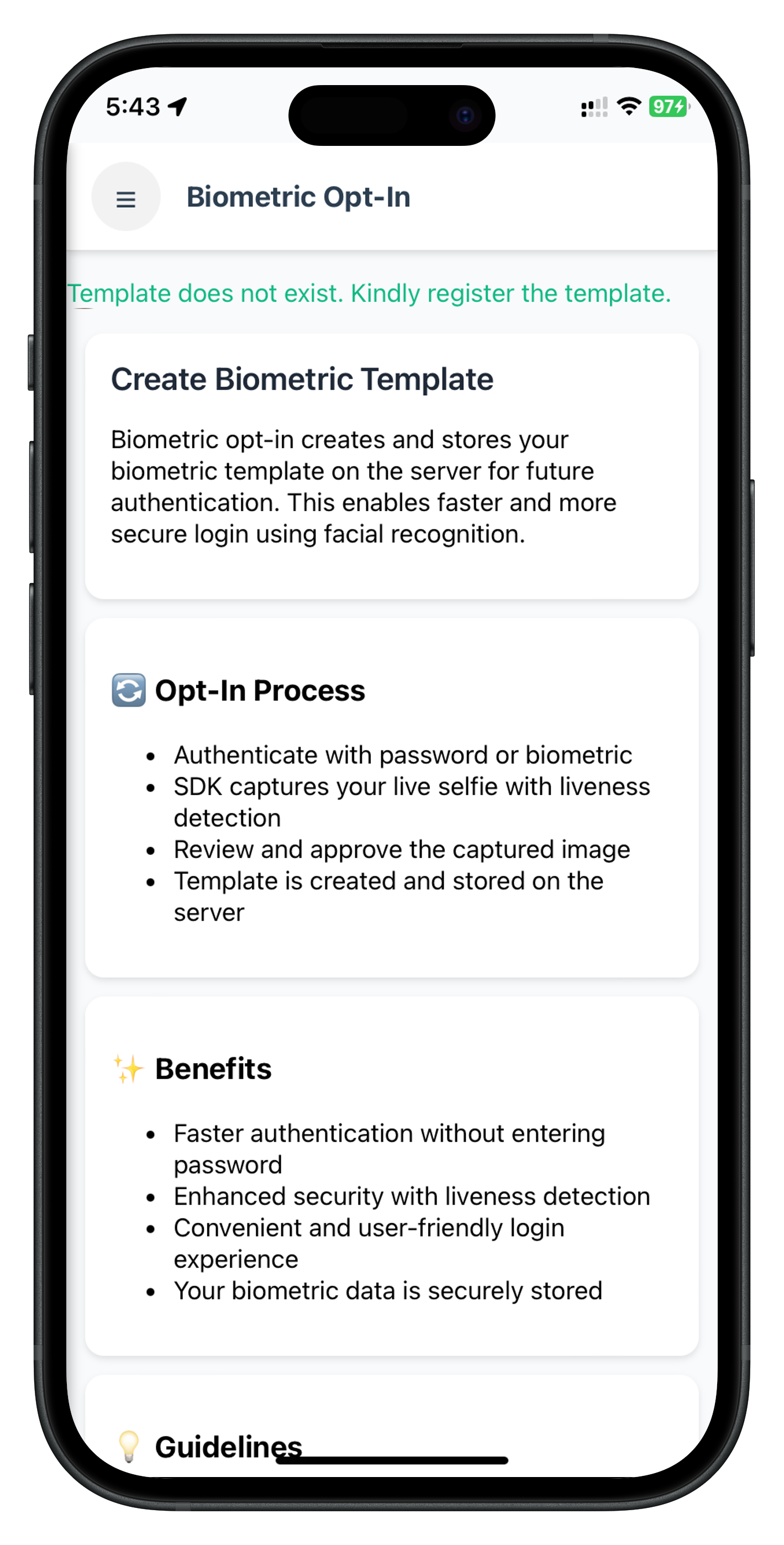
The BiometricOptInScreen shows template status check, opt-in button (enabled when no template exists), and loading states for status check and opt-in process.
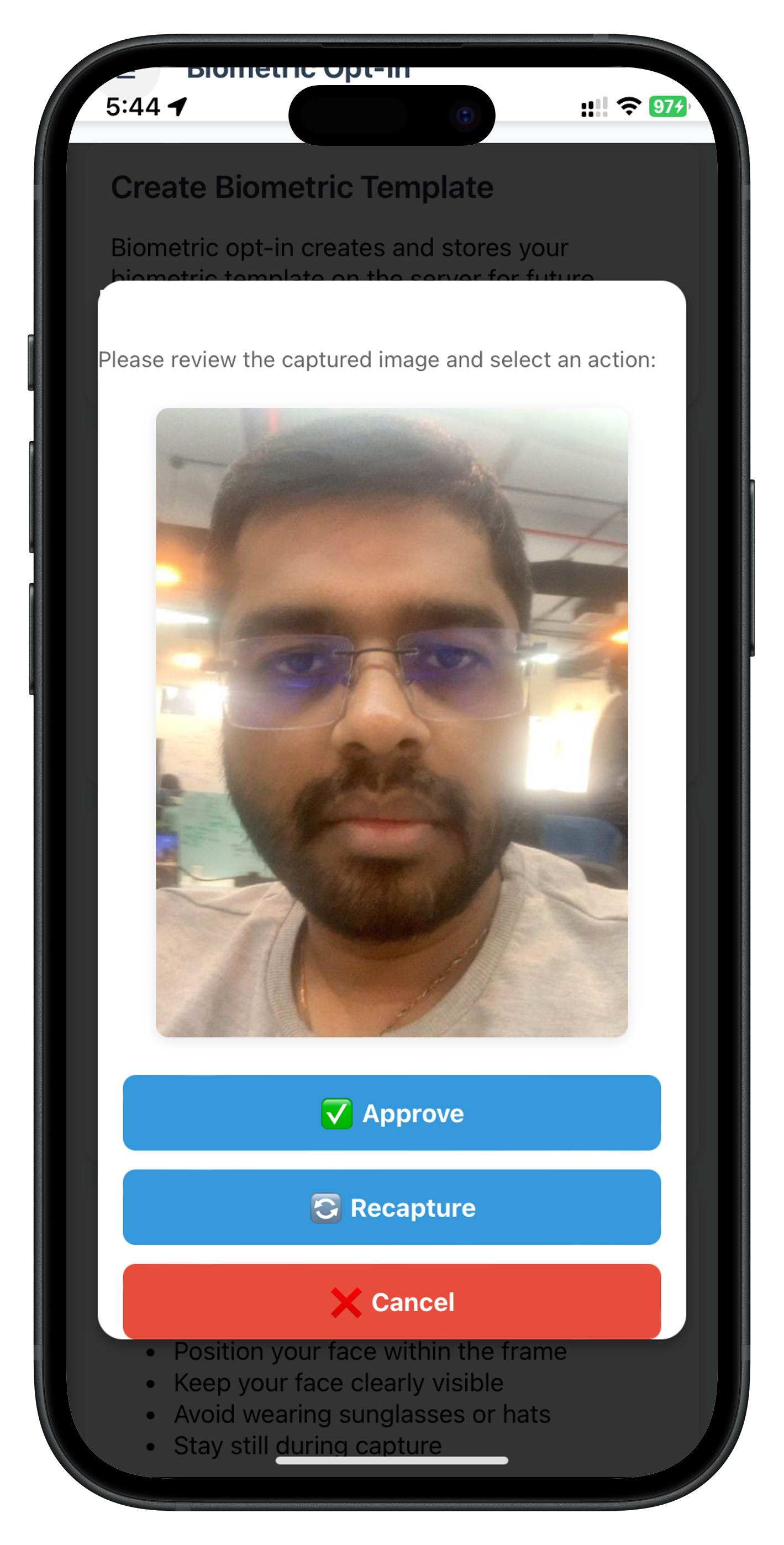
The Captured Frame Confirmation modal displays the captured selfie image with three action buttons: Approve (creates template), Recapture (retakes selfie, modal stays open), and Cancel (aborts flow).
The BiometricOptOutScreen handles the template deletion workflow. It's simpler than opt-in because there's no selfie capture - only authentication followed by direct template deletion.
The screen uses a simplified state object (no captured frame modal):
// Screen state
state: {
  isCheckingStatus: true,
  templateStatus: {
    exists: false,
    statusCode: null,
    statusMessage: ''
  },
  isOptingOut: false,
  showPasswordDialog: false,
  passwordAttempts: 3,
  passwordError: '',
  currentChallengeMode: null
}
Create BiometricOptOutScreen.js:
// www/src/tutorial/screens/idv/biometricOptOut/BiometricOptOutScreen.js
/**
* Biometric Opt-Out Screen
*
* Allows users to delete their biometric template from the server.
*
* Flow (Workflow 11, Challenge Mode 7):
* 1. Screen loads → checks if template exists
* 2. If doesn't exist (status 600): Show message, disable button
* 3. If exists (status 100): Enable opt-out button
* 4. User taps "Start Opt-Out" → initiateIDVBiometricOptOut() called
* 5. SDK authenticates user (LDA first, password fallback if needed)
* 6. If password needed: Show PasswordValidationDialog (challengeMode 7)
* 7. SDK sends template deletion request to server
* 8. SDK fires onIDVBiometricOptOutStatus with final result
* 9. Screen shows success/failure modal
*
* Key Differences from Opt-In:
* - No selfie capture (simpler flow)
* - Button enabled when template EXISTS (opposite of opt-in)
* - Challenge mode 7 instead of 6
* - Direct deletion after authentication
*/
const BiometricOptOutScreen = {
// Screen state
state: {
isCheckingStatus: true,
templateStatus: {
exists: false,
statusCode: null,
statusMessage: ''
},
isOptingOut: false,
showPasswordDialog: false,
passwordAttempts: 3,
passwordError: '',
currentChallengeMode: null
},
// Stored original handler (for chaining)
originalGetPasswordHandler: null,
/**
* Called when screen content is loaded into #app-content
* This is the ONLY entry point for screen initialization
*
* @param {Object} params - Navigation parameters (if any)
* @param {Object} params.optOutResult - Opt-out completion result (if returning from workflow)
*/
onContentLoaded(params) {
console.log('BiometricOptOutScreen - Content loaded with params:', JSON.stringify(params, null, 2));
// Reset state
this.state = {
isCheckingStatus: true,
templateStatus: {
exists: false,
statusCode: null,
statusMessage: ''
},
isOptingOut: false,
showPasswordDialog: false,
passwordAttempts: 3,
passwordError: '',
currentChallengeMode: null,
optOutResult: params.optOutResult || null
};
// Setup event listeners
this.setupEventListeners();
// Register IDV event handlers
this.registerIDVEventHandlers();
// If returning with opt-out result, display it
if (this.state.optOutResult) {
this.displayOptOutResult(this.state.optOutResult);
} else {
// Check template status only if not returning with result
this.checkTemplateStatus();
}
},
/**
* Setup event listeners for UI interactions
*/
setupEventListeners() {
// Menu button
const menuButton = document.getElementById('optout-menu-btn');
if (menuButton) {
menuButton.onclick = () => {
console.log('BiometricOptOutScreen - Menu button clicked, opening drawer');
NavigationService.openDrawer();
};
}
// Start Opt-Out button
const startButton = document.getElementById('optout-start-btn');
if (startButton) {
startButton.onclick = () => this.handleStartOptOut();
}
},
/**
* Register IDV event handlers with chaining
*/
registerIDVEventHandlers() {
const eventManager = rdnaIDVService.getEventManager();
// Template status handler
eventManager.setCheckUserBiometricTemplateStatusHandler(
this.handleCheckUserBiometricTemplateStatusResponse.bind(this)
);
// Opt-out status handler
eventManager.setBiometricOptOutStatusHandler(
this.handleBiometricOptOutStatusResponse.bind(this)
);
// Store original getPassword handler and wrap it (for chaining)
const rdnaEventManager = rdnaService.getEventManager();
this.originalGetPasswordHandler = rdnaEventManager.getPasswordHandler;
rdnaEventManager.setGetPasswordHandler(
this.handleGetPassword.bind(this)
);
},
/**
* Cleanup event handlers when navigating away
*/
cleanup() {
console.log('BiometricOptOutScreen - Cleaning up event handlers');
const eventManager = rdnaIDVService.getEventManager();
// Clear IDV event handlers
eventManager.setCheckUserBiometricTemplateStatusHandler(null);
eventManager.setBiometricOptOutStatusHandler(null);
// Restore original getPassword handler
const rdnaEventManager = rdnaService.getEventManager();
rdnaEventManager.setGetPasswordHandler(this.originalGetPasswordHandler);
// Hide password dialog if visible
if (this.state.showPasswordDialog) {
PasswordValidationDialog.hide();
}
},
/**
* Check biometric template status on server
*/
async checkTemplateStatus() {
console.log('BiometricOptOutScreen - Checking template status');
this.state.isCheckingStatus = true;
this.updateUI();
try {
await rdnaIDVService.checkIDVUserBiometricTemplateStatus();
console.log('BiometricOptOutScreen - Template status check initiated');
} catch (error) {
console.error('BiometricOptOutScreen - Template status check failed:', JSON.stringify(error, null, 2));
this.state.isCheckingStatus = false;
this.showError('Failed to check template status: ' + (error.error?.errorString || 'Unknown error'));
this.updateUI();
}
},
/**
* Handle template status response
*/
handleCheckUserBiometricTemplateStatusResponse(data) {
console.log('BiometricOptOutScreen - Template status response:', JSON.stringify(data, null, 2));
// Clear loading state
this.state.isCheckingStatus = false;
const errorCode = data.error?.longErrorCode;
const errorString = data.error?.errorString || 'Unknown error';
if (errorCode !== 0) {
console.error('BiometricOptOutScreen - Template status error:', errorString);
this.state.templateStatus = {
exists: false,
statusCode: null,
statusMessage: errorString
};
this.showError('Error checking template status: ' + errorString);
this.updateUI();
return;
}
// Parse idvResponse to get status
let statusCode = null;
let statusMessage = '';
if (data.idvResponse) {
try {
const idvData = JSON.parse(data.idvResponse);
statusCode = idvData.status_code;
statusMessage = idvData.status_message || '';
console.log('BiometricOptOutScreen - Status code:', statusCode);
console.log('BiometricOptOutScreen - Status message:', statusMessage);
} catch (parseError) {
console.error('BiometricOptOutScreen - Failed to parse idvResponse:', parseError);
}
}
if (statusCode === 100) {
// Template exists - user can opt out
this.state.templateStatus = {
exists: true,
statusCode,
statusMessage: statusMessage || 'Biometric template exists. You can delete it.'
};
} else if (statusCode === 600) {
// Template doesn't exist - user cannot opt out
this.state.templateStatus = {
exists: false,
statusCode,
statusMessage: statusMessage || 'No biometric template found. Nothing to delete.'
};
} else {
// Other status code
this.state.templateStatus = {
exists: false,
statusCode,
statusMessage: statusMessage || 'Unknown template status'
};
}
this.updateUI();
},
/**
* Handle getPassword event (challengeMode 7 for opt-out)
* This wraps the original handler to enable chaining
*/
handleGetPassword(data) {
console.log('BiometricOptOutScreen - getPassword event:', JSON.stringify(data, null, 2));
// Only handle challengeMode 7 (biometric opt-out)
if (data.challengeMode !== 7) {
console.log('BiometricOptOutScreen - Not challengeMode 7, passing to original handler');
if (this.originalGetPasswordHandler) {
this.originalGetPasswordHandler(data);
}
return;
}
// Check for errors in the getPassword event data
const errorCode = data.error?.longErrorCode || data.error?.shortErrorCode;
const errorString = data.error?.errorString;
let statusCode = null;
let statusMessage = '';
// Check challengeResponse.status (this is where status info is nested)
if (data.challengeResponse?.status) {
statusCode = data.challengeResponse.status.statusCode;
statusMessage = data.challengeResponse.status.statusMessage || '';
}
// Determine if there's an error to display
let initialError = '';
if (errorCode && errorCode !== 0) {
// SDK error (errorCode != 0)
initialError = errorString || 'Authentication error';
} else if (statusCode && statusCode !== 100 && statusCode !== 0) {
// Backend status error (statusCode != 100 and != 0)
initialError = statusMessage || 'Authentication error';
}
console.log('BiometricOptOutScreen - getPassword validation:', JSON.stringify({
errorCode,
errorString,
statusCode,
statusMessage,
initialError
}, null, 2));
// Handle password dialog for opt-out
console.log('BiometricOptOutScreen - Showing password dialog for opt-out');
this.state.currentChallengeMode = data.challengeMode;
this.state.passwordAttempts = data.attemptsLeft || 3;
this.state.passwordError = initialError;
this.state.showPasswordDialog = true;
PasswordValidationDialog.show({
title: 'Password Required',
message: 'Enter your password to continue with biometric opt-out',
attemptsLeft: this.state.passwordAttempts,
errorMessage: this.state.passwordError,
onSubmit: (password) => this.handlePasswordSubmit(password),
onCancel: () => this.handlePasswordCancel()
});
},
/**
* Handle password submission
*/
async handlePasswordSubmit(password) {
console.log('BiometricOptOutScreen - Password submitted');
try {
const result = await rdnaService.setPassword(password, this.state.currentChallengeMode);
console.log('BiometricOptOutScreen - Password submitted successfully:', JSON.stringify(result, null, 2));
// Keep dialog visible with loading state - it will be hidden by status event
} catch (error) {
console.error('BiometricOptOutScreen - Password submission failed:', JSON.stringify(error, null, 2));
// Extract error information
const errorCode = error.error?.longErrorCode || error.error?.shortErrorCode;
const errorString = error.error?.errorString;
// Determine error message to display
let displayError = '';
if (errorCode && errorCode !== 0) {
// SDK error (errorCode != 0)
displayError = errorString || 'Password verification failed';
}
console.log('BiometricOptOutScreen - Password error details:', JSON.stringify({
errorCode,
errorString,
displayError
}, null, 2));
this.state.passwordError = displayError;
PasswordValidationDialog.update({
errorMessage: this.state.passwordError
});
}
},
/**
* Handle password dialog cancel
*/
handlePasswordCancel() {
console.log('BiometricOptOutScreen - Password cancelled');
this.state.showPasswordDialog = false;
this.state.isOptingOut = false;
this.updateUI();
},
/**
* Handle biometric opt-out status response event
*
* This event is fired when the opt-out workflow completes (success or failure).
* Navigate back to BiometricOptOut screen with the result to ensure the modal
* is displayed on the correct screen (not underneath other screens).
*
* @param {Object} data - Opt-out status event data
*/
handleBiometricOptOutStatusResponse(data) {
console.log('BiometricOptOutScreen - Opt-out status response:', JSON.stringify(data, null, 2));
// Hide password dialog immediately if visible (before navigation)
if (this.state.showPasswordDialog) {
console.log('BiometricOptOutScreen - Hiding password dialog before navigation');
PasswordValidationDialog.hide();
this.state.showPasswordDialog = false;
}
// Navigate back to this screen with the result
// This will trigger onContentLoaded with optOutResult in params
console.log('BiometricOptOutScreen - Final opt-out result received, navigating back to screen');
NavigationService.navigate('BiometricOptOut', {
optOutResult: data
});
},
/**
* Display opt-out result (success or error) with modal dialog
*
* Shows a confirm/alert dialog after navigating back to this screen.
* 300ms delay ensures navigation completes before showing modal.
*
* @param {Object} data - Opt-out result data from event
*/
displayOptOutResult(data) {
console.log('BiometricOptOutScreen - Displaying opt-out result');
// Hide password dialog if visible
if (this.state.showPasswordDialog) {
PasswordValidationDialog.hide();
this.state.showPasswordDialog = false;
}
this.state.isOptingOut = false;
const errorCode = data.error?.longErrorCode;
const errorString = data.error?.errorString || 'Unknown error';
// Parse idvResponse to get status
let statusCode = null;
let statusMessage = '';
if (data.idvResponse) {
try {
const idvData = JSON.parse(data.idvResponse);
statusCode = idvData.status_code;
statusMessage = idvData.status_message || '';
console.log('BiometricOptOutScreen - Opt-out status code:', statusCode);
console.log('BiometricOptOutScreen - Opt-out status message:', statusMessage);
} catch (parseError) {
console.error('BiometricOptOutScreen - Failed to parse idvResponse:', parseError);
}
}
console.log('BiometricOptOutScreen - Response validation:', JSON.stringify({
errorCode,
errorString,
statusCode,
statusMessage
}, null, 2));
// Small delay to ensure navigation completes before showing modal
setTimeout(() => {
// Check for sync error first
if (errorCode !== 0) {
console.error('BiometricOptOutScreen - Opt-out error:', errorString);
alert(
'Opt-Out Failed\n\n' +
`${errorString} (${errorCode})\n\n` +
'Click OK to continue.'
);
} else if (statusCode === 100) {
// Success
console.log('BiometricOptOutScreen - Opt-out completed successfully');
alert(
'Opt-Out Successful\n\n' +
`${statusMessage || 'Biometric template deleted successfully'}\n\n` +
'Click OK to continue.'
);
} else {
// Backend error
console.error('BiometricOptOutScreen - Opt-out backend error:', statusCode);
alert(
'Opt-Out Failed\n\n' +
`${statusMessage || 'Failed to delete biometric template'} (${statusCode})\n\n` +
'Click OK to continue.'
);
}
// Clear optOutResult from state after displaying
this.state.optOutResult = null;
// Recheck template status after modal dismissed
this.checkTemplateStatus();
this.updateUI();
}, 300);
},
/**
* Handle start opt-out button click
*/
async handleStartOptOut() {
if (this.state.isOptingOut) {
console.log('BiometricOptOutScreen - Already opting out, ignoring');
return;
}
console.log('BiometricOptOutScreen - Starting opt-out');
this.state.isOptingOut = true;
this.updateUI();
try {
await rdnaIDVService.initiateIDVBiometricOptOut();
console.log('BiometricOptOutScreen - Opt-out initiated');
// Flow continues via events (getPassword or status)
} catch (error) {
console.error('BiometricOptOutScreen - Opt-out initiation failed:', JSON.stringify(error, null, 2));
this.showError('Failed to start opt-out: ' + (error.error?.errorString || 'Unknown error'));
this.state.isOptingOut = false;
this.updateUI();
}
},
/**
* Update UI based on current state
*/
updateUI() {
// Update status message
const statusMessageElement = document.getElementById('optout-status-message');
if (statusMessageElement) {
if (this.state.isCheckingStatus) {
// Show checking status message
statusMessageElement.innerHTML = `<p style="color: #3b82f6;">⏳ Checking template status...</p>`;
statusMessageElement.style.display = 'block';
} else if (this.state.templateStatus.statusCode !== null) {
// Show template status
const color = this.state.templateStatus.exists ? '#10b981' : '#f59e0b';
statusMessageElement.innerHTML = `<p style="color: ${color};">${this.escapeHtml(this.state.templateStatus.statusMessage)}</p>`;
statusMessageElement.style.display = 'block';
} else {
statusMessageElement.style.display = 'none';
}
}
// Update start button
const startButton = document.getElementById('optout-start-btn');
if (startButton) {
// Disable button if:
// 1. Still checking status
// 2. Template doesn't exist (nothing to delete)
// 3. Currently opting out
const isDisabled = this.state.isCheckingStatus ||
!this.state.templateStatus.exists ||
this.state.isOptingOut;
startButton.disabled = isDisabled;
// Update button text based on state
if (this.state.isCheckingStatus) {
startButton.textContent = 'Checking Status...';
} else if (this.state.isOptingOut) {
startButton.textContent = 'Processing...';
} else {
startButton.textContent = 'Start Opt-Out';
}
}
},
/**
* Show error message
*/
showError(message) {
const statusMessageElement = document.getElementById('optout-status-message');
if (statusMessageElement) {
statusMessageElement.innerHTML = `<p style="color: #dc2626;">${this.escapeHtml(message)}</p>`;
statusMessageElement.style.display = 'block';
}
},
/**
* Escape HTML to prevent XSS
*/
escapeHtml(unsafe) {
if (!unsafe) return '';
return unsafe
.replace(/&/g, '&')
.replace(/</g, '<')
.replace(/>/g, '>')
.replace(/"/g, '"')
.replace(/'/g, ''');
}
};
// Expose to global window object for NavigationService
window.BiometricOptOutScreen = BiometricOptOutScreen;
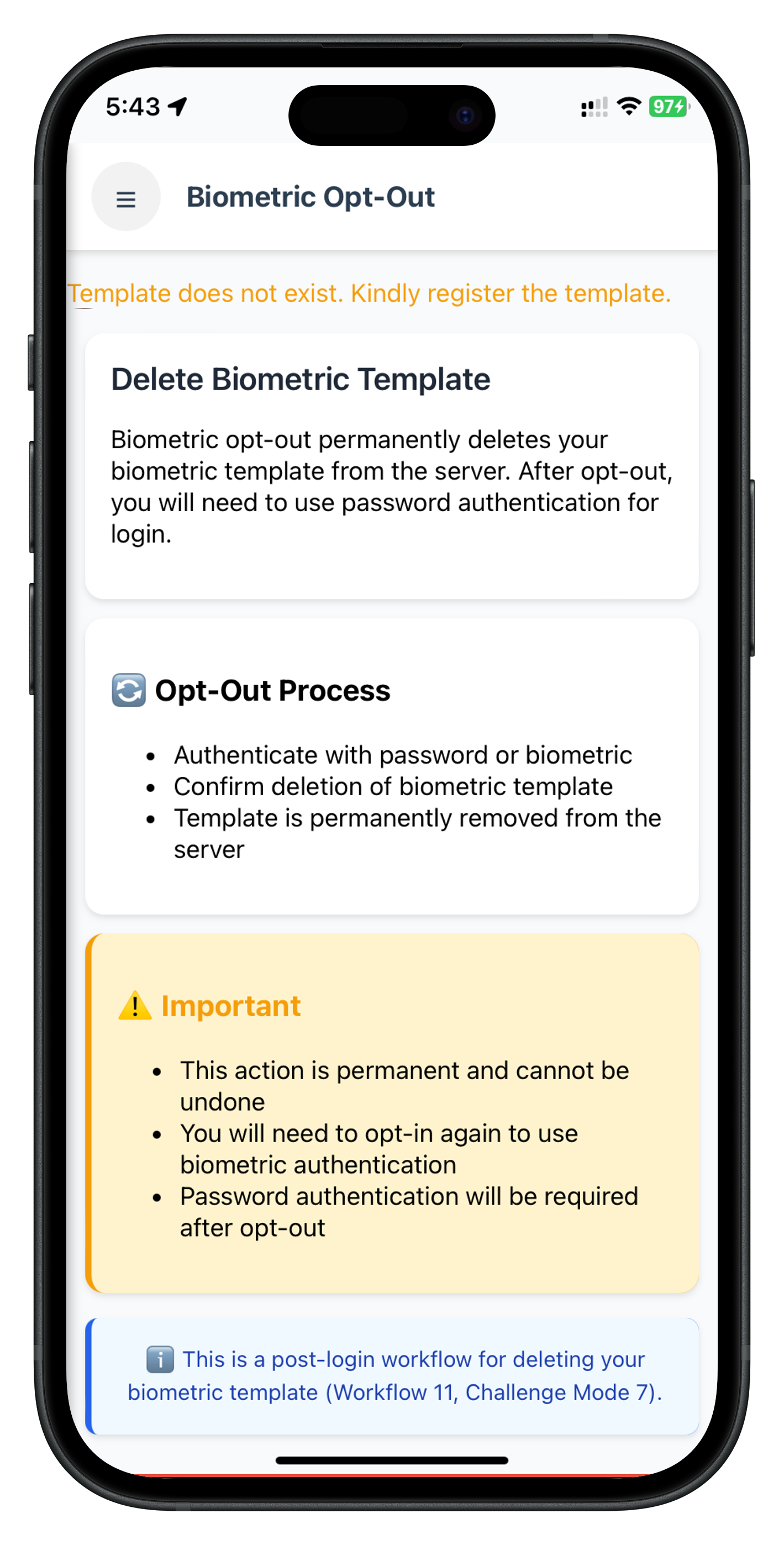
The BiometricOptOutScreen shows template status check, opt-out button (enabled when template exists), and loading states. No selfie capture or modal confirmation is needed.
The Biometric Opt-In and Opt-Out screens need to be integrated into the application's navigation system. In Cordova SPA architecture, this involves adding screen templates to index.html and updating the navigation menu.
The screen templates are already added in the complete implementation. Verify that index.html includes the screen container divs:
<!-- www/index.html -->

<!-- Biometric Opt-In Screen -->
<div id="BiometricOptInScreen" class="screen" style="display: none;">
  <!-- Screen content rendered by BiometricOptInScreen.js -->
</div>

<!-- Biometric Opt-Out Screen -->
<div id="BiometricOptOutScreen" class="screen" style="display: none;">
  <!-- Screen content rendered by BiometricOptOutScreen.js -->
</div>
Add menu items for Biometric Opt-In and Opt-Out in the drawer menu. Update the drawer content in your menu component or directly in index.html:
<!-- www/index.html - Drawer Menu Items -->

<!-- Biometric Opt-In Menu Item -->
<div class="menu-item" onclick="NavigationService.navigate('BiometricOptInScreen')">
  <span class="menu-icon">🔐</span>
  <span class="menu-text">Biometric Opt-In</span>
</div>

<!-- Biometric Opt-Out Menu Item -->
<div class="menu-item" onclick="NavigationService.navigate('BiometricOptOutScreen')">
  <span class="menu-icon">🗑️</span>
  <span class="menu-text">Biometric Opt-Out</span>
</div>
The drawer menu now includes both biometric opt-in and opt-out menu items:
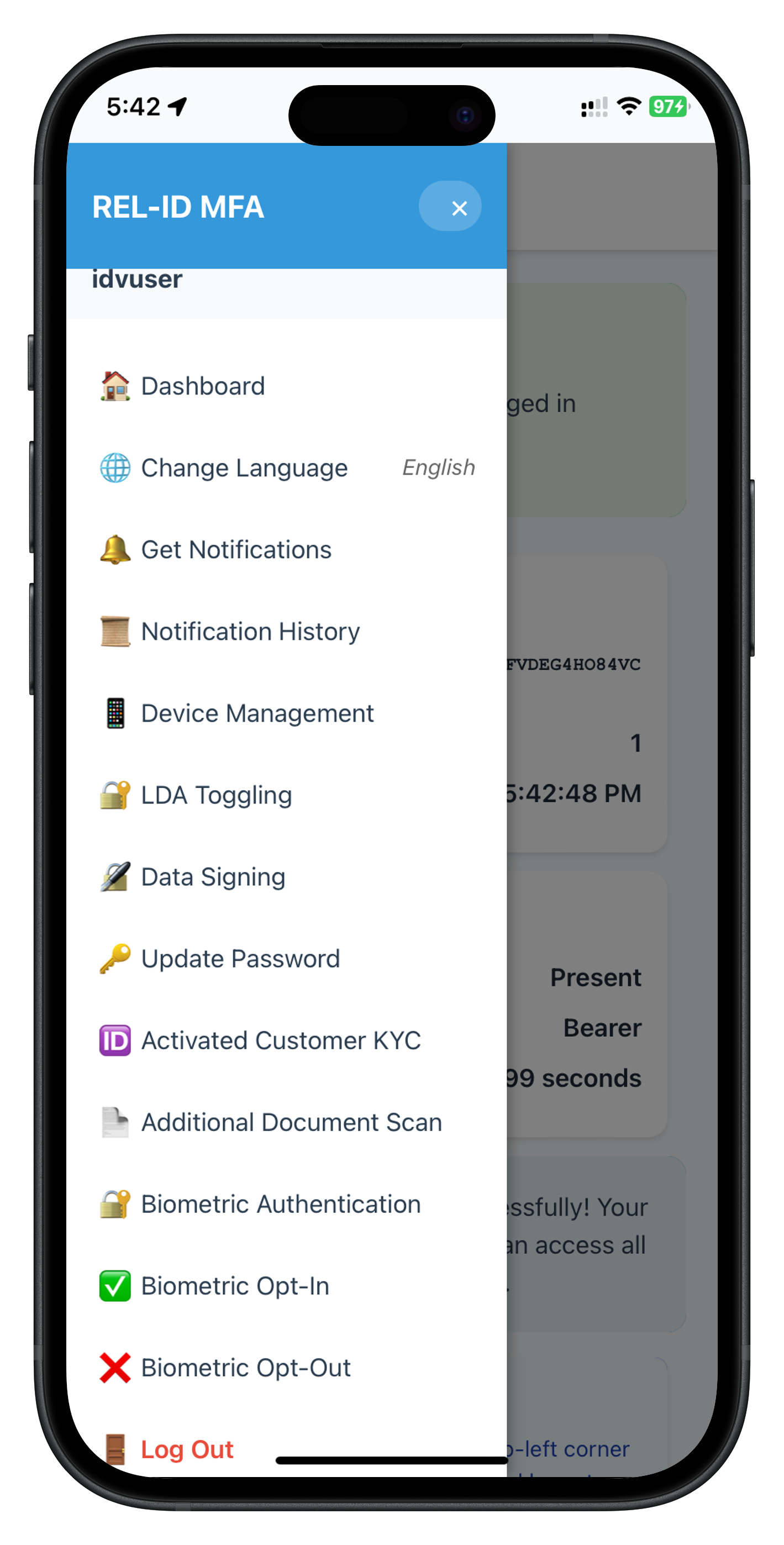
The drawer menu includes "🔐 Biometric Opt-In" and "🗑️ Biometric Opt-Out" menu items for biometric template management.
The screens use NavigationService.navigate() for navigation. Ensure the NavigationService is properly configured:
// www/src/tutorial/navigation/NavigationService.js

const NavigationService = {
  /**
   * Navigate to a screen with optional parameters
   * @param {string} screenName - Name of the screen to navigate to
   * @param {Object} params - Optional parameters to pass to the screen
   */
  navigate(screenName, params = {}) {
    console.log(`NavigationService - Navigating to: ${screenName}`);

    // Hide all screens
    const screens = document.querySelectorAll('.screen');
    screens.forEach(screen => {
      screen.style.display = 'none';
    });

    // Show target screen
    const targetScreen = document.getElementById(screenName);
    if (targetScreen) {
      targetScreen.style.display = 'block';

      // Call screen's onContentLoaded if it exists
      if (window[screenName] && typeof window[screenName].onContentLoaded === 'function') {
        window[screenName].onContentLoaded(params);
      }
    } else {
      console.error(`NavigationService - Screen not found: ${screenName}`);
    }
  },

  /**
   * Go back to previous screen
   */
  goBack() {
    console.log('NavigationService - Going back');
    // Implement back navigation logic
    // For this codelab, navigate to Dashboard
    this.navigate('DashboardScreen');
  }
};

// Expose to window for global access
window.NavigationService = NavigationService;
After implementing the screens, let's understand what REL-ID plugin APIs are called and what screen-level events are handled for each flow.
REL-ID Plugin APIs Called:
RdnaClient.checkIDVUserBiometricTemplateStatus(successCallback, errorCallback)RdnaClient.initiateIDVBiometricOptIn(successCallback, errorCallback)RdnaClient.setIDVBiometricOptInConfirmation(action, successCallback, errorCallback)action: 0 (Approve), 1 (Recapture), or 2 (Cancel)Screen-Level Events Handled:
The event sequence depends on whether LDA is available and successful:
Branch A: LDA Available & Successful
1. getIDVSelfieProcessStartConfirmation (idvWorkflow: 10)
   - Closes password dialog if open
   - Navigates to IDVSelfieProcessStart screen
   - Native selfie screen appears

2. onIDVOptInCapturedFrameConfirmation
   - Receives captured frame (base64 image)
   - Navigates back to BiometricOptIn screen with image data
   - Shows captured frame modal

3. onIDVBiometricOptInStatus (challengeMode: 6)
   - Final template creation result
   - Status code 100 = success
Total: 3 events (getPassword is skipped when LDA succeeds)
Branch B: LDA Cancelled OR LDA Unavailable
1. getPassword (challengeMode: 6, idvWorkflow: 10)
   - Shows password dialog
   - Validates entered password
   - Shows error if incorrect

2. getIDVSelfieProcessStartConfirmation (idvWorkflow: 10)
   - Closes password dialog
   - Navigates to IDVSelfieProcessStart screen
   - Native selfie screen appears

3. onIDVOptInCapturedFrameConfirmation
   - Receives captured frame (base64 image)
   - Navigates back to BiometricOptIn screen with image data
   - Shows captured frame modal

4. onIDVBiometricOptInStatus (challengeMode: 6)
   - Final template creation result
   - Status code 100 = success
Total: 4 events (includes getPassword for password fallback)
REL-ID Plugin APIs Called:
RdnaClient.checkIDVUserBiometricTemplateStatus(successCallback, errorCallback)RdnaClient.initiateIDVBiometricOptOut(successCallback, errorCallback)Screen-Level Events Handled:
The event sequence depends on whether LDA is available and successful:
Branch A: LDA Available & Successful
1. onIDVBiometricOptOutStatus (challengeMode: 7)
   - SDK deletes template directly after LDA success
   - Status code 100 = success
Total: 1 event (getPassword is skipped when LDA succeeds)
Branch B: LDA Cancelled OR LDA Unavailable
1. getPassword (challengeMode: 7, idvWorkflow: 11)
   - Shows password dialog
   - Validates entered password
   - Shows error if incorrect
   - Closes password dialog on success

2. onIDVBiometricOptOutStatus (challengeMode: 7)
   - SDK deletes template after password validation
   - Status code 100 = success
Total: 2 events (includes getPassword for password fallback)
Aspect | Opt-In (LDA Success) | Opt-In (Password) | Opt-Out (LDA Success) | Opt-Out (Password) |
getPassword | ❌ Skipped | ✅ Event 1 | ❌ Skipped | ✅ Event 1 |
getSelfieStart | ✅ Event 1 | ✅ Event 2 | ❌ No Selfie | ❌ No Selfie |
Captured Frame | ✅ Event 2 | ✅ Event 3 | ❌ No Selfie | ❌ No Selfie |
Final Status | ✅ Event 3 | ✅ Event 4 | ✅ Event 1 | ✅ Event 2 |
Total Events | 3 | 4 | 1 | 2 |
Flow | Workflow | Challenge Mode | Template Check | Selfie Capture |
Opt-In |
|
| Optional (UX) | Required |
Opt-Out |
|
| Required | Not Required |
Prepare and run the application on your target platform:
# Prepare the app (copies www/ to platforms/)
cordova prepare

# Run on iOS
cordova run ios

# Run on Android
cordova run android
Test Case 1: Fresh User (No Template)
Test Case 2: Existing Template
Test Case 3: Recapture Flow
Test Case 4: Cancel Flow
Test Case 1: Existing Template
Test Case 2: No Template
Test LDA Availability:
Test LDA Unavailable:
Test Password Validation:
Enable verbose logging to debug issues:
// Add to app.js before initialization
window.DEBUG_MODE = true;

// All console.log statements will show in browser console or platform logs
View platform logs:
# iOS logs (Xcode console or)
cordova run ios --device --console

# Android logs
cordova run android --device
adb logcat | grep "RdnaClient"
Issue: Plugin not defined
Issue: Template status check fails
Issue: Password dialog doesn't show
Issue: Captured frame modal doesn't show
Congratulations! You've successfully implemented Post-Login Server Biometric Template Management with both opt-in and opt-out flows in your Cordova application.
You now have:
Thank you for completing this codelab! Happy coding! 🚀