This codelab demonstrates how to implement the REL-ID Initialization flow using the cordova-plugin-rdna Cordova plugin. The REL-ID SDK provides secure identity verification and session management for mobile applications.
What You'll Learn
- How to initialize the REL-ID SDK in a Cordova application using SPA architecture
- Event-driven architecture for handling initialization callbacks with document.addEventListener()
- Connection profile management using cordova-plugin-file
- Advanced SDK configuration with initOptions (language, permissions, telemetry)
- Single Page Application (SPA) patterns for better performance
- Error handling and user feedback implementation
What You'll Need
- Cordova development environment set up
cordova-plugin-rdnaplugin (local)cordova-plugin-filefor loading configuration files- Basic understanding of JavaScript and DOM events
- Connection profile JSON file from your Uniken Admin or Uniken gateway manager
- Access to the sample app source code for reference
Get the Code from GitHub
The code to get started is stored in a GitHub repository.
You can clone the repository using the following command:
git clone https://github.com/uniken-public/codelab-cordova.git
Navigate to the relid-initialize folder in the repository you cloned earlier
This codelab uses Single Page Application (SPA) architecture for optimal performance and user experience.
Why SPA?
SPA Benefits:
- ✅ One-time SDK initialization - Event handlers registered once, persist forever
- ✅ No page reloads - Template-based navigation (no white flash between screens)
- ✅ Persistent event handlers - SDK handlers work across all screens
- ✅ Faster navigation - Content swapping instead of full page loads
- ✅ Better UX - Smooth transitions between screens
SPA Key Components
Component | Purpose | Location |
index.html | Single HTML with templates |
|
NavigationService | Template swapping |
|
AppInitializer | One-time SDK init |
|
Screen modules | onContentLoaded() lifecycle |
|
SPA Flow
deviceready → AppInitializer.initialize() → NavigationService.navigate('TutorialHome')
  ↓
Template swapped → TutorialHomeScreen.onContentLoaded() → User clicks Initialize
  ↓
SDK initialized → onInitialized event → Navigate to TutorialSuccess
  ↓
Template swapped → TutorialSuccessScreen.onContentLoaded(sessionData)
Before implementing your own REL-ID initialization, let's examine the sample app structure to understand the recommended SPA architecture:
Component | Purpose | Sample App Reference |
Connection Profile | Configuration data |
|
Profile Parser | Utility to parse connection data |
|
Event Manager | Handles SDK callbacks |
|
REL-ID Service | Main SDK interface |
|
Event Provider | Global event handling |
|
App Initializer | One-time SDK handler registration |
|
Navigation Service | SPA template swapping |
|
UI Screens | User interface screens |
|
Recommended Directory Structure
Create the following directory structure in your Cordova project:
www/
├── index.html                          # Single HTML with templates
├── css/
│   └── index.css                       # All styles
├── js/
│   └── app.js                          # deviceready bootstrap
└── src/
    ├── uniken/
    │   ├── cp/
    │   │   └── agent_info.json
    │   ├── services/
    │   │   ├── rdnaEventManager.js
    │   │   └── rdnaService.js
    │   ├── utils/
    │   │   ├── connectionProfileParser.js
    │   │   └── progressHelper.js
    │   ├── providers/
    │   │   └── SDKEventProvider.js
    │   └── AppInitializer.js           # SPA initializer
    └── tutorial/
        ├── navigation/
        │   └── NavigationService.js    # SPA navigation
        └── screens/
            ├── TutorialHomeScreen.js
            ├── TutorialSuccessScreen.js
            └── TutorialErrorScreen.js
Project Structure
This project includes a local Cordova plugin. Ensure the plugin directory exists in your project root:
# Verify plugin directory exists
ls -la ./RdnaClient
Add the REL-ID Plugin (Local)
The SDK plugin is included as a local plugin in the project. Install it from the local directory:
cordova plugin add ./RdnaClient
Add File Plugin
For loading local JSON files, install cordova-plugin-file:
cordova plugin add cordova-plugin-file
Platform Setup
# Add platforms
cordova platform add ios
cordova platform add android

# Prepare platforms
cordova prepare
Follow the Cordova platform setup guide for platform-specific configuration.
agent_info.json
Create your connection profile JSON file in www/src/uniken/cp/agent_info.json:
{
  "RelIds": [
    {
      "Name": "YourRELIDAgentName",
      "RelId": "your-rel-id-string-here"
    }
  ],
  "Profiles": [
    {
      "Name": "YourRELIDAgentName",
      "Host": "your-gateway-host.com",
      "Port": "443"
    }
  ]
}
Security Considerations
- Never print RelId values to console
- Use environment-specific configuration files
The connection profile parser loads and validates the agent_info.json file using cordova-plugin-file.
Create www/src/uniken/utils/connectionProfileParser.js:
/**
 * Parses agent info data and extracts connection profile
 * @param {Object} profileData - Raw agent info data
 * @returns {Object} Parsed connection profile
 */
function parseAgentInfo(profileData) {
  if (!profileData.RelIds || profileData.RelIds.length === 0) {
    throw new Error('No RelIds found in agent info');
  }

  if (!profileData.Profiles || profileData.Profiles.length === 0) {
    throw new Error('No Profiles found in agent info');
  }

  // Always pick the first array objects
  const firstRelId = profileData.RelIds[0];

  if (!firstRelId.Name || !firstRelId.RelId) {
    throw new Error('Invalid RelId object - missing Name or RelId');
  }

  // Find matching profile by Name (1-1 mapping)
  const matchingProfile = profileData.Profiles.find(
    profile => profile.Name === firstRelId.Name
  );

  if (!matchingProfile) {
    throw new Error(`No matching profile found for RelId name: ${firstRelId.Name}`);
  }

  if (!matchingProfile.Host || !matchingProfile.Port) {
    throw new Error('Invalid Profile object - missing Host or Port');
  }

  // Convert port to number if it's a string
  const port = typeof matchingProfile.Port === 'string'
    ? parseInt(matchingProfile.Port, 10)
    : matchingProfile.Port;

  if (isNaN(port)) {
    throw new Error(`Invalid port value: ${matchingProfile.Port}`);
  }

  return {
    relId: firstRelId.RelId,
    host: matchingProfile.Host,
    port: port
  };
}

/**
 * Loads agent info from file using cordova-plugin-file
 */
async function loadAgentInfo() {
  return new Promise((resolve, reject) => {
    try {
      const basePath = cordova.file.applicationDirectory + 'www/';
      const filePath = basePath + 'src/uniken/cp/agent_info.json';

      console.log('ConnectionProfileParser - Loading file from:', filePath);

      // Resolve file path and read with FileReader
      window.resolveLocalFileSystemURL(
        filePath,
        (fileEntry) => {
          fileEntry.file(
            (file) => {
              const reader = new FileReader();

              reader.onloadend = function() {
                try {
                  const profileData = JSON.parse(this.result);
                  const parsed = parseAgentInfo(profileData);
                  resolve(parsed);
                } catch (error) {
                  reject(new Error(`Failed to parse: ${error.message}`));
                }
              };

              reader.onerror = (error) => reject(error);
              reader.readAsText(file);
            },
            (error) => reject(error)
          );
        },
        (error) => reject(error)
      );
    } catch (error) {
      reject(new Error(`Failed to load agent info: ${error.message}`));
    }
  });
}
The parser performs several critical functions:
- Validates JSON structure
- Matches RelIds with Profiles by name
- Converts port values to numbers
- Provides comprehensive error handling
- Uses cordova-plugin-file for reliable file loading
The event manager handles all REL-ID SDK callbacks using DOM events and a singleton pattern.
Create www/src/uniken/services/rdnaEventManager.js:
/**
 * REL-ID SDK Event Manager
 * Manages all SDK events using document.addEventListener()
 */
class RdnaEventManager {
  constructor() {
    if (RdnaEventManager.instance) {
      return RdnaEventManager.instance;
    }

    this._initialized = false;
    this.listeners = [];
    this.initializeProgressHandler = null;
    this.initializeErrorHandler = null;
    this.initializedHandler = null;

    RdnaEventManager.instance = this;
  }

  static getInstance() {
    if (!RdnaEventManager.instance) {
      RdnaEventManager.instance = new RdnaEventManager();
    }
    return RdnaEventManager.instance;
  }

  /**
   * Initialize event listeners (idempotent - safe to call multiple times)
   * In SPA architecture, this is called ONCE in AppInitializer
   */
  initialize() {
    if (this._initialized) {
      console.log('RdnaEventManager - Already initialized, skipping');
      return;
    }

    console.log('RdnaEventManager - Initializing event listeners');
    this.registerEventListeners();
    this._initialized = true;
  }

  registerEventListeners() {
    console.log('RdnaEventManager - Registering native event listeners');

    const progressListener = this.onInitializeProgress.bind(this);
    const errorListener = this.onInitializeError.bind(this);
    const initializedListener = this.onInitialized.bind(this);

    document.addEventListener('onInitializeProgress', progressListener, false);
    document.addEventListener('onInitializeError', errorListener, false);
    document.addEventListener('onInitialized', initializedListener, false);

    this.listeners.push(
      { name: 'onInitializeProgress', handler: progressListener },
      { name: 'onInitializeError', handler: errorListener },
      { name: 'onInitialized', handler: initializedListener }
    );

    console.log('RdnaEventManager - Native event listeners registered');
  }

  onInitializeProgress(event) {
    console.log("RdnaEventManager - Initialize progress event received");

    try {
      const progressData = JSON.parse(event.response);
      console.log("RdnaEventManager - Progress:", progressData.initializeStatus);

      if (this.initializeProgressHandler) {
        this.initializeProgressHandler(progressData);
      }
    } catch (error) {
      console.error("RdnaEventManager - Failed to parse progress:", error);
    }
  }

  onInitializeError(event) {
    console.log("RdnaEventManager - Initialize error event received");

    try {
      const errorData = JSON.parse(event.response);
      console.error("RdnaEventManager - Initialize error:", errorData.errorString);

      if (this.initializeErrorHandler) {
        this.initializeErrorHandler(errorData);
      }
    } catch (error) {
      console.error("RdnaEventManager - Failed to parse error:", error);
    }
  }

  onInitialized(event) {
    console.log("RdnaEventManager - Initialize success event received");

    try {
      const initializedData = JSON.parse(event.response);
      console.log("RdnaEventManager - Successfully initialized, Session ID:", initializedData.session.sessionID);

      if (this.initializedHandler) {
        this.initializedHandler(initializedData);
      }
    } catch (error) {
      console.error("RdnaEventManager - Failed to parse success:", error);
    }
  }

  setInitializeProgressHandler(callback) {
    this.initializeProgressHandler = callback;
  }

  setInitializeErrorHandler(callback) {
    this.initializeErrorHandler = callback;
  }

  setInitializedHandler(callback) {
    this.initializedHandler = callback;
  }

  cleanup() {
    console.log('RdnaEventManager - Cleaning up event listeners');

    this.listeners.forEach(listener => {
      document.removeEventListener(listener.name, listener.handler, false);
    });
    this.listeners = [];

    this.initializeProgressHandler = null;
    this.initializeErrorHandler = null;
    this.initializedHandler = null;

    console.log('RdnaEventManager - Cleanup completed');
  }
}
Key features of the event manager:
- onInitializeProgress: Tracks initialization progress through various stages
- onInitializeError: Reports initialization errors with specific error codes
- onInitialized: Confirms successful initialization with session data
- Setter Methods: Use
setInitializeProgressHandler(),setInitializeErrorHandler(), etc. to register callbacks - Cleanup: Proper cleanup of event listeners with
removeEventListener() - Idempotent: Safe to call initialize() multiple times (SPA pattern)
The REL-ID service provides the main interface for SDK operations using the Cordova plugin API.
Create www/src/uniken/services/rdnaService.js:
class RdnaService {
  constructor() {
    if (RdnaService.instance) {
      return RdnaService.instance;
    }

    this.eventManager = null;
    RdnaService.instance = this;
  }

  static getInstance() {
    if (!RdnaService.instance) {
      RdnaService.instance = new RdnaService();
    }
    return RdnaService.instance;
  }

  getEventManager() {
    if (!this.eventManager) {
      this.eventManager = RdnaEventManager.getInstance();
    }
    return this.eventManager;
  }

  async getSDKVersion() {
    return new Promise((resolve, reject) => {
      com.uniken.rdnaplugin.RdnaClient.getSDKVersion(
        (response) => {
          try {
            const parsed = JSON.parse(response);
            const version = parsed?.response || 'Unknown';
            console.log('RdnaService - SDK Version:', version);
            resolve(version);
          } catch (error) {
            reject(new Error('Failed to parse SDK version response'));
          }
        },
        (error) => reject(error),
        []
      );
    });
  }

  /**
   * Initializes the REL-ID SDK with optional advanced configuration
   * @param {InitOptions} [initOptions] - Optional configuration for language, permissions, and telemetry
   * @returns {Promise<RDNASyncResponse>} Promise that resolves with sync response structure
   */
  async initialize(initOptions) {
    const profile = await loadAgentInfo();
    console.log('RdnaService - Loaded connection profile:', JSON.stringify({
      host: profile.host,
      port: profile.port,
      relId: profile.relId.substring(0, 10) + '...',
    }, null, 2));

    // Use provided options or default values
    const defaultInitOptions = {
      internationalizationOptions: {
        localeCode: '',           // Empty string - SDK will default to 'en'
        localeName: '',
        languageDirection: 0      // 0 = LTR (Left-to-Right)
      },
      permissionOptions: {
        isLocationPermissionRequired: true,    // Location permission is requested
        isLocationPermissionMandatory: false   // But SDK can work without it
      },
      otelConfig: {
        otelHTTPEndpointURL: '',
        enableEncoding: '',
        disableTrace: 1,                       // Tracing disabled by default
        otelTraceFlushTimeout: 0
      }
    };

    const finalInitOptions = initOptions || defaultInitOptions;
    const initOptionsString = JSON.stringify(finalInitOptions);

    console.log('RdnaService - Starting initialization');
    console.log('RdnaService - InitOptions:', initOptionsString);

    return new Promise((resolve, reject) => {
      com.uniken.rdnaplugin.RdnaClient.initialize(
        (response) => {
          console.log('RdnaService - Initialize sync callback received');

          try {
            const result = JSON.parse(response);
            console.log('RdnaService - Initialize sync response:', JSON.stringify({
              longErrorCode: result.error?.longErrorCode,
              shortErrorCode: result.error?.shortErrorCode,
              errorString: result.error?.errorString
            }, null, 2));

            if (result.error && result.error.longErrorCode === 0) {
              console.log('RdnaService - Sync response success');
              resolve(result);
            } else {
              reject(result);
            }
          } catch (error) {
            reject(new Error('Failed to parse initialize response'));
          }
        },
        (error) => {
          console.error('RdnaService - Initialize sync error callback:');
          const result = JSON.parse(error);
          console.log('RdnaService - Initialize sync error response:', JSON.stringify({
            longErrorCode: result.error?.longErrorCode,
            shortErrorCode: result.error?.shortErrorCode,
            errorString: result.error?.errorString
          }, null, 2));
          reject(result);
        },
        [
          profile.relId,                                              // 0: agentInfo - The REL-ID encrypted string
          profile.host,                                               // 1: gatewayHost - Hostname or IP of the gateway server
          profile.port,                                               // 2: gatewayPort - Port number for gateway server
          '',                                                         // 3: cipherSpecs - Encryption format string
          '',                                                         // 4: cipherSalt - Cryptographic salt
          '',                                                         // 5: proxySettings - Proxy configuration (JSON string, optional)
          '',                                                         // 6: sslCertificate - SSL certificate configuration (optional)
          com.uniken.rdnaplugin.RdnaClient.RDNALoggingLevel.RDNA_NO_LOGS,  // 7: logLevel - Logging level
          initOptionsString                                           // 8: initOptions - Advanced SDK configuration (JSON string)
        ]
      );
    });
  }
}

const rdnaService = RdnaService.getInstance();
Important API Parameters
The com.uniken.rdnaplugin.RdnaClient.initialize() call requires specific parameter ordering:
Parameter | Purpose | Example |
| RelId | From connection profile |
| Server hostname | From connection profile |
| Server port | From connection profile |
| Logging setting |
|
| SDK configuration (optional) | JSON string with language, permissions, and telemetry settings |
The REL-ID SDK supports advanced configuration through the initOptions parameter. This allows you to customize language settings, permission requirements, and telemetry options based on your application's needs.
InitOptions JSDoc Definition
The InitOptions type is defined in www/src/uniken/services/rdnaService.js using JSDoc:
/**
 * @typedef {Object} InitOptions
 * @property {Object} internationalizationOptions - Language configuration
 * @property {string} internationalizationOptions.localeCode - ISO 639-1 language code (e.g., 'en', 'ar', 'es'). Empty string defaults to 'en'
 * @property {string} internationalizationOptions.localeName - Display name for the locale
 * @property {number} internationalizationOptions.languageDirection - 0 = LTR (Left-to-Right), 1 = RTL (Right-to-Left)
 * @property {Object} permissionOptions - Permission configuration
 * @property {boolean} permissionOptions.isLocationPermissionRequired - Whether location permission is needed
 * @property {boolean} permissionOptions.isLocationPermissionMandatory - If true, SDK fails without permission; if false, works with limited functionality
 * @property {Object} otelConfig - OpenTelemetry configuration
 * @property {string} otelConfig.otelHTTPEndpointURL - OpenTelemetry HTTP endpoint URL (empty = disabled)
 * @property {string} otelConfig.enableEncoding - Encoding format for OTel data
 * @property {number} otelConfig.disableTrace - 0 = enable tracing, 1 = disable tracing
 * @property {number} otelConfig.otelTraceFlushTimeout - Timeout in milliseconds for flushing traces
 */
Language Options Configuration
Language options control the SDK's display language and text direction (LTR/RTL):
// Example: Arabic (RTL) configuration
const language = 'ar';  // Get from i18n library or user settings
const languageDirection = ['ar', 'he', 'fa', 'ur'].includes(language) ? 1 : 0;

const initOptions = {
  internationalizationOptions: {
    localeCode: language,        // ISO 639-1 code: 'ar' for Arabic
    localeName: 'Arabic',        // Display name
    languageDirection: 1         // RTL direction
  },
  // ... other options
};
RTL Languages: Arabic (ar), Hebrew (he), Persian (fa), Urdu (ur) LTR Languages: All others (default)
Common Use Cases:
- Multi-language applications with i18n support
- Apps targeting specific regions (Middle East, Asia, etc.)
- Dynamic language switching based on user preferences
Permission Options Configuration
Permission options define whether the SDK requires location access and if it's mandatory:
const initOptions = {
  // ... language options
  permissionOptions: {
    isLocationPermissionRequired: true,   // Request location permission
    isLocationPermissionMandatory: false  // SDK works without it (limited functionality)
  },
  // ... otel config
};
Configuration Scenarios:
Scenario | Required | Mandatory | Behavior |
Location-based features |
|
| SDK requests permission but works without it |
Location required for compliance |
|
| SDK initialization fails without permission |
No location needed |
|
| SDK doesn't request location permission |
Use Cases:
- Fraud Detection: Location helps identify suspicious activity patterns (new device activation)
- Risk Analysis: Geographic data enhances security risk assessment
- Compliance: Some regulations require location tracking for transactions
OpenTelemetry (OTel) Configuration
OpenTelemetry configuration enables enterprise-level monitoring and distributed tracing:
const initOptions = {
  // ... language options
  // ... permission options
  otelConfig: {
    otelHTTPEndpointURL: 'https://your-otel-collector.example.com',  // Your OTel endpoint
    enableEncoding: '',           // Encoding format (empty for default)
    disableTrace: 0,              // 0 = enabled, 1 = disabled
    otelTraceFlushTimeout: 0      // Flush timeout in milliseconds (0 = default)
  }
};
Default Configuration (Recommended for Most Apps):
otelConfig: {
  otelHTTPEndpointURL: '',  // Empty = telemetry disabled
  enableEncoding: '',
  disableTrace: 1,          // Tracing disabled
  otelTraceFlushTimeout: 0
}
Use Cases:
- Enterprise applications with centralized monitoring
- Organizations using OpenTelemetry for observability
- Production apps requiring performance tracking and debugging
Complete Configuration Example
Here's a complete example showing all three configuration areas:
// Example: Arabic banking app with location and telemetry
const initOptions = {
  internationalizationOptions: {
    localeCode: 'ar',
    localeName: 'Arabic',
    languageDirection: 1  // RTL
  },
  permissionOptions: {
    isLocationPermissionRequired: true,
    isLocationPermissionMandatory: false
  },
  otelConfig: {
    otelHTTPEndpointURL: 'https://telemetry.yourbank.com',
    enableEncoding: '',
    disableTrace: 0,  // Enabled for enterprise monitoring
    otelTraceFlushTimeout: 5000
  }
};

// Call initialize with custom configuration
rdnaService.initialize(initOptions)
  .then((syncResponse) => {
    console.log('Initialization successful');
  })
  .catch((error) => {
    console.error('Initialization failed:', error);
  });
Backward Compatibility
The initOptions parameter is optional. Existing code without initOptions continues to work with default values:
// Works with default configuration
rdnaService.initialize()
  .then((syncResponse) => console.log('Success'))
  .catch((error) => console.error('Failed'));

// Works with custom configuration
rdnaService.initialize(initOptions)
  .then((syncResponse) => console.log('Success'))
  .catch((error) => console.error('Failed'));
How Cordova Plugins Work
Cordova plugins are loaded automatically - no imports needed.
Loading Flow (Local Plugin):
- Install:
cordova plugin add ./RdnaClient - Build: Plugin registers JavaScript interface
- Access: Use global namespace
com.uniken.rdnaplugin.RdnaClient
// ❌ NOT NEEDED (no imports for local plugins)
import RdnaClient from './RdnaClient';

// ✅ CORRECT - Direct global access (same for local and remote plugins)
com.uniken.rdnaplugin.RdnaClient.getSDKVersion(successCallback, errorCallback, []);
Script Loading Order
In your HTML files, maintain this order:
<!-- 1. Cordova core -->
<script src="cordova.js"></script>

<!-- 2. Utilities -->
<script src="src/uniken/utils/connectionProfileParser.js"></script>
<script src="src/uniken/utils/progressHelper.js"></script>

<!-- 3. Services -->
<script src="src/uniken/services/rdnaEventManager.js"></script>
<script src="src/uniken/services/rdnaService.js"></script>

<!-- 4. Providers -->
<script src="src/uniken/providers/SDKEventProvider.js"></script>

<!-- 5. App Initializer -->
<script src="src/uniken/AppInitializer.js"></script>

<!-- 6. Navigation -->
<script src="src/tutorial/navigation/NavigationService.js"></script>

<!-- 7. Screens -->
<script src="src/tutorial/screens/TutorialHomeScreen.js"></script>

<!-- 8. Bootstrap -->
<script src="js/app.js"></script>
The App Initializer is the cornerstone of SPA architecture - it registers all SDK handlers ONCE.
Create www/src/uniken/AppInitializer.js:
const AppInitializer = {
  _initialized: false,

  /**
   * Initialize all SDK event handlers (call ONCE in app.js)
   * Safe to call multiple times - will skip if already initialized
   */
  initialize() {
    if (this._initialized) {
      console.log('AppInitializer - Already initialized, skipping');
      return;
    }

    console.log('AppInitializer - Initializing SDK handlers');

    try {
      // Step 1: Initialize event manager
      const eventManager = rdnaService.getEventManager();
      eventManager.initialize();

      // Step 2: Initialize SDK event provider
      SDKEventProvider.initialize();

      this._initialized = true;
      console.log('AppInitializer - SDK handlers successfully initialized');
      console.log('AppInitializer - Handlers will persist for entire app lifecycle');
    } catch (error) {
      console.error('AppInitializer - Failed to initialize:', error);
      throw error;
    }
  }
};
SPA Architecture Benefits:
- ✅ Called ONCE in app.js deviceready handler
- ✅ Handlers persist for entire app lifecycle
- ✅ No re-initialization needed on navigation
- ✅ Idempotent (safe to call multiple times)
The Navigation Service handles screen transitions using template swapping instead of page reloads.
Create www/src/tutorial/navigation/NavigationService.js:
const NavigationService = {
  currentRoute: null,

  /**
   * Navigate to a screen with optional parameters
   */
  navigate(routeName, params) {
    console.log('NavigationService - Navigating to:', routeName);
    this.currentRoute = routeName;
    this.loadScreenContent(routeName, params || {});
  },

  /**
   * Load screen content from template (SPA pattern)
   */
  loadScreenContent(routeName, params) {
    // Get template element (ID format: "TutorialHome-template")
    const templateId = `${routeName}-template`;
    const template = document.getElementById(templateId);

    if (!template) {
      console.error('NavigationService - Template not found:', templateId);
      return;
    }

    // Clone template content
    const content = template.content.cloneNode(true);

    // Get app content container
    const container = document.getElementById('app-content');
    if (!container) {
      console.error('NavigationService - App content container not found');
      return;
    }

    // Replace container content (SPA magic - no page reload!)
    container.innerHTML = '';
    container.appendChild(content);

    // Initialize screen with params
    const screenObj = window[`${routeName}Screen`];
    if (screenObj && typeof screenObj.onContentLoaded === 'function') {
      screenObj.onContentLoaded(params);
    }
  }
};
SPA Pattern Explanation:
- Uses
templateelements in index.html - Clones template content with
cloneNode(true) - Swaps content in
#app-contentcontainer - Calls screen's
onContentLoaded(params)method - No
window.location.href- no page reload!
In SPA architecture, each screen consists of:
- HTML template in index.html
- JavaScript module with onContentLoaded() lifecycle
index.html Structure
Create www/index.html with SPA structure:
<!DOCTYPE html>
<html>
<head>
    <meta charset="utf-8">
    <title>REL-ID Integration Tutorial</title>
    <link rel="stylesheet" href="css/index.css">
</head>
<body>
    <!-- SPA Content Container -->
    <div id="app-content"></div>

    <!-- Template: Tutorial Home Screen -->
    <template id="TutorialHome-template">
        <div class="container">
            <div class="header">
                <h1>REL-ID Integration Tutorial</h1>
                <p>Learn cordova-plugin-rdna Integration</p>
            </div>

            <div class="card">
                <h2>SDK Information</h2>
                <span>SDK Version: </span>
                <span id="sdk-version">Loading...</span>
            </div>

            <button id="initialize-btn">Initialize</button>

            <div id="progress-container" style="display: none;">
                <p id="progress-text">Initializing...</p>
            </div>
        </div>
    </template>

    <!-- All Scripts (loaded once) -->
    <script src="cordova.js"></script>
    <script src="src/uniken/utils/connectionProfileParser.js"></script>
    <script src="src/uniken/utils/progressHelper.js"></script>
    <script src="src/uniken/services/rdnaEventManager.js"></script>
    <script src="src/uniken/services/rdnaService.js"></script>
    <script src="src/uniken/providers/SDKEventProvider.js"></script>
    <script src="src/uniken/AppInitializer.js"></script>
    <script src="src/tutorial/navigation/NavigationService.js"></script>
    <script src="src/tutorial/screens/TutorialHomeScreen.js"></script>
    <script src="src/tutorial/screens/TutorialSuccessScreen.js"></script>
    <script src="src/tutorial/screens/TutorialErrorScreen.js"></script>
    <script src="js/app.js"></script>
</body>
</html>
Screen JavaScript Module
Create www/src/tutorial/screens/TutorialHomeScreen.js:
const TutorialHomeScreen = {
  isInitializing: false,

  /**
   * Called when screen content is loaded into DOM (SPA lifecycle)
   */
  onContentLoaded(params) {
    console.log('TutorialHomeScreen - Content loaded');

    this.isInitializing = false;
    this.loadSDKVersion();
    this.setupEventListeners();
    this.registerSDKEventHandlers();
  },

  setupEventListeners() {
    const initButton = document.getElementById('initialize-btn');
    if (initButton) {
      initButton.onclick = this.handleInitializePress.bind(this);
    }
  },

  registerSDKEventHandlers() {
    const eventManager = rdnaService.getEventManager();

    eventManager.setInitializeProgressHandler((data) => {
      const message = getProgressMessage(data);
      this.updateProgress(message);
    });

    eventManager.setInitializeErrorHandler((errorData) => {
      this.isInitializing = false;
      this.updateButtonState(false);
      this.hideProgress();

      NavigationService.navigate('TutorialError', {
        shortErrorCode: errorData.shortErrorCode,
        longErrorCode: errorData.longErrorCode,
        errorString: errorData.errorString
      });
    });
  },

  async loadSDKVersion() {
    const versionElement = document.getElementById('sdk-version');
    if (!versionElement) return;

    try {
      versionElement.textContent = 'Loading...';
      const version = await rdnaService.getSDKVersion();
      versionElement.textContent = version;
    } catch (error) {
      versionElement.textContent = 'Unknown';
    }
  },

  handleInitializePress() {
    if (this.isInitializing) return;

    console.log('TutorialHomeScreen - User clicked Initialize button');

    this.isInitializing = true;
    this.updateButtonState(true);
    this.showProgress('Starting RDNA initialization...');

    // ========================================
    // CONFIGURE SDK INITIALIZATION OPTIONS
    // ========================================
    // Customers: Customize this section based on your application requirements
    // If you don't provide initOptions, the SDK will use default values

    // OPTION 1: Use default configuration (recommended for most apps)
    // Simply call: rdnaService.initialize()

    // OPTION 2: Customize configuration for your app needs
    // Example scenarios:

    // Scenario A: Arabic/RTL language support
    // const language = 'ar';  // Get from your i18n library
    // const languageDirection = ['ar', 'he', 'fa', 'ur'].includes(language) ? 1 : 0;

    // Scenario B: English/LTR language support (default)
    const language = 'en';  // TODO: Replace with dynamic language from your app's i18n system
    const languageDirection = 0;  // 0 = LTR (Left-to-Right), 1 = RTL (Right-to-Left)

    // Scenario C: Location permission configuration
    const requireLocationPermission = true;   // Does your app need location for fraud detection?
    const locationIsMandatory = false;        // If false, SDK works with limited functionality without location

    // Scenario D: OpenTelemetry (OTel) configuration
    const enableTelemetry = false;  // Set to true for enterprise monitoring and observability

    // Build the initOptions configuration object
    const initOptions = {
      internationalizationOptions: {
        localeCode: language,               // ISO 639-1 code: 'en', 'ar', 'es', 'fr', etc.
        localeName: language,                // Display name for the locale
        languageDirection: languageDirection // 0 = LTR, 1 = RTL
      },
      permissionOptions: {
        isLocationPermissionRequired: requireLocationPermission,
        isLocationPermissionMandatory: locationIsMandatory
      },
      otelConfig: {
        otelHTTPEndpointURL: enableTelemetry ? 'https://your-otel-collector.example.com' : '',
        enableEncoding: '',
        disableTrace: enableTelemetry ? 0 : 1,  // 0 = enabled, 1 = disabled
        otelTraceFlushTimeout: 0
      }
    };

    console.log('TutorialHomeScreen - Initializing with custom options:', JSON.stringify(initOptions, null, 2));

    // Call rdnaService.initialize() with custom configuration
    // Pass initOptions to customize SDK behavior
    // Or call without parameters: rdnaService.initialize() to use defaults
    rdnaService.initialize(initOptions)
      .then((syncResponse) => {
        console.log('TutorialHomeScreen - RDNA initialization sync response:', JSON.stringify({
          longErrorCode: syncResponse.error?.longErrorCode,
          shortErrorCode: syncResponse.error?.shortErrorCode,
          errorString: syncResponse.error?.errorString
        }, null, 2));

        // Sync response success - waiting for async events (onInitialized or onInitializeError)
      })
      .catch((error) => {
        console.error('TutorialHomeScreen - RDNA initialization promise rejected:', JSON.stringify(error, null, 2));

        // Update UI
        this.isInitializing = false;
        this.updateButtonState(false);
        this.hideProgress();

        // Show error alert
        const errorMessage = error.error
          ? `${error.error.errorString}\n\nError Codes:\nLong: ${error.error.longErrorCode}\nShort: ${error.error.shortErrorCode}`
          : 'Initialization failed';

        alert(`Initialization Failed\n\n${errorMessage}`);

        // Restore original handlers
        this.restoreOriginalHandlers();
      });
  },

  updateButtonState(isLoading) {
    const button = document.getElementById('initialize-btn');
    if (button) {
      button.disabled = isLoading;
      button.textContent = isLoading ? 'Initializing...' : 'Initialize';
    }
  },

  showProgress(message) {
    const container = document.getElementById('progress-container');
    const textElement = document.getElementById('progress-text');
    if (container && textElement) {
      textElement.textContent = message;
      container.style.display = 'block';
    }
  },

  hideProgress() {
    const container = document.getElementById('progress-container');
    if (container) {
      container.style.display = 'none';
    }
  }
};

// Expose to global scope for NavigationService
window.TutorialHomeScreen = TutorialHomeScreen;
App Bootstrap
Create www/js/app.js:
const App = {
  initialize() {
    document.addEventListener('deviceready', this.onDeviceReady.bind(this), false);
  },

  onDeviceReady() {
    console.log('App - Device ready');

    // Initialize SDK handlers ONCE (SPA magic!)
    AppInitializer.initialize();

    // Navigate to home screen
    NavigationService.navigate('TutorialHome');

    console.log('App - SDK handlers will persist for entire app lifecycle');
  }
};

App.initialize();
Key Implementation Features
SPA Lifecycle:
onContentLoaded(params)replaces React's useEffect- Direct DOM manipulation replaces useState
- Event listeners for button clicks
- Screen objects exposed to global scope
State Management:
- Object properties instead of React state
- Manual DOM updates when state changes
- No framework required
Event-Driven Architecture:
- Success navigation handled by SDKEventProvider's onInitialized handler
- Progress updates delivered through event manager
- Screen-specific handlers for progress and errors
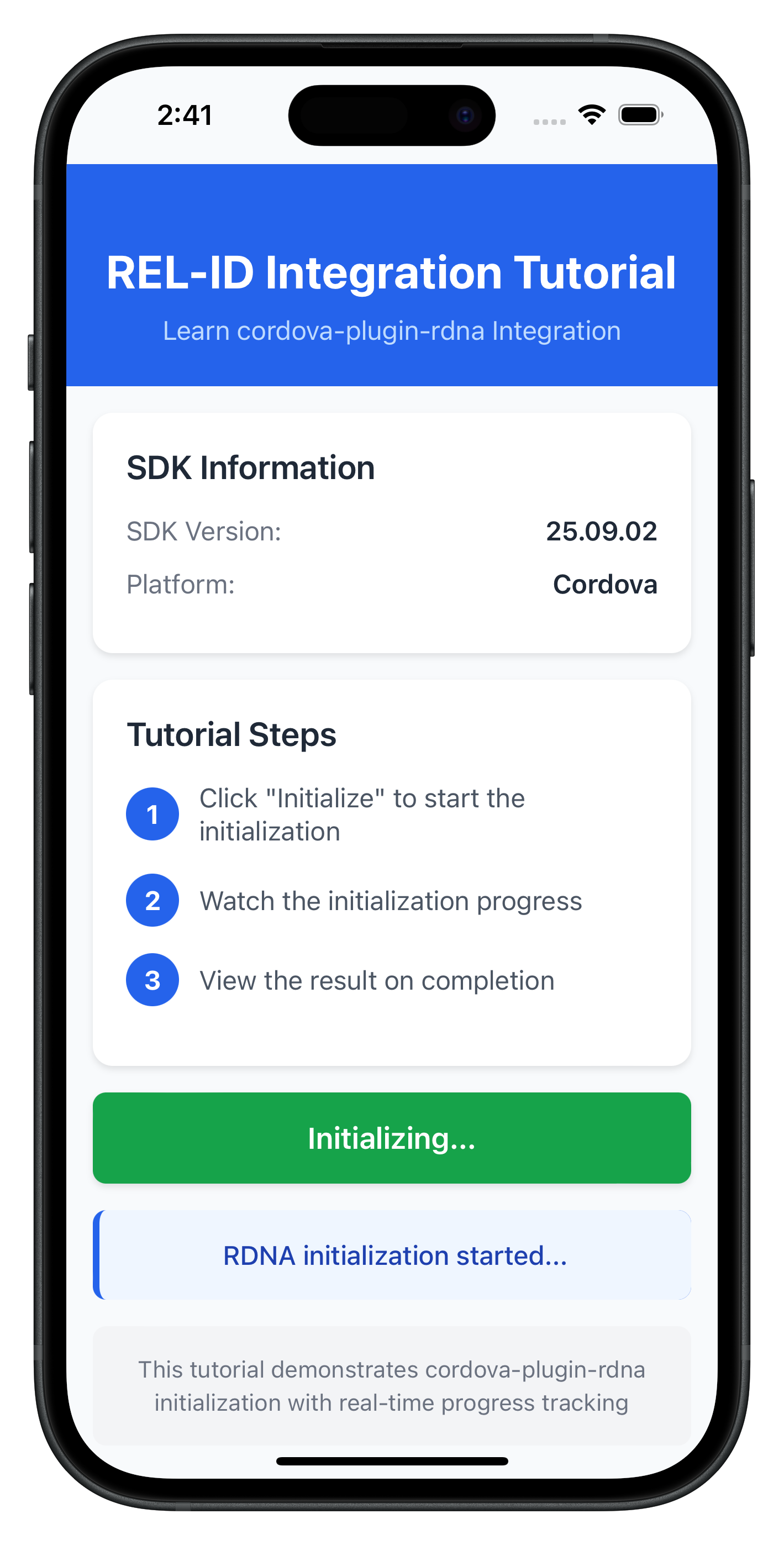
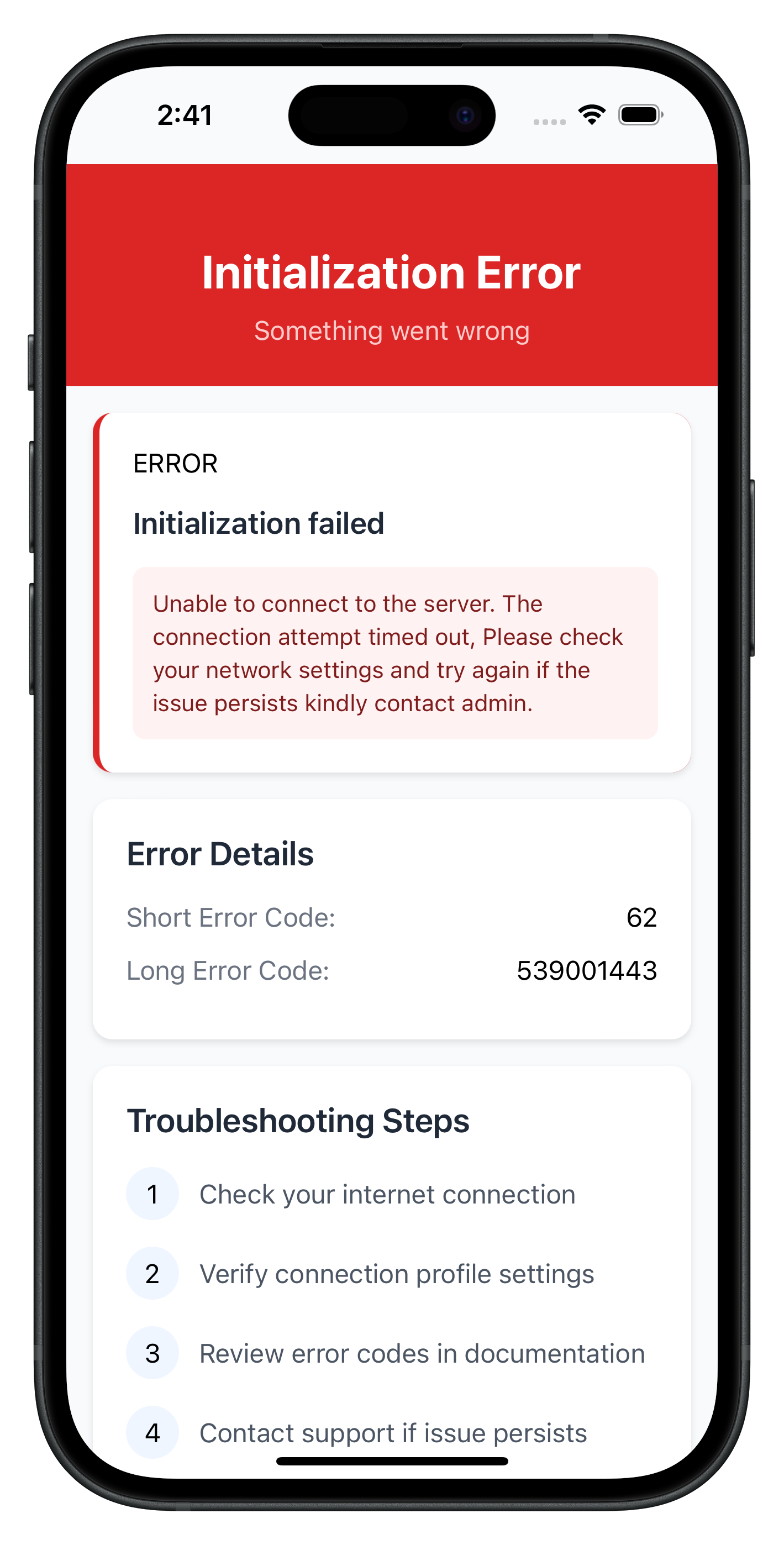
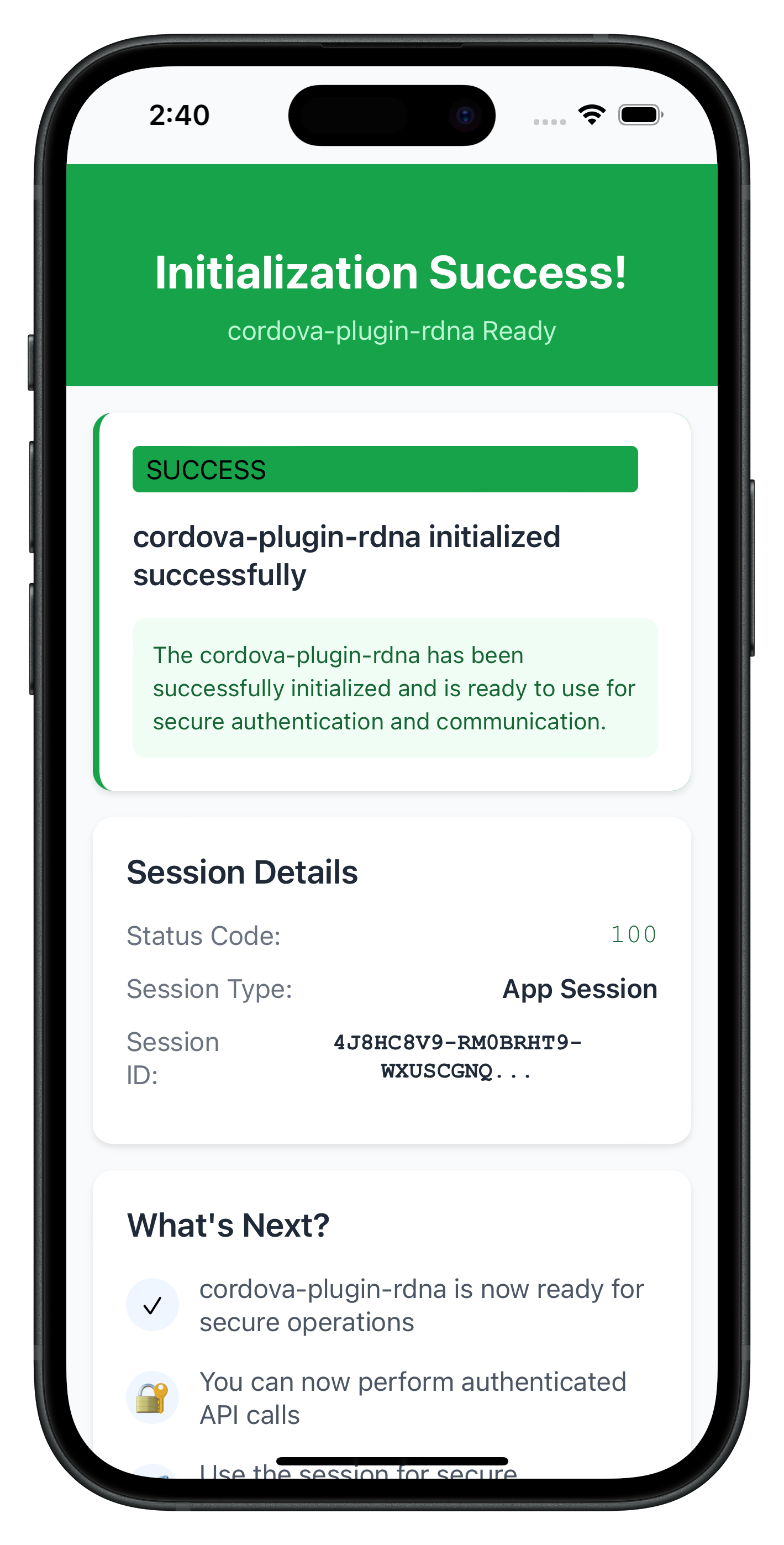
The following images showcase screens from the sample application:
|
|
|
Build and Run
# Prepare platforms
cordova prepare

# Run on iOS
cordova run ios

# Run on Android
cordova run android
Debugging
iOS: Safari → Develop → Simulator → [Your App] Android: Chrome → chrome://inspect → Inspect
Key Test Scenarios
- Successful Initialization: Verify the complete flow works end-to-end
- Network Errors: Test with invalid host/port configurations
- Invalid Credentials: Test with incorrect RelId values
- Progress Tracking: Verify progress events are properly displayed
- Default Configuration: Test initialization without initOptions parameter
- Custom Language: Test with RTL languages (Arabic, Hebrew, etc.)
- Location Permissions: Test with mandatory and non-mandatory location settings
Verification Steps
Test your implementation with console logging:
// Test SDK version retrieval
rdnaService.getSDKVersion()
  .then((version) => console.log('SDK Version:', version))
  .catch((error) => console.error('Version failed:', error));

// Test basic initialization (with default values)
rdnaService.initialize()
  .then((syncResponse) => console.log('Initialization successful:', JSON.stringify(syncResponse, null, 2)))
  .catch((error) => console.error('Initialization failed:', error));

// Test initialization with custom initOptions
const customOptions = {
  internationalizationOptions: {
    localeCode: 'ar',
    localeName: 'Arabic',
    languageDirection: 1
  },
  permissionOptions: {
    isLocationPermissionRequired: true,
    isLocationPermissionMandatory: false
  },
  otelConfig: {
    otelHTTPEndpointURL: '',
    enableEncoding: '',
    disableTrace: 1,
    otelTraceFlushTimeout: 0
  }
};

rdnaService.initialize(customOptions)
  .then((syncResponse) => console.log('Custom initialization successful:', JSON.stringify(syncResponse, null, 2)))
  .catch((error) => console.error('Custom initialization failed:', error));
The sample app includes comprehensive testing patterns in the tutorial screens:
- SDK version verification before initialization
- Progress message formatting and display
- Error handling with user-friendly messages
- Navigation between success and error states
Connection Profile Issues
Error: "No RelIds found in agent info" Solution: Verify your JSON structure matches the sample in www/src/uniken/cp/agent_info.json
Error: "No matching profile found for RelId name" Solution: Ensure the Name field in RelIds matches the Name field in Profiles
Cordova-Specific Issues
"Can't find variable: com"
- Plugin not loaded
- Solution: Run
cordova prepareand rebuild - Verify plugin installed:
cordova plugin ls
"Plugin not found"
- Plugin not installed correctly
- Solution: For local plugin:
cordova plugin add ./RdnaClient - Verify RdnaClient directory exists:
ls -la ./RdnaClient
Local plugin installation fails
- Plugin directory not found
- Solution: Verify
./RdnaClientdirectory exists in project root - Check plugin.xml exists:
test -f ./RdnaClient/plugin.xml
File loading fails on iOS
- Missing cordova-plugin-file
- Solution:
cordova plugin add cordova-plugin-file - Verify installed:
cordova plugin ls | grep file
Events not firing
- Event names don't match exactly
- Listeners not registered before SDK calls
- Solution: Verify event names match: ‘onInitializeProgress', ‘onInitializeError', ‘onInitialized'
- Register handlers in AppInitializer BEFORE calling initialize()
Changes not reflecting
- www/ files not synced to platforms/
- Solution: Run
cordova prepareafter any www/ changes
Screen not loading (SPA)
- Template ID mismatch
- Screen object not exposed to window
- Solution: Verify template ID matches:
${routeName}-template - Add:
window.TutorialHomeScreen = TutorialHomeScreen;
Network Connectivity
Error: Network connection failures Solution: Check host/port values and network accessibility
Error: REL-ID connection issues Solution: Verify the REL-ID server is set up and running
SDK Initialization
Error Code 88: SDK already initialized Solution: Terminate the SDK
Error Code 288: SDK detected dynamic attack performed on the app Solution: Terminate the app
Error Code 179: Initialization in progress Solution: Wait for current initialization to complete before retrying
Security Considerations
- Use
com.uniken.rdnaplugin.RdnaClient.RDNALoggingLevel.RDNA_NO_LOGSin production - Never log full RelId values (use partial logging:
relId.substring(0, 10) + '...') - Store session data securely
- Validate all connection profile data before use
- Configure Content Security Policy in index.html
Memory Management
- Clean up event listeners with
removeEventListener() - Use singleton pattern for services to avoid memory leaks
- Properly clean up handlers when screens unmount
- In SPA: AppInitializer ensures handlers registered only once
Performance Optimization
- Load all scripts once in index.html (SPA benefit)
- Minimize DOM manipulation
- Use event delegation where possible
- Template cloning is efficient
User Experience
- Provide clear progress indicators during initialization
- Display meaningful error messages to users
- Implement retry mechanisms for network failures
- Use SPA for smooth screen transitions
Congratulations! You've successfully learned how to implement REL-ID SDK initialization in Cordova with:
- ✅ SPA (Single Page Application) architecture
- ✅ Proper project structure and organization
- ✅ Connection profile management using cordova-plugin-file
- ✅ Advanced SDK configuration with initOptions (language, permissions, telemetry)
- ✅ Event-driven initialization handling with DOM events
- ✅ AppInitializer pattern for one-time handler registration
- ✅ Template-based navigation for smooth UX
- ✅ Comprehensive error handling and user feedback
- ✅ Security best practices and memory management
Key Cordova Patterns Learned
- Global plugin API access via
com.uniken.rdnaplugin.RdnaClient(no imports) - DOM events for SDK callbacks with
document.addEventListener() - cordova-plugin-file + FileReader API for loading local files
- JSON.parse() for all plugin responses
- SPA architecture with template swapping
- onContentLoaded() lifecycle pattern
- AppInitializer for one-time initialization
- Script loading order is important
- deviceready event for app bootstrap
Next Steps
- Explore the sample app's MTD (Mobile Threat Detection) implementation
- Explore MFA (Multi-Factor Authentication) flows