🎯 Learning Path:
- Complete REL-ID Initialization Flow Codelab
- Complete REL-ID Complete Activation & Login Flow Codelab
- Complete REL-ID Complete IDV Activation Flow Codelab
- You are here → Post-Login Additional Document Scan Implementation
Welcome to the REL-ID IDV Post-Login Additional Document Scan Flow codelab! This tutorial teaches you how to implement a streamlined additional document verification workflow for activated customers using document scanning and validation.
What You'll Build
In this codelab, you'll implement a complete post-login additional document scan workflow:
- 🏠 Drawer Menu Integration: Access Additional Document Scan from Dashboard navigation
- 🆕 Additional Document Scan Entry Screen: Scan initiation with reason parameter
- 📄 Document Scan Process: Automated document verification with workflow 7
- ✅ Document Validation Display: Comprehensive extracted data display with challenge mode 11
- 🔄 Streamlined Flow: Document-only verification (no selfie or consent requirements)
- 📱 Done Button Navigation: Proper navigation context maintenance for menu button functionality
- 🔔 Provider-Level Event Handling: Persistent handlers that survive screen disposal
Key Feature: Streamlined Document-Only Flow
This codelab demonstrates post-login additional document scan, a streamlined workflow that focuses exclusively on document verification:
Post-Login KYC Flow (Challenge Mode 9 - 7 Screens):
Dashboard → KYC → Document → Selfie → Consent → Completion

Post-Login Additional Document Scan (Challenge Mode 11 - 3 Screens - This Codelab):
Dashboard → Start Scan → Document Capture → View Results → Done
Critical Differences from KYC:
- Workflow: 7 (RDNA_IDV_ADDITIONAL_DOCUMENT_SCAN) instead of 6
- Challenge Mode: 11 (additional document scan) instead of 9 (KYC)
- Screens: 3 screens vs 7 screens (no selfie, no consent)
- Validation Event:
onIDVAdditionalDocumentScaninstead ofonActivatedCustomerKYCResponse - Use Case: Supplementary document submission vs comprehensive KYC compliance
- Entry Point: AdditionalDocumentScanScreen with scan initiation
What You'll Learn
- ✅ How to implement post-login additional document scan for activated customers
- ✅ Using workflow 7 (RDNA_IDV_ADDITIONAL_DOCUMENT_SCAN) and challenge mode 11
- ✅ Initiating additional document scan with reason parameter
- ✅ Handling
onIDVAdditionalDocumentScanvalidation event with extracted data - ✅ Displaying comprehensive document validation results
- ✅ Implementing drawer navigator pattern for menu button functionality
- ✅ Error 241 handling (user cancellation on close button)
- ✅ Streamlined document-only workflow without selfie or consent
- ✅ Supporting multiple document scans in a single session
- ✅ Provider-based event handling architecture for Flutter/GoRouter
Prerequisites
- Completion of REL-ID Initialization codelab
- Completion of REL-ID MFA Activation & Login codelab
- Understanding of post-login KYC flow (recommended)
- Basic understanding of Flutter and Dart
- REL-ID SDK integration credentials
- Document scanning license (Regula)
- Test identity documents for scanning
Technology Stack
- Flutter: 3.10.3+
- Dart: 3.0+
- REL-ID SDK: rdna_client (Latest)
- Regula Document Reader: For document scanning and OCR
- State Management: flutter_riverpod 2.4.0
- Navigation: go_router 13.0.0
Post-Login Additional Document Scan Flow Diagram
Understanding the complete streamlined flow is crucial before implementation:
1. User Login (Activated Customer)
   ↓ (Existing credentials authenticated)

2. Dashboard → Open Drawer Menu
   ↓ (User navigates to Additional Document Scan option)

3. 🆕 Additional Document Scan Entry Screen
   ├─ Display document scan information and guidelines
   ├─ User clicks "Start Additional Document Scan"
   ├─ Provider-level event handler registered (persistent)
   ├─ initiateIDVAdditionalDocumentScan(reason)
   │  • reason: "Additional Document Verification"
   │  • workflow: 7 (RDNA_IDV_ADDITIONAL_DOCUMENT_SCAN)
   │  • challengeMode: 11 (additional document scan)
   └─ SDK initiates additional document scan workflow
   ↓

4. 📄 IDV Document Scan Process
   ├─ getIDVDocumentScanProcessStartConfirmation event
   │  • idvWorkflow: 7 (RDNA_IDV_ADDITIONAL_DOCUMENT_SCAN)
   ├─ Navigate to IDVDocumentProcessStartConfirmationScreen
   ├─ User clicks "Start Scan" OR Close button (X)
   │  ├─ "Start Scan": setIDVDocumentScanProcessStartConfirmation(true, 7)
   │  │   → Opens native camera with Regula SDK
   │  └─ Close button (X): setIDVDocumentScanProcessStartConfirmation(false, 7)
   │      → Triggers onIDVAdditionalDocumentScan with error 241 (User Cancelled)
   └─ Native Document Capture (Regula SDK) - only if "Start Scan" clicked
   ↓

5. ✅ Document Validation & Result Display
   ├─ onIDVAdditionalDocumentScan event triggered
   │  • challengeMode: 11 (additional document scan)
   │  • idvResponse: Contains extracted document data
   │    - identity_data: name, date_of_birth, gender, nationality
   │    - document_info: document_number, issue_date, expiry_date, issuing_authority
   │    - document_status: validation status
   │    - version: response version
   ├─ Provider-level handler receives event (survives screen disposal)
   ├─ Navigate to IDVAdditionalDocumentScanResultScreen
   ├─ Display comprehensive extracted document data
   └─ User reviews identity information and document details
   ↓

6. 🔄 Completion & Retry Option
   ├─ User clicks "Done" button
   ├─ Navigate back to AdditionalDocumentScan screen
   │  • context.goNamed('AdditionalDocumentScan', extra: sessionData)
   │  • Maintains navigation context for menu button functionality
   ├─ User can perform another document scan
   └─ Menu button (hamburger icon) remains functional
IDV Workflow and Challenge Mode Values
For post-login additional document scan flow, you'll use these specific values:
Parameter | Value | Description |
idvWorkflow |
|
|
challengeMode |
| Additional document scan validation mode |
Validation Event |
| Event triggered after document capture |
Comparison with Other IDV Flows:
Aspect | Pre-Login (Activation) | Post-Login (KYC) | Additional Document Scan (This Codelab) |
Workflow | 0-5 (Activation) | 6 (RDNA_IDV_POSTLOGIN_KYC) | 7 (RDNA_IDV_ADDITIONAL_DOCUMENT_SCAN) |
Challenge Mode | 8 | 9 | 11 |
Screens | 7 screens | 7 screens | 3 screens |
Validation Event |
|
|
|
Selfie Required | Yes | Yes | No |
Selfie Consent Required | Yes | Yes | No |
Use Case | New user activation | KYC compliance | Supplementary documents |
Before You Begin
Ensure you have completed these requirements:
1. Previous Codelabs Completed
- ✅ REL-ID Initialization Flow
- ✅ REL-ID MFA Activation & Login Flow
- ✅ REL-ID IDV Post-Login KYC Flow (Recommended for IDV understanding)
2. Development Environment
# Required tools
Flutter SDK >= 3.10.3
Dart SDK >= 3.0.0

# Verify installation
flutter doctor
3. REL-ID SDK Credentials
- Valid Agent Information (connection profile)
- Document scanning license (Regula)
- Backend server configured for IDV additional document scan
Get the Code from GitHub
Clone the codelab repository:
git clone https://github.com/uniken-team/relid-codelab-flutter.git
cd relid-codelab-flutter/relid-IDV-post-login-additional-document-scan
Project Structure
The post-login additional document scan codelab follows this structure:
relid-IDV-post-login-additional-document-scan/
├── lib/
│   ├── tutorial/
│   │   ├── screens/
│   │   │   ├── idv/                                                    # IDV Screens
│   │   │   │   ├── additional_document_scan/                          # 🆕 Additional Document Scan Screens
│   │   │   │   │   ├── additional_document_scan_screen.dart           # Entry point with scan initiation
│   │   │   │   │   └── idv_additional_document_scan_result_screen.dart # Validation result display
│   │   │   │   ├── idv_document_scan_start_screen.dart               # Document scan confirmation (reused)
│   │   │   │   ├── idv_confirm_document_details_screen.dart          # (Not used in additional scan)
│   │   │   │   ├── idv_selfie_start_screen.dart                     # (Not used in additional scan)
│   │   │   │   ├── idv_selfie_confirmation_screen.dart               # (Not used in additional scan)
│   │   │   │   ├── idv_biometric_consent_screen.dart                # (Not used in additional scan)
│   │   │   │   └── activated_customer_kyc/
│   │   │   │       └── activated_customer_kyc_screen.dart            # (KYC flow entry, not used here)
│   │   │   ├── mfa/                                                   # MFA Screens
│   │   │   │   ├── dashboard_screen.dart
│   │   │   │   └── ...
│   │   │   └── components/
│   │   │       ├── drawer_content.dart                               # 🆕 Additional Document Scan menu item
│   │   │       └── ...
│   │   └── navigation/
│   │       └── app_router.dart                                        # 🆕 Additional Document Scan routes (GoRouter)
│   └── uniken/
│       ├── services/
│       │   └── idv/
│       │       ├── rdna_idv_service.dart                             # 🆕 initiateIDVAdditionalDocumentScan()
│       │       └── rdna_idv_event_manager.dart                       # 🆕 onIDVAdditionalDocumentScan event
│       └── providers/
│           └── idv/
│               └── sdk_idv_event_provider.dart                        # 🆕 Additional document scan handler
├── assets/
│   └── (none required - connection profile in lib/uniken/cp/)
├── android/
│   └── app/src/main/
│       ├── assets/Regula/                                             # Document scanning assets
│       │   ├── db.dat                                                 # 110.5MB database
│       │   └── certificates/
│       └── res/raw/
│           └── regula.license
├── ios/
│   └── idv-artifacts/                                                 # Document scanning assets
│       ├── db.dat
│       ├── regula.license
│       └── Certificates.bundle/
└── pubspec.yaml                                                        # Dependencies and assets
IDV Assets Configuration
The project requires pre-configured IDV assets for document verification. These are identical to the KYC flow configuration:
Android Configuration:
android/app/src/main/assets/Regula/db.dat
android/app/src/main/assets/Regula/certificates/icaopkd-002-complete-000325.ldif
android/app/src/main/res/raw/regula.license
iOS Configuration:
ios/idv-artifacts/db.dat
ios/idv-artifacts/regula.license
ios/idv-artifacts/Certificates.bundle/icaopkd-002-complete-000325.ldif
Install Dependencies and Run
# Install dependencies
flutter pub get

# Run the application
flutter run
# or specify device
flutter run -d ios
flutter run -d android

# List available devices
flutter devices
Understanding the IDV Service Layer
Before implementing the additional document scan flow, it's essential to understand the foundational IDV services that power all identity verification operations. These services are already implemented in the codebase from previous IDV flows and are reused for additional document scanning.
The Two Core Services
1. rdna_idv_service.dart - IDV API Service Layer
Location: lib/uniken/services/idv/rdna_idv_service.dart
Purpose: Singleton service that wraps all REL-ID SDK IDV APIs with async/await interfaces
Key Responsibilities:
- ✅ Wraps native SDK APIs in type-safe, async/await methods
- ✅ Auto-initializes on getInstance() to ensure event listeners are ready
- ✅ Provides access to the event manager instance
- ✅ Handles sync response validation (error.longErrorCode == 0)
APIs Available for Additional Document Scan Flow:
// Document Scan APIs
await rdnaIDVService.setIDVDocumentScanProcessStartConfirmation(isConfirm, idvWorkflow);

// Additional Document Scan API (🆕 Primary API for this codelab)
await rdnaIDVService.initiateIDVAdditionalDocumentScan(reason);

// Note: Selfie and Consent APIs are NOT used in additional document scan flow
// This is a streamlined document-only workflow
Example Usage:
final rdnaIDVService = RdnaIDVService.getInstance();

// Initiate additional document scan
final response = await rdnaIDVService.initiateIDVAdditionalDocumentScan(
  'Additional Document Verification'
);

// Check synchronous response
if (response.error?.longErrorCode == 0) {
  print('Additional document scan initiation request accepted');
  // Wait for async events: getIDVDocumentScanProcessStartConfirmation
  // Then: onIDVAdditionalDocumentScan
} else {
  print('Initiation failed: ${response.error?.errorString}');
}
2. rdna_idv_event_manager.dart - Native Event Manager
Location: lib/uniken/services/idv/rdna_idv_event_manager.dart
Purpose: Singleton manager that handles all native IDV SDK events
Key Responsibilities:
- ✅ Registers native event listeners on getInstance() (auto-initialization)
- ✅ Parses JSON responses from native SDK
- ✅ Maintains callback handlers for each event type
- ✅ Provides setter methods to register event handlers
- ✅ Cleanup functionality for event listener removal
Events Handled for Additional Document Scan Flow:
// Document Scan Event (Reused from previous flows)
getIDVDocumentScanProcessStartConfirmation  // Pre-scan consent (idvWorkflow: 7)

// Additional Document Scan Validation Event (🆕 Primary event for this codelab)
onIDVAdditionalDocumentScan                 // Document validation results (challengeMode: 11)

// Note: Selfie and Consent events are NOT used in additional document scan flow
Example Event Handler Registration:
final eventManager = RdnaIDVEventManager.getInstance(rdnaClient);

// Register handler for additional document scan validation event
eventManager.setAdditionalDocumentScanHandler((String jsonData) {
  print('Additional document scan validation event received');

  // Parse JSON response
  final data = jsonDecode(jsonData) as Map<String, dynamic>;

  // Process validation data
  handleValidationResponse(data);
});
3. Event Response Structure
Purpose: Understanding the structure of the additional document scan validation event response
Response Structure:
// Parsed event data structure
{
  'userID': 'string',                      // User identifier
  'sessionID': 'string',                   // Session identifier
  'reason': 'string',                      // Reason for additional document scan
  'error': {
    'longErrorCode': 0,                   // 0 = success, 241 = user cancelled, > 0 = error
    'shortErrorCode': 0,
    'errorString': 'string'               // Human-readable error description
  },
  'challengeMode': 11,                    // Always 11 for additional document scan
  'status': {
    'statusCode': 100,                    // Backend status: 100 = success, 0 or other = error
    'statusMessage': 'string'             // Status description
  },
  'idvResponse': {                         // Dynamic document data structure
    'version': '1.0',                      // Response schema version
    'document_type': 'PASSPORT',           // Document type scanned
    'identity_data': { ... },              // Extracted identity information
    'document_info': { ... },              // Document metadata
    'document_status': { ... },            // Validation results
    'checks_performed': { ... },           // Detailed validation checks
    'confidence_scores': { ... }           // AI confidence metrics
  }
}
Dual Validation Pattern:
The response requires checking two levels of validation:
- Sync Validation (API level):
error.longErrorCode == 0→ API call successfulerror.longErrorCode != 0→ API call failed (network, SDK error)
- Backend Validation (Document level):
status.statusCode == 100→ Document validation successfulstatus.statusCode != 100 && != 0→ Document validation failed (expired, invalid, etc.)
idvResponse Structure:
When validation is successful, idvResponse contains extracted document data:
{
  'version': '1.0',                      // Response schema version
  'document_type': 'PASSPORT',           // Document type scanned
  'orchestration_use_case': '...',       // Backend workflow identifier

  'identity_data': {                     // Extracted identity information
    'full_name': 'John Doe',
    'date_of_birth': '1990-01-15',
    'gender': 'M',
    'nationality': 'USA',
    // ... other identity fields
  },

  'document_info': {                     // Document metadata
    'document_number': 'ABC123456',
    'issue_date': '2020-01-01',
    'expiry_date': '2030-01-01',
    'issuing_authority': 'US Dept of State',
    // ... other document fields
  },

  'document_status': {                   // Validation results
    'overall_document_status': 'OK',     // 'OK', 'ERROR', 'WARNING'
    'error_list': [],                    // List of errors if any
    'warning_list': []                   // List of warnings if any
  },

  'checks_performed': {                  // Detailed validation checks
    'data_consistency': true,            // MRZ vs Visual zone consistency
    'expiry_valid': true,                // Document not expired
    // ... other checks
  },

  'confidence_scores': {                 // AI confidence metrics
    'overall_confidence': 95,            // 0-100
    'authenticity_score': 92             // 0-100
  }
}
Usage in Event Handlers:
void handleAdditionalDocumentScanResponse(String jsonData) {
  final data = jsonDecode(jsonData) as Map<String, dynamic>;

  final errorCode = data['error']?['longErrorCode'] as int? ?? -1;
  final statusCode = data['status']?['statusCode'] as int? ?? -1;

  // 1st Check: Sync error validation
  if (errorCode != 0) {
    // Handle API/SDK errors
    if (errorCode == 241) {
      print('User cancelled document scan');
    } else {
      print('API error: ${data['error']?['errorString']}');
    }
    return;
  }

  // 2nd Check: Backend validation
  if (statusCode != 100 && statusCode != 0) {
    // Handle document validation errors
    print('Validation failed: ${data['status']?['statusMessage']}');
    return;
  }

  // Success: Process document data
  print('Document validated successfully');
  print('Document type: ${data['idvResponse']?['document_type']}');
  print('Identity data: ${data['idvResponse']?['identity_data']}');
}
The 3-Layer Architecture Pattern
The IDV implementation follows a clear 3-layer pattern that separates concerns:
┌─────────────────────────────────────────────────────┐
│  LAYER 3: UI LAYER (Flutter Widgets)               │
│  • AdditionalDocumentScanScreen (entry point)      │
│  • IDVDocumentScanStartScreen                       │
│  • IDVAdditionalDocumentScanResultScreen            │
│  • Display UI, handle user interactions            │
└─────────────────────────────────────────────────────┘
                        ↓
┌─────────────────────────────────────────────────────┐
│  LAYER 2: PROVIDER LAYER (Riverpod)                │
│  • SDKIDVEventProvider                              │
│  • Handles global getIDVDocumentScanStart event    │
│  • Provider-level handlers for onIDVAdditionalScan │
└─────────────────────────────────────────────────────┘
                        ↓
┌─────────────────────────────────────────────────────┐
│  LAYER 1: SERVICE LAYER (Business Logic)           │
│  • rdna_idv_service.dart → API calls (async/await) │
│  • rdna_idv_event_manager.dart → Native events     │
│  • Event response structures (Dart classes)        │
└─────────────────────────────────────────────────────┘
                        ↓
┌─────────────────────────────────────────────────────┐
│  NATIVE LAYER (REL-ID SDK)                          │
│  • rdna_client Flutter plugin                       │
│  • Native document scanner (Regula)                 │
└─────────────────────────────────────────────────────┘
Key Architectural Patterns
Singleton Pattern (Auto-Initialization)
Both services use singleton pattern with auto-initialization:
// rdna_idv_service.dart
class RdnaIDVService {
  static RdnaIDVService? _instance;
  final RdnaClient _rdnaClient;
  final RdnaIDVEventManager _eventManager;

  RdnaIDVService._(this._rdnaClient, this._eventManager) {
    print('RdnaIDVService - Service initialized, event listeners are ready');
  }

  static RdnaIDVService getInstance() {
    if (_instance == null) {
      print('RdnaIDVService - Initializing service (auto-initialization on first call)');
      final rdnaClient = RdnaClient();
      final eventManager = RdnaIDVEventManager.getInstance(rdnaClient);
      _instance = RdnaIDVService._(rdnaClient, eventManager);
    }
    return _instance!;
  }
}
Why Singleton + Auto-Init?
- ✅ Ensures event listeners are registered BEFORE any native events fire
- ✅ Prevents race conditions where events fire before handlers are ready
- ✅ Single source of truth for all IDV operations
- ✅ No manual initialization required by screens
Provider-Level Event Handler Pattern (Flutter-Specific)
Critical Flutter/GoRouter Consideration: Unlike React Native where screens stay mounted, Flutter with GoRouter disposes screens when navigating away. This means screen-level handlers would be lost.
Solution: Use provider-level handlers that survive screen disposal:
// sdk_idv_event_provider.dart
class SDKIDVEventProvider extends ConsumerStatefulWidget {
  @override
  ConsumerState<SDKIDVEventProvider> createState() => _SDKIDVEventProviderState();
}

class _SDKIDVEventProviderState extends ConsumerState<SDKIDVEventProvider> {
  final RdnaIDVEventManager _eventManager = RdnaIDVService.getInstance().getEventManager();

  @override
  void initState() {
    super.initState();

    // Register provider-level handler (survives screen disposal)
    _eventManager.setAdditionalDocumentScanHandler(
      _handleAdditionalDocumentScanResponse
    );
  }

  void _handleAdditionalDocumentScanResponse(String jsonData) {
    print('Provider - Additional document scan response received');

    // Store response in StateProvider
    ref.read(additionalDocumentScanResponseProvider.notifier).state = jsonData;

    // Navigate back to entry screen after delay
    Future.delayed(const Duration(milliseconds: 100), () {
      appRouter.goNamed('AdditionalDocumentScan');
    });
  }

  @override
  void dispose() {
    _eventManager.setAdditionalDocumentScanHandler(null);
    super.dispose();
  }
}
How It Works:
- Handler Registration: Provider registers handler in initState()
- Event Receipt: Handler receives event (even if screen is disposed)
- State Storage: Handler stores data in StateProvider
- Navigation: Handler navigates back to entry screen
- Screen Rebuild: Entry screen rebuilds and detects state change via ref.watch()
- Response Handling: addPostFrameCallback schedules dialog/navigation after build
Why Provider-Level Instead of Screen-Level?
User on AdditionalDocumentScan screen
         ↓
Clicks "Start Additional Document Scan"
         ↓
Navigates to DocumentScanStart screen
(AdditionalDocumentScan screen DISPOSED by GoRouter)
         ↓
User scans document or cancels
         ↓
SDK sends onIDVAdditionalDocumentScan event
         ↓
Provider-level handler receives event (ALWAYS active)
         ↓
Handler stores response in StateProvider
         ↓
Handler navigates back to AdditionalDocumentScan
         ↓
Screen rebuilds, ref.watch() detects response data
         ↓
addPostFrameCallback schedules dialog/navigation
Overview
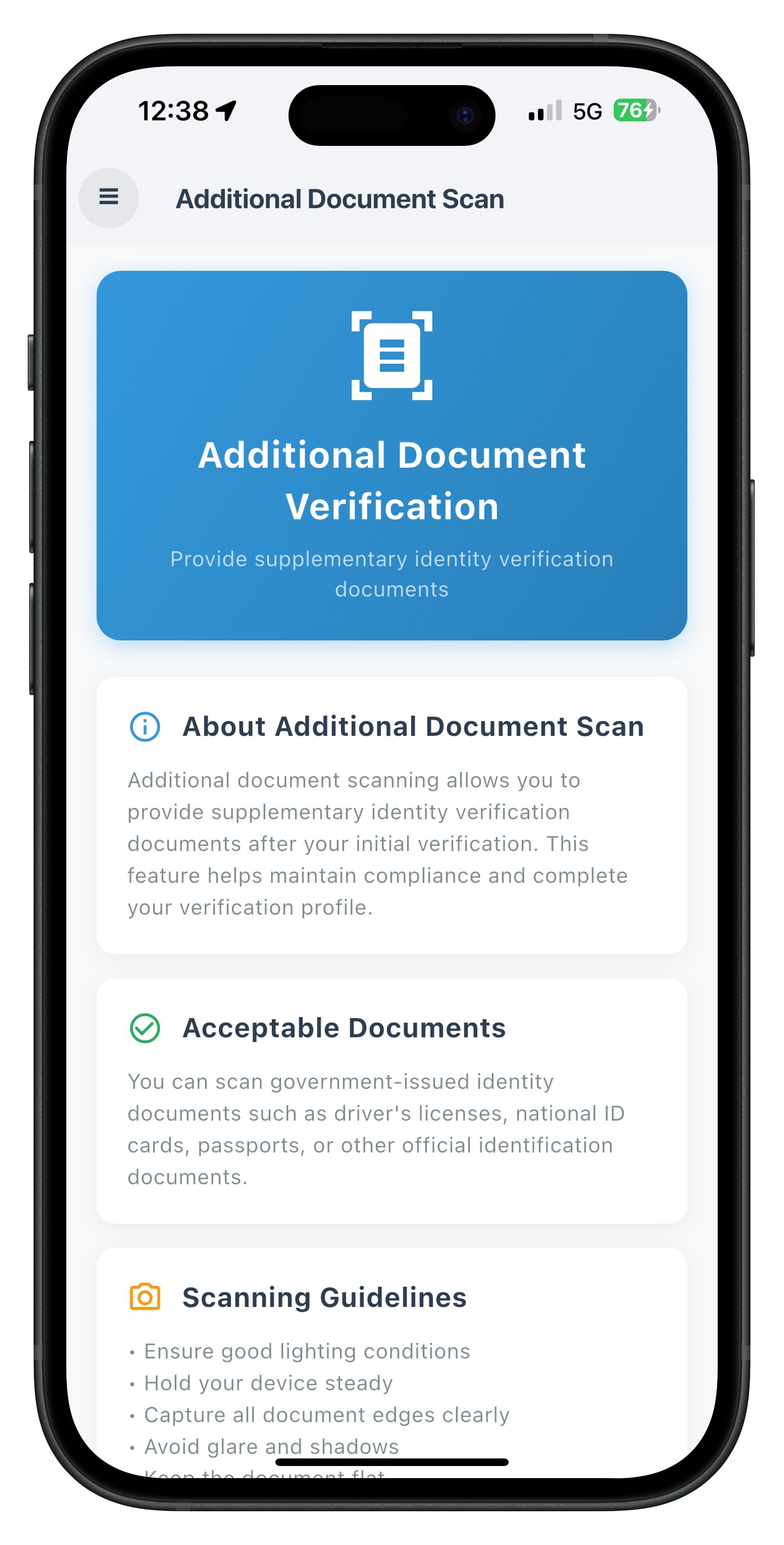
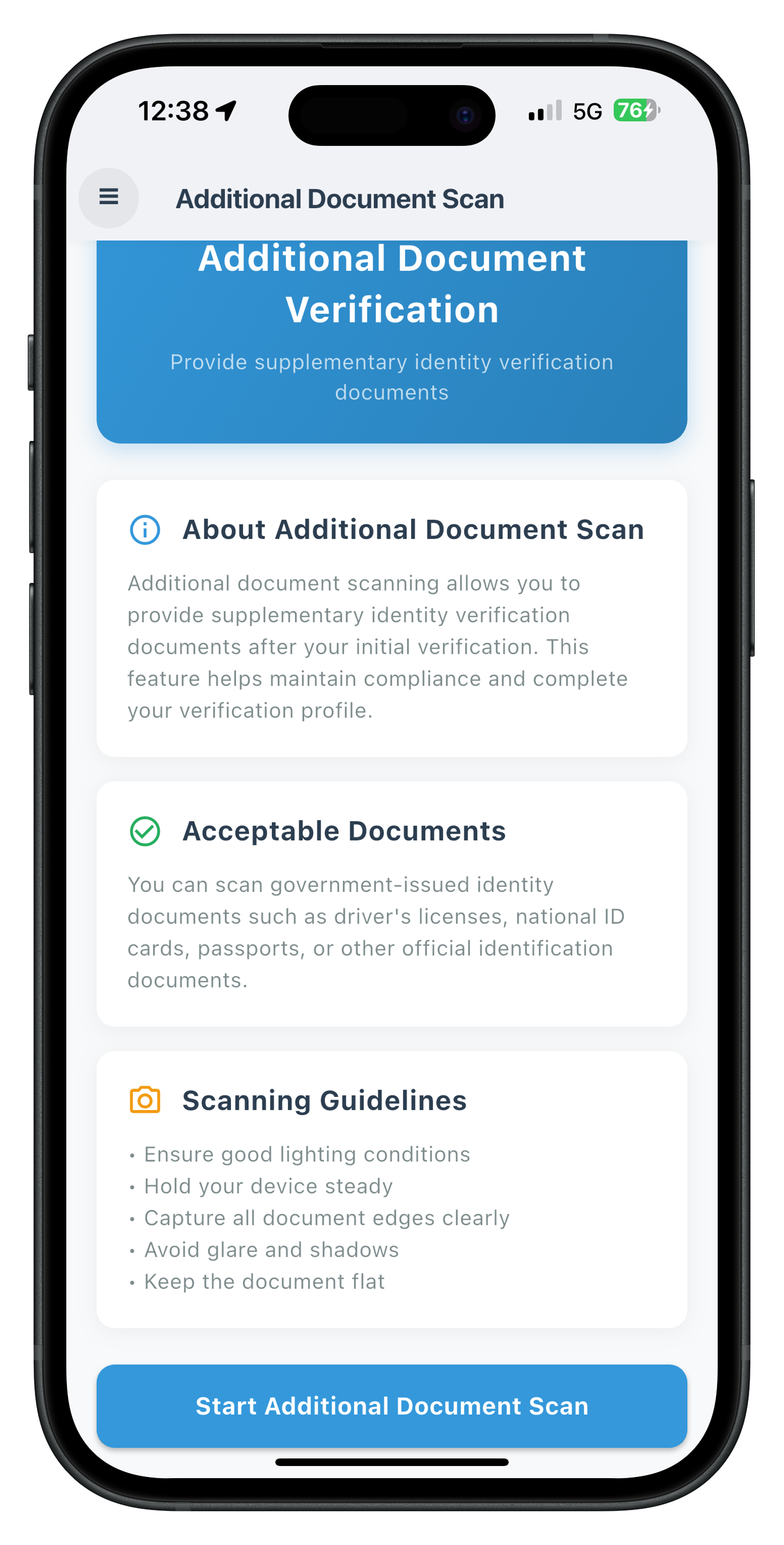
The AdditionalDocumentScanScreen serves as the entry point for post-login additional document verification. This screen allows users to initiate the scan workflow with a reason parameter.
Key Features
- Document scan initiation with workflow 7 and reason parameter
- Provider-level event handler for validation results (survives screen disposal)
- Error 241 handling for user cancellation
- GoRouter navigation pattern for menu button functionality
- Riverpod state management with ref.watch() pattern
Implementation Steps
Step 1: Import Required Dependencies
import 'dart:convert';
import 'package:flutter/material.dart';
import 'package:flutter_riverpod/flutter_riverpod.dart';
import 'package:go_router/go_router.dart';
import 'package:rdna_client/rdna_struct.dart';
import '../../../../uniken/services/idv/rdna_idv_service.dart';
import '../../../../uniken/providers/idv/sdk_idv_event_provider.dart';
import '../../components/drawer_content.dart';
Key imports:
- dart:convert: For JSON parsing of event data
- flutter_riverpod: For ConsumerStatefulWidget and ref.watch()
- go_router: For navigation with context.go()
- rdna_struct.dart: For RDNAUserLoggedIn session data type
- Path correction:
../../../../uniken(4 levels up from screens/idv/additional_document_scan/) - No direct event manager import: Provider handles all events
Step 2: Setup State Management
class _AdditionalDocumentScanScreenState
    extends ConsumerState<AdditionalDocumentScanScreen> {
  bool _isInitiating = false;
  bool _hasReceivedResponse = false;
  bool _isScreenActive = false;
  RdnaIDVService? _rdnaIDVService;

  @override
  void initState() {
    super.initState();
    _rdnaIDVService = RdnaIDVService.getInstance();
  }

  @override
  void didChangeDependencies() {
    super.didChangeDependencies();

    // Reset UI state when screen becomes active (Flutter equivalent of useFocusEffect)
    if (!_isScreenActive) {
      _isScreenActive = true;
      _resetUIState();
    }
  }

  @override
  void deactivate() {
    _isScreenActive = false;
    super.deactivate();
  }

  void _resetUIState() {
    print('AdditionalDocumentScan - Screen focused, resetting UI state');

    if (mounted) {
      setState(() {
        _hasReceivedResponse = false;
      });
    }
  }
}
State variables:
- _isInitiating: Tracks button loading state during API call
- _hasReceivedResponse: Prevents duplicate response handling
- _isScreenActive: Tracks screen lifecycle (similar to React Navigation focus)
- _rdnaIDVService: Singleton service instance
Lifecycle Methods:
- didChangeDependencies(): Reset state when screen becomes active (Flutter's useFocusEffect)
- deactivate(): Mark screen inactive when navigating away
- mounted check: Ensure setState() only called when widget is active
Step 3: Implement Provider Response Handler
This handler processes the onIDVAdditionalDocumentScan event with challengeMode: 11 and workflow: 7:
void _handleProviderResponse(String dataStr, RDNAUserLoggedIn? sessionData) {
  print('AdditionalDocumentScan - Handling provider response');

  try {
    final data = jsonDecode(dataStr) as Map<String, dynamic>;
    print('AdditionalDocumentScan - User ID: ${data['userID']}');

    final errorCode = data['error']?['longErrorCode'] as int? ?? -1;
    final statusCode = data['status']?['statusCode'] as int? ?? -1;
    final statusMessage = data['status']?['statusMessage'] as String? ?? 'Unknown status';
    final errorString = data['error']?['errorString'] as String? ?? 'Unknown error';

    print('AdditionalDocumentScan - Error Code: $errorCode');
    print('AdditionalDocumentScan - Status Code: $statusCode');

    // Dual Validation Pattern
    if (errorCode != 0) {
      // Sync error - show dialog
      print('AdditionalDocumentScan - Error detected: $errorCode');
      _showErrorDialog('$errorString (Error Code: $errorCode)');
    } else if (statusCode != 100 && statusCode != 0) {
      // Backend error - show dialog
      print('AdditionalDocumentScan - Status error: $statusCode');
      _showErrorDialog('$statusMessage (Status Code: $statusCode)');
    } else {
      // Success - navigate to result screen
      print('AdditionalDocumentScan - Document scan successful, navigating to result screen');

      final idvResponse = data['idvResponse'];
      if (idvResponse != null) {
        print('AdditionalDocumentScan - Document Type: ${idvResponse['document_type']}');
        print('AdditionalDocumentScan - Overall Confidence: ${idvResponse['confidence_scores']?['overall_confidence']}');
      }

      // Navigate to result screen with document data
      if (mounted) {
        context.go(
          '/idv-additional-document-scan-result',
          extra: {
            'challengeMode': data['challengeMode'],
            'eventData': data,
            'sessionData': sessionData,
          },
        );
      }
    }
  } catch (e) {
    print('AdditionalDocumentScan - Error parsing event data: $e');
    _showErrorDialog('Failed to process document scan response');
  }
}

void _showErrorDialog(String message) {
  if (!mounted) return;

  showDialog(
    context: context,
    builder: (context) => AlertDialog(
      title: const Text('Error'),
      content: Text(message),
      actions: [
        TextButton(
          onPressed: () {
            Navigator.of(context).pop();
          },
          child: const Text('OK'),
        ),
      ],
    ),
  );
}
Step 4: Watch Provider State in build() Method
@override
Widget build(BuildContext context) {
  // Watch provider for additional document scan response
  final responseData = ref.watch(additionalDocumentScanResponseProvider);

  // Get session data from provider as fallback
  final globalSessionData = ref.watch(sessionDataProvider);
  final effectiveSessionData = widget.sessionData ?? globalSessionData;

  // Handle response data when it changes from null → data
  if (responseData != null && !_hasReceivedResponse) {
    _hasReceivedResponse = true;

    // Schedule handling after build completes
    WidgetsBinding.instance.addPostFrameCallback((_) {
      _handleProviderResponse(responseData, effectiveSessionData);

      // Clear provider state
      ref.read(additionalDocumentScanResponseProvider.notifier).state = null;
    });
  }

  return Scaffold(
    backgroundColor: const Color(0xFFF8F9FA),
    appBar: AppBar(
      backgroundColor: Colors.white,
      elevation: 2,
      shadowColor: Colors.black.withOpacity(0.1),
      leading: Builder(
        builder: (context) => IconButton(
          icon: Container(
            width: 44,
            height: 44,
            decoration: BoxDecoration(
              color: Colors.black.withOpacity(0.05),
              borderRadius: BorderRadius.circular(22),
            ),
            child: const Center(
              child: Text(
                '☰',
                style: TextStyle(
                  fontSize: 20,
                  color: Color(0xFF2C3E50),
                  fontWeight: FontWeight.bold,
                ),
              ),
            ),
          ),
          onPressed: () => Scaffold.of(context).openDrawer(),
        ),
      ),
      title: const Text(
        'Additional Document Scan',
        style: TextStyle(
          fontSize: 18,
          fontWeight: FontWeight.bold,
          color: Color(0xFF2C3E50),
        ),
      ),
      centerTitle: false,
    ),
    drawer: DrawerContent(
      sessionData: effectiveSessionData,
      currentRoute: 'AdditionalDocumentScan',
    ),
    // ... body content
  );
}
How the Flow Works:
- Provider receives event → Stores data in
additionalDocumentScanResponseProvider - Provider navigates → Uses
appRouter.goNamed('AdditionalDocumentScan') - Screen rebuilds →
ref.watch()detects provider state change - After build →
addPostFrameCallback()schedules response handling - Handler runs → Shows dialog or navigates to result screen
- State cleared → Provider state set to null for next scan
Step 5: Implement Document Scan Initiation
Future<void> _handleStartAdditionalDocumentScan() async {
  setState(() {
    _isInitiating = true;
  });

  print('AdditionalDocumentScan - Starting additional document scan');
  print('AdditionalDocumentScan - Calling initiateIDVAdditionalDocumentScan with reason: Additional Document Verification');

  final response = await _rdnaIDVService!
      .initiateIDVAdditionalDocumentScan('Additional Document Verification');

  print('AdditionalDocumentScan - InitiateIDVAdditionalDocumentScan sync response received');
  print('AdditionalDocumentScan - Sync response: longErrorCode=${response.error?.longErrorCode}, errorString=${response.error?.errorString}');

  if (mounted) {
    setState(() {
      _isInitiating = false;
    });
  }

  if (response.error?.longErrorCode != 0) {
    // Sync error - show dialog
    print('AdditionalDocumentScan - Sync error: ${response.error?.errorString}');
    if (mounted) {
      showDialog(
        context: context,
        builder: (context) => AlertDialog(
          title: const Text('Error'),
          content: Text(response.error?.errorString ?? 'Failed to initiate additional document scan'),
          actions: [
            TextButton(
              onPressed: () => Navigator.of(context).pop(),
              child: const Text('OK'),
            ),
          ],
        ),
      );
    }
  } else {
    // Success - workflow initiated
    print('AdditionalDocumentScan - Additional document scan workflow initiated, waiting for SDK events');
  }
}
API Call Flow:
- Set loading state → Show CircularProgressIndicator on button
- Call API →
await rdnaIDVService.initiateIDVAdditionalDocumentScan(reason) - Check sync response →
error.longErrorCode == 0means success - Clear loading → Remove CircularProgressIndicator
- Handle error → Show dialog if sync error
- Wait for events →
getIDVDocumentScanProcessStartConfirmation, thenonIDVAdditionalDocumentScan
Step 6: Build UI with Start Button
Screen UI Preview
The entry screen provides a clean, informative interface for initiating document scans:
Entry Screen - Top Portion |
Entry Screen - Bottom Portion |
ElevatedButton(
  onPressed: _isInitiating ? null : _handleStartAdditionalDocumentScan,
  style: ElevatedButton.styleFrom(
    backgroundColor: const Color(0xFF3498DB),
    foregroundColor: Colors.white,
    padding: const EdgeInsets.symmetric(vertical: 16),
    shape: RoundedRectangleBorder(
      borderRadius: BorderRadius.circular(12),
    ),
    elevation: 2,
  ),
  child: _isInitiating
      ? const SizedBox(
          height: 20,
          width: 20,
          child: CircularProgressIndicator(
            strokeWidth: 2,
            valueColor: AlwaysStoppedAnimation<Color>(Colors.white),
          ),
        )
      : const Text(
        'Start Additional Document Scan',
        style: TextStyle(
          fontSize: 16,
          fontWeight: FontWeight.bold,
        ),
      ),
),
UI Features:
- Disabled during loading:
onPressed: _isInitiating ? null : handler - Loading indicator: CircularProgressIndicator replaces button text
- Material Design: Follows Flutter material guidelines with proper colors and spacing
- Accessibility: Clear button text and appropriate touch target size
Overview
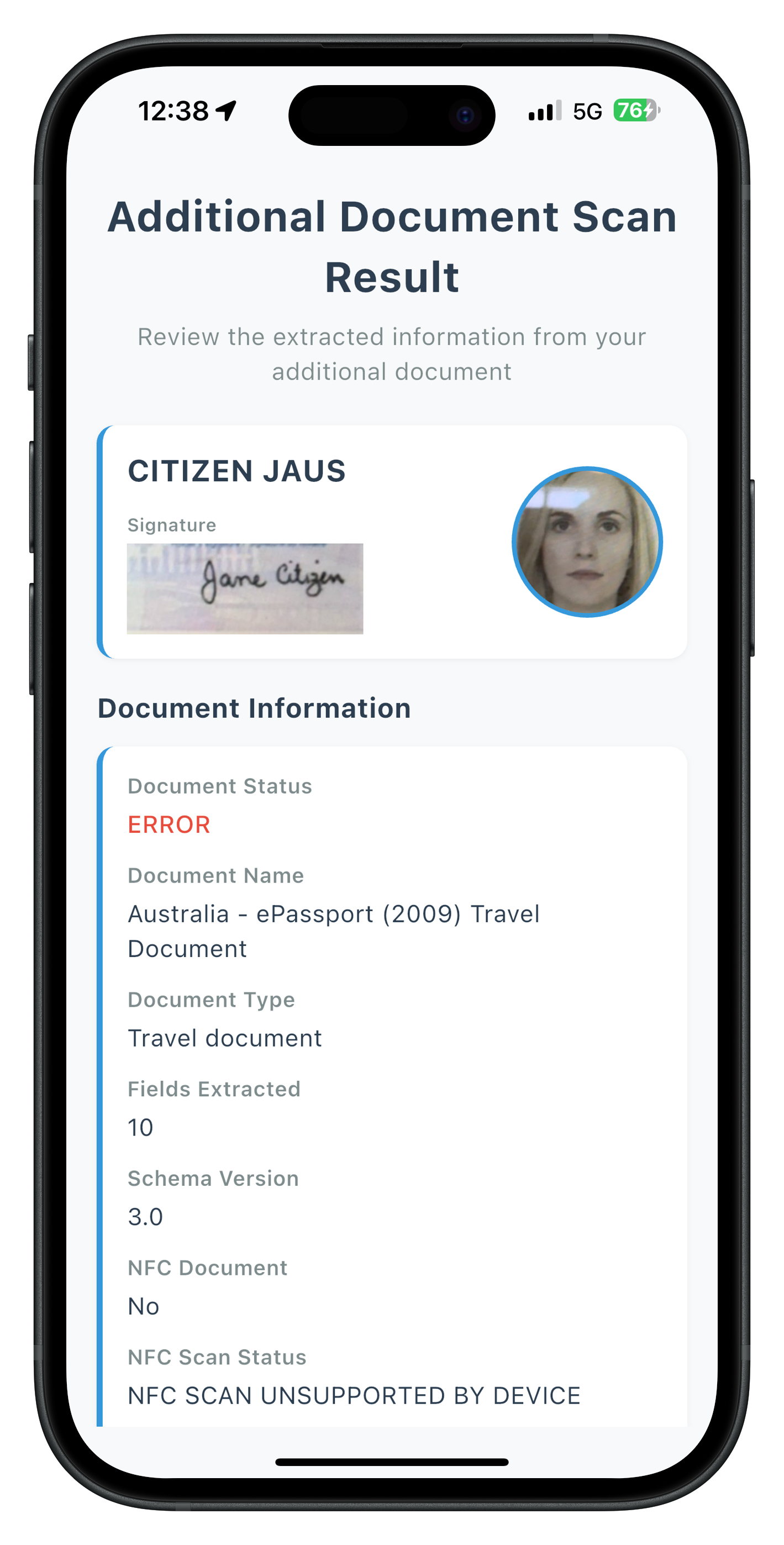
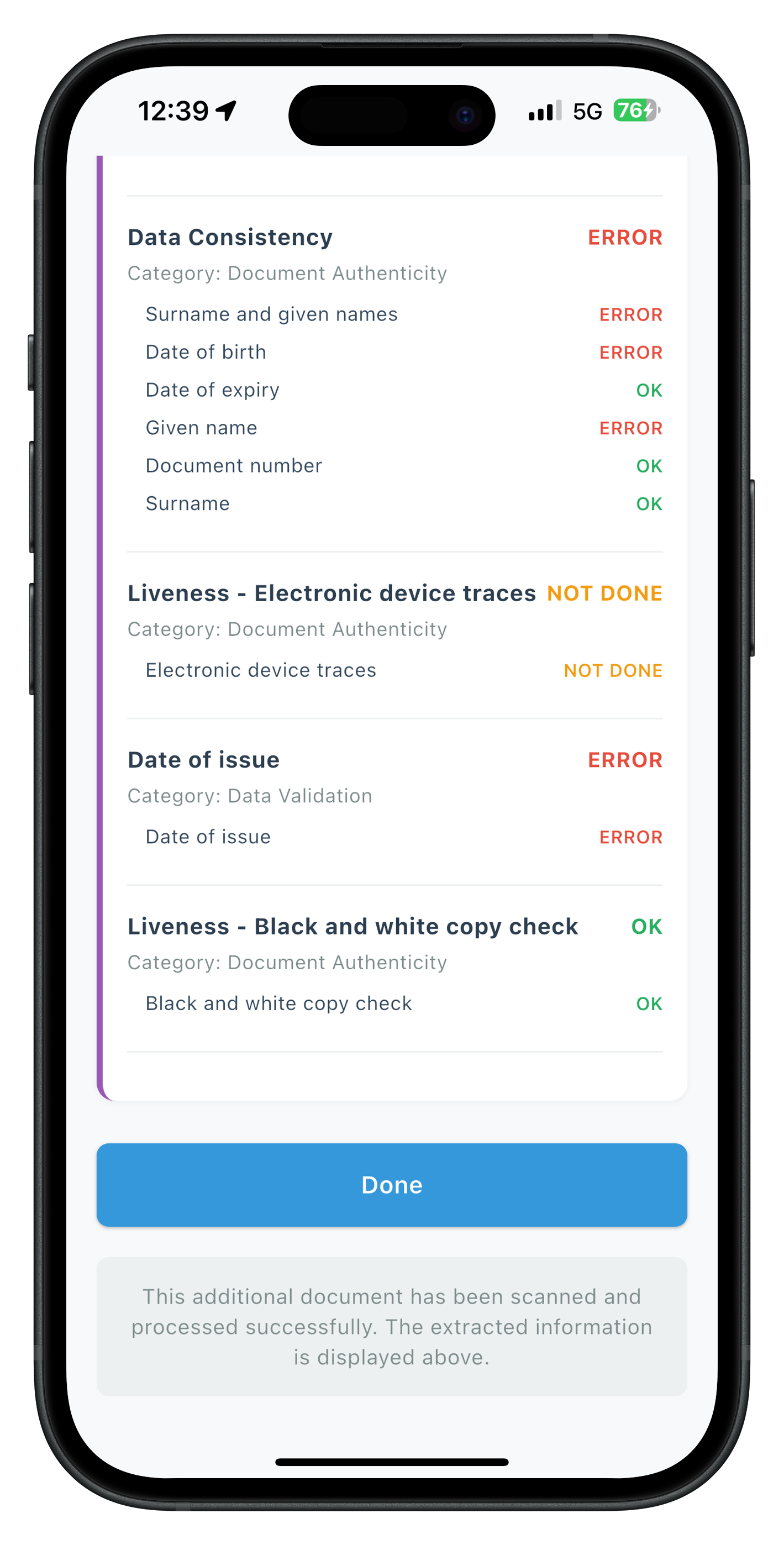
The IDVAdditionalDocumentScanResultScreen displays the comprehensive document data extracted during the scan. This screen receives the validation event data with challengeMode: 11 and presents it in an organized, user-friendly format.
Screen Implementation
Step 1: Import and Setup
import 'dart:convert';
import 'dart:typed_data';
import 'package:flutter/material.dart';
import 'package:go_router/go_router.dart';
import 'package:rdna_client/rdna_struct.dart';

class IDVAdditionalDocumentScanResultScreen extends StatefulWidget {
  final Map<String, dynamic>? extra;

  const IDVAdditionalDocumentScanResultScreen({
    super.key,
    this.extra,
  });

  @override
  State<IDVAdditionalDocumentScanResultScreen> createState() =>
      _IDVAdditionalDocumentScanResultScreenState();
}
Key imports:
- dart:convert: For base64 decoding of images
- dart:typed_data: For Uint8List handling
- go_router: For navigation with context.goNamed()
- rdna_struct.dart: For session data types
Step 2: Extract Validation Data
class _IDVAdditionalDocumentScanResultScreenState
    extends State<IDVAdditionalDocumentScanResultScreen> {
  Map<String, dynamic>? eventData;
  Map<String, dynamic>? idvResponse;
  RDNAUserLoggedIn? sessionData;

  @override
  void initState() {
    super.initState();
    eventData = widget.extra?['eventData'] as Map<String, dynamic>?;
    idvResponse = eventData?['idvResponse'] as Map<String, dynamic>?;
    sessionData = widget.extra?['sessionData'] as RDNAUserLoggedIn?;

    print('IDVAdditionalDocumentScanResult - Screen mounted with params:');
    print('  challengeMode: ${widget.extra?['challengeMode']}');
    print('  idvResponse: ${idvResponse != null ? "present" : "null"}');
    print('  sessionData: ${sessionData != null ? "present" : "null"}');
  }
}
Step 3: Implement Done Button Navigation
void _handleDone() {
  print('IDVAdditionalDocumentScanResult - Done button pressed, navigating to AdditionalDocumentScan');
  context.goNamed('AdditionalDocumentScan', extra: sessionData);
}
Navigation Pattern:
- From: Result screen
- To: AdditionalDocumentScan (entry screen)
- Method:
context.goNamed()with named route - Data: Pass sessionData via
extraparameter
Step 4: Implement Helper Functions
/// Get status color based on status value
Color _getStatusColor(String? status) {
  switch (status) {
    case 'OK':
      return const Color(0xFF27AE60);
    case 'ERROR':
      return const Color(0xFFE74C3C);
    case 'WARNING':
    case 'NOT DONE':
      return const Color(0xFFF39C12);
    default:
      return const Color(0xFF7F8C8D);
  }
}

/// Build base64 image widget
Widget _buildBase64Image(String? base64String, BoxFit fit) {
  if (base64String == null || base64String.isEmpty) {
    return const SizedBox.shrink();
  }

  try {
    final bytes = base64Decode(base64String);
    return Image.memory(
      bytes,
      fit: fit,
      errorBuilder: (context, error, stackTrace) {
        return Container(
          color: Colors.grey[200],
          child: const Center(
            child: Icon(Icons.broken_image, size: 48, color: Colors.grey),
          ),
        );
      },
    );
  } catch (e) {
    print('Error decoding base64 image: $e');
    return const SizedBox.shrink();
  }
}
Helper functions:
- _getStatusColor(): Maps status string to color (OK → green, ERROR → red, etc.)
- _buildBase64Image(): Decodes base64 image data and displays with error handling
Step 5: Build Personal Info Header
Widget _buildPersonalInfoHeader() {
  final identityData = idvResponse?['identity_data'] as Map<String, dynamic>?;
  final documentInfo = idvResponse?['document_info'] as Map<String, dynamic>?;
  final documentImages = documentInfo?['document_images'] as Map<String, dynamic>?;

  final fullName = identityData?['Surname and given names'] as String? ??
      '${identityData?['Given name'] ?? ''} ${identityData?['Surname'] ?? ''}'.trim();
  final portraitImage = documentImages?['portrait_image'] as String?;
  final signatureImage = documentImages?['signature_image'] as String?;

  if (fullName.isEmpty && portraitImage == null && signatureImage == null) {
    return const SizedBox.shrink();
  }

  return Container(
    padding: const EdgeInsets.all(20),
    margin: const EdgeInsets.only(bottom: 16),
    decoration: BoxDecoration(
      color: Colors.white,
      borderRadius: BorderRadius.circular(12),
      boxShadow: [
        BoxShadow(
          color: Colors.black.withOpacity(0.05),
          blurRadius: 10,
          offset: const Offset(0, 2),
        ),
      ],
    ),
    child: Row(
      crossAxisAlignment: CrossAxisAlignment.start,
      children: [
        // Name and Signature Column
        Expanded(
          child: Column(
            crossAxisAlignment: CrossAxisAlignment.start,
            children: [
              if (fullName.isNotEmpty)
                Text(
                  fullName,
                  style: const TextStyle(
                    fontSize: 24,
                    fontWeight: FontWeight.bold,
                    color: Color(0xFF2C3E50),
                  ),
                ),
              if (signatureImage != null && signatureImage.isNotEmpty) ...[
                const SizedBox(height: 16),
                const Text(
                  'Signature',
                  style: TextStyle(
                    fontSize: 12,
                    fontWeight: FontWeight.bold,
                    color: Color(0xFF7F8C8D),
                  ),
                ),
                const SizedBox(height: 8),
                Container(
                  height: 60,
                  decoration: BoxDecoration(
                    border: Border.all(color: const Color(0xFFE0E0E0)),
                    borderRadius: BorderRadius.circular(8),
                  ),
                  child: _buildBase64Image(signatureImage, BoxFit.contain),
                ),
              ],
            ],
          ),
        ),
        // Portrait Image
        if (portraitImage != null && portraitImage.isNotEmpty) ...[
          const SizedBox(width: 20),
          Container(
            width: 120,
            height: 150,
            decoration: BoxDecoration(
              borderRadius: BorderRadius.circular(12),
              border: Border.all(color: const Color(0xFFE0E0E0)),
            ),
            clipBehavior: Clip.antiAlias,
            child: _buildBase64Image(portraitImage, BoxFit.cover),
          ),
        ],
      ],
    ),
  );
}
Personal Info Header Features:
- Displays full name (extracted from identity_data)
- Shows portrait image from document (if available)
- Shows signature image (if available)
- Responsive layout with Row/Expanded
- Material Design card styling
Step 6: Build Document Images Section
Widget _buildDocumentImages() {
  final documentInfo = idvResponse?['document_info'] as Map<String, dynamic>?;
  final documentImages = documentInfo?['document_images'] as Map<String, dynamic>?;
  final frontPage = documentImages?['document_front_page'] as String?;
  final backPage = documentImages?['document_back_page'] as String?;

  if ((frontPage == null || frontPage.isEmpty) &&
      (backPage == null || backPage.isEmpty)) {
    return const SizedBox.shrink();
  }

  return Container(
    padding: const EdgeInsets.all(20),
    margin: const EdgeInsets.only(bottom: 16),
    decoration: BoxDecoration(
      color: Colors.white,
      borderRadius: BorderRadius.circular(12),
      boxShadow: [
        BoxShadow(
          color: Colors.black.withOpacity(0.05),
          blurRadius: 10,
          offset: const Offset(0, 2),
        ),
      ],
    ),
    child: Column(
      crossAxisAlignment: CrossAxisAlignment.start,
      children: [
        const Text(
          'Document Images',
          style: TextStyle(
            fontSize: 20,
            fontWeight: FontWeight.bold,
            color: Color(0xFF2C3E50),
          ),
        ),
        const SizedBox(height: 20),
        if (frontPage != null && frontPage.isNotEmpty) ...[
          const Text(
            'Front Page',
            style: TextStyle(
              fontSize: 14,
              fontWeight: FontWeight.bold,
              color: Color(0xFF7F8C8D),
            ),
          ),
          const SizedBox(height: 8),
          Container(
            height: 200,
            decoration: BoxDecoration(
              border: Border.all(color: const Color(0xFFE0E0E0)),
              borderRadius: BorderRadius.circular(8),
            ),
            child: _buildBase64Image(frontPage, BoxFit.contain),
          ),
          const SizedBox(height: 16),
        ],
        if (backPage != null && backPage.isNotEmpty) ...[
          const Text(
            'Back Page',
            style: TextStyle(
              fontSize: 14,
              fontWeight: FontWeight.bold,
              color: Color(0xFF7F8C8D),
            ),
          ),
          const SizedBox(height: 8),
          Container(
            height: 200,
            decoration: BoxDecoration(
              border: Border.all(color: const Color(0xFFE0E0E0)),
              borderRadius: BorderRadius.circular(8),
            ),
            child: _buildBase64Image(backPage, BoxFit.contain),
          ),
        ],
      ],
    ),
  );
}
Document Images Features:
- Displays front page of document (if available)
- Displays back page of document (if available)
- Fixed height containers (200px) for consistent layout
- Border and rounded corners for visual separation
- Conditional rendering - only show if images exist
Step 7: Build Identity Data Section
Widget _buildIdentityData() {
  final identityData = idvResponse?['identity_data'] as Map<String, dynamic>?;
  if (identityData == null || identityData.isEmpty) {
    return const SizedBox.shrink();
  }

  return Container(
    padding: const EdgeInsets.all(20),
    margin: const EdgeInsets.only(bottom: 16),
    decoration: BoxDecoration(
      color: Colors.white,
      borderRadius: BorderRadius.circular(12),
      boxShadow: [
        BoxShadow(
          color: Colors.black.withOpacity(0.05),
          blurRadius: 10,
          offset: const Offset(0, 2),
        ),
      ],
    ),
    child: Column(
      crossAxisAlignment: CrossAxisAlignment.start,
      children: [
        const Row(
          children: [
            Icon(Icons.person, color: Color(0xFF3498DB), size: 24),
            SizedBox(width: 12),
            Text(
              'Extracted Information',
              style: TextStyle(
                fontSize: 20,
                fontWeight: FontWeight.bold,
                color: Color(0xFF2C3E50),
              ),
            ),
          ],
        ),
        const SizedBox(height: 16),
        ...identityData.entries.map((entry) {
          if (entry.value == null || entry.value.toString().isEmpty) {
            return const SizedBox.shrink();
          }
          return Padding(
            padding: const EdgeInsets.only(bottom: 12),
            child: _buildDataRow(entry.key, entry.value.toString()),
          );
        }),
      ],
    ),
  );
}

Widget _buildDataRow(String label, String value, {Color? valueColor, bool valueBold = false}) {
  return Padding(
    padding: const EdgeInsets.only(bottom: 12),
    child: SizedBox(
      width: double.infinity,
      child: Column(
        crossAxisAlignment: CrossAxisAlignment.start,
        children: [
          Text(
            label,
            style: const TextStyle(
              fontSize: 12,
              fontWeight: FontWeight.bold,
              color: Color(0xFF7F8C8D),
            ),
          ),
          const SizedBox(height: 4),
          Text(
            value,
            style: TextStyle(
              fontSize: 16,
              color: valueColor ?? const Color(0xFF2C3E50),
              fontWeight: valueBold ? FontWeight.bold : FontWeight.normal,
            ),
          ),
        ],
      ),
    ),
  );
}
Identity Data Features:
- Dynamically renders all fields from identity_data
- Uses label-value pair layout with left alignment
- Skips null or empty values
- Full-width layout with
SizedBox(width: double.infinity) - Material Design card styling
Step 8: Build Done Button
Screen UI Preview
The result screen displays extracted document information in a clean, organized layout:
Result Screen - Top Portion |
Result Screen - Bottom Portion |
ElevatedButton(
  onPressed: _handleDone,
  style: ElevatedButton.styleFrom(
    backgroundColor: const Color(0xFF3498DB),
    foregroundColor: Colors.white,
    padding: const EdgeInsets.symmetric(vertical: 16),
    shape: RoundedRectangleBorder(
      borderRadius: BorderRadius.circular(12),
    ),
    elevation: 2,
  ),
  child: const Text(
    'Done',
    style: TextStyle(
      fontSize: 16,
      fontWeight: FontWeight.bold,
    ),
  ),
),
Done Button:
- Navigates back to entry screen with sessionData
- Primary blue color (#3498DB)
- Full-width button with vertical padding
- Material Design elevation and rounded corners
Overview
Proper navigation is critical for maintaining menu button (hamburger icon) functionality throughout the additional document scan flow. Flutter uses GoRouter for navigation, and screens that need drawer functionality must receive session data via the extra parameter.
The Navigation Pattern
In Flutter with GoRouter, screens need to receive sessionData to maintain context:
// App Structure with GoRouter
GoRoute(
  path: '/dashboard/additional-document-scan',
  name: 'AdditionalDocumentScan',
  builder: (context, state) {
    final sessionData = state.extra as RDNAUserLoggedIn?;
    return AdditionalDocumentScanScreen(sessionData: sessionData);
  },
),
Critical: Always pass sessionData via the extra parameter when navigating. Without it, the screen can't initialize the DrawerContent properly.
Drawer Menu UI Preview
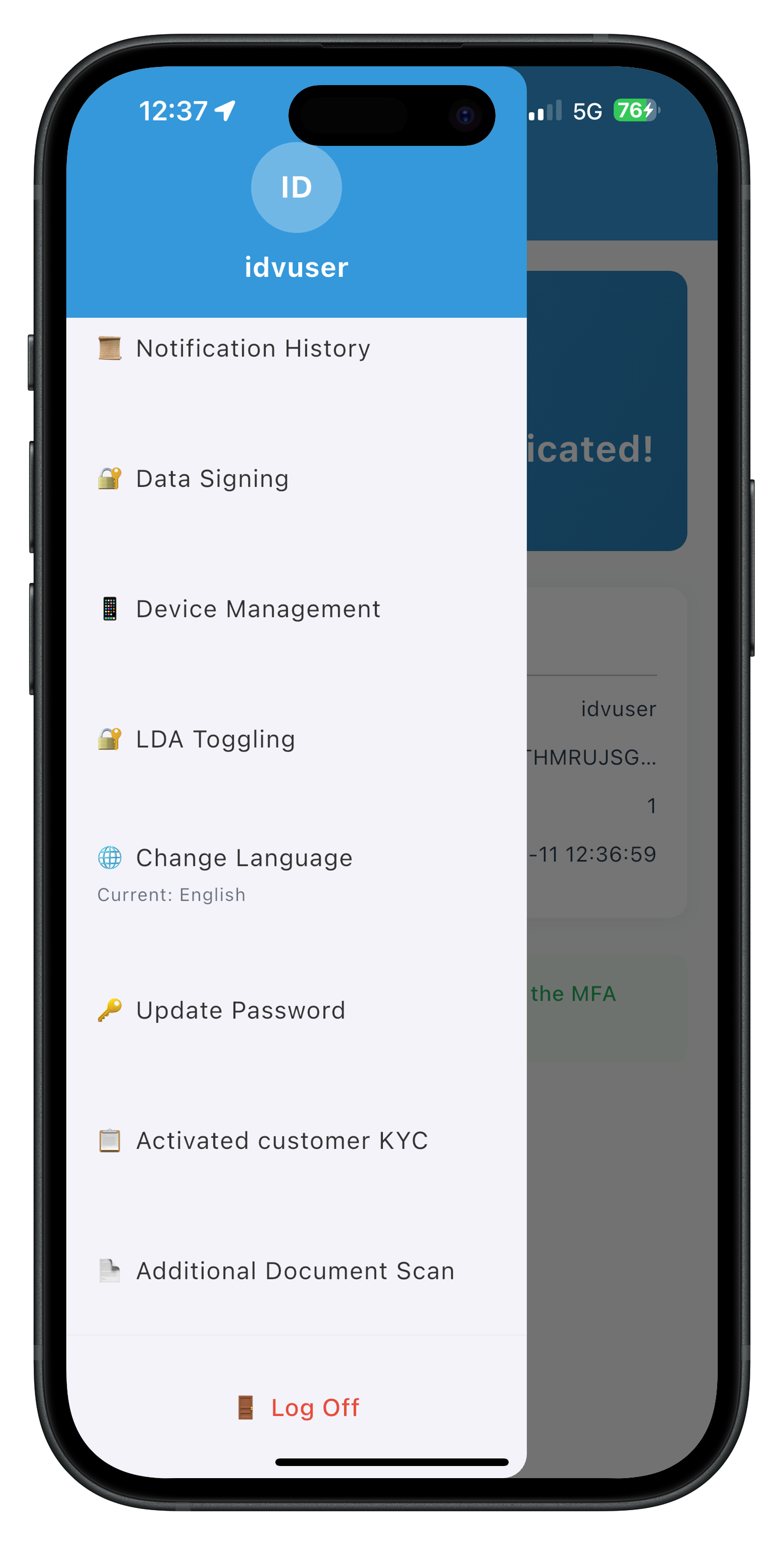
The drawer menu includes the Additional Document Scan navigation item for easy access.
Correct Navigation Pattern
Always navigate with sessionData:
// ✅ CORRECT: Pass sessionData via extra parameter
context.goNamed('AdditionalDocumentScan', extra: sessionData);
// ❌ WRONG: Navigation without sessionData breaks drawer context
context.goNamed('AdditionalDocumentScan');
Implementation in Result Screen
void _handleDone() {
  print('IDVAdditionalDocumentScanResult - Done button pressed');
  print('Navigating to AdditionalDocumentScan');

  // Navigate back to entry screen with sessionData
  context.goNamed('AdditionalDocumentScan', extra: sessionData);

  // Menu button will continue to work on the entry screen
}
Implementation in Provider Event Handler
void _handleAdditionalDocumentScanResponse(String jsonData) {
  final data = jsonDecode(jsonData) as Map<String, dynamic>;

  // Store response in StateProvider
  ref.read(additionalDocumentScanResponseProvider.notifier).state = jsonData;

  // Navigate back to entry screen after delay
  Future.delayed(const Duration(milliseconds: 100), () {
    appRouter.goNamed('AdditionalDocumentScan');
  });
}
GoRouter Configuration
Ensure routes are properly configured in app_router.dart:
// app_router.dart
import 'package:go_router/go_router.dart';
import 'package:rdna_client/rdna_struct.dart';
import '../screens/idv/additional_document_scan/additional_document_scan_screen.dart';
import '../screens/idv/additional_document_scan/idv_additional_document_scan_result_screen.dart';

final appRouter = GoRouter(
  initialLocation: '/',
  routes: [
    // ... other routes

    // Additional Document Scan Entry Screen
    GoRoute(
      path: '/dashboard/additional-document-scan',
      name: 'AdditionalDocumentScan',
      builder: (context, state) {
        final sessionData = state.extra as RDNAUserLoggedIn?;
        return AdditionalDocumentScanScreen(sessionData: sessionData);
      },
    ),

    // Additional Document Scan Result Screen
    GoRoute(
      path: '/idv-additional-document-scan-result',
      name: 'IDVAdditionalDocumentScanResult',
      builder: (context, state) {
        final extra = state.extra as Map<String, dynamic>?;
        return IDVAdditionalDocumentScanResultScreen(extra: extra);
      },
    ),
  ],
);
Drawer Content Configuration
Ensure the menu item is registered in drawer_content.dart:
// drawer_content.dart
Widget _buildAdditionalDocumentScanMenuItem() {
  return ListTile(
    contentPadding: const EdgeInsets.symmetric(horizontal: 20, vertical: 15),
    tileColor: widget.currentRoute == 'AdditionalDocumentScan'
        ? const Color(0xFFF0F0F0)
        : null,
    title: Text(
      '📄 Additional Document Scan',
      style: TextStyle(
        fontSize: 16,
        fontWeight: widget.currentRoute == 'AdditionalDocumentScan'
            ? FontWeight.bold
            : FontWeight.normal,
        color: const Color(0xFF2C3E50),
      ),
    ),
    onTap: () {
      Navigator.pop(context);
      if (widget.currentRoute != 'AdditionalDocumentScan') {
        context.goNamed('AdditionalDocumentScan', extra: widget.sessionData);
      }
    },
  );
}
Menu Button Verification
After implementing the navigation pattern, verify menu button functionality:
1. Complete a document scan flow
2. Click "Done" button on result screen
3. Verify you're back on AdditionalDocumentScan screen
4. Click the menu button (hamburger icon) in the AppBar
5. Drawer should open smoothly
6. Select another menu item (e.g., Dashboard)
7. Menu navigation should work correctly
8. Return to Additional Document Scan
9. Menu button still works
What You've Learned
- ✅ Why sessionData is required for drawer functionality in GoRouter
- ✅ Correct navigation pattern:
context.goNamed('ScreenName', extra: sessionData) - ✅ Where to apply navigation (result screen, provider handlers)
- ✅ How to configure GoRouter routes with sessionData
- ✅ How to verify menu button functionality after navigation
Overview
Error 241 is a special error code that occurs when users click the close button (X) on the document scan confirmation screen. It's not a system error but rather expected user behavior that should be handled gracefully.
When Error 241 Occurs
User Flow Leading to Error 241:
1. User clicks "Start Additional Document Scan"
2. initiateIDVAdditionalDocumentScan() called successfully
3. SDK triggers getIDVDocumentScanProcessStartConfirmation event (workflow 7)
4. User navigated to IDVDocumentScanStartScreen
5. User clicks close button (X) instead of "Start Scan"
6. setIDVDocumentScanProcessStartConfirmation(false, 7) called
7. SDK cancels workflow
8. onIDVAdditionalDocumentScan event triggered with error 241
Error 241 Event Structure
// Event data when error 241 occurs
{
  'userID': 'user@example.com',
  'sessionID': 'session-12345',
  'challengeMode': 11,  // Still challenge mode 11
  'error': {
    'longErrorCode': 241,  // User cancelled
    'shortErrorCode': 241,
    'errorString': 'User Cancelled'
  },
  'status': {
    'statusCode': 0,
    'statusMessage': 'Cancelled by user'
  },
  'idvResponse': null  // No document data when cancelled
}
Current Implementation
The entry screen's _handleProviderResponse() method handles error 241:
void _handleProviderResponse(String dataStr) {
  final data = jsonDecode(dataStr) as Map<String, dynamic>;
  final errorCode = data['error']?['longErrorCode'] as int? ?? -1;

  if (errorCode != 0) {
    // Includes error 241
    print('AdditionalDocumentScan - Error detected: $errorCode');
    _showErrorDialog('${data['error']?['errorString']} (Error Code: $errorCode)');
  }
}
Current Behavior: Shows "User Cancelled (Error Code: 241)" in error dialog.
Improved Handling (Optional)
You can improve the user experience by handling 241 separately:
void _handleProviderResponse(String dataStr) {
  final data = jsonDecode(dataStr) as Map<String, dynamic>;
  final errorCode = data['error']?['longErrorCode'] as int? ?? -1;

  if (errorCode == 241) {
    // User cancellation - friendly message
    print('AdditionalDocumentScan - User cancelled document scan');
    _showInfoDialog(
      'Document Scan Cancelled',
      'You can start a new scan whenever you\'re ready.',
    );
  } else if (errorCode != 0) {
    // Other errors
    print('AdditionalDocumentScan - Error detected: $errorCode');
    _showErrorDialog('${data['error']?['errorString']} (Error Code: $errorCode)');
  }
}

void _showInfoDialog(String title, String message) {
  if (!mounted) return;

  showDialog(
    context: context,
    builder: (context) => AlertDialog(
      title: Text(title),
      content: Text(message),
      actions: [
        TextButton(
          onPressed: () => Navigator.of(context).pop(),
          child: const Text('OK'),
        ),
      ],
    ),
  );
}
What You've Learned
- ✅ Error 241 is triggered by user clicking close button (expected behavior)
- ✅ Error 241 occurs after
setIDVDocumentScanProcessStartConfirmation(false, 7) - ✅ Event structure includes error 241 but no idvResponse data
- ✅ Current implementation shows error dialog for all non-zero error codes
- ✅ Optional improvement: separate handling for friendly cancellation messaging
Overview
Comprehensive testing ensures the additional document scan flow works correctly with workflow 7 and challenge mode 11 across all scenarios.
Complete Flow Testing
Test 1: Successful Document Scan
Steps:
1. Run the app: flutter run -d ios (or android)
2. Login with activated credentials
3. Navigate to Dashboard → Open Drawer → Select "Additional Document Scan"
4. Verify: Entry screen displays with scan initiation button
5. Click "Start Additional Document Scan"
6. Verify: Console shows "initiateIDVAdditionalDocumentScan" called with reason
7. Verify: Navigation to document scan confirmation screen (workflow 7)
8. Click "Start Scan" button
9. Verify: Native camera opens for document capture
10. Scan a valid document
11. Verify: Console shows "onIDVAdditionalDocumentScan event received"
12. Verify: Console shows "Challenge Mode: 11"
13. Verify: Navigation to result screen with extracted data
14. Verify: Identity information displayed (name, DOB, nationality, etc.)
15. Verify: Document details displayed (document number, issue/expiry dates, etc.)
16. Verify: Validation status displayed (version, document status)
17. Click "Done" button
18. Verify: Navigation back to entry screen
19. Verify: Menu button (hamburger icon) still works
20. Click menu button
21. Verify: Drawer menu opens successfully
Test 2: User Cancellation (Error 241)
Steps:
1. Navigate to Additional Document Scan screen
2. Click "Start Additional Document Scan"
3. Wait for document scan confirmation screen
4. Click close button (X) in top-right corner
5. Verify: Console shows "setIDVDocumentScanProcessStartConfirmation(false, 7)"
6. Verify: Console shows "onIDVAdditionalDocumentScan event with error 241"
7. Verify: Navigation back to entry screen
8. Verify: Dialog appears with "User Cancelled (Error Code: 241)"
9. Click "OK" on dialog
10. Verify: "Start Additional Document Scan" button is re-enabled
11. Verify: User can retry the scan
12. Verify: Menu button still works
Test 3: Multiple Document Scans
Steps:
1. Complete successful document scan (Test 1)
2. Click "Done" to return to entry screen
3. Click "Start Additional Document Scan" again
4. Complete another document scan
5. Verify: New validation event received with challengeMode 11
6. Verify: Result screen shows extracted document data
7. Click "Done"
8. Verify: Back at entry screen with button enabled
9. Verify: Can perform third scan if desired
Menu Button Functionality Verification
After each test above, verify:
1. Menu button (hamburger icon) is visible in AppBar
2. Clicking menu button opens drawer
3. Drawer shows all navigation items
4. Selecting "Dashboard" from drawer navigates correctly
5. Selecting "Additional Document Scan" again from drawer works
6. Menu button continues working after navigation
Console Log Verification
During testing, verify these key console logs appear:
For successful flow:
✓ "AdditionalDocumentScan - Starting additional document scan"
✓ "RdnaIDVService - Initiating IDV additional document scan"
✓ "Provider - Additional document scan response received"
✓ "AdditionalDocumentScan - Handling provider response"
✓ "AdditionalDocumentScan - Document scan successful"
✓ "AdditionalDocumentScan - Document Type: PASSPORT"
✓ "AdditionalDocumentScan - Overall Confidence: 95"

For error 241:
✓ "setIDVDocumentScanProcessStartConfirmation(false, 7)"
✓ "Provider - Additional document scan response received"
✓ "AdditionalDocumentScan - Error detected: 241"
✓ "User cancelled document scan (error 241)"
Error Handling Tests
Test 4: Network Failure During Initiation
Steps:
1. Enable airplane mode
2. Navigate to Additional Document Scan
3. Click "Start Additional Document Scan"
4. Verify: Error dialog displayed on entry screen
5. Verify: Button remains enabled for retry
6. Disable airplane mode
7. Retry scan
8. Verify: Scan proceeds normally
Test 5: Poor Quality Document
Steps:
1. Start document scan with valid document type
2. In camera view, scan a blurry or partially obscured document
3. Verify: Validation event received but may contain incomplete data
4. Verify: Result screen displays available fields dynamically
5. Verify: Missing or null fields are not rendered
6. Click "Done"
7. Verify: Can retry with better quality document
Performance Testing
- Scan Duration: Document capture to result display should complete in < 8 seconds
- Navigation Smoothness: All screen transitions should be smooth without jank
- Provider Responsiveness: Validation event should trigger result navigation immediately
- Memory Usage: Multiple scans should not cause memory leaks
Flutter DevTools Verification
# Launch DevTools
flutter pub global activate devtools
flutter pub global run devtools

# Open in browser when app is running
# Verify:
1. Widget tree shows proper widget hierarchy
2. No memory leaks after multiple scans
3. Provider states update correctly
4. No unnecessary widget rebuilds
What You've Verified
- ✅ Complete document scan flow with workflow 7 and challengeMode 11
- ✅ Error 241 handling with dialog messaging
- ✅ Multiple consecutive document scans in one session
- ✅ Menu button functionality throughout entire flow
- ✅ GoRouter navigation maintains sessionData context
- ✅ Extracted data display with different document types
- ✅ Error handling for network failures and poor quality scans
- ✅ Console logging for debugging and verification
- ✅ Hot reload compatibility
- ✅ Performance and memory usage
Congratulations!
You've successfully implemented the REL-ID IDV Post-Login Additional Document Scan Flow for Flutter! 🎉
What You've Accomplished
In this codelab, you've built a complete, production-ready additional document verification system:
- ✅ Additional Document Scan Initiation:
initiateIDVAdditionalDocumentScanAPI with workflow 7 and reason parameter - ✅ Document Scan Process: Native camera integration with workflow 7 (RDNA_IDV_ADDITIONAL_DOCUMENT_SCAN)
- ✅ Validation Event Handling:
onIDVAdditionalDocumentScanwith challengeMode 11 - ✅ Provider-Based Architecture: Event handlers that survive screen disposal
- ✅ Comprehensive Result Display: Extracted identity data, document info, and validation status
- ✅ GoRouter Navigation: Proper navigation maintaining sessionData and drawer functionality
- ✅ Error 241 Handling: User-friendly cancellation messaging with retry option
- ✅ Multiple Scans Support: Users can scan multiple documents in one session
- ✅ Streamlined Flow: Document-only verification (no selfie or consent required)
Key Technical Achievements
You now understand:
- Workflow 7: RDNA_IDV_ADDITIONAL_DOCUMENT_SCAN for supplementary document verification
- Challenge Mode 11: Additional document scan specific validation mode
- Provider-Level Event Handling: Handlers that persist through navigation with GoRouter
- GoRouter Navigation: Proper pattern with sessionData to maintain context
- Error 241: User cancellation is expected behavior, not a system error
- Dynamic Data Structures: Handling different document types with varying extracted fields
- Flutter Lifecycle: Understanding screen disposal and provider persistence
Flutter-Specific Patterns Learned
- Provider vs Screen-Level Handlers: Why providers are required with GoRouter
- addPostFrameCallback: Scheduling actions after build completes
- Future.delayed: Ensuring state propagation before navigation
- ref.watch(): Reactive state detection for automatic UI updates
- StateProvider: Simple state storage for cross-screen communication
- Riverpod Integration: Clean separation of UI and business logic
Next Steps
Now that you've mastered additional document scan in Flutter, consider:
- Explore other IDV workflows (KYC, Selfie Verification)
- Implement biometric authentication features
- Add offline capability with local storage
- Enhance error handling with custom error screens
- Implement analytics tracking for document scan metrics
Thank you for completing the REL-ID IDV Post-Login Additional Document Scan Flow Flutter codelab!