🎯 Learning Path:
- Complete REL-ID Initialization Flow Codelab
- Complete REL-ID Complete Activation & Login Flow Codelab
- Complete REL-ID IDV MFA Activation Flow Codelab (Recommended)
- You are here → Post-Login KYC Flow Implementation
Welcome to the REL-ID IDV Post-Login KYC Flow codelab! This tutorial teaches you how to implement comprehensive Know Your Customer (KYC) identity verification for activated customers using document scanning, facial recognition, and biometric authentication.
What You'll Build
In this codelab, you'll implement a complete post-login KYC workflow for activated customers:
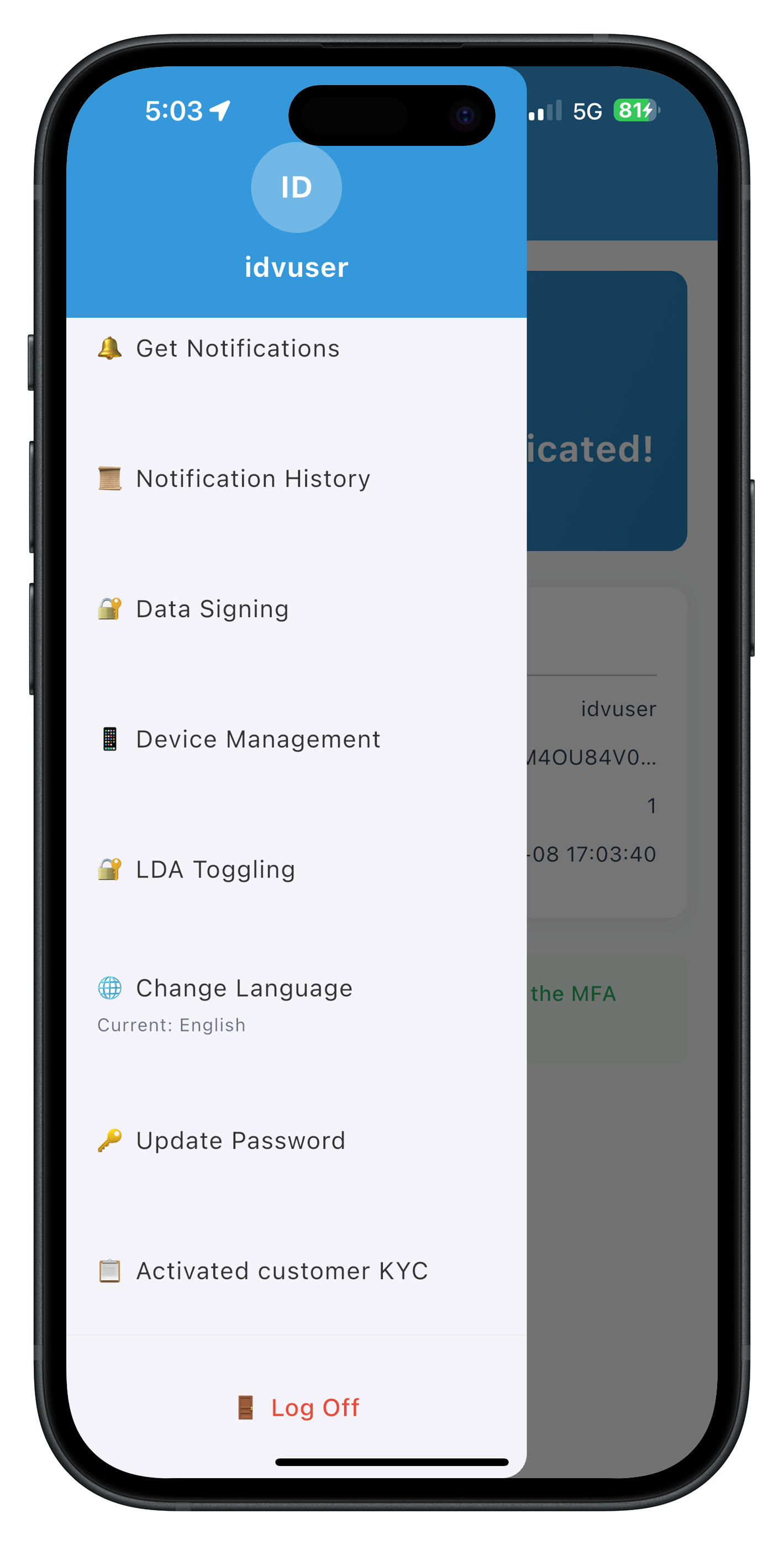
- 🏠 Drawer Menu Integration: Access KYC from Dashboard navigation
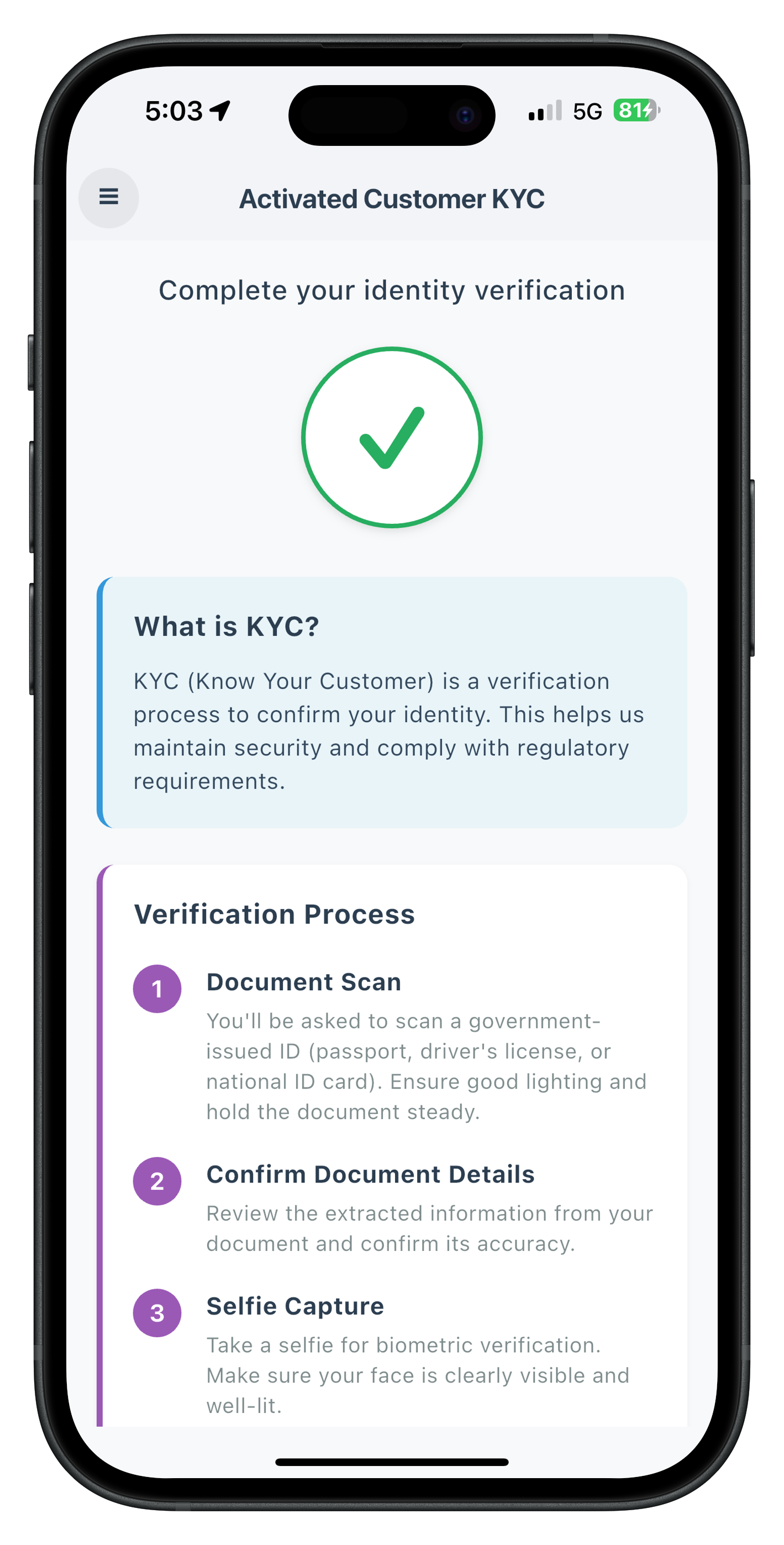
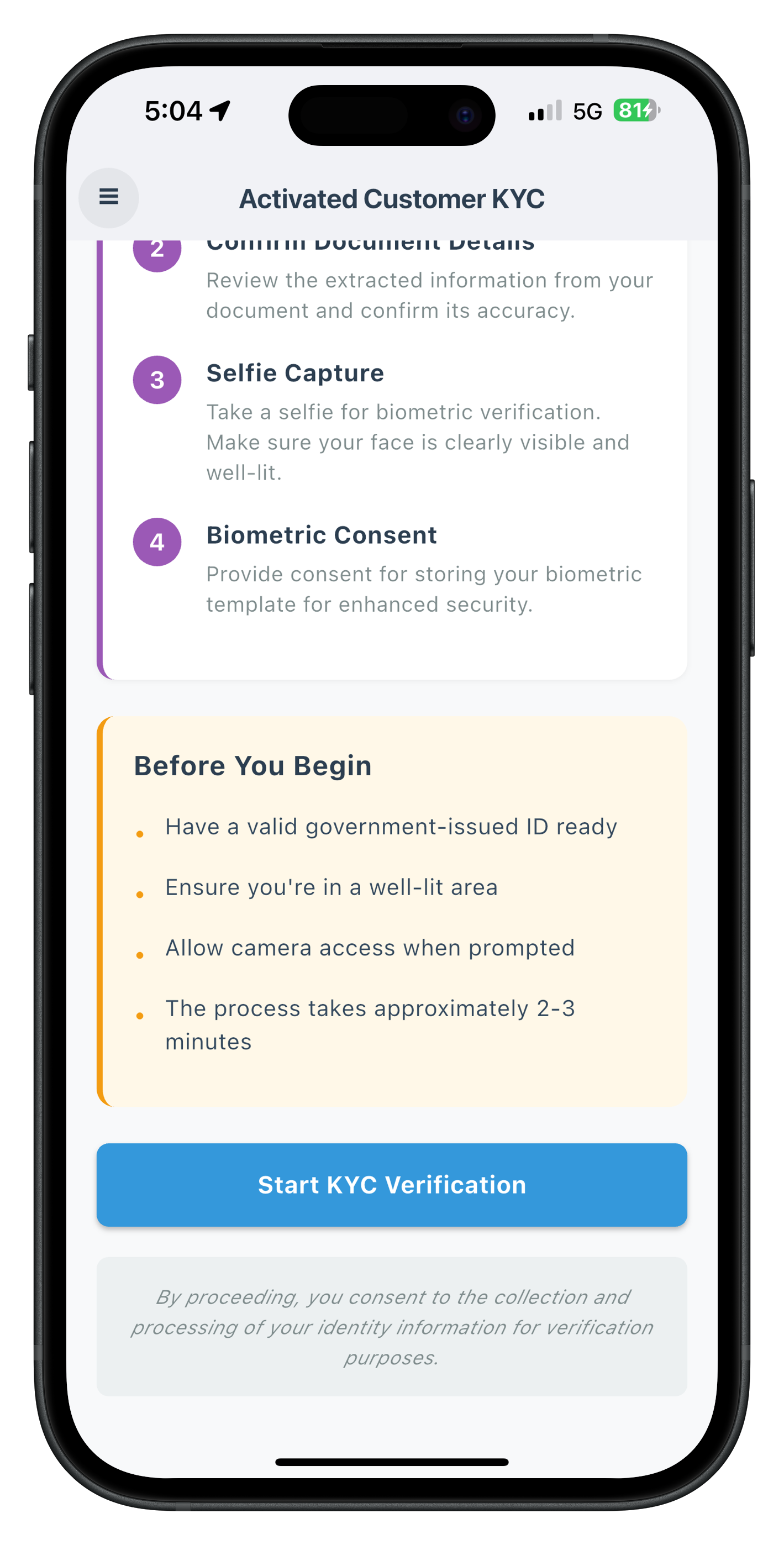
- 🆕 Activated Customer KYC Screen: Entry point for post-login KYC initiation
- 📄 Document Scan Process: Automated document verification with workflow 6
- 📸 Document Details Confirmation: Interactive OCR data validation with challenge mode 9
- 🤳 Selfie Capture Process: Live selfie capture with liveness detection
- ✅ Selfie Biometric Verification: Face matching with challenge mode 9 navigation
- 🔐 Biometric Consent Management: Template storage consent with mode-based behavior
- 🔔 Provider-Based Event Handling: App-level handlers using Riverpod
- ✅ Dual Validation Pattern: Two-tier error checking for robust validation
Key Difference: Post-Login KYC vs Pre-Login IDV
This codelab demonstrates post-login KYC for activated customers, where identity verification occurs after user login for compliance purposes:
Pre-Login IDV Flow (Challenge Mode 8):
Activation Code → IDV (Document → Selfie → Consent) → Password Setup → Dashboard

Post-Login KYC Flow (Challenge Mode 9 - This Codelab):
Login → Dashboard → Navigate to KYC → IDV (Document → Selfie → Consent) → Completion
Critical Differences:
- Workflow: 6 (RDNA_IDV_POSTLOGIN_KYC) instead of 0-5
- Challenge Mode: 9 (post-login) instead of 8 (pre-login)
- Entry Point: ActivatedCustomerKYCScreen (drawer menu) instead of activation flow
- Event Handling: Provider-level handlers with StateProvider pattern
- Close Button: Challenge mode-based navigation (mode 9 uses cancel APIs or direct navigation)
- Validation: Dual validation pattern (SDK sync error + backend status code)
What You'll Learn
- ✅ How to implement post-login KYC workflow for activated customers
- ✅ Using workflow 6 (RDNA_IDV_POSTLOGIN_KYC) and challenge mode 9
- ✅ Implementing provider-level event handlers with Riverpod StateProvider
- ✅ Managing drawer menu navigation for KYC access with GoRouter
- ✅ Document scanning with challenge mode 9 validation
- ✅ Selfie capture with challenge mode 9 navigation patterns
- ✅ Handling biometric consent with response structure differences
- ✅ Implementing dual validation pattern (sync error + backend status)
- ✅ Challenge mode-based close button behaviors
- ✅ Completing KYC with onActivatedCustomerKYCResponse event
- ✅ Using ref.watch() and ref.read() for state management
- ✅ Scheduling UI updates with WidgetsBinding.addPostFrameCallback
Prerequisites
- Completion of REL-ID Initialization codelab
- Completion of REL-ID MFA Activation & Login codelab
- Understanding of pre-login IDV flow (recommended)
- Basic understanding of Flutter and Dart
- REL-ID SDK integration credentials
- Document scanning license (Regula)
- Test identity documents for scanning
Technology Stack
- Flutter: 3.38.4
- Dart: 3.x
- REL-ID SDK: rdna_client (Latest)
- State Management: flutter_riverpod 2.4.0
- Navigation: go_router 13.0.0
- Regula Document Reader: For document scanning and OCR
Post-Login KYC Flow Diagram
Understanding the complete flow is crucial before implementation:
1. User Login (Activated Customer)
   ↓ (Existing credentials authenticated)

2. Dashboard → Open Drawer Menu
   ↓ (User navigates to KYC option)

3. 🆕 Activated Customer KYC Screen
   ├─ Display KYC information and requirements
   ├─ User clicks "Start KYC Verification"
   ├─ Provider-level event handler already registered (persistent)
   ├─ initiateActivatedCustomerKYC("Post Login KYC")
   │  • workflow: 6 (RDNA_IDV_POSTLOGIN_KYC)
   │  • challengeMode: 9 (post-login)
   └─ SDK initiates post-login KYC workflow
   ↓

4. 📄 IDV Document Scan Process
   ├─ getIDVDocumentScanProcessStartConfirmation event
   │  • idvWorkflow: 6 (RDNA_IDV_POSTLOGIN_KYC)
   ├─ setIDVDocumentScanProcessStartConfirmation(true, 6)
   ├─ Native Document Capture (Regula SDK)
   ├─ getIDVConfirmDocumentDetails event
   │  • challengeMode: 9
   │  • response_data: OCR-extracted document fields
   │  • Close button: cancel API (mode 9) → triggers onActivatedCustomerKYCResponse
   └─ setIDVConfirmDocumentDetails(true, 9)
   ↓

5. 🤳 IDV Selfie Capture Process
   ├─ getIDVSelfieProcessStartConfirmation event
   │  • idvWorkflow: 6 (RDNA_IDV_POSTLOGIN_KYC)
   ├─ setIDVSelfieProcessStartConfirmation(true, false, 6)
   ├─ Native Selfie Capture (Liveness Detection)
   ├─ getIDVSelfieConfirmation event
   │  • challengeMode: 9
   │  • response_data: Biometric match results
   │  • Close button: navigate directly (mode 9) → no cancel API
   └─ setIDVSelfieConfirmation("true", 9)
   ↓

6. 🔐 IDV Biometric Consent
   ├─ getIDVBiometricOptInConsent event
   │  • challengeMode: 9
   │  • status at root level (no challengeResponse for mode 9)
   │  • Close button: navigate directly (mode 9)
   └─ setIDVBiometricOptInConsent(true, 9)
   ↓

7. ✅ KYC Completion
   ├─ onActivatedCustomerKYCResponse event triggered
   ├─ Provider-level handler receives event (always active in app)
   ├─ Handler stores response in StateProvider
   ├─ Handler waits 100ms for state propagation
   ├─ Handler navigates to ActivatedCustomerKYCScreen
   │  • context.goNamed('ActivatedCustomerKYC')
   ├─ Screen watches provider with ref.watch()
   ├─ addPostFrameCallback schedules dialog
   ├─ Dual validation performed:
   │  • Check error.longErrorCode (0 = OK, 240 = User Cancelled)
   │  • Check status.statusCode (100 or 0 = success)
   ├─ Success/Error dialog shown
   └─ User clicks "Go to Dashboard" → Navigate to Dashboard
IDV Workflow and Challenge Mode Values
For post-login KYC flow, you'll use these specific values:
Parameter | Value | Description |
idvWorkflow | 6 |
|
challengeMode | 9 | Post-login challenge mode |
Comparison with Pre-Login Flow:
Aspect | Pre-Login (Activation) | Post-Login (KYC) |
Workflow | 0-5 (Activation workflows) | 6 (RDNA_IDV_POSTLOGIN_KYC) |
Challenge Mode | 8 | 9 |
Entry Point | ActivationCodeScreen | ActivatedCustomerKYCScreen (drawer menu) |
Close Button (Document Confirm) | resetAuthState() | cancel API → triggers event |
Close Button (Selfie Confirm) | resetAuthState() | Direct navigation |
Close Button (Biometric Consent) | resetAuthState() | Direct navigation |
Response Structure | challengeResponse.status | status at root level |
Event Handler | Provider-level (Riverpod) | Provider-level (Riverpod) |
Before You Begin
Ensure you have completed these requirements:
1. Previous Codelabs Completed
- ✅ REL-ID Initialization Flow
- ✅ REL-ID MFA Activation & Login Flow
- ✅ REL-ID IDV MFA Activation Flow (Recommended for IDV understanding)
2. Development Environment
# Required tools
Flutter SDK >= 3.38.4
Dart SDK >= 3.x
flutter doctor (all checks passed)
Xcode (for iOS) or Android Studio (for Android)
Verify Flutter installation:
flutter --version
flutter doctor
3. REL-ID SDK Credentials
- Connection profile configuration
- Valid REL-ID SDK license
- Document scanning license (Regula)
Get the Code from GitHub
The code to get started can be found in a GitHub repository.
You can clone the repository using the following command:
git clone https://github.com/uniken-team/relid-codelab-flutter.git
Navigate to the relid-IDV-post-login-kyc folder in the repository you cloned earlier:
cd relid-codelab-flutter/relid-IDV-post-login-kyc
Install Dependencies
Install all required Flutter packages:
flutter pub get
Project Structure
The post-login KYC codelab follows this structure:
relid-IDV-post-login-kyc/
├── lib/
│   ├── main.dart                                         # App entry point
│   ├── tutorial/
│   │   ├── screens/
│   │   │   ├── idv/                                      # IDV Screens
│   │   │   │   ├── activated_customer_kyc/               # 🆕 KYC Entry Point
│   │   │   │   │   └── activated_customer_kyc_screen.dart # Post-login KYC initiation
│   │   │   │   ├── idv_document_process_start_confirmation_screen.dart
│   │   │   │   ├── idv_confirm_document_details_screen.dart
│   │   │   │   ├── idv_selfie_process_start_confirmation_screen.dart
│   │   │   │   ├── idv_selfie_confirmation_screen.dart
│   │   │   │   └── idv_biometric_opt_in_consent_screen.dart
│   │   │   ├── mfa/                                      # MFA Screens
│   │   │   │   ├── dashboard_screen.dart
│   │   │   │   └── ...
│   │   │   └── components/
│   │   │       ├── drawer_content.dart                   # 🆕 KYC menu item
│   │   │       └── ...
│   │   └── navigation/
│   │       └── app_router.dart                           # 🆕 KYC route added
│   └── uniken/
│       ├── services/
│       │   └── idv/
│       │       ├── rdna_idv_service.dart                 # 🆕 initiateActivatedCustomerKYC()
│       │       └── rdna_idv_event_manager.dart           # 🆕 onActivatedCustomerKYCResponse event
│       └── providers/
│           └── idv/
│               └── sdk_idv_event_provider.dart           # 🆕 KYC response handler
├── rdna-client/                                          # Local plugin (path dependency)
│   ├── lib/
│   │   ├── rdna_client.dart
│   │   └── rdna_struct.dart
│   └── pubspec.yaml
├── android/
│   └── app/src/main/
│       ├── assets/Regula/                                # Document scanning assets
│       │   ├── db.dat                                    # 110.5MB database
│       │   └── certificates/
│       └── res/raw/
│           └── regula.license
└── ios/
    └── idv-artifacts/                                    # Document scanning assets
        ├── db.dat
        ├── regula.license
        └── Certificates.bundle/
IDV Assets Configuration
The project requires pre-configured IDV assets for document verification:
Android Configuration:
android/app/src/main/assets/Regula/db.dat
android/app/src/main/assets/Regula/certificates/icaopkd-002-complete-000325.ldif
android/app/src/main/res/raw/regula.license
iOS Configuration:
ios/idv-artifacts/db.dat
ios/idv-artifacts/regula.license
ios/idv-artifacts/Certificates.bundle/icaopkd-002-complete-000325.ldif
Overview
Before implementing the KYC screen, you need to add the initiateActivatedCustomerKYC() API method to the IDV service layer. This method initiates the post-login KYC workflow and returns a Future with the sync response.
Add initiateActivatedCustomerKYC API
Add the following method to rdna_idv_service.dart:
// lib/uniken/services/idv/rdna_idv_service.dart

import 'dart:convert';
import 'package:rdna_client/rdna_client.dart';
import 'package:rdna_client/rdna_struct.dart';
import 'rdna_idv_event_manager.dart';

/// Initiate Activated Customer KYC
///
/// Initiates post-login KYC workflow for already activated customers.
/// This API triggers the complete IDV flow with workflow 6 (RDNA_IDV_POSTLOGIN_KYC)
/// and challenge mode 9 (post-login).
///
/// ## Parameters
/// - `reason`: Reason for KYC initiation (e.g., "Post Login KYC", "Compliance Verification")
///
/// ## Returns
/// Future<RDNASyncResponse> with sync response
///
/// ## Response Validation Logic
/// 1. Check error.longErrorCode: 0 = success, > 0 = error
/// 2. Success: SDK initiates post-login KYC workflow (workflow 6, mode 9)
/// 3. SDK automatically triggers IDV workflow events in sequence
///
/// ## Events Triggered
/// - onIDVActivatedCustomerKYCResponse: Async event with KYC initiation result
///
/// ## Example
/// ```dart
/// final response = await rdnaIDVService.initiateActivatedCustomerKYC('Post Login KYC');
///
/// if (response.error?.longErrorCode == 0) {
///   // Sync validation passed - wait for async event
///   print('KYC initiation request accepted');
///   // Listen for onIDVActivatedCustomerKYCResponse event
/// } else {
///   // Sync error
///   print('KYC initiation failed: \${response.error?.errorString}');
/// }
/// ```
Future<RDNASyncResponse> initiateActivatedCustomerKYC(
  String reason,
) async {
  print('RdnaIDVService - Initiating activated customer KYC:');
  print('  reason: $reason');

  final responseStr = await _rdnaClient.initiateActivatedCustomerKYC(reason);

  // Parse the JSON string response
  final responseJson = jsonDecode(responseStr) as Map<String, dynamic>;
  final response = RDNASyncResponse.fromJson(responseJson);

  print('RdnaIDVService - InitiateActivatedCustomerKYC sync response received');
  print('  error code: \${response.error?.longErrorCode}');
  print('  error string: \${response.error?.errorString}');

  return response;
}
Understanding the Response Flow
Synchronous Response (Immediate):
- Returns
RDNASyncResponsewitherror.longErrorCode - 0 = Success - KYC workflow initiated
>0= Error - KYC workflow failed to start
Asynchronous Event (Later):
- SDK triggers
onIDVActivatedCustomerKYCResponseevent - Contains KYC completion status after all IDV steps
- Handled by provider-level event handler
Overview
The IDV Event Manager registers listeners for all IDV-related SDK events, including the new onIDVActivatedCustomerKYCResponse event for post-login KYC.
Event Registration Pattern
Flutter's rdna_client plugin uses a callback-based event system. The event manager registers callbacks for each event type:
// lib/uniken/services/idv/rdna_idv_event_manager.dart

/// Typedef for activated customer KYC response callback
typedef RDNAIDVActivatedCustomerKYCResponseCallback = void Function(String);

class RdnaIDVEventManager {
  final RdnaClient _rdnaClient;
  final List<Listener?> _listeners = [];

  // Callback storage
  RDNAIDVActivatedCustomerKYCResponseCallback? _activatedCustomerKYCResponseHandler;

  RdnaIDVEventManager._(this._rdnaClient) {
    print('RdnaIDVEventManager - Initializing event manager');
    _registerEventListeners();
  }

  static RdnaIDVEventManager getInstance(RdnaClient rdnaClient) {
    _instance ??= RdnaIDVEventManager._(rdnaClient);
    return _instance!;
  }
}
Register onIDVActivatedCustomerKYCResponse Event
Add the event listener registration in _registerEventListeners():
void _registerEventListeners() {
  print('RdnaIDVEventManager - Registering event listeners');

  // ... existing event registrations (document scan, selfie, consent)

  // Activated Customer KYC Response Event
  _listeners.add(
    _rdnaClient.on(
      RdnaClient.onIDVActivatedCustomerKYCResponse,
      _onActivatedCustomerKYCResponse,
    ),
  );

  print('RdnaIDVEventManager - All event listeners registered');
}
Implement Event Handler
Add the internal event handler method:
/// Internal handler for activated customer KYC response event
void _onActivatedCustomerKYCResponse(dynamic data) {
  print('RdnaIDVEventManager - onActivatedCustomerKYCResponse event received');

  if (_activatedCustomerKYCResponseHandler != null) {
    print('RdnaIDVEventManager - Invoking activated customer KYC response callback');
    _activatedCustomerKYCResponseHandler!(data as String);
  } else {
    print('RdnaIDVEventManager - Warning: No handler set for activatedCustomerKYCResponse');
  }
}
Add Setter for External Callback
Add the public setter method for the provider to register its callback:
/// Sets the activated customer KYC response handler
///
/// This callback is invoked when the SDK sends onIDVActivatedCustomerKYCResponse event.
/// The event is triggered after post-login KYC workflow completes or is cancelled.
///
/// ## Parameters
/// - `callback`: Function to handle the event (receives JSON string)
void setActivatedCustomerKYCResponseHandler(
  RDNAIDVActivatedCustomerKYCResponseCallback? callback,
) {
  _activatedCustomerKYCResponseHandler = callback;
  print('RdnaIDVEventManager - Activated customer KYC response handler ${callback != null ? "registered" : "cleared"}');
}
Cleanup Event Listeners
Ensure cleanup in the cleanup() method:
/// Cleanup all event listeners
void cleanup() {
  print('RdnaIDVEventManager - Cleaning up event listeners');

  for (final listener in _listeners) {
    listener?.cancel();
  }
  _listeners.clear();

  // Clear all handlers
  _activatedCustomerKYCResponseHandler = null;

  print('RdnaIDVEventManager - Cleanup completed');
}
Overview
In Flutter with GoRouter, screens are disposed when navigating away. To handle events that may fire while the initiating screen is not active, we use a provider-level event handler that stores event data in a StateProvider.
Why Provider-Level Event Handling?
The Challenge:
- User starts KYC on ActivatedCustomerKYCScreen
- User navigates to DocumentScanStart screen
- ActivatedCustomerKYCScreen is disposed by GoRouter
- User cancels document scan
- SDK fires onActivatedCustomerKYCResponse event
- Problem: ActivatedCustomerKYCScreen doesn't exist to handle the event!
The Solution:
- Register event handler at provider level (app-wide)
- Store event data in StateProvider (persists across navigation)
- Screen watches StateProvider with ref.watch()
- When screen rebuilds, it processes the stored event data
Create State Provider
Add the StateProvider in sdk_idv_event_provider.dart:
// lib/uniken/providers/idv/sdk_idv_event_provider.dart

import 'package:flutter_riverpod/flutter_riverpod.dart';
import 'dart:convert';
import '../../services/idv/rdna_idv_service.dart';
import '../../../tutorial/navigation/app_router.dart';

/// Provider for Activated Customer KYC response data
///
/// ## Why StateProvider?
/// - Simple state (JSON string or null)
/// - Provider handler uses ref.read() to SET state
/// - Screen uses ref.watch() to LISTEN to state
/// - No complex business logic needed
///
/// ## StateProvider vs StateNotifier:
/// - StateProvider: Simple value storage (String?, int?, bool?)
/// - StateNotifier: Complex state with business logic
final activatedCustomerKYCResponseProvider = StateProvider<String?>((ref) => null);
Implement Provider-Level Event Handler
Add the handler method:
/// Handle activated customer KYC response event
///
/// ## Why this pattern?
/// - Provider-level handlers persist across navigation (unlike screen-level)
/// - State stored in StateProvider survives screen disposal
/// - 100ms delay ensures state propagates before navigation
/// - Screen watches provider and processes data when rebuilt
///
/// ## Flow:
/// 1. SDK fires onIDVActivatedCustomerKYCResponse event
/// 2. This handler receives event (even if screen is disposed)
/// 3. Store response in StateProvider
/// 4. Wait 100ms for state to propagate
/// 5. Navigate to ActivatedCustomerKYC screen
/// 6. Screen rebuilds, ref.watch() detects state
/// 7. Screen processes response and shows dialog
/// 8. Screen clears state to prevent duplicate dialogs
void _handleActivatedCustomerKYCResponse(String jsonData) {
  print('SDKIDVEventProvider - Activated customer KYC response received');
  print('SDKIDVEventProvider - Storing response in StateProvider');

  // Store response data in provider state
  ref.read(activatedCustomerKYCResponseProvider.notifier).state = jsonData;

  // Navigate back to ActivatedCustomerKYC screen with delay
  // Delay ensures state propagates before navigation
  Future.delayed(const Duration(milliseconds: 100), () {
    print('SDKIDVEventProvider - Navigating back to ActivatedCustomerKYC screen');
    appRouter.goNamed('ActivatedCustomerKYC');
  });
}
Register Handler in Provider Initialization
void _setupIDVEventHandlers() {
  final rdnaIDVService = RdnaIDVService.getInstance();
  final eventManager = rdnaIDVService.getEventManager();

  // ... other event handlers (document scan, selfie, consent)

  // Register activated customer KYC event handler
  eventManager.setActivatedCustomerKYCResponseHandler(
    _handleActivatedCustomerKYCResponse
  );

  print('SDKIDVEventProvider - IDV event handlers registered successfully');
}
Cleanup Handler on Disposal
@override
void dispose() {
  final rdnaIDVService = RdnaIDVService.getInstance();
  final eventManager = rdnaIDVService.getEventManager();

  // Clear all handlers
  eventManager.setActivatedCustomerKYCResponseHandler(null);

  super.dispose();
}
Understanding ref.read() vs ref.watch()
ref.read() - Write State (used in handler):
// Provider handler (write-only, no rebuild)
ref.read(activatedCustomerKYCResponseProvider.notifier).state = jsonData;
// Sets the state value, does NOT listen for changes
ref.watch() - Read State (used in screen):
// Screen build method (read + listen, auto-rebuild)
final kycResponse = ref.watch(activatedCustomerKYCResponseProvider);
// Returns current state AND rebuilds widget when state changes
Drawer Menu UI Preview
Overview
The drawer menu provides easy access to the Post-Login KYC screen from anywhere in the app. You'll add a new menu item that navigates to the ActivatedCustomerKYCScreen.
ActivatedCustomerKYC Screen UI Preview
|
|
Add KYC Menu Item
In drawer_content.dart, add the menu builder method:
// lib/tutorial/screens/idv/activated_customer_kyc/activated_customer_kyc_screen.dart


import 'dart:convert';
import 'package:flutter/material.dart';
import 'package:flutter_riverpod/flutter_riverpod.dart';
import 'package:go_router/go_router.dart';
import 'package:rdna_client/rdna_client.dart';
import '../../../../uniken/services/idv/rdna_idv_service.dart';
import '../../../../uniken/providers/idv/sdk_idv_event_provider.dart';
import '../../components/status_banner.dart';
import '../../components/drawer_content.dart';

/// Activated Customer KYC Screen
///
/// Entry point for post-login KYC verification for activated customers.
///
/// ## Key Patterns Demonstrated:
/// 1. ConsumerStatefulWidget - Access to both local and provider state
/// 2. ref.watch() - Listen to provider state changes
/// 3. addPostFrameCallback - Safe dialog scheduling
/// 4. Two-tier validation - Sync + async response checking
class ActivatedCustomerKYCScreen extends ConsumerStatefulWidget {
  const ActivatedCustomerKYCScreen({super.key});

  @override
  ConsumerState<ActivatedCustomerKYCScreen> createState() =>
      _ActivatedCustomerKYCScreenState();
}

class _ActivatedCustomerKYCScreenState
    extends ConsumerState<ActivatedCustomerKYCScreen> {
  // ============================================================================
  // LOCAL STATE VARIABLES
  // ============================================================================

  /// Is "Start KYC Verification" button processing?
  bool _isProcessing = false;

  /// Error message to display in red banner
  String _error = '';

  /// Has KYC response been received and dialog shown?
  bool _hasReceivedResponse = false;

  /// REL-ID IDV service instance
  RdnaIDVService? _rdnaIDVService;

  @override
  void initState() {
    super.initState();
    _rdnaIDVService = RdnaIDVService.getInstance();
  }

  @override
  void didChangeDependencies() {
    super.didChangeDependencies();
    // Reset UI state when screen becomes active
    _resetUIState();
  }

  /// Reset UI state when screen is focused
  void _resetUIState() {
    if (mounted) {
      setState(() {
        _hasReceivedResponse = false;
        _error = '';
      });
    }
  }

  /// Handle Start KYC Verification Button
  ///
  /// Calls initiateActivatedCustomerKYC API with reason "Post Login KYC".
  Future<void> _handleStartKYCVerification() async {
    setState(() {
      _isProcessing = true;
      _error = '';
    });

    try {
      print('ActivatedCustomerKYC - Starting KYC verification process');

      // Call API to initiate activated customer KYC
      final response = await _rdnaIDVService!.initiateActivatedCustomerKYC(
          'Post Login KYC');

      print('ActivatedCustomerKYC - KYC initiated successfully');
      print('ActivatedCustomerKYC - Waiting for onIDVActivatedCustomerKYCResponse event');

      // Check sync response
      if (response.error?.longErrorCode != 0) {
        // Sync error
        setState(() {
          _error = response.error?.errorString ?? 'Failed to initiate KYC verification';
          _isProcessing = false;
        });
      } else {
        // Success - wait for async event
        setState(() {
          _isProcessing = false;
        });
      }
    } catch (error) {
      print('ActivatedCustomerKYC - Failed to initiate KYC: $error');
      setState(() {
        _error = 'Failed to initiate KYC verification';
        _isProcessing = false;
      });
    }
  }

  /// Handle onActivatedCustomerKYCResponse Event
  ///
  /// Called when KYC response is received from provider.
  /// Shows result dialog and allows navigation to Dashboard.
  ///
  /// ## Two-Tier Validation
  /// Both error.longErrorCode and status.statusCode must indicate success:
  /// 1. error.longErrorCode === 0 (SDK accepts request)
  /// 2. status.statusCode === 100 or 0 (Backend validates successfully)
  void _handleActivatedCustomerKYCResponse(String jsonData) {
    print('ActivatedCustomerKYC - Processing KYC response');

    try {
      final data = jsonDecode(jsonData) as Map<String, dynamic>;

      final errorData = data['error'] as Map<String, dynamic>?;
      final statusData = data['status'] as Map<String, dynamic>?;

      final errorCode = errorData?['longErrorCode'] as int? ?? -1;
      final errorString = errorData?['errorString'] as String? ?? '';
      final statusCode = statusData?['statusCode'] as int?;
      final statusMessage = statusData?['statusMessage'] as String? ?? '';

      print('ActivatedCustomerKYC - Error Code: $errorCode');
      print('ActivatedCustomerKYC - Status Code: $statusCode');

      // Reset button state to allow retry
      if (mounted) {
        setState(() {
          _hasReceivedResponse = false;
          _isProcessing = false;
        });
      }

      // Small delay to ensure screen is ready before showing dialog
      Future.delayed(const Duration(milliseconds: 300), () {
        if (!mounted) return;

        // Check for sync error first
        if (errorCode != 0) {
          // Sync error case
          print('ActivatedCustomerKYC - Sync error detected: $errorCode');

          _showResultDialog(
            title: 'Error',
            message: 'KYC initiation failed: ${errorString.isNotEmpty ? errorString : 'Failed to initiate KYC verification'} ($errorCode)',
            isSuccess: false,
          );
        } else if (statusCode != null && statusCode != 100 && statusCode != 0) {
          // Backend error case
          print('ActivatedCustomerKYC - Backend error detected: $statusCode');

          _showResultDialog(
            title: 'Error',
            message: 'KYC initiation failed: ${statusMessage.isNotEmpty ? statusMessage : 'Failed to initiate KYC verification'} ($statusCode)',
            isSuccess: false,
          );
        } else {
          // Success case
          print('ActivatedCustomerKYC - KYC completed successfully');

          _showResultDialog(
            title: 'Success',
            message: 'The KYC process has been completed successfully. $statusMessage',
            isSuccess: true,
          );
        }
      });
    } catch (e) {
      print('ActivatedCustomerKYC - Error parsing KYC response: $e');
    }
  }

  /// Show result dialog with navigation to Dashboard
  void _showResultDialog({
    required String title,
    required String message,
    required bool isSuccess,
  }) {
    showDialog(
      context: context,
      barrierDismissible: false,
      builder: (BuildContext context) {
        return AlertDialog(
          title: Row(
            children: [
              Icon(
                isSuccess ? Icons.check_circle : Icons.error,
                color: isSuccess ? const Color(0xFF27AE60) : const Color(0xFFE74C3C),
                size: 28,
              ),
              const SizedBox(width: 12),
              Text(title),
            ],
          ),
          content: Text(message),
          actions: [
            TextButton(
              onPressed: () {
                Navigator.of(context).pop();
                // Navigate to Dashboard
                context.goNamed('dashboardScreen');
              },
              style: TextButton.styleFrom(
                backgroundColor: const Color(0xFF3498DB),
                foregroundColor: Colors.white,
                padding: const EdgeInsets.symmetric(horizontal: 24, vertical: 12),
              ),
              child: const Text('Go to Dashboard'),
            ),
          ],
        );
      },
    );
  }

  @override
  Widget build(BuildContext context) {
    // ============================================================================
    // WATCH PROVIDER STATE
    // ============================================================================

    /// Watch the KYC response provider
    ///
    /// ## Why ref.watch() in build()?
    /// - Listens to provider state changes
    /// - Auto-rebuilds widget when state changes
    /// - Returns current state value
    ///
    /// ## What happens:
    /// 1. Provider handler sets state: ref.read().state = jsonData
    /// 2. StateProvider notifies listeners
    /// 3. ref.watch() triggers rebuild
    /// 4. This build() method runs again
    /// 5. kycResponse now has the new value
    final kycResponse = ref.watch(activatedCustomerKYCResponseProvider);

    // ============================================================================
    // HANDLE RESPONSE AFTER BUILD
    // ============================================================================

    /// If response exists, handle it AFTER build completes
    ///
    /// ## Why addPostFrameCallback?
    /// - Cannot call showDialog() during build
    /// - Must wait for build to finish
    /// - Schedules callback to run after frame
    ///
    /// ## Why clear state after handling?
    /// - Prevents duplicate dialogs
    /// - Resets provider to null
    /// - Ready for next KYC attempt
    if (kycResponse != null) {
      WidgetsBinding.instance.addPostFrameCallback((_) {
        _handleActivatedCustomerKYCResponse(kycResponse);

        // Clear state to prevent duplicate dialogs
        ref.read(activatedCustomerKYCResponseProvider.notifier).state = null;
      });
    }

    // ============================================================================
    // BUILD UI
    // ============================================================================

    return Scaffold(
      drawer: const DrawerContent(
        sessionData: null,
        currentRoute: 'ActivatedCustomerKYC',
      ),
      appBar: AppBar(
        leading: Builder(
          builder: (context) => IconButton(
            icon: const Icon(Icons.menu, color: Colors.white),
            onPressed: () => Scaffold.of(context).openDrawer(),
          ),
        ),
        title: const Text(
          'Activated Customer KYC',
          style: TextStyle(color: Colors.white, fontSize: 20),
        ),
        backgroundColor: const Color(0xFF3498DB),
      ),
      body: SafeArea(
        child: SingleChildScrollView(
          child: Padding(
            padding: const EdgeInsets.all(20.0),
            child: Column(
              crossAxisAlignment: CrossAxisAlignment.start,
              children: [
                // Error Banner
                if (_error.isNotEmpty)
                  StatusBanner(
                    message: _error,
                    type: StatusBannerType.error,
                  ),

                // KYC Icon
                Center(
                  child: Container(
                    width: 120,
                    height: 120,
                    margin: const EdgeInsets.only(top: 20, bottom: 30),
                    decoration: BoxDecoration(
                      color: const Color(0xFFE8F5E9),
                      shape: BoxShape.circle,
                    ),
                    child: const Icon(
                      Icons.verified_user,
                      size: 60,
                      color: Color(0xFF27AE60),
                    ),
                  ),
                ),

                // Title
                const Text(
                  'Complete Your KYC Verification',
                  style: TextStyle(
                    fontSize: 24,
                    fontWeight: FontWeight.bold,
                    color: Color(0xFF2C3E50),
                  ),
                ),

                const SizedBox(height: 20),

                // What is KYC?
                const Text(
                  'What is KYC?',
                  style: TextStyle(
                    fontSize: 18,
                    fontWeight: FontWeight.bold,
                    color: Color(0xFF34495E),
                  ),
                ),

                const SizedBox(height: 10),

                const Text(
                  'KYC (Know Your Customer) is a verification process to confirm your identity. This helps us maintain security and comply with regulations.',
                  style: TextStyle(
                    fontSize: 14,
                    color: Color(0xFF7F8C8D),
                    height: 1.5,
                  ),
                ),

                const SizedBox(height: 30),

                // Start KYC Button
                SizedBox(
                  width: double.infinity,
                  height: 50,
                  child: ElevatedButton(
                    onPressed: _isProcessing ? null : _handleStartKYCVerification,
                    style: ElevatedButton.styleFrom(
                      backgroundColor: const Color(0xFF3498DB),
                      disabledBackgroundColor: const Color(0xFFBDC3C7),
                      shape: RoundedRectangleBorder(
                        borderRadius: BorderRadius.circular(8),
                      ),
                    ),
                    child: _isProcessing
                        ? const SizedBox(
                            width: 24,
                            height: 24,
                            child: CircularProgressIndicator(
                              color: Colors.white,
                              strokeWidth: 2,
                            ),
                          )
                        : const Text(
                            'Start KYC Verification',
                            style: TextStyle(
                              fontSize: 16,
                              fontWeight: FontWeight.bold,
                              color: Colors.white,
                            ),
                          ),
                  ),
                ),

                const SizedBox(height: 20),

                // Help Text
                const Text(
                  'By clicking "Start KYC Verification", you consent to the collection and processing of your identity information.',
                  textAlign: TextAlign.center,
                  style: TextStyle(
                    fontSize: 12,
                    color: Color(0xFF95A5A6),
                    height: 1.4,
                  ),
                ),
              ],
            ),
          ),
        ),
      ),
    );
  }
}
Key Implementation Details
1. ConsumerStatefulWidget:
- Provides access to both local state (
setState) and provider state (ref) - Local state:
_isProcessing,_error(UI-specific) - Provider state:
activatedCustomerKYCResponseProvider(app-wide)
2. ref.watch() Pattern:
final kycResponse = ref.watch(activatedCustomerKYCResponseProvider);
// Automatically rebuilds when provider state changes
3. addPostFrameCallback Pattern:
if (kycResponse != null) {
  WidgetsBinding.instance.addPostFrameCallback((_) {
    // Safe to call showDialog() here
    _handleActivatedCustomerKYCResponse(kycResponse);

    // Clear state to prevent duplicate dialogs
    ref.read(activatedCustomerKYCResponseProvider.notifier).state = null;
  });
}
4. Two-Tier Validation:
// Tier 1: Check SDK sync error
if (errorCode != 0) {
  // Sync error
}
// Tier 2: Check backend status code
else if (statusCode != null && statusCode != 100 && statusCode != 0) {
  // Backend error
}
// Both passed: Success
else {
  // Success
}
Add Route to Navigation
Update app_router.dart to include the KYC route:
// lib/tutorial/navigation/app_router.dart

GoRoute(
  path: '/activated-customer-kyc',
  name: 'ActivatedCustomerKYC',
  builder: (context, state) {
    return const ActivatedCustomerKYCScreen();
  },
),
Build and Run the Application
Build and run your Flutter application:
# Clean build
flutter clean
flutter pub get

# Run on iOS
flutter run -d ios

# Run on Android
flutter run -d android

# List available devices
flutter devices
Hot Reload During Development
Flutter supports hot reload for rapid development:
# In terminal while app is running:
r  # Hot reload
R  # Hot restart
q  # Quit
Verification Steps
Follow these steps to verify the post-login KYC implementation:
Step 1: Login to Application
- Launch the app
- Complete initialization and activation (if first time)
- Login with valid credentials
- Navigate to Dashboard
Step 2: Access KYC Screen
- Open drawer menu from Dashboard
- Locate "📋 Activated customer KYC" menu item
- Tap the menu item
- Verify navigation to ActivatedCustomerKYCScreen
Step 3: Initiate KYC Workflow
- Read the KYC information on screen
- Tap "Start KYC Verification" button
- Expected: Button shows loading spinner
- Expected: Navigation to Document Scan Start screen
Step 4: Complete Document Scan
- Read document scan instructions
- Tap "Start Document Scan" button
- Capture document using device camera
- Expected: Navigation to Confirm Document Details screen
- Review OCR-extracted data
- Tap "Confirm" button
Step 5: Complete Selfie Capture
- Read selfie capture instructions
- Tap "Start Selfie Capture" button
- Capture selfie using device camera
- Expected: Navigation to Selfie Confirmation screen
- Review biometric match results
- Tap "Confirm" button
Step 6: Provide Biometric Consent
- Read biometric consent information
- Tap "Accept" button
- Expected: Navigation back to ActivatedCustomerKYCScreen
- Expected: Success dialog appears
- Expected: Dialog shows "KYC process completed successfully"
- Tap "Go to Dashboard"
- Expected: Navigation to Dashboard
Testing Error Scenarios
Test Case: Cancel During Document Scan
- Start KYC verification
- Navigate to Document Scan Start
- Tap close button (X)
- Expected: Navigation back to ActivatedCustomerKYCScreen
- Expected: Error dialog with error code 240 (User Cancelled)
Test Case: Sync Error
- Disconnect network
- Tap "Start KYC Verification"
- Expected: Red error banner appears
- Expected: Error message displayed
Test Case: Invalid Document
- Start KYC verification
- Scan invalid or unreadable document
- Expected: Error shown in Confirm Document Details
- Expected: Option to recapture document
Debug Console Output
Monitor console logs for event flow:
flutter: ActivatedCustomerKYC - Starting KYC verification process
flutter: RdnaIDVService - Initiating activated customer KYC
flutter: RdnaIDVService - Reason: Post Login KYC
flutter: RdnaIDVEventManager - onIDVActivatedCustomerKYCResponse event received
flutter: SDKIDVEventProvider - Activated customer KYC response received
flutter: SDKIDVEventProvider - Storing response in StateProvider
flutter: SDKIDVEventProvider - Navigating back to ActivatedCustomerKYC screen
flutter: ActivatedCustomerKYC - Processing KYC response
flutter: ActivatedCustomerKYC - Error Code: 0
flutter: ActivatedCustomerKYC - Status Code: 100
flutter: ActivatedCustomerKYC - KYC completed successfully
Common Issues
Issue: "MissingPluginException"
Symptom: App crashes with MissingPluginException when calling SDK methods.
Cause: Plugin not properly registered or hot reload after plugin changes.
Solution:
flutter clean
flutter pub get
# Full restart (not hot reload)
flutter run
Issue: Event Handler Not Firing
Symptom: onActivatedCustomerKYCResponse event not received.
Cause: Event handler not registered at provider level.
Solution:
- Verify
SDKIDVEventProvideris initialized in app startup - Check event manager registration in
_setupIDVEventHandlers() - Ensure provider is not disposed prematurely
// Verify in main.dart or app initialization:
void main() {
  runApp(
    ProviderScope(
      child: MyApp(),
    ),
  );
}
Issue: Dialog Not Showing
Symptom: KYC completes but no success/error dialog appears.
Cause: Provider state not cleared after showing dialog.
Solution: Ensure state is cleared after handling:
if (kycResponse != null) {
  WidgetsBinding.instance.addPostFrameCallback((_) {
    _handleActivatedCustomerKYCResponse(kycResponse);

    // CRITICAL: Clear state after handling
    ref.read(activatedCustomerKYCResponseProvider.notifier).state = null;
  });
}
Issue: "Asset not found" Error
Symptom: Document scanning fails with asset not found error.
Cause: Regula assets not properly configured.
Solution:
- Verify assets exist in correct locations:
- Android:
android/app/src/main/assets/Regula/ - iOS:
ios/idv-artifacts/
- Android:
- Ensure license files are present
- Clean and rebuild:
flutter clean
cd ios && pod install --repo-update
cd android && ./gradlew clean
flutter run
Issue: Navigation Not Working
Symptom: context.goNamed() fails or shows wrong screen.
Cause: Route name mismatch or route not defined.
Solution:
- Verify route name matches exactly:
// In app_router.dart:
GoRoute(
  path: '/activated-customer-kyc',
  name: 'ActivatedCustomerKYC',  // Must match exactly
  ...
)

// In screen:
context.goNamed('ActivatedCustomerKYC');  // Must match exactly
- Check route is added to GoRouter configuration
Issue: State Not Updating
Symptom: UI doesn't update when provider state changes.
Cause: Using ref.read() instead of ref.watch() in build method.
Solution:
// ❌ Wrong - won't rebuild
final kycResponse = ref.read(activatedCustomerKYCResponseProvider);

// ✅ Correct - auto-rebuilds
final kycResponse = ref.watch(activatedCustomerKYCResponseProvider);
Issue: iOS Build Fails
Symptom: CocoaPods errors or build failures on iOS.
Solution:
cd ios
pod deintegrate
pod install --repo-update
cd ..
flutter clean
flutter run -d ios
Issue: Android Build Fails
Symptom: Gradle sync errors or build failures on Android.
Solution:
cd android
./gradlew clean
cd ..
flutter clean
flutter pub get
flutter run -d android
State Management
Use Appropriate State Scope:
- Local state (
setState): UI-specific, screen lifetime - Provider state (Riverpod): Cross-screen, app lifetime
Example:
// Local state - only this screen cares
bool _isProcessing = false;

// Provider state - multiple screens need it
final kycResponseProvider = StateProvider<String?>((ref) => null);
Performance
Use const Constructors:
// ✅ Good - const widget won't rebuild unnecessarily
const Text('Activated customer KYC')

// ❌ Avoid - new widget instance on every build
Text('Activated customer KYC')
Avoid Unnecessary Rebuilds:
// ✅ Good - only watch what you need
final kycResponse = ref.watch(activatedCustomerKYCResponseProvider);

// ❌ Avoid - watches entire complex object
final allState = ref.watch(entireAppStateProvider);
Memory Management
Cancel Subscriptions:
@override
void dispose() {
  // Clean up event handlers
  final eventManager = RdnaIDVService.getInstance().getEventManager();
  eventManager.setActivatedCustomerKYCResponseHandler(null);

  super.dispose();
}
Dispose Controllers:
final TextEditingController _controller = TextEditingController();

@override
void dispose() {
  _controller.dispose();
  super.dispose();
}
Security
Avoid Logging Sensitive Data:
// ❌ Don't log PII or sensitive fields
print('User SSN: ${data['ssn']}');

// ✅ Log only non-sensitive identifiers
print('User ID: ${data['userID']}');
Use Secure Storage:
// For sensitive data, use flutter_secure_storage
final storage = FlutterSecureStorage();
await storage.write(key: 'token', value: sensitiveToken);
Error Handling
Provide Clear Error Messages:
// ✅ Good - user-friendly message with error code
'KYC initiation failed: Network error (1001)'

// ❌ Avoid - technical jargon
'Exception: SocketException: Failed host lookup'
Always Check Mounted:
Future.delayed(Duration(milliseconds: 300), () {
  if (!mounted) return;  // ✅ Prevent setState on disposed widget

  setState(() {
    // Update state
  });
});
Congratulations! You've successfully implemented the REL-ID IDV Post-Login KYC Flow in Flutter.
What You've Accomplished
✅ Post-Login KYC Integration: Implemented workflow 6 (RDNA_IDV_POSTLOGIN_KYC) for activated customers
✅ Provider-Based Event Handling: Used Riverpod StateProvider for app-wide event management
✅ ConsumerStatefulWidget Pattern: Combined local and provider state effectively
✅ ref.watch() & ref.read(): Mastered Riverpod state listening and updating
✅ addPostFrameCallback: Safely scheduled dialogs after build completion
✅ Two-Tier Validation: Implemented robust error checking (sync + async)
✅ Challenge Mode Logic: Handled mode 8 vs mode 9 navigation patterns
✅ GoRouter Navigation: Used named routes for type-safe navigation
✅ Drawer Menu Integration: Added KYC access point to app navigation
✅ Complete IDV Flow: Document scan → Selfie → Biometric consent
Key Flutter Patterns Learned
- Provider-Level Event Handling: Events handled at app level, not screen level
- StateProvider Pattern: Simple state storage with ref.read/ref.watch
- ConsumerStatefulWidget: Access to both local and provider state
- Post-Frame Callbacks: Safe UI updates after build completes
- GoRouter Disposal: Understanding screen lifecycle with routing
- Dual Validation: Checking both synchronous and asynchronous responses
Next Steps
Continue your REL-ID SDK journey:
- Advanced IDV Flows - Multi-document verification, document type selection
Production Checklist
Before deploying to production:
- [ ] Test all error scenarios thoroughly
- [ ] Verify Regula license is production-ready
- [ ] Configure proper logging and monitoring
- [ ] Test on multiple devices and OS versions
- [ ] Review security best practices
- [ ] Configure release build settings
- [ ] Test network failure scenarios
- [ ] Verify compliance with data privacy regulations
Resources
- REL-ID Flutter SDK Documentation
- Flutter Riverpod Guide
- GoRouter Documentation
- Flutter Best Practices
- REL-ID Developer Portal
Happy Coding! 🚀