🎯 Learning Path:
- Complete REL-ID Initialization Flow Codelab
- Complete REL-ID Complete IDV MFA Activation & Login Flow Codelab
- Optional: Complete other IDV flows if you need to create a biometric template first
- You are here → Post-Login Server Biometric Authentication Implementation
Welcome to the REL-ID IDV Post-Login Server Biometric Authentication Flow codelab! This tutorial teaches you how to implement secure server-side biometric verification using stored biometric templates with liveness detection for activated customers.
What You'll Build
In this codelab, you'll implement a complete post-login server biometric authentication workflow:
- 🔍 Template Status Check: Verify biometric template availability on server
- 🆕 Server Biometric Authentication Screen: Entry point for authentication initiation
- 📸 Selfie Capture Process: Live selfie capture with liveness detection (reused from IDV MFA flow)
- ✅ Authentication Result Display: Comprehensive audit data with success/failure status
- 🔄 Provider-Based Event Architecture: Riverpod StateProvider for persistent event handling
- 🔔 Navigate-Back-Before-Dialog Pattern: Proper navigation maintaining drawer context
- 🔐 Status Code Validation: Template existence verification (100=exists, 600=no template)
Key Difference: Server Biometric Auth vs KYC Flow
This codelab demonstrates post-login server biometric authentication, which is different from KYC:
KYC Flow (Workflow 6, Challenge Mode 9):
Document Scan → Selfie Capture → Biometric Consent → Complete KYC
(Creates new biometric template)

Server Biometric Auth Flow (Workflow 8, Challenge Mode 25 - This Codelab):
Template Check → Start Authentication → Selfie Capture → View Result
(Uses existing biometric template for verification)
Critical Differences:
- Workflow: 8 (selfie capture) instead of 6 (complete KYC)
- Challenge Mode: 25 (server biometric auth result) instead of 9 (KYC)
- Template Requirement: Requires pre-existing template (status check first)
- Flow Simplicity: Selfie capture only (no document scanning or consent)
- Entry Point: ServerBiometricAuthenticationScreen (drawer menu) instead of KYC screen
- Result Event:
onIDVServerBiometricAuthenticationResultinstead ofonActivatedCustomerKYCResponse - Status Codes: 100=template exists, 600=no template (validation before authentication)
What You'll Learn
- ✅ How to check biometric template status before authentication
- ✅ Using workflow 8 (selfie capture) and challenge mode 25 (server biometric auth)
- ✅ Implementing template status validation with status codes 100/600
- ✅ Handling server biometric authentication result events with audit data
- ✅ Managing drawer menu navigation for biometric authentication access
- ✅ Implementing Riverpod StateProvider for persistent event handlers
- ✅ Using navigate-back-before-dialog pattern for result display
- ✅ Parsing authentication audit info (status, use case, transaction ID, attempts)
- ✅ Handling error 240 (user cancellation) gracefully
Prerequisites
- Completion of REL-ID Initialization codelab
- Completion of REL-ID IDV MFA Activation & Login codelab
- Biometric template on server (from KYC flow or other biometric opt-in process)
- Basic understanding of Flutter and Dart
- REL-ID SDK integration credentials
- Understanding of liveness detection concepts
Technology Stack
- Flutter: 3.10.3+
- Dart: 3.0+
- REL-ID SDK: rdna_client (Latest)
- Aware FaceCapture: For selfie capture and liveness detection
- Navigation: go_router 13.0+
- State Management: flutter_riverpod 2.4+
Post-Login Server Biometric Authentication Flow Diagram
Understanding the complete flow is crucial before implementation:
1. User Login (Activated Customer with Biometric Template)
   ↓ (Existing credentials authenticated)

2. Dashboard → Open Drawer Menu
   ↓ (User navigates to Biometric Authentication option)

3. 🆕 Server Biometric Authentication Screen
   ├─ Screen mounted → initState triggers
   ├─ Automatic template status check
   ├─ checkIDVUserBiometricTemplateStatus() API called
   └─ Wait for onIDVCheckUserBiometricTemplateStatus event
   ↓

4. Template Status Validation
   ├─ onIDVCheckUserBiometricTemplateStatus event received
   ├─ Provider-level handler processes event
   ├─ Parse status code:
   │  ├─ statusCode === 100: Template exists → Enable button
   │  └─ statusCode === 600: No template → Disable button, show message
   └─ Display template status on screen
   ↓

5. Start Authentication (only if template exists)
   ├─ User clicks "Start Authentication" button
   ├─ initiateIDVServerBiometricAuthentication("Server Biometric Authentication") API called
   └─ SDK initiates server biometric authentication workflow
   ↓

6. 📸 Selfie Capture Process (Reused from IDV MFA Flow)
   ├─ getIDVSelfieProcessStartConfirmation event
   │  • idvWorkFlow: 8 (selfie capture)
   ├─ Navigate to IDVSelfieStartScreen
   ├─ User clicks "Start Selfie Capture" OR Close button (X)
   │  ├─ "Start Selfie Capture": setIDVSelfieProcessStartConfirmation(true, 8) → Opens camera
   │  └─ Close button: setIDVSelfieProcessStartConfirmation(false, 8) → Triggers result event with error 240
   └─ Native Selfie Capture (Aware FaceCapture) with liveness detection
   ↓

7. ✅ Server Biometric Authentication Result
   ├─ onIDVServerBiometricAuthenticationResult event triggered
   │  • challengeMode: 25 (server biometric authentication)
   ├─ Provider-level handler receives event (even if on different screen)
   ├─ Navigate back to ServerBiometricAuthentication screen
   │  • context.goNamed('ServerBiometricAuthentication')
   ├─ 300ms delay for navigation to complete
   ├─ Parse idvResponse for audit data:
   │  ├─ Authentication Status (SUCCESS/FAILURE from idv_audit_info.status)
   │  ├─ Orchestration Use Case (RDNA_IDV_POSTLOGIN_IDV_SELFIE_BIOMETRIC)
   │  ├─ Transaction ID (idv_audit_transaction_id)
   │  └─ Attempts Left (attempts_left)
   ├─ Display result dialog with audit data
   └─ User clicks "Back to Dashboard" or "OK"
   ↓

8. Completion
   ├─ Navigate to Dashboard or stay on screen
   └─ User can perform another authentication (template check happens on mount)
UI Preview: Dashboard Drawer Menu
The biometric authentication flow is accessed from the drawer menu:
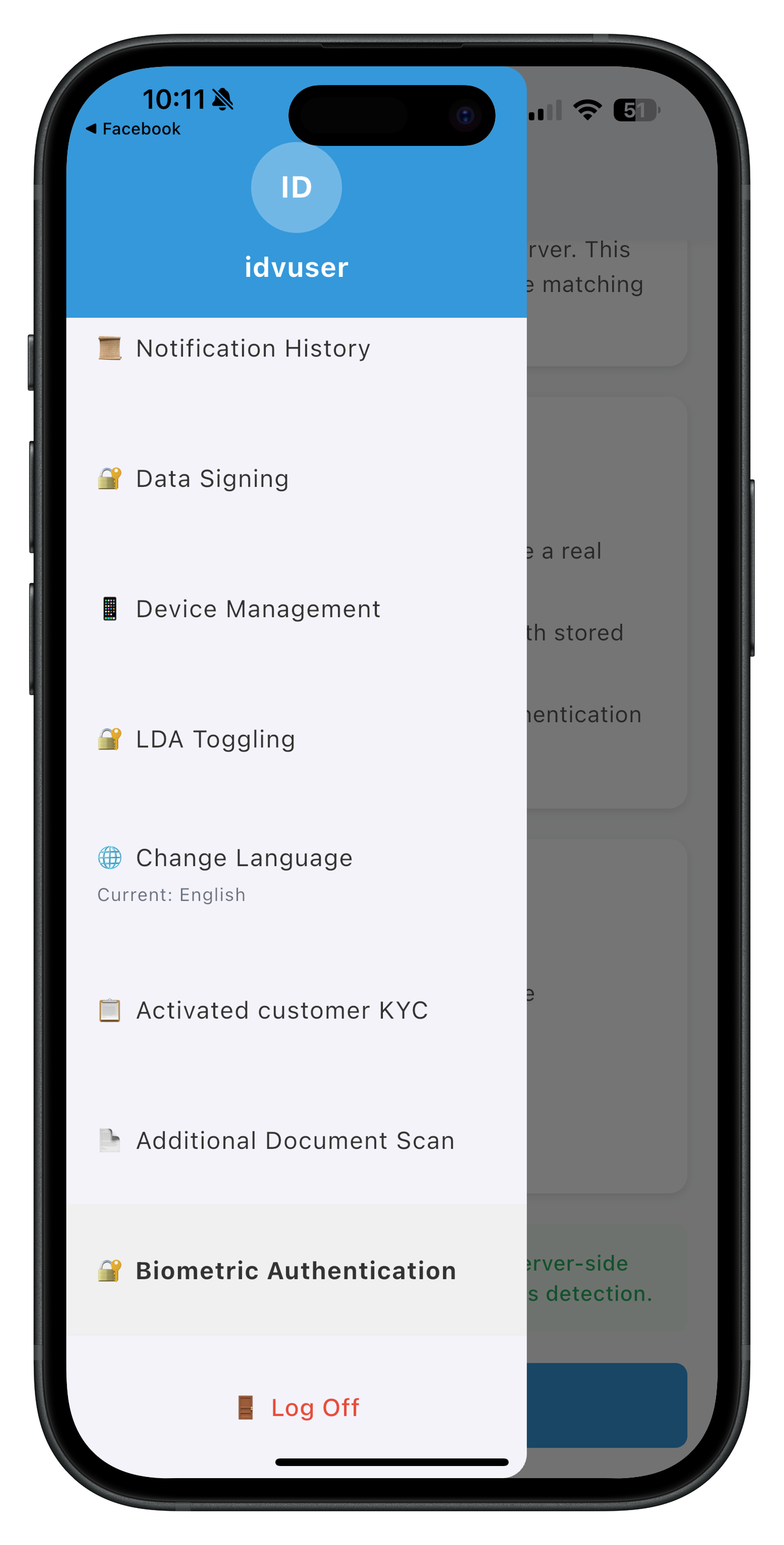
The drawer menu includes a new "🔐 Biometric Authentication" menu item that navigates to the ServerBiometricAuthenticationScreen.
IDV Workflow and Challenge Mode Values
For post-login server biometric authentication, you'll use these specific values:
Parameter | Value | Description |
idvWorkflow |
| Selfie capture for server biometric authentication |
challengeMode |
| Server biometric authentication result event |
Status Codes |
| Template exists / No template |
Comparison with Other IDV Flows:
Aspect | KYC Flow | Additional Document Scan | Server Biometric Auth |
Workflow | 6 | 7 | 8 |
Challenge Mode | 9 | 10 | 25 |
Template Check | No | No | Yes (required) |
Document Scan | Yes | Yes | No |
Selfie Capture | Yes | No | Yes |
Biometric Consent | Yes | No | No |
Template Creation | Yes (new) | No | No (uses existing) |
Entry Point | ActivatedCustomerKYCScreen | AdditionalDocumentScanScreen | ServerBiometricAuthenticationScreen |
API | initiateActivatedCustomerKYC | initiateIDVAdditionalDocumentScan | initiateIDVServerBiometricAuthentication and checkIDVUserBiometricTemplateStatus |
Result Event | onActivatedCustomerKYCResponse | onIDVAdditionalDocumentScan | onIDVServerBiometricAuthenticationResult |
Before You Begin
Before starting this codelab, ensure you meet these requirements:
1. Previous Codelabs Completed
- ✅ REL-ID Initialization Flow Codelab - Understand SDK initialization
- ✅ REL-ID IDV MFA Activation & Login Flow Codelab - Complete MFA and login implementation
- Biometric template on server: User must have completed KYC flow or biometric opt-in
2. Development Environment
- Flutter SDK 3.10.3 or higher installed
- Dart 3.0 or higher
- Android Studio or VS Code with Flutter extensions
- iOS: Xcode 14+ (for iOS development)
- Android: Android SDK with API 21+ support
# Verify Flutter installation
flutter doctor

# Check Flutter version
flutter --version
3. REL-ID SDK Credentials
- REL-ID account with IDV permissions enabled
- Connection profile (agent_info.json) from REL-ID Developer Portal
- Server biometric authentication enabled on your REL-ID account
Get the Code from GitHub
Clone or download the complete sample application:
# Clone the repository
git clone https://github.com/uniken-team/relid-codelab-flutter.git

# Navigate to the server biometric authentication folder
cd relid-codelab-flutter/relid-IDV-post-login-server-biometric-authentication

# Install dependencies
flutter pub get
Project Structure
The server biometric authentication implementation follows this structure:
lib/
├── tutorial/
│   ├── navigation/
│   │   └── app_router.dart                       # GoRouter with server biometric route
│   └── screens/
│       ├── components/
│       │   ├── drawer_content.dart               # Drawer menu with Biometric Authentication item
│       │   ├── status_banner.dart                # Success/error banners
│       │   └── custom_button.dart                # Reusable button with loading states
│       ├── mfa/
│       │   └── dashboard_screen.dart             # Main dashboard
│       └── idv/
│           ├── server_biometric_authentication/  # 🆕 New screen
│           │   └── server_biometric_authentication_screen.dart
│           └── idv_selfie_start_screen.dart      # Reused from MFA flow
└── uniken/
    ├── providers/
    │   └── idv/
    │       └── sdk_idv_event_provider.dart       # 🆕 Provider-level event handlers
    ├── services/
    │   └── idv/
    │       ├── rdna_idv_service.dart             # 🆕 Template check & auth APIs
    │       └── rdna_idv_event_manager.dart       # 🆕 Event listener management
    └── cp/
        └── agent_info.json                       # Connection profile
IDV Assets Configuration
The project uses the Aware FaceCapture library for biometric authentication.
Required Assets:
- Aware FaceCapture Library - Embedded in rdna_client plugin for liveness detection
NOT Required:
- ❌ Regula db.dat (document recognition database)
- ❌ Regula certificates (ICAO PKD certificates)
- ❌ Regula license files
Overview
The IDV service layer provides two critical APIs for server biometric authentication:
- Template Status Check API (
checkIDVUserBiometricTemplateStatus) - Server Biometric Authentication Initiation API (
initiateIDVServerBiometricAuthentication)
These APIs follow the Flutter plugin pattern where:
- Synchronous response validates request acceptance
- Asynchronous events deliver actual results
Implement Template Status Check API
The template status check API verifies if a user has a biometric template stored on the server before allowing authentication.
Create or update
lib/uniken/services/idv/rdna_idv_service.dart
:
import 'dart:convert';
import 'package:rdna_client/rdna_client.dart';
import 'package:rdna_client/rdna_struct.dart';
import 'rdna_idv_event_manager.dart';

/// REL-ID IDV SDK Service
///
/// Provides a singleton service for Identity Verification (IDV) related SDK operations.
class RdnaIDVService {
  static RdnaIDVService? _instance;
  final RdnaClient _rdnaClient;
  final RdnaIDVEventManager _eventManager;

  RdnaIDVService._(this._rdnaClient, this._eventManager) {
    print('RdnaIDVService - Service initialized');
  }

  /// Gets the singleton instance of RdnaIDVService
  static RdnaIDVService getInstance() {
    if (_instance == null) {
      print('RdnaIDVService - Initializing service');
      final rdnaClient = RdnaClient();
      final eventManager = RdnaIDVEventManager.getInstance(rdnaClient);
      _instance = RdnaIDVService._(rdnaClient, eventManager);
    }
    return _instance!;
  }

  /// Gets the IDV event manager instance
  RdnaIDVEventManager getEventManager() {
    return _eventManager;
  }

  /// Checks if user biometric template exists on server
  ///
  /// This API checks template availability before allowing server biometric authentication.
  /// The synchronous response validates request acceptance, while the actual result
  /// comes via onIDVCheckUserBiometricTemplateStatus event.
  ///
  /// ## Response Validation Logic
  /// 1. Check error.longErrorCode: 0 = success, > 0 = error
  /// 2. Wait for onIDVCheckUserBiometricTemplateStatus event with status code
  /// 3. Status code 100 = template exists (enable authentication)
  /// 4. Status code 600 = no template (disable authentication, show message)
  ///
  /// ## Returns
  /// RDNASyncResponse with sync validation (error.longErrorCode == 0 means accepted)
  ///
  /// ## Example
  /// ```dart
  /// final rdnaIDVService = RdnaIDVService.getInstance();
  /// final response = await rdnaIDVService.checkIDVUserBiometricTemplateStatus();
  ///
  /// if (response.error?.longErrorCode == 0) {
  ///   print('Template check initiated, wait for event');
  ///   // Event handler will receive onIDVCheckUserBiometricTemplateStatus event
  /// } else {
  ///   print('Error: ${response.error?.errorString}');
  /// }
  /// ```
  Future<RDNASyncResponse> checkIDVUserBiometricTemplateStatus() async {
    print('RdnaIDVService - Checking user biometric template status');

    final responseStr = await _rdnaClient.checkIDVUserBiometricTemplateStatus();
    final responseJson = jsonDecode(responseStr) as Map<String, dynamic>;
    final response = RDNASyncResponse.fromJson(responseJson);

    print('RdnaIDVService - CheckIDVUserBiometricTemplateStatus sync response received');
    return response;
  }
}
Implement Server Biometric Authentication Initiation API
The server biometric authentication API initiates the authentication workflow for users with existing templates.
Add to
lib/uniken/services/idv/rdna_idv_service.dart
:
  /// Initiates IDV server biometric authentication workflow
  ///
  /// Starts post-login biometric authentication using server-stored biometric template.
  /// This API should only be called after verifying template exists (status code 100).
  ///
  /// ## Response Validation Logic
  /// 1. Check error.longErrorCode: 0 = success, > 0 = error
  /// 2. SDK automatically triggers getIDVSelfieProcessStartConfirmation event
  /// 3. After selfie capture, onIDVServerBiometricAuthenticationResult event fires with audit data
  ///
  /// ## Parameters
  /// - `reason`: Authentication reason (use "Server Biometric Authentication" as standard)
  ///
  /// ## Returns
  /// RDNASyncResponse with sync validation (error.longErrorCode == 0 means accepted)
  ///
  /// ## Example
  /// ```dart
  /// final rdnaIDVService = RdnaIDVService.getInstance();
  /// final reason = 'Server Biometric Authentication';
  /// final response = await rdnaIDVService.initiateIDVServerBiometricAuthentication(reason);
  ///
  /// if (response.error?.longErrorCode == 0) {
  ///   print('Authentication initiated, wait for selfie capture event');
  ///   // SDK will trigger getIDVSelfieProcessStartConfirmation event
  /// } else {
  ///   print('Error: ${response.error?.errorString}');
  /// }
  /// ```
  Future<RDNASyncResponse> initiateIDVServerBiometricAuthentication(
    String reason
  ) async {
    print('RdnaIDVService - Initiating IDV server biometric authentication with reason: $reason');

    final responseStr = await _rdnaClient.initiateIDVServerBiometricAuthentication(reason);
    final responseJson = jsonDecode(responseStr) as Map<String, dynamic>;
    final response = RDNASyncResponse.fromJson(responseJson);

    print('RdnaIDVService - InitiateIDVServerBiometricAuthentication sync response received');
    return response;
  }

  /// Sets selfie process start confirmation
  ///
  /// This API must be invoked in response to getIDVSelfieProcessStartConfirmation event.
  /// Initiates or cancels the selfie capture process during IDV workflows.
  ///
  /// ## Parameters
  /// - `isConfirm`: true to start selfie capture, false to cancel
  /// - `idvWorkflow`: IDV workflow enum value (8 for server biometric auth)
  /// - `useBackCamera`: true for back camera, false for front camera
  ///
  /// ## Returns
  /// String response from the plugin
  Future<String> setIDVSelfieProcessStartConfirmation(
    bool isConfirm,
    int idvWorkflow,
    bool useBackCamera,
  ) async {
    print('RdnaIDVService - Setting selfie process start confirmation:');
    print('  isConfirm: $isConfirm');
    print('  idvWorkflow: $idvWorkflow');
    print('  useBackCamera: $useBackCamera');

    final response = await _rdnaClient.setIDVSelfieProcessStartConfirmation(
      isConfirm,
      idvWorkflow,
      useBackCamera,
    );

    print('RdnaIDVService - SetIDVSelfieProcessStartConfirmation response received');
    return response;
  }
Key Points
- ✅ Template Check First: Always verify template exists before authentication
- ✅ Status Code 100: Template exists, enable authentication button
- ✅ Status Code 600: No template, disable button and show message
- ✅ Workflow 8: Server biometric authentication uses workflow 8 (selfie capture)
- ✅ Challenge Mode 25: Authentication result event uses challenge mode 25
- ✅ Standard Reason: Use "Server Biometric Authentication" as the reason string
- ✅ Sync vs Async: Sync response validates request, async event delivers result
Overview
The IDV Event Manager handles two critical events for server biometric authentication:
- onIDVCheckUserBiometricTemplateStatus - Template availability result
- onIDVServerBiometricAuthenticationResult - Authentication result with audit data
These events use the eventify package and provide raw JSON strings that must be parsed.
Implement Event Manager Base
Create
lib/uniken/services/idv/rdna_idv_event_manager.dart
:
import 'package:eventify/eventify.dart';
import 'package:rdna_client/rdna_client.dart';

/// Type definitions for IDV event callbacks
typedef RDNAIDVCheckUserBiometricTemplateStatusCallback = void Function(String);
typedef RDNAIDVServerBiometricAuthenticationResultCallback = void Function(String);
typedef RDNAIDVGetSelfieProcessStartConfirmationCallback = void Function(String);

/// REL-ID IDV SDK Event Manager
///
/// Manages Identity Verification (IDV) related SDK events in a centralized manner.
class RdnaIDVEventManager {
  static RdnaIDVEventManager? _instance;
  final RdnaClient _rdnaClient;
  final List<Listener?> _listeners = [];

  // Event Handlers
  RDNAIDVCheckUserBiometricTemplateStatusCallback? _checkUserBiometricTemplateStatusHandler;
  RDNAIDVServerBiometricAuthenticationResultCallback? _serverBiometricAuthenticationResultHandler;
  RDNAIDVGetSelfieProcessStartConfirmationCallback? _getSelfieProcessStartConfirmationHandler;

  RdnaIDVEventManager._(this._rdnaClient) {
    print('RdnaIDVEventManager - Initializing event manager');
    _registerEventListeners();
  }

  /// Gets the singleton instance
  static RdnaIDVEventManager getInstance(RdnaClient rdnaClient) {
    _instance ??= RdnaIDVEventManager._(rdnaClient);
    return _instance!;
  }

  /// Registers event listeners for IDV events
  void _registerEventListeners() {
    print('RdnaIDVEventManager - Registering IDV event listeners');

    // Template Status Check Event
    _listeners.add(
      _rdnaClient.on(
        RdnaClient.onIDVCheckUserBiometricTemplateStatus,
        _onCheckUserBiometricTemplateStatus,
      ),
    );

    // Server Biometric Authentication Result Event
    _listeners.add(
      _rdnaClient.on(
        RdnaClient.onIDVServerBiometricAuthenticationResult,
        _onServerBiometricAuthenticationResult,
      ),
    );

    // Selfie Process Start Confirmation Event
    _listeners.add(
      _rdnaClient.on(
        RdnaClient.getIDVSelfieProcessStartConfirmation,
        _onGetSelfieProcessStartConfirmation,
      ),
    );

    print('RdnaIDVEventManager - IDV event listeners registered');
  }
}
Implement Template Status Check Event Handler
Add to
rdna_idv_event_manager.dart
:
  /// Handles check user biometric template status event
  void _onCheckUserBiometricTemplateStatus(EventArgs? args, Object? context) {
    print('RdnaIDVEventManager - Check user biometric template status event received');

    try {
      final jsonData = args?.data as String?;
      if (jsonData == null) {
        print('RdnaIDVEventManager - No data in event');
        return;
      }

      print('RdnaIDVEventManager - Event data received, length: ${jsonData.length}');

      if (_checkUserBiometricTemplateStatusHandler != null) {
        _checkUserBiometricTemplateStatusHandler!(jsonData);
      } else {
        print('RdnaIDVEventManager - No handler registered for template status check');
      }
    } catch (error) {
      print('RdnaIDVEventManager - Failed to process template status event: $error');
    }
  }

  /// Sets the check user biometric template status handler
  void setCheckUserBiometricTemplateStatusHandler(
    RDNAIDVCheckUserBiometricTemplateStatusCallback? handler
  ) {
    print('RdnaIDVEventManager - Setting check user biometric template status handler');
    _checkUserBiometricTemplateStatusHandler = handler;
  }
Implement Server Biometric Authentication Result Event Handler
Add to
rdna_idv_event_manager.dart
:
  /// Handles server biometric authentication result event
  void _onServerBiometricAuthenticationResult(EventArgs? args, Object? context) {
    print('RdnaIDVEventManager - Server biometric authentication result event received');

    try {
      final jsonData = args?.data as String?;
      if (jsonData == null) {
        print('RdnaIDVEventManager - No data in event');
        return;
      }

      print('RdnaIDVEventManager - Event data received, length: ${jsonData.length}');

      if (_serverBiometricAuthenticationResultHandler != null) {
        _serverBiometricAuthenticationResultHandler!(jsonData);
      } else {
        print('RdnaIDVEventManager - No handler registered for authentication result');
      }
    } catch (error) {
      print('RdnaIDVEventManager - Failed to process authentication result: $error');
    }
  }

  /// Sets the server biometric authentication result handler
  void setServerBiometricAuthenticationResultHandler(
    RDNAIDVServerBiometricAuthenticationResultCallback? handler
  ) {
    print('RdnaIDVEventManager - Setting server biometric authentication result handler');
    _serverBiometricAuthenticationResultHandler = handler;
  }
Implement Selfie Process Start Confirmation Event Handler
Add to
rdna_idv_event_manager.dart
:
  /// Handles selfie process start confirmation event
  void _onGetSelfieProcessStartConfirmation(EventArgs? args, Object? context) {
    print('RdnaIDVEventManager - Selfie process start confirmation event received');

    try {
      final jsonData = args?.data as String?;
      if (jsonData == null) {
        print('RdnaIDVEventManager - No data in event');
        return;
      }

      print('RdnaIDVEventManager - Event data received');

      if (_getSelfieProcessStartConfirmationHandler != null) {
        _getSelfieProcessStartConfirmationHandler!(jsonData);
      } else {
        print('RdnaIDVEventManager - No handler registered for selfie start confirmation');
      }
    } catch (error) {
      print('RdnaIDVEventManager - Failed to process selfie start event: $error');
    }
  }

  /// Sets the selfie process start confirmation handler
  void setGetSelfieProcessStartConfirmationHandler(
    RDNAIDVGetSelfieProcessStartConfirmationCallback? handler
  ) {
    print('RdnaIDVEventManager - Setting selfie process start confirmation handler');
    _getSelfieProcessStartConfirmationHandler = handler;
  }

  /// Cleans up event listeners
  void cleanup() {
    print('RdnaIDVEventManager - Cleaning up event listeners');
    for (var listener in _listeners) {
      listener?.cancel();
    }
    _listeners.clear();
  }
Key Points
- ✅ Singleton Pattern: Event manager is a singleton to ensure consistent event handling
- ✅ Raw JSON: Events provide raw JSON strings - parse them in your handlers
- ✅ Handler Registration: Register handlers in providers or screens
- ✅ Cleanup: Always cleanup listeners when disposing
- ✅ Challenge Mode 25: Authentication result event includes challengeMode: 25
- ✅ Status Codes: Template check event includes status codes (100/600)
Overview
The provider-based architecture uses Riverpod StateProvider for cross-screen event handling. This ensures events are received even when screens are not active (e.g., during native selfie capture).
Implement IDV Event Provider
Create or update
lib/uniken/providers/idv/sdk_idv_event_provider.dart
:
import 'dart:convert';
import 'package:flutter/material.dart';
import 'package:flutter_riverpod/flutter_riverpod.dart';
import '../../services/idv/rdna_idv_service.dart';
import '../../../tutorial/navigation/app_router.dart';

/// Provider for server biometric authentication response
///
/// Stores the onIDVServerBiometricAuthenticationResult event response data.
/// The ServerBiometricAuthenticationScreen watches this provider to show success/error dialog.
final serverBiometricAuthenticationResponseProvider = StateProvider<String?>((ref) => null);

/// SDK IDV Event Provider Widget
///
/// Wraps the app and handles global IDV SDK events.
class SDKIDVEventProviderWidget extends ConsumerStatefulWidget {
  final Widget child;

  const SDKIDVEventProviderWidget({
    super.key,
    required this.child,
  });

  @override
  ConsumerState<SDKIDVEventProviderWidget> createState() =>
      _SDKIDVEventProviderWidgetState();
}

class _SDKIDVEventProviderWidgetState
    extends ConsumerState<SDKIDVEventProviderWidget> {
  @override
  void initState() {
    super.initState();
    _setupIDVEventHandlers();
  }

  /// Set up IDV Event Subscriptions on mount
  void _setupIDVEventHandlers() {
    print('SDKIDVEventProvider - Registering IDV event handlers');

    final rdnaIDVService = RdnaIDVService.getInstance();
    final eventManager = rdnaIDVService.getEventManager();

    // Register selfie capture event handler
    eventManager.setGetSelfieProcessStartConfirmationHandler(
        _handleGetSelfieProcessStartConfirmation);

    // Register server biometric authentication event handler
    eventManager.setServerBiometricAuthenticationResultHandler(
        _handleServerBiometricAuthenticationResponse);

    print('SDKIDVEventProvider - IDV event handlers registered successfully');
  }

  /// Handles selfie process start confirmation event
  void _handleGetSelfieProcessStartConfirmation(String jsonData) {
    print('SDKIDVEventProvider - Selfie process start confirmation event received');

    try {
      final data = jsonDecode(jsonData) as Map<String, dynamic>;
      final idvWorkflow = data['idvWorkFlow'] as int?;
      final eventData = jsonData;

      print('SDKIDVEventProvider - idvWorkFlow: $idvWorkflow');

      if (idvWorkflow == 8) {
        // Workflow 8: Server biometric authentication selfie capture
        print('SDKIDVEventProvider - Navigating to IDVSelfieStart screen for server biometric auth');

        appRouter.goNamed(
          'IDVSelfieProcessStart',
          extra: {
            'idvWorkflow': idvWorkflow,
            'eventData': eventData,
          },
        );
      }
    } catch (error) {
      print('SDKIDVEventProvider - Failed to parse selfie start event: $error');
    }
  }

  /// Handles server biometric authentication response
  ///
  /// This provider-level handler receives the event, stores it in a StateProvider,
  /// and navigates back to the ServerBiometricAuthentication screen.
  void _handleServerBiometricAuthenticationResponse(String jsonData) {
    print('SDKIDVEventProvider - Server biometric authentication response event received');

    // Store response in provider so screen can access it
    ref.read(serverBiometricAuthenticationResponseProvider.notifier).state = jsonData;

    // Small delay to allow state update to propagate
    Future.delayed(const Duration(milliseconds: 100), () {
      // Navigate back to ServerBiometricAuthentication screen
      appRouter.goNamed('ServerBiometricAuthentication');
    });
  }

  @override
  void dispose() {
    print('SDKIDVEventProvider - Cleaning up IDV event handlers');

    final rdnaIDVService = RdnaIDVService.getInstance();
    final eventManager = rdnaIDVService.getEventManager();

    // Clear event handlers
    eventManager.setGetSelfieProcessStartConfirmationHandler(null);
    eventManager.setServerBiometricAuthenticationResultHandler(null);

    super.dispose();
  }

  @override
  Widget build(BuildContext context) {
    return widget.child;
  }
}
Why Provider-Based Event Handling?
The provider-based architecture solves a critical problem in IDV workflows:
Problem: During native selfie capture, the Flutter screen loses focus. If event handlers are registered only in the screen's initState, they may not receive the authentication result event when native UI is on top.
Solution: Register event handlers at the provider level (app-wide), store results in StateProvider, and let screens watch the provider. This ensures:
- ✅ Events are received even when screen is not active
- ✅ Screen automatically rebuilds when provider state changes (
ref.watch) - ✅ Navigation can happen from provider before showing dialogs
- ✅ Multiple screens can react to the same event if needed
Key Points
- ✅ Provider-Level Handlers: Register at app level, not screen level
- ✅ StateProvider: Use for cross-screen communication
- ✅ ref.watch(): Screen rebuilds automatically when provider changes
- ✅ Navigate First: Navigate back to screen before showing dialog
- ✅ 100ms Delay: Small delay ensures state propagates before navigation
Overview
The ServerBiometricAuthenticationScreen is the entry point for post-login server biometric authentication. It implements:
- Automatic template status check on mount
- Button state management based on template availability
- Authentication initiation when template exists
- Result dialog display after authentication completes
Screen UI Preview
Biometric Authentication Screen |
Biometric Authentication Screen |
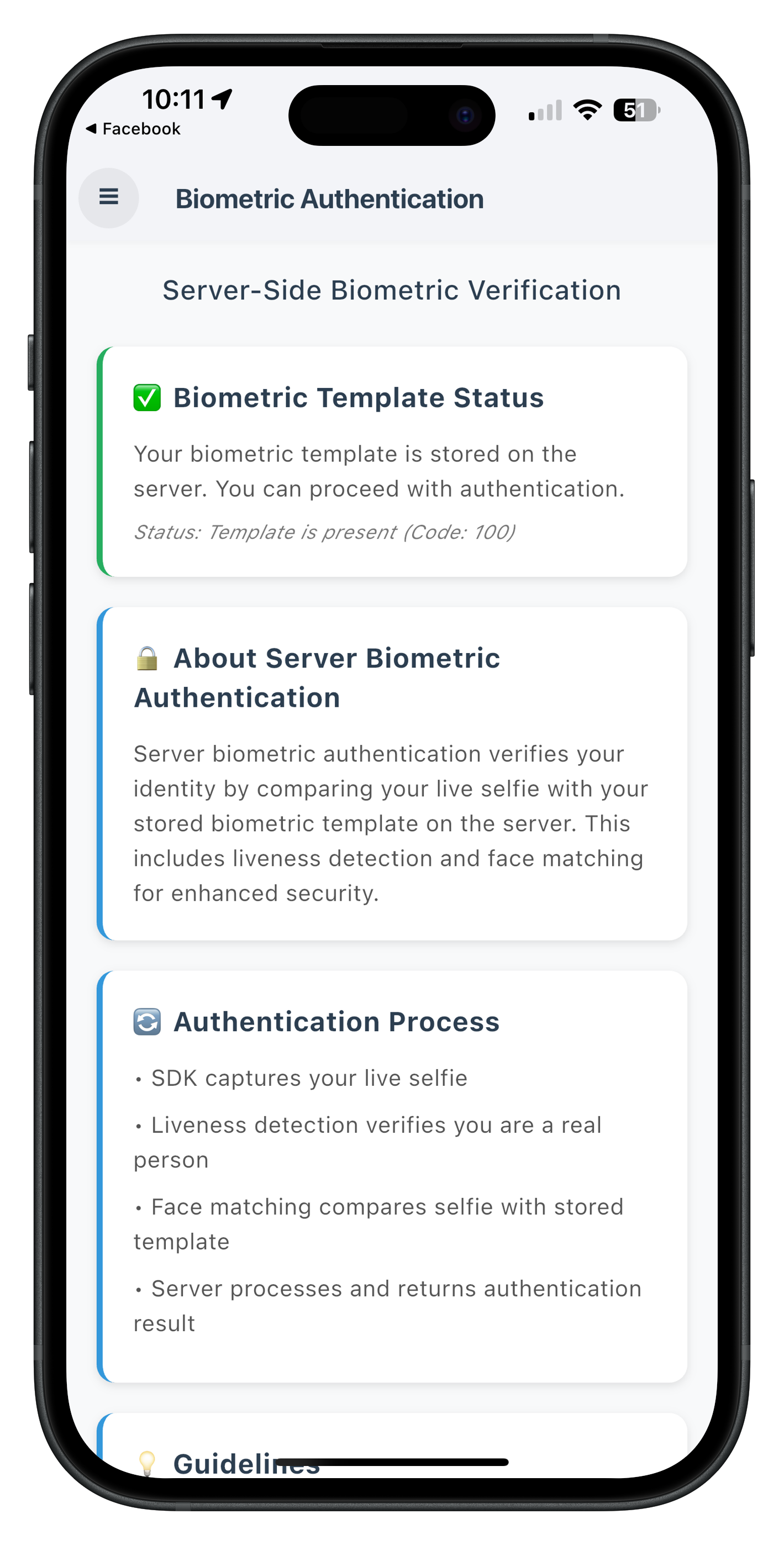
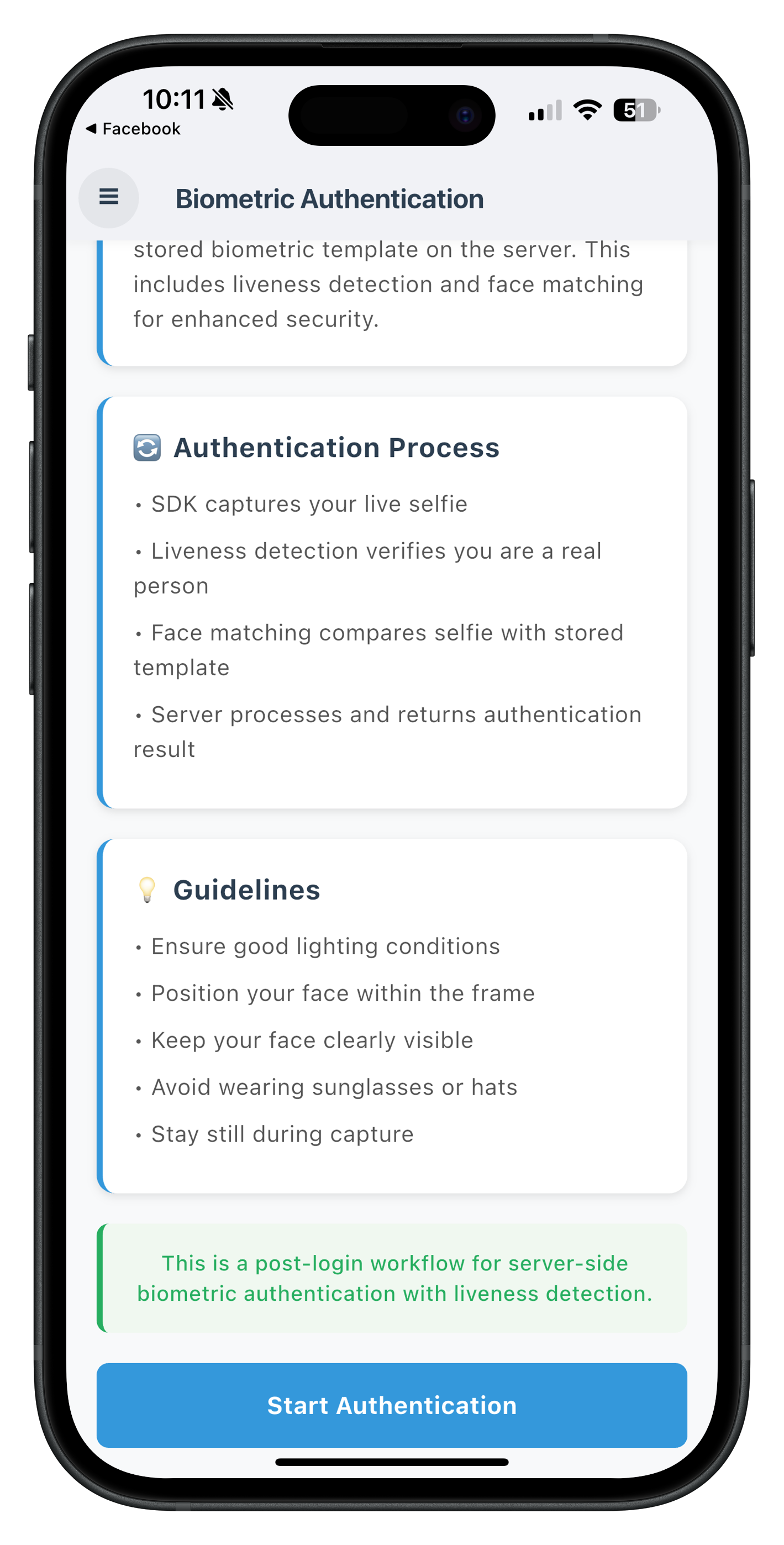
When the template exists (status code 100), a green banner displays "✅ Template Available" and the "Start Authentication" button is enabled (blue).
State 2: No Template (Status Code 600) - Button Disabled
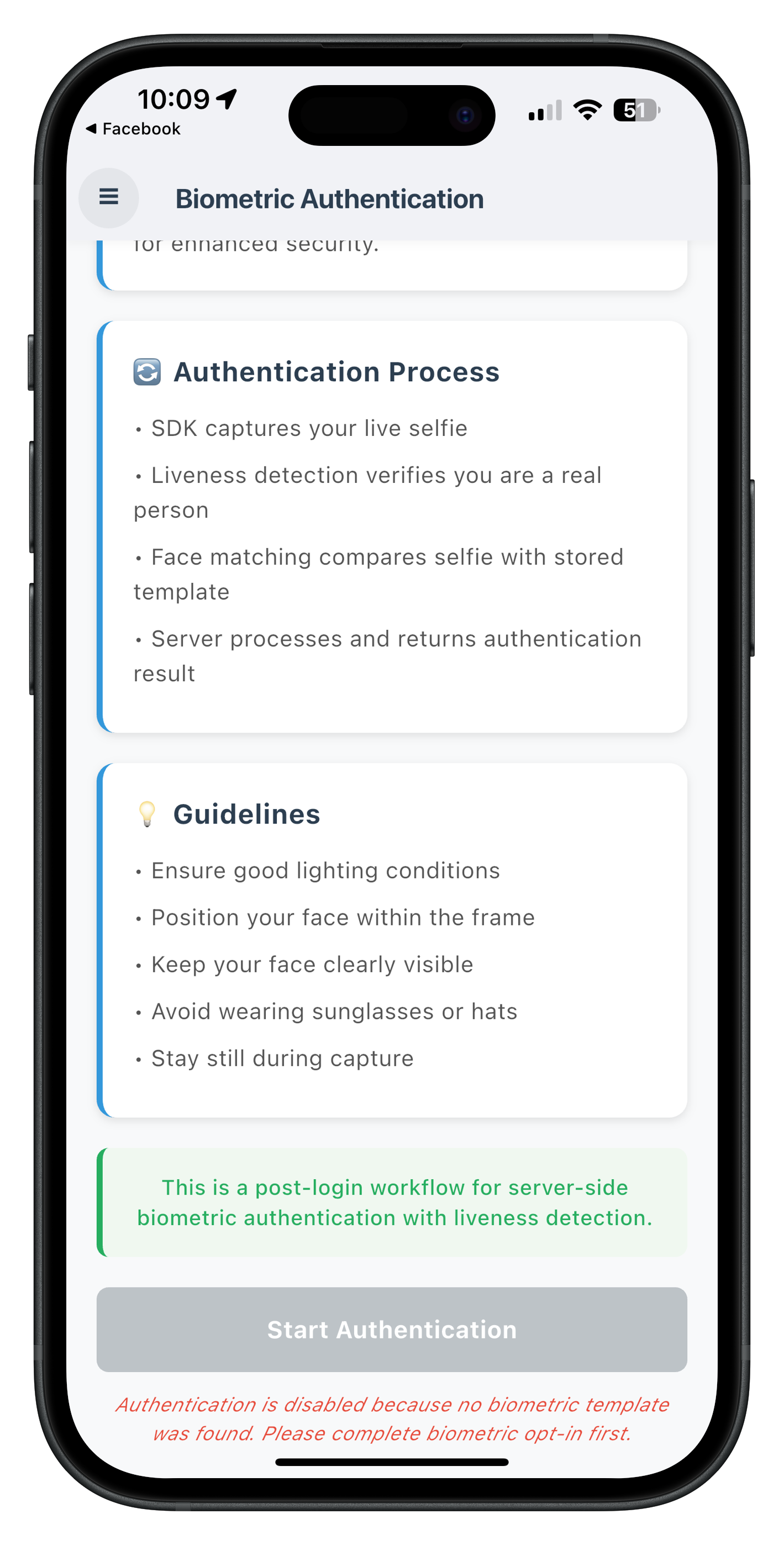
When no template is found (status code 600), an orange banner displays "⚠️ No Template Found" with help text, and the "Start Authentication" button is disabled (grey).
Implement Screen Structure
Create
lib/tutorial/screens/idv/server_biometric_authentication/server_biometric_authentication_screen.dart
:
import 'dart:convert';
import 'package:flutter/material.dart';
import 'package:flutter_riverpod/flutter_riverpod.dart';
import 'package:go_router/go_router.dart';
import 'package:rdna_client/rdna_struct.dart';
import '../../../../uniken/services/idv/rdna_idv_service.dart';
import '../../../../uniken/providers/idv/sdk_idv_event_provider.dart';
import '../../components/drawer_content.dart';
import '../../components/custom_button.dart';
import '../../components/status_banner.dart';

/// Server Biometric Authentication Screen
///
/// Entry point for post-login server biometric authentication with template check.
class ServerBiometricAuthenticationScreen extends ConsumerStatefulWidget {
  final RDNAUserLoggedIn? sessionData;

  const ServerBiometricAuthenticationScreen({
    super.key,
    this.sessionData,
  });

  @override
  ConsumerState<ServerBiometricAuthenticationScreen> createState() =>
      _ServerBiometricAuthenticationScreenState();
}

class _ServerBiometricAuthenticationScreenState
    extends ConsumerState<ServerBiometricAuthenticationScreen> {
  // State variables
  bool _isCheckingStatus = false;
  bool _isAuthenticating = false;
  bool _templateExists = false;
  int _templateStatusCode = 0;
  String _templateStatusMessage = '';

  @override
  void initState() {
    super.initState();
    print('ServerBiometricAuthenticationScreen - Component mounted');

    // Check template status on mount
    WidgetsBinding.instance.addPostFrameCallback((_) {
      _checkTemplateStatus();
    });
  }

  /// Checks if user biometric template exists on server
  Future<void> _checkTemplateStatus() async {
    print('ServerBiometricAuthenticationScreen - Checking biometric template status');

    setState(() {
      _isCheckingStatus = true;
    });

    try {
      final rdnaIDVService = RdnaIDVService.getInstance();
      final response = await rdnaIDVService.checkIDVUserBiometricTemplateStatus();

      if (response.error?.longErrorCode == 0) {
        print('ServerBiometricAuthenticationScreen - Template check initiated');
        // The actual result will come via onIDVCheckUserBiometricTemplateStatus event
        // which is handled by the provider-level handler
      } else {
        setState(() {
          _isCheckingStatus = false;
          _templateStatusMessage = 'Error: ${response.error?.errorString}';
        });

        _showErrorDialog(
          'Template Status Check Error',
          'Failed to check template status: ${response.error?.errorString}',
        );
      }
    } catch (error) {
      print('ServerBiometricAuthenticationScreen - Error: $error');

      setState(() {
        _isCheckingStatus = false;
        _templateStatusMessage = 'Error checking template status';
      });

      _showErrorDialog(
        'Template Status Check Error',
        'Failed to check template status',
      );
    }
  }

  @override
  Widget build(BuildContext context) {
    // Watch for authentication response from provider
    ref.listen<String?>(
      serverBiometricAuthenticationResponseProvider,
      (previous, next) {
        if (next != null) {
          _handleServerBiometricAuthenticationResultResponse(next);
          // Clear the provider state after handling
          Future.microtask(() {
            ref.read(serverBiometricAuthenticationResponseProvider.notifier).state = null;
          });
        }
      },
    );

    return Scaffold(
      appBar: AppBar(
        title: const Text('Biometric Authentication'),
        backgroundColor: Colors.blue,
      ),
      drawer: DrawerContent(
        sessionData: widget.sessionData,
        currentRoute: 'ServerBiometricAuthentication',
      ),
      body: _buildBody(),
    );
  }

  Widget _buildBody() {
    return SingleChildScrollView(
      padding: const EdgeInsets.all(16),
      child: Column(
        crossAxisAlignment: CrossAxisAlignment.stretch,
        children: [
          const Text(
            'Server Biometric Authentication',
            style: TextStyle(
              fontSize: 24,
              fontWeight: FontWeight.bold,
            ),
          ),
          const SizedBox(height: 20),
          const StatusBanner(
            type: StatusBannerType.success,
            message: 'This is a post-login workflow for server-side biometric authentication with liveness detection.',
          ),
          const SizedBox(height: 20),
          _buildTemplateStatusSection(),
          const SizedBox(height: 30),
          _buildAuthenticationButton(),
        ],
      ),
    );
  }

  Widget _buildTemplateStatusSection() {
    if (_isCheckingStatus) {
      return const Card(
        child: Padding(
          padding: EdgeInsets.all(16),
          child: Row(
            children: [
              SizedBox(
                width: 20,
                height: 20,
                child: CircularProgressIndicator(strokeWidth: 2),
              ),
              SizedBox(width: 12),
              Text('Checking template status...'),
            ],
          ),
        ),
      );
    }

    if (_templateStatusCode == 100) {
      return Card(
        color: Colors.green.shade50,
        child: Padding(
          padding: const EdgeInsets.all(16),
          child: Column(
            crossAxisAlignment: CrossAxisAlignment.start,
            children: [
              const Row(
                children: [
                  Icon(Icons.check_circle, color: Colors.green),
                  SizedBox(width: 8),
                  Text(
                    'Template Available',
                    style: TextStyle(
                      fontSize: 16,
                      fontWeight: FontWeight.bold,
                      color: Colors.green,
                    ),
                  ),
                ],
              ),
              const SizedBox(height: 8),
              Text(_templateStatusMessage),
            ],
          ),
        ),
      );
    } else if (_templateStatusCode == 600) {
      return Card(
        color: Colors.orange.shade50,
        child: Padding(
          padding: const EdgeInsets.all(16),
          child: Column(
            crossAxisAlignment: CrossAxisAlignment.start,
            children: [
              const Row(
                children: [
                  Icon(Icons.warning, color: Colors.orange),
                  SizedBox(width: 8),
                  Text(
                    'No Template Found',
                    style: TextStyle(
                      fontSize: 16,
                      fontWeight: FontWeight.bold,
                      color: Colors.orange,
                    ),
                  ),
                ],
              ),
              const SizedBox(height: 8),
              Text(_templateStatusMessage),
              const SizedBox(height: 8),
              const Text(
                'Please complete biometric opt-in first.',
                style: TextStyle(fontStyle: FontStyle.italic),
              ),
            ],
          ),
        ),
      );
    }

    return const SizedBox.shrink();
  }

  Widget _buildAuthenticationButton() {
    final isEnabled = _templateExists && !_isCheckingStatus && !_isAuthenticating;

    return CustomButton(
      text: 'Start Authentication',
      onPressed: isEnabled ? _handleStartAuthentication : null,
      isLoading: _isAuthenticating,
    );
  }

  /// Initiates server biometric authentication workflow
  Future<void> _handleStartAuthentication() async {
    print('ServerBiometricAuthenticationScreen - Starting authentication');

    setState(() {
      _isAuthenticating = true;
    });

    try {
      final reason = 'Server Biometric Authentication';
      final rdnaIDVService = RdnaIDVService.getInstance();
      final response = await rdnaIDVService.initiateIDVServerBiometricAuthentication(reason);

      if (response.error?.longErrorCode == 0) {
        print('ServerBiometricAuthenticationScreen - Authentication initiated');
        // The result will come via onIDVServerBiometricAuthenticationResult event
      } else {
        setState(() {
          _isAuthenticating = false;
        });

        _showErrorDialog(
          'Authentication Error',
          'Failed to initiate authentication: ${response.error?.errorString}',
        );
      }
    } catch (error) {
      print('ServerBiometricAuthenticationScreen - Error: $error');

      setState(() {
        _isAuthenticating = false;
      });

      _showErrorDialog(
        'Authentication Error',
        'Failed to initiate authentication',
      );
    }
  }

  /// Handles server biometric authentication result event
  void _handleServerBiometricAuthenticationResultResponse(String jsonData) {
    print('ServerBiometricAuthenticationScreen - Authentication result received');

    // Reset button state
    setState(() {
      _isAuthenticating = false;
    });

    try {
      final data = jsonDecode(jsonData) as Map<String, dynamic>;
      final errorCode = data['error']?['longErrorCode'] as int?;
      final statusCode = data['status']?['statusCode'] as int?;

      // Small delay to ensure navigation completes before showing dialog
      Future.delayed(const Duration(milliseconds: 300), () {
        // First check: error code
        if (errorCode != null && errorCode != 0) {
          _showErrorDialog(
            'Authentication Error',
            '${data['error']?['errorString']}\n\nError Code: $errorCode',
          );
          return;
        }

        // Second check: status code
        if (statusCode != null && statusCode != 0) {
          _showErrorDialog(
            'Authentication Failed',
            'Status: ${data['status']?['statusMessage']}\n\nStatus Code: $statusCode',
          );
          return;
        }

        // Success - parse idvResponse to check audit status
        final idvResponse = data['idvResponse'] as String?;
        if (idvResponse != null) {
          final idvResponseObj = jsonDecode(idvResponse) as Map<String, dynamic>;
          final auditStatus = idvResponseObj['idv_audit_info']?['status'] as String?;
          final orchestrationUseCase = idvResponseObj['idv_audit_info']?['orchestration_use_case'] as String?;
          final transactionId = idvResponseObj['idv_audit_info']?['idv_audit_transaction_id'] as String?;
          final attemptsLeft = idvResponseObj['attempts_left'] as int?;

          if (auditStatus == 'SUCCESS') {
            _showSuccessDialog(
              '✅ Authentication Success',
              'Audit Status: $auditStatus\n\n'
              'Use Case: ${orchestrationUseCase ?? 'N/A'}\n'
              'Transaction ID: ${transactionId ?? 'N/A'}\n'
              'Attempts Left: $attemptsLeft',
            );
          } else {
            _showErrorDialog(
              '❌ Authentication Failed',
              'Audit Status: ${auditStatus ?? 'Unknown'}\n\n'
              'Use Case: ${orchestrationUseCase ?? 'N/A'}\n'
              'Transaction ID: ${transactionId ?? 'N/A'}\n'
              'Attempts Left: $attemptsLeft',
            );
          }
        }
      });
    } catch (error) {
      print('ServerBiometricAuthenticationScreen - Parse error: $error');
      Future.delayed(const Duration(milliseconds: 300), () {
        _showErrorDialog('Parse Error', 'Failed to parse authentication result');
      });
    }
  }

  void _showSuccessDialog(String title, String message) {
    showDialog(
      context: context,
      builder: (context) => AlertDialog(
        title: Text(title),
        content: Text(message),
        actions: [
          TextButton(
            onPressed: () {
              Navigator.of(context).pop();
              context.goNamed('dashboardScreen');
            },
            child: const Text('Back to Dashboard'),
          ),
        ],
      ),
    );
  }

  void _showErrorDialog(String title, String message) {
    showDialog(
      context: context,
      builder: (context) => AlertDialog(
        title: Text(title),
        content: Text(message),
        actions: [
          TextButton(
            onPressed: () => Navigator.of(context).pop(),
            child: const Text('OK'),
          ),
        ],
      ),
    );
  }
}
Selfie Process Start Screen
The selfie process start screen is reused from the MFA flow. When the user clicks "Start Selfie Capture", the screen calls:
final rdnaIDVService = RdnaIDVService.getInstance();
await rdnaIDVService.setIDVSelfieProcessStartConfirmation(
  true,  // isConfirm
  8,     // idvWorkflow (server biometric authentication)
  false, // useBackCamera (front camera for selfie)
);
The SDK then opens the native Aware FaceCapture camera for liveness detection.
Key Points
- ✅ Template Check First: Always check template status before enabling authentication
- ✅ Button State: Enable button only when template exists (status code 100)
- ✅ ref.listen(): Watch provider for authentication results
- ✅ Navigate-Back Pattern: Provider navigates back to screen before dialog
- ✅ 300ms Delay: Ensure navigation completes before showing dialog
- ✅ Audit Data: Parse idv_audit_info for SUCCESS/FAILURE status
Add Route to GoRouter
Update lib/tutorial/navigation/app_router.dart to include the server biometric authentication route:
import 'package:go_router/go_router.dart';
import 'package:rdna_client/rdna_struct.dart';
import '../screens/idv/server_biometric_authentication/server_biometric_authentication_screen.dart';
// ... other imports

final appRouter = GoRouter(
  initialLocation: '/',
  routes: [
    // ... other routes

    GoRoute(
      path: '/dashboard/server-biometric-authentication',
      name: 'ServerBiometricAuthentication',
      builder: (context, state) {
        final sessionData = state.extra as RDNAUserLoggedIn?;
        return ServerBiometricAuthenticationScreen(sessionData: sessionData);
      },
    ),

    GoRoute(
      path: '/idv-selfie-start',
      name: 'IDVSelfieProcessStart',
      builder: (context, state) {
        final params = state.extra as Map<String, dynamic>;
        return IDVSelfieStartScreen(
          idvWorkflow: params['idvWorkflow'] as int,
          eventData: params['eventData'] as String,
        );
      },
    ),
  ],
);
Add Menu Item to Drawer
Update lib/tutorial/screens/components/drawer_content.dart to add the Biometric Authentication menu item:
ListTile(
  leading: const Icon(Icons.fingerprint),
  title: const Text('Biometric Authentication'),
  selected: currentRoute == 'ServerBiometricAuthentication',
  onTap: () {
    Navigator.pop(context);
    context.goNamed(
      'ServerBiometricAuthentication',
      extra: sessionData,
    );
  },
),
Wrap App with Event Provider
In your main.dart, wrap the app with the IDV event provider:
import 'package:flutter/material.dart';
import 'package:flutter_riverpod/flutter_riverpod.dart';
import 'uniken/providers/idv/sdk_idv_event_provider.dart';
import 'tutorial/navigation/app_router.dart';

void main() {
  runApp(
    const ProviderScope(
      child: SDKIDVEventProviderWidget(
        child: MyApp(),
      ),
    ),
  );
}

class MyApp extends StatelessWidget {
  const MyApp({super.key});

  @override
  Widget build(BuildContext context) {
    return MaterialApp.router(
      title: 'REL-ID Flutter',
      routerConfig: appRouter,
    );
  }
}
Step 1: Run the Application
# Run on Android
flutter run -d android

# Run on iOS
flutter run -d ios
Step 2: Complete MFA Login
- Complete user check
- Enter activation code
- Set password
- Accept LDA consent
- Log in with credentials
Step 3: Access Biometric Authentication
- From Dashboard, open the drawer menu (hamburger icon)
- Select "🔐 Biometric Authentication"
- Observe automatic template status check
Step 4: Test Template Exists Scenario (Status Code 100)
If the user has a biometric template:
- ✅ Template status shows "Template Available"
- ✅ "Start Authentication" button is enabled
- Click "Start Authentication"
- 🔄 Navigate to selfie capture confirmation screen
- Click "Start Selfie Capture"
- 📸 Native camera opens for selfie with liveness detection
- Capture selfie
- ✅ Navigate back to authentication screen
- ✅ Success dialog shows with audit data:
- Audit Status: SUCCESS
- Use Case: RDNA_IDV_POSTLOGIN_IDV_SELFIE_BIOMETRIC
- Transaction ID
- Attempts Left
Step 5: Test No Template Scenario (Status Code 600)
If the user does NOT have a biometric template:
- ⚠️ Template status shows "No Template Found"
- ⚠️ "Start Authentication" button is disabled (grey)
- Message displays: "Please complete biometric opt-in first"
- User must complete KYC or biometric opt-in flow to create template
Step 6: Test Cancellation Scenario (Error 240)
- Click "Start Authentication"
- Navigate to selfie capture confirmation screen
- Click close button (X) instead of "Start Selfie Capture"
- ❌ Authentication result event fires with error 240
- Error dialog shows: "User Cancelled"
- Button re-enables for retry
Verification Checklist
- [ ] Template status check happens automatically on screen load
- [ ] Button state matches template availability (enabled/disabled)
- [ ] Authentication initiates only when template exists
- [ ] Selfie capture screen displays with workflow 8
- [ ] Native camera opens for liveness detection
- [ ] Authentication result displays with complete audit data
- [ ] Success shows: status, use case, transaction ID, attempts left
- [ ] Failure shows appropriate error messages
- [ ] Error 240 (cancellation) is handled gracefully
- [ ] Menu button (hamburger) works throughout flow
- [ ] Can perform multiple authentications
🎉 Congratulations! You've successfully implemented REL-ID IDV Post-Login Server Biometric Authentication Flow in Flutter!
What You've Accomplished
- ✅ Template Status Check: Implemented automatic template verification before authentication
- ✅ Server Biometric Authentication: Built complete authentication workflow with liveness detection
- ✅ Provider-Based Architecture: Implemented Riverpod StateProvider for event handling
- ✅ Navigation Pattern: Mastered navigate-back-before-dialog for proper context
- ✅ Status Code Validation: Handle template existence (100) and absence (600)
- ✅ Audit Data Parsing: Display comprehensive authentication results
- ✅ Error Handling: Graceful handling of cancellation (error 240) and failures
Next Steps
Now that you've mastered server biometric authentication, consider:
- Explore Other IDV Flows: KYC flow, Additional Document Scan flow
- Implement Error Analytics: Track authentication success rates
- Add Biometric Settings: Allow users to manage their biometric templates
- Optimize UX: Add animations, better messaging, retry logic
- Security Enhancements: Implement attempt limits, lockout policies
Thank you for completing this codelab! 🚀