🎯 Learning Path:
- Complete REL-ID Initialization Flow Codelab
- Complete REL-ID Complete IDV MFA Activation & Login Flow Codelab
- You are here → Post-Login Biometric Template Management Implementation
Welcome to the REL-ID IDV Post-Login Server Biometric Opt-In & Opt-Out Flow codelab! This tutorial teaches you how to implement secure biometric template creation and deletion workflows with LDA (Local Device Authentication) fallback and password validation for activated customers.
What You'll Build
In this codelab, you'll implement two complete biometric template management workflows:
Biometric Opt-In Flow (Template Creation):
- 🔍 Template Status Check: Verify template doesn't exist before opt-in
- 🔐 LDA Fallback Pattern: SDK tries LDA first, falls back to password dialog
- 💬 Password Validation Dialog: Reusable component with attempts counter
- 📸 Selfie Capture Process: Live selfie capture with liveness detection
- ✅ Captured Frame Confirmation: Preview modal with Approve/Recapture/Cancel
- 🔄 Conditional Modal Behavior: Keep modal open for recapture
- 🎯 Opt-In Status Response: Template created on server
Biometric Opt-Out Flow (Template Deletion):
- 🔍 Template Status Check: Verify template exists before opt-out
- 🔐 LDA Fallback Pattern: Same LDA-first approach with password fallback
- 💬 Password Validation Dialog: Same reusable component
- ❌ Direct Template Deletion: No selfie capture, direct deletion after authentication
- 🎯 Opt-Out Status Response: Template deleted from server
Key Differences: Opt-In vs Opt-Out
This codelab demonstrates two distinct flows for biometric template management:
Opt-In Flow:
LDA/Password → Selfie Capture → Confirm Frame → Create Template
(Creates NEW biometric template on server)

Opt-Out Flow:
LDA/Password → Delete Template → Show Status
(Deletes EXISTING biometric template from server)
Critical Differences:
- Selfie Capture: Required for opt-in, NOT required for opt-out
- Template Status: Opt-in when template doesn't exist (600), opt-out when exists (100)
- Events: Different status events for each flow
- APIs: Separate APIs for opt-in and opt-out operations
What You'll Learn
- ✅ How to implement LDA-first authentication with password fallback
- ✅ Building reusable PasswordValidationDialog component
- ✅ Implementing biometric opt-in and opt-out workflows
- ✅ Handling SDK authentication events with Riverpod providers
- ✅ Event handler management to preserve global handlers
- ✅ Managing captured frame confirmation with conditional modal close
- ✅ Flow state management to prevent duplicate API calls
- ✅ Comprehensive state reset strategy at flow completion points
Prerequisites
- Completion of REL-ID Initialization codelab
- Completion of REL-ID IDV MFA Activation & Login codelab
- Basic understanding of Flutter and Dart
- REL-ID SDK integration credentials
- Understanding of biometric authentication concepts
Technology Stack
- Flutter: 3.10.3+
- Dart: 3.10.3+
- REL-ID SDK: rdna_client (Latest)
- State Management: Riverpod 2.4.0
- Navigation: GoRouter 13.0.0
- Aware FaceCapture: For selfie capture and liveness detection (opt-in only)
Biometric Opt-In Flow Diagram
Understanding the complete opt-in flow is crucial before implementation:
1. BiometricOptInScreen loads
   └─> checkTemplateStatus() checks if template exists on server

2. User clicks "Start Opt-In" button
   └─> initiateIDVBiometricOptIn() API called

3. SDK checks LDA (Local Device Authentication) availability

   A. LDA AVAILABLE
      └─> Shows LDA prompt (fingerprint/face/PIN)

      → If LDA SUCCESS: Proceeds to step 4

      → If LDA CANCELLED: Fallback to password dialog
         └─> Shows PasswordValidationDialog
         └─> User enters password and submits
         └─> Proceeds to step 4

   B. LDA NOT AVAILABLE
      └─> Fallback to password dialog
      └─> Shows PasswordValidationDialog
      └─> User enters password and submits
      └─> Proceeds to step 4

4. SDK validates authentication (LDA or password)
   └─> EVENT: getPassword (challengeMode: 6)
   └─> If valid: SDK initiates selfie capture
   └─> If invalid: Shows error, stays on dialog

5. SDK starts selfie process
   └─> Password dialog closes automatically (if open)
   └─> Native selfie screen appears

6. User captures selfie on native screen

7. SDK sends captured frame for confirmation
   └─> EVENT: onIDVOptInCapturedFrameConfirmation
   └─> data.capturedImage (base64)
   └─> isOptInFlowActive = true
   └─> Shows image modal with preview

8. User reviews captured image and chooses action:

   A. APPROVE (action: 0)
      └─> Modal closes immediately
      └─> setIDVBiometricOptInConfirmation(0)
      └─> SDK processes opt-in on server

   B. RECAPTURE (action: 1)
      └─> Modal STAYS OPEN
      └─> setIDVBiometricOptInConfirmation(1)
      └─> SDK re-opens selfie screen
      └─> Returns to step 6 (new capture updates modal)

   C. CANCEL (action: 2)
      └─> Modal closes immediately
      └─> setIDVBiometricOptInConfirmation(2)
      └─> SDK aborts opt-in process

9. SDK returns final status
   └─> EVENT: onIDVBiometricOptInStatus (challengeMode: 6)
   └─> data.status.statusCode & data.status.statusMessage
   └─> isOptInFlowActive = false

10. Show result to user:
    └─> If statusCode === 100: "Opt-In Successful"
    └─> Else: "Opt-In Failed" with message
    └─> checkTemplateStatus() to refresh UI state
Biometric Opt-Out Flow Diagram
1. BiometricOptOutScreen loads
   └─> checkTemplateStatus() checks if template exists on server
   └─> Only shows opt-out button if template exists

2. User clicks "Start Opt-Out" button
   └─> initiateIDVBiometricOptOut() API called

3. SDK checks LDA (Local Device Authentication) availability

   A. LDA AVAILABLE
      └─> Shows LDA prompt (fingerprint/face/PIN)

      → If LDA SUCCESS: Proceeds to step 4

      → If LDA CANCELLED: Fallback to password dialog
         └─> Shows PasswordValidationDialog
         └─> User enters password and submits
         └─> Proceeds to step 4

   B. LDA NOT AVAILABLE
      └─> Fallback to password dialog
      └─> Shows PasswordValidationDialog
      └─> User enters password and submits
      └─> Proceeds to step 4

4. SDK validates authentication (LDA or password)
   └─> EVENT: getPassword (challengeMode: 7)
   └─> Password dialog closes automatically
   └─> If valid: SDK directly processes opt-out (deletes template from server)
   └─> If invalid: Shows error, stays on dialog

5. SDK returns final status
   └─> EVENT: onIDVBiometricOptOutStatus (challengeMode: 7)
   └─> data.status.statusCode & data.status.statusMessage

6. Show result to user:
   └─> If statusCode === 100: "Opt-Out Successful - Template deleted"
   └─> Else: "Opt-Out Failed" with message
   └─> checkTemplateStatus() to refresh UI state
Challenge Mode Values
For biometric opt-in and opt-out, you'll use these specific challenge mode values:
Flow | Challenge Mode | Events |
Opt-In |
| getPassword (6) |
Opt-Out |
| getPassword (7) |
Comparison with Other IDV Flows:
Aspect | KYC Flow | Server Biometric Auth | Opt-In Flow | Opt-Out Flow |
Challenge Mode | 9 | 25 | 6 | 7 |
Template Check | No | Yes (required) | Yes (optional) | Yes (required) |
Document Scan | Yes | No | No | No |
Selfie Capture | Yes | Yes | Yes | No |
Template Operation | Create new | Use existing | Create new | Delete existing |
LDA Support | No | No | Yes | Yes |
Password Fallback | No | No | Yes | Yes |
Before You Begin
Ensure you have completed these requirements:
1. Previous Codelabs Completed
- ✅ REL-ID Initialization Flow
- ✅ REL-ID MFA Activation & Login Flow
- ✅ User must be activated and logged in to access opt-in/opt-out features
2. Development Environment
# Required tools
Flutter SDK >= 3.10.3
Dart SDK >= 3.10.3
Android Studio or Xcode (for iOS)
3. REL-ID SDK Credentials
- Connection profile configuration
- Valid REL-ID SDK license
- No document scanning license needed (opt-in uses selfie only)
Get the Code from GitHub
The code to get started can be found in a GitHub repository.
You can clone the repository using the following command:
git clone https://github.com/uniken-team/relid-codelab-flutter.git
Navigate to the relid-IDV-post-login-server-biometric-optin-optout folder:
cd relid-codelab-flutter/relid-IDV-post-login-server-biometric-optin-optout
Project Structure
The biometric opt-in & opt-out codelab follows this structure:
relid-IDV-post-login-server-biometric-optin-optout/
├── lib/
│   ├── tutorial/
│   │   ├── screens/
│   │   │   ├── idv/                                        # IDV Screens
│   │   │   │   ├── biometric_opt_in/                       # 🆕 Opt-In Flow
│   │   │   │   │   └── biometric_opt_in_screen.dart       # Template creation
│   │   │   │   ├── biometric_opt_out/                      # 🆕 Opt-Out Flow
│   │   │   │   │   └── biometric_opt_out_screen.dart      # Template deletion
│   │   │   │   ├── idv_selfie_start_screen.dart            # ♻️ Reused for opt-in
│   │   │   │   └── ...
│   │   │   ├── components/
│   │   │   │   ├── drawer_content.dart                     # 🆕 Opt-In/Opt-Out menu items
│   │   │   │   └── ...
│   │   │   └── ...
│   │   ├── navigation/
│   │   │   └── app_router.dart                             # 🆕 Opt-In/Opt-Out routes
│   │   └── ...
│   ├── uniken/
│   │   ├── components/
│   │   │   └── modals/
│   │   │       ├── password_validation_dialog.dart         # 🆕 Reusable password dialog
│   │   │       ├── threat_detection_modal.dart
│   │   │       └── session_modal.dart
│   │   ├── services/
│   │   │   └── idv/
│   │   │       ├── rdna_idv_service.dart                   # 🆕 Opt-in/opt-out APIs
│   │   │       │                                          # - initiateIDVBiometricOptIn()
│   │   │       │                                          # - initiateIDVBiometricOptOut()
│   │   │       │                                          # - setIDVBiometricOptInConfirmation()
│   │   │       └── rdna_idv_event_manager.dart             # 🆕 Event handlers
│   │   │                                                  # - onBiometricOptInStatus
│   │   │                                                  # - onBiometricOptOutStatus
│   │   ├── providers/
│   │   │   └── idv/
│   │   │       └── sdk_idv_event_provider.dart             # Global handlers
│   │   └── ...
│   └── main.dart
└── rdna-client/                                            # REL-ID Flutter Plugin
    └── (Aware FaceCapture Library embedded - opt-in only)
IDV Assets Configuration
The project includes pre-configured Aware FaceCapture library for opt-in:
Required Assets (Opt-In):
- Aware FaceCapture Library - Embedded in rdna_client plugin
- Native Bridge Configuration - Automatically configured for iOS and Android
NOT Required (Opt-Out):
- ❌ Aware FaceCapture - Not needed (no selfie capture)
- ❌ Regula Document Reader - Not needed (no document scanning)
Overview
Before implementing the opt-in and opt-out flows, create a reusable PasswordValidationDialog component for LDA fallback authentication. This component is used by both flows when LDA is unavailable or cancelled.
Component Features
- ✅ Password Input: Secure text entry with visibility toggle
- ✅ Attempts Counter: Color-coded display (green/orange/red)
- ✅ Error Messages: Clear display of validation errors
- ✅ Loading State: Spinner during password verification
- ✅ Auto-Focus: Password field automatically focused
- ✅ Customizable: Title and message props for different workflows
Implement PasswordValidationDialog Component
Create password_validation_dialog.dart:
// lib/uniken/components/modals/password_validation_dialog.dart
import 'package:flutter/material.dart';
/// Password Validation Dialog
///
/// Generic dialog for password verification across different authentication workflows.
class PasswordValidationDialog extends StatefulWidget {
final String title;
final String message;
final int attemptsLeft;
final String? errorMessage;
final bool isSubmitting;
final void Function(String password) onSubmitPassword;
final VoidCallback onCancel;
const PasswordValidationDialog({
super.key,
this.title = '🔐 Authentication Required',
this.message = 'Please verify your password to continue',
required this.attemptsLeft,
this.errorMessage,
required this.isSubmitting,
required this.onSubmitPassword,
required this.onCancel,
});
/// Show password validation dialog
///
/// Static method to easily show the dialog from any screen.
static Future<void> show(
BuildContext context, {
String title = '🔐 Authentication Required',
String message = 'Please verify your password to continue',
required int attemptsLeft,
String? errorMessage,
required bool isSubmitting,
required void Function(String password) onSubmitPassword,
required VoidCallback onCancel,
}) {
return showDialog(
context: context,
barrierDismissible: !isSubmitting,
builder: (context) => PasswordValidationDialog(
title: title,
message: message,
attemptsLeft: attemptsLeft,
errorMessage: errorMessage,
isSubmitting: isSubmitting,
onSubmitPassword: onSubmitPassword,
onCancel: onCancel,
),
);
}
@override
State<PasswordValidationDialog> createState() =>
_PasswordValidationDialogState();
}
class _PasswordValidationDialogState extends State<PasswordValidationDialog> {
final TextEditingController _passwordController = TextEditingController();
final FocusNode _passwordFocusNode = FocusNode();
bool _showPassword = false;
@override
void initState() {
super.initState();
// Listen to text changes to rebuild and enable/disable submit button
_passwordController.addListener(() {
setState(() {
// Rebuild to update button enabled state
});
});
// Auto-focus password input after a short delay
Future.delayed(const Duration(milliseconds: 300), () {
if (mounted) {
_passwordFocusNode.requestFocus();
}
});
}
@override
void didUpdateWidget(PasswordValidationDialog oldWidget) {
super.didUpdateWidget(oldWidget);
// Clear password field when error message changes (wrong password)
if (widget.errorMessage != oldWidget.errorMessage &&
widget.errorMessage != null) {
_passwordController.clear();
}
}
@override
void dispose() {
_passwordController.dispose();
_passwordFocusNode.dispose();
super.dispose();
}
/// Get color for attempts left counter
Color _getAttemptsColor() {
if (widget.attemptsLeft == 1) return const Color(0xFFDC2626); // Red
if (widget.attemptsLeft == 2) return const Color(0xFFF59E0B); // Orange
return const Color(0xFF10B981); // Green
}
/// Handle password submission
void _handleSubmit() {
final password = _passwordController.text.trim();
if (password.isEmpty || widget.isSubmitting) {
return;
}
widget.onSubmitPassword(password);
}
@override
Widget build(BuildContext context) {
return PopScope(
canPop: !widget.isSubmitting,
onPopInvoked: (didPop) {
if (!didPop && !widget.isSubmitting) {
widget.onCancel();
}
},
child: Dialog(
backgroundColor: Colors.transparent,
insetPadding: const EdgeInsets.all(20),
child: Container(
constraints: const BoxConstraints(
maxWidth: 480,
maxHeight: 600,
),
decoration: BoxDecoration(
color: Colors.white,
borderRadius: BorderRadius.circular(16),
boxShadow: [
BoxShadow(
color: Colors.black.withOpacity(0.3),
offset: const Offset(0, 4),
blurRadius: 8,
),
],
),
child: Column(
mainAxisSize: MainAxisSize.min,
children: [
// Header
Container(
padding: const EdgeInsets.all(20),
decoration: const BoxDecoration(
color: Color(0xFF3B82F6),
borderRadius: BorderRadius.only(
topLeft: Radius.circular(16),
topRight: Radius.circular(16),
),
),
child: Column(
children: [
Text(
widget.title,
style: const TextStyle(
fontSize: 20,
fontWeight: FontWeight.bold,
color: Colors.white,
),
textAlign: TextAlign.center,
),
const SizedBox(height: 8),
Text(
widget.message,
style: const TextStyle(
fontSize: 14,
color: Color(0xFFDBEAFE),
height: 1.4,
),
textAlign: TextAlign.center,
),
],
),
),
// Content
Flexible(
child: SingleChildScrollView(
padding: const EdgeInsets.all(20),
child: Column(
crossAxisAlignment: CrossAxisAlignment.stretch,
children: [
// Attempts Left Counter
if (widget.attemptsLeft <= 3)
Container(
padding: const EdgeInsets.all(12),
margin: const EdgeInsets.only(bottom: 16),
decoration: BoxDecoration(
color: _getAttemptsColor().withOpacity(0.12),
borderRadius: BorderRadius.circular(8),
),
child: Text(
'${widget.attemptsLeft} attempt${widget.attemptsLeft != 1 ? 's' : ''} remaining',
style: TextStyle(
fontSize: 14,
fontWeight: FontWeight.w600,
color: _getAttemptsColor(),
),
textAlign: TextAlign.center,
),
),
// Error Display
if (widget.errorMessage != null &&
widget.errorMessage!.isNotEmpty)
Container(
padding: const EdgeInsets.all(12),
margin: const EdgeInsets.only(bottom: 16),
decoration: BoxDecoration(
color: const Color(0xFFFEF2F2),
borderRadius: BorderRadius.circular(8),
border: const Border(
left: BorderSide(
color: Color(0xFFDC2626),
width: 4,
),
),
),
child: Text(
widget.errorMessage!,
style: const TextStyle(
fontSize: 14,
color: Color(0xFF7F1D1D),
height: 1.4,
),
textAlign: TextAlign.center,
),
),
// Password Input
Column(
crossAxisAlignment: CrossAxisAlignment.start,
children: [
const Text(
'Password',
style: TextStyle(
fontSize: 14,
fontWeight: FontWeight.w600,
color: Color(0xFF374151),
),
),
const SizedBox(height: 8),
Container(
decoration: BoxDecoration(
border: Border.all(
color: const Color(0xFFD1D5DB),
),
borderRadius: BorderRadius.circular(8),
color: Colors.white,
),
child: Row(
children: [
Expanded(
child: TextField(
controller: _passwordController,
focusNode: _passwordFocusNode,
obscureText: !_showPassword,
enabled: !widget.isSubmitting,
decoration: const InputDecoration(
hintText: 'Enter your password',
hintStyle: TextStyle(
color: Color(0xFF9CA3AF),
),
border: InputBorder.none,
contentPadding: EdgeInsets.all(12),
),
style: const TextStyle(
fontSize: 16,
color: Color(0xFF1F2937),
),
textInputAction: TextInputAction.done,
onSubmitted: (_) => _handleSubmit(),
),
),
IconButton(
icon: Text(
_showPassword ? '👁️' : '🙈',
style: const TextStyle(fontSize: 20),
),
onPressed: widget.isSubmitting
? null
: () {
setState(() {
_showPassword = !_showPassword;
});
},
),
],
),
),
],
),
],
),
),
),
// Action Buttons
Container(
padding: const EdgeInsets.all(20),
decoration: const BoxDecoration(
border: Border(
top: BorderSide(
color: Color(0xFFF3F4F6),
),
),
),
child: Column(
children: [
// Submit Button
SizedBox(
width: double.infinity,
child: ElevatedButton(
onPressed: _passwordController.text.trim().isEmpty ||
widget.isSubmitting
? null
: _handleSubmit,
style: ElevatedButton.styleFrom(
backgroundColor: const Color(0xFF3B82F6),
padding: const EdgeInsets.symmetric(vertical: 16),
shape: RoundedRectangleBorder(
borderRadius: BorderRadius.circular(8),
),
elevation: 2,
disabledBackgroundColor:
const Color(0xFF3B82F6).withOpacity(0.6),
),
child: widget.isSubmitting
? const Row(
mainAxisAlignment: MainAxisAlignment.center,
children: [
SizedBox(
width: 16,
height: 16,
child: CircularProgressIndicator(
strokeWidth: 2,
color: Colors.white,
),
),
SizedBox(width: 8),
Text(
'Verifying...',
style: TextStyle(
color: Colors.white,
fontSize: 16,
fontWeight: FontWeight.w600,
),
),
],
)
: const Text(
'Verify & Continue',
style: TextStyle(
color: Colors.white,
fontSize: 16,
fontWeight: FontWeight.w600,
),
),
),
),
const SizedBox(height: 12),
// Cancel Button
SizedBox(
width: double.infinity,
child: ElevatedButton(
onPressed: widget.isSubmitting ? null : widget.onCancel,
style: ElevatedButton.styleFrom(
backgroundColor: const Color(0xFFF3F4F6),
padding: const EdgeInsets.symmetric(vertical: 16),
shape: RoundedRectangleBorder(
borderRadius: BorderRadius.circular(8),
),
elevation: 0,
disabledBackgroundColor:
const Color(0xFFF3F4F6).withOpacity(0.6),
),
child: const Text(
'Cancel',
style: TextStyle(
color: Color(0xFF6B7280),
fontSize: 16,
fontWeight: FontWeight.w600,
),
),
),
),
],
),
),
],
),
),
),
);
}
}
Key Points
- Reusable: Used by both opt-in and opt-out flows
- LDA Fallback: Shows when LDA is unavailable or cancelled
- Attempts Counter: Visual feedback with color coding
- Auto-Focus: Better UX with automatic password field focus
- Error Handling: Clear display of validation errors
- Loading State: Visual feedback during verification
PasswordValidationDialog UI Preview
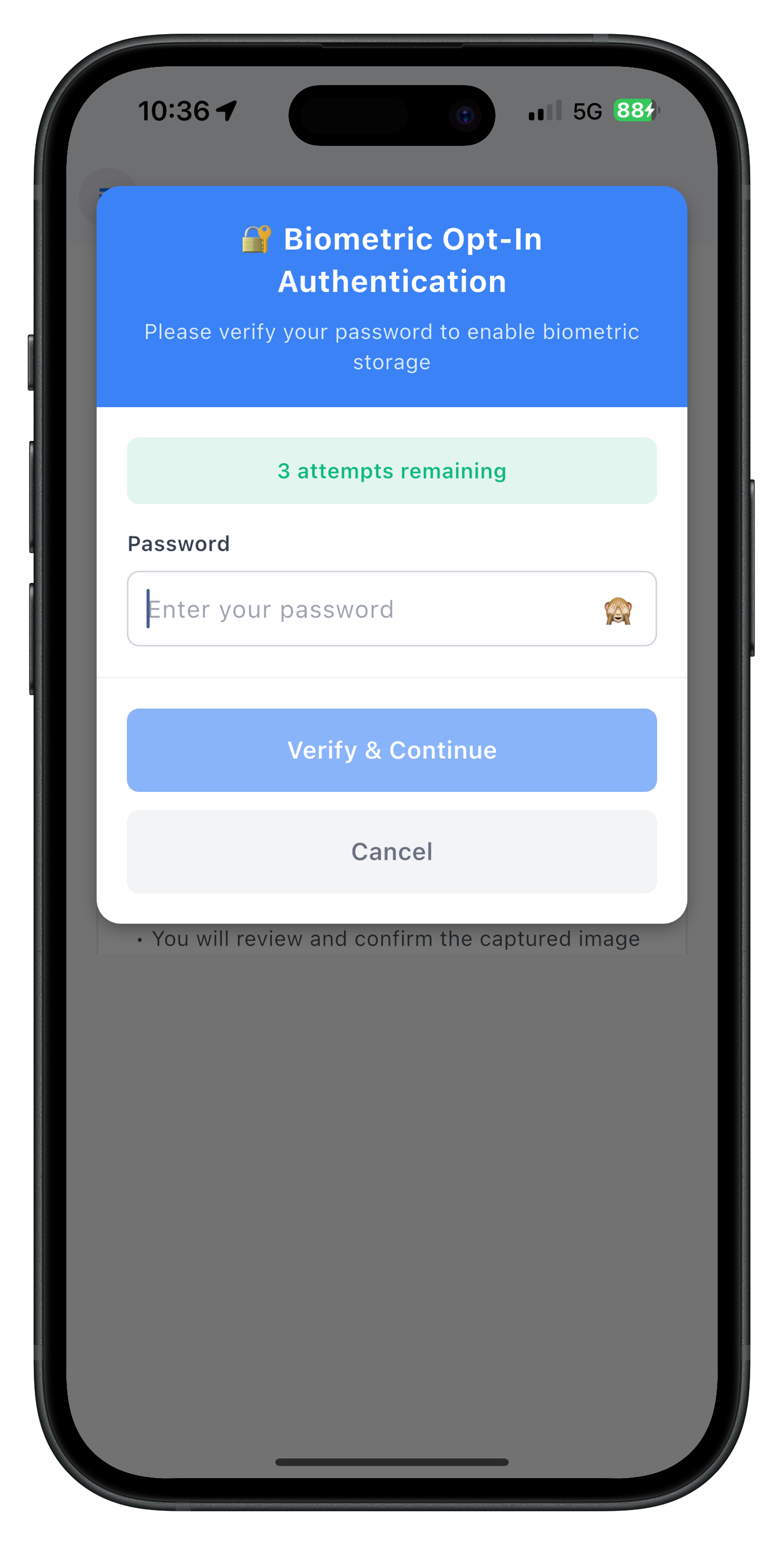
The PasswordValidationDialog shows password input field, attempts counter with color coding (green/orange/red), error messages, and action buttons for verify and cancel.
Overview
The Flutter reference app includes complete IDV service implementations for biometric opt-in and opt-out. These APIs handle template creation and deletion workflows with LDA fallback.
Biometric Opt-In APIs
The RdnaIDVService class provides the following opt-in methods:
1.
initiateIDVBiometricOptIn()
/// Initiates biometric opt-in flow for biometric template storage
///
/// This API triggers a flow that opts the logged-in user into biometric template storage.
/// This API only works on active user sessions (post-login).
///
/// After successful API call, the SDK will:
/// 1. Request user authentication (LDA if biometric login, password prompt if password login)
/// 2. On successful authentication, initiate selfie capture with liveness detection
/// 3. Trigger onIDVOptInCapturedFrameConfirmation event with the captured selfie image
/// 4. After user confirmation, trigger onIDVBiometricOptInStatus event with the opt-in result
Future<RDNASyncResponse> initiateIDVBiometricOptIn() async {
  print('RdnaIDVService - Initiating IDV biometric opt-in');

  final responseStr = await _rdnaClient.initiateIDVBiometricOptIn();

  // Parse the JSON string response
  final responseJson = jsonDecode(responseStr) as Map<String, dynamic>;
  final response = RDNASyncResponse.fromJson(responseJson);

  print('RdnaIDVService - InitiateIDVBiometricOptIn sync response received');
  print('  error code: ${response.error?.longErrorCode}');
  print('  error string: ${response.error?.errorString}');

  return response;
}
2.
setIDVBiometricOptInConfirmation(int status)
/// Sets biometric opt-in confirmation status
///
/// This API must be invoked in response to onIDVOptInCapturedFrameConfirmation event
/// to pass the user's selected action after viewing the captured selfie image.
///
/// The SDK will process the user's action:
/// - 0 (Approved): User approves the captured image, SDK proceeds with opt-in
/// - 1 (Recapture): User wants to recapture the selfie, SDK triggers selfie capture again
/// - 2 (Cancel): User cancels the opt-in flow, SDK aborts the process
Future<RDNASyncResponse> setIDVBiometricOptInConfirmation(int status) async {
  print('RdnaIDVService - Setting biometric opt-in confirmation:');
  print('  status: $status (0=Approved, 1=Recapture, 2=Cancel)');

  final responseStr = await _rdnaClient.setIDVBiometricOptInConfirmation(status);

  // Parse the JSON string response
  final responseJson = jsonDecode(responseStr) as Map<String, dynamic>;
  final response = RDNASyncResponse.fromJson(responseJson);

  print('RdnaIDVService - SetIDVBiometricOptInConfirmation sync response received');
  print('  error code: ${response.error?.longErrorCode}');
  print('  error string: ${response.error?.errorString}');

  return response;
}
Biometric Opt-Out API
initiateIDVBiometricOptOut()
/// Initiates biometric opt-out flow to delete biometric template from server
///
/// This API triggers a flow that opts the logged-in user out of biometric template storage.
/// This API only works on active user sessions (post-login).
///
/// After successful API call, the SDK will:
/// 1. Request user authentication (LDA if biometric login, password prompt if password login)
/// 2. On successful authentication, proceed to delete the user's biometric template from server
/// 3. Trigger onIDVBiometricOptOutStatus event with the opt-out result
Future<RDNASyncResponse> initiateIDVBiometricOptOut() async {
  print('RdnaIDVService - Initiating IDV biometric opt-out');

  final responseStr = await _rdnaClient.initiateIDVBiometricOptOut();

  // Parse the JSON string response
  final responseJson = jsonDecode(responseStr) as Map<String, dynamic>;
  final response = RDNASyncResponse.fromJson(responseJson);

  print('RdnaIDVService - InitiateIDVBiometricOptOut sync response received');
  print('  error code: ${response.error?.longErrorCode}');
  print('  error string: ${response.error?.errorString}');

  return response;
}
Key Points
- Challenge Mode 6: Biometric opt-in identifier (
RDNAChallengeOpMode.RDNA_IDV_BIO_OPT_IN) - Challenge Mode 7: Biometric opt-out identifier (
RDNAChallengeOpMode.RDNA_IDV_BIO_OPT_OUT) - LDA Fallback: SDK automatically handles LDA/password logic
- Confirmation Actions: 0=Approve, 1=Recapture, 2=Cancel
- Service Pattern: Singleton service with event manager
Overview
Implement the biometric opt-in screen with LDA fallback, password dialog, selfie capture, and conditional modal behavior. This screen leverages Riverpod providers for state management and event handling.
BiometricOptInScreen UI Preview
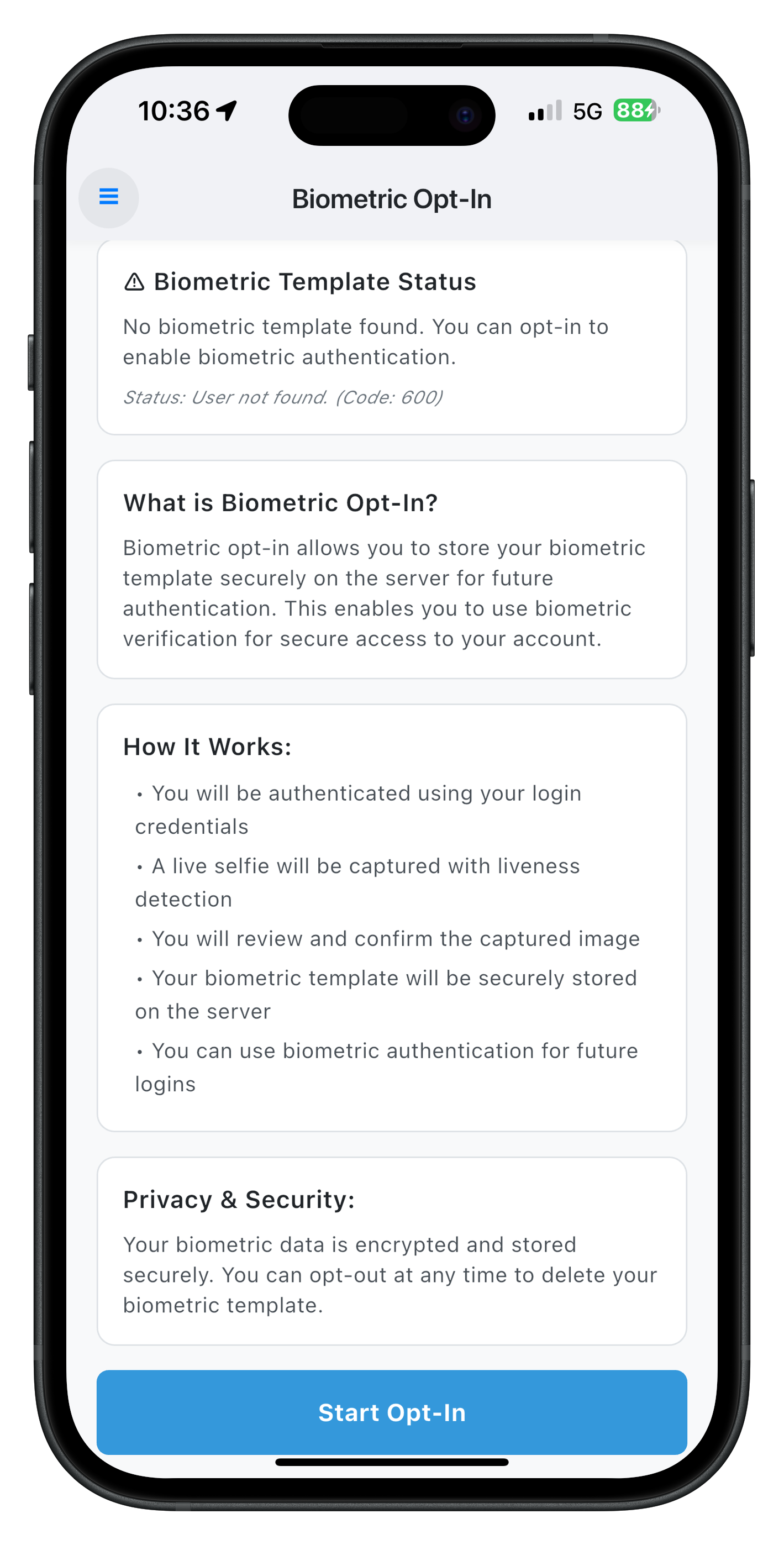
The BiometricOptInScreen shows template status check, opt-in button (enabled when no template exists), and loading states for status check and opt-in process.
Screen State Management
The BiometricOptInScreen uses ConsumerStatefulWidget for Riverpod integration:
// lib/tutorial/screens/idv/biometric_opt_in/biometric_opt_in_screen.dart

class BiometricOptInScreen extends ConsumerStatefulWidget {
  final RDNAUserLoggedIn? sessionData;

  const BiometricOptInScreen({
    super.key,
    this.sessionData,
  });

  @override
  ConsumerState<BiometricOptInScreen> createState() =>
      _BiometricOptInScreenState();
}

class _BiometricOptInScreenState extends ConsumerState<BiometricOptInScreen> {
  bool _isCheckingStatus = false;
  bool _isOptingIn = false;
  bool _isScreenActive = false;
  bool _isOptInFlowActive = false;

  // Template status state
  final Map<String, dynamic> _templateStatus = {
    'checked': false,
    'exists': false,
    'statusCode': 0,
    'statusMessage': '',
  };

  // Modal state for captured frame confirmation
  bool _capturedImageModalVisible = false;
  String _capturedImageBase64 = '';

  // Password validation dialog state
  String? _passwordError;
  bool _isPasswordSubmitting = false;

  RdnaIDVService? _rdnaIDVService;
  RdnaService? _rdnaService;

  // Store original handler for restoration
  Function? _originalGetPasswordHandler;
  // Store reference to our own handlers for comparison during cleanup
  RDNAGetPasswordCallback? _ourPasswordHandler;
  Function? _ourTemplateStatusHandler;

  // ... implementation continues
}
Template Status Check
/// Checks if user biometric template exists on server
Future<void> _checkTemplateStatus() async {
  print('BiometricOptInScreen - Checking biometric template status');

  if (mounted) {
    setState(() {
      _isCheckingStatus = true;
    });
  }

  try {
    final response =
        await _rdnaIDVService!.checkIDVUserBiometricTemplateStatus();
    print(
        'BiometricOptInScreen - CheckIDVUserBiometricTemplateStatus sync response successful');

    // The actual result will come via onIDVCheckUserBiometricTemplateStatus event
    print(
        'BiometricOptInScreen - Waiting for onIDVCheckUserBiometricTemplateStatus event');

    // If sync fails, update UI immediately
    if (response.error?.longErrorCode != 0) {
      final errorMessage = response.error?.errorString ?? 'Unknown error';
      if (mounted) {
        setState(() {
          _templateStatus['checked'] = true;
          _templateStatus['exists'] = false;
          _templateStatus['statusCode'] = 0;
          _templateStatus['statusMessage'] = 'Error: $errorMessage';
          _isCheckingStatus = false;
        });

        _showDialog(
          title: 'Template Status Check Error',
          content: 'Failed to check template status: $errorMessage',
          isSuccess: false,
        );
      }
    }
  } catch (error) {
    print(
        'BiometricOptInScreen - CheckIDVUserBiometricTemplateStatus sync error: $error');

    if (mounted) {
      setState(() {
        _templateStatus['checked'] = true;
        _templateStatus['exists'] = false;
        _templateStatus['statusCode'] = 0;
        _templateStatus['statusMessage'] =
            'Error: Failed to check template status';
        _isCheckingStatus = false;
      });

      _showDialog(
        title: 'Template Status Check Error',
        content: 'Failed to check template status',
        isSuccess: false,
      );
    }
  }
}
Opt-In Initiation
/// Initiates biometric opt-in workflow
Future<void> _handleStartOptIn() async {
  print('BiometricOptInScreen - Starting biometric opt-in');

  setState(() {
    _isOptingIn = true;
  });

  print('BiometricOptInScreen - Calling initiateIDVBiometricOptIn');

  final response = await _rdnaIDVService!.initiateIDVBiometricOptIn();
  print(
      'BiometricOptInScreen - InitiateIDVBiometricOptIn sync response successful');

  // Sync success means API accepted the request
  // The captured frame will come via onIDVOptInCapturedFrameConfirmation event
  print(
      'BiometricOptInScreen - Biometric opt-in initiated, waiting for captured frame event');

  // If sync fails, show error immediately
  if (response.error?.longErrorCode != 0) {
    final errorMessage = response.error?.errorString ?? 'Unknown error';
    setState(() {
      _isOptingIn = false;
    });

    _showDialog(
      title: 'Opt-In Error',
      content: 'Failed to initiate opt-in: $errorMessage',
      isSuccess: false,
    );
  }
}
Password Event Handling
/// Handles getPassword event for password step-up authentication (challengeMode = 6)
///
/// This event is triggered when SDK requires password verification before allowing biometric opt-in.
/// Only handles challengeMode 6 (biometric opt-in), passes other modes to original handler.
void _handleGetPassword(RDNAGetPassword data) {
  try {
    final challengeMode = data.challengeMode ?? -1;
    final attemptsLeft = data.attemptsLeft ?? 3;
    final statusCode =
        data.challengeResponse?.status?.statusCode ?? -1;
    final statusMessage =
        data.challengeResponse?.status?.statusMessage ?? '';

    print('BiometricOptInScreen - getPassword event:');
    print('  challengeMode: $challengeMode');
    print('  attemptsLeft: $attemptsLeft');
    print('  statusCode: $statusCode');

    // Only handle challengeMode 6 (biometric opt-in)
    if (challengeMode != 6) {
      print(
          'BiometricOptInScreen - Not challengeMode 6, passing to original handler');
      // Pass to original handler for other challenge modes
      if (_originalGetPasswordHandler != null) {
        (_originalGetPasswordHandler as dynamic)(data);
      }
      return;
    }

    // Update password dialog state
    setState(() {
      _isPasswordSubmitting = false;

      if (statusCode != 100) {
        // Failed authentication - show error
        _passwordError =
            statusMessage.isNotEmpty ? statusMessage : 'Authentication failed. Please try again.';
      } else {
        // Clear any previous errors
        _passwordError = null;
      }
    });

    // Show generic password validation dialog
    if (mounted) {
      PasswordValidationDialog.show(
        context,
        title: '🔐 Biometric Opt-In Authentication',
        message: 'Please verify your password to enable biometric storage',
        attemptsLeft: attemptsLeft,
        errorMessage: _passwordError,
        isSubmitting: _isPasswordSubmitting,
        onSubmitPassword: _handlePasswordSubmit,
        onCancel: _handlePasswordCancel,
      );
    }
  } catch (e) {
    print('BiometricOptInScreen - Error handling getPassword event: $e');
  }
}
Captured Frame Handling
/// Handles captured frame data from provider
///
/// The SDK sends the captured image as a plain base64-encoded string.
/// The data is a base64 JPEG image that can be directly used with Image.memory().
void _handleCapturedFrameFromProvider(String base64Data) {
  print('BiometricOptInScreen - Captured frame from provider');
  print('BiometricOptInScreen - Captured image length: ${base64Data.length}');

  // Close password dialog if it's open (authentication succeeded)
  if (mounted && Navigator.canPop(context)) {
    Navigator.pop(context); // Close password dialog
  }

  // Reset submitting state
  if (mounted) {
    setState(() {
      _isPasswordSubmitting = false;
    });
  }

  // Mark that we're in active opt-in flow
  _isOptInFlowActive = true;
  print('BiometricOptInScreen - Opt-in flow marked as active');

  // Show modal immediately with captured image
  if (mounted) {
    setState(() {
      _capturedImageModalVisible = true;
      _capturedImageBase64 = base64Data; // Use base64 data directly
    });
  }
}
Captured Frame Action Handling
/// Handles captured frame confirmation action
void _handleCapturedFrameAction(int action) {
  print('BiometricOptInScreen - Captured frame action: $action');

  // Close modal for Approve/Cancel, but keep it open for Recapture
  if (action != IDVStatus.RDNA_IDV_RECAPTURE) {
    setState(() {
      _capturedImageModalVisible = false;
    });
  }

  // Use Future to ensure API call happens on next event loop tick
  Future.delayed(Duration.zero, () async {
    final response = await _rdnaIDVService!.setIDVBiometricOptInConfirmation(action);
    print(
        'BiometricOptInScreen - SetIDVBiometricOptInConfirmation sync response successful');

    // Check if sync fails, show error immediately
    if (response.error?.longErrorCode != 0) {
      final errorMessage = response.error?.errorString ?? 'Unknown error';
      print(
          'BiometricOptInScreen - SetIDVBiometricOptInConfirmation sync error: $errorMessage');

      setState(() {
        _isOptingIn = false;
      });

      // Reset opt-in flow flag as flow failed
      _isOptInFlowActive = false;
      print(
          'BiometricOptInScreen - Opt-in flow marked as inactive (confirmation error)');

      _showDialog(
        title: 'Confirmation Error',
        content: 'Failed to confirm action: $errorMessage',
        isSuccess: false,
      );
      return;
    }

    if (action == IDVStatus.RDNA_IDV_CANCEL) {
      // User cancelled, reset state
      setState(() {
        _isOptingIn = false;
      });
      print(
          'BiometricOptInScreen - Cancelled requested, waiting for onIDVBiometricOptInStatus event');
    } else if (action == IDVStatus.RDNA_IDV_RECAPTURE) {
      // User wants to recapture, SDK will trigger capture again
      print(
          'BiometricOptInScreen - Recapture requested, waiting for new captured frame');
    } else if (action == IDVStatus.RDNA_IDV_APPROVED) {
      // User approved, SDK will process opt-in
      print(
          'BiometricOptInScreen - Approved, waiting for onIDVBiometricOptInStatus event');
    }
  });
}
Captured Frame Confirmation Modal UI Preview
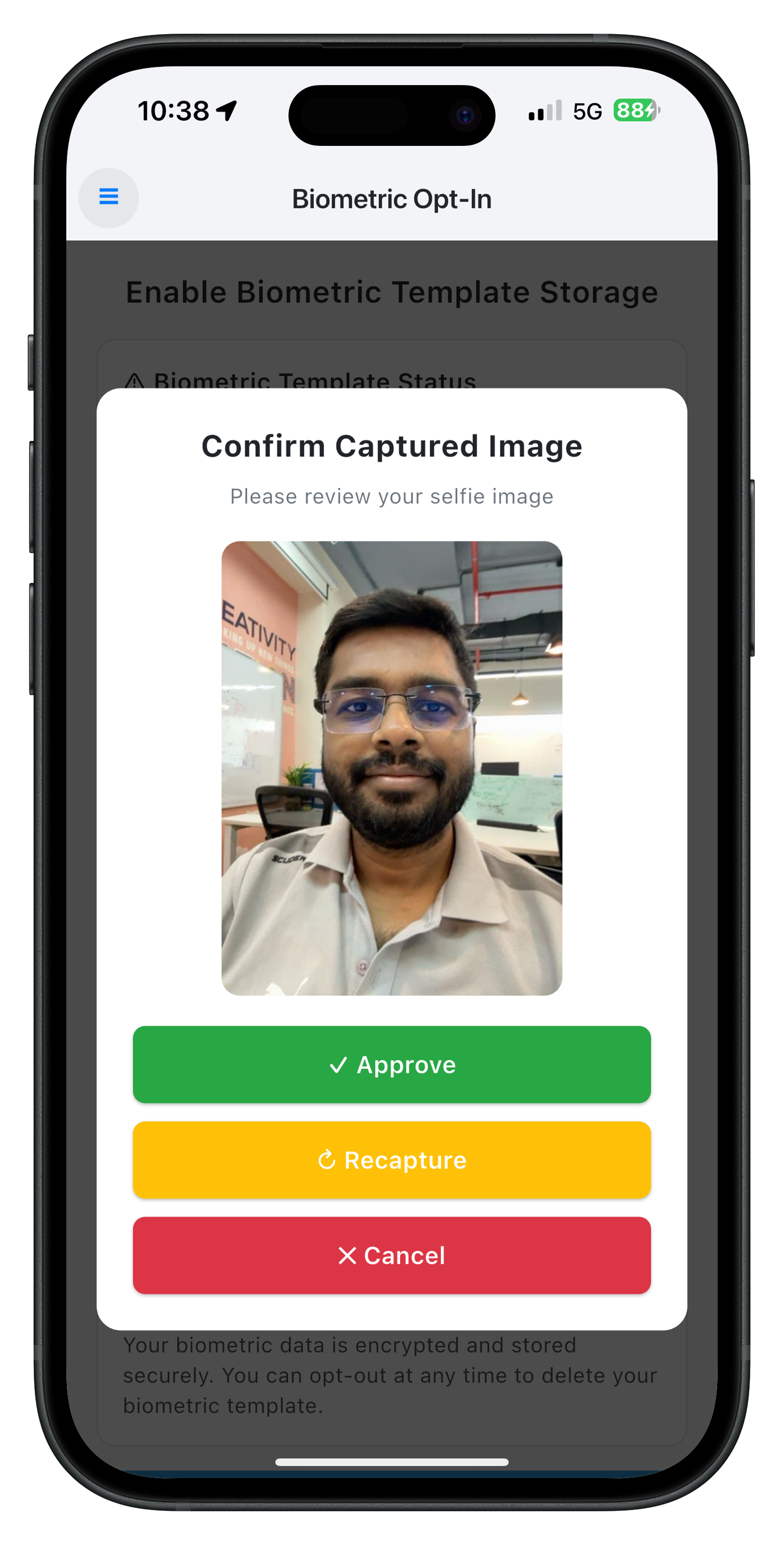
The Captured Frame Confirmation modal displays the captured selfie image with three action buttons: Approve (creates template), Recapture (retakes selfie, modal stays open), and Cancel (aborts flow).
UI with Captured Frame Modal
@override
Widget build(BuildContext context) {
  // Watch providers for opt-in events
  final capturedFrameData = ref.watch(optInCapturedFrameProvider);
  final optInStatusData = ref.watch(biometricOptInStatusProvider);

  // ... provider watchers and handlers

  return Scaffold(
    backgroundColor: const Color(0xFFF8F9FA),
    appBar: AppBar(
      backgroundColor: Colors.white,
      elevation: 2,
      title: const Text(
        'Biometric Opt-In',
        style: TextStyle(
          fontSize: 18,
          fontWeight: FontWeight.w600,
          color: Color(0xFF212529),
        ),
      ),
      centerTitle: true,
    ),
    drawer: DrawerContent(
      sessionData: effectiveSessionData,
      currentRoute: 'BiometricOptIn',
    ),
    body: Stack(
      children: [
        SingleChildScrollView(
          child: Padding(
            padding: const EdgeInsets.all(20),
            child: Column(
              crossAxisAlignment: CrossAxisAlignment.stretch,
              children: [
                // Title Section
                const Text(
                  'Enable Biometric Template Storage',
                  style: TextStyle(
                    fontSize: 20,
                    fontWeight: FontWeight.w600,
                    color: Color(0xFF212529),
                  ),
                  textAlign: TextAlign.center,
                ),
                const SizedBox(height: 16),

                // Template Status Section
                if (_templateStatus['checked'] as bool) ...[
                  Container(
                    padding: const EdgeInsets.all(16),
                    decoration: BoxDecoration(
                      color: Colors.white,
                      borderRadius: BorderRadius.circular(12),
                      border: Border.all(
                        color: const Color(0xFFDEE2E6),
                      ),
                    ),
                    child: Column(
                      crossAxisAlignment: CrossAxisAlignment.start,
                      children: [
                        Text(
                          _templateStatus['exists'] as bool
                              ? '✅ Biometric Template Status'
                              : '⚠️ Biometric Template Status',
                          style: const TextStyle(
                            fontSize: 16,
                            fontWeight: FontWeight.w600,
                            color: Color(0xFF212529),
                          ),
                        ),
                        const SizedBox(height: 8),
                        Text(
                          _templateStatus['exists'] as bool
                              ? 'You have already opted in for biometric storage. Your template is securely stored on the server.'
                              : 'No biometric template found. You can opt-in to enable biometric authentication.',
                          style: const TextStyle(
                            fontSize: 14,
                            color: Color(0xFF495057),
                            height: 1.4,
                          ),
                        ),
                      ],
                    ),
                  ),
                  const SizedBox(height: 16),
                ],

                // Action Button
                CustomButton(
                  title: _isOptingIn
                      ? 'Processing...'
                      : _isCheckingStatus
                          ? 'Checking Status...'
                          : 'Start Opt-In',
                  onPress: _handleStartOptIn,
                  loading: _isOptingIn,
                  disabled: _isOptingIn ||
                      _isCheckingStatus ||
                      (_templateStatus['exists'] as bool),
                ),
              ],
            ),
          ),
        ),

        // Captured Image Confirmation Modal
        if (_capturedImageModalVisible)
          Container(
            color: Colors.black.withOpacity(0.7),
            child: Center(
              child: Container(
                margin: const EdgeInsets.all(20),
                padding: const EdgeInsets.all(24),
                decoration: BoxDecoration(
                  color: Colors.white,
                  borderRadius: BorderRadius.circular(16),
                ),
                child: Column(
                  mainAxisSize: MainAxisSize.min,
                  children: [
                    const Text(
                      'Confirm Captured Image',
                      style: TextStyle(
                        fontSize: 20,
                        fontWeight: FontWeight.w700,
                        color: Color(0xFF212529),
                      ),
                      textAlign: TextAlign.center,
                    ),
                    const SizedBox(height: 20),

                    // Display Captured Image
                    if (_capturedImageBase64.isNotEmpty)
                      Container(
                        height: 300,
                        decoration: BoxDecoration(
                          borderRadius: BorderRadius.circular(12),
                          color: const Color(0xFFF8F9FA),
                        ),
                        child: ClipRRect(
                          borderRadius: BorderRadius.circular(12),
                          child: Image.memory(
                            base64Decode(_capturedImageBase64),
                            fit: BoxFit.contain,
                          ),
                        ),
                      ),
                    const SizedBox(height: 20),

                    // Action Buttons
                    SizedBox(
                      width: double.infinity,
                      child: ElevatedButton(
                        onPressed: () => _handleCapturedFrameAction(
                            IDVStatus.RDNA_IDV_APPROVED),
                        style: ElevatedButton.styleFrom(
                          backgroundColor: const Color(0xFF28A745),
                          padding: const EdgeInsets.symmetric(vertical: 14),
                          shape: RoundedRectangleBorder(
                            borderRadius: BorderRadius.circular(8),
                          ),
                        ),
                        child: const Text(
                          '✓ Approve',
                          style: TextStyle(
                            fontSize: 16,
                            fontWeight: FontWeight.w600,
                            color: Colors.white,
                          ),
                        ),
                      ),
                    ),
                    const SizedBox(height: 12),
                    SizedBox(
                      width: double.infinity,
                      child: ElevatedButton(
                        onPressed: () => _handleCapturedFrameAction(
                            IDVStatus.RDNA_IDV_RECAPTURE),
                        style: ElevatedButton.styleFrom(
                          backgroundColor: const Color(0xFFFFC107),
                          padding: const EdgeInsets.symmetric(vertical: 14),
                          shape: RoundedRectangleBorder(
                            borderRadius: BorderRadius.circular(8),
                          ),
                        ),
                        child: const Text(
                          '↻ Recapture',
                          style: TextStyle(
                            fontSize: 16,
                            fontWeight: FontWeight.w600,
                            color: Colors.white,
                          ),
                        ),
                      ),
                    ),
                    const SizedBox(height: 12),
                    SizedBox(
                      width: double.infinity,
                      child: ElevatedButton(
                        onPressed: () => _handleCapturedFrameAction(
                            IDVStatus.RDNA_IDV_CANCEL),
                        style: ElevatedButton.styleFrom(
                          backgroundColor: const Color(0xFFDC3545),
                          padding: const EdgeInsets.symmetric(vertical: 14),
                          shape: RoundedRectangleBorder(
                            borderRadius: BorderRadius.circular(8),
                          ),
                        ),
                        child: const Text(
                          '✕ Cancel',
                          style: TextStyle(
                            fontSize: 16,
                            fontWeight: FontWeight.w600,
                            color: Colors.white,
                          ),
                        ),
                      ),
                    ),
                  ],
                ),
              ),
            ),
          ),
      ],
    ),
  );
}
Key Points
- Riverpod Providers: Watch for captured frame and opt-in status events
- LDA Fallback: Password dialog shows when LDA fails or is cancelled
- Conditional Modal: Stays open for recapture, closes for approve/cancel
- Flow State Flag: Prevents duplicate API calls during active flow
- Event Manager: Handles SDK events through provider pattern
Overview
Implement the biometric opt-out screen with LDA fallback and password dialog. This screen is simpler than opt-in because it doesn't require selfie capture or modal confirmation.
BiometricOptOutScreen UI Preview
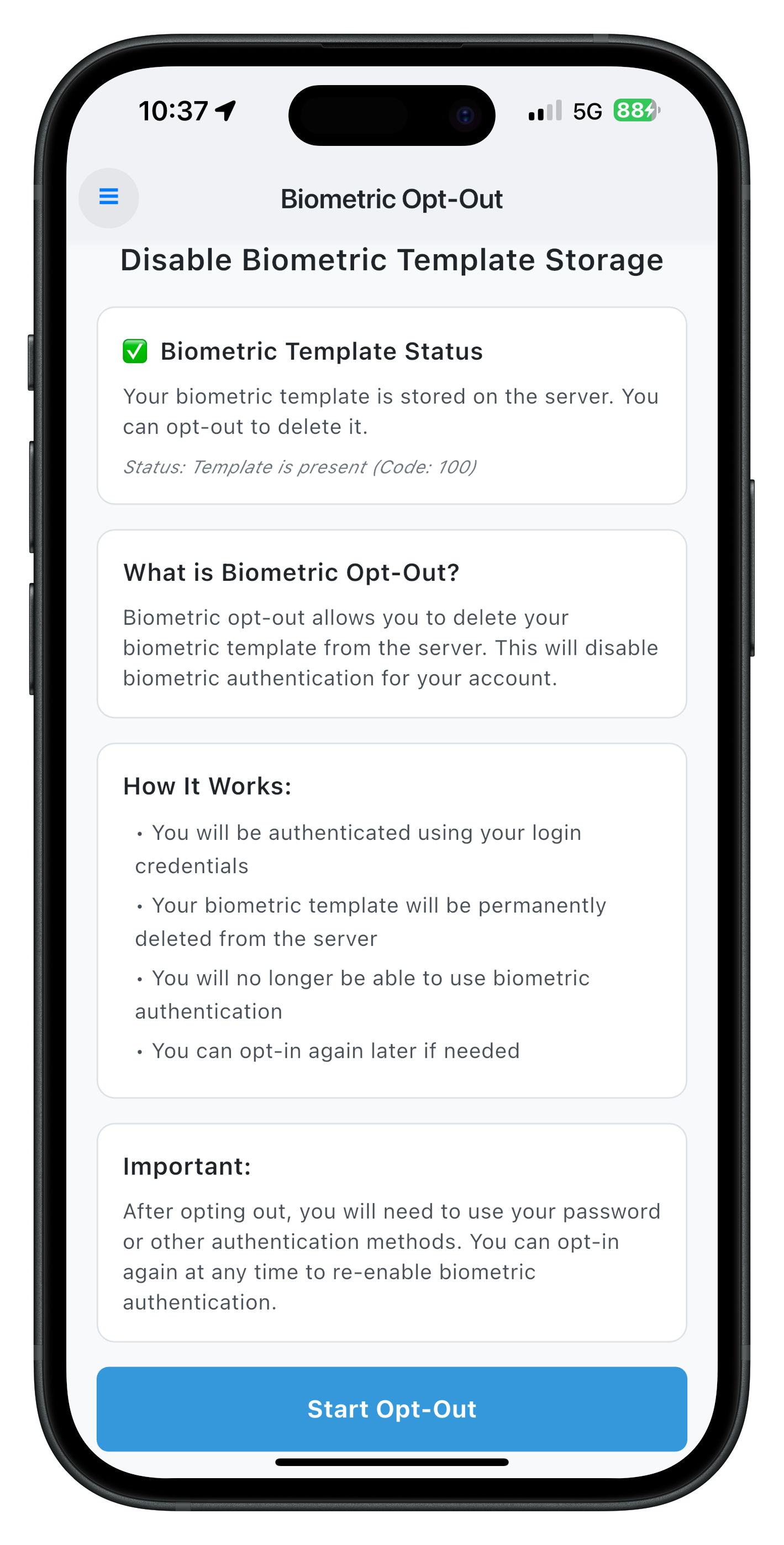
The BiometricOptOutScreen shows template status check, opt-out button (enabled when template exists), and loading states for status check and opt-out process.
Complete BiometricOptOutScreen Implementation
The implementation follows a similar pattern to opt-in but without selfie capture:
// lib/tutorial/screens/idv/biometric_opt_out/biometric_opt_out_screen.dart

class BiometricOptOutScreen extends ConsumerStatefulWidget {
  final RDNAUserLoggedIn? sessionData;

  const BiometricOptOutScreen({
    super.key,
    this.sessionData,
  });

  @override
  ConsumerState<BiometricOptOutScreen> createState() =>
      _BiometricOptOutScreenState();
}

class _BiometricOptOutScreenState extends ConsumerState<BiometricOptOutScreen> {
  bool _isCheckingStatus = false;
  bool _isOptingOut = false;
  bool _isScreenActive = false;
  bool _hasReceivedOptOutStatus = false;

  // Template status state
  final Map<String, dynamic> _templateStatus = {
    'checked': false,
    'exists': false,
    'statusCode': 0,
    'statusMessage': '',
  };

  // Password validation dialog state
  String? _passwordError;
  bool _isPasswordSubmitting = false;

  RdnaIDVService? _rdnaIDVService;
  RdnaService? _rdnaService;

  // ... implementation similar to opt-in screen
}
Opt-Out Initiation
/// Initiates biometric opt-out workflow
Future<void> _handleStartOptOut() async {
  print('BiometricOptOutScreen - Starting biometric opt-out');

  setState(() {
    _isOptingOut = true;
  });

  print('BiometricOptOutScreen - Calling initiateIDVBiometricOptOut');

  final response = await _rdnaIDVService!.initiateIDVBiometricOptOut();
  print(
      'BiometricOptOutScreen - InitiateIDVBiometricOptOut sync response successful');

  // Sync success means API accepted the request
  // The opt-out result will come via onIDVBiometricOptOutStatus event
  print(
      'BiometricOptOutScreen - Biometric opt-out initiated, waiting for result event');

  // If sync fails, show error immediately
  if (response.error?.longErrorCode != 0) {
    final errorMessage = response.error?.errorString ?? 'Unknown error';
    setState(() {
      _isOptingOut = false;
    });

    _showDialog(
      title: 'Opt-Out Error',
      content: 'Failed to initiate opt-out: $errorMessage',
      isSuccess: false,
    );
  }
}
Password Event Handling
/// Handles getPassword event for password step-up authentication (challengeMode = 7)
///
/// This event is triggered when SDK requires password verification before allowing biometric opt-out.
/// Only handles challengeMode 7 (biometric opt-out), passes other modes to original handler.
void _handleGetPassword(RDNAGetPassword data) {
  try {
    final challengeMode = data.challengeMode ?? -1;
    final attemptsLeft = data.attemptsLeft ?? 3;
    final statusCode =
        data.challengeResponse?.status?.statusCode ?? -1;
    final statusMessage =
        data.challengeResponse?.status?.statusMessage ?? '';

    print('BiometricOptOutScreen - getPassword event:');
    print('  challengeMode: $challengeMode');
    print('  attemptsLeft: $attemptsLeft');
    print('  statusCode: $statusCode');

    // Only handle challengeMode 7 (biometric opt-out)
    if (challengeMode != 7) {
      print(
          'BiometricOptOutScreen - Not challengeMode 7, passing to original handler');
      // Pass to original handler for other challenge modes
      if (_originalGetPasswordHandler != null) {
        (_originalGetPasswordHandler as dynamic)(data);
      }
      return;
    }

    // Update password dialog state
    setState(() {
      _isPasswordSubmitting = false;

      if (statusCode != 100) {
        // Failed authentication - show error
        _passwordError =
            statusMessage.isNotEmpty ? statusMessage : 'Authentication failed. Please try again.';
      } else {
        // Clear any previous errors
        _passwordError = null;
      }
    });

    // Show generic password validation dialog
    if (mounted) {
      PasswordValidationDialog.show(
        context,
        title: '🔐 Biometric Opt-Out Authentication',
        message: 'Please verify your password to delete biometric template',
        attemptsLeft: attemptsLeft,
        errorMessage: _passwordError,
        isSubmitting: _isPasswordSubmitting,
        onSubmitPassword: _handlePasswordSubmit,
        onCancel: _handlePasswordCancel,
      );
    }
  } catch (e) {
    print('BiometricOptOutScreen - Error handling getPassword event: $e');
  }
}
Opt-Out Status Handling
/// Handles opt-out status data from provider
void _handleOptOutStatusFromProvider(String jsonData) {
  print('BiometricOptOutScreen - Opt-out status from provider');

  try {
    final data = jsonDecode(jsonData) as Map<String, dynamic>;
    print('BiometricOptOutScreen - User ID: ${data['userID']}');
    print('BiometricOptOutScreen - Challenge Mode: ${data['challengeMode']}');
    print('BiometricOptOutScreen - Status Code: ${data['status']?['statusCode']}');
    print('BiometricOptOutScreen - Status Message: ${data['status']?['statusMessage']}');
    print('BiometricOptOutScreen - Error Code: ${data['error']?['longErrorCode']}');

    // Close password dialog if it's open (authentication succeeded)
    if (mounted && Navigator.canPop(context)) {
      Navigator.pop(context); // Close password dialog
    }

    // Reset button state
    if (mounted) {
      setState(() {
        _isOptingOut = false;
        _isPasswordSubmitting = false;
      });
    }

    final errorCode = data['error']?['longErrorCode'] as int? ?? -1;
    final statusCode = data['status']?['statusCode'] as int? ?? -1;
    final statusMessage = data['status']?['statusMessage'] as String? ?? '';

    // First check: error code
    if (errorCode != 0) {
      print('BiometricOptOutScreen - Opt-out failed with error: $errorCode');
      _showDialog(
        title: 'Opt-Out Failed',
        content: 'Failed to complete biometric opt-out: ${data['error']?['errorString']}',
        isSuccess: false,
      );
      return;
    }

    // Second check: status code
    if (statusCode == 100) {
      // Success
      print('BiometricOptOutScreen - Opt-out successful');
      _showDialog(
        title: 'Opt-Out Successful',
        content: '$statusMessage\n\nYour biometric template has been deleted from the server. You can opt-in again if needed.',
        isSuccess: true,
        onOk: () {
          print('BiometricOptOutScreen - Success acknowledged, checking template status');
          // Refresh template status to show updated state
          _checkTemplateStatus();
        },
      );
    } else {
      // Failure
      print('BiometricOptOutScreen - Opt-out failed, status_code: $statusCode');
      _showDialog(
        title: 'Opt-Out Failed',
        content: statusMessage.isNotEmpty ? statusMessage : 'Failed to complete biometric opt-out',
        isSuccess: false,
      );
    }
  } catch (e) {
    print('BiometricOptOutScreen - Error parsing opt-out status: $e');
  }
}
UI Implementation
@override
Widget build(BuildContext context) {
  // Watch provider for opt-out status
  final optOutStatusData = ref.watch(biometricOptOutStatusProvider);

  // ... provider watchers and handlers

  return Scaffold(
    backgroundColor: const Color(0xFFF8F9FA),
    appBar: AppBar(
      backgroundColor: Colors.white,
      elevation: 2,
      title: const Text(
        'Biometric Opt-Out',
        style: TextStyle(
          fontSize: 18,
          fontWeight: FontWeight.w600,
          color: Color(0xFF212529),
        ),
      ),
      centerTitle: true,
    ),
    drawer: DrawerContent(
      sessionData: effectiveSessionData,
      currentRoute: 'BiometricOptOut',
    ),
    body: SingleChildScrollView(
      child: Padding(
        padding: const EdgeInsets.all(20),
        child: Column(
          crossAxisAlignment: CrossAxisAlignment.stretch,
          children: [
            // Title Section
            const Text(
              'Disable Biometric Template Storage',
              style: TextStyle(
                fontSize: 20,
                fontWeight: FontWeight.w600,
                color: Color(0xFF212529),
              ),
              textAlign: TextAlign.center,
            ),
            const SizedBox(height: 16),

            // Template Status Section
            if (_templateStatus['checked'] as bool) ...[
              Container(
                padding: const EdgeInsets.all(16),
                decoration: BoxDecoration(
                  color: Colors.white,
                  borderRadius: BorderRadius.circular(12),
                  border: Border.all(
                    color: const Color(0xFFDEE2E6),
                  ),
                ),
                child: Column(
                  crossAxisAlignment: CrossAxisAlignment.start,
                  children: [
                    Text(
                      _templateStatus['exists'] as bool
                          ? '✅ Biometric Template Status'
                          : '⚠️ Biometric Template Status',
                      style: const TextStyle(
                        fontSize: 16,
                        fontWeight: FontWeight.w600,
                        color: Color(0xFF212529),
                      ),
                    ),
                    const SizedBox(height: 8),
                    Text(
                      _templateStatus['exists'] as bool
                          ? 'Your biometric template is stored on the server. You can opt-out to delete it.'
                          : 'No biometric template found on the server. You have already opted out or never opted in.',
                      style: const TextStyle(
                        fontSize: 14,
                        color: Color(0xFF495057),
                        height: 1.4,
                      ),
                    ),
                  ],
                ),
              ),
              const SizedBox(height: 16),
            ],

            // Action Button
            CustomButton(
              title: _isOptingOut
                  ? 'Processing...'
                  : _isCheckingStatus
                      ? 'Checking Status...'
                      : 'Start Opt-Out',
              onPress: _handleStartOptOut,
              loading: _isOptingOut,
              disabled: _isOptingOut ||
                  _isCheckingStatus ||
                  !(_templateStatus['exists'] as bool),
            ),
            const SizedBox(height: 16),

            // Disabled Message
            if (!(_templateStatus['exists'] as bool) &&
                (_templateStatus['checked'] as bool))
              const Text(
                'No biometric template found. Please use the Biometric Opt-In option if you want to enable biometric authentication.',
                style: TextStyle(
                  fontSize: 14,
                  color: Color(0xFFDC3545),
                  fontStyle: FontStyle.italic,
                ),
                textAlign: TextAlign.center,
              ),
          ],
        ),
      ),
    ),
  );
}
Key Points
- Simpler Flow: No selfie capture, no modal confirmation
- Same LDA Fallback: LDA-first with password fallback
- Same PasswordValidationDialog: Reuses the component
- Challenge Mode 7: Opt-out identifier (
RDNAChallengeOpMode.RDNA_IDV_BIO_OPT_OUT) - Direct Deletion: Template deleted after authentication
- Event Handling: Only password and status events needed
After implementing the screens, let's understand how Flutter uses Riverpod providers for SDK event management and how events flow from the SDK to your UI.
Provider-Based Event Management
Unlike traditional callback patterns, Flutter uses Riverpod StateProviders to manage SDK events. This architecture provides:
- Reactive UI Updates: Screens automatically rebuild when events occur
- State Persistence: Event data survives screen navigation and disposal
- Clean Separation: Event logic separated from UI logic
- Type Safety: Compile-time checks for state access
Key Providers for Biometric Flows
The following providers are defined in sdk_idv_event_provider.dart:
1.
optInCapturedFrameProvider
final optInCapturedFrameProvider = StateProvider<String?>((ref) => null);
- Purpose: Stores captured selfie image (base64) during opt-in
- Event Source:
onIDVOptInCapturedFrameConfirmationSDK event - Usage: BiometricOptInScreen watches this to show image modal
2.
biometricOptInStatusProvider
final biometricOptInStatusProvider = StateProvider<String?>((ref) => null);
- Purpose: Stores final opt-in result (success/failure)
- Event Source:
onIDVBiometricOptInStatusSDK event - Usage: BiometricOptInScreen watches this to show result dialog
3.
biometricOptOutStatusProvider
final biometricOptOutStatusProvider = StateProvider<String?>((ref) => null);
- Purpose: Stores opt-out result (template deletion status)
- Event Source:
onIDVBiometricOptOutStatusSDK event - Usage: BiometricOptOutScreen watches this to show result dialog
SDKIDVEventProviderWidget Architecture
The SDKIDVEventProviderWidget wraps your app and registers all SDK event handlers:
class SDKIDVEventProviderWidget extends ConsumerStatefulWidget {
  final Widget child;

  @override
  ConsumerState<SDKIDVEventProviderWidget> createState() =>
      _SDKIDVEventProviderWidgetState();
}

class _SDKIDVEventProviderWidgetState
    extends ConsumerState<SDKIDVEventProviderWidget> {

  @override
  void initState() {
    super.initState();
    _setupIDVEventHandlers();  // Register all event handlers
  }

  void _setupIDVEventHandlers() {
    final rdnaIDVService = RdnaIDVService.getInstance();
    final eventManager = rdnaIDVService.getEventManager();

    // Register biometric opt-in event handlers
    eventManager.setOptInCapturedFrameConfirmationHandler(
      _handleOptInCapturedFrameConfirmation);
    eventManager.setBiometricOptInStatusHandler(
      _handleBiometricOptInStatus);

    // Register biometric opt-out event handler
    eventManager.setBiometricOptOutStatusHandler(
      _handleBiometricOptOutStatus);
  }

  @override
  Widget build(BuildContext context) {
    return widget.child;  // Renders app tree
  }
}
Key Points:
- Initialized once at app startup
- Stays in memory throughout app lifecycle
- Handles events even when screens are disposed
- Updates providers that screens watch
Biometric Opt-In Flow
Flutter SDK APIs Called:
initiateIDVBiometricOptIn()- When: User clicks "Opt In to Biometric Authentication" button
- Purpose: Initiates opt-in flow with LDA-first authentication
- Returns: Synchronous response (validates request acceptance)
setIDVBiometricOptInConfirmation(status)- When: User confirms captured frame action
- Parameters:
status:0(Approve),1(Recapture), or2(Cancel)
- Purpose: Sends user decision to SDK for template creation
Provider Update Sequence:
The event sequence depends on whether LDA is available and successful:
Branch A: LDA Available & Successful
1. onIDVOptInCapturedFrameConfirmation event fires
   ├─> Event handler: _handleOptInCapturedFrameConfirmation()
   ├─> Updates: optInCapturedFrameProvider with base64 image
   ├─> Screen watches provider and shows image modal
   └─> User takes action (Approve/Recapture/Cancel)

2. onIDVBiometricOptInStatus event fires (challengeMode: 6)
   ├─> Event handler: _handleBiometricOptInStatus()
   ├─> Updates: biometricOptInStatusProvider with result JSON
   ├─> Screen watches provider and shows result dialog
   └─> statusCode 100 = success, template created
Total: 2 provider updates (getPassword callback is NOT triggered when LDA succeeds)
Branch B: LDA Cancelled OR LDA Unavailable
1. getPassword callback fires (challengeMode: 6)
   ├─> Shows PasswordValidationDialog
   ├─> User enters password
   ├─> Password validated by SDK
   └─> Dialog closes on success

2. onIDVOptInCapturedFrameConfirmation event fires
   ├─> Event handler: _handleOptInCapturedFrameConfirmation()
   ├─> Updates: optInCapturedFrameProvider with base64 image
   ├─> Screen watches provider and shows image modal
   └─> User takes action (Approve/Recapture/Cancel)

3. onIDVBiometricOptInStatus event fires (challengeMode: 6)
   ├─> Event handler: _handleBiometricOptInStatus()
   ├─> Updates: biometricOptInStatusProvider with result JSON
   ├─> Screen watches provider and shows result dialog
   └─> statusCode 100 = success, template created
Total: 2 provider updates + 1 password callback (getPassword callback triggers password dialog)
Biometric Opt-Out Flow
Flutter SDK APIs Called:
initiateIDVBiometricOptOut()- When: User clicks "Opt Out of Biometric Authentication" button
- Purpose: Initiates opt-out flow with LDA-first authentication
- Returns: Synchronous response (validates request acceptance)
Provider Update Sequence:
The event sequence depends on whether LDA is available and successful:
Branch A: LDA Available & Successful
1. onIDVBiometricOptOutStatus event fires (challengeMode: 7)
   ├─> SDK deletes template directly after LDA success
   ├─> Event handler: _handleBiometricOptOutStatus()
   ├─> Updates: biometricOptOutStatusProvider with result JSON
   ├─> Screen watches provider and shows result dialog
   └─> statusCode 100 = success, template deleted
Total: 1 provider update (getPassword callback is NOT triggered when LDA succeeds)
Branch B: LDA Cancelled OR LDA Unavailable
1. getPassword callback fires (challengeMode: 7)
   ├─> Shows PasswordValidationDialog
   ├─> User enters password
   ├─> Password validated by SDK
   └─> Dialog closes on success

2. onIDVBiometricOptOutStatus event fires (challengeMode: 7)
   ├─> SDK deletes template after password validation
   ├─> Event handler: _handleBiometricOptOutStatus()
   ├─> Updates: biometricOptOutStatusProvider with result JSON
   ├─> Screen watches provider and shows result dialog
   └─> statusCode 100 = success, template deleted
Total: 1 provider update + 1 password callback (getPassword callback triggers password dialog)
API & Provider Comparison Table
Aspect | Opt-In Flow | Opt-Out Flow |
APIs Called | 2 APIs | 1 API |
Challenge Mode | 6 | 7 |
Providers (LDA Success) | 2 updates | 1 update |
Providers (Password Fallback) | 2 updates + callback | 1 update + callback |
Selfie Capture | ✅ Required | ❌ Not required |
getPassword Callback | Only if LDA fails/cancelled | Only if LDA fails/cancelled |
User Interaction | Approve/Recapture/Cancel frame | Just authentication |
How Screens Watch Providers
Screens use ref.watch() to reactively listen to provider changes:
Example from BiometricOptInScreen:
@override
Widget build(BuildContext context, WidgetRef ref) {
  // Watch providers - screen rebuilds when these change
  final capturedFrameData = ref.watch(optInCapturedFrameProvider);
  final optInStatusData = ref.watch(biometricOptInStatusProvider);

  // React to captured frame event
  if (capturedFrameData != null && _isOptInFlowActive) {
    // Show captured image modal
    _showCapturedImageModal(capturedFrameData);

    // Clear provider state after handling
    ref.read(optInCapturedFrameProvider.notifier).state = null;
  }

  // React to opt-in status event
  if (optInStatusData != null) {
    // Show result dialog
    _showOptInResultDialog(jsonDecode(optInStatusData));

    // Clear provider state after handling
    ref.read(biometricOptInStatusProvider.notifier).state = null;
  }

  return Scaffold(...);  // UI rendering
}
Pattern Flow:
- SDK Event Fires → Event handler in
SDKIDVEventProviderWidget - Provider Updated →
ref.read(provider.notifier).state = data - Screen Rebuilds →
ref.watch(provider)detects change - UI Reacts → Show modal/dialog based on new data
- State Cleared →
ref.read(provider.notifier).state = nullafter handling
Event Data Structures
Opt-In Captured Frame Event:
// Plain base64 JPEG image string (not JSON)
String base64Image = "/9j/4AAQSkZJRgABAQAA...";

// Use with Image.memory()
Image.memory(base64Decode(base64Image))
Opt-In Status Event:
{
  "error": {
    "longErrorCode": 0,
    "errorString": "Success"
  },
  "status": {
    "statusCode": 100,
    "statusMessage": "Biometric template stored successfully"
  }
}
Opt-Out Status Event:
{
  "error": {
    "longErrorCode": 0,
    "errorString": "Success"
  },
  "status": {
    "statusCode": 100,
    "statusMessage": "Biometric template deleted successfully"
  }
}
Provider Cleanup
Providers are automatically cleaned up when the app disposes:
final rdnaIDVServiceProvider = Provider<RdnaIDVService>((ref) {
  final service = RdnaIDVService.getInstance();

  // Cleanup on provider dispose
  ref.onDispose(() {
    service.cleanup();  // Clears event handlers
  });

  return service;
});
Best Practices:
- Clear provider state after handling events
- Don't store large data in providers long-term
- Use
ref.onDispose()for cleanup logic - Test provider updates in isolation
Add Routes to App Router
Update app_router.dart to include biometric opt-in and opt-out routes:
// lib/tutorial/navigation/app_router.dart

import 'package:go_router/go_router.dart';
import '../screens/idv/biometric_opt_in/biometric_opt_in_screen.dart';
import '../screens/idv/biometric_opt_out/biometric_opt_out_screen.dart';

final appRouter = GoRouter(
  routes: [
    // ... existing routes

    GoRoute(
      path: '/biometric-opt-in',
      name: 'BiometricOptIn',
      builder: (context, state) => const BiometricOptInScreen(),
    ),
    GoRoute(
      path: '/biometric-opt-out',
      name: 'BiometricOptOut',
      builder: (context, state) => const BiometricOptOutScreen(),
    ),
  ],
);
Add Menu Items to Drawer Content
Update drawer_content.dart to include biometric management menu items:
// lib/tutorial/screens/components/drawer_content.dart

// Biometric Opt-In Menu Item
ListTile(
  leading: const Icon(Icons.fingerprint, color: Color(0xFF007BFF)),
  title: const Text('🔐 Biometric Opt-In'),
  onTap: () {
    Navigator.pop(context); // Close drawer
    context.goNamed('BiometricOptIn');
  },
),

// Biometric Opt-Out Menu Item
ListTile(
  leading: const Icon(Icons.no_encryption, color: Color(0xFFDC3545)),
  title: const Text('🗑️ Biometric Opt-Out'),
  onTap: () {
    Navigator.pop(context); // Close drawer
    context.goNamed('BiometricOptOut');
  },
),
The drawer menu now includes both biometric opt-in and opt-out menu items:
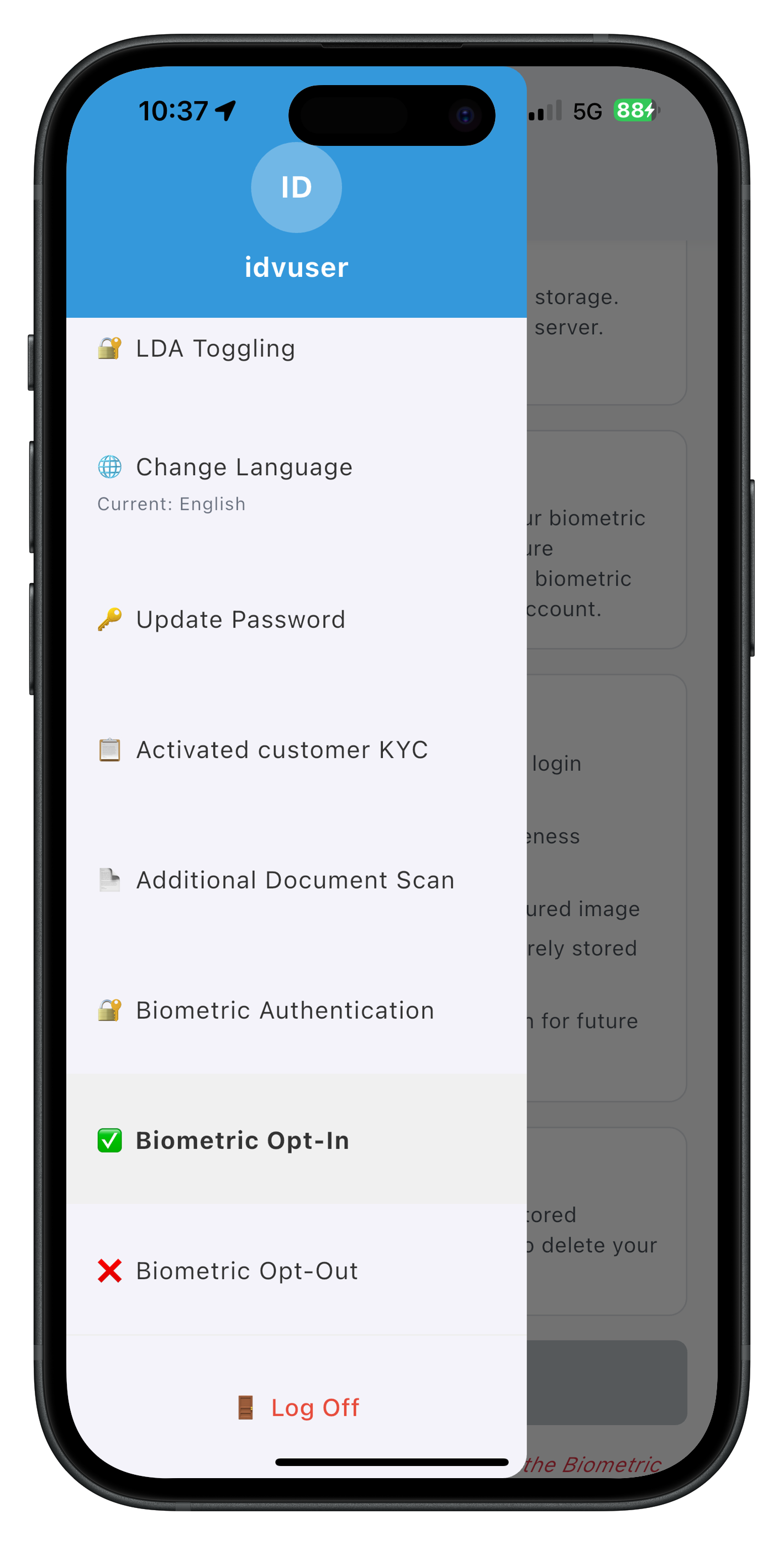
The drawer menu displays both "🔐 Biometric Opt-In" and "🗑️ Biometric Opt-Out" menu items with distinct icons for easy identification.
Complete Flow Walkthroughs
Test both biometric opt-in and opt-out flows:
Opt-In Flow Walkthrough
Step 1: Login and Navigate
1. Launch the app
2. Complete user login (activated customer)
3. Navigate to Dashboard
4. Open drawer menu (hamburger icon)
5. Select "🔐 Biometric Opt-In"
Step 2: Template Status Check
1. Screen opens and automatically checks template status
2. Observe loading indicator: "Checking template status..."
3. Template status displayed:
   - ✅ If no template (status code 600):
     - Message: "No template found - you can opt-in"
     - "Start Opt-In" button enabled
   - ⚠️ If template exists (status code 100):
     - Message: "Template already exists"
     - Button disabled (grey)
     - Help text: "Use Biometric Opt-Out to delete it first"
Step 3: Start Opt-In (if no template)
1. Click "Start Opt-In" button
2. SDK checks LDA availability:

   A. LDA Available:
      - LDA prompt appears (fingerprint/face/PIN)
      - If LDA succeeds → Proceeds to Step 4
      - If LDA cancelled → Password dialog appears → Enter password → Proceeds to Step 4

   B. LDA Not Available:
      - Password dialog appears immediately
      - Enter password
      - Click "Verify & Continue"
      - Proceeds to Step 4
Step 4: Password Verification (if LDA failed/cancelled/unavailable)
1. PasswordValidationDialog shows:
   - Title: "Biometric Opt-In Authentication"
   - Message: "Please verify your password to enable biometric storage"
   - Password input field (auto-focused)
   - Attempts counter (3/2/1 with color coding)
2. Enter password
3. Click "Verify & Continue"
4. getPassword event fires (challengeMode: 6)
   - If valid: Proceeds to Step 5
   - If invalid: Error shown, dialog stays open, attempts decremented
Step 5: Selfie Capture
1. Password dialog closes automatically
2. Native camera opens with Aware FaceCapture
3. Liveness detection guides user
4. User captures selfie
5. Camera closes
Step 6: Captured Frame Confirmation
1. onIDVOptInCapturedFrameConfirmation event fires
2. isOptInFlowActive = true
3. Captured frame modal appears with base64 image preview
4. Three buttons shown:
   - ✓ Approve (action: 0)
   - ↻ Recapture (action: 1)
   - ✕ Cancel (action: 2)

User choices:

A. Approve:
   - Modal closes immediately
   - setIDVBiometricOptInConfirmation(0) called
   - SDK creates template on server
   - Proceeds to Step 7

B. Recapture:
   - Modal STAYS OPEN
   - setIDVBiometricOptInConfirmation(1) called
   - SDK re-opens selfie screen
   - Returns to Step 5 (new capture updates same modal)

C. Cancel:
   - Modal closes immediately
   - setIDVBiometricOptInConfirmation(2) called
   - SDK aborts opt-in
   - Status event fires with cancellation
Step 7: View Opt-In Result
1. onIDVBiometricOptInStatus event fires (challengeMode: 6)
2. isOptInFlowActive = false
3. Result dialog appears:

   Success (statusCode: 100):
   - Title: "Opt-In Successful"
   - Message: "Your biometric template has been securely stored on the server."
   - Button: "OK" → Refreshes template status

   Failure (statusCode: other):
   - Title: "Opt-In Failed"
   - Message: "[error message]"
   - Button: "OK"
Opt-Out Flow Walkthrough
Step 1: Login and Navigate
1. Launch the app
2. Complete user login (activated customer)
3. Navigate to Dashboard
4. Open drawer menu (hamburger icon)
5. Select "🗑️ Biometric Opt-Out"
Step 2: Template Status Check
1. Screen opens and automatically checks template status
2. Observe loading indicator: "Checking template status..."
3. Template status displayed:
   - ✅ If template exists (status code 100):
     - Message: "Template found on the server"
     - "Start Opt-Out" button enabled
   - ⚠️ If no template (status code 600):
     - Message: "No template found"
     - Button disabled (grey)
     - Help text: "Use Biometric Opt-In to create one first"
Step 3: Start Opt-Out (if template exists)
1. Click "Start Opt-Out" button
2. SDK checks LDA availability:

   A. LDA Available:
      - LDA prompt appears (fingerprint/face/PIN)
      - If LDA succeeds → Proceeds to Step 4 (no password dialog)
      - If LDA cancelled → Password dialog appears → Enter password → Proceeds to Step 4

   B. LDA Not Available:
      - Password dialog appears immediately
      - Enter password
      - Click "Verify & Continue"
      - Proceeds to Step 4
Step 4: Password Verification (if LDA failed/cancelled/unavailable)
1. PasswordValidationDialog shows:
   - Title: "Biometric Opt-Out Authentication"
   - Message: "Please verify your password to delete biometric template"
   - Password input field (auto-focused)
   - Attempts counter (3/2/1 with color coding)
2. Enter password
3. Click "Verify & Continue"
4. getPassword event fires (challengeMode: 7)
   - If valid: Password dialog closes, SDK deletes template directly (NO selfie)
   - If invalid: Error shown, dialog stays open, attempts decremented
Step 5: View Opt-Out Result
1. onIDVBiometricOptOutStatus event fires (challengeMode: 7)
2. Result dialog appears:

   Success (statusCode: 100):
   - Title: "Opt-Out Successful"
   - Message: "Your biometric template has been deleted from the server."
   - Button: "OK" → Refreshes template status

   Failure (statusCode: other):
   - Title: "Opt-Out Failed"
   - Message: "[error message]"
   - Button: "OK"
Verification Checklist
Use this checklist to verify your implementation:
Opt-In Flow:
- [ ] Template status check on screen load (status 600 enables button)
- [ ] LDA prompt appears when available
- [ ] Password dialog appears on LDA cancel/unavailable
- [ ] Password dialog shows title "Biometric Opt-In Authentication"
- [ ] Password dialog auto-focuses password field
- [ ] Attempts counter displays with color coding
- [ ] getPassword event handled (challenge mode 6)
- [ ] Password dialog closes automatically after success
- [ ] Selfie capture completes successfully
- [ ] Captured frame modal shows base64 image
- [ ] Modal stays open for recapture
- [ ] Modal closes for approve/cancel
- [ ] Status event handled correctly (challenge mode 6)
- [ ] Flow state prevents duplicate API calls
- [ ] State reset on completion
Opt-Out Flow:
- [ ] Template status check on screen load (status 100 enables button)
- [ ] LDA prompt appears when available
- [ ] Password dialog appears on LDA cancel/unavailable
- [ ] Password dialog shows title "Biometric Opt-Out Authentication"
- [ ] getPassword event handled (challenge mode 7)
- [ ] No selfie capture (direct deletion)
- [ ] Status event handled correctly (challenge mode 7)
- [ ] Template status refreshed after opt-out
Common:
- [ ] Navigation works throughout both flows
- [ ] Returning to screens re-checks template status
- [ ] Multiple opt-in/opt-out operations work correctly
- [ ] Error messages are clear and actionable
🎉 Congratulations!
You've successfully implemented the REL-ID IDV Post-Login Server Biometric Opt-In & Opt-Out Flow in your Flutter application!
What You've Accomplished
✅ PasswordValidationDialog Component: Built reusable password dialog with LDA fallback support
✅ Biometric Opt-In Flow: Implemented complete template creation with selfie capture (challenge mode 6)
✅ Biometric Opt-Out Flow: Implemented complete template deletion (challenge mode 7)
✅ LDA Fallback Pattern: Mastered LDA-first authentication with seamless password fallback
✅ Event Handler Management: Preserved global handlers while adding screen-specific logic
✅ Conditional Modal Behavior: Implemented smart modal close for recapture UX
✅ Flow State Management: Used state flags to prevent duplicate API calls
✅ Production-Ready Implementation: Built robust, user-friendly biometric template management
Key Takeaways
- LDA-First Approach: Always try LDA before password for better UX
- Reusable Components: PasswordValidationDialog serves both flows
- Challenge Modes: 6 for opt-in, 7 for opt-out
- Selfie Capture: Required for opt-in, not required for opt-out
- Event Management: Riverpod providers handle SDK events cleanly
- Conditional Modal: Keep modal open for recapture to prevent flashing
- Flow State: Prevent duplicate API calls during active flows
- State Reset: Reset at all completion points to avoid blocking
Next Steps
Now that you've mastered biometric template management, consider:
- Explore Server Biometric Authentication: Use created templates for authentication
- Implement Template Analytics: Track opt-in/opt-out rates
- Add Settings Screen: Centralized biometric management UI
- Optimize UX: Add animations, better messaging, retry logic
- Security Enhancements: Implement attempt limits, lockout policies
- User Education: In-app guides explaining biometric template benefits
Resources
- REL-ID Developer Portal
- Biometric Opt-In & Opt-Out API Docs
- Flutter Documentation
- Riverpod Documentation
🔐 Thank you for completing the REL-ID IDV Post-Login Server Biometric Opt-In & Opt-Out Flow codelab!