This codelab demonstrates how to implement the RELID Initialization flow using the rdna_client Flutter plugin. The RELID SDK provides secure identity verification and session management for mobile applications.
What You'll Learn
- How to initialize the RELID SDK in a Flutter application
- Event-driven architecture for handling initialization callbacks
- Connection profile management and configuration
- Advanced SDK configuration with initOptions (language, permissions, telemetry)
- Error handling and user feedback implementation
What You'll Need
- Flutter development environment set up
rdna_clientplugin added to your project- Basic understanding of Flutter widgets and state management
- Connection profile JSON file from your Uniken Admin or Uniken gateway manager
- Access to the sample app source code for reference
Get the Code from GitHub
The code to get started is stored in a GitHub repository.
You can clone the repository using the following command:
git clone https://github.com/uniken-public/codelab-flutter.git
Navigate to the relid-initialize folder in the repository you cloned earlier
Before implementing your own RELID initialization, let's examine the sample app structure to understand the recommended architecture:
Component | Purpose | Sample App Reference |
Connection Profile | Configuration data |
|
Profile Parser | Utility to parse connection data |
|
Event Manager | Handles SDK callbacks |
|
RELID Service | Main SDK interface |
|
Event Provider | Global event handling |
|
UI Components | User interface screens |
|
Recommended Directory Structure
Create the following directory structure in your Flutter project:
lib/
├── main.dart
├── uniken/
│   ├── cp/
│   │   └── agent_info.json
│   ├── services/
│   │   ├── rdna_event_manager.dart
│   │   └── rdna_service.dart
│   ├── utils/
│   │   ├── connection_profile_parser.dart
│   │   └── progress_helper.dart
│   └── providers/
│       └── sdk_event_provider.dart
├── tutorial/
│   ├── navigation/
│   │   └── app_router.dart
│   └── screens/
│       └── tutorial/
│           ├── tutorial_home_screen.dart
│           ├── tutorial_success_screen.dart
│           └── tutorial_error_screen.dart
assets/
Prerequisites
Ensure you have Flutter installed:
flutter doctor
Add Plugin Dependency
Add the SDK plugin to your pubspec.yaml:
For local package:
dependencies:
  flutter:
    sdk: flutter
  rdna_client:
    path: rdna_client
For remote package:
dependencies:
  flutter:
    sdk: flutter
  rdna_client: ^1.0.0
Install Dependencies
flutter pub get
Platform Setup
Follow the Flutter platform setup guide for platform-specific configuration.
How Flutter Plugins Work
Flutter plugins provide platform-specific functionality through Dart APIs.
Plugin Structure:
- Dart API: The interface you use in your Flutter code
- Platform Channels: Communication with native code (iOS/Android)
- Native Implementation: Platform-specific code (Swift/Kotlin)
Using the SDK Plugin
import 'package:rdna_client/rdna_client.dart';

// Create instance
final rdnaClient = RdnaClient();

// Initialize
await rdnaClient.initialize(config);

// Use methods
final result = await rdnaClient.someMethod();
Project Structure
Organize your Flutter project:
lib/
├── main.dart                 # App entry point
├── uniken/
│   ├── services/            # SDK service wrappers
│   │   ├── rdna_service.dart
│   │   └── rdna_event_manager.dart
│   ├── screens/             # UI screens
│   │   └── tutorial_home_screen.dart
│   ├── widgets/             # Reusable widgets
│   └── utils/               # Utilities
│       └── connection_profile_parser.dart
assets/
└── agent_info.json          # Asset files
agent_info.json
Create your connection profile JSON file in lib/uniken/cp/agent_info.json:
{
  "RelIds": [
    {
      "Name": "YourRELIDAgentName",
      "RelId": "your-rel-id-string-here"
    }
  ],
  "Profiles": [
    {
      "Name": "YourRELIDAgentName",
      "Host": "your-gateway-host.com",
      "Port": "443"
    }
  ]
}
Declare Assets in pubspec.yaml
Add the asset to your pubspec.yaml:
flutter:
  assets:
    - lib/uniken/cp/agent_info.json
Security Considerations
- Never print RelId values to console
- Use environment-specific configuration files
Define the Dart classes for type safety:
// lib/uniken/utils/connection_profile_parser.dart
import 'dart:convert';
import 'package:flutter/services.dart';

/// Represents a single REL-ID entry from the connection profile
class RelId {
  final String name;
  final String relId;

  RelId({required this.name, required this.relId});

  factory RelId.fromJson(Map<String, dynamic> json) {
    return RelId(
      name: json['Name'] as String,
      relId: json['RelId'] as String,
    );
  }
}

/// Represents a single Profile entry with connection details
class Profile {
  final String name;
  final String host;
  final dynamic port; // Can be String or int from JSON

  Profile({required this.name, required this.host, required this.port});

  factory Profile.fromJson(Map<String, dynamic> json) {
    return Profile(
      name: json['Name'] as String,
      host: json['Host'] as String,
      port: json['Port'], // Accept both String and int
    );
  }
}

/// Complete agent info structure from JSON file
class AgentInfo {
  final List<RelId> relIds;
  final List<Profile> profiles;

  AgentInfo({required this.relIds, required this.profiles});

  factory AgentInfo.fromJson(Map<String, dynamic> json) {
    return AgentInfo(
      relIds: (json['RelIds'] as List)
          .map((e) => RelId.fromJson(e as Map<String, dynamic>))
          .toList(),
      profiles: (json['Profiles'] as List)
          .map((e) => Profile.fromJson(e as Map<String, dynamic>))
          .toList(),
    );
  }
}

/// Parsed connection profile with extracted values
class ParsedAgentInfo {
  final String relId;
  final String host;
  final int port;

  ParsedAgentInfo({
    required this.relId,
    required this.host,
    required this.port,
  });
}

/// Parses agent info structure and extracts connection details
ParsedAgentInfo parseAgentInfo(AgentInfo profileData) {
  if (profileData.relIds.isEmpty) {
    throw Exception('No RelIds found in agent info');
  }

  if (profileData.profiles.isEmpty) {
    throw Exception('No Profiles found in agent info');
  }

  // Always pick the first array objects
  final firstRelId = profileData.relIds[0];

  if (firstRelId.name.isEmpty || firstRelId.relId.isEmpty) {
    throw Exception('Invalid RelId object - missing Name or RelId');
  }

  // Find matching profile by Name (1-1 mapping)
  final matchingProfile = profileData.profiles.firstWhere(
    (profile) => profile.name == firstRelId.name,
    orElse: () => throw Exception(
        'No matching profile found for RelId name: ${firstRelId.name}'),
  );

  if (matchingProfile.host.isEmpty || matchingProfile.port == null) {
    throw Exception('Invalid Profile object - missing Host or Port');
  }

  // Convert port to int if it's a String
  int port;
  if (matchingProfile.port is String) {
    port = int.tryParse(matchingProfile.port as String) ?? -1;
    if (port == -1) {
      throw Exception('Invalid port value: ${matchingProfile.port}');
    }
  } else {
    port = matchingProfile.port as int;
  }

  return ParsedAgentInfo(
    relId: firstRelId.relId,
    host: matchingProfile.host,
    port: port,
  );
}

/// Loads and parses the agent_info.json file from assets
Future<ParsedAgentInfo> loadAgentInfo() async {
  try {
    final jsonString =
        await rootBundle.loadString('lib/uniken/cp/agent_info.json');
    final jsonData = json.decode(jsonString) as Map<String, dynamic>;
    final profileData = AgentInfo.fromJson(jsonData);
    return parseAgentInfo(profileData);
  } catch (error) {
    throw Exception('Failed to load agent info: $error');
  }
}
The parser performs several critical functions:
- Validates JSON structure
- Matches RelIds with Profiles by name
- Converts port values to numbers
- Provides comprehensive error handling
- Uses
rootBundlefor asset loading
The event manager handles all RELID SDK callbacks using a singleton pattern:
// lib/uniken/services/rdna_event_manager.dart
import 'package:eventify/eventify.dart';
import 'package:rdna_client/rdna_client.dart';
import 'package:rdna_client/rdna_struct.dart';

/// Type definitions for event callbacks
typedef RDNAInitializeProgressCallback = void Function(RDNAInitProgressStatus);
typedef RDNAInitializeErrorCallback = void Function(RDNAInitializeError);
typedef RDNAInitializeSuccessCallback = void Function(RDNAInitialized);

/// REL-ID SDK Event Manager
class RdnaEventManager {
  static RdnaEventManager? _instance;
  final RdnaClient _rdnaClient;
  final List<Listener?> _listeners = [];

  // Composite event handlers (can handle multiple concerns)
  RDNAInitializeProgressCallback? _initializeProgressHandler;
  RDNAInitializeErrorCallback? _initializeErrorHandler;
  RDNAInitializeSuccessCallback? _initializedHandler;

  RdnaEventManager._(this._rdnaClient) {
    _registerEventListeners();
  }

  /// Gets the singleton instance of RdnaEventManager
  static RdnaEventManager getInstance(RdnaClient rdnaClient) {
    _instance ??= RdnaEventManager._(rdnaClient);
    return _instance!;
  }

  /// Registers native event listeners for all SDK events
  void _registerEventListeners() {
    print('RdnaEventManager - Registering native event listeners');

    _listeners.add(
      _rdnaClient.on(RdnaClient.onInitializeProgress, _onInitializeProgress),
    );
    _listeners.add(
      _rdnaClient.on(RdnaClient.onInitializeError, _onInitializeError),
    );
    _listeners.add(
      _rdnaClient.on(RdnaClient.onInitialized, _onInitialized),
    );

    print('RdnaEventManager - Native event listeners registered');
  }

  /// Handles SDK initialization progress events
  void _onInitializeProgress(dynamic progressData) {
    print('RdnaEventManager - Initialize progress event received');

    final data = progressData as RDNAInitProgressStatus;
    print('RdnaEventManager - Progress: ${data.initializeStatus}');

    if (_initializeProgressHandler != null) {
      _initializeProgressHandler!(data);
    }
  }

  /// Handles SDK initialization error events
  void _onInitializeError(dynamic errorData) {
    print('RdnaEventManager - Initialize error event received');

    final data = errorData as RDNAInitializeError;
    print('RdnaEventManager - Initialize error: ${data.errorString}');

    if (_initializeErrorHandler != null) {
      _initializeErrorHandler!(data);
    }
  }

  /// Handles SDK initialization success events
  void _onInitialized(dynamic initializedData) {
    print('RdnaEventManager - Initialize success event received');

    final data = initializedData as RDNAInitialized;
    print('RdnaEventManager - Successfully initialized, Session ID: ${data.session?.sessionId}');

    if (_initializedHandler != null) {
      _initializedHandler!(data);
    }
  }

  /// Sets event handlers for SDK events. Only one handler per event type.

  /// Sets the handler for initialization progress events
  void setInitializeProgressHandler(RDNAInitializeProgressCallback? callback) {
    _initializeProgressHandler = callback;
  }

  /// Sets the handler for initialization error events
  void setInitializeErrorHandler(RDNAInitializeErrorCallback? callback) {
    _initializeErrorHandler = callback;
  }

  /// Sets the handler for initialization success events
  void setInitializedHandler(RDNAInitializeSuccessCallback? callback) {
    _initializedHandler = callback;
  }

  /// Cleans up all event listeners and handlers
  void cleanup() {
    print('RdnaEventManager - Cleaning up event listeners and handlers');

    // Remove native event listeners
    for (final listener in _listeners) {
      if (listener != null) {
        _rdnaClient.off(listener);
      }
    }
    _listeners.clear();

    // Clear all event handlers
    _initializeProgressHandler = null;
    _initializeErrorHandler = null;
    _initializedHandler = null;

    print('RdnaEventManager - Cleanup completed');
  }
}
Key features of the event manager:
- onInitializeProgress: Tracks initialization progress through various stages
- onInitializeError: Reports initialization errors with specific error codes
- onInitialized: Confirms successful initialization with session data
- Setter Methods: Use
setInitializeProgressHandler(),setInitializeErrorHandler(), etc. to register callbacks - Cleanup: Proper cleanup of event listeners to prevent memory leaks
The RELID service provides the main interface for SDK operations:
// lib/uniken/services/rdna_service.dart
import 'package:rdna_client/rdna_client.dart';
import 'package:rdna_client/rdna_struct.dart';
import '../utils/connection_profile_parser.dart';
import 'rdna_event_manager.dart';

/// REL-ID SDK Service
class RdnaService {
  static RdnaService? _instance;
  final RdnaClient _rdnaClient;
  final RdnaEventManager _eventManager;

  RdnaService._(this._rdnaClient, this._eventManager);

  /// Gets the singleton instance of RdnaService
  static RdnaService getInstance() {
    if (_instance == null) {
      final rdnaClient = RdnaClient();
      final eventManager = RdnaEventManager.getInstance(rdnaClient);
      _instance = RdnaService._(rdnaClient, eventManager);
    }
    return _instance!;
  }

  /// Cleans up the service and event manager
  void cleanup() {
    print('RdnaService - Cleaning up service');
    _eventManager.cleanup();
  }

  /// Gets the event manager instance for external callback setup
  RdnaEventManager getEventManager() {
    return _eventManager;
  }

  /// Gets the version of the REL-ID SDK
  Future<String> getSDKVersion() async {
    print('RdnaService - Requesting SDK version');

    final response = await _rdnaClient.getSDKVersion();

    final version = response.response ?? 'Unknown';
    print('RdnaService - SDK Version: $version');
    return version;
  }

  /// Initializes the REL-ID SDK with optional advanced configuration
  ///
  /// Parameters:
  /// - initOptions: Optional configuration for language, permissions, and telemetry
  ///                If not provided, uses default values suitable for most applications
  ///
  /// Returns:
  /// Future<RDNASyncResponse> containing sync response structure
  Future<RDNASyncResponse> initialize([RDNAInitOptions? initOptions]) async {
    final profile = await loadAgentInfo();
    print('RdnaService - Loaded connection profile:');
    print('  Host: ${profile.host}');
    print('  Port: ${profile.port}');
    print('  RelId: ${profile.relId.substring(0, 10)}...');

    print('RdnaService - Starting initialization');

    // If no initOptions provided, use default values
    // Default configuration:
    // - Language: Empty (SDK defaults to 'en'), LTR direction
    // - Permissions: Location required but not mandatory
    // - Telemetry: Disabled (disableTrace: 1)
    final defaultInitOptions = RDNAInitOptions(
      internationalizationOptions: RDNAinternationalizationOptions(
        localeCode: '',           // Empty string - SDK will default to 'en'
        localeName: '',
        languageDirection: 0      // 0 = LTR (Left-to-Right)
      ),
      permissionOptions: RDNAPermissionOptions(
        isLocationPermissionRequired: true,    // Location permission is requested
        isLocationPermissionMandatory: false   // But SDK can work without it
      ),
      otelConfig: RDNAOtelConfig(
        otelHTTPEndpointURL: '',
        enableEncoding: '',
        disableTrace: 1,                       // Tracing disabled by default
        otelTraceFlushTimeout: 0
      ),
    );

    // Use provided options or defaults
    final finalInitOptions = initOptions ?? defaultInitOptions;

    print('RdnaService - InitOptions: ${finalInitOptions.toJson()}');

    final response = await _rdnaClient.initialize(
      profile.relId,                   // agentInfo: RelId from connection profile
      profile.host,                    // gatewayHost: Server hostname from connection profile
      profile.port,                    // gatewayPort: Server port from connection profile
      '',                              // cipherSpec: Empty for default
      '',                              // cipherSalt: Empty for default
      null,                            // proxySettings: null for no proxy
      null,                            // sslCertificate: null for default
      RDNALoggingLevel.RDNA_NO_LOGS,   // logLevel: No logs for production
      finalInitOptions,                // initOptions: Advanced SDK configuration (optional)
    );

    print('RdnaService - Initialize sync response received');
    print('RdnaService - Sync response:');
    print('  Long Error Code: ${response.error?.longErrorCode}');
    print('  Short Error Code: ${response.error?.shortErrorCode}');

    return response;
  }
}
Important API Parameters
The rdnaClient.initialize() call requires specific parameter ordering:
Parameter | Purpose | Example |
| RelId | From connection profile Ex. {"Name": "YourRELIDAgentName","RelId": "your-rel-id-string-here"} |
| Server hostname | From connection profile Ex. {"Host": "your-gateway-host.com","Port": "443"} |
| Server port | From connection profile Ex. {"Host": "your-gateway-host.com","Port": "443"} |
| Logging setting |
|
| SDK configuration (optional) | RDNAInitOptions with language, permissions, and telemetry settings |
The RELID SDK supports advanced configuration through the initOptions parameter. This allows you to customize language settings, permission requirements, and telemetry options based on your application's needs.
RDNAInitOptions Class
The RDNAInitOptions class is provided by the rdna_client plugin in package:rdna_client/rdna_struct.dart:
class RDNAInitOptions {
  final RDNAinternationalizationOptions internationalizationOptions;
  final RDNAPermissionOptions permissionOptions;
  final RDNAOtelConfig otelConfig;

  RDNAInitOptions({
    required this.internationalizationOptions,
    required this.permissionOptions,
    required this.otelConfig,
  });
}
Language Options Configuration
Language options control the SDK's display language and text direction (LTR/RTL):
// Example: Arabic (RTL) configuration
const language = 'ar';  // Get from your i18n library or user settings
const languageDirection = ['ar', 'he', 'fa', 'ur'].contains(language) ? 1 : 0;

final initOptions = RDNAInitOptions(
  internationalizationOptions: RDNAinternationalizationOptions(
    localeCode: language,        // ISO 639-1 code: 'ar' for Arabic
    localeName: 'Arabic',         // Display name
    languageDirection: 1          // RTL direction
  ),
  // ... other options
);
RTL Languages: Arabic (ar), Hebrew (he), Persian (fa), Urdu (ur) LTR Languages: All others (default)
Common Use Cases:
- Multi-language applications with i18n support
- Apps targeting specific regions (Middle East, Asia, etc.)
- Dynamic language switching based on user preferences
Permission Options Configuration
Permission options define whether the SDK requires location access and if it's mandatory:
final initOptions = RDNAInitOptions(
  // ... language options
  permissionOptions: RDNAPermissionOptions(
    isLocationPermissionRequired: true,   // Request location permission
    isLocationPermissionMandatory: false  // SDK works without it (limited functionality)
  ),
  // ... otel config
);
Configuration Scenarios:
Scenario | Required | Mandatory | Behavior |
Location-based features |
|
| SDK requests permission but works without it |
Location required for compliance |
|
| SDK initialization fails without permission |
No location needed |
|
| SDK doesn't request location permission |
Use Cases:
- Fraud Detection: Location helps identify suspicious activity patterns (new device activation)
- Risk Analysis: Geographic data enhances security risk assessment
- Compliance: Some regulations require location tracking for transactions
OpenTelemetry (OTel) Configuration
OpenTelemetry configuration enables enterprise-level monitoring and distributed tracing:
final initOptions = RDNAInitOptions(
  // ... language options
  // ... permission options
  otelConfig: RDNAOtelConfig(
    otelHTTPEndpointURL: 'https://your-otel-collector.example.com',  // Your OTel endpoint
    enableEncoding: '',           // Encoding format (empty for default)
    disableTrace: 0,              // 0 = enabled, 1 = disabled
    otelTraceFlushTimeout: 0      // Flush timeout in milliseconds (0 = default)
  )
);
Default Configuration (Recommended for Most Apps):
otelConfig: RDNAOtelConfig(
  otelHTTPEndpointURL: '',  // Empty = telemetry disabled
  enableEncoding: '',
  disableTrace: 1,          // Tracing disabled
  otelTraceFlushTimeout: 0
)
Use Cases:
- Enterprise applications with centralized monitoring
- Organizations using OpenTelemetry for observability
- Production apps requiring performance tracking and debugging
Complete Configuration Example
Here's a complete example showing all three configuration areas:
// Example: Arabic banking app with location and telemetry
final initOptions = RDNAInitOptions(
  internationalizationOptions: RDNAinternationalizationOptions(
    localeCode: 'ar',
    localeName: 'Arabic',
    languageDirection: 1  // RTL
  ),
  permissionOptions: RDNAPermissionOptions(
    isLocationPermissionRequired: true,
    isLocationPermissionMandatory: false
  ),
  otelConfig: RDNAOtelConfig(
    otelHTTPEndpointURL: 'https://telemetry.yourbank.com',
    enableEncoding: '',
    disableTrace: 0,  // Enabled for enterprise monitoring
    otelTraceFlushTimeout: 5000
  )
);

// Call initialize with custom configuration
await rdnaService.initialize(initOptions);
Backward Compatibility
The initOptions parameter is optional. Existing code without initOptions continues to work with default values:
// Works with default configuration
await rdnaService.initialize();

// Works with custom configuration
await rdnaService.initialize(initOptions);
Create a screen widget that handles user interaction and displays progress:
// lib/tutorial/screens/tutorial/tutorial_home_screen.dart
import 'package:flutter/material.dart';
import 'package:flutter_riverpod/flutter_riverpod.dart';
import 'package:go_router/go_router.dart';
import 'package:rdna_client/rdna_struct.dart';
import '../../../uniken/services/rdna_service.dart';
import '../../../uniken/utils/progress_helper.dart';

class TutorialHomeScreen extends ConsumerStatefulWidget {
  const TutorialHomeScreen({super.key});

  @override
  ConsumerState<TutorialHomeScreen> createState() => _TutorialHomeScreenState();
}

class _TutorialHomeScreenState extends ConsumerState<TutorialHomeScreen> {
  String _sdkVersion = 'Loading...';
  bool _isInitializing = false;
  String _progressMessage = '';

  @override
  void initState() {
    super.initState();
    _loadSDKVersion();
    _setupEventHandlers();
  }

  @override
  void dispose() {
    // Cleanup - reset handlers
    final rdnaService = RdnaService.getInstance();
    final eventManager = rdnaService.getEventManager();
    eventManager.setInitializeProgressHandler(null);
    eventManager.setInitializeErrorHandler(null);
    super.dispose();
  }

  /// Load SDK version on screen init
  Future<void> _loadSDKVersion() async {
    try {
      final rdnaService = RdnaService.getInstance();
      final version = await rdnaService.getSDKVersion();

      if (mounted) {
        setState(() {
          _sdkVersion = version;
        });
      }
    } catch (error) {
      print('TutorialHomeScreen - Failed to load SDK version: $error');

      if (mounted) {
        setState(() {
          _sdkVersion = 'Unknown';
        });
      }
    }
  }

  void _setupEventHandlers() {
    final rdnaService = RdnaService.getInstance();
    final eventManager = rdnaService.getEventManager();

    // Register error handler directly in TutorialHomeScreen
    eventManager.setInitializeErrorHandler((RDNAInitializeError errorData) {
      print('TutorialHomeScreen - Received initialize error: ${errorData.errorString}');

      // Update local state
      setState(() {
        _isInitializing = false;
        _progressMessage = '';
      });

      // Navigate to error screen with the error details
      if (mounted) {
        context.goNamed('tutorialErrorScreen', extra: errorData);
      }
    });
  }

  Future<void> _handleInitializePress() async {
    if (_isInitializing) return;

    setState(() {
      _isInitializing = true;
      _progressMessage = 'Starting RDNA initialization...';
    });

    print('TutorialHomeScreen - User clicked Initialize - Starting RDNA...');

    // ========================================
    // CONFIGURE SDK INITIALIZATION OPTIONS
    // ========================================
    // Customers: Customize this section based on your application requirements
    // If you don't provide initOptions, the SDK will use default values

    // OPTION 1: Use default configuration (recommended for most apps)
    // Simply call: rdnaService.initialize()
    // This uses: localeCode='en', languageDirection=LTR, location required but not mandatory

    // OPTION 2: Customize configuration for your app needs
    // Example scenarios:

    // Scenario A: Arabic/RTL language support
    // const language = 'ar';  // Get from your i18n library (e.g., Intl, device settings)
    // const languageDirection = ['ar', 'he', 'fa', 'ur'].contains(language) ? 1 : 0;

    // Scenario B: English/LTR language support (default)
    const language = 'en';  // TODO: Replace with dynamic language from your app's i18n system
    const languageDirection = 0;  // 0 = LTR (Left-to-Right), 1 = RTL (Right-to-Left)

    // Scenario C: Location permission configuration
    // Set based on your app's requirements for location-based risk analysis
    const requireLocationPermission = true;   // Does your app need location for fraud detection?
    const locationIsMandatory = false;        // If false, SDK works with limited functionality without location

    // Scenario D: OpenTelemetry (OTel) configuration
    // Enable only if your organization uses OpenTelemetry for distributed tracing
    const enableTelemetry = false;  // Set to true for enterprise monitoring and observability

    // Build the initOptions configuration object
    final initOptions = RDNAInitOptions(
      internationalizationOptions: RDNAinternationalizationOptions(
        localeCode: language,               // ISO 639-1 code: 'en', 'ar', 'es', 'fr', etc. (empty string defaults to 'en')
        localeName: language,                // Display name for the locale
        languageDirection: languageDirection // 0 = LTR, 1 = RTL
      ),
      permissionOptions: RDNAPermissionOptions(
        isLocationPermissionRequired: requireLocationPermission,
        isLocationPermissionMandatory: locationIsMandatory
      ),
      otelConfig: RDNAOtelConfig(
        otelHTTPEndpointURL: enableTelemetry ? 'https://your-otel-collector.example.com' : '',
        enableEncoding: '',
        disableTrace: enableTelemetry ? 0 : 1,  // 0 = enabled, 1 = disabled
        otelTraceFlushTimeout: 0
      ),
    );

    print('TutorialHomeScreen - Initializing with custom options: ${initOptions.toJson()}');

    // Register progress handler directly with the event manager
    final rdnaService = RdnaService.getInstance();
    final eventManager = rdnaService.getEventManager();

    eventManager.setInitializeProgressHandler((RDNAInitProgressStatus data) {
      print('TutorialHomeScreen - Progress update: ${data.initializeStatus}');
      final message = getProgressMessage(data);
      if (mounted) {
        setState(() {
          _progressMessage = message;
        });
      }
    });

    // Call rdnaService.initialize() with custom configuration
    // Pass initOptions to customize SDK behavior
    // Or call without parameters: rdnaService.initialize() to use defaults
    final syncResponse = await rdnaService.initialize(initOptions);

    print('TutorialHomeScreen - RDNA initialization sync response received');
    print('TutorialHomeScreen - Sync response:');
    print('  Long Error Code: ${syncResponse.error!.longErrorCode}');
    print('  Short Error Code: ${syncResponse.error!.shortErrorCode}');

    // Check sync response - error is always present, check longErrorCode
    if (syncResponse.error!.longErrorCode != 0) {
      // Sync error - show dialog immediately
      print('TutorialHomeScreen - Sync error: ${syncResponse.error!.errorString}');

      if (mounted) {
        setState(() {
          _isInitializing = false;
          _progressMessage = '';
        });

        _showErrorDialog(syncResponse.error!);
      }
    } else {
      // Sync success (longErrorCode == 0) - async events will handle next steps
      print('TutorialHomeScreen - Sync success, waiting for async events...');
    }
  }

  /// Show sync error dialog
  void _showErrorDialog(RDNAError error) {
    showDialog(
      context: context,
      builder: (context) => AlertDialog(
        title: const Text('Initialization Failed'),
        content: Text(
          '${error.errorString}\n\n'
          'Error Codes:\n'
          'Long: ${error.longErrorCode}\n'
          'Short: ${error.shortErrorCode}',
        ),
        actions: [
          TextButton(
            onPressed: () => Navigator.of(context).pop(),
            child: const Text('OK'),
          ),
        ],
      ),
    );
  }

  @override
  Widget build(BuildContext context) {
    // Build method includes SDK version display, initialize button, and progress display
    return Scaffold(
      body: SafeArea(
        child: Column(
          children: [
            // Display SDK version, initialize button, progress message
            Text('SDK Version: $_sdkVersion'),
            ElevatedButton(
              onPressed: _isInitializing ? null : _handleInitializePress,
              child: Text(_isInitializing ? 'Initializing...' : 'Initialize'),
            ),
            if (_isInitializing)
              Text(_progressMessage),
          ],
        ),
      ),
    );
  }
}
Success Event Handling
The sample app uses a centralized approach for handling the onInitialized success event through SDKEventProvider:
// lib/uniken/providers/sdk_event_provider.dart
class SDKEventProviderWidget extends ConsumerStatefulWidget {
  final Widget child;

  const SDKEventProviderWidget({super.key, required this.child});

  @override
  ConsumerState<SDKEventProviderWidget> createState() => _SDKEventProviderWidgetState();
}

class _SDKEventProviderWidgetState extends ConsumerState<SDKEventProviderWidget> {
  @override
  void initState() {
    super.initState();
    _setupSDKEventHandlers();
  }

  void _setupSDKEventHandlers() {
    final rdnaService = RdnaService.getInstance();
    final eventManager = rdnaService.getEventManager();

    // Set up event handlers once on mount
    eventManager.setInitializedHandler(_handleInitialized);
  }

  /// Event handler for successful initialization
  void _handleInitialized(RDNAInitialized data) {
    print('SDKEventProvider - Successfully initialized, Session ID: ${data.session?.sessionId}');

    appRouter.goNamed('tutorialSuccessScreen', extra: data);
  }

  @override
  Widget build(BuildContext context) {
    return widget.child;
  }
}
This provider should wrap your app's root to ensure the onInitialized event is handled globally.
Key Implementation Features
The sample app demonstrates several important patterns:
Async/Await Pattern:
- Uses async/await for clean asynchronous handling
- Direct response checking without excessive error handling
Error Handling:
- Checks
longErrorCodeto determine sync success - Shows user-friendly error messages with specific error codes
Progress Tracking:
- Real-time progress updates during initialization stages:
- System threat check status
- App threat check status
- Network threat check status
- Overall initialization status
Event-Driven Architecture:
- Success navigation is handled by SDKEventProvider's onInitialized handler
- Progress updates are delivered through the event manager system
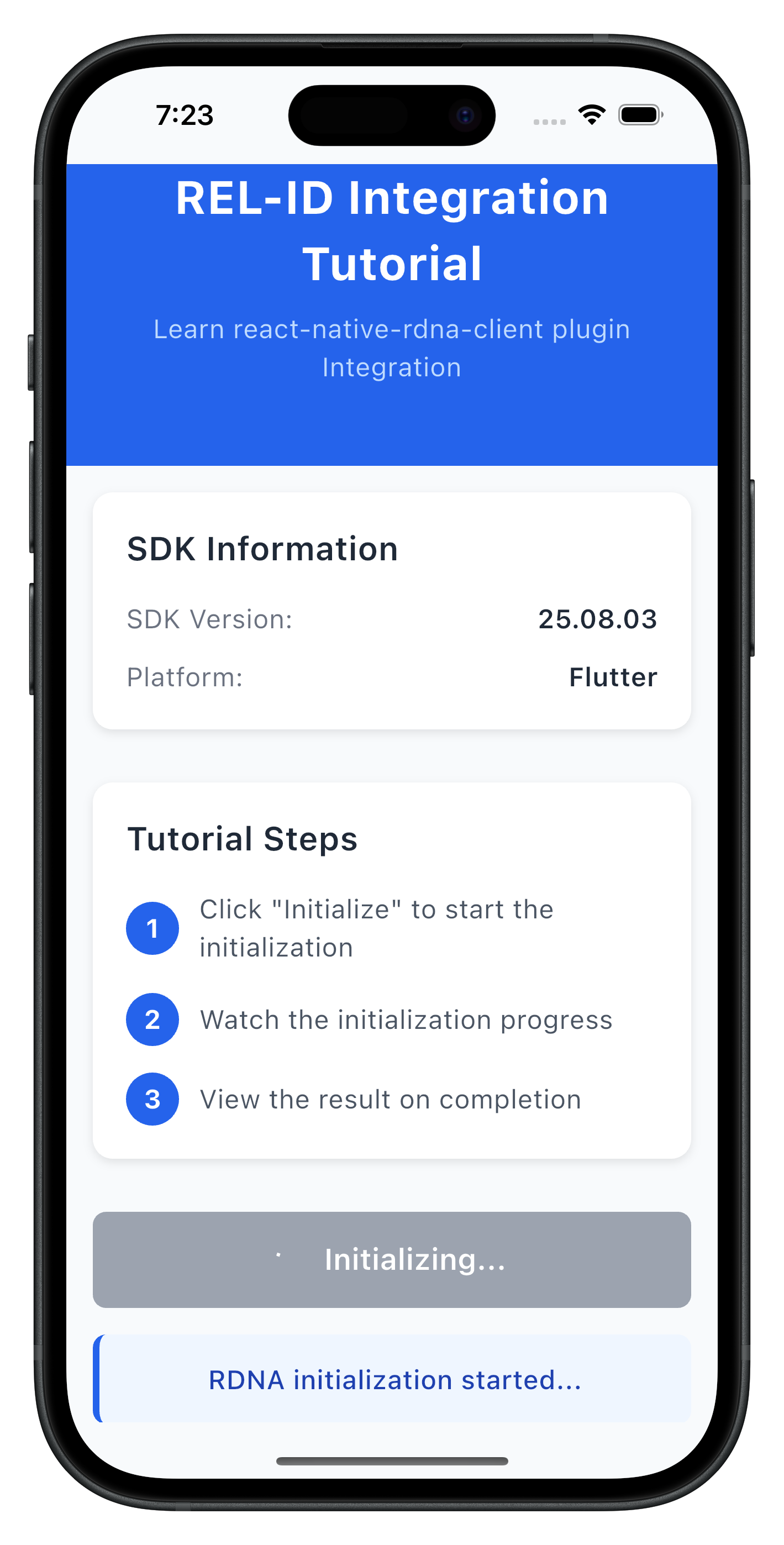
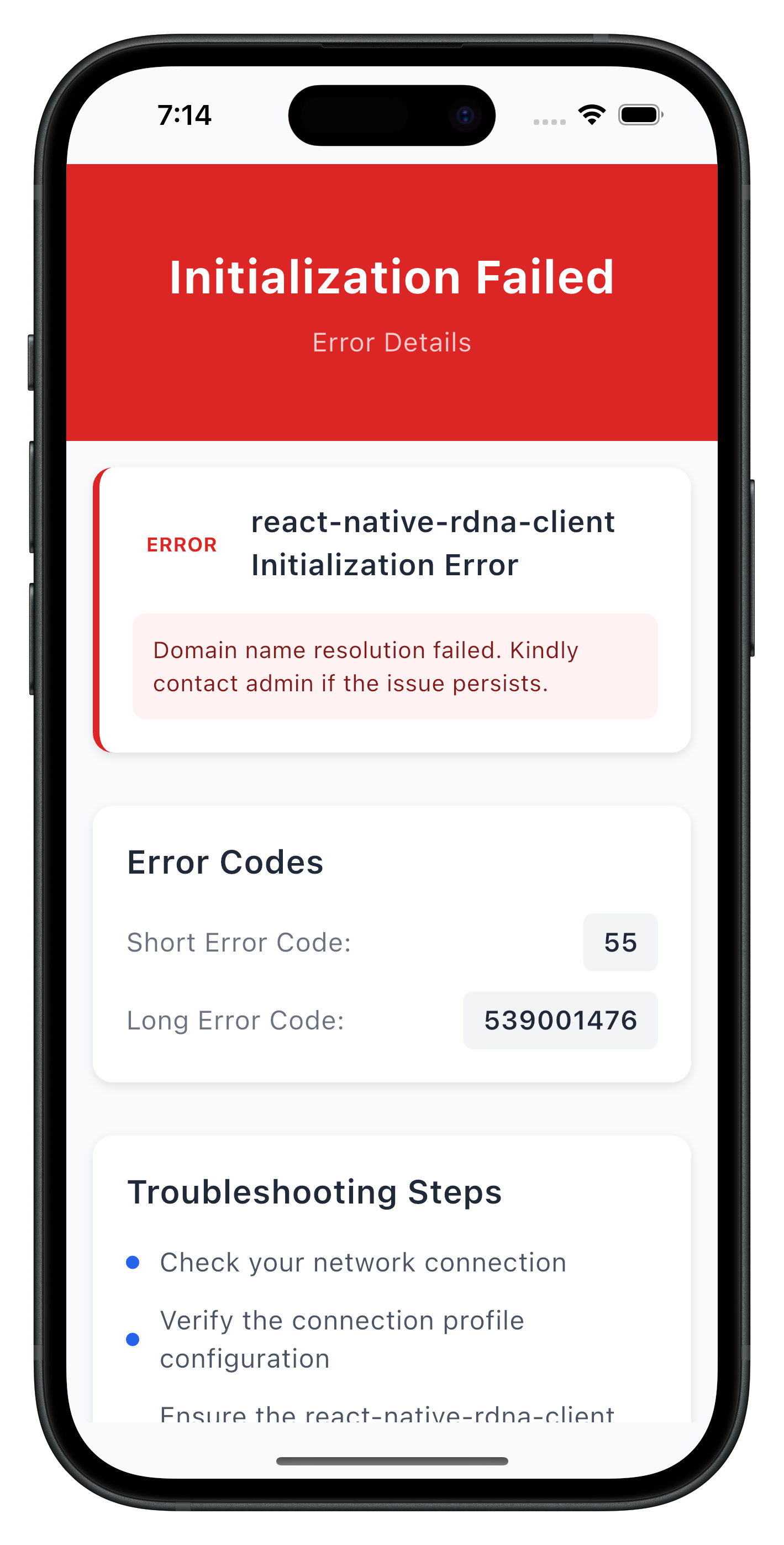
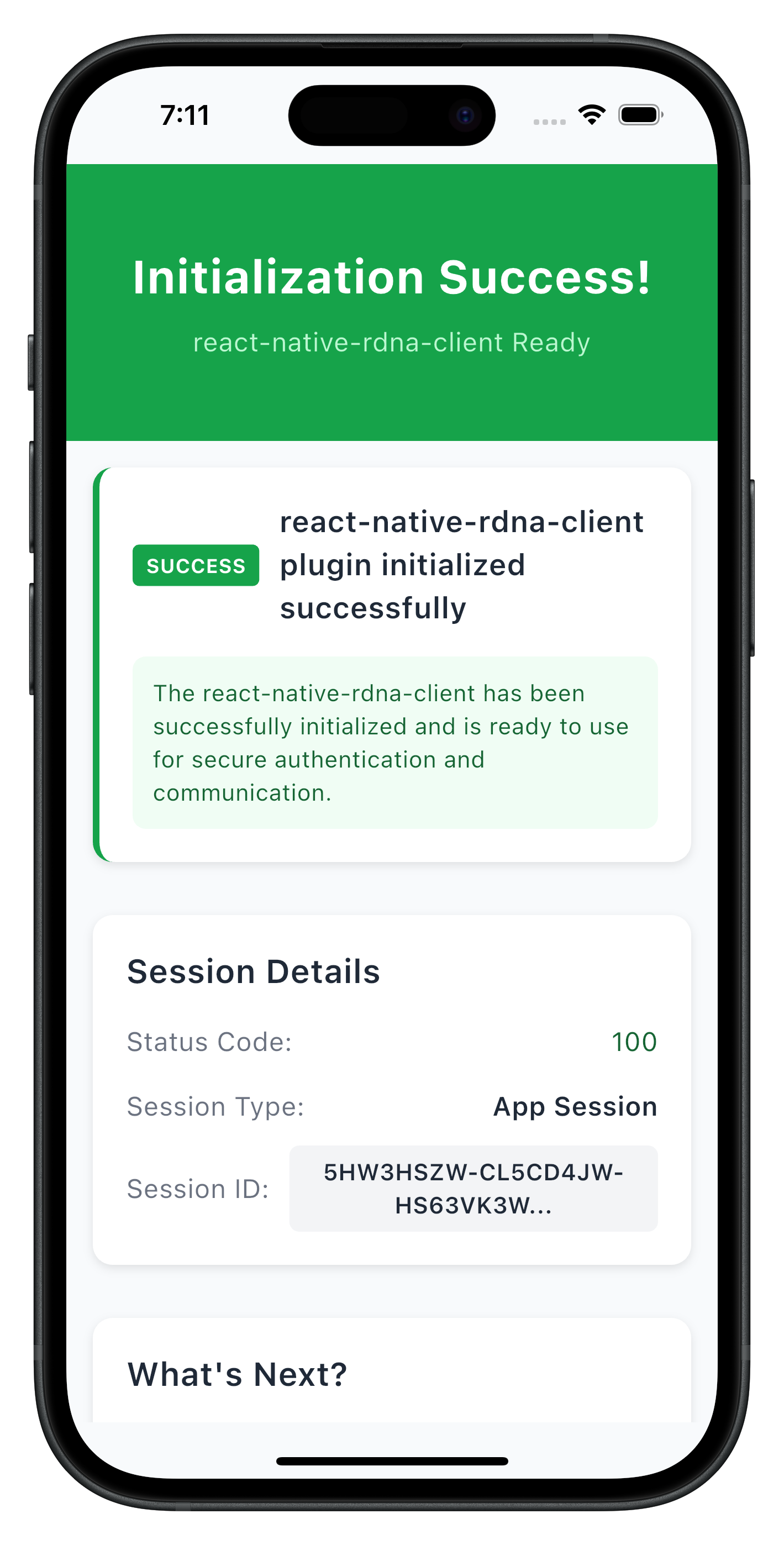
The following images showcase screens from the sample application:
|
|
|
Build and Run
# Run on connected device
flutter run

# Run on iOS simulator
flutter run -d ios

# Run on Android emulator
flutter run -d android

# List available devices
flutter devices
Hot Reload
Flutter supports hot reload for rapid development:
- Press
rin terminal for hot reload - Press
Rfor hot restart - Changes reflect instantly
Debugging
VS Code: Use the built-in debugger with breakpoints Android Studio: Use the Flutter Inspector DevTools: Run flutter pub global activate devtools then devtools
Key Test Scenarios
- Successful Initialization: Verify the complete flow works end-to-end
- Network Errors: Test with invalid host/port configurations
- Invalid Credentials: Test with incorrect RelId values
- Progress Tracking: Verify progress events are properly displayed
- Default Configuration: Test initialization without initOptions parameter
- Custom Language: Test with RTL languages (Arabic, Hebrew, etc.)
- Location Permissions: Test with mandatory and non-mandatory location settings
Verification Steps
Test your implementation with below APIs:
// Test SDK version retrieval
final version = await rdnaService.getSDKVersion();
print('SDK Version: $version');

// Test basic initialization (with default values)
final syncResponse = await rdnaService.initialize();
if (syncResponse.error?.longErrorCode == 0) {
  print('Initialization successful');
} else {
  print('Initialization failed: ${syncResponse.error?.errorString}');
}

// Test initialization with custom initOptions
final customOptions = RDNAInitOptions(
  internationalizationOptions: RDNAinternationalizationOptions(
    localeCode: 'ar',
    localeName: 'Arabic',
    languageDirection: 1
  ),
  permissionOptions: RDNAPermissionOptions(
    isLocationPermissionRequired: true,
    isLocationPermissionMandatory: false
  ),
  otelConfig: RDNAOtelConfig(
    otelHTTPEndpointURL: '',
    enableEncoding: '',
    disableTrace: 1,
    otelTraceFlushTimeout: 0
  )
);

final customSyncResponse = await rdnaService.initialize(customOptions);
if (customSyncResponse.error?.longErrorCode == 0) {
  print('Custom initialization successful');
} else {
  print('Custom initialization failed: ${customSyncResponse.error?.errorString}');
}
The sample app includes comprehensive testing patterns in the tutorial screens:
- SDK version verification before initialization
- Progress message formatting and display
- Error handling with user-friendly messages
- Navigation between success and error states
Connection Profile Issues
Error: "No RelIds found in agent info" Solution: Verify your JSON structure matches the sample in lib/uniken/cp/agent_info.json
Error: "No matching profile found for RelId name" Solution: Ensure the Name field in RelIds matches the Name field in Profiles
Flutter-Specific Issues
"MissingPluginException"
- Plugin not properly registered
- Solution: Run
flutter clean && flutter pub get, then rebuild
"Asset not found"
- Asset not declared in pubspec.yaml
- Solution: Add asset path under
flutter.assetsin pubspec.yaml
"Null check operator used on null value"
- Accessing null before initialization
- Solution: Ensure async initialization completes before use
Hot reload not working
- Changes to native code require full restart
- Solution: Stop and restart with
flutter run
iOS build fails
- CocoaPods issues
- Solution:
cd ios && pod install --repo-update
Android build fails
- Gradle sync issues
- Solution: Run
flutter cleanand rebuild
Plugin version conflicts
- Dependency resolution issues
- Solution: Check
pubspec.lock, runflutter pub upgrade
Network Connectivity
Error: Network connection failures Solution: Check host/port values and network accessibility
Error: REL-ID connection issues Solution: Verify the REL-ID server setup and running
SDK Initialization
Error Code 88: SDK already initialized Solution: Terminate the sdk
Error Code 288: SDK detected dynamic attack performed on the app Solution: Terminate the app
Error Code 179: Initialization in progress Solution: Wait for current initialization to complete before retrying
Security Considerations
- Use
RDNALoggingLevel.RDNA_NO_LOGSin production - Never log full RelId values (use partial logging:
relId.substring(0, 10) + '...') - Store session data securely using flutter_secure_storage
- Validate all connection profile data before use
- Enable obfuscation for release builds:
flutter build --obfuscate
State Management
- Use appropriate state management for app complexity
- Consider Provider or Riverpod for dependency injection
- Avoid storing sensitive data in widget state
Performance
- Use
constconstructors where possible - Avoid rebuilding widgets unnecessarily
- Profile with Flutter DevTools
Memory Management
- Cancel StreamSubscriptions in dispose()
- Dispose controllers (TextEditingController, AnimationController)
- Use weak references for long-lived callbacks
- Always clean up event listeners in widget
dispose()if needed - Use the singleton pattern for services to avoid memory leaks
- Implement proper error boundaries
- Handle component unmounting gracefully
User Experience
- Provide clear progress indicators during initialization
- Display meaningful error messages to users
- Implement retry mechanisms for network failures
- Handle background/foreground app state changes
Congratulations! You've successfully learned how to implement RELID SDK initialization with:
- ✅ Proper project structure and organization
- ✅ Connection profile management and parsing
- ✅ Event-driven initialization handling
- ✅ Advanced SDK configuration with initOptions (language, permissions, telemetry)
- ✅ Comprehensive error handling and user feedback
- ✅ Security best practices and memory management
Key Flutter Patterns Learned
- Async/await for asynchronous operations
- Streams for event handling
- StatefulWidget lifecycle management
- Proper resource disposal
- Asset management with pubspec.yaml
- Hot reload for rapid development
Next Steps
- Explore the sample app's MTD (Mobile Threat Detection) implementation