🎯 Learning Path:
- Complete REL-ID Initialization Flow Codelab (iOS)
- Complete REL-ID Complete Activation & Login Flow Codelab (iOS)
- You are here → Identity Verification MFA Activation Flow Implementation
Welcome to the REL-ID Identity Verification MFA Activation Flow codelab for iOS! This tutorial teaches you how to implement comprehensive identity verification during the user activation process using document scanning, facial recognition, and biometric authentication.
What You'll Build
In this codelab, you'll enhance your existing REL-ID MFA activation flow with integrated identity verification:
- 📱 Enhanced Activation Flow: Seamless IDV integration within MFA activation
- 📄 Document Scan Process: Automated document verification during user onboarding
- 📸 Document Details Confirmation: Interactive review of OCR-extracted identity information
- 🤳 Selfie Capture Process: Live selfie capture with liveness detection
- ✅ Selfie Biometric Verification: Face matching between document and live selfie
- 🔐 Biometric Consent Management: User consent for biometric template storage
- 🔑 Password Setup: Secure password creation after IDV completion
- 📊 Complete Closure-Based Architecture: Closure handlers for all IDV workflows
Key Difference: IDV During Activation vs MFA Activation
This codelab demonstrates IDV integrated within MFA activation, where identity verification occurs immediately after the activation code and before password setup:
Standard MFA Activation Flow:
Activation Code → Password Setup → Dashboard

IDV MFA Activation Flow (This Codelab):
Activation Code → IDV (Document → Selfie → Consent) → Password Setup → Dashboard
What You'll Learn
- ✅ How to integrate IDV within MFA activation workflow
- ✅ Implementing REL-ID IDV APIs with proper closure handling
- ✅ Document scanning and OCR data validation during onboarding
- ✅ Selfie capture with liveness detection and face matching
- ✅ Handling biometric consent and template storage
- ✅ Managing IDV workflow states and challenge modes
- ✅ Error handling and retry logic for IDV operations
- ✅ Completing activation flow after successful IDV verification
Prerequisites
- Completion of REL-ID Initialization codelab (iOS)
- Completion of REL-ID MFA Activation & Login codelab (iOS)
- Basic understanding of Swift and UIKit
- REL-ID SDK integration credentials
- Document scanning license (Regula)
- Test identity documents for scanning
Technology Stack
- iOS: 13.0+
- Swift: 5.0+
- UIKit: Storyboard-based UI
- REL-ID SDK: RELIDIDV Framework (Latest)
- Regula Document Reader: For document scanning and OCR
- CocoaPods: Dependency management
IDV MFA Activation Flow Diagram
Understanding the complete flow is crucial before implementation:
1. SDK Initialization
   ↓ (RDNAService.shared.initialize)

2. User Registration
   ↓ (CheckUserViewController → onGetUser closure)

3. Activation Code Verification
   ↓ (ActivationCodeViewController → activation code validated)

4. 📄 IDV Document Scan Process
   ├─ onGetIDVDocumentScanProcessStartConfirmation closure
   │  • idvWorkflow: .IDV_ACTIVATION
   │  • challengeMode: 8 (activation)
   ├─ RDNAIDVService.shared.setIDVDocumentScanProcessStartConfirmation(true, .IDV_ACTIVATION)
   ├─ Native Document Capture (Regula SDK)
   ├─ onGetIDVConfirmDocumentDetails closure
   │  • challengeMode: 8
   │  • documentDetails: OCR-extracted document fields JSON
   └─ RDNAIDVService.shared.setIDVConfirmDocumentDetails(true, challengeMode)
   ↓

5. 🤳 IDV Selfie Capture Process
   ├─ onGetIDVSelfieProcessStartConfirmation closure
   │  • idvWorkflow: .IDV_ACTIVATION
   ├─ RDNAIDVService.shared.setIDVSelfieProcessStartConfirmation(true, false, .IDV_ACTIVATION)
   ├─ Native Selfie Capture (Liveness Detection)
   ├─ onGetIDVSelfieConfirmation closure
   │  • challengeMode: 8
   │  • selfieDetails: Biometric match results JSON
   └─ RDNAIDVService.shared.setIDVSelfieConfirmation("true", challengeMode)
   ↓

6. 🔐 IDV Biometric Consent
   ├─ onGetIDVBiometricOptInConsent closure
   │  • challengeMode: 8
   └─ RDNAIDVService.shared.setIDVBiometricOptInConsent(true, challengeMode)
   ↓

7. 🔑 Password Setup
   ↓ (SetPasswordViewController → onGetPassword closure)

8. ✅ onUserLoggedIn Closure
   ↓

9. Dashboard Navigation
IDV Workflow and Challenge Mode Values
For MFA activation flow, you'll use these specific values:
Parameter | Value | Description |
idvWorkflow |
| Standard activation workflow |
challengeMode |
| Activation challenge mode |
Before You Begin
Ensure you have completed these requirements:
1. Previous Codelabs Completed
- ✅ REL-ID Initialization Flow (iOS)
- ✅ REL-ID MFA Activation & Login Flow (iOS)
2. Development Environment
# Required tools
macOS 11.0+ (Big Sur or later)
Xcode 13.0+
CocoaPods 1.11.0+
Swift 5.0+
3. REL-ID SDK Credentials
- Connection profile configuration
- Valid REL-ID SDK license
- Document scanning license (Regula)
Get the Code from GitHub
The code to get started can be found in a GitHub repository.
You can clone the repository using the following command:
git clone https://github.com/uniken-team/codelab.git
Navigate to the relid-codelab-ios/relid-IDV-MFA-activation-flow folder in the repository you cloned earlier:
cd codelab/relid-codelab-ios/relid-IDV-MFA-activation-flow
Project Structure
The IDV MFA Activation codelab follows this structure:
relid-IDV-MFA-activation-flow/
├── relidcodelab/
│   ├── Sources/
│   │   ├── Tutorial/
│   │   │   ├── Screens/
│   │   │   │   ├── IDV/                               # IDV Screens
│   │   │   │   │   ├── IDVDocumentProcessStartConfirmationViewController.swift
│   │   │   │   │   ├── IDVConfirmDocumentDetailsViewController.swift
│   │   │   │   │   ├── IDVSelfieProcessStartConfirmationViewController.swift
│   │   │   │   │   ├── IDVSelfieConfirmationViewController.swift
│   │   │   │   │   └── IDVBiometricOptInConsentViewController.swift
│   │   │   │   └── MFA/                               # MFA Screens
│   │   │   │       ├── CheckUserViewController.swift
│   │   │   │       ├── ActivationCodeViewController.swift
│   │   │   │       └── SetPasswordViewController.swift
│   │   │   └── Navigation/
│   │   │       ├── AppCoordinator.swift               # Main MFA coordinator
│   │   │       └── AppIDVCoordinator.swift            # IDV coordinator
│   │   └── Uniken/
│   │       └── Services/
│   │           ├── IDV/
│   │           │   ├── RDNAIDVService.swift           # IDV Service Layer
│   │           │   └── RDNAIDVDelegateManager.swift   # IDV Delegate Manager
│   │           ├── RDNAService.swift                  # Main RDNA Service
│   │           └── RDNADelegateManager.swift          # Main Delegate Manager
│   └── idv-artifacts/                                 # iOS IDV Assets
│       ├── db.dat                                     # Document recognition DB (110.5MB)
│       ├── regula.license                             # Regula license file
│       └── Certificates.bundle/
│           └── icaopkd-002-complete-000325.ldif
├── Podfile                                            # CocoaPods dependencies
└── relidcodelab.xcworkspace                           # Xcode workspace (use this!)
Installation
Step 1: Clone and Setup
# Navigate to the codelab folder
cd relid-codelab-ios/relid-IDV-MFA-activation-flow

# Add the `RELID.xcframework` to your project:
#   - Drag and drop `RELID.xcframework` into your Xcode project
#   - Select your target → General → Frameworks,Libraries, and Embedded Content
#   - Set embed mode to "Embed & Sign"

# Place the RELIDIDV local pod(IDV libs) at ./RELID_IDV/
# (Contact REL-ID team for the framework)
Step 2: Install CocoaPods Dependencies
# Install CocoaPods (if not already installed)
sudo gem install cocoapods

# Install dependencies
pod install
Step 3: Configure IDV Assets
The following IDV assets need to be configured in your project at the specified paths:
iOS Configuration:
Place the following files (provided by Uniken admin team) at these locations:
- 📄 Document Recognition Database:
idv-artifacts/db.dat - 📄 Regula License:
idv-artifacts/regula.license - 📄 Certificate Bundle:
idv-artifacts/Certificates.bundle/icaopkd-002-complete-000325.ldif
Step 4: Open and Run the Application
# Open the workspace (NOT the .xcodeproj!)
open relidcodelab.xcworkspace
In Xcode:
- Select a simulator or device target
- Click Product → Run (or press ⌘R)
- The app will build and launch
Architecture Overview: Code Isolation & Single Responsibility
This codelab implements IDV functionality using a clean, isolated architecture that follows single responsibility principles. All IDV-related code is separated into dedicated directories, making the codebase maintainable and scalable.
Key Architectural Benefits
- ✅ Code Isolation: All IDV code is isolated under
IDV/subdirectories - ✅ Single Responsibility: Each file has one clear purpose
- ✅ Closure-Based Callbacks: Strongly-typed closure handlers for IDV events
- ✅ Coordinator Pattern: Centralized navigation management for IDV screens
- ✅ Centralized Delegate Management: Single source of truth for IDV event handling
Complete IDV File Structure
The IDV implementation consists of 7 core files organized in 3 layers:
Sources/Uniken/Services/IDV/              # SERVICE LAYER
├── RDNAIDVService.swift                  # IDV API wrapper (sync methods)
└── RDNAIDVDelegateManager.swift          # Protocol conformance & closure dispatch

Sources/Tutorial/Navigation/              # NAVIGATION LAYER
└── AppIDVCoordinator.swift               # IDV screen navigation coordinator

Sources/Tutorial/Screens/IDV/             # UI LAYER
├── IDVDocumentProcessStartConfirmationViewController.swift
├── IDVConfirmDocumentDetailsViewController.swift
├── IDVSelfieProcessStartConfirmationViewController.swift
├── IDVSelfieConfirmationViewController.swift
└── IDVBiometricOptInConsentViewController.swift
The 3-Layer Architecture Pattern
The IDV implementation follows a clear 3-layer pattern that separates concerns:
┌─────────────────────────────────────────────────────┐
│  LAYER 3: UI LAYER (UIViewControllers)            │
│  • 5 IDV Screens (Document, Selfie, Consent)       │
│  • Display UI, handle user interactions            │
└─────────────────────────────────────────────────────┘
                        ↓
┌─────────────────────────────────────────────────────┐
│  LAYER 2: COORDINATOR LAYER (Navigation)           │
│  • AppIDVCoordinator.swift                          │
│  • Connects closures to navigation                 │
│  • Manages screen instantiation and transitions    │
└─────────────────────────────────────────────────────┘
                        ↓
┌─────────────────────────────────────────────────────┐
│  LAYER 1: SERVICE LAYER (Business Logic)           │
│  • RDNAIDVService.swift → API calls (sync methods) │
│  • RDNAIDVDelegateManager.swift → Protocol impl    │
│  • Closure-based callback dispatching              │
└─────────────────────────────────────────────────────┘
                        ↓
┌─────────────────────────────────────────────────────┐
│  NATIVE LAYER (REL-ID SDK)                          │
│  • RELIDIDV Framework                                │
│  • Native document scanner (Regula)                 │
│  • Native selfie capture (Liveness)                │
└─────────────────────────────────────────────────────┘
How the Layers Connect: Event Flow Example
Here's how a document scan event flows through all layers:
// 1️⃣ NATIVE LAYER: SDK fires protocol method
Native SDK → calls getIDVDocumentScanProcessStartConfirmation(_:)

// 2️⃣ SERVICE LAYER: Delegate Manager handles it
RDNAIDVDelegateManager.getIDVDocumentScanProcessStartConfirmation(_:)
  → Dispatches to main thread
  → Calls registered closure handler

// 3️⃣ COORDINATOR LAYER: Coordinator handles navigation
AppIDVCoordinator.showIDVDocumentScanProcessStartConfirmation(idvWorkflow:)
  → Instantiates view controller from storyboard
  → Passes workflow parameter
  → Pushes to navigation stack

// 4️⃣ UI LAYER: Screen displays
IDVDocumentProcessStartConfirmationViewController
  → Shows guidelines
  → User clicks "Scan Document"
  → Calls RDNAIDVService.shared.setIDVDocumentScanProcessStartConfirmation()

// 5️⃣ SERVICE LAYER: API call
RDNAIDVService.shared.setIDVDocumentScanProcessStartConfirmation()
  → Calls native SDK API
  → Returns RDNAError (sync response)
  → Checks error.longErrorCode (0 = success)

// 6️⃣ NATIVE LAYER: Opens camera
SDK opens Regula document scanner
  → User captures document
  → SDK fires next protocol method (getIDVConfirmDocumentDetails)
  → Cycle continues...
Key Architectural Patterns
1. Singleton Pattern (Service & Delegate Manager)
Both the Service and Delegate Manager use singleton pattern for global state management:
// Service - One instance for all IDV API calls
class RDNAIDVService {
    static let shared = RDNAIDVService()
    private let rdna = RDNA.sharedInstance()

    private init() {
        print("RDNAIDVService - Service initialized")
    }
}

// Delegate Manager - One instance for all IDV protocol callbacks
class RDNAIDVDelegateManager: NSObject,
                               RDNAIDVDocumentProcessingCallbacks,
                               RDNAIDVSelfieProcessingCallbacks,
                               RDNAIDVBiometricManagementCallbacks {
    static let shared = RDNAIDVDelegateManager()

    private override init() {
        super.init()
        print("RDNAIDVDelegateManager - Initialized")
    }
}
Why? Ensures a single instance manages all IDV operations and protocol callbacks globally.
2. Coordinator Pattern (Navigation)
The Coordinator pattern centralizes navigation logic and screen instantiation:
// Coordinator manages navigation for all IDV screens
class AppIDVCoordinator {
    static let shared = AppIDVCoordinator()

    private weak var navigationController: UINavigationController?
    private let storyboard = UIStoryboard(name: "Main", bundle: nil)

    func configure(with navigationController: UINavigationController) {
        self.navigationController = navigationController
        registerIDVEventHandlers()
    }

    private func registerIDVEventHandlers() {
        let delegateManager = RDNAIDVDelegateManager.shared

        // Register closure for document scan start
        delegateManager.onGetIDVDocumentScanProcessStartConfirmation = { [weak self] idvWorkflow in
            self?.showIDVDocumentScanProcessStartConfirmation(idvWorkflow: idvWorkflow)
        }
        // ... register other closures
    }
}
Why? Centralizes navigation logic, provides type-safe screen transitions, and maintains weak references to prevent retain cycles.
3. Closure-Based Callbacks (Type-Safe Events)
All IDV events use strongly-typed closure handlers:
// Closure properties for each IDV event
var onGetIDVDocumentScanProcessStartConfirmation: ((_ idvWorkflow: RDNAIDVWorkflow) -> Void)?
var onGetIDVConfirmDocumentDetails: ((_ challengeMode: RDNAChallengeOpMode, _ responseDataJSON: String) -> Void)?
var onGetIDVSelfieProcessStartConfirmation: ((_ idvWorkflow: RDNAIDVWorkflow) -> Void)?
// ... etc for all 5 events

// Protocol method calls closure with extracted parameters
func getIDVDocumentScanProcessStartConfirmation(_ idvWorkflow: RDNAIDVWorkflow) {
    print("RDNAIDVDelegateManager - Document scan start event received")

    // Main thread dispatch and call registered closure
    DispatchQueue.main.async { [weak self] in
        self?.onGetIDVDocumentScanProcessStartConfirmation?(idvWorkflow)
    }
}
Why? Type safety catches errors at compile-time, and closures provide clean functional-style callbacks without delegation boilerplate.
4. Synchronous API Pattern (Service Methods)
The Service wraps native SDK APIs that return RDNAError synchronously:
// Native SDK returns RDNAError directly (sync)
func setIDVDocumentScanProcessStartConfirmation(
    isConfirm: Bool,
    idvWorkflow: RDNAIDVWorkflow
) -> RDNAError {
    print("RDNAIDVService - Setting document scan start confirmation")

    let error = rdna.setIDVDocumentScanProcessStartConfirmation(
        isConfirm,
        idvWorkflow: idvWorkflow
    )

    if error.longErrorCode == 0 {
        print("RDNAIDVService - Success")
    } else {
        print("RDNAIDVService - Error: \(error.longErrorCode) - \(error.errorString ?? "")")
    }

    return error
}
Why? The SDK provides synchronous validation responses (error.longErrorCode). Actual results come through protocol callbacks asynchronously.
App Integration: Coordinator Setup
The final piece is integrating AppIDVCoordinator into your app lifecycle:
// SceneDelegate.swift - Setup both coordinators
func scene(_ scene: UIScene, willConnectTo session: UISceneSession, options connectionOptions: UIScene.ConnectionOptions) {
    guard let windowScene = (scene as? UIWindowScene) else { return }

    window = UIWindow(windowScene: windowScene)

    // Setup navigation
    let navigationController = UINavigationController()

    // Configure both coordinators (MFA + IDV)
    AppCoordinator.shared.configure(with: navigationController)
    AppIDVCoordinator.shared.configure(with: navigationController)  // ← IDV coordinator

    // Start app flow
    AppCoordinator.shared.start()

    window?.rootViewController = navigationController
    window?.makeKeyAndVisible()
}
Why this setup?
AppCoordinator         → Handles: onGetUser, onGetPassword, onUserLoggedIn, etc. (MFA flow)
AppIDVCoordinator      → Handles: IDV document scan, selfie, consent events (IDV flow)
Architecture Benefits Summary
1. Code Isolation
✅ All IDV code under IDV/ subdirectories
✅ Easy to locate and modify IDV features
✅ No mixing of MFA and IDV code
✅ Clean separation of concerns
2. Single Responsibility
✅ RDNAIDVDelegateManager.swift → Handles protocol callbacks only
✅ RDNAIDVService.swift → Handles API calls only
✅ AppIDVCoordinator.swift → Handles navigation only
✅ ViewControllers → UI rendering only
3. Type Safety
✅ Strongly-typed closure signatures
✅ Compiler-enforced protocol conformance
✅ SDK type integration (RDNAIDVWorkflow, RDNAChallengeOpMode)
✅ Compile-time error detection
4. Centralized Management
✅ All navigation logic in AppIDVCoordinator
✅ Single source of truth for event handling
✅ Consistent event-to-screen mapping
✅ Easy to trace event flow
Overview
The IDV Delegate Manager is the foundation of the IDV architecture. It implements the RELIDIDV framework protocols and dispatches events through strongly-typed closure handlers.
File Location
Sources/Uniken/Services/IDV/RDNAIDVDelegateManager.swift
Key Responsibilities
- ✅ Protocol Conformance: Implements 4 IDV protocols (24 total methods)
- ✅ Closure Dispatching: Calls registered closure handlers with parsed parameters
- ✅ Main Thread Dispatch: Ensures all UI updates happen on main thread
- ✅ Type Safety: Strongly-typed closure signatures for compile-time validation
- ✅ Event Filtering: Only implements methods used in activation flow
IDV Protocols Implemented
The Delegate Manager conforms to 4 modular IDV protocols:
Protocol | Methods Used | Description |
RDNAIDVDocumentProcessingCallbacks | 2 of 6 | Document scan and OCR callbacks |
RDNAIDVSelfieProcessingCallbacks | 2 of 2 | Selfie capture and analysis callbacks |
RDNAIDVBiometricManagementCallbacks | 1 of 10 | Biometric consent callbacks |
RDNAIDVKYCManagementCallbacks | 0 of 6 | KYC management (not used in activation) |
Complete Implementation
Create the file at Sources/Uniken/Services/IDV/RDNAIDVDelegateManager.swift:
//
//  RDNAIDVDelegateManager.swift
//  relidcodelab
//
//  Purpose: Manages IDV-specific SDK callbacks with closure-based dispatching
//  Architecture: Singleton pattern implementing IDV protocol callbacks
//

import Foundation
import RELID

/**
 * RDNAIDVDelegateManager - Manages IDV-specific SDK callbacks
 *
 * Implements IDV protocol methods from RELID SDK and dispatches to closures.
 * Handles document scanning, selfie capture, and biometric consent callbacks.
 *
 * **IDV Protocols Implemented (Modular):**
 * - RDNAIDVDocumentProcessingCallbacks (6 methods)
 * - RDNAIDVSelfieProcessingCallbacks (2 methods)
 * - RDNAIDVBiometricManagementCallbacks (10 methods)
 * - RDNAIDVKYCManagementCallbacks (6 methods)
 *
 * **Registration:**
 * Each protocol is registered separately via:
 * - setIDVDocumentProcessingDelegate
 * - setIDVSelfieProcessingDelegate
 * - setIDVBiometricManagementDelegate
 * - setIDVKYCManagementDelegate
 *
 * **Pattern:**
 * - Main thread dispatch for all callbacks
 * - Closure-based callback handling
 * - JSON conversion for complex response data
 */
class RDNAIDVDelegateManager: NSObject,
                               RDNAIDVDocumentProcessingCallbacks,
                               RDNAIDVSelfieProcessingCallbacks,
                               RDNAIDVBiometricManagementCallbacks,
                               RDNAIDVKYCManagementCallbacks {

    // MARK: - Singleton

    static let shared = RDNAIDVDelegateManager()

    private override init() {
        super.init()
        print("RDNAIDVDelegateManager - Initialized")
    }

    // MARK: - Document Scan Callback Closures

    /// Closure invoked when SDK requests document scan start confirmation
    /// IDV-SPECIFIC: Navigate to IDVDocumentProcessStartConfirmationViewController
    /// - Parameter idvWorkflow: IDV workflow type (activation, KYC, opt-in, etc.)
    var onGetIDVDocumentScanProcessStartConfirmation: ((_ idvWorkflow: RDNAIDVWorkflow) -> Void)?

    /// Closure invoked when SDK provides scanned document details for confirmation
    /// IDV-SPECIFIC: Navigate to IDVConfirmDocumentDetailsViewController with OCR data
    /// - Parameters:
    ///   - challengeMode: Challenge operation mode indicating the IDV context
    ///   - responseDataJSON: JSON string containing OCR-extracted document details
    var onGetIDVConfirmDocumentDetails: ((_ challengeMode: RDNAChallengeOpMode, _ responseDataJSON: String) -> Void)?

    // MARK: - Selfie Capture Callback Closures

    /// Closure invoked when SDK requests selfie capture start confirmation
    /// IDV-SPECIFIC: Navigate to IDVSelfieProcessStartConfirmationViewController
    /// - Parameter idvWorkflow: IDV workflow type (activation, KYC, opt-in, etc.)
    var onGetIDVSelfieProcessStartConfirmation: ((_ idvWorkflow: RDNAIDVWorkflow) -> Void)?

    /// Closure invoked when SDK provides selfie analysis results for confirmation
    /// IDV-SPECIFIC: Navigate to IDVSelfieConfirmationViewController with biometric results
    /// - Parameters:
    ///   - userID: User ID being verified
    ///   - challengeMode: Challenge operation mode indicating the IDV context
    ///   - responseDataJSON: JSON string containing biometric analysis results
    var onGetIDVSelfieConfirmation: ((_ userID: String, _ challengeMode: RDNAChallengeOpMode, _ responseDataJSON: String) -> Void)?

    // MARK: - Biometric Consent Callback Closures

    /// Closure invoked when SDK requests biometric opt-in consent
    /// IDV-SPECIFIC: Navigate to IDVBiometricOptInConsentViewController
    /// - Parameters:
    ///   - userID: User ID for biometric template storage
    ///   - attemptsLeft: Number of attempts remaining
    ///   - challengeMode: Challenge operation mode
    ///   - idvResponseJSON: JSON string containing IDV response details
    ///   - status: Status information dictionary
    ///   - challengeResponse: Complete challenge response with session info
    ///   - error: Error information
    var onGetIDVBiometricOptInConsent: ((_ userID: String, _ attemptsLeft: Int, _ challengeMode: RDNAChallengeOpMode, _ idvResponseJSON: String, _ status: [AnyHashable: Any], _ challengeResponse: RDNAChallengeResponse, _ error: RDNAError) -> Void)?
}

// MARK: - RDNAIDVDocumentProcessingCallbacks Protocol

extension RDNAIDVDelegateManager {

    /// getIDVDocumentScanProcessStartConfirmation - Called when SDK requests document scan start confirmation
    /// **VERIFIED against RDNAIDVProtocol.h - RDNAIDVDocumentProcessingCallbacks**
    /// - Parameter idvWorkflow: IDV workflow type enum (activation, KYC, opt-in, etc.)
    func getIDVDocumentScanProcessStartConfirmation(_ idvWorkflow: RDNAIDVWorkflow) {
        print("RDNAIDVDelegateManager - getIDVDocumentScanProcessStartConfirmation called")
        print("  IDV Workflow: \(idvWorkflow.rawValue)")

        // IDV-SPECIFIC: Dispatch to IDVDocumentProcessStartConfirmationViewController
        DispatchQueue.main.async { [weak self] in
            self?.onGetIDVDocumentScanProcessStartConfirmation?(idvWorkflow)
        }
    }

    /// getIDVConfirmDocumentDetails - Called when SDK provides scanned document details
    /// **VERIFIED against RDNAIDVProtocol.h - RDNAIDVDocumentProcessingCallbacks**
    /// - Parameters:
    ///   - documentDetails: JSON string containing OCR-extracted document details
    ///   - mode: Challenge operation mode
    func getIDVConfirmDocumentDetails(_ documentDetails: String, challenge mode: RDNAChallengeOpMode) {
        print("RDNAIDVDelegateManager - getIDVConfirmDocumentDetails called")
        print("  Challenge Mode: \(mode.rawValue)")
        print("  Document Details JSON: \(documentDetails.prefix(200))...")

        // IDV-SPECIFIC: Dispatch to IDVConfirmDocumentDetailsViewController
        DispatchQueue.main.async { [weak self] in
            self?.onGetIDVConfirmDocumentDetails?(mode, documentDetails)
        }
    }

    /// getIDVDocumentProcessCanceled - Called when document scan process is canceled
    /// **VERIFIED against RDNAIDVProtocol.h - RDNAIDVDocumentProcessingCallbacks**
    /// Not used in this codelab - user cancellation handled via close button
    func getIDVDocumentProcessCanceled() {
        print("RDNAIDVDelegateManager - getIDVDocumentProcessCanceled called")
        // Not used in this codelab - stub for protocol conformance
    }

    /// getIDVRescanDocumentConfirmation - Called when SDK requests document rescan confirmation
    /// **VERIFIED against RDNAIDVProtocol.h - RDNAIDVDocumentProcessingCallbacks**
    /// Not used in this codelab - rescan handled via reject button in confirm details screen
    func getIDVRescanDocumentConfirmation() {
        print("RDNAIDVDelegateManager - getIDVRescanDocumentConfirmation called")
        // Not used in this codelab - stub for protocol conformance
    }

    /// onIDVAdditionalDocumentScan - Called for additional document scan requests
    /// **Required by RDNAIDVDocumentProcessingCallbacks protocol**
    /// Not used in activation flow codelab
    func onIDVAdditionalDocumentScan(_ userID: String, documentDetails: String, status: RDNARequestStatus, challenge mode: RDNAChallengeOpMode, error: RDNAError) {
        print("RDNAIDVDelegateManager - onIDVAdditionalDocumentScan called (not used in this codelab)")
    }

    /// onDatabaseDownloadProgress - Called during database download progress
    /// **Required by RDNAIDVDocumentProcessingCallbacks protocol**
    /// Not used in activation flow codelab
    func onDatabaseDownloadProgress(_ status: RDNAIDVDownloadStatus, databaseID: String) {
        print("RDNAIDVDelegateManager - onDatabaseDownloadProgress called (not used in this codelab)")
    }
}

// MARK: - RDNAIDVSelfieProcessingCallbacks Protocol

extension RDNAIDVDelegateManager {

    /// getIDVSelfieProcessStartConfirmation - Called when SDK requests selfie capture start confirmation
    /// **VERIFIED against RDNAIDVProtocol.h - RDNAIDVSelfieProcessingCallbacks**
    /// - Parameter idvWorkflow: IDV workflow type enum (activation, KYC, opt-in, etc.)
    func getIDVSelfieProcessStartConfirmation(_ idvWorkflow: RDNAIDVWorkflow) {
        print("RDNAIDVDelegateManager - getIDVSelfieProcessStartConfirmation called")
        print("  IDV Workflow: \(idvWorkflow.rawValue)")

        // IDV-SPECIFIC: Dispatch to IDVSelfieProcessStartConfirmationViewController
        DispatchQueue.main.async { [weak self] in
            self?.onGetIDVSelfieProcessStartConfirmation?(idvWorkflow)
        }
    }

    /// getIDVSelfieConfirmation - Called when SDK provides selfie analysis results
    /// **VERIFIED against RDNAIDVProtocol.h - RDNAIDVSelfieProcessingCallbacks**
    /// - Parameters:
    ///   - selfieDetails: JSON string containing biometric analysis results
    ///   - mode: Challenge operation mode
    func getIDVSelfieConfirmation(_ selfieDetails: String, challenge mode: RDNAChallengeOpMode) {
        print("RDNAIDVDelegateManager - getIDVSelfieConfirmation called")
        print("  Challenge Mode: \(mode.rawValue)")
        print("  Selfie Details JSON: \(selfieDetails.prefix(200))...")

        // Extract userID from selfieDetails JSON if possible (for logging)
        if let data = selfieDetails.data(using: .utf8),
           let json = try? JSONSerialization.jsonObject(with: data) as? [String: Any],
           let userID = json["user_id"] as? String {
            print("  User ID: \(userID)")

            // IDV-SPECIFIC: Dispatch to IDVSelfieConfirmationViewController
            DispatchQueue.main.async { [weak self] in
                self?.onGetIDVSelfieConfirmation?(userID, mode, selfieDetails)
            }
        } else {
            // Fallback: use empty userID
            print("  User ID: (not found in JSON)")
            DispatchQueue.main.async { [weak self] in
                self?.onGetIDVSelfieConfirmation?("", mode, selfieDetails)
            }
        }
    }
}

// MARK: - RDNAIDVBiometricManagementCallbacks Protocol

extension RDNAIDVDelegateManager {

    /// getIDVBiometricOptInConsent - Called when SDK requests biometric template storage consent
    /// **VERIFIED against RDNAIDVProtocol.h - RDNAIDVBiometricManagementCallbacks**
    /// - Parameters:
    ///   - userID: User ID for biometric template storage
    ///   - response: Complete challenge response with session info and IDV response
    ///   - mode: Challenge operation mode
    ///   - error: Error information
    func getIDVBiometricOpt(inConsent userID: String, response: RDNAChallengeResponse, challenge mode: RDNAChallengeOpMode, error: RDNAError) {
        print("RDNAIDVDelegateManager - getIDVBiometricOptInConsent called")
        print("  User ID: \(userID)")
        print("  Challenge Mode: \(mode.rawValue)")
        print("  Status Code: \(response.status.statusCode)")
        print("  Error Code: \(error.longErrorCode)")

        // Extract data from response (using available properties)
        let attemptsLeft = Int(response.status.statusCode)
        let idvResponse = ""
        let status: [AnyHashable: Any] = [:]

        // IDV-SPECIFIC: Dispatch to IDVBiometricOptInConsentViewController
        DispatchQueue.main.async { [weak self] in
            self?.onGetIDVBiometricOptInConsent?(userID, attemptsLeft, mode, idvResponse, status, response, error)
        }
    }

    // MARK: - Unused Biometric Management Protocol Methods (Stubs for Protocol Conformance)

    func getIDVBiometricOptOutConsent(_ userID: String, attemptsLeft: Int32, challenge mode: RDNAChallengeOpMode, idvResponse: String, status: [AnyHashable: Any], challengeResponse response: RDNAChallengeResponse, error: RDNAError) {
        print("RDNAIDVDelegateManager - getIDVBiometricOptOutConsent called (not used in this codelab)")
    }

    func onIDVBiometricTemplateUploadStatus(_ uploadResponse: String, status: RDNARequestStatus, error: RDNAError) {
        print("RDNAIDVDelegateManager - onIDVBiometricTemplateUploadStatus called (not used in this codelab)")
    }

    func getIDVUserBiometricTemplateStatusResponse(_ statusResponse: String, status: RDNARequestStatus, error: RDNAError) {
        print("RDNAIDVDelegateManager - getIDVUserBiometricTemplateStatusResponse called (not used in this codelab)")
    }

    func onIDVBiometricTemplateDeleteStatus(_ deleteResponse: String, status: RDNARequestStatus, error: RDNAError) {
        print("RDNAIDVDelegateManager - onIDVBiometricTemplateDeleteStatus called (not used in this codelab)")
    }

    func getIDVBiometricConsentModifyOptionsConfirmation(_ userID: String, challenge mode: RDNAChallengeOpMode, idvResponse: String, status: [AnyHashable: Any], response: RDNAChallengeResponse, error: RDNAError) {
        print("RDNAIDVDelegateManager - getIDVBiometricConsentModifyOptionsConfirmation called (not used in this codelab)")
    }

    func onIDVCheckUserBiometricTemplateStatus(_ userID: String, idvResponse: String, status: RDNARequestStatus, error: RDNAError) {
        print("RDNAIDVDelegateManager - onIDVCheckUserBiometricTemplateStatus called (not used in this codelab)")
    }

    func onIDVServerBiometricAuthenticationResult(_ userID: String, idvResponse: String, status: RDNARequestStatus, error: RDNAError) {
        print("RDNAIDVDelegateManager - onIDVServerBiometricAuthenticationResult called (not used in this codelab)")
    }

    func onIDVOpt(inCapturedFrameConfirmation capturedImage: String) {
        print("RDNAIDVDelegateManager - onIDVOptInCapturedFrameConfirmation called (not used in this codelab)")
    }

    func onIDVBiometricOpt(inStatus userID: String, idvResponse: String, status: RDNARequestStatus, error: RDNAError) {
        print("RDNAIDVDelegateManager - onIDVBiometricOptInStatus called (not used in this codelab)")
    }

    func onIDVBiometricOptOutStatus(_ userID: String, idvResponse: String, status: RDNARequestStatus, error: RDNAError) {
        print("RDNAIDVDelegateManager - onIDVBiometricOptOutStatus called (not used in this codelab)")
    }
}

// MARK: - RDNAIDVKYCManagementCallbacks Protocol

extension RDNAIDVDelegateManager {

    // All KYC protocol methods are stubs - not used in activation flow

    func onIDVKYCDataSubmittedResponse(_ kycResponse: String, status: RDNARequestStatus, error: RDNAError) {
        print("RDNAIDVDelegateManager - onIDVKYCDataSubmittedResponse called (not used in this codelab)")
    }

    func getIDVKYCStatus(_ kycStatusResponse: String, status: RDNARequestStatus, error: RDNAError) {
        print("RDNAIDVDelegateManager - getIDVKYCStatus called (not used in this codelab)")
    }

    func onIDVKYCDataDeletedResponse(_ kycDeleteResponse: String, status: RDNARequestStatus, error: RDNAError) {
        print("RDNAIDVDelegateManager - onIDVKYCDataDeletedResponse called (not used in this codelab)")
    }

    func onIDVActivatedCustomerKYCResponse(_ userID: String, status: RDNARequestStatus, error: RDNAError) {
        print("RDNAIDVDelegateManager - onIDVActivatedCustomerKYCResponse called (not used in this codelab)")
    }

    func onIDVAgentKYCResponse(_ userID: String, forUserID: String, status: RDNARequestStatus, error: RDNAError) {
        print("RDNAIDVDelegateManager - onIDVAgentKYCResponse called (not used in this codelab)")
    }

    func onIDVKYCProgress(_ status: String) {
        print("RDNAIDVDelegateManager - onIDVKYCProgress called (not used in this codelab)")
    }
}
Key Implementation Details
1. Closure-Based Callback Pattern
// 1. Declare closure property with strongly-typed signature
var onGetIDVDocumentScanProcessStartConfirmation: ((_ idvWorkflow: RDNAIDVWorkflow) -> Void)?

// 2. Protocol method implementation
func getIDVDocumentScanProcessStartConfirmation(_ idvWorkflow: RDNAIDVWorkflow) {
    print("Event received")

    // 3. Main thread dispatch + call closure
    DispatchQueue.main.async { [weak self] in
        self?.onGetIDVDocumentScanProcessStartConfirmation?(idvWorkflow)
    }
}
2. Protocol Method Signatures
All protocol methods follow patterns defined in RDNAIDVProtocol.h:
// Document callbacks use: (String, challenge: RDNAChallengeOpMode)
func getIDVConfirmDocumentDetails(_ documentDetails: String, challenge mode: RDNAChallengeOpMode)

// Selfie callbacks use: (String, challenge: RDNAChallengeOpMode)
func getIDVSelfieConfirmation(_ selfieDetails: String, challenge mode: RDNAChallengeOpMode)

// Biometric callbacks use: (String, response: RDNAChallengeResponse, challenge: RDNAChallengeOpMode, error: RDNAError)
func getIDVBiometricOpt(inConsent userID: String, response: RDNAChallengeResponse, challenge mode: RDNAChallengeOpMode, error: RDNAError)
3. JSON Parameter Handling
Some events provide complex data as JSON strings:
func getIDVConfirmDocumentDetails(_ documentDetails: String, challenge mode: RDNAChallengeOpMode) {
    // documentDetails is a JSON string containing OCR data
    // Parse in view controller for display

    DispatchQueue.main.async { [weak self] in
        self?.onGetIDVConfirmDocumentDetails?(mode, documentDetails)
    }
}
The JSON parsing happens in the view controllers to keep the delegate manager focused on protocol conformance and dispatching.
Overview
The IDV Service Layer wraps the native RELIDIDV framework APIs with a clean, type-safe Swift interface. It provides singleton access to all IDV operations.
File Location
Sources/Uniken/Services/IDV/RDNAIDVService.swift
Key Responsibilities
- ✅ API Wrapping: Wraps native SDK methods with Swift-friendly signatures
- ✅ Error Handling: Returns RDNAError objects for validation
- ✅ Logging: Comprehensive logging for debugging
- ✅ Delegate Registration: Manages IDV delegate setup
- ✅ Type Safety: Uses SDK enums (RDNAIDVWorkflow, RDNAChallengeOpMode)
IDV APIs Provided
The service exposes 5 main IDV APIs:
API Method | Purpose | Response Pattern |
| Start/cancel document scan | Sync error + async events |
| Confirm/reject OCR data | Sync error + async events |
| Start/cancel selfie capture | Sync error + async events |
| Confirm/reject selfie results | Sync error + async events |
| User consent for biometric storage | Sync error + async events |
Complete Implementation
Create the file at Sources/Uniken/Services/IDV/RDNAIDVService.swift:
//
//  RDNAIDVService.swift
//  relidcodelab
//
//  Purpose: REL-ID IDV SDK Service
//  Provides singleton service for Identity Verification operations
//

import Foundation
import RELID

/**
 * REL-ID IDV SDK Service
 *
 * Provides a singleton service for Identity Verification (IDV) related SDK operations.
 * Wraps the native RELID SDK IDV API with type-safe interface.
 * Handles document scanning, selfie capture, and biometric consent operations.
 *
 * IDV APIs:
 *
 * **Document Scan APIs:**
 * - setIDVDocumentScanProcessStartConfirmation: Start/cancel document scan
 * - setIDVConfirmDocumentDetails: Confirm/reject scanned document OCR data
 *
 * **Selfie Capture APIs:**
 * - setIDVSelfieProcessStartConfirmation: Start/cancel selfie capture
 * - setIDVSelfieConfirmation: Confirm/reject selfie biometric results
 *
 * **Biometric Consent APIs:**
 * - setIDVBiometricOptInConsent: User consent for biometric template storage
 *
 * All methods follow the synchronous pattern:
 * 1. SDK method returns RDNAError directly
 * 2. Check error.longErrorCode (0 = success, non-zero = error)
 * 3. Asynchronous events deliver actual results through RDNAIDVDelegateManager callbacks
 *
 * @see RELID SDK Documentation for detailed IDV integration
 */
class RDNAIDVService {

    // MARK: - Singleton

    static let shared = RDNAIDVService()
    private let rdna = RDNA.sharedInstance()

    private init() {
        print("RDNAIDVService - Service initialized")
    }

    // MARK: - Document Scan APIs

    /**
     * Sets document scan process start confirmation
     *
     * This API must be invoked in response to getIDVDocumentScanProcessStartConfirmation callback.
     * Initiates or cancels the document scan process during IDV workflows.
     *
     * Response Validation Logic:
     * 1. Check error.longErrorCode: 0 = success, non-zero = error
     * 2. If isConfirm=true: SDK starts document capture UI
     * 3. If isConfirm=false: IDV flow terminates, redirects to getUser (pre-login) or appropriate workflow event (post-login)
     * 4. Error code 146 = "IDV identity verification canceled by user"
     *
     * - Parameters:
     *   - isConfirm: true to start document scan, false to cancel IDV flow
     *   - idvWorkflow: IDV workflow enum value from the callback event
     * - Returns: RDNAError indicating success or failure
     */
    func setIDVDocumentScanProcessStartConfirmation(
        isConfirm: Bool,
        idvWorkflow: RDNAIDVWorkflow
    ) -> RDNAError {
        print("RDNAIDVService - Setting document scan start confirmation: isConfirm=\(isConfirm), workflow=\(idvWorkflow.rawValue)")

        let error = rdna.setIDVDocumentScanProcessStartConfirmation(
            isConfirm,
            idvWorkflow: idvWorkflow
        )

        if error.longErrorCode == 0 {
            print("RDNAIDVService - Document scan start confirmation success")
        } else {
            print("RDNAIDVService - Document scan start confirmation error: \(error.longErrorCode) - \(error.errorString ?? "")")
        }

        return error
    }

    /**
     * Sets document details confirmation
     *
     * This API must be invoked in response to getIDVConfirmDocumentDetails callback.
     * Confirms or rejects the OCR-extracted document information displayed to the user.
     *
     * Response Validation Logic:
     * 1. Check error.longErrorCode: 0 = success, non-zero = error
     * 2. If isConfirm=true: SDK proceeds with validated document data to next step in IDV workflow
     * 3. If isConfirm=false: SDK may allow document rescan or terminate based on workflow configuration
     * 4. challengeMode determines the operation context (biometric, document scan, etc.)
     *
     * - Parameters:
     *   - isConfirm: true to confirm document details, false to reject and possibly rescan
     *   - challengeMode: Challenge operation mode enum value indicating the IDV operation context
     * - Returns: RDNAError indicating success or failure
     */
    func setIDVConfirmDocumentDetails(
        isConfirm: Bool,
        challengeMode: RDNAChallengeOpMode
    ) -> RDNAError {
        print("RDNAIDVService - Setting confirm document details: isConfirm=\(isConfirm), challengeMode=\(challengeMode.rawValue)")

        let error = rdna.setIDVConfirmDocumentDetails(
            isConfirm,
            challenge: challengeMode
        )

        if error.longErrorCode == 0 {
            print("RDNAIDVService - Confirm document details success")
        } else {
            print("RDNAIDVService - Confirm document details error: \(error.longErrorCode) - \(error.errorString ?? "")")
        }

        return error
    }

    // MARK: - Selfie Capture APIs

    /**
     * Sets selfie process start confirmation
     *
     * This API must be invoked in response to getIDVSelfieProcessStartConfirmation callback.
     * Initiates or cancels the selfie capture process during IDV workflows.
     *
     * Response Validation Logic:
     * 1. Check error.longErrorCode: 0 = success, non-zero = error
     * 2. If isConfirm=true: SDK starts selfie capture UI with specified camera
     * 3. If isConfirm=false: IDV flow terminates, redirects to appropriate workflow event
     * 4. useDeviceBackCamera determines which camera to use (default: front camera)
     *
     * - Parameters:
     *   - isConfirm: true to start selfie capture, false to cancel IDV flow
     *   - useDeviceBackCamera: true to use back camera, false to use front camera (default: false)
     *   - idvWorkflow: IDV workflow enum value from the callback event
     * - Returns: RDNAError indicating success or failure
     */
    func setIDVSelfieProcessStartConfirmation(
        isConfirm: Bool,
        useDeviceBackCamera: Bool,
        idvWorkflow: RDNAIDVWorkflow
    ) -> RDNAError {
        print("RDNAIDVService - Setting selfie process start confirmation: isConfirm=\(isConfirm), useBackCamera=\(useDeviceBackCamera), workflow=\(idvWorkflow.rawValue)")

        let error = rdna.setIDVSelfieProcessStartConfirmation(
            isConfirm,
            useDeviceBackCamera: useDeviceBackCamera,
            idvWorkflow: idvWorkflow
        )

        if error.longErrorCode == 0 {
            print("RDNAIDVService - Selfie process start confirmation success")
        } else {
            print("RDNAIDVService - Selfie process start confirmation error: \(error.longErrorCode) - \(error.errorString ?? "")")
        }

        return error
    }

    /**
     * Sets selfie confirmation
     *
     * This API must be invoked in response to getIDVSelfieConfirmation callback.
     * Confirms or rejects the captured selfie and biometric analysis results.
     *
     * Response Validation Logic:
     * 1. Check error.longErrorCode: 0 = success, non-zero = error
     * 2. If action="true": SDK proceeds with validated selfie data to next step in IDV workflow
     * 3. If action="false": SDK may allow selfie recapture or terminate based on workflow configuration
     * 4. challengeMode determines the operation context (biometric matching, liveness detection, etc.)
     *
     * - Parameters:
     *   - action: User confirmation action (typically "true" for accept, "false" for reject)
     *   - challengeMode: Challenge operation mode enum value from the getIDVSelfieConfirmation callback
     * - Returns: RDNAError indicating success or failure
     */
    func setIDVSelfieConfirmation(
        action: String,
        challengeMode: RDNAChallengeOpMode
    ) -> RDNAError {
        print("RDNAIDVService - Setting selfie confirmation: action=\(action), challengeMode=\(challengeMode.rawValue)")

        let error = rdna.setIDVSelfieConfirmation(
            action,
            challenge: challengeMode
        )

        if error.longErrorCode == 0 {
            print("RDNAIDVService - Selfie confirmation success")
        } else {
            print("RDNAIDVService - Selfie confirmation error: \(error.longErrorCode) - \(error.errorString ?? "")")
        }

        return error
    }

    // MARK: - Biometric Consent APIs

    /**
     * Sets biometric opt-in consent
     *
     * This API must be invoked in response to getIDVBiometricOptInConsent callback.
     * Submits user's consent decision for biometric template storage during IDV workflows.
     *
     * Response Validation Logic:
     * 1. Check error.longErrorCode: 0 = success, non-zero = error
     * 2. If isOptIn=true: User consents to biometric template storage, SDK proceeds with IDV flow
     * 3. If isOptIn=false: User declines biometric storage, SDK may continue without storing template
     * 4. The IDV flow will continue to the next step
     * 5. Async events will be handled by RDNAIDVDelegateManager callbacks
     *
     * - Parameters:
     *   - isOptIn: User consent decision (true = allow biometric storage, false = deny)
     *   - challengeMode: Challenge mode from the getIDVBiometricOptInConsent callback
     * - Returns: RDNAError indicating success or failure
     */
    func setIDVBiometricOptInConsent(
        isOptIn: Bool,
        challengeMode: RDNAChallengeOpMode
    ) -> RDNAError {
        print("RDNAIDVService - Setting biometric opt-in consent: isOptIn=\(isOptIn), challengeMode=\(challengeMode.rawValue)")

        let error = rdna.setIDVBiometricOptInConsent(
            isOptIn,
            challenge: challengeMode
        )

        if error.longErrorCode == 0 {
            print("RDNAIDVService - Biometric opt-in consent success")
        } else {
            print("RDNAIDVService - Biometric opt-in consent error: \(error.longErrorCode) - \(error.errorString ?? "")")
        }

        return error
    }

    // MARK: - IDV Delegate Registration

    /**
     * Register IDV Document Processing delegate with SDK
     *
     * Must be called in the onInitialized callback after SDK initialization completes.
     *
     * - Parameter delegate: Object conforming to RDNAIDVDocumentProcessingCallbacks protocol
     */
    func setIDVDocumentProcessingDelegate(_ delegate: RDNAIDVDocumentProcessingCallbacks?) {
        print("RDNAIDVService - Registering IDV Document Processing delegate: \(delegate != nil ? "✅" : "❌ nil")")
        rdna.setIDVDocumentProcessingDelegate(delegate)
        print("RDNAIDVService - IDV Document Processing delegate \(delegate != nil ? "registered" : "unregistered")")
    }

    /**
     * Register IDV Selfie Processing delegate with SDK
     *
     * Must be called in the onInitialized callback after SDK initialization completes.
     *
     * - Parameter delegate: Object conforming to RDNAIDVSelfieProcessingCallbacks protocol
     */
    func setIDVSelfieProcessingDelegate(_ delegate: RDNAIDVSelfieProcessingCallbacks?) {
        print("RDNAIDVService - Registering IDV Selfie Processing delegate: \(delegate != nil ? "✅" : "❌ nil")")
        rdna.setIDVSelfieProcessingDelegate(delegate)
        print("RDNAIDVService - IDV Selfie Processing delegate \(delegate != nil ? "registered" : "unregistered")")
    }

    /**
     * Register IDV Biometric Management delegate with SDK
     *
     * Must be called in the onInitialized callback after SDK initialization completes.
     *
     * - Parameter delegate: Object conforming to RDNAIDVBiometricManagementCallbacks protocol
     */
    func setIDVBiometricManagementDelegate(_ delegate: RDNAIDVBiometricManagementCallbacks?) {
        print("RDNAIDVService - Registering IDV Biometric Management delegate: \(delegate != nil ? "✅" : "❌ nil")")
        rdna.setIDVBiometricManagementDelegate(delegate)
        print("RDNAIDVService - IDV Biometric Management delegate \(delegate != nil ? "registered" : "unregistered")")
    }

    /**
     * Register IDV KYC Management delegate with SDK
     *
     * Must be called in the onInitialized callback after SDK initialization completes.
     *
     * - Parameter delegate: Object conforming to RDNAIDVKYCManagementCallbacks protocol
     */
    func setIDVKYCManagementDelegate(_ delegate: RDNAIDVKYCManagementCallbacks?) {
        print("RDNAIDVService - Registering IDV KYC Management delegate: \(delegate != nil ? "✅" : "❌ nil")")
        rdna.setIDVKYCManagementDelegate(delegate)
        print("RDNAIDVService - IDV KYC Management delegate \(delegate != nil ? "registered" : "unregistered")")
    }
}
Key Implementation Details
1. Synchronous API Pattern
// All IDV APIs return RDNAError synchronously
func setIDVDocumentScanProcessStartConfirmation(
    isConfirm: Bool,
    idvWorkflow: RDNAIDVWorkflow
) -> RDNAError {
    // Call native SDK
    let error = rdna.setIDVDocumentScanProcessStartConfirmation(
        isConfirm,
        idvWorkflow: idvWorkflow
    )

    // Validate sync response
    if error.longErrorCode == 0 {
        print("Success - SDK will fire async events")
    } else {
        print("Error: \(error.errorString ?? "")")
    }

    return error
}
2. Parameter Type Safety
Methods use SDK enum types for type safety:
// SDK enum types ensure compile-time validation
idvWorkflow: RDNAIDVWorkflow     // .IDV_ACTIVATION, .IDV_POSTLOGIN_KYC, etc.
challengeMode: RDNAChallengeOpMode  // .CHALLENGE_OP_SET, .CHALLENGE_OP_VERIFY, etc.
3. Delegate Registration Pattern
Delegate registration happens once in onInitialized callback:
// In AppCoordinator.swift - onInitialized closure
RDNADelegateManager.shared.onInitialized = { response in
    // Register all IDV delegates with shared manager instance
    RDNAIDVService.shared.setIDVDocumentProcessingDelegate(RDNAIDVDelegateManager.shared)
    RDNAIDVService.shared.setIDVSelfieProcessingDelegate(RDNAIDVDelegateManager.shared)
    RDNAIDVService.shared.setIDVBiometricManagementDelegate(RDNAIDVDelegateManager.shared)
    RDNAIDVService.shared.setIDVKYCManagementDelegate(RDNAIDVDelegateManager.shared)
    print("All IDV delegates registered ✅")
}
Overview
The IDV Coordinator manages navigation for all 5 IDV screens. It connects RDNAIDVDelegateManager closure handlers to screen navigation using the Coordinator pattern.
File Location
Sources/Tutorial/Navigation/AppIDVCoordinator.swift
Key Responsibilities
- ✅ Navigation Management: Instantiates and pushes IDV view controllers
- ✅ Closure Registration: Registers closure handlers with RDNAIDVDelegateManager
- ✅ Parameter Passing: Passes closure parameters to view controllers
- ✅ Main Thread Safety: Ensures navigation happens on main thread
- ✅ Weak References: Prevents retain cycles with weak self captures
IDV Screens Managed
The coordinator manages 5 IDV screens:
Screen | Trigger Event | Purpose |
IDVDocumentProcessStartConfirmation |
| Document scan guidelines |
IDVConfirmDocumentDetails |
| OCR data review |
IDVSelfieProcessStartConfirmation |
| Selfie capture guidelines |
IDVSelfieConfirmation |
| Biometric results review |
IDVBiometricOptInConsent |
| Biometric consent |
Complete Implementation
Create the file at Sources/Tutorial/Navigation/AppIDVCoordinator.swift:
//
//  AppIDVCoordinator.swift
//  relidcodelab
//
//  Purpose: IDV Navigation Coordinator
//  Handles navigation and event registration for all 5 IDV screens
//

import UIKit
import RELID

/// AppIDVCoordinator - Manages IDV workflow navigation
/// Registers all IDV callbacks and coordinates screen transitions
class AppIDVCoordinator {
    static let shared = AppIDVCoordinator()

    private weak var navigationController: UINavigationController?
    private let storyboard = UIStoryboard(name: "Main", bundle: nil)

    private init() {}

    // MARK: - Configuration

    /// Configure with navigation controller and register all IDV event handlers
    func configure(with navigationController: UINavigationController) {
        self.navigationController = navigationController
        registerIDVEventHandlers()
    }

    // MARK: - IDV Event Registration

    private func registerIDVEventHandlers() {
        let delegateManager = RDNAIDVDelegateManager.shared

        // Event 1: Document Scan Process Start Confirmation
        delegateManager.onGetIDVDocumentScanProcessStartConfirmation = { [weak self] idvWorkflow in
            print("IDVCoordinator - Received getIDVDocumentScanProcessStartConfirmation event")
            self?.showIDVDocumentScanProcessStartConfirmation(idvWorkflow: idvWorkflow)
        }

        // Event 2: Confirm Document Details
        delegateManager.onGetIDVConfirmDocumentDetails = { [weak self] challengeMode, responseDataJSON in
            print("IDVCoordinator - Received getIDVConfirmDocumentDetails event")
            self?.showIDVConfirmDocumentDetails(
                challengeMode: challengeMode,
                responseDataJSON: responseDataJSON
            )
        }

        // Event 3: Selfie Process Start Confirmation
        delegateManager.onGetIDVSelfieProcessStartConfirmation = { [weak self] idvWorkflow in
            print("IDVCoordinator - Received getIDVSelfieProcessStartConfirmation event")
            self?.showIDVSelfieProcessStartConfirmation(idvWorkflow: idvWorkflow)
        }

        // Event 4: Selfie Confirmation
        delegateManager.onGetIDVSelfieConfirmation = { [weak self] userID, challengeMode, responseDataJSON in
            print("IDVCoordinator - Received getIDVSelfieConfirmation event")
            self?.showIDVSelfieConfirmation(
                userID: userID,
                challengeMode: challengeMode,
                responseDataJSON: responseDataJSON
            )
        }

        // Event 5: Biometric Opt-In Consent
        delegateManager.onGetIDVBiometricOptInConsent = { [weak self] userID, attemptsLeft, challengeMode, idvResponseJSON, status, challengeResponse, sdkError in
            print("IDVCoordinator - Received getIDVBiometricOptInConsent event")
            self?.showIDVBiometricOptInConsent(
                userID: userID,
                attemptsLeft: attemptsLeft,
                challengeMode: challengeMode,
                idvResponseJSON: idvResponseJSON,
                status: status,
                challengeResponse: challengeResponse,
                sdkError: sdkError
            )
        }

        print("IDVCoordinator - All 5 IDV event handlers registered")
    }

    // MARK: - Navigation Methods

    /// Navigate to Document Scan Process Start Confirmation screen
    private func showIDVDocumentScanProcessStartConfirmation(idvWorkflow: RDNAIDVWorkflow) {
        guard let vc = storyboard.instantiateViewController(
            withIdentifier: "IDVDocumentProcessStartConfirmationViewController"
        ) as? IDVDocumentProcessStartConfirmationViewController else {
            print("IDVCoordinator - Failed to instantiate IDVDocumentProcessStartConfirmationViewController")
            return
        }

        // Pass parameters
        vc.idvWorkflow = idvWorkflow

        // Navigate
        DispatchQueue.main.async { [weak self] in
            self?.navigationController?.pushViewController(vc, animated: true)
            print("IDVCoordinator - Navigated to IDVDocumentProcessStartConfirmation")
        }
    }

    /// Navigate to Confirm Document Details screen
    private func showIDVConfirmDocumentDetails(
        challengeMode: RDNAChallengeOpMode,
        responseDataJSON: String
    ) {
        guard let vc = storyboard.instantiateViewController(
            withIdentifier: "IDVConfirmDocumentDetailsViewController"
        ) as? IDVConfirmDocumentDetailsViewController else {
            print("IDVCoordinator - Failed to instantiate IDVConfirmDocumentDetailsViewController")
            return
        }

        // Pass parameters
        vc.challengeMode = challengeMode
        vc.responseDataJSON = responseDataJSON

        // Navigate
        DispatchQueue.main.async { [weak self] in
            self?.navigationController?.pushViewController(vc, animated: true)
            print("IDVCoordinator - Navigated to IDVConfirmDocumentDetails")
        }
    }

    /// Navigate to Selfie Process Start Confirmation screen
    private func showIDVSelfieProcessStartConfirmation(idvWorkflow: RDNAIDVWorkflow) {
        guard let vc = storyboard.instantiateViewController(
            withIdentifier: "IDVSelfieProcessStartConfirmationViewController"
        ) as? IDVSelfieProcessStartConfirmationViewController else {
            print("IDVCoordinator - Failed to instantiate IDVSelfieProcessStartConfirmationViewController")
            return
        }

        // Pass parameters
        vc.idvWorkflow = idvWorkflow

        // Navigate
        DispatchQueue.main.async { [weak self] in
            self?.navigationController?.pushViewController(vc, animated: true)
            print("IDVCoordinator - Navigated to IDVSelfieProcessStartConfirmation")
        }
    }

    /// Navigate to Selfie Confirmation screen
    private func showIDVSelfieConfirmation(
        userID: String,
        challengeMode: RDNAChallengeOpMode,
        responseDataJSON: String
    ) {
        guard let vc = storyboard.instantiateViewController(
            withIdentifier: "IDVSelfieConfirmationViewController"
        ) as? IDVSelfieConfirmationViewController else {
            print("IDVCoordinator - Failed to instantiate IDVSelfieConfirmationViewController")
            return
        }

        // Pass parameters
        vc.userID = userID
        vc.challengeMode = challengeMode
        vc.responseDataJSON = responseDataJSON

        // Navigate
        DispatchQueue.main.async { [weak self] in
            self?.navigationController?.pushViewController(vc, animated: true)
            print("IDVCoordinator - Navigated to IDVSelfieConfirmation")
        }
    }

    /// Navigate to Biometric Opt-In Consent screen
    private func showIDVBiometricOptInConsent(
        userID: String,
        attemptsLeft: Int,
        challengeMode: RDNAChallengeOpMode,
        idvResponseJSON: String,
        status: [AnyHashable: Any],
        challengeResponse: RDNAChallengeResponse?,
        sdkError: RDNAError?
    ) {
        guard let vc = storyboard.instantiateViewController(
            withIdentifier: "IDVBiometricOptInConsentViewController"
        ) as? IDVBiometricOptInConsentViewController else {
            print("IDVCoordinator - Failed to instantiate IDVBiometricOptInConsentViewController")
            return
        }

        // Pass parameters
        vc.userID = userID
        vc.attemptsLeft = attemptsLeft
        vc.challengeMode = challengeMode
        vc.idvResponseJSON = idvResponseJSON
        vc.status = status
        vc.challengeResponse = challengeResponse
        vc.sdkError = sdkError

        // Navigate
        DispatchQueue.main.async { [weak self] in
            self?.navigationController?.pushViewController(vc, animated: true)
            print("IDVCoordinator - Navigated to IDVBiometricOptInConsent")
        }
    }
}
Key Implementation Details
1. Closure Registration Pattern
private func registerIDVEventHandlers() {
    let delegateManager = RDNAIDVDelegateManager.shared

    // Register closure that calls navigation method
    delegateManager.onGetIDVDocumentScanProcessStartConfirmation = { [weak self] idvWorkflow in
        self?.showIDVDocumentScanProcessStartConfirmation(idvWorkflow: idvWorkflow)
    }
}
2. View Controller Instantiation
// 1. Instantiate from storyboard with identifier
guard let vc = storyboard.instantiateViewController(
    withIdentifier: "IDVDocumentProcessStartConfirmationViewController"
) as? IDVDocumentProcessStartConfirmationViewController else {
    print("Failed to instantiate")
    return
}

// 2. Pass parameters via properties
vc.idvWorkflow = idvWorkflow

// 3. Push to navigation stack on main thread
DispatchQueue.main.async { [weak self] in
    self?.navigationController?.pushViewController(vc, animated: true)
}
3. Main Thread Navigation
All navigation happens on main thread:
DispatchQueue.main.async { [weak self] in
    self?.navigationController?.pushViewController(vc, animated: true)
}
Overview
After the SDK initializes successfully, you must register all IDV delegates in the onInitialized callback. This is a critical step that enables IDV functionality.
Why Delegate Registration is Required
The RELIDIDV framework uses modular protocol-based callbacks. You must explicitly register your delegate manager with the SDK so it knows where to send IDV events.
Registration Location
Delegate registration happens in AppCoordinator.swift within the onInitialized closure:
Implementation
Add this code to your existing AppCoordinator.swift file in the setupGlobalCallbackNavigation() method:
// MARK: Initialize Handlers (from relid-initialize)

RDNADelegateManager.shared.onInitialized = { [weak self] response in
    print("AppCoordinator - onInitialized called")

    // IDV: Register individual IDV delegates (REQUIRED for IDV functionality)
    RDNAIDVService.shared.setIDVDocumentProcessingDelegate(RDNAIDVDelegateManager.shared)
    RDNAIDVService.shared.setIDVSelfieProcessingDelegate(RDNAIDVDelegateManager.shared)
    RDNAIDVService.shared.setIDVBiometricManagementDelegate(RDNAIDVDelegateManager.shared)
    RDNAIDVService.shared.setIDVKYCManagementDelegate(RDNAIDVDelegateManager.shared)
    print("AppCoordinator - All IDV delegates registered ✅")

    // Continue with rest of onInitialized logic...
}
Verification
After adding the code, run your app and check the console logs:
AppCoordinator - onInitialized called
RDNAIDVService - Registering IDV Document Processing delegate: ✅
RDNAIDVService - IDV Document Processing delegate registered
RDNAIDVService - Registering IDV Selfie Processing delegate: ✅
RDNAIDVService - IDV Selfie Processing delegate registered
RDNAIDVService - Registering IDV Biometric Management delegate: ✅
RDNAIDVService - IDV Biometric Management delegate registered
RDNAIDVService - Registering IDV KYC Management delegate: ✅
RDNAIDVService - IDV KYC Management delegate registered
AppCoordinator - All IDV delegates registered ✅
What Each Delegate Handles
Delegate | Protocol | Events |
Document Processing |
| Document scan start, OCR results, rescan |
Selfie Processing |
| Selfie capture start, biometric results |
Biometric Management |
| Biometric consent, template management |
KYC Management |
| KYC submission, status (not used in activation) |
Overview
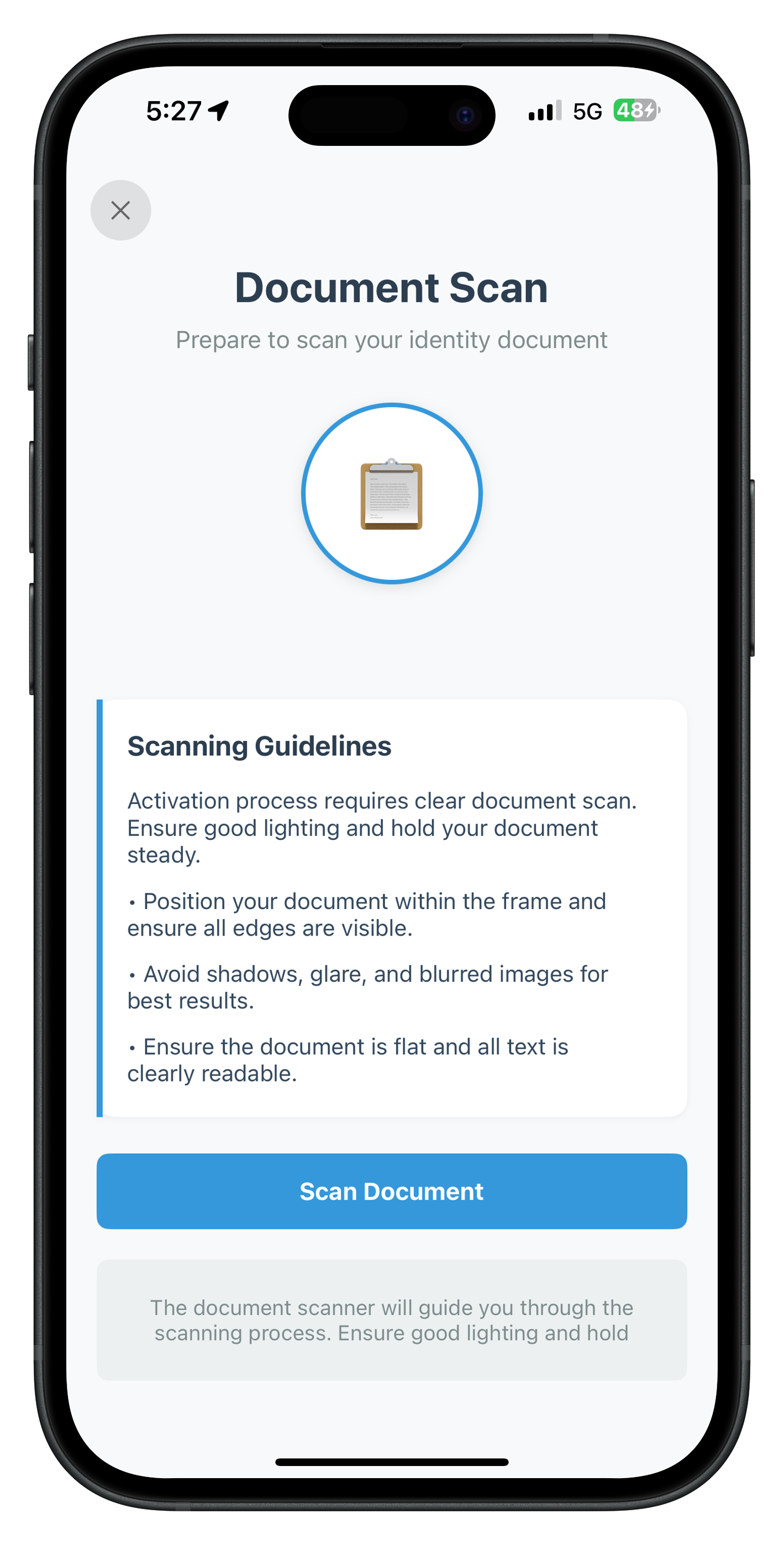
The Document Scan Start Screen is the first IDV screen in the activation flow. It displays guidelines for document scanning and allows users to start or cancel the process.
Screen Purpose
- ✅ Show document scanning requirements and tips
- ✅ Display workflow-specific guidelines
- ✅ Handle user confirmation to start scan
- ✅ Handle user cancellation of IDV flow
- ✅ Call appropriate IDV API based on user action
Event Flow
1. SDK fires: getIDVDocumentScanProcessStartConfirmation(_ idvWorkflow)
2. RDNAIDVDelegateManager dispatches to closure
3. AppIDVCoordinator navigates to this screen
4. User clicks "Scan Document" → calls setIDVDocumentScanProcessStartConfirmation(true, workflow)
5. SDK opens native Regula document scanner
6. After scan → SDK fires getIDVConfirmDocumentDetails event
The following image showcases screen from the sample application:
Complete Implementation
Create the file at Sources/Tutorial/Screens/IDV/IDVDocumentProcessStartConfirmationViewController.swift:
//
//  IDVDocumentProcessStartConfirmationViewController.swift
//  relidcodelab
//
//  Purpose: IDV Document Scan Start Screen
//  Handles getIDVDocumentScanProcessStartConfirmation event
//  UI: Storyboard-based with IBOutlets
//

import UIKit
import RELID

/**
 * IDV Document Scan Start Screen
 *
 * This screen handles the IDV document scan process start confirmation event.
 * It provides information about document scanning requirements and allows users
 * to either start the scan process or cancel.
 *
 * Key Features:
 * - Display document scan guidelines and requirements
 * - Start document scanning process
 * - Cancel/close the IDV flow
 * - Loading states during API calls
 * - Error handling with user feedback
 *
 * Event Flow:
 * 1. Receives getIDVDocumentScanProcessStartConfirmation event via AppIDVCoordinator
 * 2. Displays scan requirements and guidelines
 * 3. User clicks "Scan Document" -> calls RDNAIDVService.setIDVDocumentScanProcessStartConfirmation(true, idvWorkflow)
 * 4. User clicks close button -> calls RDNAIDVService.setIDVDocumentScanProcessStartConfirmation(false, idvWorkflow)
 */
class IDVDocumentProcessStartConfirmationViewController: UIViewController {

    // MARK: - IBOutlets (Connected in Storyboard)

    @IBOutlet weak var closeButton: UIButton!
    @IBOutlet weak var titleLabel: UILabel!
    @IBOutlet weak var subtitleLabel: UILabel!
    @IBOutlet weak var documentIconContainer: UIView!
    @IBOutlet weak var documentIconLabel: UILabel!
    @IBOutlet weak var errorBanner: UIView!
    @IBOutlet weak var errorLabel: UILabel!
    @IBOutlet weak var guidelinesContainer: UIView!
    @IBOutlet weak var guidelinesLeftBorder: UIView!
    @IBOutlet weak var guidelinesTitleLabel: UILabel!
    @IBOutlet weak var workflowGuidelineLabel: UILabel!
    @IBOutlet weak var guideline1Label: UILabel!
    @IBOutlet weak var guideline2Label: UILabel!
    @IBOutlet weak var guideline3Label: UILabel!
    @IBOutlet weak var scanButton: UIButton!
    @IBOutlet weak var activityIndicator: UIActivityIndicatorView!
    @IBOutlet weak var helpLabel: UILabel!

    // MARK: - Properties

    /// IDV workflow type (passed from AppIDVCoordinator)
    var idvWorkflow: RDNAIDVWorkflow = .IDV_ACTIVATION

    /// Processing state
    private var isProcessing = false

    // MARK: - Lifecycle

    override func viewDidLoad() {
        super.viewDidLoad()
        setupUI()
        print("IDVDocumentScanStart - Screen loaded with workflow: \(idvWorkflow.rawValue)")
    }

    // MARK: - Setup

    private func setupUI() {
        // Configure document icon container
        documentIconContainer.layer.cornerRadius = 60
        documentIconContainer.layer.borderWidth = 3
        documentIconContainer.layer.borderColor = UIColor(hex: "#3498db")?.cgColor
        documentIconContainer.layer.shadowColor = UIColor.black.cgColor
        documentIconContainer.layer.shadowOffset = CGSize(width: 0, height: 2)
        documentIconContainer.layer.shadowOpacity = 0.1
        documentIconContainer.layer.shadowRadius = 4

        // Configure guidelines container
        guidelinesContainer.layer.cornerRadius = 12
        guidelinesContainer.layer.shadowColor = UIColor.black.cgColor
        guidelinesContainer.layer.shadowOffset = CGSize(width: 0, height: 1)
        guidelinesContainer.layer.shadowOpacity = 0.05
        guidelinesContainer.layer.shadowRadius = 2
        guidelinesLeftBorder.backgroundColor = UIColor(hex: "#3498db")

        // Configure scan button
        scanButton.layer.cornerRadius = 8

        // Configure error banner
        errorBanner.layer.cornerRadius = 8
        errorBanner.layer.borderWidth = 1
        errorBanner.layer.borderColor = UIColor(hex: "#e74c3c")?.cgColor
        errorBanner.isHidden = true

        // Set workflow-specific guideline
        workflowGuidelineLabel.text = getWorkflowGuideline()
    }

    // MARK: - Helper Methods

    private func getWorkflowGuideline() -> String {
        switch idvWorkflow {
        case .IDV_ACTIVATION:
            return "Activation process requires clear document scan. Ensure good lighting and hold your document steady."
        case .IDV_ACTIVATION_WITH_TEMPLATE:
            return "Activation with biometric template. Position document within frame for verification."
        case .IDV_ADDITIONAL_DEVICE_WITH_TEMPLATE:
            return "Additional device activation requires clear document scan. Position document within frame."
        case .IDV_ADDITIONAL_DEVICE_WITHOUT_TEMPLATE:
            return "Additional device setup. Scan your identity document clearly for verification."
        case .IDV_ACCOUNT_RECOVERY_WITH_TEMPLATE:
            return "Account recovery process. Scan your identity document clearly for verification."
        case .IDV_ACCOUNT_RECOVERY_WITHOUT_TEMPLATE:
            return "Account recovery requires document verification. Ensure all text is visible and document is flat."
        case .IDV_POSTLOGIN_KYC:
            return "KYC verification process. Hold document steady and avoid glare for best results."
        case .IDV_POSTLOGIN_AGENT_KYC:
            return "Agent-assisted KYC process. Scan customer document clearly with proper lighting."
        default:
            return "Ensure you have good lighting and hold your document steady for the verification process."
        }
    }

    private func showError(_ message: String) {
        errorLabel.text = message
        errorBanner.isHidden = false
    }

    private func hideError() {
        errorBanner.isHidden = true
    }

    private func setProcessing(_ processing: Bool) {
        isProcessing = processing

        if processing {
            scanButton.setTitle("Starting Scan...", for: .normal)
            scanButton.isEnabled = false
            activityIndicator.startAnimating()
            closeButton.isEnabled = false
        } else {
            scanButton.setTitle("Scan Document", for: .normal)
            scanButton.isEnabled = true
            activityIndicator.stopAnimating()
            closeButton.isEnabled = true
        }
    }

    // MARK: - IBActions

    @IBAction func handleScanDocument(_ sender: UIButton) {
        print("IDVDocumentScanStart - Starting document scan process with workflow: \(idvWorkflow.rawValue)")

        setProcessing(true)
        hideError()

        // Call IDV service to start document scan
        let error = RDNAIDVService.shared.setIDVDocumentScanProcessStartConfirmation(
            isConfirm: true,
            idvWorkflow: idvWorkflow
        )

        if error.longErrorCode == 0 {
            print("IDVDocumentScanStart - Document scan started successfully")
            // SDK will now open native document scanner UI
            // Async events will be handled by RDNAIDVDelegateManager
        } else {
            print("IDVDocumentScanStart - Failed to start document scan: \(error.longErrorCode) - \(error.errorString ?? "")")
            setProcessing(false)
            showError(error.errorString ?? "Failed to start document scan")
        }
    }

    @IBAction func handleClose(_ sender: UIButton) {
        print("IDVDocumentScanStart - Cancelling document scan process")

        setProcessing(true)
        hideError()

        // Call IDV service to cancel document scan
        let error = RDNAIDVService.shared.setIDVDocumentScanProcessStartConfirmation(
            isConfirm: false,
            idvWorkflow: idvWorkflow
        )

        if error.longErrorCode == 0 {
            print("IDVDocumentScanStart - Document scan cancelled successfully")
            // SDK will handle navigation back to getUser or previous screen
        } else {
            print("IDVDocumentScanStart - Failed to cancel document scan: \(error.longErrorCode) - \(error.errorString ?? "")")
            setProcessing(false)
            showError(error.errorString ?? "Failed to cancel document scan")
        }
    }
}
Key Implementation Details
1. Property Configuration
// Passed from AppIDVCoordinator
var idvWorkflow: RDNAIDVWorkflow = .IDV_ACTIVATION

// Internal state
private var isProcessing = false
2. API Call Pattern
@IBAction func handleScanDocument(_ sender: UIButton) {
    setProcessing(true)  // Show loading state
    hideError()          // Clear previous errors

    // Call IDV service
    let error = RDNAIDVService.shared.setIDVDocumentScanProcessStartConfirmation(
        isConfirm: true,
        idvWorkflow: idvWorkflow
    )

    // Handle sync response
    if error.longErrorCode == 0 {
        // Success - SDK will open scanner
        // Keep processing state active
    } else {
        // Error - show message and reset UI
        setProcessing(false)
        showError(error.errorString ?? "Failed to start document scan")
    }
}
3. UI State Management
private func setProcessing(_ processing: Bool) {
    isProcessing = processing

    if processing {
        // Disable interactions during processing
        scanButton.setTitle("Starting Scan...", for: .normal)
        scanButton.isEnabled = false
        activityIndicator.startAnimating()
        closeButton.isEnabled = false
    } else {
        // Re-enable interactions
        scanButton.setTitle("Scan Document", for: .normal)
        scanButton.isEnabled = true
        activityIndicator.stopAnimating()
        closeButton.isEnabled = true
    }
}
Storyboard Setup
Ensure your storyboard has:
- View Controller with Storyboard ID:
IDVDocumentProcessStartConfirmationViewController - Custom Class set to:
IDVDocumentProcessStartConfirmationViewController - All IBOutlets connected to UI elements
- Button actions connected to
@IBActionmethods
Testing the Screen
- Complete user registration (
CheckUserViewController) - Enter activation code (
ActivationCodeViewController) - This screen should appear automatically
- Click "Scan Document" → Native document scanner opens
- Click close button → IDV flow cancels, returns to start
Overview
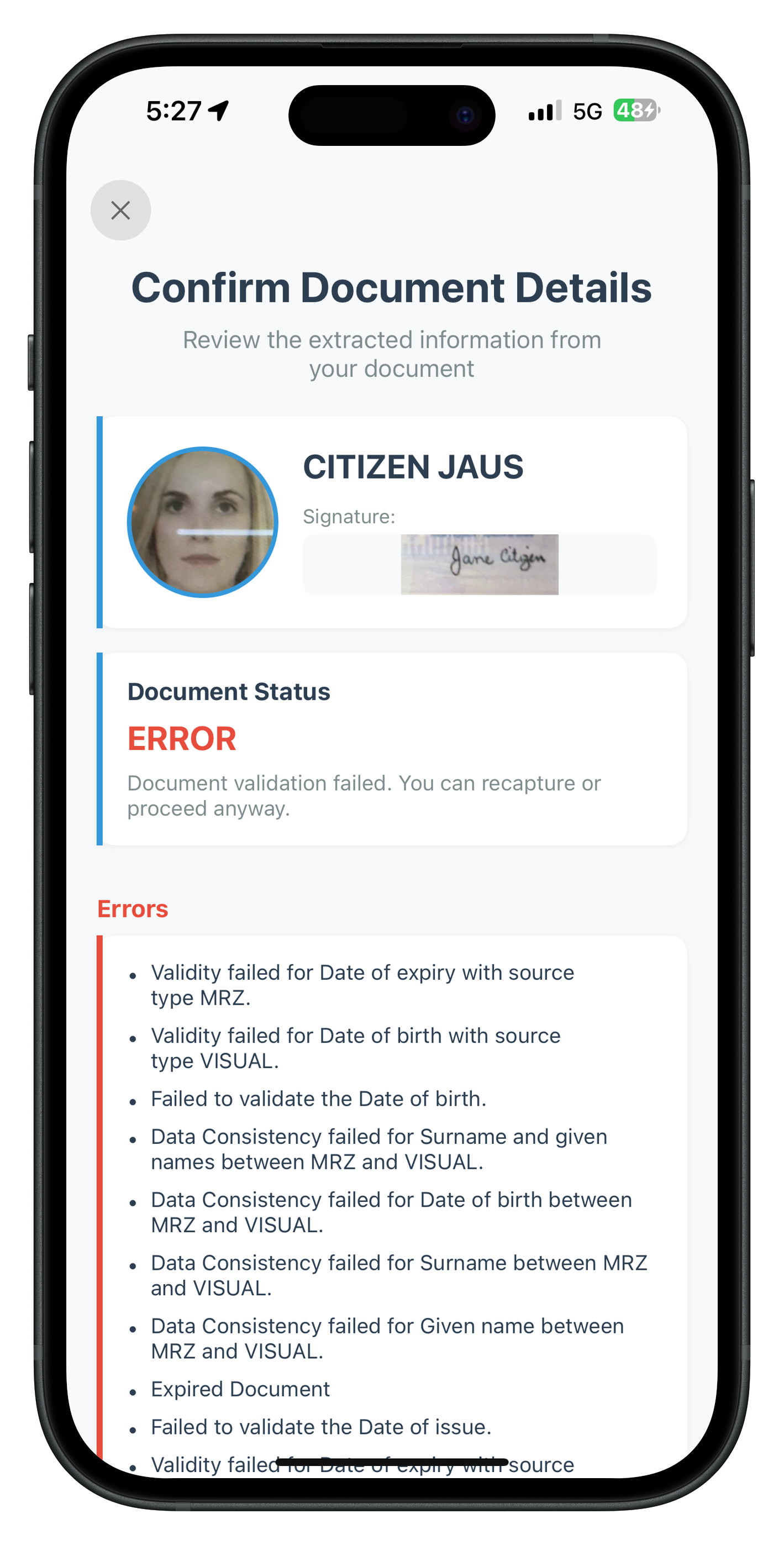
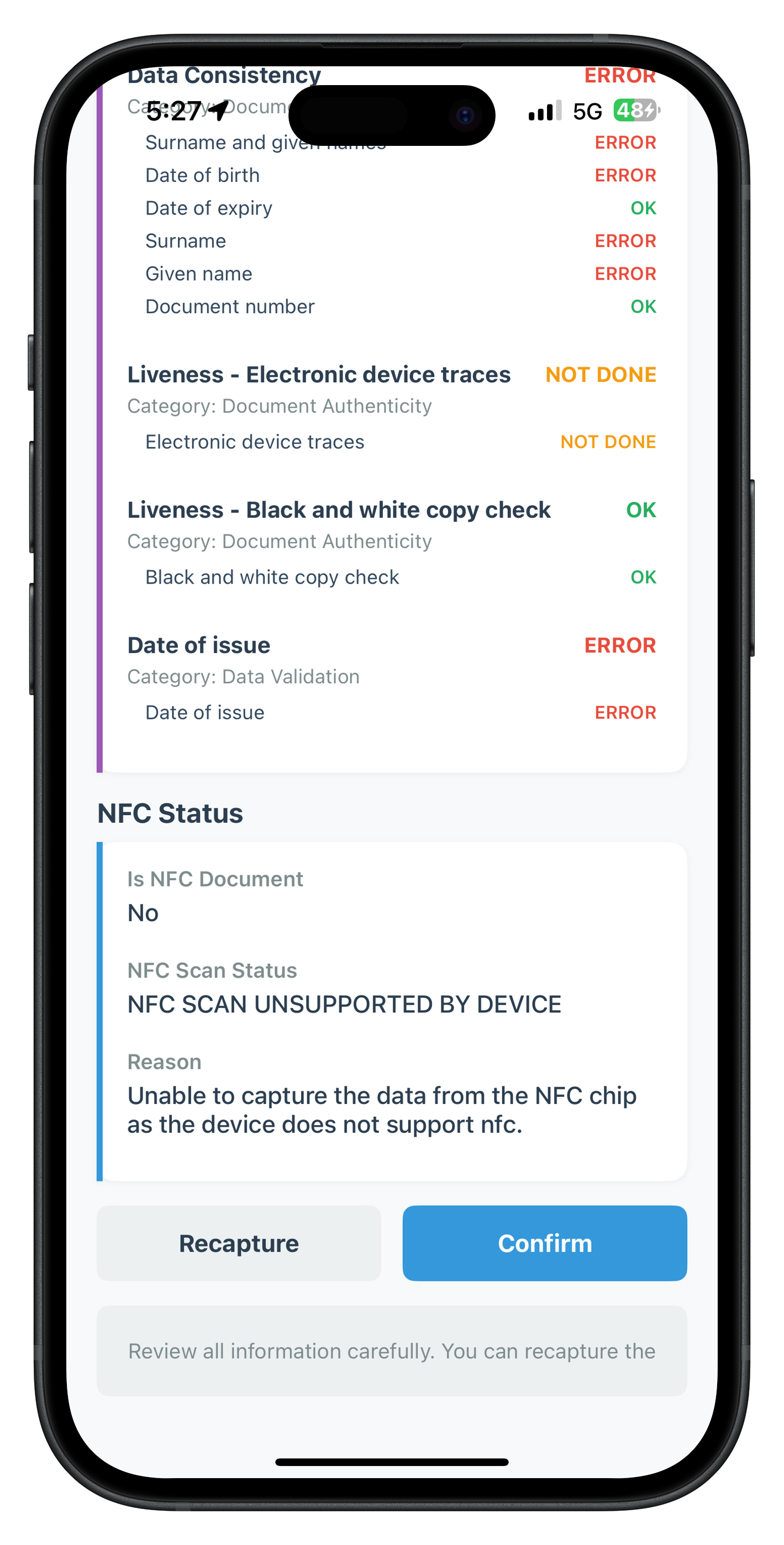
The Document Details Confirmation Screen displays OCR-extracted information from the scanned document. Users can review and confirm the data or request a rescan if information is incorrect.
Screen Purpose
- ✅ Display OCR-extracted identity information (name, DOB, document number, etc.)
- ✅ Show document images (front/back pages)
- ✅ Display portrait and signature images
- ✅ Show validation checks and results
- ✅ Display errors and warnings if any
- ✅ Allow user to confirm or reject document data
Data Structure
The responseDataJSON contains a complex nested structure:
{
  "response_data": {
    "document_info": {
      "surname": "DOE",
      "given_name": "JOHN",
      "date_of_birth": "1990-01-15",
      "document_number": "AB123456",
      "expiry_date": "2030-12-31",
      "issuing_country": "USA",
      "document_type": "PASSPORT",
      "portrait_image": "base64...",
      "signature_image": "base64..."
    },
    "document_pages": [
      { "page_index": 0, "image": "base64..." },
      { "page_index": 1, "image": "base64..." }
    ],
    "checks_performed": [
      { "check_name": "Document Authenticity", "result": "PASSED" },
      { "check_name": "Chip Verification", "result": "NOT_PERFORMED" }
    ],
    "errors": [],
    "warnings": ["Minor wear detected on document surface"],
    "overall_status": "VALID"
  }
}
The following images showcase screens from the sample application:
Document Details Screen |
Document Details Screen |
Complete Implementation
The implementation is extensive. Here's the key part (full code is in the reference app):
//
//  IDVConfirmDocumentDetailsViewController.swift
//  relidcodelab
//
//  Purpose: IDV Document Details Confirmation Screen
//  Displays OCR-extracted document information for user validation
//

import UIKit
import RELID

class IDVConfirmDocumentDetailsViewController: UIViewController {

    // MARK: - IBOutlets (Extensive - see reference app for full list)

    @IBOutlet weak var scrollView: UIScrollView!
    @IBOutlet weak var titleLabel: UILabel!
    @IBOutlet weak var subtitleLabel: UILabel!
    @IBOutlet weak var portraitImageView: UIImageView!
    @IBOutlet weak var signatureImageView: UIImageView!
    @IBOutlet weak var nameLabel: UILabel!
    @IBOutlet weak var identityDataStackView: UIStackView!
    @IBOutlet weak var frontPageImageView: UIImageView!
    @IBOutlet weak var backPageImageView: UIImageView!
    @IBOutlet weak var checksStackView: UIStackView!
    @IBOutlet weak var errorListStackView: UIStackView!
    @IBOutlet weak var warningListStackView: UIStackView!
    @IBOutlet weak var statusValueLabel: UILabel!
    @IBOutlet weak var recaptureButton: UIButton!
    @IBOutlet weak var confirmButton: UIButton!
    @IBOutlet weak var activityIndicator: UIActivityIndicatorView!
    // ... many more outlets

    // MARK: - Properties

    /// Challenge mode (passed from AppIDVCoordinator)
    var challengeMode: RDNAChallengeOpMode = RDNAChallengeOpMode(rawValue: 0)!

    /// Response data JSON string (passed from AppIDVCoordinator)
    var responseDataJSON: String = ""

    /// Parsed response data dictionary
    private var responseData: [String: Any]?

    /// Processing state
    private var isProcessing = false

    // MARK: - Lifecycle

    override func viewDidLoad() {
        super.viewDidLoad()
        parseResponseData()
        setupUI()
        populateUI()
    }

    // MARK: - Data Parsing

    private func parseResponseData() {
        guard let data = responseDataJSON.data(using: .utf8),
              let json = try? JSONSerialization.jsonObject(with: data) as? [String: Any] else {
            print("IDVConfirmDocumentDetails - Failed to parse response data JSON")
            return
        }

        responseData = json
        print("IDVConfirmDocumentDetails - Response data parsed successfully")
    }

    // MARK: - UI Population

    private func populateUI() {
        guard let responseData = responseData,
              let data = responseData["response_data"] as? [String: Any] else {
            print("IDVConfirmDocumentDetails - No response data to display")
            return
        }

        populatePersonalInfo(data)
        populateIdentityData(data)
        populateDocumentImages(data)
        populateValidationChecks(data)
        populateErrorsAndWarnings(data)
        populateDocumentStatus(data)
    }

    private func populatePersonalInfo(_ data: [String: Any]) {
        guard let documentInfo = data["document_info"] as? [String: Any] else { return }

        // Name
        let surname = documentInfo["surname"] as? String ?? ""
        let givenName = documentInfo["given_name"] as? String ?? ""
        nameLabel.text = "\(givenName) \(surname)".trimmingCharacters(in: .whitespaces)

        // Portrait image
        if let portraitBase64 = documentInfo["portrait_image"] as? String,
           let imageData = Data(base64Encoded: portraitBase64),
           let image = UIImage(data: imageData) {
            portraitImageView.image = image
        }

        // Signature image
        if let signatureBase64 = documentInfo["signature_image"] as? String,
           let imageData = Data(base64Encoded: signatureBase64),
           let image = UIImage(data: imageData) {
            signatureImageView.image = image
        }
    }

    private func populateIdentityData(_ data: [String: Any]) {
        guard let documentInfo = data["document_info"] as? [String: Any] else { return }

        // Clear existing rows
        identityDataStackView.arrangedSubviews.forEach { $0.removeFromSuperview() }

        // Add data rows
        addDataRow(label: "Document Type", value: documentInfo["document_type"] as? String ?? "N/A")
        addDataRow(label: "Document Number", value: documentInfo["document_number"] as? String ?? "N/A")
        addDataRow(label: "Date of Birth", value: documentInfo["date_of_birth"] as? String ?? "N/A")
        addDataRow(label: "Expiry Date", value: documentInfo["expiry_date"] as? String ?? "N/A")
        addDataRow(label: "Issuing Country", value: documentInfo["issuing_country"] as? String ?? "N/A")
        // ... more fields
    }

    private func populateDocumentImages(_ data: [String: Any]) {
        guard let documentPages = data["document_pages"] as? [[String: Any]] else { return }

        for page in documentPages {
            guard let pageIndex = page["page_index"] as? Int,
                  let imageBase64 = page["image"] as? String,
                  let imageData = Data(base64Encoded: imageBase64),
                  let image = UIImage(data: imageData) else { continue }

            if pageIndex == 0 {
                frontPageImageView.image = image
            } else if pageIndex == 1 {
                backPageImageView.image = image
            }
        }
    }

    private func populateValidationChecks(_ data: [String: Any]) {
        guard let checks = data["checks_performed"] as? [[String: Any]] else { return }

        checksStackView.arrangedSubviews.forEach { $0.removeFromSuperview() }

        for check in checks {
            let checkName = check["check_name"] as? String ?? "Unknown Check"
            let result = check["result"] as? String ?? "N/A"
            addCheckRow(name: checkName, result: result)
        }
    }

    private func populateDocumentStatus(_ data: [String: Any]) {
        let status = data["overall_status"] as? String ?? "UNKNOWN"
        statusValueLabel.text = status

        // Color based on status
        switch status.uppercased() {
        case "VALID":
            statusValueLabel.textColor = UIColor(hex: "#27ae60")
        case "INVALID":
            statusValueLabel.textColor = UIColor(hex: "#e74c3c")
        default:
            statusValueLabel.textColor = UIColor(hex: "#f39c12")
        }
    }

    // MARK: - Helper Methods (Stack View Rows)

    private func addDataRow(label: String, value: String) {
        let rowView = UIView()
        rowView.translatesAutoresizingMaskIntoConstraints = false

        let labelView = UILabel()
        labelView.text = label
        labelView.font = .boldSystemFont(ofSize: 14)
        labelView.textColor = UIColor(hex: "#7f8c8d")
        labelView.translatesAutoresizingMaskIntoConstraints = false

        let valueView = UILabel()
        valueView.text = value
        valueView.font = .systemFont(ofSize: 14)
        valueView.textColor = UIColor(hex: "#2c3e50")
        valueView.textAlignment = .right
        valueView.translatesAutoresizingMaskIntoConstraints = false

        rowView.addSubview(labelView)
        rowView.addSubview(valueView)

        NSLayoutConstraint.activate([
            labelView.leadingAnchor.constraint(equalTo: rowView.leadingAnchor),
            labelView.centerYAnchor.constraint(equalTo: rowView.centerYAnchor),
            valueView.trailingAnchor.constraint(equalTo: rowView.trailingAnchor),
            valueView.centerYAnchor.constraint(equalTo: rowView.centerYAnchor),
            rowView.heightAnchor.constraint(equalToConstant: 32)
        ])

        identityDataStackView.addArrangedSubview(rowView)
    }

    private func addCheckRow(name: String, result: String) {
        // Similar implementation for check rows
        // See reference app for complete code
    }

    // MARK: - IBActions

    @IBAction func handleConfirm(_ sender: UIButton) {
        print("IDVConfirmDocumentDetails - Confirming document details")

        setProcessing(true)
        hideError()

        // Call IDV service to confirm document details
        let error = RDNAIDVService.shared.setIDVConfirmDocumentDetails(
            isConfirm: true,
            challengeMode: challengeMode
        )

        if error.longErrorCode == 0 {
            print("IDVConfirmDocumentDetails - Document details confirmed successfully")
            // SDK will proceed to next IDV step (selfie capture)
        } else {
            print("IDVConfirmDocumentDetails - Failed to confirm document details: \(error.longErrorCode) - \(error.errorString ?? "")")
            setProcessing(false)
            showError(error.errorString ?? "Failed to confirm document details")
        }
    }

    @IBAction func handleRecapture(_ sender: UIButton) {
        print("IDVConfirmDocumentDetails - Requesting document recapture")

        setProcessing(true)
        hideError()

        // Call IDV service to reject document details
        let error = RDNAIDVService.shared.setIDVConfirmDocumentDetails(
            isConfirm: false,
            challengeMode: challengeMode
        )

        if error.longErrorCode == 0 {
            print("IDVConfirmDocumentDetails - Document recapture requested successfully")
            // SDK will return to document scan
        } else {
            print("IDVConfirmDocumentDetails - Failed to request recapture: \(error.longErrorCode) - \(error.errorString ?? "")")
            setProcessing(false)
            showError(error.errorString ?? "Failed to request recapture")
        }
    }

    private func setProcessing(_ processing: Bool) {
        isProcessing = processing
        confirmButton.isEnabled = !processing
        recaptureButton.isEnabled = !processing
        if processing {
            activityIndicator.startAnimating()
        } else {
            activityIndicator.stopAnimating()
        }
    }

    private func showError(_ message: String) {
        // Show error banner
    }

    private func hideError() {
        // Hide error banner
    }
}
Key Implementation Details
1. JSON Parsing Pattern
private func parseResponseData() {
    guard let data = responseDataJSON.data(using: .utf8),
          let json = try? JSONSerialization.jsonObject(with: data) as? [String: Any] else {
        print("Failed to parse JSON")
        return
    }

    responseData = json
}
2. Base64 Image Decoding
if let imageBase64 = documentInfo["portrait_image"] as? String,
   let imageData = Data(base64Encoded: imageBase64),
   let image = UIImage(data: imageData) {
    portraitImageView.image = image
}
3. Dynamic Stack View Population
private func addDataRow(label: String, value: String) {
    let rowView = UIView()
    // Create label and value views programmatically
    // Add to stack view
    identityDataStackView.addArrangedSubview(rowView)
}
After document confirmation, the SDK triggers the selfie capture flow to verify that the person presenting the document is the actual owner through facial biometric matching.
Screen Purpose
This screen serves several critical functions in the IDV workflow:
- Selfie Capture Preparation: Provides users with clear instructions and guidelines for capturing a high-quality selfie with liveness detection
- Camera Selection: Allows users to choose between front camera (default, recommended) or back camera based on preference or accessibility needs
- Workflow-Specific Guidelines: Displays tailored capture instructions based on the specific IDV workflow type (activation, recovery, additional device, etc.)
- User Control: Enables users to initiate the native selfie capture process when ready, or cancel/close to exit the IDV flow
- Native SDK Integration: Triggers the REL-ID SDK's native selfie capture UI with built-in liveness detection for security
Event Flow
1. SDK fires getIDVSelfieProcessStartConfirmation event
   ↓
2. AppIDVCoordinator receives event via RDNAIDVDelegateManager
   ↓
3. Coordinator creates IDVSelfieProcessStartConfirmationViewController
   ↓
4. Screen displays capture guidelines and camera selection
   ↓
5. User clicks "Capture Selfie" button
   ↓
6. App calls RDNAIDVService.setIDVSelfieProcessStartConfirmation(true, useBackCamera, idvWorkflow)
   ↓
7. SDK opens native selfie camera with liveness detection
   ↓
8. User completes selfie capture with liveness checks
   ↓
9. SDK analyzes biometric data and fires getIDVSelfieConfirmation event
Complete Implementation
File: IDVSelfieProcessStartConfirmationViewController.swift
//
//  IDVSelfieProcessStartConfirmationViewController.swift
//  relidcodelab
//
//  Purpose: IDV Selfie Capture Start Screen
//  Handles getIDVSelfieProcessStartConfirmation event
//  UI: Storyboard-based with IBOutlets
//

import UIKit
import RELID

/**
 * IDV Selfie Capture Start Screen
 *
 * This screen handles the IDV selfie capture process start confirmation event.
 * It provides information about selfie capture requirements and allows users
 * to either start the capture process or cancel.
 *
 * Key Features:
 * - Display selfie capture guidelines and requirements
 * - Camera selection option (front/back camera)
 * - Start selfie capture process
 * - Cancel/close the IDV flow
 * - Loading states during API calls
 * - Error handling with user feedback
 * - Workflow-specific guidelines
 *
 * Event Flow:
 * 1. Receives getIDVSelfieProcessStartConfirmation event via AppCoordinator
 * 2. Displays capture requirements and guidelines
 * 3. User selects camera preference (front/back)
 * 4. User clicks "Capture Selfie" -> calls RDNAIDVService.setIDVSelfieProcessStartConfirmation(true, useBackCamera, idvWorkflow)
 * 5. User clicks close button -> calls RDNAIDVService.setIDVSelfieProcessStartConfirmation(false, false, idvWorkflow)
 */
class IDVSelfieProcessStartConfirmationViewController: UIViewController {

    // MARK: - IBOutlets (Connected in Storyboard)

    @IBOutlet weak var closeButton: UIButton!
    @IBOutlet weak var titleLabel: UILabel!
    @IBOutlet weak var subtitleLabel: UILabel!
    @IBOutlet weak var selfieIconContainer: UIView!
    @IBOutlet weak var selfieIconLabel: UILabel!
    @IBOutlet weak var errorBanner: UIView!
    @IBOutlet weak var errorLabel: UILabel!
    @IBOutlet weak var guidelinesContainer: UIView!
    @IBOutlet weak var guidelinesLeftBorder: UIView!
    @IBOutlet weak var guidelinesTitleLabel: UILabel!
    @IBOutlet weak var guideline1Label: UILabel!
    @IBOutlet weak var guideline2Label: UILabel!
    @IBOutlet weak var guideline3Label: UILabel!
    @IBOutlet weak var cameraSeparator: UIView!
    @IBOutlet weak var cameraLabel: UILabel!
    @IBOutlet weak var cameraSwitch: UISwitch!
    @IBOutlet weak var captureButton: UIButton!
    @IBOutlet weak var activityIndicator: UIActivityIndicatorView!
    @IBOutlet weak var helpContainer: UIView!
    @IBOutlet weak var helpLabel: UILabel!

    // MARK: - Properties

    /// IDV workflow type (passed from AppCoordinator)
    var idvWorkflow: RDNAIDVWorkflow = .IDV_ACTIVATION

    /// Processing state
    private var isProcessing = false

    // MARK: - Lifecycle

    override func viewDidLoad() {
        super.viewDidLoad()
        setupUI()
        populateWorkflowGuidelines()
        print("IDVSelfieProcessStart - Screen loaded with workflow: \(idvWorkflow.rawValue)")
    }

    // MARK: - Setup

    private func setupUI() {
        // Configure selfie icon container
        selfieIconContainer.layer.cornerRadius = 60
        selfieIconContainer.layer.borderWidth = 3
        selfieIconContainer.layer.borderColor = UIColor(hex: "#3498db")?.cgColor
        selfieIconContainer.layer.shadowColor = UIColor.black.cgColor
        selfieIconContainer.layer.shadowOffset = CGSize(width: 0, height: 2)
        selfieIconContainer.layer.shadowOpacity = 0.1
        selfieIconContainer.layer.shadowRadius = 4

        // Configure guidelines container
        guidelinesContainer.layer.cornerRadius = 12
        guidelinesContainer.layer.shadowColor = UIColor.black.cgColor
        guidelinesContainer.layer.shadowOffset = CGSize(width: 0, height: 1)
        guidelinesContainer.layer.shadowOpacity = 0.05
        guidelinesContainer.layer.shadowRadius = 2
        guidelinesLeftBorder.backgroundColor = UIColor(hex: "#3498db")

        // Configure camera separator
        cameraSeparator.backgroundColor = UIColor(hex: "#ecf0f1")

        // Configure camera switch
        cameraSwitch.onTintColor = UIColor(hex: "#3498db")
        cameraSwitch.thumbTintColor = .white

        // Configure capture button
        captureButton.layer.cornerRadius = 8

        // Configure error banner
        errorBanner.layer.cornerRadius = 8
        errorBanner.layer.borderWidth = 1
        errorBanner.layer.borderColor = UIColor(hex: "#e74c3c")?.cgColor
        errorBanner.isHidden = true

        // Configure help container
        helpContainer.layer.cornerRadius = 8
        helpContainer.backgroundColor = UIColor(hex: "#ecf0f1")
    }

    // MARK: - Helper Methods

    private func populateWorkflowGuidelines() {
        let guidelines = getWorkflowGuidelines()
        guideline1Label.text = "• \(guidelines.text1)"
        guideline2Label.text = "• \(guidelines.text2)"
        guideline3Label.text = "• \(guidelines.text3)"
    }

    private func getWorkflowGuidelines() -> (text1: String, text2: String, text3: String) {
        switch idvWorkflow {
        case .IDV_ACTIVATION:
            return (
                "Ensure good lighting and position your face clearly in the frame for IDV activation process.",
                "Remove any sunglasses, hats, or face coverings for clear facial recognition.",
                "Look directly at the camera and follow any on-screen prompts during capture."
            )
        case .IDV_ACTIVATION_WITH_TEMPLATE:
            return (
                "Position your face clearly for IDV activation with template verification.",
                "Ensure your face matches the document photo for identity verification.",
                "Maintain steady position and good lighting throughout the capture process."
            )
        case .IDV_ADDITIONAL_DEVICE_WITH_TEMPLATE:
            return (
                "Additional device activation requires clear selfie capture for verification.",
                "Position your face within the frame and ensure good lighting conditions.",
                "Face will be matched with your existing biometric template for verification."
            )
        case .IDV_ADDITIONAL_DEVICE_WITHOUT_TEMPLATE:
            return (
                "Additional device without template requires new biometric enrollment.",
                "Position your face clearly for initial biometric template creation.",
                "Follow capture guidelines for successful template generation."
            )
        case .IDV_ACCOUNT_RECOVERY_WITH_TEMPLATE:
            return (
                "Account recovery with template - verify your identity using existing biometric data.",
                "Position your face clearly for comparison with stored template.",
                "Ensure good lighting and stable positioning for successful verification."
            )
        case .IDV_ACCOUNT_RECOVERY_WITHOUT_TEMPLATE:
            return (
                "Account recovery without template - create new biometric profile.",
                "Position your face clearly for new biometric template creation.",
                "Follow capture instructions for successful profile establishment."
            )
        case .IDV_POSTLOGIN_KYC:
            return (
                "Post-login KYC process - capture selfie for identity verification.",
                "Ensure your face is clearly visible and well-lit for verification.",
                "Face will be compared with document photo for identity confirmation."
            )
        case .IDV_POSTLOGIN_IDV_SELFIE_BIOMETRIC:
            return (
                "Post-login selfie biometric - capture selfie for biometric authentication.",
                "Position your face clearly for biometric template verification.",
                "Ensure stable positioning and good lighting for accurate capture."
            )
        case .IDV_POSTLOGIN_IDV_STEPUP_AUTH:
            return (
                "Step-up authentication - additional verification through selfie capture.",
                "Position your face clearly for enhanced security verification.",
                "Face will be verified against your existing biometric profile."
            )
        case .IDV_POSTLOGIN_OPTIN:
            return (
                "Biometric opt-in process - capture selfie for biometric enrollment.",
                "Position your face clearly for initial biometric template creation.",
                "This will enable biometric authentication for future logins."
            )
        case .IDV_POSTLOGIN_AGENT_KYC:
            return (
                "Agent KYC process - capture customer selfie for identity verification.",
                "Ensure customer face is clearly visible and well-positioned.",
                "Face will be compared with document photo for customer verification."
            )
        default:
            return (
                "Ensure good lighting and position your face clearly in the frame.",
                "Remove any sunglasses, hats, or face coverings for clear facial recognition.",
                "Look directly at the camera and follow any on-screen prompts during capture."
            )
        }
    }

    private func showError(_ message: String) {
        errorLabel.text = message
        errorBanner.isHidden = false
    }

    private func hideError() {
        errorBanner.isHidden = true
    }

    private func setProcessing(_ processing: Bool) {
        isProcessing = processing

        if processing {
            captureButton.setTitle("Starting Capture...", for: .normal)
            captureButton.isEnabled = false
            activityIndicator.startAnimating()
            closeButton.isEnabled = false
            cameraSwitch.isEnabled = false
        } else {
            captureButton.setTitle("Capture Selfie", for: .normal)
            captureButton.isEnabled = true
            activityIndicator.stopAnimating()
            closeButton.isEnabled = true
            cameraSwitch.isEnabled = true
        }
    }

    // MARK: - IBActions

    @IBAction func handleCaptureSelfie(_ sender: UIButton) {
        print("IDVSelfieProcessStart - Starting selfie capture process with workflow: \(idvWorkflow.rawValue)")
        print("IDVSelfieProcessStart - Use back camera: \(cameraSwitch.isOn)")

        setProcessing(true)
        hideError()

        // Call IDV service to start selfie capture
        let error = RDNAIDVService.shared.setIDVSelfieProcessStartConfirmation(
            isConfirm: true,
            useDeviceBackCamera: cameraSwitch.isOn,
            idvWorkflow: idvWorkflow
        )

        if error.longErrorCode == 0 {
            print("IDVSelfieProcessStart - Selfie capture started successfully")
            // SDK will now open native selfie capture UI
            // Async events will be handled by RDNAIDVDelegateManager
        } else {
            print("IDVSelfieProcessStart - Failed to start selfie capture: \(error.longErrorCode) - \(error.errorString ?? "")")
            setProcessing(false)
            showError(error.errorString ?? "Failed to start selfie capture")
        }
    }

    @IBAction func handleClose(_ sender: UIButton) {
        print("IDVSelfieProcessStart - Cancelling selfie capture process")

        setProcessing(true)
        hideError()

        // Call IDV service to cancel selfie capture
        let error = RDNAIDVService.shared.setIDVSelfieProcessStartConfirmation(
            isConfirm: false,
            useDeviceBackCamera: false, // doesn't matter for cancel
            idvWorkflow: idvWorkflow
        )

        if error.longErrorCode == 0 {
            print("IDVSelfieProcessStart - Selfie capture cancelled successfully")
            // SDK will handle navigation back to previous screen
        } else {
            print("IDVSelfieProcessStart - Failed to cancel selfie capture: \(error.longErrorCode) - \(error.errorString ?? "")")
            setProcessing(false)
            showError(error.errorString ?? "Failed to cancel selfie capture")
        }
    }
}
The following image showcases screen from the sample application:
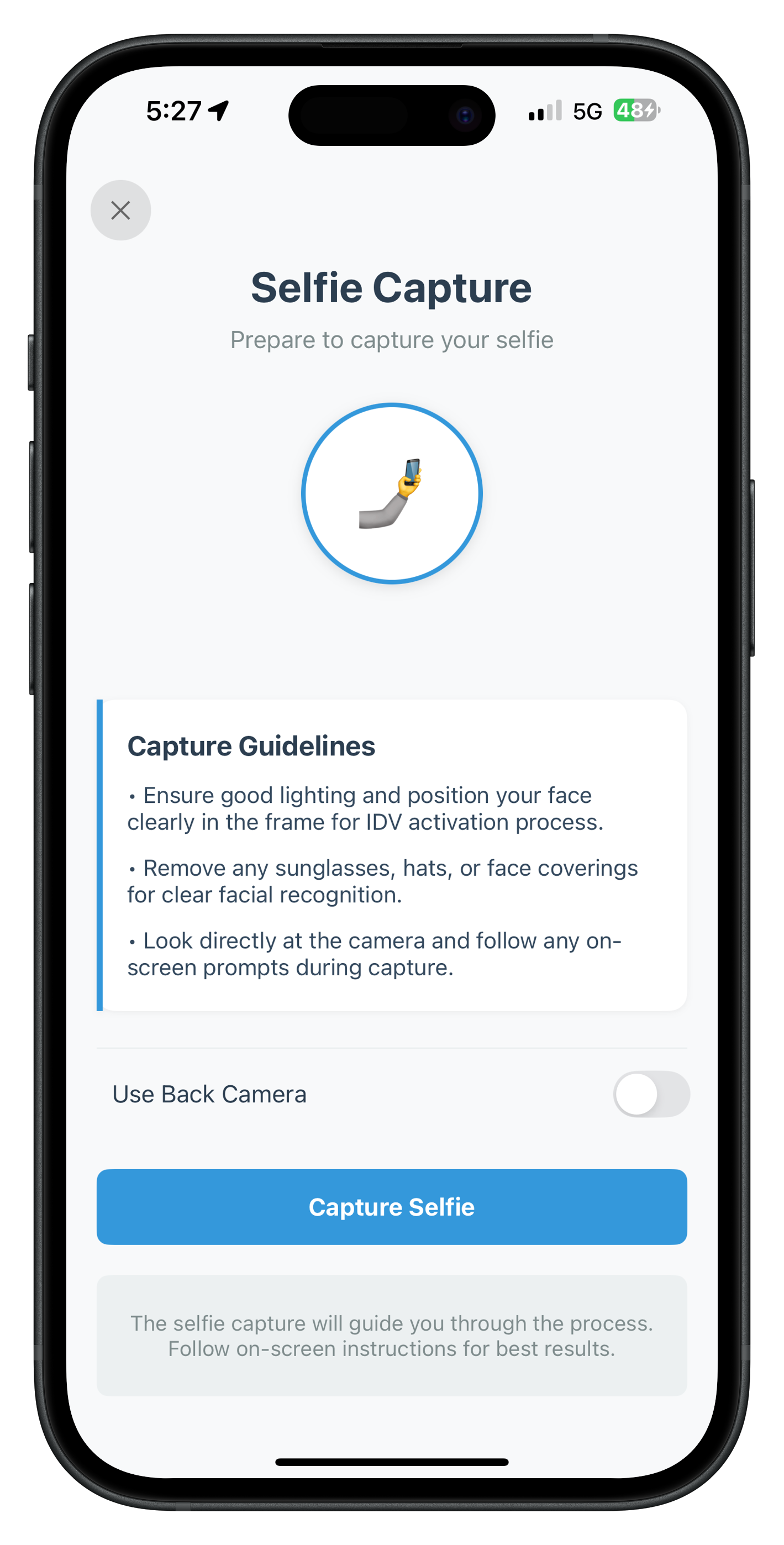
Native Selfie Capture
When RDNAIDVService.setIDVSelfieProcessStartConfirmation(true, useBackCamera, idvWorkflow) is called:
- SDK Opens Native Camera: The REL-ID SDK launches its native camera interface with the selected orientation (front/back camera)
- Liveness Detection Guidance: The SDK guides users through head movements and facial expressions to verify the selfie is from a live person
- Image Capture: High-quality selfie image is captured with proper positioning and lighting validation
- Biometric Analysis: SDK performs comprehensive analysis including:
- Face detection and extraction
- Liveness score calculation (0-100% range)
- Face matching with document portrait photo
- Quality checks for blur, lighting, and pose
- Result Event: SDK triggers
getIDVSelfieConfirmationevent with biometric match results and scores
Workflow-Specific Guidelines
Testing the Screen
- Complete the Document Details Confirmation screen by clicking "Confirm"
- Selfie Capture Start screen should appear automatically
- Review the workflow-specific guidelines displayed
- Toggle the camera switch to select front or back camera
- Click "Capture Selfie" to launch native camera with liveness detection
- Follow on-screen liveness prompts (head movements, expressions)
- SDK captures selfie and performs biometric analysis
- Verify navigation to Selfie Confirmation screen with match results
After the native selfie capture completes with liveness detection, the SDK analyzes the biometric data and presents the results for user review and confirmation.
Screen Purpose
This is the most complex IDV screen, handling multiple responsibilities:
- Side-by-Side Image Comparison: Displays the document portrait photo alongside the captured selfie for visual verification
- Biometric Match Results: Shows whether the face match succeeded (MATCHED) or failed (NOT_MATCHED) with clear visual indicators
- Score Display: Presents quantitative metrics including face match score (0-100%) and liveness score (0-100%)
- Dynamic Action Buttons: Renders server-controlled button options based on match result (success vs failure scenarios)
- Multiple Recovery Paths: On failed match, offers users choices to continue anyway, rescan document, or recapture selfie
- Complex Data Parsing: Handles deeply nested JSON response with base64 images, scores, and action button configurations
Event Flow
1. SDK completes selfie capture with liveness detection
   ↓
2. SDK analyzes biometric data (face matching + liveness)
   ↓
3. SDK fires getIDVSelfieConfirmation event with results
   ↓
4. AppIDVCoordinator receives event via RDNAIDVDelegateManager
   ↓
5. Coordinator creates IDVSelfieConfirmationViewController with response data
   ↓
6. Screen parses JSON, decodes base64 images, populates UI
   ↓
7. User reviews match result and scores
   ↓
8. User clicks action button (continue, rescan, or recapture)
   ↓
9. App calls RDNAIDVService.setIDVSelfieConfirmation(actionKey, challengeMode)
   ↓
10. SDK executes action:
    - "continue-flow" → getIDVBiometricOptInConsent event
    - "reinit-idv-document-scan" → Document rescan flow
    - "reinit-idv-selfie" → Selfie recapture flow
Data Structure
The getIDVSelfieConfirmation event provides comprehensive biometric analysis data:
{
  "challengeMode": 8,
  "response_data": {
    "response_data": {
      "biometric_result": {
        "display_text": "MATCHED",
        "result_criteria": "FACE_MATCH"
      },
      "face_matcher_response": {
        "score": 0.95
      },
      "analyze_liveness_response": {
        "video": {
          "liveness_result": {
            "score": 92
          },
          "autocapture_result": {
            "selfie_image": "base64_encoded_selfie"
          }
        }
      },
      "document_detail": {
        "document_info": {
          "portrait_image": "base64_encoded_document_photo"
        }
      }
    },
    "action_buttons": {
      "success_button": [
        { "button_text": "Continue", "key": "continue-flow" }
      ],
      "failure_button": [
        { "button_text": "Continue Anyway", "key": "continue-flow" },
        { "button_text": "Rescan Document", "key": "reinit-idv-document-scan" },
        { "button_text": "Recapture Selfie", "key": "reinit-idv-selfie" }
      ]
    }
  }
}
Complete Implementation
File: IDVSelfieConfirmationViewController.swift
//
//  IDVSelfieConfirmationViewController.swift
//  relidcodelab
//
//  Purpose: IDV Selfie Confirmation Screen
//  Displays biometric match result between document image and captured selfie
//  UI: Storyboard-based with IBOutlets
//

import UIKit
import RELID

/**
 * IDV Selfie Confirmation Screen
 *
 * This screen displays the biometric match result between document image and captured selfie.
 * It handles the getIDVSelfieConfirmation event and allows users to confirm or reject
 * the selfie biometric results.
 *
 * Key Features:
 * - Side-by-side image comparison (document photo vs selfie)
 * - Biometric match result with icon and scores
 * - Face matching score and liveness score display
 * - Dynamic action buttons based on match result
 * - Close button to reset authentication state
 *
 * Event Flow:
 * 1. Receives getIDVSelfieConfirmation event with biometric analysis data via AppCoordinator
 * 2. Displays selfie image, document photo, and match results
 * 3. User clicks action button -> calls RDNAIDVService.setIDVSelfieConfirmation(action, challengeMode)
 * 4. User clicks close button -> calls RDNAService.resetAuthState() to cancel IDV flow
 */
class IDVSelfieConfirmationViewController: UIViewController {

    // MARK: - IBOutlets (Connected in Storyboard)

    @IBOutlet weak var scrollView: UIScrollView!
    @IBOutlet weak var closeButton: UIButton!

    // Title Section
    @IBOutlet weak var titleLabel: UILabel!
    @IBOutlet weak var subtitleLabel: UILabel!

    // User Name (Optional)
    @IBOutlet weak var userNameContainer: UIView!
    @IBOutlet weak var userNameLeftBorder: UIView!
    @IBOutlet weak var userNameLabel: UILabel!

    // Image Comparison Section
    @IBOutlet weak var documentPhotoLabel: UILabel!
    @IBOutlet weak var documentPhotoImageView: UIImageView!
    @IBOutlet weak var documentPhotoPlaceholder: UIView!
    @IBOutlet weak var documentPhotoPlaceholderLabel: UILabel!

    @IBOutlet weak var selfiePhotoLabel: UILabel!
    @IBOutlet weak var selfiePhotoImageView: UIImageView!
    @IBOutlet weak var selfiePhotoPlaceholder: UIView!
    @IBOutlet weak var selfiePhotoPlaceholderLabel: UILabel!

    // Match Result Section
    @IBOutlet weak var matchResultContainer: UIView!
    @IBOutlet weak var matchResultLeftBorder: UIView!
    @IBOutlet weak var matchIconLabel: UILabel!
    @IBOutlet weak var matchTextLabel: UILabel!
    @IBOutlet weak var matchStatusLabel: UILabel!
    @IBOutlet weak var matchSeparator: UIView!

    @IBOutlet weak var scoresContainer: UIView!
    @IBOutlet weak var faceMatchScoreRow: UIView!
    @IBOutlet weak var faceMatchScoreLabel: UILabel!
    @IBOutlet weak var faceMatchScoreValue: UILabel!

    @IBOutlet weak var livenessScoreRow: UIView!
    @IBOutlet weak var livenessScoreLabel: UILabel!
    @IBOutlet weak var livenessScoreValue: UILabel!

    @IBOutlet weak var criteriaRow: UIView!
    @IBOutlet weak var criteriaLabel: UILabel!
    @IBOutlet weak var criteriaValue: UILabel!

    // Error Banner
    @IBOutlet weak var errorBanner: UIView!
    @IBOutlet weak var errorLabel: UILabel!

    // Help Container
    @IBOutlet weak var helpContainer: UIView!
    @IBOutlet weak var helpLabel: UILabel!

    // Action Buttons Container (dynamic buttons will be added programmatically)
    @IBOutlet weak var actionButtonsContainer: UIView!
    @IBOutlet weak var activityIndicator: UIActivityIndicatorView!

    // MARK: - Properties

    /// User ID (passed from AppCoordinator)
    var userID: String = ""

    /// Challenge mode (passed from AppCoordinator)
    var challengeMode: RDNAChallengeOpMode = RDNAChallengeOpMode(rawValue: 0)!

    /// Response data JSON string (passed from AppCoordinator)
    var responseDataJSON: String = ""

    /// Parsed response data dictionary
    private var responseData: [String: Any]?

    /// Processing state
    private var isProcessing = false

    // MARK: - Lifecycle

    override func viewDidLoad() {
        super.viewDidLoad()
        parseResponseData()
        setupUI()
        populateUI()
        print("IDVSelfieConfirmation - Screen loaded")
        print("  UserID: \(userID)")
        print("  ChallengeMode: \(challengeMode.rawValue)")
    }

    // MARK: - Setup

    private func setupUI() {
        // Configure user name container
        userNameContainer.layer.cornerRadius = 12
        userNameContainer.layer.shadowColor = UIColor.black.cgColor
        userNameContainer.layer.shadowOffset = CGSize(width: 0, height: 1)
        userNameContainer.layer.shadowOpacity = 0.05
        userNameContainer.layer.shadowRadius = 2
        userNameLeftBorder.backgroundColor = UIColor(hex: "#3498db")

        // Configure document photo
        documentPhotoImageView.layer.cornerRadius = 12
        documentPhotoImageView.layer.borderWidth = 2
        documentPhotoImageView.layer.borderColor = UIColor(hex: "#3498db")?.cgColor
        documentPhotoImageView.clipsToBounds = true

        documentPhotoPlaceholder.layer.cornerRadius = 12
        documentPhotoPlaceholder.layer.borderWidth = 2
        documentPhotoPlaceholder.layer.borderColor = UIColor(hex: "#3498db")?.cgColor
        documentPhotoPlaceholder.backgroundColor = UIColor(hex: "#ecf0f1")

        // Configure selfie photo
        selfiePhotoImageView.layer.cornerRadius = 12
        selfiePhotoImageView.layer.borderWidth = 2
        selfiePhotoImageView.layer.borderColor = UIColor(hex: "#3498db")?.cgColor
        selfiePhotoImageView.clipsToBounds = true

        selfiePhotoPlaceholder.layer.cornerRadius = 12
        selfiePhotoPlaceholder.layer.borderWidth = 2
        selfiePhotoPlaceholder.layer.borderColor = UIColor(hex: "#3498db")?.cgColor
        selfiePhotoPlaceholder.backgroundColor = UIColor(hex: "#ecf0f1")

        // Configure match result container
        matchResultContainer.layer.cornerRadius = 12
        matchResultContainer.layer.shadowColor = UIColor.black.cgColor
        matchResultContainer.layer.shadowOffset = CGSize(width: 0, height: 2)
        matchResultContainer.layer.shadowOpacity = 0.1
        matchResultContainer.layer.shadowRadius = 4
        matchResultLeftBorder.backgroundColor = UIColor(hex: "#3498db")

        matchSeparator.backgroundColor = UIColor(hex: "#ecf0f1")

        // Configure error banner
        errorBanner.layer.cornerRadius = 8
        errorBanner.layer.borderWidth = 1
        errorBanner.layer.borderColor = UIColor(hex: "#e74c3c")?.cgColor
        errorBanner.isHidden = true

        // Configure help container
        helpContainer.layer.cornerRadius = 8
        helpContainer.backgroundColor = UIColor(hex: "#ecf0f1")

        // Configure action buttons container
        actionButtonsContainer.backgroundColor = .white
        actionButtonsContainer.layer.borderColor = UIColor(hex: "#ecf0f1")?.cgColor
        actionButtonsContainer.layer.borderWidth = 1
    }

    // MARK: - Data Parsing

    private func parseResponseData() {
        guard let data = responseDataJSON.data(using: .utf8),
              let json = try? JSONSerialization.jsonObject(with: data) as? [String: Any] else {
            print("IDVSelfieConfirmation - Failed to parse response data JSON")
            return
        }

        responseData = json
        print("IDVSelfieConfirmation - Response data parsed successfully")
    }

    // MARK: - UI Population

    private func populateUI() {
        guard let responseData = responseData else {
            print("IDVSelfieConfirmation - No response data to display")
            return
        }

        populateUserName()
        populateImageComparison()
        populateMatchResult()
        populateActionButtons()
    }

    private func populateUserName() {
        guard let responseData = responseData,
              let innerResponseData = responseData["response_data"] as? [String: Any],
              let documentDetail = innerResponseData["document_detail"] as? [String: Any],
              let documentInfo = documentDetail["document_info"] as? [String: Any],
              let name = documentInfo["name"] as? String, !name.isEmpty else {
            // Use userID if name not available
            if !userID.isEmpty && userID != "User" {
                userNameLabel.text = userID
                userNameContainer.isHidden = false
            } else {
                userNameContainer.isHidden = true
            }
            return
        }

        userNameLabel.text = name
        userNameContainer.isHidden = false
    }

    private func populateImageComparison() {
        guard let responseData = responseData,
              let innerResponseData = responseData["response_data"] as? [String: Any] else {
            return
        }

        // Extract document portrait image
        if let documentDetail = innerResponseData["document_detail"] as? [String: Any],
           let documentInfo = documentDetail["document_info"] as? [String: Any],
           let portraitBase64 = documentInfo["portrait_image"] as? String,
           let imageData = Data(base64Encoded: portraitBase64),
           let image = UIImage(data: imageData) {
            documentPhotoImageView.image = image
            documentPhotoImageView.isHidden = false
            documentPhotoPlaceholder.isHidden = true
        } else {
            documentPhotoImageView.isHidden = true
            documentPhotoPlaceholder.isHidden = false
        }

        // Extract selfie image
        if let livenessResponse = innerResponseData["analyze_liveness_response"] as? [String: Any],
           let video = livenessResponse["video"] as? [String: Any],
           let autocaptureResult = video["autocapture_result"] as? [String: Any],
           let selfieBase64 = autocaptureResult["selfie_image"] as? String,
           let imageData = Data(base64Encoded: selfieBase64),
           let image = UIImage(data: imageData) {
            selfiePhotoImageView.image = image
            selfiePhotoImageView.isHidden = false
            selfiePhotoPlaceholder.isHidden = true
        } else {
            selfiePhotoImageView.isHidden = true
            selfiePhotoPlaceholder.isHidden = false
        }
    }

    private func populateMatchResult() {
        guard let responseData = responseData,
              let innerResponseData = responseData["response_data"] as? [String: Any],
              let biometricResult = innerResponseData["biometric_result"] as? [String: Any],
              let displayText = biometricResult["display_text"] as? String else {
            matchResultContainer.isHidden = true
            return
        }

        let isMatched = displayText == "MATCHED"
        let matchIcon = isMatched ? "✓" : "✗"
        let matchColor = isMatched ? UIColor(hex: "#27ae60") : UIColor(hex: "#e74c3c")
        let matchText = isMatched
            ? "Selfie matches with document image"
            : "Selfie does not match with document image"

        matchIconLabel.text = matchIcon
        matchIconLabel.textColor = matchColor

        matchTextLabel.text = matchText
        matchTextLabel.textColor = matchColor

        matchStatusLabel.text = "Status: \(displayText)"

        // Populate scores
        var hasScores = false

        // Face Match Score
        if let faceMatcherResponse = innerResponseData["face_matcher_response"] as? [String: Any],
           let score = faceMatcherResponse["score"] as? Double {
            faceMatchScoreValue.text = String(format: "%.2f%%", score * 100)
            faceMatchScoreRow.isHidden = false
            hasScores = true
        } else {
            faceMatchScoreRow.isHidden = true
        }

        // Liveness Score
        if let livenessResponse = innerResponseData["analyze_liveness_response"] as? [String: Any],
           let video = livenessResponse["video"] as? [String: Any],
           let livenessResult = video["liveness_result"] as? [String: Any],
           let score = livenessResult["score"] as? Int {
            livenessScoreValue.text = "\(score)%"
            livenessScoreRow.isHidden = false
            hasScores = true
        } else {
            livenessScoreRow.isHidden = true
        }

        // Criteria
        if let resultCriteria = biometricResult["result_criteria"] as? String {
            criteriaValue.text = resultCriteria
            criteriaRow.isHidden = false
            hasScores = true
        } else {
            criteriaRow.isHidden = true
        }

        scoresContainer.isHidden = !hasScores
        matchResultContainer.isHidden = false
    }

    private func populateActionButtons() {
        // Clear existing buttons
        actionButtonsContainer.subviews.forEach { $0.removeFromSuperview() }

        guard let responseData = responseData else {
            createFallbackButtons()
            return
        }

        // Extract action buttons
        guard let actionButtons = responseData["action_buttons"] as? [String: Any] else {
            createFallbackButtons()
            return
        }

        // Determine which buttons to show based on match result
        let innerResponseData = responseData["response_data"] as? [String: Any]
        let biometricResult = innerResponseData?["biometric_result"] as? [String: Any]
        let displayText = biometricResult?["display_text"] as? String
        let isMatched = displayText == "MATCHED"

        let buttons: [[String: Any]]
        if isMatched {
            buttons = actionButtons["success_button"] as? [[String: Any]] ?? []
        } else {
            buttons = actionButtons["failure_button"] as? [[String: Any]] ?? []
        }

        if buttons.isEmpty {
            createFallbackButtons()
            return
        }

        createDynamicButtons(buttons: buttons)
    }

    private func createFallbackButtons() {
        let stackView = UIStackView()
        stackView.axis = .horizontal
        stackView.spacing = 12
        stackView.distribution = .fillEqually
        stackView.translatesAutoresizingMaskIntoConstraints = false

        let recaptureButton = createActionButton(title: "Recapture Selfie", actionKey: "reinit-idv-selfie", isPrimary: false)
        let continueButton = createActionButton(title: "Continue", actionKey: "continue-flow", isPrimary: true)

        stackView.addArrangedSubview(recaptureButton)
        stackView.addArrangedSubview(continueButton)

        actionButtonsContainer.addSubview(stackView)

        NSLayoutConstraint.activate([
            stackView.leadingAnchor.constraint(equalTo: actionButtonsContainer.leadingAnchor, constant: 20),
            stackView.trailingAnchor.constraint(equalTo: actionButtonsContainer.trailingAnchor, constant: -20),
            stackView.topAnchor.constraint(equalTo: actionButtonsContainer.topAnchor, constant: 16),
            stackView.bottomAnchor.constraint(equalTo: actionButtonsContainer.bottomAnchor, constant: -16)
        ])
    }

    private func createDynamicButtons(buttons: [[String: Any]]) {
        if buttons.count == 1 {
            // Single button - full width
            createSingleButtonLayout(button: buttons[0])
        } else if buttons.count == 2 {
            // Two buttons - side by side
            createTwoButtonsLayout(buttons: buttons)
        } else if buttons.count == 3 {
            // Three buttons - 2 in row + 1 full width
            createThreeButtonsLayout(buttons: buttons)
        } else {
            // More than 3 - stacked layout
            createStackedButtonsLayout(buttons: buttons)
        }
    }

    private func createSingleButtonLayout(button: [String: Any]) {
        let btn = createActionButton(
            title: button["button_text"] as? String ?? "Continue",
            actionKey: button["key"] as? String ?? "continue-flow",
            isPrimary: true
        )
        btn.translatesAutoresizingMaskIntoConstraints = false

        actionButtonsContainer.addSubview(btn)

        NSLayoutConstraint.activate([
            btn.leadingAnchor.constraint(equalTo: actionButtonsContainer.leadingAnchor, constant: 20),
            btn.trailingAnchor.constraint(equalTo: actionButtonsContainer.trailingAnchor, constant: -20),
            btn.topAnchor.constraint(equalTo: actionButtonsContainer.topAnchor, constant: 16),
            btn.bottomAnchor.constraint(equalTo: actionButtonsContainer.bottomAnchor, constant: -16),
            btn.heightAnchor.constraint(equalToConstant: 48)
        ])
    }

    private func createTwoButtonsLayout(buttons: [[String: Any]]) {
        let stackView = UIStackView()
        stackView.axis = .horizontal
        stackView.spacing = 12
        stackView.distribution = .fillEqually
        stackView.translatesAutoresizingMaskIntoConstraints = false

        for button in buttons {
            let buttonText = button["button_text"] as? String ?? "Action"
            let actionKey = button["key"] as? String ?? ""
            let isPrimary = buttonText.lowercased().contains("continue")

            let btn = createActionButton(title: buttonText, actionKey: actionKey, isPrimary: isPrimary)
            stackView.addArrangedSubview(btn)
        }

        actionButtonsContainer.addSubview(stackView)

        NSLayoutConstraint.activate([
            stackView.leadingAnchor.constraint(equalTo: actionButtonsContainer.leadingAnchor, constant: 20),
            stackView.trailingAnchor.constraint(equalTo: actionButtonsContainer.trailingAnchor, constant: -20),
            stackView.topAnchor.constraint(equalTo: actionButtonsContainer.topAnchor, constant: 16),
            stackView.bottomAnchor.constraint(equalTo: actionButtonsContainer.bottomAnchor, constant: -16),
            stackView.heightAnchor.constraint(equalToConstant: 48)
        ])
    }

    private func createThreeButtonsLayout(buttons: [[String: Any]]) {
        let containerStack = UIStackView()
        containerStack.axis = .vertical
        containerStack.spacing = 12
        containerStack.translatesAutoresizingMaskIntoConstraints = false

        // First row - two buttons
        let topRow = UIStackView()
        topRow.axis = .horizontal
        topRow.spacing = 12
        topRow.distribution = .fillEqually

        for i in 0..<2 {
            let button = buttons[i]
            let buttonText = button["button_text"] as? String ?? "Action"
            let actionKey = button["key"] as? String ?? ""
            let isPrimary = buttonText.lowercased().contains("continue")

            let btn = createActionButton(title: buttonText, actionKey: actionKey, isPrimary: isPrimary)
            topRow.addArrangedSubview(btn)
        }

        // Second row - one button full width
        let button = buttons[2]
        let buttonText = button["button_text"] as? String ?? "Action"
        let actionKey = button["key"] as? String ?? ""
        let isPrimary = buttonText.lowercased().contains("continue")
        let bottomButton = createActionButton(title: buttonText, actionKey: actionKey, isPrimary: isPrimary)

        containerStack.addArrangedSubview(topRow)
        containerStack.addArrangedSubview(bottomButton)

        actionButtonsContainer.addSubview(containerStack)

        NSLayoutConstraint.activate([
            containerStack.leadingAnchor.constraint(equalTo: actionButtonsContainer.leadingAnchor, constant: 20),
            containerStack.trailingAnchor.constraint(equalTo: actionButtonsContainer.trailingAnchor, constant: -20),
            containerStack.topAnchor.constraint(equalTo: actionButtonsContainer.topAnchor, constant: 16),
            containerStack.bottomAnchor.constraint(equalTo: actionButtonsContainer.bottomAnchor, constant: -16),
            topRow.heightAnchor.constraint(equalToConstant: 48),
            bottomButton.heightAnchor.constraint(equalToConstant: 48)
        ])
    }

    private func createStackedButtonsLayout(buttons: [[String: Any]]) {
        let stackView = UIStackView()
        stackView.axis = .vertical
        stackView.spacing = 12
        stackView.translatesAutoresizingMaskIntoConstraints = false

        for button in buttons {
            let buttonText = button["button_text"] as? String ?? "Action"
            let actionKey = button["key"] as? String ?? ""
            let isPrimary = buttonText.lowercased().contains("continue")

            let btn = createActionButton(title: buttonText, actionKey: actionKey, isPrimary: isPrimary)
            stackView.addArrangedSubview(btn)

            NSLayoutConstraint.activate([
                btn.heightAnchor.constraint(equalToConstant: 48)
            ])
        }

        actionButtonsContainer.addSubview(stackView)

        NSLayoutConstraint.activate([
            stackView.leadingAnchor.constraint(equalTo: actionButtonsContainer.leadingAnchor, constant: 20),
            stackView.trailingAnchor.constraint(equalTo: actionButtonsContainer.trailingAnchor, constant: -20),
            stackView.topAnchor.constraint(equalTo: actionButtonsContainer.topAnchor, constant: 16),
            stackView.bottomAnchor.constraint(equalTo: actionButtonsContainer.bottomAnchor, constant: -16)
        ])
    }

    private func createActionButton(title: String, actionKey: String, isPrimary: Bool) -> UIButton {
        let button = UIButton(type: .system)
        button.setTitle(title, for: .normal)
        button.titleLabel?.font = .systemFont(ofSize: 16, weight: .semibold)
        button.layer.cornerRadius = 8

        if isPrimary {
            button.backgroundColor = UIColor(hex: "#3498db")
            button.setTitleColor(.white, for: .normal)
        } else {
            button.backgroundColor = UIColor(hex: "#ecf0f1")
            button.setTitleColor(UIColor(hex: "#2c3e50"), for: .normal)
        }

        button.addTarget(self, action: #selector(handleActionButton(_:)), for: .touchUpInside)
        button.accessibilityIdentifier = actionKey

        return button
    }

    private func showError(_ message: String) {
        errorLabel.text = message
        errorBanner.isHidden = false
    }

    private func hideError() {
        errorBanner.isHidden = true
    }

    private func setProcessing(_ processing: Bool) {
        isProcessing = processing

        if processing {
            activityIndicator.startAnimating()
            closeButton.isEnabled = false
            actionButtonsContainer.subviews.forEach { view in
                if let button = view as? UIButton {
                    button.isEnabled = false
                    button.setTitle("Processing...", for: .normal)
                } else if let stackView = view as? UIStackView {
                    stackView.arrangedSubviews.forEach { subview in
                        if let button = subview as? UIButton {
                            button.isEnabled = false
                            button.setTitle("Processing...", for: .normal)
                        } else if let innerStack = subview as? UIStackView {
                            innerStack.arrangedSubviews.forEach { innerSubview in
                                if let button = innerSubview as? UIButton {
                                    button.isEnabled = false
                                    button.setTitle("Processing...", for: .normal)
                                }
                            }
                        }
                    }
                }
            }
        } else {
            activityIndicator.stopAnimating()
            closeButton.isEnabled = true
            // Re-populate buttons with original titles
            populateActionButtons()
        }
    }

    // MARK: - IBActions

    @objc private func handleActionButton(_ sender: UIButton) {
        guard let actionKey = sender.accessibilityIdentifier else {
            print("IDVSelfieConfirmation - No action key found for button")
            return
        }

        print("IDVSelfieConfirmation - Processing action: \(actionKey)")

        setProcessing(true)
        hideError()

        // Call IDV service with action key
        let error = RDNAIDVService.shared.setIDVSelfieConfirmation(
            action: actionKey,
            challengeMode: challengeMode
        )

        if error.longErrorCode == 0 {
            print("IDVSelfieConfirmation - Action processed successfully: \(actionKey)")
            // SDK will handle navigation to next step or previous screen
        } else {
            print("IDVSelfieConfirmation - Failed to process action: \(error.longErrorCode) - \(error.errorString ?? "")")
            setProcessing(false)
            showError(error.errorString ?? "Failed to process action")
        }
    }

    @IBAction func handleClose(_ sender: UIButton) {
        print("IDVSelfieConfirmation - Calling resetAuthState to cancel IDV flow")

        setProcessing(true)
        hideError()

        // Call RDNAService to reset auth state (cancel entire IDV flow)
        let error = RDNAService.shared.resetAuthState()

        if error.longErrorCode == 0 {
            print("IDVSelfieConfirmation - ResetAuthState successful")
            // SDK will handle navigation back to appropriate screen
        } else {
            print("IDVSelfieConfirmation - ResetAuthState error: \(error.longErrorCode) - \(error.errorString ?? "")")
            setProcessing(false)
            showError(error.errorString ?? "Failed to cancel IDV flow")
        }
    }
}
The following image showcases screen from the sample application:
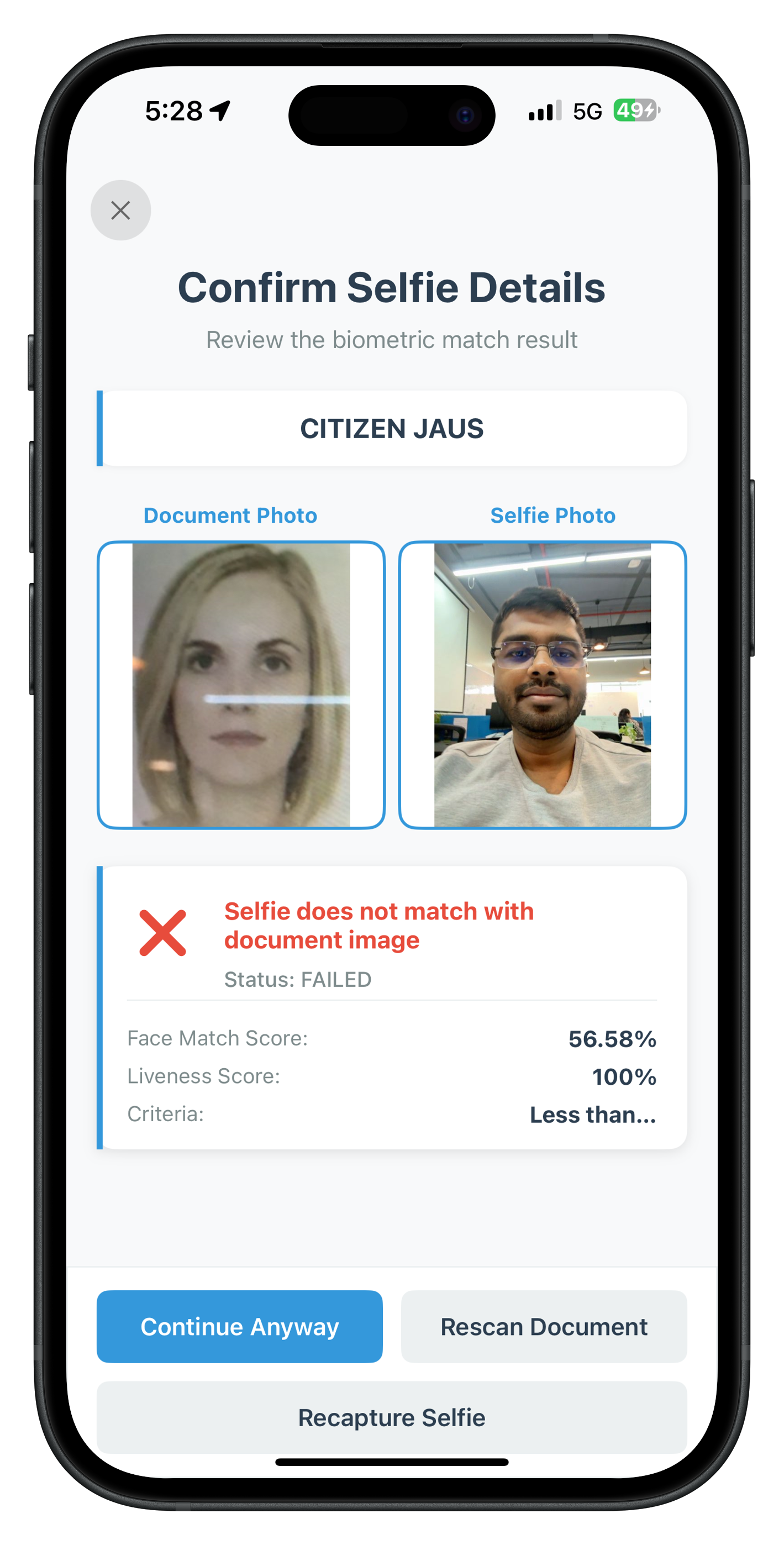
Understanding Action Keys
Action keys are string values that control the IDV workflow after selfie confirmation. They are returned in the action_buttons object from the server and must be passed exactly to the RDNAIDVService.setIDVSelfieConfirmation() method.
The Three Action Keys
Action Key | SDK Behavior | When to Use |
| Proceeds to next event ( | User accepts selfie match result and wants to continue |
| Triggers document rescan (fires | User believes document scan was poor quality or incorrect |
| Initiates selfie recapture flow (fires | User wants to retake selfie (poor lighting, closed eyes, etc.) |
Server-Driven UI Pattern
The action_buttons object provides server-controlled button configurations that differ based on match success or failure:
When Biometric Match SUCCEEDS (display_text: "MATCHED"):
- Shows only
success_buttonarray (typically just "Continue") - Single clear path forward
When Biometric Match FAILS (display_text: "NOT_MATCHED"):
- Shows
failure_buttonarray (typically "Continue Anyway", "Rescan Document", "Recapture Selfie") - Multiple recovery options for user to choose
Dynamic Button Layouts
The implementation handles 1, 2, 3, or 4+ button configurations automatically:
- 1 Button: Full-width button
- 2 Buttons: Side-by-side equal width
- 3 Buttons: Two buttons in top row, one full-width below
- 4+ Buttons: Stacked vertical layout
This ensures the UI adapts gracefully regardless of server-configured button options.
Testing the Screen
- Complete the Selfie Capture Start screen and native camera capture
- Selfie Confirmation screen should appear with biometric analysis results
- Verify side-by-side image comparison (document photo vs selfie)
- Check match result icon (✓ for MATCHED, ✗ for NOT_MATCHED)
- Review face match score and liveness score percentages
- Test action buttons based on match result:
- If MATCHED: Click "Continue" to proceed
- If NOT_MATCHED: Try "Recapture Selfie" or "Rescan Document"
- Verify navigation based on selected action
After successful selfie confirmation, the SDK requests user consent for storing the biometric template. This screen handles the getIDVBiometricOptInConsent event.
Screen Purpose
This screen manages biometric data storage consent with clear user choice:
- Consent Information: Explains what biometric template storage means and its benefits
- Transparent Communication: Clearly describes how biometric data will be encrypted, stored, and used
- User Choice: Provides explicit Approve/Reject options without any default or pre-selected choice
- Workflow Context: Adapts consent messaging based on challenge mode (activation, opt-in, etc.)
Event Flow
1. SDK completes selfie confirmation successfully
   ↓
2. SDK fires getIDVBiometricOptInConsent event
   ↓
3. AppIDVCoordinator receives event via RDNAIDVDelegateManager
   ↓
4. Coordinator creates IDVBiometricOptInConsentViewController
   ↓
5. Screen displays consent information and options
   ↓
6. User clicks "Approve" or "Reject"
   ↓
7. App calls RDNAIDVService.setIDVBiometricOptInConsent(isOptIn, challengeMode)
   ↓
8. SDK processes consent and continues to password setup (getPassword event)
Complete Implementation
File: IDVBiometricOptInConsentViewController.swift
//
//  IDVBiometricOptInConsentViewController.swift
//  relidcodelab
//
//  Purpose: IDV Biometric Opt-In Consent Screen
//  Displays biometric template storage consent options
//  UI: Storyboard-based with IBOutlets
//

import UIKit
import RELID

/**
 * IDV Biometric Opt-In Consent Screen
 *
 * This screen displays biometric template storage consent options and allows users to accept or deny.
 * Triggered by the getIDVBiometricOptInConsent event during IDV workflows.
 *
 * Key Features:
 * - Biometric consent explanation with challenge mode specific messaging
 * - Accept/Reject consent options
 * - Real-time error handling and loading states
 * - Challenge mode based consent text variations
 *
 * Event Flow:
 * 1. Receives getIDVBiometricOptInConsent event via AppCoordinator
 * 2. Displays consent information based on challenge mode
 * 3. User clicks "Approve" -> calls RDNAIDVService.setIDVBiometricOptInConsent(true, challengeMode)
 * 4. User clicks "Reject" -> calls RDNAIDVService.setIDVBiometricOptInConsent(false, challengeMode)
 * 5. User clicks close button -> calls RDNAService.resetAuthState() to cancel IDV flow
 */
class IDVBiometricOptInConsentViewController: UIViewController {

    // MARK: - IBOutlets (Connected in Storyboard)

    @IBOutlet weak var closeButton: UIButton!
    @IBOutlet weak var titleLabel: UILabel!
    @IBOutlet weak var subtitleLabel: UILabel!

    // Description Container
    @IBOutlet weak var descriptionContainer: UIView!
    @IBOutlet weak var descriptionLeftBorder: UIView!
    @IBOutlet weak var descriptionTitleLabel: UILabel!
    @IBOutlet weak var descriptionTextLabel: UILabel!

    // Bullet Points
    @IBOutlet weak var bullet1Label: UILabel!
    @IBOutlet weak var bullet2Label: UILabel!
    @IBOutlet weak var bullet3Label: UILabel!
    @IBOutlet weak var bullet4Label: UILabel!

    // Error Banner
    @IBOutlet weak var errorBanner: UIView!
    @IBOutlet weak var errorLabel: UILabel!

    // Action Buttons
    @IBOutlet weak var rejectButton: UIButton!
    @IBOutlet weak var approveButton: UIButton!
    @IBOutlet weak var activityIndicator: UIActivityIndicatorView!

    // Help Container
    @IBOutlet weak var helpContainer: UIView!
    @IBOutlet weak var helpLabel: UILabel!

    // MARK: - Properties

    /// User ID (passed from AppCoordinator)
    var userID: String = ""

    /// Attempts left (passed from AppCoordinator)
    var attemptsLeft: Int = 0

    /// Challenge mode (passed from AppCoordinator)
    var challengeMode: RDNAChallengeOpMode = RDNAChallengeOpMode(rawValue: 0)!

    /// IDV response JSON string (passed from AppCoordinator)
    var idvResponseJSON: String = ""

    /// Status dictionary (passed from AppCoordinator)
    var status: [AnyHashable: Any] = [:]

    /// Challenge response (passed from AppCoordinator)
    var challengeResponse: RDNAChallengeResponse?

    /// Error information (passed from AppCoordinator)
    var sdkError: RDNAError?

    /// Processing state
    private var isProcessing = false

    // MARK: - Lifecycle

    override func viewDidLoad() {
        super.viewDidLoad()
        setupUI()
        populateConsentDescription()
        print("IDVBiometricOptInConsent - Screen loaded")
        print("  UserID: \(userID)")
        print("  AttemptsLeft: \(attemptsLeft)")
        print("  ChallengeMode: \(challengeMode.rawValue)")
    }

    // MARK: - Setup

    private func setupUI() {
        // Configure description container
        descriptionContainer.layer.cornerRadius = 8
        descriptionContainer.backgroundColor = UIColor(hex: "#f0f8ff")
        descriptionLeftBorder.backgroundColor = UIColor(hex: "#3498db")

        // Configure error banner
        errorBanner.layer.cornerRadius = 8
        errorBanner.layer.borderWidth = 1
        errorBanner.layer.borderColor = UIColor(hex: "#e74c3c")?.cgColor
        errorBanner.isHidden = true

        // Configure buttons
        rejectButton.layer.cornerRadius = 8
        approveButton.layer.cornerRadius = 8

        // Configure help container
        helpContainer.layer.cornerRadius = 8
        helpContainer.backgroundColor = UIColor(hex: "#ecf0f1")

        // Set bullet point texts (static)
        bullet1Label.text = "• Your biometric data will be encrypted and stored securely"
        bullet2Label.text = "• This enables faster authentication for future sessions"
        bullet3Label.text = "• You can manage your consent preferences at any time"
        bullet4Label.text = "• Rejecting will not affect your current authentication"
    }

    // MARK: - Helper Methods

    private func populateConsentDescription() {
        let description = getConsentDescription()
        descriptionTextLabel.text = description
    }

    private func getConsentDescription() -> String {
        let mode = challengeMode.rawValue

        switch mode {
        case 10: // IDV_BIOMETRIC_OPT_IN
            return "Your biometric template will be used for enhanced security verification. This allows for faster and more secure authentication in future sessions."
        default:
            return "Your selfie biometric template will be securely stored for identity verification. This enables faster authentication and enhanced security for your account."
        }
    }

    private func showError(_ message: String) {
        errorLabel.text = message
        errorBanner.isHidden = false
    }

    private func hideError() {
        errorBanner.isHidden = true
    }

    private func setProcessing(_ processing: Bool) {
        isProcessing = processing

        if processing {
            rejectButton.setTitle("Processing...", for: .normal)
            approveButton.setTitle("Processing...", for: .normal)
            rejectButton.isEnabled = false
            approveButton.isEnabled = false
            activityIndicator.startAnimating()
            closeButton.isEnabled = false
        } else {
            rejectButton.setTitle("Reject", for: .normal)
            approveButton.setTitle("Approve", for: .normal)
            rejectButton.isEnabled = true
            approveButton.isEnabled = true
            activityIndicator.stopAnimating()
            closeButton.isEnabled = true
        }
    }

    // MARK: - IBActions

    @IBAction func handleReject(_ sender: UIButton) {
        print("IDVBiometricOptInConsent - Processing biometric opt-in consent: false")

        setProcessing(true)
        hideError()

        // Call IDV service to reject consent (isOptIn = false)
        let error = RDNAIDVService.shared.setIDVBiometricOptInConsent(
            isOptIn: false,
            challengeMode: challengeMode
        )

        if error.longErrorCode == 0 {
            print("IDVBiometricOptInConsent - Consent rejected successfully")
            // SDK will proceed to next step or complete flow
        } else {
            print("IDVBiometricOptInConsent - Failed to process consent: \(error.longErrorCode) - \(error.errorString ?? "")")
            setProcessing(false)
            showError(error.errorString ?? "Failed to process consent")
        }
    }

    @IBAction func handleApprove(_ sender: UIButton) {
        print("IDVBiometricOptInConsent - Processing biometric opt-in consent: true")

        setProcessing(true)
        hideError()

        // Call IDV service to approve consent (isOptIn = true)
        let error = RDNAIDVService.shared.setIDVBiometricOptInConsent(
            isOptIn: true,
            challengeMode: challengeMode
        )

        if error.longErrorCode == 0 {
            print("IDVBiometricOptInConsent - Consent approved successfully")
            // SDK will proceed to next step or complete flow
        } else {
            print("IDVBiometricOptInConsent - Failed to process consent: \(error.longErrorCode) - \(error.errorString ?? "")")
            setProcessing(false)
            showError(error.errorString ?? "Failed to process consent")
        }
    }

    @IBAction func handleClose(_ sender: UIButton) {
        print("IDVBiometricOptInConsent - Calling resetAuthState to cancel IDV flow")

        setProcessing(true)
        hideError()

        // Call RDNAService to reset auth state (cancel entire IDV flow)
        let error = RDNAService.shared.resetAuthState()

        if error.longErrorCode == 0 {
            print("IDVBiometricOptInConsent - ResetAuthState successful")
            // SDK will handle navigation back to appropriate screen
        } else {
            print("IDVBiometricOptInConsent - ResetAuthState error: \(error.longErrorCode) - \(error.errorString ?? "")")
            setProcessing(false)
            showError(error.errorString ?? "Failed to cancel IDV flow")
        }
    }
}
The following image showcases screen from the sample application:
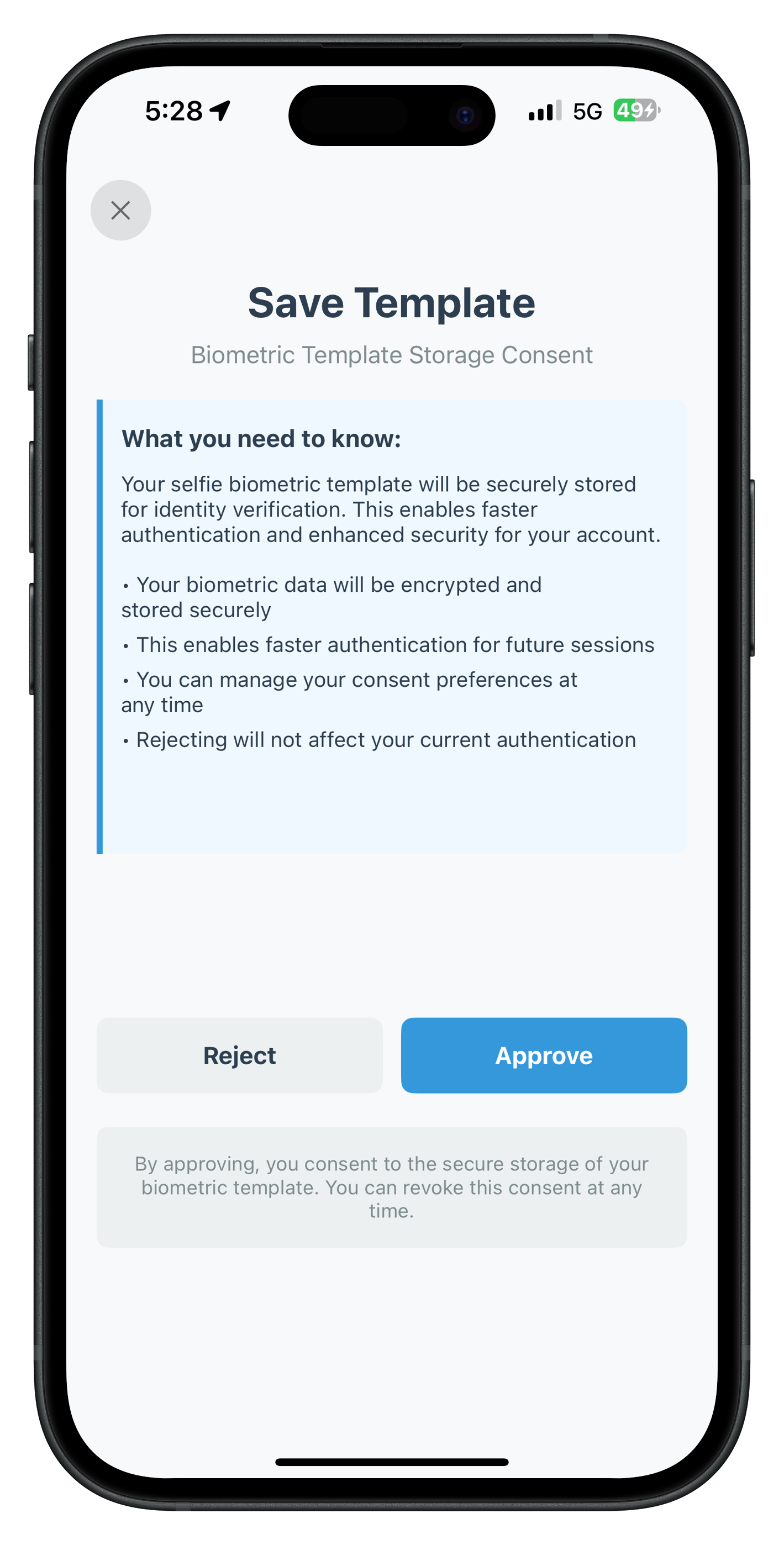
Consent Options Impact
Action | Storage | Impact |
Approve ( | Biometric template stored securely | Faster future authentication, enhanced security |
Reject ( | Template not stored | Standard authentication methods only |
Testing the Screen
- Complete the Selfie Confirmation screen successfully
- Biometric Consent screen should appear automatically
- Review the consent information and bullet points
- Note the workflow-specific description text
- Click "Approve" to store biometric template
- Verify navigation to Password Setup screen
- OR click "Reject" to decline storage
- Verify navigation to Password Setup screen (consent not required to continue)
- Test close button to cancel entire IDV flow
End-to-End Testing Checklist
Test the complete IDV MFA activation flow to ensure all components work together correctly.
Test Activation Flow
Step-by-Step Testing:
1. Launch App
   ✅ SDK initialization success
   ✅ RDNAIDVService and RDNAIDVDelegateManager initialized
   ✅ IDV delegates registered in onInitialized

2. Enter Username (CheckUserViewController)
   ✅ Navigate to activation code screen

3. Enter Activation Code (ActivationCodeViewController)
   ✅ IDV flow begins automatically

4. IDV Document Scan Start Screen
   ✅ Guidelines displayed correctly
   ✅ Workflow-specific text shown
   ✅ Click "Scan Document" → Native scanner opens
   ✅ Cancel button works (calls setIDVDocumentScanProcessStartConfirmation(false))

5. Native Document Scanner (Regula)
   ✅ Camera opens and captures document
   ✅ OCR extraction occurs
   ✅ SDK triggers getIDVConfirmDocumentDetails event

6. Document Details Confirmation Screen
   ✅ OCR data displayed (name, DOB, document number)
   ✅ Portrait and document images shown
   ✅ Validation status correct
   ✅ Confirm button proceeds to next step
   ✅ Reject button allows rescan

7. Selfie Capture Start Screen
   ✅ Workflow-specific guidelines displayed
   ✅ Camera selection works (front/back toggle)
   ✅ Click "Capture Selfie" → Native selfie camera opens
   ✅ Cancel button works

8. Native Selfie Capture (Liveness Detection)
   ✅ Liveness prompts guide user
   ✅ Selfie captured successfully
   ✅ SDK triggers getIDVSelfieConfirmation event

9. Selfie Confirmation Screen
   ✅ Side-by-side image comparison shown
   ✅ Biometric match result displayed (MATCHED/NOT_MATCHED)
   ✅ Face match score and liveness score shown
   ✅ Dynamic action buttons work correctly
   ✅ Continue button proceeds
   ✅ Retry actions work (reinit-idv-document-scan, reinit-idv-selfie)

10. Biometric Consent Screen
    ✅ Consent information displayed
    ✅ Approve button works (isOptIn=true)
    ✅ Reject button works (isOptIn=false)

11. Password Setup Screen
    ✅ Password creation successful
    ✅ Validation rules enforced

12. Dashboard Screen
    ✅ User logged in
    ✅ Activation complete!
Test Error Scenarios
Ensure proper error handling:
- ✅ Cancel flows: Close button at any IDV screen
- ✅ Poor document quality: Rescan with better lighting
- ✅ Face mismatch: Retry document scan or selfie capture
- ✅ Network errors: Proper error messages displayed
- ✅ SDK errors: Error codes handled and user-friendly messages shown
Architecture Benefits
The implemented architecture provides:
✅ Clean separation of concerns (Service → Delegate Manager → Coordinator → ViewControllers)
✅ Testable components with dependency injection
✅ Type-safe closure handlers for all events
✅ Reusable coordinator pattern for navigation
✅ Modular protocol conformance (4 IDV protocols)
✅ Comprehensive error handling at every layer
✅ Main thread safety guaranteed for UI updates
Issue 1: IDV Events Not Firing
Symptoms: IDV screens never appear after activation code
Solution:
// Ensure IDV delegates are registered in onInitialized
RDNADelegateManager.shared.onInitialized = { response in
    RDNAIDVService.shared.setIDVDocumentProcessingDelegate(RDNAIDVDelegateManager.shared)
    RDNAIDVService.shared.setIDVSelfieProcessingDelegate(RDNAIDVDelegateManager.shared)
    RDNAIDVService.shared.setIDVBiometricManagementDelegate(RDNAIDVDelegateManager.shared)
    RDNAIDVService.shared.setIDVKYCManagementDelegate(RDNAIDVDelegateManager.shared)
}
Issue 2: Document Scanner Doesn't Open
Symptoms: Clicking "Scan Document" does nothing or shows error
Causes:
- Missing IDV assets (db.dat, regula.license)
- Invalid Regula license
- Camera permissions not granted
Solution:
- Verify IDV assets are in project and added to target
- Check Info.plist for camera permission description
- Verify Regula license validity and expiration date
Issue 3: Storyboard Navigation Fails
Symptoms: Console shows "Failed to instantiate" messages
Solution:
// Verify storyboard identifiers match exactly (case-sensitive)
"IDVDocumentProcessStartConfirmationViewController"
"IDVConfirmDocumentDetailsViewController"
"IDVSelfieProcessStartConfirmationViewController"
"IDVSelfieConfirmationViewController"
"IDVBiometricOptInConsentViewController"

// Verify custom class is set in storyboard
// Verify module is set to your app target
Issue 4: JSON Parsing Errors
Symptoms: Blank screens or missing data in confirmation screens
Solution:
// Add defensive JSON parsing
guard let data = responseDataJSON.data(using: .utf8),
      let json = try? JSONSerialization.jsonObject(with: data) as? [String: Any],
      let responseData = json["response_data"] as? [String: Any] else {
    print("Failed to parse response data")
    return
}
Issue 5: Memory Issues with Images
Symptoms: App crashes or high memory usage during document confirmation
Solution:
// Downsample large base64 images
func downsampleImage(_ imageData: Data, targetSize: CGSize) -> UIImage? {
    let options = [
        kCGImageSourceCreateThumbnailWithTransform: true,
        kCGImageSourceCreateThumbnailFromImageAlways: true,
        kCGImageSourceThumbnailMaxPixelSize: max(targetSize.width, targetSize.height)
    ] as CFDictionary

    guard let source = CGImageSourceCreateWithData(imageData as CFData, nil),
          let imageRef = CGImageSourceCreateThumbnailAtIndex(source, 0, options) else {
        return nil
    }

    return UIImage(cgImage: imageRef)
}
🎉 You have successfully completed the REL-ID Identity Verification MFA Activation Flow codelab for iOS!
You've built a complete, production-ready IDV integration that demonstrates secure identity verification during the MFA activation process.
What You've Built
✅ Complete IDV Implementation: All 5 IDV screens with full functionality
- Document Scan Start Screen with workflow-specific guidelines
- Document Details Confirmation Screen with OCR validation
- Selfie Capture Start Screen with camera selection
- Selfie Confirmation Screen with biometric matching
- Biometric Consent Screen with template storage options
✅ iOS Architecture Patterns:
- RDNAIDVService: Singleton service wrapping native SDK APIs
- RDNAIDVDelegateManager: Protocol-based callback management with closures
- AppIDVCoordinator: Coordinator pattern for IDV navigation
- Closure-Based Event Handling: Type-safe, memory-safe event architecture
✅ Production-Ready Features:
- Comprehensive error handling and validation
- User-friendly feedback and retry logic
- Main thread safety for all UI updates
- Proper memory management with weak references
Key Skills You've Learned
✅ Integrate IDV functionality within MFA activation flow ✅ Implement document scanning with Regula Document Reader SDK ✅ Handle OCR data validation and document details confirmation ✅ Capture selfies with liveness detection and face matching ✅ Perform biometric verification between document and live selfie ✅ Manage biometric consent and template storage ✅ Use closure-based event handling for IDV callbacks ✅ Implement coordinator pattern for complex navigation flows ✅ Handle errors gracefully with user-friendly messages ✅ Work with UIKit ViewControllers, IBOutlets, and IBActions
iOS Architecture Recap
AppDelegate
    ↓ (Initialize SDK)
RDNAService.shared.initialize()
    ↓ (Register IDV Delegates)
RDNAIDVService.shared.setIDVDocumentProcessingDelegate()
RDNAIDVService.shared.setIDVSelfieProcessingDelegate()
RDNAIDVService.shared.setIDVBiometricManagementDelegate()
    ↓ (IDV Events Triggered)
RDNAIDVDelegateManager Protocol Methods
    ↓ (Dispatch to Closures on Main Thread)
AppIDVCoordinator Closure Handlers
    ↓ (Navigate to Screens)
IDV ViewControllers (5 screens)
    ↓ (User Actions)
RDNAIDVService API Calls
    ↓ (SDK Processing)
Next Event → Repeat Flow
What's Next?
1. Explore Additional IDV Workflows
This codelab covered IDV during MFA activation (idvWorkflow: .IDV_ACTIVATION). REL-ID SDK supports other workflows:
- IDV_POSTLOGIN_KYC: Post-login KYC verification for existing users
- IDV_ADDITIONAL_DEVICE_WITH_TEMPLATE: Device activation with existing biometric template
- IDV_ACCOUNT_RECOVERY_WITH_TEMPLATE: Account recovery using stored biometrics
- IDV_POSTLOGIN_OPTIN: Biometric enrollment for existing users
2. Production Considerations
Before deploying to production:
- ✅ Implement proper error logging and monitoring
- ✅ Add analytics tracking for IDV flow completion rates
- ✅ Test with various document types (passport, driver's license, ID card, etc.)
- ✅ Optimize IDV asset delivery (db.dat is ~100MB)
- ✅ Implement user privacy policy disclosures for biometric data
- ✅ Add accessibility features (VoiceOver support, dynamic type)
- ✅ Test on low-end devices and poor network conditions
- ✅ Implement proper certificate handling for Regula validation
3. Advanced Customization
Enhance the IDV experience:
- Custom UI Styling: Match your app's branding
- Localization: Multi-language support for global users
- Custom Validation Rules: Additional document field validation
- Enhanced Biometric Scoring: Adjust thresholds based on risk profile
- Custom Consent Text: Compliance with regional regulations (GDPR, CCPA, etc.)
Resources
Thank you for completing this codelab! 🚀
Happy coding! 👨💻👩💻