🎯 Learning Path:
- Complete REL-ID Initialization Flow Codelab
- Complete REL-ID Complete Activation & Login Flow Codelab
- Complete REL-ID Complete IDV Activation Flow Codelab
- You are here → Post-Login Additional Document Scan Implementation
Welcome to the REL-ID IDV Post-Login Additional Document Scan Flow codelab! This tutorial teaches you how to implement a streamlined additional document verification workflow for activated customers using document scanning and validation.
What You'll Build
In this codelab, you'll implement a complete post-login additional document scan workflow:
- 🏠 Menu Integration: Access Additional Document Scan from Dashboard navigation
- 🆕 Additional Document Scan Entry Screen: Scan initiation with reason parameter
- 📄 Document Scan Process: Automated document verification with workflow 7
- ✅ Document Validation Display: Comprehensive extracted data display with challenge mode 10
- 🔄 Streamlined Flow: Document-only verification (no selfie or consent requirements)
- 📱 Done Button Navigation: Proper navigation context maintenance for menu button functionality
- 🔔 Screen-Level Event Handling: Persistent handlers for validation events
Key Feature: Streamlined Document-Only Flow
This codelab demonstrates post-login additional document scan, a streamlined workflow that focuses exclusively on document verification:
Post-Login KYC Flow (Challenge Mode 9 - 7 Screens):
Dashboard → KYC → Document → Selfie → Consent → Completion

Post-Login Additional Document Scan (Challenge Mode 10 - 3 Screens - This Codelab):
Dashboard → Start Scan → Document Capture → View Results → Done
Critical Differences from KYC:
- Workflow: 7 (IDV_POSTLOGIN_DOC_SCAN_ONLY) instead of 6
- Challenge Mode: 10 (additional document scan) instead of 9 (KYC)
- Screens: 3 screens vs 7 screens (no selfie, no consent)
- Validation Event:
onIDVAdditionalDocumentScaninstead ofonIDVActivatedCustomerKYCResponse - Use Case: Supplementary document submission vs comprehensive KYC compliance
- Entry Point: AdditionalDocumentScanViewController with scan initiation
What You'll Learn
- ✅ How to implement post-login additional document scan for activated customers
- ✅ Using workflow 7 (IDV_POSTLOGIN_DOC_SCAN_ONLY) and challenge mode 10
- ✅ Initiating additional document scan with reason parameter
- ✅ Handling
onIDVAdditionalDocumentScanvalidation event with extracted data - ✅ Displaying comprehensive document validation results
- ✅ Implementing navigation coordinator pattern for menu button functionality
- ✅ Error 240 handling (user cancellation on close button)
- ✅ Streamlined document-only workflow without selfie or consent
- ✅ Supporting multiple document scans in a single session
Prerequisites
- Completion of REL-ID Initialization codelab
- Completion of REL-ID MFA Activation & Login codelab
- Understanding of post-login KYC flow (recommended)
- Basic understanding of Swift and UIKit
- REL-ID SDK integration credentials
- Document scanning license (Regula)
- Test identity documents for scanning
Technology Stack
- iOS: 13.0+
- Swift: 5.5+
- UIKit: Storyboard-based UI
- REL-ID SDK: RELIDIDV Framework (Latest)
- Regula Document Reader: For document scanning and OCR
- Xcode: 13.0 or later
Post-Login Additional Document Scan Flow Diagram
Understanding the complete streamlined flow is crucial before implementation:
1. User Login (Activated Customer)
   ↓ (Existing credentials authenticated)

2. Dashboard → Open Menu
   ↓ (User navigates to Additional Document Scan option)

3. 🆕 Additional Document Scan Entry Screen
   ├─ Display document scan information and guidelines
   ├─ User taps "Start Additional Document Scan"
   ├─ Screen-level event handler registered (persistent)
   ├─ initiateIDVAdditionalDocumentScan(reason)
   │  • reason: "Additional Document Verification"
   │  • workflow: 7 (IDV_POSTLOGIN_DOC_SCAN_ONLY)
   │  • challengeMode: 10 (additional document scan)
   └─ SDK initiates additional document scan workflow
   ↓

4. 📄 IDV Document Scan Process
   ├─ getIDVDocumentScanProcessStartConfirmation event
   │  • idvWorkflow: 7 (IDV_POSTLOGIN_DOC_SCAN_ONLY)
   ├─ Navigate to IDVDocumentProcessStartConfirmationViewController
   ├─ User taps "Start Scan" OR Close button (X)
   │  ├─ "Start Scan": setIDVDocumentScanProcessStartConfirmation(true, 7)
   │  │   → Opens native camera with Regula SDK
   │  └─ Close button (X): setIDVDocumentScanProcessStartConfirmation(false, 7)
   │      → Triggers onIDVAdditionalDocumentScan with error 240 (User Cancelled)
   └─ Native Document Capture (Regula SDK) - only if "Start Scan" tapped
   ↓

5. ✅ Document Validation & Result Display
   ├─ onIDVAdditionalDocumentScan event triggered
   │  • challengeMode: 10 (additional document scan)
   │  • documentDetails: Contains extracted document data
   │    - identity_data: name, date_of_birth, gender, nationality
   │    - document_info: document_number, issue_date, expiry_date, issuing_authority
   │    - document_status: validation status
   │    - version: response version
   ├─ Screen-level handler receives event (even if on different screen)
   ├─ Navigate to IDVAdditionalDocumentScanResultViewController
   ├─ Display comprehensive extracted document data
   └─ User reviews identity information and document details
   ↓

6. 🔄 Completion & Retry Option
   ├─ User taps "Done" button
   ├─ Navigate back to AdditionalDocumentScanViewController
   │  • AppIDVCoordinator.showAdditionalDocumentScan()
   │  • Maintains navigation context for menu button functionality
   ├─ User can perform another document scan
   └─ Menu button (hamburger icon) remains functional
IDV Workflow and Challenge Mode Values
For post-login additional document scan flow, you'll use these specific values:
Parameter | Value | Description |
idvWorkflow |
|
|
challengeMode |
| Additional document scan validation mode |
Validation Event |
| Event triggered after document capture |
Comparison with Other IDV Flows:
Aspect | Pre-Login (Activation) | Post-Login (KYC) | Additional Document Scan (This Codelab) |
Workflow | 0-5 (Activation) | 6 (IDV_POSTLOGIN_KYC) | 7 (IDV_POSTLOGIN_DOC_SCAN_ONLY) |
Challenge Mode | 8 | 9 | 10 |
Screens | 7 screens | 7 screens | 3 screens |
Validation Event |
|
|
|
Selfie Required | Yes | Yes | No |
Selfie Consent Required | Yes | Yes | No |
Use Case | New user activation | KYC compliance | Supplementary documents |
Before You Begin
Ensure you have completed these requirements:
1. Previous Codelabs Completed
- ✅ REL-ID Initialization Flow
- ✅ REL-ID MFA Activation & Login Flow
- ✅ REL-ID IDV Post-Login KYC Flow (Recommended for IDV understanding)
2. Development Environment
# Check Xcode version
xcode-select --version

# Required versions
Xcode >= 13.0
Swift >= 5.5
iOS Deployment Target >= 13.0
3. REL-ID SDK Credentials
- Connection profile configuration
- Valid REL-ID SDK license
- Document scanning license (Regula)
Get the Code from GitHub
The code to get started can be found in a GitHub repository.
You can clone the repository using the following command:
git clone https://github.com/uniken-team/codelab.git
Navigate to the relid-codelab-ios/relid-IDV-post-login-additional-document-scan folder in the repository you cloned earlier:
cd codelab/relid-codelab-ios/relid-IDV-post-login-additional-document-scan
Installation
Step 1: Clone and Setup
# Navigate to the codelab folder
cd relid-codelab-ios/relid-IDV-post-login-additional-document-scan

# Add the `RELID.xcframework` to your project:
#   - Drag and drop `RELID.xcframework` into your Xcode project
#   - Select your target → General → Frameworks, Libraries, and Embedded Content
#   - Set embed mode to "Embed & Sign"

# Place the RELIDIDV local pod (IDV libs) at ./RELID_IDV/
# (Contact REL-ID team for the framework)
Step 2: Install CocoaPods Dependencies
The project uses CocoaPods for dependency management. Here's the Podfile configuration:
platform :ios, '13.0'

target 'relidcodelab' do
  use_frameworks!

  # REL-ID IDV SDK (Local Pod)
  pod 'RELIDIDV', :path => './RELID_IDV/'

  # Additional Dependencies
  pod 'IQKeyboardManagerSwift'
  pod 'SideMenu', '~> 6.5'
  pod 'Firebase/Messaging'
end
Install the dependencies:
# Install CocoaPods (if not already installed)
sudo gem install cocoapods

# Install dependencies
pod install
Step 3: Configure IDV Assets
The following IDV assets need to be configured in your project at the specified paths:
iOS Configuration:
Place the following files (provided by Uniken admin team) at these locations:
- 📄 Document Recognition Database:
idv-artifacts/db.dat - 📄 Regula License:
idv-artifacts/regula.license - 📄 Certificate Bundle:
idv-artifacts/Certificates.bundle/icaopkd-002-complete-000325.ldif
Step 4: Open and Run the Application
# Open the workspace (NOT the .xcodeproj!)
open relidcodelab.xcworkspace
In Xcode:
- Select a simulator or device target
- Click Product → Run (or press ⌘R)
- The app will build and launch
Project Structure
The post-login additional document scan codelab follows this structure:
relidcodelab/
├── AppDelegate.swift
├── SceneDelegate.swift
├── Sources/
│   ├── Tutorial/
│   │   ├── Navigation/
│   │   │   └── AppIDVCoordinator.swift                           # 🆕 Additional scan navigation
│   │   └── Screens/
│   │       ├── IDV/
│   │       │   └── AdditionalDocumentScan/                       # 🆕 Additional Document Scan Screens
│   │       │       ├── AdditionalDocumentScanViewController.swift  # Entry point with scan initiation
│   │       │       └── IDVAdditionalDocumentScanResultViewController.swift  # Validation result display
│   │       ├── IDVDocumentProcessStartConfirmationViewController.swift  # Document scan confirmation (reused)
│   │       └── ActivatedCustomerKYC/                             # (KYC flow entry, not used here)
│   └── Uniken/
│       ├── Services/
│       │   └── IDV/
│       │       ├── RDNAIDVService.swift                          # 🆕 initiateIDVAdditionalDocumentScan()
│       │       └── RDNAIDVDelegateManager.swift                  # 🆕 onIDVAdditionalDocumentScan event
│       ├── Utils/
│       │   └── ConnectionProfileParser.swift                     # Connection profile parsing
│       └── CP/
│           └── agent_info.json                                   # Connection profile config
├── Base.lproj/
│   └── Main.storyboard                                           # UI definitions for all screens
├── idv-artifacts/                                                # Document scanning assets
│   ├── db.dat                                                    # 110.5MB database
│   ├── regula.license                                            # Document scanning license
│   └── Certificates.bundle/                                      # Certificate files
│       └── icaopkd-002-complete-000325.ldif
└── Podfile                                                       # CocoaPods dependencies
How iOS SDKs Work
iOS SDKs are distributed as frameworks that link with your application.
SDK Structure:
- Framework: Pre-compiled code packaged as .framework or .xcframework
- Public API: Swift/Objective-C interfaces you use in your code
- Native Implementation: Compiled binary code
Using the RELID iOS SDK
The RELID iOS SDK is integrated via CocoaPods and provides a singleton instance:
import RELID

// Access the SDK singleton
let rdna = RDNA.sharedInstance()

// Initialize SDK
let error = rdna.initialize(relid, host: host, port: port)

// Use IDV APIs
let error = rdna.initiateIDVAdditionalDocumentScan(reason)
SDK Delegate Pattern
iOS SDKs use the delegate pattern for callbacks:
// 1. Conform to protocol
class RDNAIDVDelegateManager: NSObject, RDNAIDVDocumentProcessingCallbacks {

    // 2. Implement protocol methods
    func onIDVAdditionalDocumentScan(
        _ userID: String,
        documentDetails: String,
        status: RDNARequestStatus,
        challenge mode: RDNAChallengeOpMode,
        error: RDNAError
    ) {
        // Handle callback
    }
}

// 3. Register delegate with SDK
rdna.setIDVDocumentProcessingDelegate(RDNAIDVDelegateManager.shared)
Project Architecture
┌─────────────────────────────────────┐
│   View Controllers (UIKit)           │
│   - AdditionalDocumentScanVC         │
│   - IDVAdditionalDocumentScanResultVC│
└─────────────────────────────────────┘
              ↓
┌─────────────────────────────────────┐
│   Navigation Coordinator             │
│   - AppIDVCoordinator                │
└─────────────────────────────────────┘
              ↓
┌─────────────────────────────────────┐
│   Service Layer                      │
│   - RDNAIDVService (singleton)       │
└─────────────────────────────────────┘
              ↓
┌─────────────────────────────────────┐
│   Delegate Manager                   │
│   - RDNAIDVDelegateManager           │
└─────────────────────────────────────┘
              ↓
┌─────────────────────────────────────┐
│   RELID iOS SDK (Framework)          │
│   - RDNA.sharedInstance()            │
└─────────────────────────────────────┘
Understanding the IDV Service Layer
Before implementing the additional document scan flow, it's essential to understand the foundational IDV services that power all identity verification operations. These services are already implemented in the codebase from previous IDV flows and are reused for additional document scanning.
The Two Core Services
1. RDNAIDVService - IDV API Service Layer
Location: Sources/Uniken/Services/IDV/RDNAIDVService.swift
Purpose: Singleton service that wraps all RELID SDK IDV APIs
Key Responsibilities:
- ✅ Wraps native SDK APIs in type-safe Swift methods
- ✅ Provides singleton access pattern
- ✅ Handles SDK error responses
- ✅ Manages delegate registration
APIs Available for Additional Document Scan Flow:
import RELID

class RDNAIDVService {
    static let shared = RDNAIDVService()
    private let rdna = RDNA.sharedInstance()

    // Document Scan APIs
    func setIDVDocumentScanProcessStartConfirmation(
        isConfirm: Bool,
        idvWorkflow: RDNAIDVWorkflow
    ) -> RDNAError {
        let error = rdna.setIDVDocumentScanProcessStartConfirmation(
            isConfirm,
            idvWorkflow: idvWorkflow
        )
        return error
    }

    // Additional Document Scan API (🆕 Primary API for this codelab)
    func initiateIDVAdditionalDocumentScan(reason: String) -> RDNAError {
        print("RDNAIDVService - Initiating additional document scan: reason=\(reason)")

        let error = rdna.initiateIDVAdditionalDocumentScan(reason)

        if error.longErrorCode == 0 {
            print("RDNAIDVService - Additional document scan initiated successfully")
            print("RDNAIDVService - SDK will auto-trigger IDV workflow events (workflow=7, document-only)")
        } else {
            print("RDNAIDVService - Failed to initiate additional document scan: \(error.longErrorCode) - \(error.errorString ?? "")")
        }

        return error
    }

    // Note: Selfie and Consent APIs are NOT used in additional document scan flow
    // This is a streamlined document-only workflow
}
2. RDNAIDVDelegateManager - Native Event Manager
Location: Sources/Uniken/Services/IDV/RDNAIDVDelegateManager.swift
Purpose: Singleton manager that handles all native IDV SDK events
Key Responsibilities:
- ✅ Implements SDK protocol methods
- ✅ Dispatches events to closures on main thread
- ✅ Maintains callback closures for each event type
- ✅ Provides registration methods for event handlers
Implementation Pattern:
class RDNAIDVDelegateManager: NSObject,
                               RDNAIDVDocumentProcessingCallbacks,
                               RDNAIDVSelfieProcessingCallbacks,
                               RDNAIDVBiometricManagementCallbacks,
                               RDNAIDVKYCManagementCallbacks {

    static let shared = RDNAIDVDelegateManager()

    // Closure for additional document scan response
    var onIDVAdditionalDocumentScanResponse: ((_ userID: String, _ documentDetails: String, _ status: RDNARequestStatus, _ challengeMode: RDNAChallengeOpMode, _ error: RDNAError) -> Void)?

    // Protocol method implementation
    func onIDVAdditionalDocumentScan(
        _ userID: String,
        documentDetails: String,
        status: RDNARequestStatus,
        challenge mode: RDNAChallengeOpMode,
        error: RDNAError
    ) {
        print("RDNAIDVDelegateManager - onIDVAdditionalDocumentScan called")
        print("RDNAIDVDelegateManager - UserID: \(userID)")
        print("RDNAIDVDelegateManager - Challenge Mode: \(mode.rawValue)")
        print("RDNAIDVDelegateManager - Error Code: \(error.longErrorCode)")
        print("RDNAIDVDelegateManager - Status Code: \(status.statusCode)")

        // Dispatch to closure on main thread
        DispatchQueue.main.async { [weak self] in
            self?.onIDVAdditionalDocumentScanResponse?(userID, documentDetails, status, mode, error)
        }
    }
}
Event Response Structure
Dual Validation Pattern:
The response requires checking two levels of validation:
- SDK Validation (API level):
error.longErrorCode == 0→ SDK call successfulerror.longErrorCode != 0→ SDK call failed (network, SDK error)
- Backend Validation (Document level):
status.statusCode == 100→ Document validation successfulstatus.statusCode == 0→ Document validation successful (alternate success code)- Other status codes → Document validation failed
documentDetails JSON Structure:
When validation is successful, documentDetails contains extracted document data:
// Parse JSON string to dictionary
if let data = documentDetails.data(using: .utf8),
   let json = try? JSONSerialization.jsonObject(with: data) as? [String: Any] {

    // Identity data
    let identityData = json["identity_data"] as? [String: Any]
    let fullName = identityData?["Surname and given names"] as? String
    let dateOfBirth = identityData?["Date of birth"] as? String
    let gender = identityData?["Sex"] as? String
    let nationality = identityData?["Nationality"] as? String

    // Document info
    let documentInfo = json["document_info"] as? [String: Any]
    let documentNumber = documentInfo?["document_number"] as? String
    let issueDate = documentInfo?["issue_date"] as? String
    let expiryDate = documentInfo?["expiry_date"] as? String

    // Document status
    let documentStatus = json["document_status"] as? [String: Any]
    let overallStatus = documentStatus?["overall_document_status"] as? String
    let errorList = documentStatus?["error_list"] as? [String]
    let warningList = documentStatus?["warning_list"] as? [String]

    // Document images
    let documentImages = documentInfo?["document_images"] as? [String: Any]
    let frontPageBase64 = documentImages?["front_page"] as? String
    let backPageBase64 = documentImages?["back_page"] as? String
    let portraitBase64 = documentImages?["portrait_image"] as? String
    let signatureBase64 = documentImages?["signature_image"] as? String
}
Usage in Event Handlers:
private func handleAdditionalDocumentScanResponse(
    userID: String,
    documentDetails: String,
    status: RDNARequestStatus,
    challengeMode: RDNAChallengeOpMode,
    error: RDNAError
) {
    // 1st Check: SDK error validation
    if error.longErrorCode != 0 {
        // Handle SDK/API errors
        if error.longErrorCode == 240 {
            print("User cancelled document scan")
        } else {
            print("SDK error: \(error.errorString ?? "")")
        }
        return
    }

    // 2nd Check: Backend validation
    if status.statusCode != 100 && status.statusCode != 0 {
        // Handle document validation errors
        print("Validation failed: \(status.statusMessage ?? "")")
        return
    }

    // Success: Process document data
    print("Document validated successfully")
    navigateToResultScreen(documentDetails: documentDetails, challengeMode: challengeMode)
}
Screen Overview
The AdditionalDocumentScanViewController serves as the entry point for the additional document scan workflow. This screen allows activated customers to initiate supplementary document verification.
Key Features:
- Entry point for additional document scan workflow
- Calls
initiateIDVAdditionalDocumentScanAPI - Handles
onIDVAdditionalDocumentScanresponse (screen-level handler) - Dual validation pattern (sync error + backend status)
- Success: Navigate to result screen
- Error: Show modal alert and stay on screen for retry
AdditionalDocumentScanViewController UI Preview
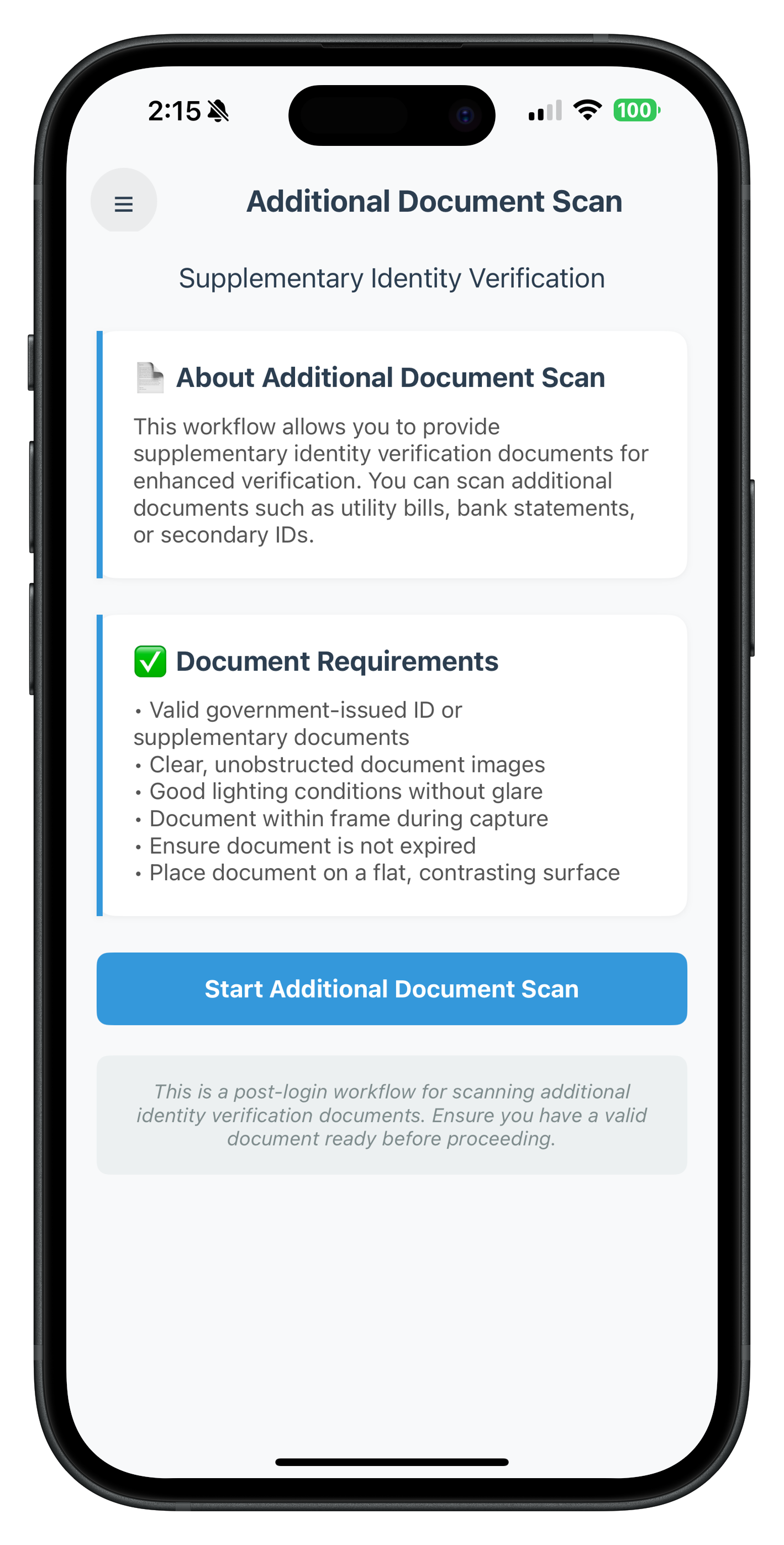
Additional Document Scan entry screen with menu button, guidelines, and scan action button
Implementation: AdditionalDocumentScanViewController.swift
Location: Sources/Tutorial/Screens/IDV/AdditionalDocumentScan/AdditionalDocumentScanViewController.swift
import UIKit
import RELID

class AdditionalDocumentScanViewController: UIViewController {

    // MARK: - IBOutlets (Connected in Storyboard)

    @IBOutlet weak var menuButton: UIButton!
    @IBOutlet weak var scrollView: UIScrollView!
    @IBOutlet weak var titleLabel: UILabel!
    @IBOutlet weak var subtitleLabel: UILabel!

    // Info Sections
    @IBOutlet weak var infoContainer1: UIView!
    @IBOutlet weak var infoLeftBorder1: UIView!
    @IBOutlet weak var infoTitleLabel1: UILabel!
    @IBOutlet weak var infoTextLabel1: UILabel!

    @IBOutlet weak var infoContainer2: UIView!
    @IBOutlet weak var infoLeftBorder2: UIView!
    @IBOutlet weak var infoTitleLabel2: UILabel!
    @IBOutlet weak var infoTextLabel2: UILabel!

    // Action Button
    @IBOutlet weak var startButton: UIButton!
    @IBOutlet weak var activityIndicator: UIActivityIndicatorView!

    // Help Container
    @IBOutlet weak var helpContainer: UIView!
    @IBOutlet weak var helpLabel: UILabel!

    // MARK: - Properties

    private var isInitiating = false

    // MARK: - Lifecycle

    override func viewDidLoad() {
        super.viewDidLoad()
        setupUI()
        registerEventHandler()
        print("AdditionalDocumentScan - Screen loaded")
    }

    override func viewWillAppear(_ animated: Bool) {
        super.viewWillAppear(animated)
        // Re-register handler when screen reappears
        registerEventHandler()
    }

    deinit {
        // Unregister handler when view controller is deallocated
        RDNAIDVDelegateManager.shared.onIDVAdditionalDocumentScanResponse = nil
        print("AdditionalDocumentScan - View controller deallocated")
    }

    // MARK: - Setup

    private func setupUI() {
        // Configure info containers
        configureInfoContainer(infoContainer1, leftBorder: infoLeftBorder1, borderColor: "#3498db")
        configureInfoContainer(infoContainer2, leftBorder: infoLeftBorder2, borderColor: "#3498db")

        // Configure button
        startButton.layer.cornerRadius = 8

        // Configure help container
        helpContainer.layer.cornerRadius = 8
        helpContainer.backgroundColor = UIColor(hex: "#ecf0f1")
    }

    private func configureInfoContainer(_ container: UIView, leftBorder: UIView, borderColor: String) {
        container.layer.cornerRadius = 12
        container.layer.shadowColor = UIColor.black.cgColor
        container.layer.shadowOffset = CGSize(width: 0, height: 1)
        container.layer.shadowOpacity = 0.05
        container.layer.shadowRadius = 2
        leftBorder.backgroundColor = UIColor(hex: borderColor)
    }

    // MARK: - Event Handler Registration

    /**
     * Register screen-level event handler for onIDVAdditionalDocumentScan
     *
     * CRITICAL: This handler MUST persist across navigation to receive the callback
     * after document capture completes. The callback may fire while user is on a
     * different screen (IDVDocumentProcessStartConfirmationViewController).
     */
    private func registerEventHandler() {
        RDNAIDVDelegateManager.shared.onIDVAdditionalDocumentScanResponse = { [weak self] userID, documentDetails, status, challengeMode, error in
            print("AdditionalDocumentScan - onIDVAdditionalDocumentScanResponse received")
            print("AdditionalDocumentScan - UserID: \(userID)")
            print("AdditionalDocumentScan - Error Code: \(error.longErrorCode)")
            print("AdditionalDocumentScan - Status Code: \(status.statusCode)")

            self?.handleAdditionalDocumentScanResponse(
                userID: userID,
                documentDetails: documentDetails,
                status: status,
                challengeMode: challengeMode,
                error: error
            )
        }
    }

    /**
     * Handle additional document scan response with dual validation
     *
     * Validation Pattern:
     * 1. Check error.longErrorCode: 0 = success, > 0 = SDK error
     * 2. Check status.statusCode: 100 or 0 = success, other = backend error
     * 3. If either check fails: Show error modal
     * 4. If both pass: Navigate to result screen
     */
    private func handleAdditionalDocumentScanResponse(
        userID: String,
        documentDetails: String,
        status: RDNARequestStatus,
        challengeMode: RDNAChallengeOpMode,
        error: RDNAError
    ) {
        // Dual validation pattern
        let errorCode = error.longErrorCode
        let statusCode = status.statusCode

        // First check: Sync error from SDK
        if errorCode != 0 {
            print("AdditionalDocumentScan - SDK Error: \(errorCode) - \(error.errorString ?? "")")

            // Navigate back to this screen (in case we're on a different screen)
            navigateToSelf {
                // Show error modal after navigation completes
                DispatchQueue.main.asyncAfter(deadline: .now() + 0.3) {
                    self.showErrorModal(
                        title: "Error",
                        message: error.errorString ?? "Failed to scan document"
                    )
                }
            }
            return
        }

        // Second check: Backend status code
        if statusCode != 100 && statusCode != 0 {
            print("AdditionalDocumentScan - Backend Error: \(statusCode) - \(status.statusMessage ?? "")")

            // Navigate back to this screen
            navigateToSelf {
                // Show error modal after navigation completes
                DispatchQueue.main.asyncAfter(deadline: .now() + 0.3) {
                    self.showErrorModal(
                        title: "Error",
                        message: status.statusMessage ?? "Document scan failed"
                    )
                }
            }
            return
        }

        // Success: Navigate to result screen
        print("AdditionalDocumentScan - Success! Navigating to result screen")
        navigateToResultScreen(
            documentDetails: documentDetails,
            challengeMode: challengeMode
        )
    }

    // MARK: - IBActions

    @IBAction func menuButtonTapped(_ sender: UIButton) {
        // Open menu
        print("AdditionalDocumentScan - Menu button tapped")
        MenuViewController.presentMenu(from: self)
    }

    @IBAction func handleStartScan(_ sender: UIButton) {
        print("AdditionalDocumentScan - Start button tapped")

        guard !isInitiating else {
            print("AdditionalDocumentScan - Already initiating, ignoring tap")
            return
        }

        setInitiating(true)

        // Call SDK to initiate additional document scan
        let error = RDNAIDVService.shared.initiateIDVAdditionalDocumentScan(
            reason: "Additional Document Verification"
        )

        if error.longErrorCode == 0 {
            print("AdditionalDocumentScan - Initiation successful")
            print("AdditionalDocumentScan - SDK will trigger getIDVDocumentScanProcessStartConfirmation event")
            // Reset state - response will come via event handler
            setInitiating(false)
        } else {
            print("AdditionalDocumentScan - Initiation failed: \(error.longErrorCode) - \(error.errorString ?? "")")
            setInitiating(false)
            showErrorModal(
                title: "Error",
                message: error.errorString ?? "Failed to start document scan"
            )
        }
    }

    // MARK: - UI State

    private func setInitiating(_ initiating: Bool) {
        isInitiating = initiating

        if initiating {
            startButton.setTitle("Starting...", for: .normal)
            startButton.isEnabled = false
            activityIndicator.startAnimating()
        } else {
            startButton.setTitle("Start Additional Document Scan", for: .normal)
            startButton.isEnabled = true
            activityIndicator.stopAnimating()
        }
    }

    // MARK: - Navigation

    /**
     * Navigate back to this screen (self)
     *
     * Used when error occurs and we need to ensure we're on this screen
     * before showing the error modal.
     */
    private func navigateToSelf(completion: @escaping () -> Void) {
        // Check if we're already on this screen
        if navigationController?.topViewController == self {
            completion()
            return
        }

        // Navigate via AppIDVCoordinator
        AppIDVCoordinator.shared.showAdditionalDocumentScan(animated: false)

        // Wait for navigation to complete
        DispatchQueue.main.asyncAfter(deadline: .now() + 0.1) {
            completion()
        }
    }

    /**
     * Navigate to result screen
     *
     * Shows the extracted document data and validation results
     */
    private func navigateToResultScreen(documentDetails: String, challengeMode: RDNAChallengeOpMode) {
        AppIDVCoordinator.shared.showIDVAdditionalDocumentScanResult(
            documentDetails: documentDetails,
            challengeMode: challengeMode
        )
    }

    // MARK: - Modal Alert

    private func showErrorModal(title: String, message: String) {
        let alert = UIAlertController(title: title, message: message, preferredStyle: .alert)

        let okAction = UIAlertAction(title: "OK", style: .default) { _ in
            print("AdditionalDocumentScan - Error modal dismissed")
            // User can retry by tapping the start button again
        }

        alert.addAction(okAction)
        present(alert, animated: true)
    }
}

// MARK: - UIColor Extension for Hex Colors

extension UIColor {
    convenience init?(hex: String) {
        var hexSanitized = hex.trimmingCharacters(in: .whitespacesAndNewlines)
        hexSanitized = hexSanitized.replacingOccurrences(of: "#", with: "")

        var rgb: UInt64 = 0

        guard Scanner(string: hexSanitized).scanHexInt64(&rgb) else { return nil }

        self.init(
            red: CGFloat((rgb & 0xFF0000) >> 16) / 255.0,
            green: CGFloat((rgb & 0x00FF00) >> 8) / 255.0,
            blue: CGFloat(rgb & 0x0000FF) / 255.0,
            alpha: 1.0
        )
    }
}
Key Implementation Details
1. Screen-Level Event Handler:
- The handler is registered in
viewDidLoad()andviewWillAppear() - Handler persists across navigation to receive callback from different screens
- Handler is unregistered in
deinitfor cleanup
2. Dual Validation Pattern:
- First validates SDK error code (
error.longErrorCode) - Then validates backend status code (
status.statusCode) - Both must pass for success
3. Navigation Logic:
- Success: Navigate to result screen via
AppIDVCoordinator - Error: Navigate back to self (if on different screen), then show modal
4. Initiating Additional Document Scan:
let error = RDNAIDVService.shared.initiateIDVAdditionalDocumentScan(
    reason: "Additional Document Verification"
)
Screen Overview
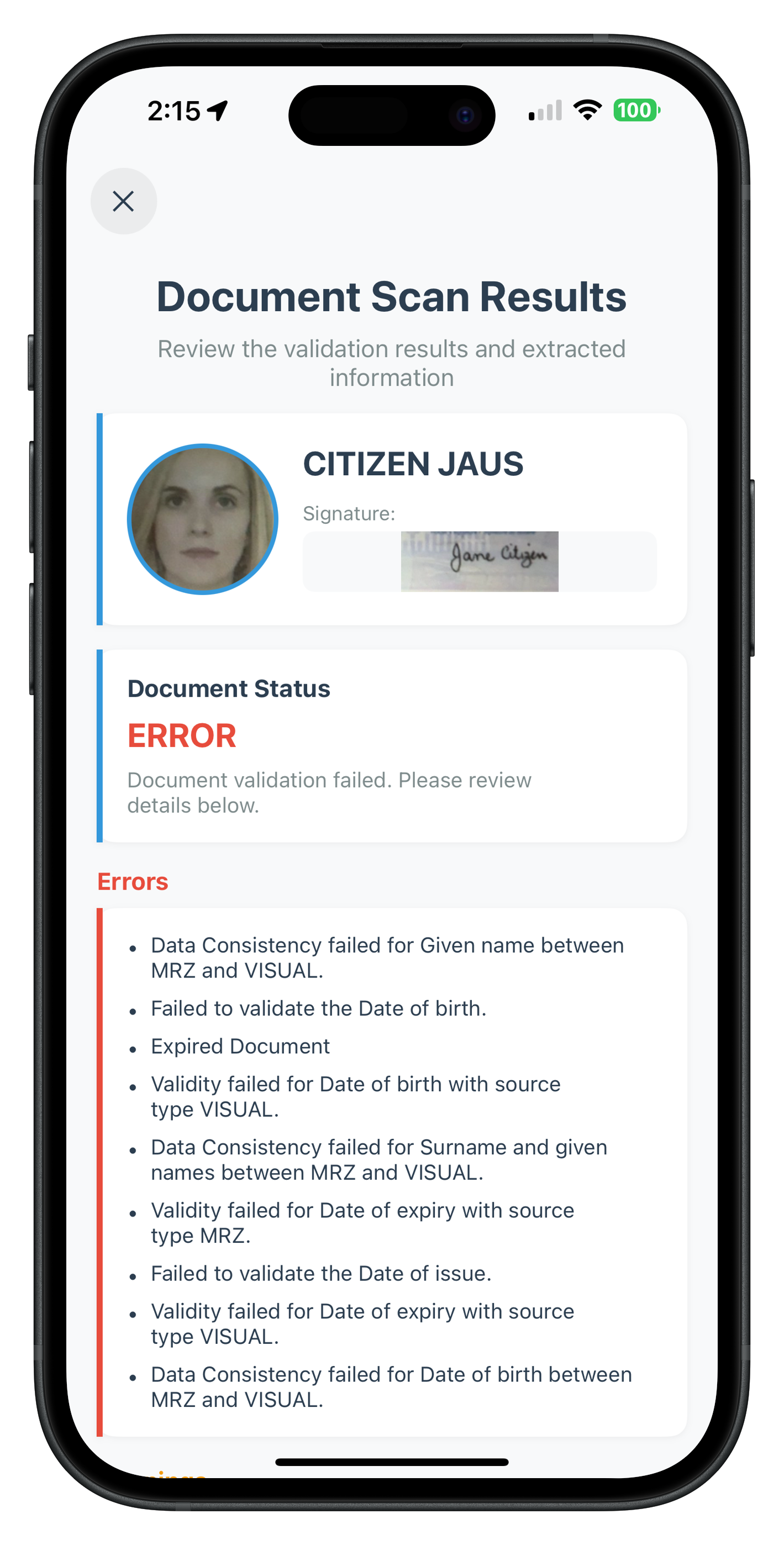
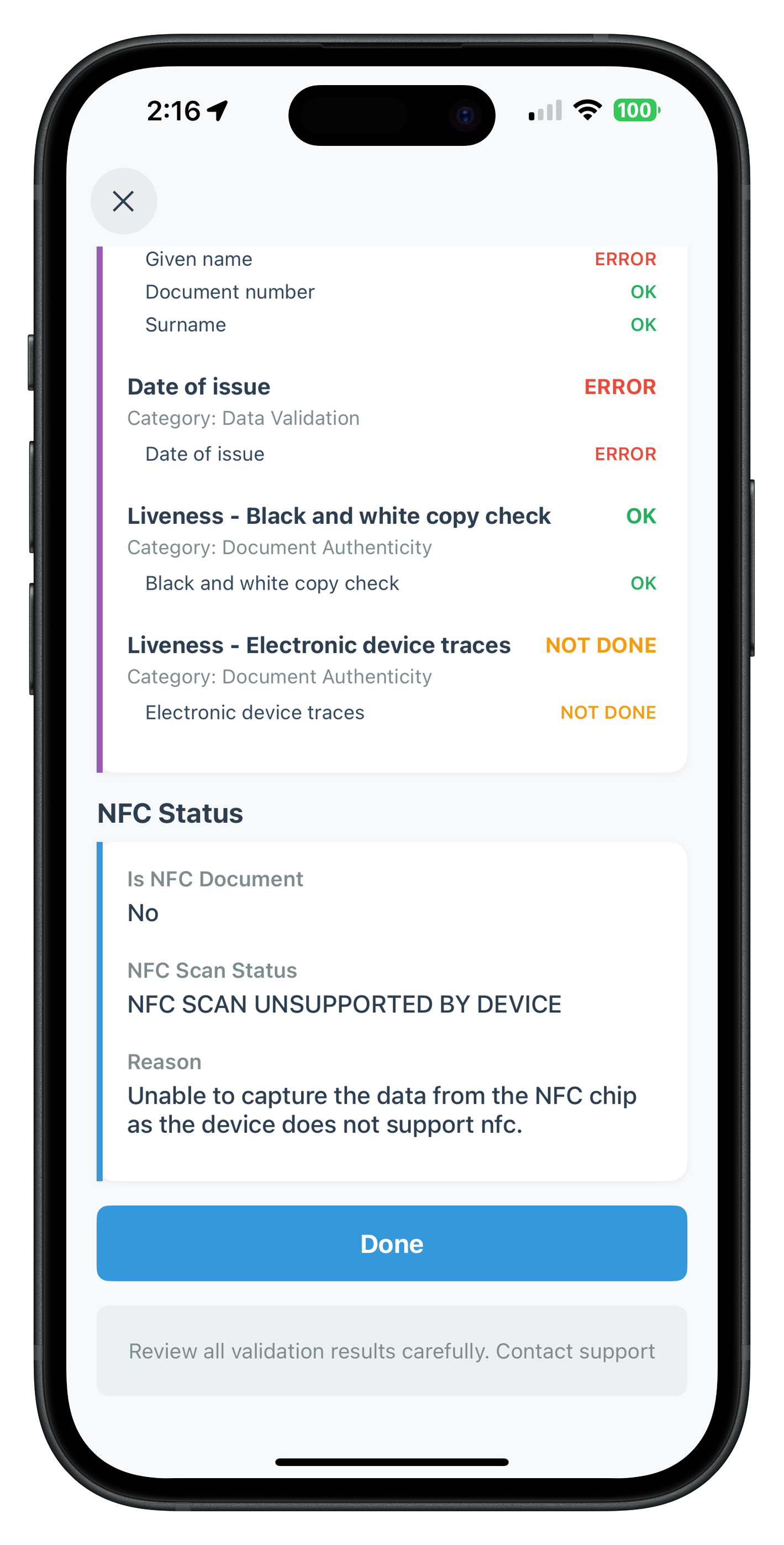
The IDVAdditionalDocumentScanResultViewController displays the comprehensive extracted document data and validation results after a successful document scan.
Key Features:
- Display all document details (OCR-extracted data)
- Portrait and signature images
- Document images (front/back pages)
- Extracted identity data with validation status
- Detailed checks performed with results
- Error and warning lists
- NFC scan status information
- Overall document validation status
- "Done" button to return to entry screen
IDVAdditionalDocumentScanResultViewController UI Preview
Top Portion - Identity Information |
Bottom Portion - Document Details & Status |
Implementation: IDVAdditionalDocumentScanResultViewController.swift
Location: Sources/Tutorial/Screens/IDV/AdditionalDocumentScan/IDVAdditionalDocumentScanResultViewController.swift
import UIKit
import RELID

class IDVAdditionalDocumentScanResultViewController: UIViewController {

    // MARK: - IBOutlets (Connected in Storyboard)

    @IBOutlet weak var closeButton: UIButton!
    @IBOutlet weak var scrollView: UIScrollView!

    // Title Section
    @IBOutlet weak var titleLabel: UILabel!
    @IBOutlet weak var subtitleLabel: UILabel!

    // Personal Info Header (Portrait + Signature)
    @IBOutlet weak var personalInfoContainer: UIView!
    @IBOutlet weak var personalInfoLeftBorder: UIView!
    @IBOutlet weak var nameLabel: UILabel!
    @IBOutlet weak var signatureContainer: UIView!
    @IBOutlet weak var signatureImageView: UIImageView!
    @IBOutlet weak var portraitImageView: UIImageView!

    // Document Status Section
    @IBOutlet weak var statusContainer: UIView!
    @IBOutlet weak var statusLeftBorder: UIView!
    @IBOutlet weak var statusLabel: UILabel!
    @IBOutlet weak var statusValueLabel: UILabel!
    @IBOutlet weak var statusHintLabel: UILabel!

    // Error List Section
    @IBOutlet weak var errorListSection: UIView!
    @IBOutlet weak var errorListContainer: UIView!
    @IBOutlet weak var errorListLeftBorder: UIView!
    @IBOutlet weak var errorListStackView: UIStackView!

    // Warning List Section
    @IBOutlet weak var warningListSection: UIView!
    @IBOutlet weak var warningListContainer: UIView!
    @IBOutlet weak var warningListLeftBorder: UIView!
    @IBOutlet weak var warningListStackView: UIStackView!

    // Identity Data Section
    @IBOutlet weak var identityDataSection: UIView!
    @IBOutlet weak var identityDataContainer: UIView!
    @IBOutlet weak var identityDataLeftBorder: UIView!
    @IBOutlet weak var identityDataStackView: UIStackView!

    // Document Images Section
    @IBOutlet weak var documentImagesSection: UIView!
    @IBOutlet weak var frontPageContainer: UIView!
    @IBOutlet weak var frontPageImageView: UIImageView!
    @IBOutlet weak var backPageContainer: UIView!
    @IBOutlet weak var backPageImageView: UIImageView!

    // Validation Checks Section
    @IBOutlet weak var validationChecksSection: UIView!
    @IBOutlet weak var checksContainer: UIView!
    @IBOutlet weak var checksLeftBorder: UIView!
    @IBOutlet weak var checksStackView: UIStackView!

    // NFC Status Section
    @IBOutlet weak var nfcStatusSection: UIView!
    @IBOutlet weak var nfcStatusContainer: UIView!
    @IBOutlet weak var nfcStatusLeftBorder: UIView!
    @IBOutlet weak var nfcStatusStackView: UIStackView!

    // Action Button
    @IBOutlet weak var doneButton: UIButton!

    // Help Container
    @IBOutlet weak var helpContainer: UIView!
    @IBOutlet weak var helpLabel: UILabel!

    // MARK: - Properties

    var challengeMode: RDNAChallengeOpMode = RDNAChallengeOpMode(rawValue: 0)!
    var documentDetailsJSON: String = ""
    private var documentData: [String: Any]?

    // MARK: - Lifecycle

    override func viewDidLoad() {
        super.viewDidLoad()
        parseDocumentData()
        setupUI()
        populateUI()
        print("IDVAdditionalDocumentScanResult - Screen loaded with challengeMode: \(challengeMode.rawValue)")
    }

    // MARK: - Setup

    private func setupUI() {
        // Configure personal info container
        personalInfoContainer.layer.cornerRadius = 12
        personalInfoContainer.layer.shadowColor = UIColor.black.cgColor
        personalInfoContainer.layer.shadowOffset = CGSize(width: 0, height: 1)
        personalInfoContainer.layer.shadowOpacity = 0.05
        personalInfoContainer.layer.shadowRadius = 2
        personalInfoLeftBorder.backgroundColor = UIColor(hex: "#3498db")

        // Configure portrait image
        portraitImageView.layer.cornerRadius = 50
        portraitImageView.layer.borderWidth = 3
        portraitImageView.layer.borderColor = UIColor(hex: "#3498db")?.cgColor
        portraitImageView.clipsToBounds = true

        // Configure signature image
        signatureImageView.layer.cornerRadius = 8
        signatureImageView.backgroundColor = UIColor(hex: "#f8f9fa")

        // Configure status container
        statusContainer.layer.cornerRadius = 12
        statusContainer.layer.shadowColor = UIColor.black.cgColor
        statusContainer.layer.shadowOffset = CGSize(width: 0, height: 1)
        statusContainer.layer.shadowOpacity = 0.05
        statusContainer.layer.shadowRadius = 2
        statusLeftBorder.backgroundColor = UIColor(hex: "#3498db")

        // Configure section containers
        configureDataContainer(identityDataContainer, leftBorder: identityDataLeftBorder, borderColor: "#3498db")
        configureDataContainer(errorListContainer, leftBorder: errorListLeftBorder, borderColor: "#e74c3c")
        configureDataContainer(warningListContainer, leftBorder: warningListLeftBorder, borderColor: "#f39c12")
        configureDataContainer(checksContainer, leftBorder: checksLeftBorder, borderColor: "#9b59b6")
        configureDataContainer(nfcStatusContainer, leftBorder: nfcStatusLeftBorder, borderColor: "#3498db")

        // Configure document images
        frontPageImageView.layer.cornerRadius = 8
        frontPageImageView.backgroundColor = UIColor(hex: "#f8f9fa")
        backPageImageView.layer.cornerRadius = 8
        backPageImageView.backgroundColor = UIColor(hex: "#f8f9fa")

        // Configure button
        doneButton.layer.cornerRadius = 8

        // Configure help container
        helpContainer.layer.cornerRadius = 8
        helpContainer.backgroundColor = UIColor(hex: "#ecf0f1")
    }

    private func configureDataContainer(_ container: UIView, leftBorder: UIView, borderColor: String) {
        container.layer.cornerRadius = 12
        container.layer.shadowColor = UIColor.black.cgColor
        container.layer.shadowOffset = CGSize(width: 0, height: 1)
        container.layer.shadowOpacity = 0.05
        container.layer.shadowRadius = 2
        leftBorder.backgroundColor = UIColor(hex: borderColor)
    }

    // MARK: - Data Parsing

    private func parseDocumentData() {
        guard let data = documentDetailsJSON.data(using: .utf8),
              let json = try? JSONSerialization.jsonObject(with: data) as? [String: Any] else {
            print("IDVAdditionalDocumentScanResult - Failed to parse document details JSON")
            return
        }

        documentData = json
        print("IDVAdditionalDocumentScanResult - Document data parsed successfully")
    }

    // MARK: - UI Population

    private func populateUI() {
        guard let documentData = documentData else {
            print("IDVAdditionalDocumentScanResult - No document data to display")
            return
        }

        populatePersonalInfoHeader()
        populateDocumentStatus()
        populateErrorList()
        populateWarningList()
        populateIdentityData()
        populateDocumentImages()
        populateValidationChecks()
        populateNFCStatus()
    }

    private func populatePersonalInfoHeader() {
        guard let identityData = documentData?["identity_data"] as? [String: Any] else {
            personalInfoContainer.isHidden = true
            return
        }

        // Extract name
        let fullName = identityData["Surname and given names"] as? String ??
                       "\(identityData["Given name"] as? String ?? "") \(identityData["Surname"] as? String ?? "")".trimmingCharacters(in: .whitespaces)

        if fullName.isEmpty {
            nameLabel.isHidden = true
        } else {
            nameLabel.text = fullName
            nameLabel.isHidden = false
        }

        // Extract and display portrait image
        if let documentInfo = documentData?["document_info"] as? [String: Any],
           let documentImages = documentInfo["document_images"] as? [String: Any],
           let portraitBase64 = documentImages["portrait_image"] as? String,
           let imageData = Data(base64Encoded: portraitBase64),
           let image = UIImage(data: imageData) {
            portraitImageView.image = image
            portraitImageView.isHidden = false
        } else {
            portraitImageView.isHidden = true
        }

        // Extract and display signature image
        if let documentInfo = documentData?["document_info"] as? [String: Any],
           let documentImages = documentInfo["document_images"] as? [String: Any],
           let signatureBase64 = documentImages["signature_image"] as? String,
           let imageData = Data(base64Encoded: signatureBase64),
           let image = UIImage(data: imageData) {
            signatureImageView.image = image
            signatureContainer.isHidden = false
        } else {
            signatureContainer.isHidden = true
        }

        personalInfoContainer.isHidden = fullName.isEmpty && portraitImageView.isHidden && signatureContainer.isHidden
    }

    private func populateDocumentStatus() {
        guard let documentStatus = documentData?["document_status"] as? [String: Any],
              let overallStatus = documentStatus["overall_document_status"] as? String else {
            statusContainer.isHidden = true
            return
        }

        statusValueLabel.text = overallStatus
        statusValueLabel.textColor = getStatusColor(overallStatus)

        // Show status hint based on status
        if overallStatus == "ERROR" {
            statusHintLabel.text = "Document validation failed. Please review details below."
            statusHintLabel.isHidden = false
        } else if overallStatus == "WARNING" {
            statusHintLabel.text = "Document has warnings. Review details below."
            statusHintLabel.isHidden = false
        } else {
            statusHintLabel.isHidden = true
        }

        statusContainer.isHidden = false
    }

    private func populateErrorList() {
        guard let documentStatus = documentData?["document_status"] as? [String: Any],
              let errorList = documentStatus["error_list"] as? [String],
              !errorList.isEmpty else {
            errorListSection.isHidden = true
            return
        }

        // Clear existing items
        errorListStackView.arrangedSubviews.forEach { $0.removeFromSuperview() }

        // Add error items
        for errorText in errorList {
            let itemView = createListItemView(text: errorText)
            errorListStackView.addArrangedSubview(itemView)
        }

        errorListSection.isHidden = false
    }

    private func populateWarningList() {
        guard let documentStatus = documentData?["document_status"] as? [String: Any],
              let warningList = documentStatus?["warning_list"] as? [String],
              !warningList.isEmpty else {
            warningListSection.isHidden = true
            return
        }

        // Clear existing items
        warningListStackView.arrangedSubviews.forEach { $0.removeFromSuperview() }

        // Add warning items
        for warningText in warningList {
            let itemView = createListItemView(text: warningText)
            warningListStackView.addArrangedSubview(itemView)
        }

        warningListSection.isHidden = false
    }

    private func populateIdentityData() {
        guard let identityData = documentData?["identity_data"] as? [String: Any],
              !identityData.isEmpty else {
            identityDataSection.isHidden = true
            return
        }

        // Clear existing items
        identityDataStackView.arrangedSubviews.forEach { $0.removeFromSuperview() }

        // Add identity data rows
        for (key, value) in identityData {
            let dataRowView = createDataRowView(label: key, value: "\(value)")
            identityDataStackView.addArrangedSubview(dataRowView)
        }

        identityDataSection.isHidden = false
    }

    private func populateDocumentImages() {
        guard let documentInfo = documentData?["document_info"] as? [String: Any],
              let documentImages = documentInfo["document_images"] as? [String: Any] else {
            documentImagesSection.isHidden = true
            return
        }

        var hasImages = false

        // Front page
        if let frontPageBase64 = documentImages["front_page"] as? String,
           let imageData = Data(base64Encoded: frontPageBase64),
           let image = UIImage(data: imageData) {
            frontPageImageView.image = image
            frontPageContainer.isHidden = false
            hasImages = true
        } else {
            frontPageContainer.isHidden = true
        }

        // Back page
        if let backPageBase64 = documentImages["back_page"] as? String,
           let imageData = Data(base64Encoded: backPageBase64),
           let image = UIImage(data: imageData) {
            backPageImageView.image = image
            backPageContainer.isHidden = false
            hasImages = true
        } else {
            backPageContainer.isHidden = true
        }

        documentImagesSection.isHidden = !hasImages
    }

    private func populateValidationChecks() {
        guard let documentStatus = documentData?["document_status"] as? [String: Any],
              let checksPerformed = documentStatus["checks_performed"] as? [[String: Any]],
              !checksPerformed.isEmpty else {
            validationChecksSection.isHidden = true
            return
        }

        // Clear existing items
        checksStackView.arrangedSubviews.forEach { $0.removeFromSuperview() }

        // Add check groups
        for check in checksPerformed {
            let checkView = createCheckGroupView(check: check)
            checksStackView.addArrangedSubview(checkView)
        }

        validationChecksSection.isHidden = false
    }

    private func populateNFCStatus() {
        guard let documentStatus = documentData?["document_status"] as? [String: Any] else {
            nfcStatusSection.isHidden = true
            return
        }

        let hasNFCInfo = documentStatus["is_nfc_document"] != nil ||
                         documentStatus["nfc_scan_status"] != nil ||
                         documentStatus["nfc_scan_status_reason"] != nil

        guard hasNFCInfo else {
            nfcStatusSection.isHidden = true
            return
        }

        // Clear existing items
        nfcStatusStackView.arrangedSubviews.forEach { $0.removeFromSuperview() }

        // Add NFC data rows
        if let isNFCDocument = documentStatus["is_nfc_document"] as? Bool {
            let row = createDataRowView(label: "Is NFC Document", value: isNFCDocument ? "Yes" : "No")
            nfcStatusStackView.addArrangedSubview(row)
        }

        if let nfcScanStatus = documentStatus["nfc_scan_status"] as? String {
            let row = createDataRowView(label: "NFC Scan Status", value: nfcScanStatus)
            nfcStatusStackView.addArrangedSubview(row)
        }

        if let nfcReason = documentStatus["nfc_scan_status_reason"] as? String {
            let row = createDataRowView(label: "Reason", value: nfcReason)
            nfcStatusStackView.addArrangedSubview(row)
        }

        nfcStatusSection.isHidden = false
    }

    // MARK: - UI Helper Methods

    private func createListItemView(text: String) -> UIView {
        let container = UIView()
        container.translatesAutoresizingMaskIntoConstraints = false

        let bulletLabel = UILabel()
        bulletLabel.text = "•"
        bulletLabel.font = .systemFont(ofSize: 16, weight: .bold)
        bulletLabel.textColor = UIColor(hex: "#2c3e50")
        bulletLabel.translatesAutoresizingMaskIntoConstraints = false

        let textLabel = UILabel()
        textLabel.text = text
        textLabel.font = .systemFont(ofSize: 14)
        textLabel.textColor = UIColor(hex: "#2c3e50")
        textLabel.numberOfLines = 0
        textLabel.translatesAutoresizingMaskIntoConstraints = false

        container.addSubview(bulletLabel)
        container.addSubview(textLabel)

        NSLayoutConstraint.activate([
            bulletLabel.leadingAnchor.constraint(equalTo: container.leadingAnchor),
            bulletLabel.topAnchor.constraint(equalTo: container.topAnchor),

            textLabel.leadingAnchor.constraint(equalTo: bulletLabel.trailingAnchor, constant: 8),
            textLabel.trailingAnchor.constraint(equalTo: container.trailingAnchor),
            textLabel.topAnchor.constraint(equalTo: container.topAnchor),
            textLabel.bottomAnchor.constraint(equalTo: container.bottomAnchor)
        ])

        return container
    }

    private func createDataRowView(label: String, value: String) -> UIView {
        let container = UIView()
        container.translatesAutoresizingMaskIntoConstraints = false

        let labelView = UILabel()
        labelView.text = label
        labelView.font = .systemFont(ofSize: 14, weight: .semibold)
        labelView.textColor = UIColor(hex: "#7f8c8d")
        labelView.translatesAutoresizingMaskIntoConstraints = false

        let valueView = UILabel()
        valueView.text = value
        valueView.font = .systemFont(ofSize: 16, weight: .medium)
        valueView.textColor = UIColor(hex: "#2c3e50")
        valueView.numberOfLines = 0
        valueView.translatesAutoresizingMaskIntoConstraints = false

        container.addSubview(labelView)
        container.addSubview(valueView)

        NSLayoutConstraint.activate([
            labelView.leadingAnchor.constraint(equalTo: container.leadingAnchor),
            labelView.trailingAnchor.constraint(equalTo: container.trailingAnchor),
            labelView.topAnchor.constraint(equalTo: container.topAnchor),

            valueView.leadingAnchor.constraint(equalTo: container.leadingAnchor),
            valueView.trailingAnchor.constraint(equalTo: container.trailingAnchor),
            valueView.topAnchor.constraint(equalTo: labelView.bottomAnchor, constant: 4),
            valueView.bottomAnchor.constraint(equalTo: container.bottomAnchor, constant: -12)
        ])

        return container
    }

    private func createCheckGroupView(check: [String: Any]) -> UIView {
        let container = UIView()
        container.translatesAutoresizingMaskIntoConstraints = false

        let checkName = check["check_name"] as? String ?? ""
        let checkStatus = check["check_status"] as? String ?? ""
        let checkCategory = check["check_category"] as? String ?? ""

        let headerContainer = UIView()
        headerContainer.translatesAutoresizingMaskIntoConstraints = false

        let nameLabel = UILabel()
        nameLabel.text = checkName
        nameLabel.font = .systemFont(ofSize: 15, weight: .bold)
        nameLabel.textColor = UIColor(hex: "#2c3e50")
        nameLabel.numberOfLines = 0
        nameLabel.translatesAutoresizingMaskIntoConstraints = false

        let statusLabel = UILabel()
        statusLabel.text = checkStatus
        statusLabel.font = .systemFont(ofSize: 14, weight: .bold)
        statusLabel.textColor = getStatusColor(checkStatus)
        statusLabel.translatesAutoresizingMaskIntoConstraints = false

        headerContainer.addSubview(nameLabel)
        headerContainer.addSubview(statusLabel)

        NSLayoutConstraint.activate([
            nameLabel.leadingAnchor.constraint(equalTo: headerContainer.leadingAnchor),
            nameLabel.topAnchor.constraint(equalTo: headerContainer.topAnchor),
            nameLabel.trailingAnchor.constraint(equalTo: statusLabel.leadingAnchor, constant: -8),

            statusLabel.trailingAnchor.constraint(equalTo: headerContainer.trailingAnchor),
            statusLabel.topAnchor.constraint(equalTo: headerContainer.topAnchor),
            statusLabel.bottomAnchor.constraint(equalTo: nameLabel.bottomAnchor),

            headerContainer.bottomAnchor.constraint(equalTo: nameLabel.bottomAnchor)
        ])

        let categoryLabel = UILabel()
        categoryLabel.text = "Category: \(checkCategory)"
        categoryLabel.font = .systemFont(ofSize: 13)
        categoryLabel.textColor = UIColor(hex: "#7f8c8d")
        categoryLabel.translatesAutoresizingMaskIntoConstraints = false

        container.addSubview(headerContainer)
        container.addSubview(categoryLabel)

        NSLayoutConstraint.activate([
            headerContainer.leadingAnchor.constraint(equalTo: container.leadingAnchor),
            headerContainer.trailingAnchor.constraint(equalTo: container.trailingAnchor),
            headerContainer.topAnchor.constraint(equalTo: container.topAnchor),

            categoryLabel.leadingAnchor.constraint(equalTo: container.leadingAnchor),
            categoryLabel.trailingAnchor.constraint(equalTo: container.trailingAnchor),
            categoryLabel.topAnchor.constraint(equalTo: headerContainer.bottomAnchor, constant: 4),
            categoryLabel.bottomAnchor.constraint(equalTo: container.bottomAnchor, constant: -16)
        ])

        return container
    }

    private func getStatusColor(_ status: String) -> UIColor {
        switch status {
        case "OK": return UIColor(hex: "#27ae60") ?? .systemGreen
        case "ERROR": return UIColor(hex: "#e74c3c") ?? .systemRed
        case "WARNING", "NOT DONE": return UIColor(hex: "#f39c12") ?? .systemOrange
        default: return UIColor(hex: "#7f8c8d") ?? .systemGray
        }
    }

    // MARK: - IBActions

    @IBAction func closeButtonTapped(_ sender: UIButton) {
        print("IDVAdditionalDocumentScanResult - Close button tapped")
        // Navigate back to AdditionalDocumentScanViewController
        AppIDVCoordinator.shared.showAdditionalDocumentScan()
    }

    @IBAction func handleDone(_ sender: UIButton) {
        print("IDVAdditionalDocumentScanResult - Done button tapped")
        // Navigate back to AdditionalDocumentScanViewController
        AppIDVCoordinator.shared.showAdditionalDocumentScan()
    }
}
Key Implementation Details
1. JSON Parsing:
- Parse
documentDetailsJSONstring to dictionary - Extract nested data structures (identity_data, document_info, etc.)
2. Dynamic UI Population:
- Programmatically create views for lists and data rows
- Hide sections with no data
- Display images from Base64 strings
3. Status Color Coding:
- OK: Green (#27ae60)
- ERROR: Red (#e74c3c)
- WARNING: Orange (#f39c12)
4. Navigation:
- Done button navigates back to entry screen via
AppIDVCoordinator
Navigation Coordinator Overview
The AppIDVCoordinator manages navigation between all IDV screens and registers global event handlers.
Key Responsibilities:
- Register all IDV event handlers
- Navigate to appropriate screens based on events
- Pass parameters to view controllers
- Maintain navigation context
Menu Integration UI Preview
The Additional Document Scan feature is accessible from the dashboard menu:
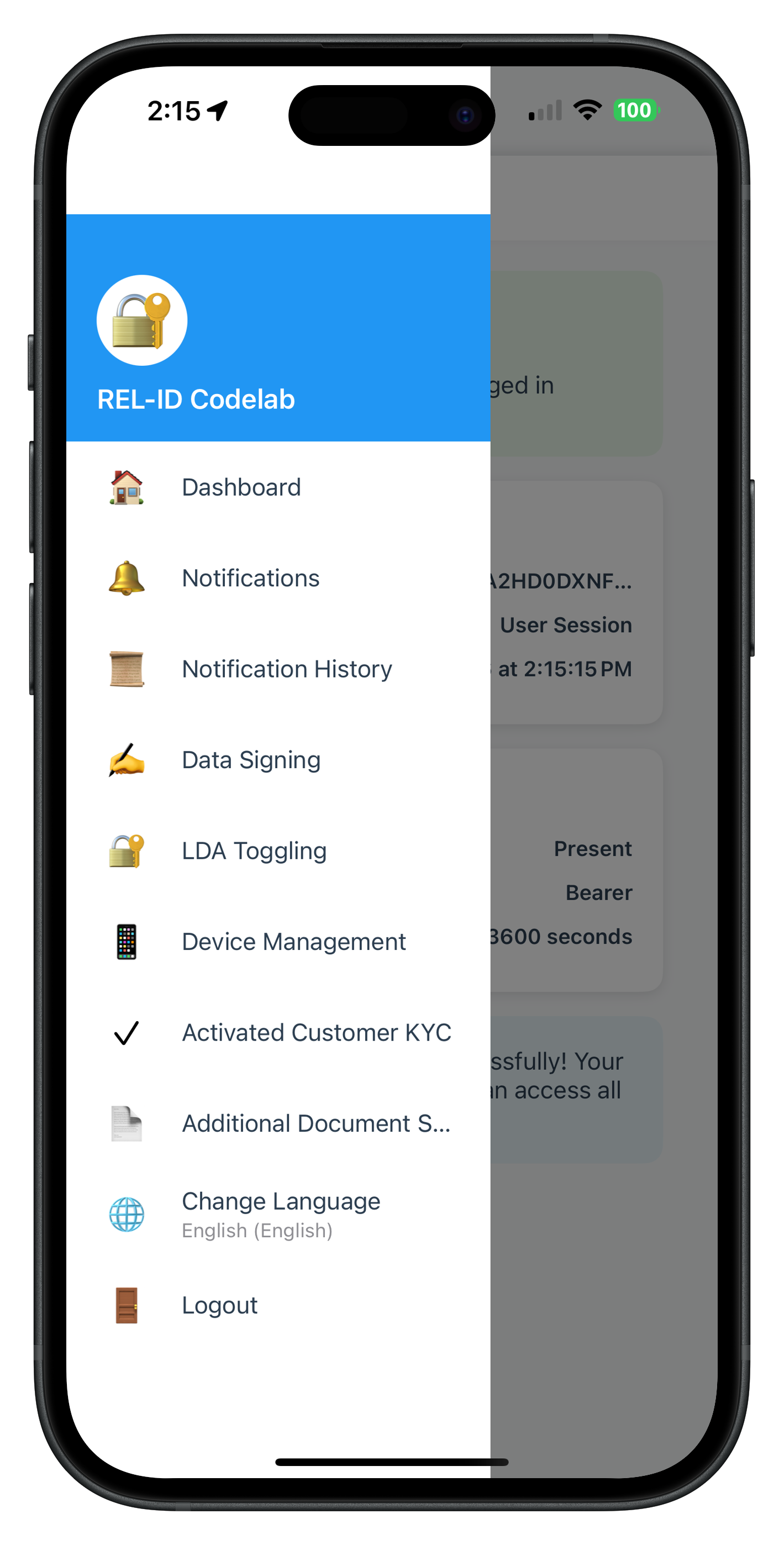
Dashboard menu showing Additional Document Scan option
Implementation: AppIDVCoordinator.swift
Location: Sources/Tutorial/Navigation/AppIDVCoordinator.swift
import UIKit
import RELID

class AppIDVCoordinator {
    static let shared = AppIDVCoordinator()

    private weak var navigationController: UINavigationController?
    private let storyboard = UIStoryboard(name: "Main", bundle: nil)

    private init() {}

    // MARK: - Configuration

    func configure(with navigationController: UINavigationController) {
        self.navigationController = navigationController
        registerIDVEventHandlers()
    }

    // MARK: - IDV Event Registration

    private func registerIDVEventHandlers() {
        let delegateManager = RDNAIDVDelegateManager.shared

        // Event 1: Document Scan Process Start Confirmation
        delegateManager.onGetIDVDocumentScanProcessStartConfirmation = { [weak self] idvWorkflow in
            print("IDVCoordinator - Received getIDVDocumentScanProcessStartConfirmation event")
            self?.showIDVDocumentScanProcessStartConfirmation(idvWorkflow: idvWorkflow)
        }

        // Event 2: Confirm Document Details (Not used in additional scan flow)
        delegateManager.onGetIDVConfirmDocumentDetails = { [weak self] challengeMode, responseDataJSON in
            print("IDVCoordinator - Received getIDVConfirmDocumentDetails event (not used in additional scan)")
        }

        print("IDVCoordinator - IDV event handlers registered")
    }

    // MARK: - Navigation Methods

    private func showIDVDocumentScanProcessStartConfirmation(idvWorkflow: RDNAIDVWorkflow) {
        guard let vc = storyboard.instantiateViewController(
            withIdentifier: "IDVDocumentProcessStartConfirmationViewController"
        ) as? IDVDocumentProcessStartConfirmationViewController else {
            print("IDVCoordinator - Failed to instantiate IDVDocumentProcessStartConfirmationViewController")
            return
        }

        vc.idvWorkflow = idvWorkflow

        DispatchQueue.main.async { [weak self] in
            self?.navigationController?.pushViewController(vc, animated: true)
            print("IDVCoordinator - Navigated to IDVDocumentProcessStartConfirmation")
        }
    }

    // MARK: - Public Navigation Methods

    /// Navigate to Additional Document Scan screen (Post-Login)
    /// Entry point for supplementary document verification workflow
    func showAdditionalDocumentScan(animated: Bool = true) {
        guard let vc = storyboard.instantiateViewController(
            withIdentifier: "AdditionalDocumentScanViewController"
        ) as? AdditionalDocumentScanViewController else {
            print("IDVCoordinator - Failed to instantiate AdditionalDocumentScanViewController")
            return
        }

        DispatchQueue.main.async { [weak self] in
            self?.navigationController?.pushViewController(vc, animated: animated)
            print("IDVCoordinator - Navigated to AdditionalDocumentScan")
        }
    }

    /// Navigate to IDV Additional Document Scan Result screen
    /// Displays extracted document data and validation results
    func showIDVAdditionalDocumentScanResult(
        documentDetails: String,
        challengeMode: RDNAChallengeOpMode
    ) {
        guard let vc = storyboard.instantiateViewController(
            withIdentifier: "IDVAdditionalDocumentScanResultViewController"
        ) as? IDVAdditionalDocumentScanResultViewController else {
            print("IDVCoordinator - Failed to instantiate IDVAdditionalDocumentScanResultViewController")
            return
        }

        vc.documentDetailsJSON = documentDetails
        vc.challengeMode = challengeMode

        DispatchQueue.main.async { [weak self] in
            self?.navigationController?.pushViewController(vc, animated: true)
            print("IDVCoordinator - Navigated to IDVAdditionalDocumentScanResult")
        }
    }
}
Coordinator Setup
In your AppDelegate or SceneDelegate, configure the coordinator:
func application(_ application: UIApplication, didFinishLaunchingWithOptions launchOptions: [UIApplication.LaunchOptionsKey: Any]?) -> Bool {

    // Get navigation controller from window
    if let navigationController = window?.rootViewController as? UINavigationController {
        // Configure IDV coordinator
        AppIDVCoordinator.shared.configure(with: navigationController)
    }

    return true
}
End-to-End Testing Checklist
Test the complete additional document scan workflow:
1. Login and Navigation
- ✅ Login with activated customer credentials
- ✅ Navigate to Additional Document Scan from menu
- ✅ Entry screen displays correctly
2. Initiate Document Scan
- ✅ Tap "Start Additional Document Scan" button
- ✅ SDK initiates workflow 7
- ✅ Navigate to document scan confirmation screen
3. Document Capture
- ✅ Tap "Start Scan" - camera opens
- ✅ Capture document (front/back pages)
- ✅ SDK processes document with Regula
4. Validation Results
- ✅ Navigate to result screen automatically
- ✅ Display extracted document data
- ✅ Show portrait and signature images
- ✅ Display document images (front/back)
- ✅ Show validation status and checks
5. Completion
- ✅ Tap "Done" button
- ✅ Navigate back to entry screen
- ✅ Menu button remains functional
6. Error Handling
- ✅ User cancels scan (close button) - error 240
- ✅ Document validation fails - error modal
- ✅ Network error - error modal
- ✅ Retry functionality works
Testing with Different Documents
Test with various document types:
✅ Passport
✅ Driver License
✅ National ID Card
✅ Residence Permit
Testing Edge Cases
✅ Expired document
✅ Damaged document
✅ Poor lighting conditions
✅ Multiple consecutive scans
✅ App backgrounding during scan
Manual Test Execution
# Build and run on iOS device
# (Document scanning requires real device, not simulator)

1. Open relidcodelab.xcworkspace in Xcode
2. Select iOS device (not simulator)
3. Press Cmd + R to build and run
4. Login with test credentials
5. Navigate to Additional Document Scan
6. Follow the workflow steps
7. Verify each screen and transition
Common Issues and Solutions
Issue 1: "No such module ‘RELIDIDV'"
Cause: CocoaPods dependencies not installed or Xcode cache issue
Solution:
# Clean build folder
rm -rf ~/Library/Developer/Xcode/DerivedData

# Re-install pods
pod deintegrate
pod install

# Clean and rebuild in Xcode
Cmd + Shift + K (Clean Build Folder)
Cmd + B (Build)
Issue 2: "Resource not found" (db.dat or regula.license)
Cause: IDV assets not included in Xcode target
Solution:
- Select
db.datin Project Navigator - Open File Inspector (right panel)
- Check "Target Membership" for relidcodelab
- Repeat for
regula.licenseandCertificates.bundle
Issue 3: Code Signing Errors
Cause: Provisioning profile or certificate issues
Solution:
- Open Xcode → Preferences → Accounts
- Verify Apple ID is signed in
- Download manual profiles if needed
- Select correct team in project settings
Issue 4: Document Scan Event Not Received
Cause: Event handler not registered or delegate not set
Solution:
// Ensure delegate is registered in onInitialized callback
func onInitialized() {
    // Register IDV delegates
    RDNAIDVService.shared.setIDVDocumentProcessingDelegate(RDNAIDVDelegateManager.shared)
}
Issue 5: Images Not Displaying in Result Screen
Cause: Base64 decoding failure or invalid image data
Solution:
// Add error handling for image decoding
if let imageData = Data(base64Encoded: base64String) {
    if let image = UIImage(data: imageData) {
        imageView.image = image
    } else {
        print("Failed to create image from data")
    }
} else {
    print("Failed to decode Base64 string")
}
What You've Accomplished
Congratulations! You've successfully implemented the REL-ID IDV Post-Login Additional Document Scan Flow. You now have:
- ✅ Additional Document Scan Entry Screen - Initiate supplementary document verification
- ✅ Document Capture Integration - Automated document scanning with Regula SDK
- ✅ Validation Result Display - Comprehensive extracted data presentation
- ✅ Dual Validation Pattern - SDK + backend validation for robust error handling
- ✅ Navigation Coordinator - Centralized navigation and event management
- ✅ Screen-Level Event Handling - Persistent handlers for async callbacks
- ✅ Error Handling - User cancellation, validation failures, retry logic ✅ Streamlined Workflow - Document-only flow (3 screens vs 7 screens in KYC)
Key Takeaways
- Workflow 7 vs Workflow 6: Additional document scan (workflow 7) is a streamlined document-only flow, while post-login KYC (workflow 6) includes selfie and biometric consent.
- Challenge Mode 10: Additional document scan uses challenge mode 10, distinct from pre-login (8) and post-login KYC (9).
- Event-Driven Architecture: iOS SDK uses delegate pattern for callbacks. Screen-level handlers ensure events are received regardless of current screen.
- Dual Validation: Always check both
error.longErrorCode(SDK) andstatus.statusCode(backend) for comprehensive validation. - Navigation Coordinator: Centralize navigation logic and event registration in a coordinator for maintainability.
Complete Implementation Checklist
- ✅ RDNAIDVService with initiateIDVAdditionalDocumentScan API
- ✅ RDNAIDVDelegateManager with onIDVAdditionalDocumentScan callback
- ✅ AdditionalDocumentScanViewController with scan initiation
- ✅ IDVAdditionalDocumentScanResultViewController with data display
- ✅ AppIDVCoordinator with navigation and event handling
- ✅ Storyboard UI for both view controllers
- ✅ IDV assets (db.dat, regula.license, certificates)
- ✅ Error handling and validation
- ✅ Testing on physical device
Next Steps
Now that you've mastered post-login additional document scan, you can:
- Explore Other IDV Flows:
- Pre-login IDV (workflow 0-5, mode 8)
- Post-login KYC (workflow 6, mode 9)
- Biometric opt-in/opt-out management
- Enhance the UI:
- Add animations for screen transitions
- Implement custom camera overlay
- Add document type selection
Additional Resources
- REL-ID iOS SDK Documentation)
- REL-ID Initialization Codelab
- REL-ID MFA Activation Codelab
- REL-ID Post-Login KYC Codelab
Thank you for completing this codelab! Happy coding!