🎯 Learning Path:
- Complete RELID Initialization Flow Codelab
- Complete RELID Complete Activation & Login Flow Codelab
- Complete RELID IDV MFA Activation Flow Codelab (Recommended)
- You are here → Post-Login KYC Flow Implementation
Welcome to the RELID IDV Post-Login KYC Flow codelab! This tutorial teaches you how to implement comprehensive Know Your Customer (KYC) identity verification for activated customers using document scanning, facial recognition, and biometric authentication.
What You'll Build
In this codelab, you'll implement a complete post-login KYC workflow for activated customers:
- 🏠 Side Menu Integration: Access KYC from Dashboard navigation
- 🆕 Activated Customer KYC Screen: Entry point for post-login KYC initiation
- 📄 Document Scan Process: Automated document verification with workflow 6
- 📸 Document Details Confirmation: Interactive OCR data validation with challenge mode 9
- 🤳 Selfie Capture Process: Live selfie capture with liveness detection
- ✅ Selfie Biometric Verification: Face matching with challenge mode 9 navigation
- 🔐 Biometric Consent Management: Template storage consent with mode-based behavior
- 🔔 Persistent Event Handling: View controller-level handlers that remain active
- ✅ Dual Validation Pattern: Two-tier error checking for robust validation
Key Difference: Post-Login KYC vs Pre-Login IDV
This codelab demonstrates post-login KYC for activated customers, where identity verification occurs after user login for compliance purposes:
Pre-Login IDV Flow (Challenge Mode 8):
Activation Code → IDV (Document → Selfie → Consent) → Password Setup → Dashboard

Post-Login KYC Flow (Challenge Mode 9 - This Codelab):
Login → Dashboard → Navigate to KYC → IDV (Document → Selfie → Consent) → Completion
Critical Differences:
- Workflow: 6 (RDNA_IDV_POSTLOGIN_KYC) instead of 0-5
- Challenge Mode: 9 (post-login) instead of 8 (pre-login)
- Entry Point: ActivatedCustomerKYCViewController (side menu) instead of activation flow
- Event Handling: Persistent view controller-level handlers instead of global-only handlers
- Close Button: Challenge mode-based navigation (mode 9 uses cancel APIs or direct navigation)
- Validation: Dual validation pattern (SDK sync error + backend status code)
What You'll Learn
- ✅ How to implement post-login KYC workflow for activated customers
- ✅ Using workflow 6 (RDNA_IDV_POSTLOGIN_KYC) and challenge mode 9
- ✅ Implementing persistent event handlers that stay active across screens
- ✅ Managing side menu navigation for KYC access
- ✅ Document scanning with challenge mode 9 validation
- ✅ Selfie capture with challenge mode 9 navigation patterns
- ✅ Handling biometric consent with response structure differences
- ✅ Implementing dual validation pattern (sync error + backend status)
- ✅ Challenge mode-based close button behaviors
- ✅ Completing KYC with onIDVActivatedCustomerKYCResponse event
Prerequisites
- Completion of RELID Initialization codelab
- Completion of RELID MFA Activation & Login codelab
- Understanding of pre-login IDV flow (recommended)
- Basic understanding of iOS development with Swift and UIKit
- RELID SDK integration credentials
- Document scanning license (Regula)
- Test identity documents for scanning
Technology Stack
- iOS: 13.0+
- Swift: 5.5+
- Xcode: 14.0+
- RELID iOS SDK Framework: (Latest)
- Regula Document Reader: For document scanning and OCR
- SideMenu: For drawer navigation
- IQKeyboardManagerSwift: For keyboard management
- Firebase Messaging: For push notifications
Post-Login KYC Flow Diagram
Understanding the complete flow is crucial before implementation:
1. User Login (Activated Customer)
   ↓ (Existing credentials authenticated)

2. Dashboard → Open Side Menu
   ↓ (User navigates to KYC option)

3. 🆕 Activated Customer KYC Screen
   ├─ Display KYC information and requirements
   ├─ User clicks "Start KYC Verification"
   ├─ View controller-level event handler registered (persistent)
   ├─ initiateActivatedCustomerKYC("Post Login KYC")
   │  • workflow: 6 (RDNA_IDV_POSTLOGIN_KYC)
   │  • challengeMode: 9 (post-login)
   └─ SDK initiates post-login KYC workflow
   ↓

4. 📄 IDV Document Scan Process
   ├─ getIDVDocumentScanProcessStartConfirmation event
   │  • idvWorkflow: 6 (RDNA_IDV_POSTLOGIN_KYC)
   ├─ setIDVDocumentScanProcessStartConfirmation(true, 6)
   ├─ Native Document Capture (Regula SDK)
   ├─ getIDVConfirmDocumentDetails event
   │  • challengeMode: 9
   │  • documentDetails: OCR-extracted document fields
   │  • Close button: cancel API (mode 9) → triggers onIDVActivatedCustomerKYCResponse
   └─ setIDVConfirmDocumentDetails(true, 9)
   ↓

5. 🤳 IDV Selfie Capture Process
   ├─ getIDVSelfieProcessStartConfirmation event
   │  • idvWorkflow: 6 (RDNA_IDV_POSTLOGIN_KYC)
   ├─ setIDVSelfieProcessStartConfirmation(true, false, 6)
   ├─ Native Selfie Capture (Liveness Detection)
   ├─ getIDVSelfieConfirmation event
   │  • challengeMode: 9
   │  • selfieDetails: Biometric match results
   │  • Close button: navigate directly (mode 9) → no cancel API
   └─ setIDVSelfieConfirmation("true", 9)
   ↓

6. 🔐 IDV Biometric Consent
   ├─ getIDVBiometricOptInConsent event
   │  • challengeMode: 9
   │  • status at root level (no challengeResponse for mode 9)
   │  • Close button: navigate directly (mode 9)
   └─ setIDVBiometricOptInConsent(true, 9)
   ↓

7. ✅ KYC Completion
   ├─ onIDVActivatedCustomerKYCResponse event triggered
   ├─ View controller-level handler receives event (even if on different screen)
   ├─ Handler navigates back to ActivatedCustomerKYCViewController
   │  • navigationController?.popToViewController(_, animated: true)
   ├─ Dual validation performed:
   │  • Check error.longErrorCode (0 = OK, 240 = User Cancelled)
   │  • Check status.statusCode (100 or 0 = success)
   ├─ Success/Error alert shown
   └─ User clicks "Go to Dashboard" → Navigate to Dashboard
IDV Workflow and Challenge Mode Values
For post-login KYC flow, you'll use these specific values:
Parameter | Value | Description |
idvWorkflow |
|
|
challengeMode |
| Post-login challenge mode |
Comparison with Pre-Login Flow:
Aspect | Pre-Login (Activation) | Post-Login (KYC) |
Workflow | 0-5 (Activation workflows) | 6 (RDNA_IDV_POSTLOGIN_KYC) |
Challenge Mode | 8 | 9 |
Entry Point | ActivationCodeViewController | ActivatedCustomerKYCViewController (side menu) |
Close Button (Document Confirm) | resetAuthState() | cancel API → triggers event |
Close Button (Selfie Confirm) | resetAuthState() | Direct navigation |
Close Button (Biometric Consent) | resetAuthState() | Direct navigation |
Response Structure | challengeResponse.status | status at root level |
Event Handler | Global delegate only | View controller-level + global delegate |
Before You Begin
Ensure you have completed these requirements:
1. Previous Codelabs Completed
- ✅ RELID Initialization Flow
- ✅ RELID MFA Activation & Login Flow
- ✅ RELID IDV MFA Activation Flow (Recommended for IDV understanding)
2. Development Environment
# Required tools
Xcode >= 14.0
Swift >= 5.5
CocoaPods (for dependency management)
Verify your Xcode installation:
xcode-select --version
3. RELID SDK Credentials
- Connection profile configuration
- Valid RELID SDK license
- Document scanning license (Regula)
Get the Code from GitHub
The code to get started can be found in a GitHub repository.
You can clone the repository using the following command:
git clone https://github.com/uniken-team/relid-codelab-ios.git
Navigate to the relid-IDV-post-login-kyc folder in the repository you cloned earlier:
cd relid-codelab-ios/relid-IDV-post-login-kyc
Project Structure
The post-login KYC codelab follows this comprehensive structure:
relid-IDV-post-login-kyc/
├── 📱 Complete Swift/iOS MFA + IDV App
│   ├── relidcodelab.xcodeproj       # Xcode project
│   ├── relidcodelab.xcworkspace     # CocoaPods workspace (USE THIS!)
│   ├── Podfile                       # CocoaPods configuration
│   ├── Pods/                         # CocoaPods dependencies (auto-generated)
│   │   ├── DocumentReader/               # Regula document reader (via RELIDIDV pod)
│   │   ├── DocumentReaderFullAuthRFID/   # Regula RFID authentication (via RELIDIDV pod)
│   │   ├── onnxruntime-c/                # ONNX runtime for ML models (via RELIDIDV pod)
│   │   ├── IQKeyboardManagerSwift/       # Keyboard management
│   │   ├── SideMenu/                     # Drawer navigation
│   │   └── Firebase/                     # Push notifications (FCM)
│   ├── RELID.xcframework             # 📦 REL-ID Native SDK (Main SDK - REQUIRED)
│   │                                     # - Core MFA authentication APIs
│   │                                     # - Base RDNA client functionality
│   │                                     # - Session management
│   ├── RELID_IDV/                    # 📦 REL-ID IDV Local Pod (IDV Components - REQUIRED)
│   │   ├── RELIDIDV.podspec              # Pod specification
│   │   └── AwFaceCapture.xcframework     # Biometric selfie capture framework
│   │                                     # Dependencies (auto-installed via CocoaPods):
│   │                                     #   - DocumentReader 8.2.4934 (Regula)
│   │                                     #   - DocumentReaderFullAuthRFID 8.2.13463
│   │                                     #   - onnxruntime-c (ML runtime)
│   └── relidcodelab/idv-artifacts/   # 🆕 IDV Assets Directory (REQUIRED)
│       ├── db.dat                        # Regula document recognition database (105MB)
│       ├── regula.license                # Regula document reader license for iOS
│       └── Certificates.bundle/          # ICAO PKD certificates bundle
│           └── icaopkd-002-complete-000325.ldif  # Document validation certificates
│
├── 📦 IDV Post-Login KYC Source Architecture
│   └── relidcodelab/Sources/
│       ├── Tutorial/                 # Enhanced MFA + IDV flow
│       │   ├── Navigation/           # Enhanced navigation with IDV support
│       │   │   ├── AppCoordinator.swift            # Event-driven navigation coordinator
│       │   │   └── AppIDVCoordinator.swift         # 🆕 IDV-specific coordinator
│       │   │                                      # - IDV event routing
│       │   │                                      # - Screen state management
│       │   │                                      # - showActivatedCustomerKYC()
│       │   └── Screens/              # Enhanced screens with IDV
│       │       ├── Components/       # Reusable UI components
│       │       │   └── UIColor+Extensions.swift
│       │       ├── MFA/              # 🔐 MFA screens (base authentication)
│       │       │   ├── CheckUserViewController.swift        # User validation
│       │       │   ├── ActivationCodeViewController.swift   # OTP verification
│       │       │   ├── SetPasswordViewController.swift      # Password creation
│       │       │   ├── VerifyPasswordViewController.swift   # Password verification
│       │       │   ├── DashboardViewController.swift        # Main dashboard
│       │       │   ├── MenuViewController.swift             # 🆕 Enhanced with KYC menu item
│       │       │   └── ...                                  # Other MFA screens
│       │       └── IDV/              # 🆕 IDV Post-Login KYC screens (6 screens)
│       │           ├── ActivatedCustomerKYCViewController.swift              # 🆕 Post-Login KYC entry point
│       │           │                                                        # - KYC initiation screen
│       │           │                                                        # - Persistent event handling
│       │           ├── IDVDocumentProcessStartConfirmationViewController.swift  # Document scan initiation
│       │           ├── IDVConfirmDocumentDetailsViewController.swift            # 🆕 Enhanced for mode 9
│       │           ├── IDVSelfieProcessStartConfirmationViewController.swift    # Selfie capture initiation
│       │           ├── IDVSelfieConfirmationViewController.swift               # 🆕 Enhanced for mode 9
│       │           └── IDVBiometricOptInConsentViewController.swift            # 🆕 Enhanced for mode 9
│       └── Uniken/                   # 🛡️ Enhanced REL-ID Integration
│           ├── Services/             # 🆕 Enhanced SDK service layer
│           │   ├── RDNAService.swift                # Base MFA service layer
│           │   ├── RDNADelegateManager.swift        # Base MFA delegate callbacks
│           │   └── IDV/                             # 🆕 IDV service layer
│           │       ├── RDNAIDVService.swift         # Complete IDV API methods
│           │       │                                # - 🆕 initiateActivatedCustomerKYC()
│           │       │                                # - setIDVDocumentScanProcessStartConfirmation()
│           │       │                                # - setIDVConfirmDocumentDetails()
│           │       │                                # - setIDVSelfieProcessStartConfirmation()
│           │       │                                # - setIDVSelfieConfirmation()
│           │       │                                # - setIDVBiometricOptInConsent()
│           │       └── RDNAIDVDelegateManager.swift # Complete IDV delegate callbacks
│           │                                        # - getIDVDocumentScanProcessStartConfirmation
│           │                                        # - getIDVConfirmDocumentDetails
│           │                                        # - getIDVSelfieProcessStartConfirmation
│           │                                        # - getIDVSelfieConfirmation
│           │                                        # - getIDVBiometricOptInConsent
│           │                                        # - 🆕 onIDVActivatedCustomerKYCResponse
│           ├── Utils/                # Helper utilities
│           │   └── ConnectionProfileParser.swift   # Profile configuration
│           └── CP/                   # Connection Profile
│               └── agent_info.json
│
└── 📚 Project Configuration
    ├── Podfile                      # CocoaPods dependencies (RELID SDK, Regula, IQKeyboardManager)
    ├── Info.plist                   # Camera permissions configuration
    └── Base.lproj/
        ├── Main.storyboard          # 🆕 Complete UI with all MFA + IDV + KYC scenes
        └── LaunchScreen.storyboard
Installation
Step 1: Clone and Setup
# Navigate to the codelab folder
cd relid-codelab-ios/relid-IDV-post-login-kyc

# Add the `RELID.xcframework` to your project:
#   - Drag and drop `RELID.xcframework` into your Xcode project
#   - Select your target → General → Frameworks, Libraries, and Embedded Content
#   - Set embed mode to "Embed & Sign"

# Place the RELIDIDV local pod (IDV libs) at ./RELID_IDV/
# (Contact REL-ID team for the framework)
Step 2: Install CocoaPods Dependencies
# Install CocoaPods (if not already installed)
sudo gem install cocoapods

# Install dependencies
pod install
Step 3: Configure IDV Assets
The following IDV assets need to be configured in your project at the specified paths:
iOS Configuration:
Place the following files (provided by Uniken admin team) at these locations:
- 📄 Document Recognition Database:
relidcodelab/idv-artifacts/db.dat- Contains machine learning models and templates for document recognition
- Required for OCR and document validation
- 📄 Regula License:
relidcodelab/idv-artifacts/regula.license- Platform-specific license file for iOS
- Enables document scanning and verification features
- Must match your organization's license agreement
- 📄 Certificate Bundle:
relidcodelab/idv-artifacts/Certificates.bundle/icaopkd-002-complete-000325.ldif- ICAO Public Key Directory (PKD) certificates
- Required for NFC chip verification in ePassports
- Validates digital signatures on electronic documents
Step 4: Verify Asset Configuration
After adding IDV assets to your project:
# Verify IDV assets are present
ls relidcodelab/idv-artifacts/
# Should show: db.dat, regula.license, Certificates.bundle/

# Check file sizes
du -h relidcodelab/idv-artifacts/db.dat
# Should show: ~105M
In Xcode:
- Select each asset file in Project Navigator
- Check File Inspector (right panel)
- Verify Target Membership includes
relidcodelab - Confirm files are in Copy Bundle Resources build phase
Step 5: Configure required permissions in Info.plist:
<!-- Camera Access -->
<key>NSCameraUsageDescription</key>
<string>Camera access is required for document scanning and selfie capture</string>

<!-- NFC Access (for ePassport scanning) -->
<key>NFCReaderUsageDescription</key>
<string>NFC access for reading electronic passport data</string>
<key>com.apple.developer.nfc.readersession.iso7816.select-identifiers</key>
<array>
    <string>A0000002471001</string>
    <string>A0000002472001</string>
    <string>00000000000000</string>
</array>
Step 6: Open and Run the Application
# Open the workspace (NOT the .xcodeproj!)
open relidcodelab.xcworkspace
In Xcode:
- Select a simulator or device target
- Click Product → Run (or press ⌘R)
- The app will build and launch
How iOS SDKs Work
iOS SDKs are distributed as frameworks (.framework or .xcframework) that link with your application.
RELID iOS SDK Architecture:
- RELIDIDV.xcframework: Pre-compiled framework with IDV functionality
- Public API: Swift-friendly interfaces (delegates, closures, enums)
- Native Integration: Seamless integration with UIKit and iOS patterns
Integration Pattern
The RELID iOS SDK uses a delegate pattern for event callbacks:
import UIKit
import RELID

class ActivatedCustomerKYCViewController: UIViewController {

    override func viewDidLoad() {
        super.viewDidLoad()

        // Register event handler
        setupEventHandlers()
    }

    private func setupEventHandlers() {
        // Register persistent event handler for KYC completion
        RDNAIDVDelegateManager.shared.onIDVActivatedCustomerKYCResponse = { [weak self] userID, status, error in
            self?.handleKYCCompletion(userID: userID, status: status, error: error)
        }
    }

    @IBAction func startKYCButtonTapped(_ sender: UIButton) {
        // Initiate KYC workflow
        let error = RDNAIDVService.shared.initiateActivatedCustomerKYC(reason: "Post Login KYC")

        if error.longErrorCode == 0 {
            print("KYC initiated successfully")
            // SDK will auto-trigger IDV workflow events
        } else {
            print("Failed to initiate KYC: \\(error.errorString ?? "")")
        }
    }

    private func handleKYCCompletion(userID: String, status: RDNARequestStatus, error: RDNAError) {
        // Dual validation pattern
        let errorCode = error.longErrorCode
        let statusCode = status.statusCode

        if errorCode == 0 && (statusCode == 100 || statusCode == 0) {
            // Success
            showSuccessAlert()
        } else {
            // Error
            showErrorAlert(message: error.errorString ?? "KYC verification failed")
        }
    }
}
Key SDK Components
RDNAIDVService:
- Singleton service wrapping SDK APIs
- Type-safe method signatures
- Synchronous error checking with asynchronous results
RDNAIDVDelegateManager:
- Implements SDK delegate protocols
- Closure-based callback dispatching
- Main thread dispatch for UI updates
View Controllers:
- Storyboard-based UI
- IBOutlet connections
- Event-driven navigation
Overview
The RDNAIDVService class provides a singleton service for Identity Verification (IDV) related SDK operations. It wraps the native RELID SDK IDV API with type-safe interfaces.
RDNAIDVService.swift
The service includes the initiateActivatedCustomerKYC() method which initiates the post-login KYC workflow:
// Sources/Uniken/Services/IDV/RDNAIDVService.swift

import Foundation
import RELID

/**
 * REL-ID IDV SDK Service
 *
 * Provides a singleton service for Identity Verification (IDV) related SDK operations.
 * Wraps the native RELID SDK IDV API with type-safe interface.
 * Handles document scanning, selfie capture, and biometric consent operations.
 *
 * IDV APIs:
 *
 * **Document Scan APIs:**
 * - setIDVDocumentScanProcessStartConfirmation: Start/cancel document scan
 * - setIDVConfirmDocumentDetails: Confirm/reject scanned document OCR data
 *
 * **Selfie Capture APIs:**
 * - setIDVSelfieProcessStartConfirmation: Start/cancel selfie capture
 * - setIDVSelfieConfirmation: Confirm/reject selfie biometric results
 *
 * **Biometric Consent APIs:**
 * - setIDVBiometricOptInConsent: User consent for biometric template storage
 *
 * **KYC APIs:**
 * - initiateActivatedCustomerKYC: Initiate post-login KYC workflow
 */
class RDNAIDVService {

    // MARK: - Singleton

    static let shared = RDNAIDVService()
    private let rdna = RDNA.sharedInstance()

    private init() {
        print("RDNAIDVService - Service initialized")
    }

    // MARK: - KYC APIs

    /**
     * Initiates activated customer KYC workflow (Post-Login)
     *
     * This API initiates the KYC (Know Your Customer) process for an already activated customer
     * who needs to complete identity verification post-login.
     *
     * **Workflow:**
     * 1. User must be logged in (user session established)
     * 2. Call this API to start post-login KYC
     * 3. SDK automatically triggers IDV workflow events:
     *    - getIDVDocumentScanProcessStartConfirmation (workflow: IDV_POSTLOGIN_KYC = 6)
     *    - getIDVConfirmDocumentDetails (challengeMode: RDNA_IDV_API_BIOMETRIC_AND_DOCUMENT_SCAN = 9)
     *    - getIDVSelfieProcessStartConfirmation (workflow: IDV_POSTLOGIN_KYC = 6)
     *    - getIDVSelfieConfirmation (challengeMode: RDNA_IDV_API_BIOMETRIC_AND_DOCUMENT_SCAN = 9)
     *    - getIDVBiometricOptInConsent (challengeMode: RDNA_IDV_API_BIOMETRIC_AND_DOCUMENT_SCAN = 9)
     * 4. Finally triggers: onIDVActivatedCustomerKYCResponse
     *
     * **Response Validation:**
     * 1. Check error.longErrorCode immediately (synchronous error check)
     * 2. Wait for onIDVActivatedCustomerKYCResponse callback for final result
     * 3. In callback, validate BOTH:
     *    - error.longErrorCode (SDK error)
     *    - status.statusCode (backend error)
     * 4. Success only if: error.longErrorCode == 0 AND (statusCode == 100 OR statusCode == 0)
     *
     * - Parameter reason: Reason for initiating KYC (e.g., "Post Login KYC")
     * - Returns: RDNAError indicating immediate success or failure
     */
    func initiateActivatedCustomerKYC(reason: String) -> RDNAError {
        print("RDNAIDVService - Initiating activated customer KYC: reason=\\(reason)")

        let error = rdna.initiateActivatedCustomerKYC(reason)

        if error.longErrorCode == 0 {
            print("RDNAIDVService - Activated customer KYC initiated successfully")
            print("RDNAIDVService - SDK will auto-trigger IDV workflow events (workflow=6, challengeMode=9)")
        } else {
            print("RDNAIDVService - Failed to initiate activated customer KYC: \\(error.longErrorCode) - \\(error.errorString ?? "")")
        }

        return error
    }

    // MARK: - Document Scan APIs

    func setIDVDocumentScanProcessStartConfirmation(
        isConfirm: Bool,
        idvWorkflow: RDNAIDVWorkflow
    ) -> RDNAError {
        // Implementation as shown in previous sections
        return rdna.setIDVDocumentScanProcessStartConfirmation(isConfirm, idvWorkflow: idvWorkflow)
    }

    func setIDVConfirmDocumentDetails(
        isConfirm: Bool,
        challengeMode: RDNAChallengeOpMode
    ) -> RDNAError {
        // Implementation as shown in previous sections
        return rdna.setIDVConfirmDocumentDetails(isConfirm, challenge: challengeMode)
    }

    // MARK: - Selfie Capture APIs

    func setIDVSelfieProcessStartConfirmation(
        isConfirm: Bool,
        useDeviceBackCamera: Bool,
        idvWorkflow: RDNAIDVWorkflow
    ) -> RDNAError {
        // Implementation as shown in previous sections
        return rdna.setIDVSelfieProcessStartConfirmation(isConfirm, useDeviceBackCamera: useDeviceBackCamera, idvWorkflow: idvWorkflow)
    }

    func setIDVSelfieConfirmation(
        action: String,
        challengeMode: RDNAChallengeOpMode
    ) -> RDNAError {
        // Implementation as shown in previous sections
        return rdna.setIDVSelfieConfirmation(action, challenge: challengeMode)
    }

    // MARK: - Biometric Consent APIs

    func setIDVBiometricOptInConsent(
        isOptIn: Bool,
        challengeMode: RDNAChallengeOpMode
    ) -> RDNAError {
        // Implementation as shown in previous sections
        return rdna.setIDVBiometricOptInConsent(isOptIn, challenge: challengeMode)
    }
}
Key Points
- Workflow 6: The API automatically uses
RDNA_IDV_POSTLOGIN_KYCworkflow - Challenge Mode 9: All subsequent IDV events will use post-login challenge mode
- Sync Return: Immediate response confirming KYC initiation started
- Async Event: Final result comes via
onIDVActivatedCustomerKYCResponsedelegate callback - Error Handling: Check
longErrorCodefor synchronous errors
Overview
The RDNAIDVDelegateManager class manages IDV-specific SDK callbacks. It implements IDV protocol methods from RELID SDK and dispatches to closures.
RDNAIDVDelegateManager.swift
The delegate manager includes the onIDVActivatedCustomerKYCResponse closure property:
// Sources/Uniken/Services/IDV/RDNAIDVDelegateManager.swift

import Foundation
import RELID

/**
 * RDNAIDVDelegateManager - Manages IDV-specific SDK callbacks
 *
 * Implements IDV protocol methods from RELID SDK and dispatches to closures.
 * Handles document scanning, selfie capture, and biometric consent callbacks.
 *
 * **IDV Protocols Implemented (Modular):**
 * - RDNAIDVDocumentProcessingCallbacks (6 methods)
 * - RDNAIDVSelfieProcessingCallbacks (2 methods)
 * - RDNAIDVBiometricManagementCallbacks (10 methods)
 * - RDNAIDVKYCManagementCallbacks (6 methods)
 */
class RDNAIDVDelegateManager: NSObject,
                               RDNAIDVDocumentProcessingCallbacks,
                               RDNAIDVSelfieProcessingCallbacks,
                               RDNAIDVBiometricManagementCallbacks,
                               RDNAIDVKYCManagementCallbacks {

    // MARK: - Singleton

    static let shared = RDNAIDVDelegateManager()

    private override init() {
        super.init()
        print("RDNAIDVDelegateManager - Initialized")
    }

    // MARK: - KYC Callback Closures

    /// Closure invoked when activated customer KYC process completes
    /// IDV-SPECIFIC (POST-LOGIN): Navigate back to ActivatedCustomerKYCViewController
    /// This callback fires after completing the entire IDV workflow (document scan, selfie, biometric consent)
    /// - Parameters:
    ///   - userID: User ID who completed KYC
    ///   - status: Status with statusCode (100=success, other=error)
    ///   - error: Error information (check longErrorCode)
    var onIDVActivatedCustomerKYCResponse: ((_ userID: String, _ status: RDNARequestStatus, _ error: RDNAError) -> Void)?

    // MARK: - Document Scan Callback Closures

    var onGetIDVDocumentScanProcessStartConfirmation: ((_ idvWorkflow: RDNAIDVWorkflow) -> Void)?
    var onGetIDVConfirmDocumentDetails: ((_ challengeMode: RDNAChallengeOpMode, _ responseDataJSON: String) -> Void)?

    // MARK: - Selfie Capture Callback Closures

    var onGetIDVSelfieProcessStartConfirmation: ((_ idvWorkflow: RDNAIDVWorkflow) -> Void)?
    var onGetIDVSelfieConfirmation: ((_ userID: String, _ challengeMode: RDNAChallengeOpMode, _ responseDataJSON: String) -> Void)?

    // MARK: - Biometric Consent Callback Closures

    var onGetIDVBiometricOptInConsent: ((_ userID: String, _ attemptsLeft: Int, _ challengeMode: RDNAChallengeOpMode, _ idvResponseJSON: String, _ status: [AnyHashable: Any], _ challengeResponse: RDNAChallengeResponse, _ error: RDNAError) -> Void)?
}

// MARK: - RDNAIDVKYCManagementCallbacks Protocol

extension RDNAIDVDelegateManager {

    /// onIDVActivatedCustomerKYCResponse - Called with activated customer KYC response
    /// **Callback Flow:**
    /// 1. User calls initiateActivatedCustomerKYC("Post Login KYC")
    /// 2. SDK triggers IDV workflow events (document scan, selfie, biometric consent)
    /// 3. After workflow completes, this callback fires
    /// 4. Navigate back to ActivatedCustomerKYCViewController
    /// 5. Show success/error alert modal
    ///
    /// **Dual Validation Pattern:**
    /// - First check: error.longErrorCode (SDK synchronous error)
    /// - Second check: status.statusCode (backend async validation)
    /// - Success: longErrorCode == 0 AND (statusCode == 100 OR statusCode == 0)
    func onIDVActivatedCustomerKYCResponse(_ userID: String, status: RDNARequestStatus, error: RDNAError) {
        print("RDNAIDVDelegateManager - onIDVActivatedCustomerKYCResponse called")
        print("RDNAIDVDelegateManager - UserID: \\(userID)")
        print("RDNAIDVDelegateManager - Error Code: \\(error.longErrorCode) - \\(error.errorString ?? "")")
        print("RDNAIDVDelegateManager - Status Code: \\(status.statusCode) - \\(status.statusMessage ?? "")")

        DispatchQueue.main.async { [weak self] in
            self?.onIDVActivatedCustomerKYCResponse?(userID, status, error)
        }
    }

    // Other IDV protocol methods implemented here...
    // (Document scan, selfie, biometric consent delegate methods)
}
Key Features
- Closure-Based: Uses Swift closures for callback dispatching
- Main Thread Dispatch: All callbacks dispatched on main thread for UI updates
- Type-Safe: Strong typing for all parameters
- Weak Self: Prevents retain cycles with
[weak self]
Overview
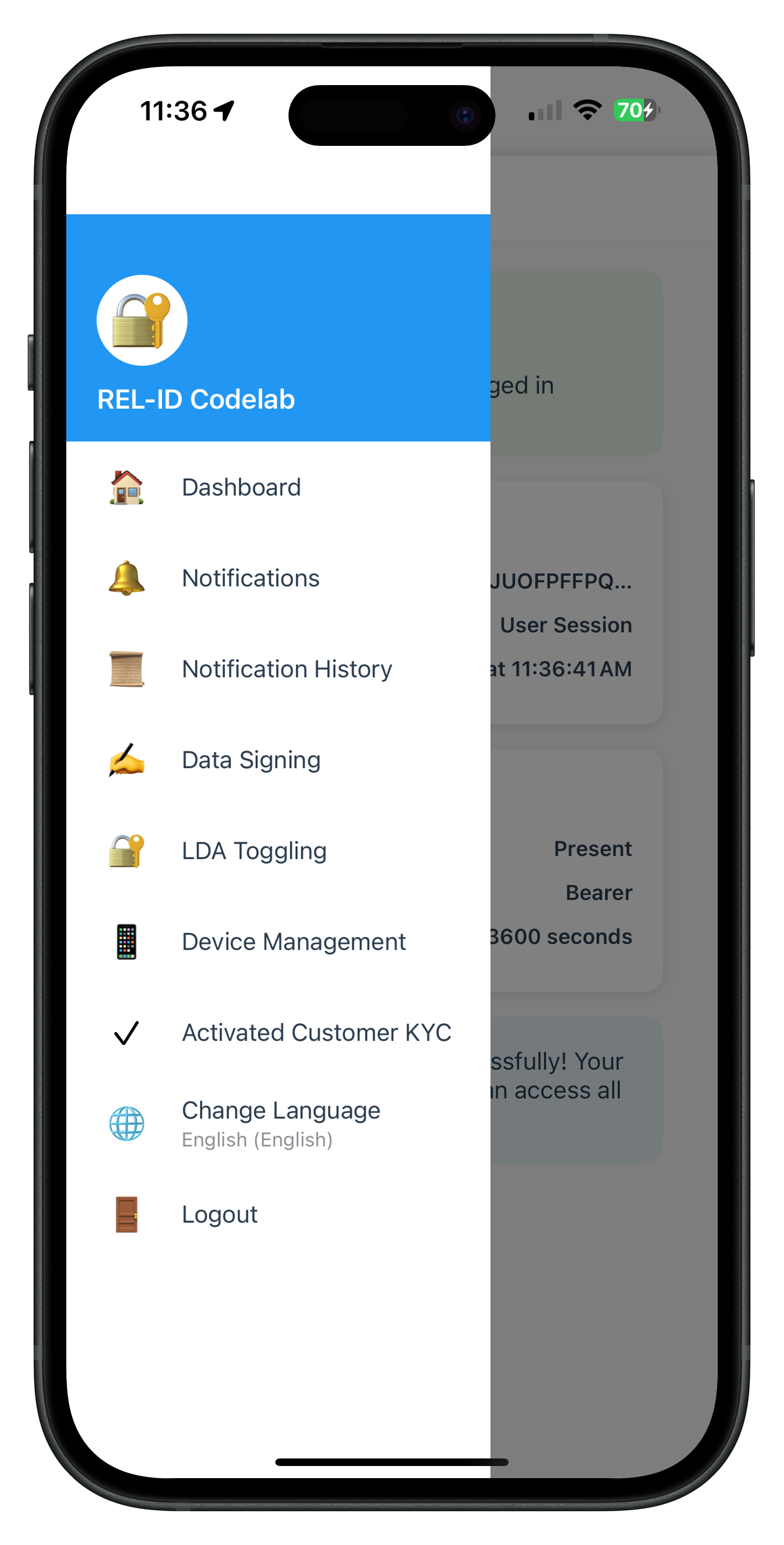
The post-login KYC flow is accessed through the side menu (drawer navigation) available from the Dashboard. The menu includes a dedicated "Activated Customer KYC" option that navigates users to the KYC entry point.
MenuViewController Integration
Add the KYC menu item to MenuViewController.swift:
// Sources/Tutorial/Screens/MFA/MenuViewController.swift

enum MenuAction {
    case dashboard
    case deviceManagement
    case activatedCustomerKYC  // 🆕 New menu action
    // ... other actions
}

private func setupMenuItems() {
    menuItems = [
        MenuItem(icon: "🏠", title: "Dashboard", subtitle: nil, action: .dashboard),
        MenuItem(icon: "📱", title: "Device Management", subtitle: nil, action: .deviceManagement),
        MenuItem(icon: "✓", title: "Activated Customer KYC", subtitle: nil, action: .activatedCustomerKYC),  // 🆕 New item
        // ... other items
    ]
}

private func handleMenuAction(_ action: MenuAction) {
    switch action {
    case .activatedCustomerKYC:
        navigateToActivatedCustomerKYC(using: navigationController)
    // ... other cases
    }
}

private func navigateToActivatedCustomerKYC(using navController: UINavigationController?) {
    // Check if already on the screen
    if navController?.viewControllers.last is ActivatedCustomerKYCViewController {
        return
    }

    // Navigate using IDV Coordinator
    AppIDVCoordinator.shared.showActivatedCustomerKYC()
}
AppIDVCoordinator Navigation
Add the public navigation method to AppIDVCoordinator.swift:
// Sources/Tutorial/Navigation/AppIDVCoordinator.swift

class AppIDVCoordinator {
    static let shared = AppIDVCoordinator()

    /// Navigate to Activated Customer KYC screen (Post-Login)
    func showActivatedCustomerKYC() {
        guard let vc = storyboard.instantiateViewController(
            withIdentifier: "ActivatedCustomerKYCViewController"
        ) as? ActivatedCustomerKYCViewController else {
            print("IDVCoordinator - Failed to instantiate ActivatedCustomerKYCViewController")
            return
        }

        DispatchQueue.main.async { [weak self] in
            self?.navigationController?.pushViewController(vc, animated: true)
            print("IDVCoordinator - Navigated to ActivatedCustomerKYC")
        }
    }
}
Side Menu UI Preview
Overview
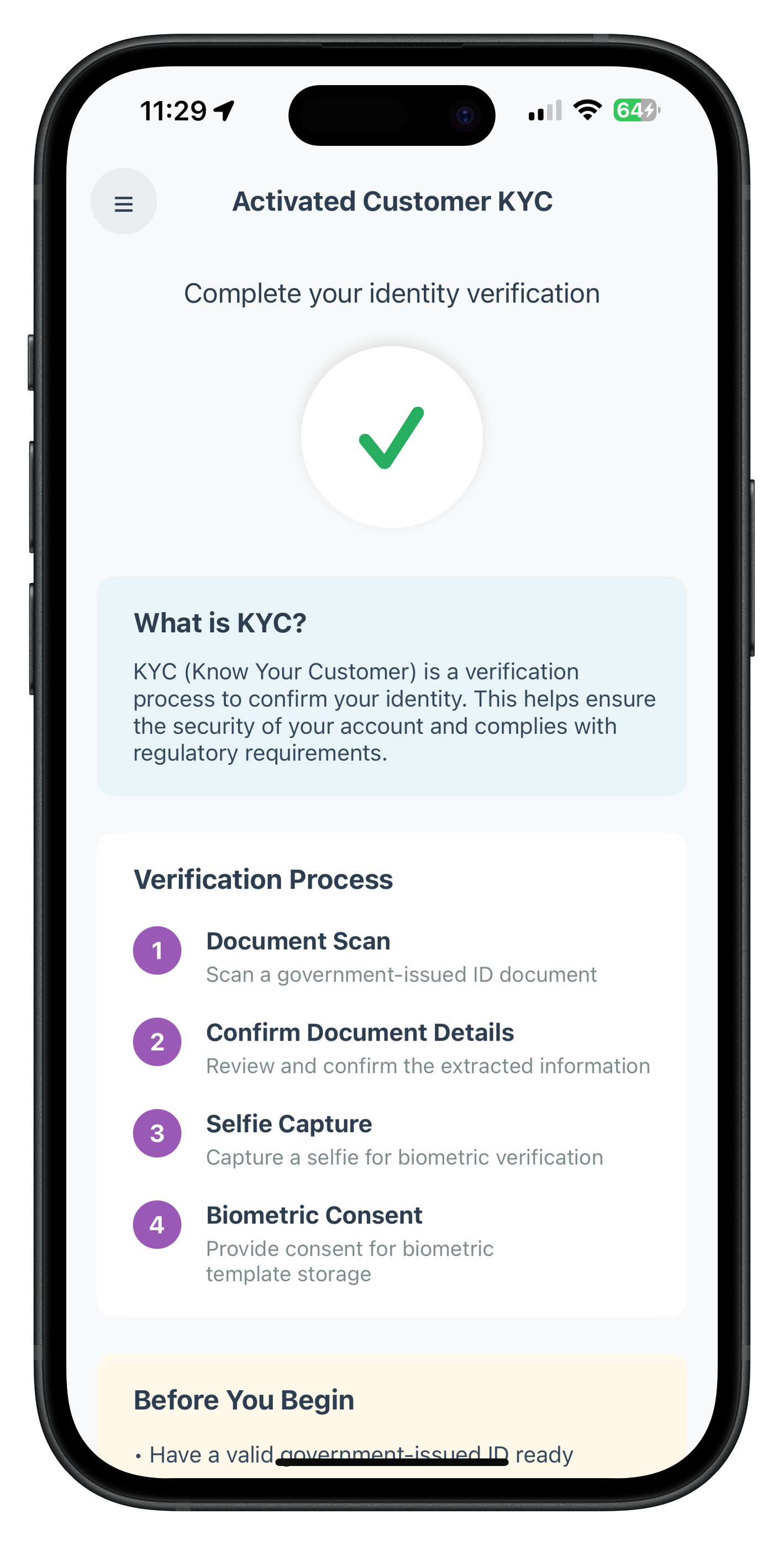
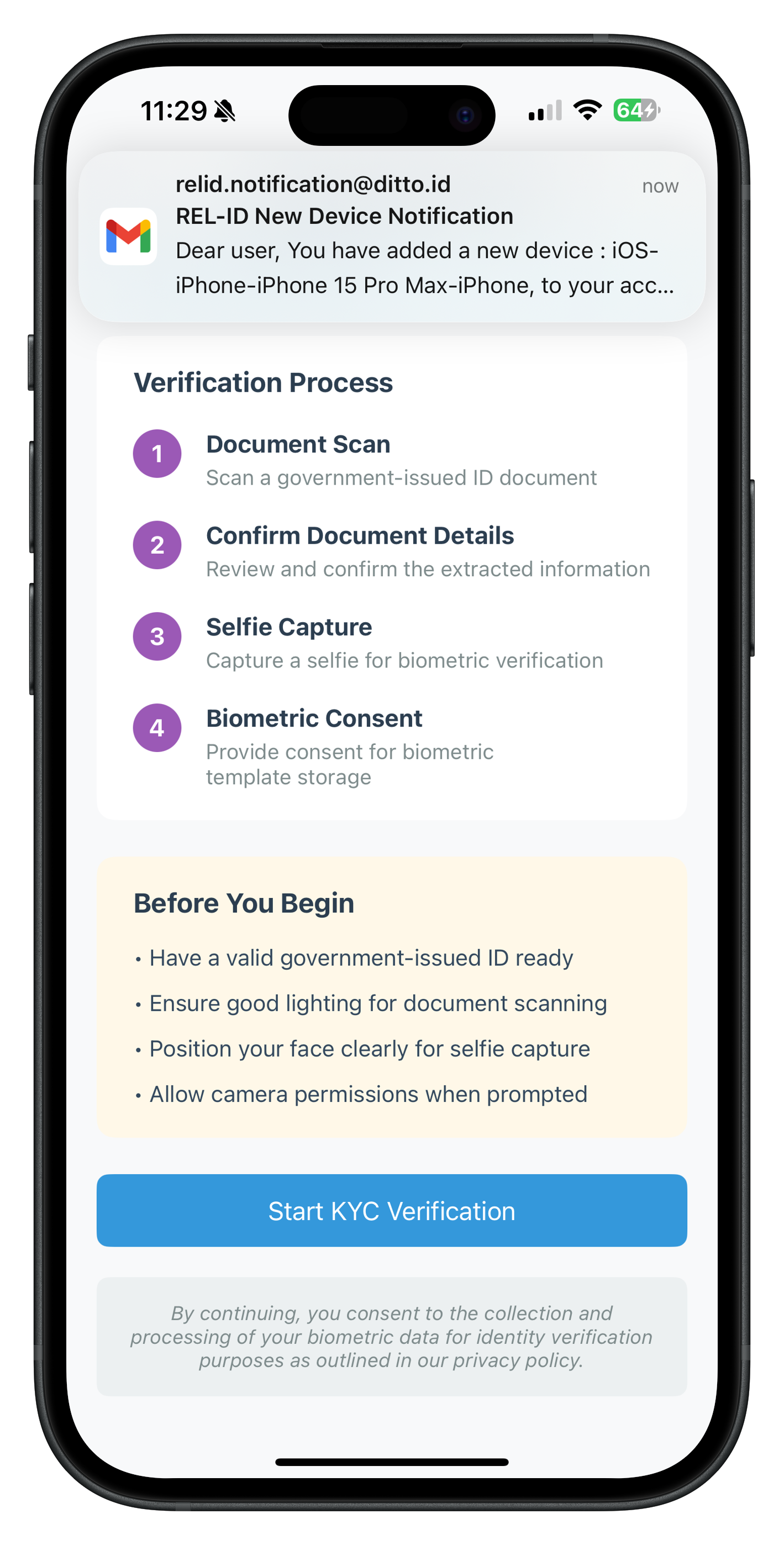
The ActivatedCustomerKYCViewController is the entry point for post-login KYC verification. It displays KYC information, educational content, and initiates the KYC workflow.
ActivatedCustomerKYC Screen UI Preview
Initial State - Ready to Start KYC |
Processing State - KYC Initiated |
ActivatedCustomerKYCViewController.swift
// Sources/Tutorial/Screens/IDV/ActivatedCustomerKYCViewController.swift

import UIKit
import RELID

/**
 * ActivatedCustomerKYCViewController
 *
 * Entry point screen for post-login KYC verification flow for activated customers.
 * Features:
 * - Initiates activated customer KYC workflow via initiateActivatedCustomerKYC API
 * - View controller-level persistent event handling for onIDVActivatedCustomerKYCResponse
 * - Dual validation pattern (SDK sync error + backend status code)
 * - Educational content about KYC process
 * - Tutorial-style UI with numbered steps
 *
 * **Event Handler Lifecycle:**
 * - Registered on viewDidLoad (persists even when IDV screens are on top)
 * - Only cleanup on deinit
 * - Navigates back to this screen automatically after KYC completion
 *
 * **Dual Validation Pattern:**
 * 1. Check error.longErrorCode first (SDK synchronous error)
 * 2. Then check status.statusCode (backend asynchronous validation)
 * 3. Success only if: longErrorCode == 0 AND (statusCode == 100 OR statusCode == 0)
 */
class ActivatedCustomerKYCViewController: UIViewController {

    // MARK: - IBOutlets

    @IBOutlet weak var scrollView: UIScrollView!
    @IBOutlet weak var menuButton: UIButton!
    @IBOutlet weak var headerTitleLabel: UILabel!
    @IBOutlet weak var subtitleLabel: UILabel!

    // KYC Information
    @IBOutlet weak var kycInfoContainer: UIView!
    @IBOutlet weak var kycInfoTitleLabel: UILabel!
    @IBOutlet weak var kycInfoTextLabel: UILabel!

    // Guidelines
    @IBOutlet weak var guidelinesContainer: UIView!
    @IBOutlet weak var step1TitleLabel: UILabel!
    @IBOutlet weak var step2TitleLabel: UILabel!
    @IBOutlet weak var step3TitleLabel: UILabel!
    @IBOutlet weak var step4TitleLabel: UILabel!

    // Requirements
    @IBOutlet weak var requirementsContainer: UIView!
    @IBOutlet weak var requirement1Label: UILabel!
    @IBOutlet weak var requirement2Label: UILabel!
    @IBOutlet weak var requirement3Label: UILabel!
    @IBOutlet weak var requirement4Label: UILabel!

    // Actions
    @IBOutlet weak var startButton: UIButton!
    @IBOutlet weak var loadingIndicator: UIActivityIndicatorView!

    // Error Banner
    @IBOutlet weak var errorBannerContainer: UIView!
    @IBOutlet weak var errorBannerLabel: UILabel!

    // MARK: - State Properties

    private var isProcessing = false {
        didSet {
            updateStartButtonState()
        }
    }

    private var errorMessage: String? {
        didSet {
            updateErrorBanner()
        }
    }

    // MARK: - Lifecycle

    override func viewDidLoad() {
        super.viewDidLoad()

        setupUI()
        setupEventHandlers()

        print("ActivatedCustomerKYCViewController - View loaded")
    }

    override func viewWillAppear(_ animated: Bool) {
        super.viewWillAppear(animated)

        // Reset state on screen focus
        isProcessing = false
        errorMessage = nil

        print("ActivatedCustomerKYCViewController - View will appear, state reset")
    }

    deinit {
        // Cleanup event handler
        RDNAIDVDelegateManager.shared.onIDVActivatedCustomerKYCResponse = nil
        print("ActivatedCustomerKYCViewController - Event handler cleaned up")
    }

    // MARK: - Setup

    private func setupUI() {
        // Configure static UI elements
        headerTitleLabel.text = "Activated Customer KYC"
        subtitleLabel.text = "Complete your identity verification"

        kycInfoTitleLabel.text = "What is KYC?"
        kycInfoTextLabel.text = "KYC (Know Your Customer) is a verification process to confirm your identity. This helps ensure the security of your account and complies with regulatory requirements."

        step1TitleLabel.text = "1. Document Scan"
        step2TitleLabel.text = "2. Confirm Document Details"
        step3TitleLabel.text = "3. Selfie Capture"
        step4TitleLabel.text = "4. Biometric Consent"

        requirement1Label.text = "• Have a valid government-issued ID ready"
        requirement2Label.text = "• Ensure good lighting for document scanning"
        requirement3Label.text = "• Position your face clearly for selfie capture"
        requirement4Label.text = "• Allow camera permissions when prompted"

        startButton.layer.cornerRadius = 8
        loadingIndicator.hidesWhenStopped = true
        errorBannerContainer.isHidden = true
    }

    // MARK: - Event Handlers Setup

    private func setupEventHandlers() {
        // Register view controller-level persistent event handler for onIDVActivatedCustomerKYCResponse
        // This handler persists even when other IDV screens are on top
        RDNAIDVDelegateManager.shared.onIDVActivatedCustomerKYCResponse = { [weak self] userID, status, error in
            self?.handleActivatedCustomerKYCResponse(userID: userID, status: status, error: error)
        }

        print("ActivatedCustomerKYCViewController - Event handler registered (persistent)")
    }

    // MARK: - Event Handler Implementation

    private func handleActivatedCustomerKYCResponse(userID: String, status: RDNARequestStatus, error: RDNAError) {
        print("ActivatedCustomerKYCViewController - handleActivatedCustomerKYCResponse called")
        print("ActivatedCustomerKYCViewController - UserID: \\(userID)")
        print("ActivatedCustomerKYCViewController - Error: \\(error.longErrorCode) - \\(error.errorString ?? "")")
        print("ActivatedCustomerKYCViewController - Status: \\(status.statusCode) - \\(status.statusMessage ?? "")")

        // Navigate back to this screen (in case we're on another IDV screen)
        if let navController = navigationController {
            for vc in navController.viewControllers {
                if vc is ActivatedCustomerKYCViewController {
                    navController.popToViewController(vc, animated: true)
                    break
                }
            }
        }

        // Dual validation pattern
        let errorCode = error.longErrorCode
        let statusCode = status.statusCode

        var isSuccess = false
        var message = ""

        // Check sync error first
        if errorCode != 0 {
            // SDK sync error
            isSuccess = false
            message = "KYC verification failed: \\(error.errorString ?? "Unknown error")"
        } else if statusCode != 100 && statusCode != 0 {
            // Backend error
            isSuccess = false
            message = "KYC verification failed: \\(status.statusMessage ?? "Server error")"
        } else {
            // Success
            isSuccess = true
            message = "KYC verification completed successfully! Your identity has been verified."
        }

        // Reset state
        isProcessing = false

        // Show alert modal
        let alert = UIAlertController(
            title: isSuccess ? "Success" : "Error",
            message: message,
            preferredStyle: .alert
        )

        alert.addAction(UIAlertAction(title: "Go to Dashboard", style: .default) { [weak self] _ in
            self?.navigateToDashboard()
        })

        present(alert, animated: true)
    }

    // MARK: - IBActions

    @IBAction func menuButtonTapped(_ sender: UIButton) {
        // Open side menu
        print("ActivatedCustomerKYCViewController - Menu button tapped")
        MenuViewController.presentMenu(from: self)
    }

    @IBAction func startButtonTapped(_ sender: UIButton) {
        print("ActivatedCustomerKYCViewController - Start button tapped")

        guard !isProcessing else {
            print("ActivatedCustomerKYCViewController - Button disabled (processing)")
            return
        }

        isProcessing = true
        errorMessage = nil

        // Call SDK API
        let error = RDNAIDVService.shared.initiateActivatedCustomerKYC(reason: "Post Login KYC")

        if error.longErrorCode == 0 {
            print("ActivatedCustomerKYCViewController - KYC initiated successfully")
            print("ActivatedCustomerKYCViewController - SDK will auto-trigger IDV workflow events")
            // SDK will automatically trigger IDV workflow events
            // Keep isProcessing true until final callback
        } else {
            print("ActivatedCustomerKYCViewController - Failed to initiate KYC: \\(error.longErrorCode) - \\(error.errorString ?? "")")
            isProcessing = false
            errorMessage = error.errorString ?? "Failed to initiate KYC verification"
        }
    }

    // MARK: - Navigation

    private func navigateToDashboard() {
        print("ActivatedCustomerKYCViewController - Navigating to Dashboard")

        // Navigate to Dashboard
        if let navController = navigationController {
            for vc in navController.viewControllers {
                if vc is DashboardViewController {
                    navController.popToViewController(vc, animated: true)
                    return
                }
            }
        }

        // If Dashboard not found in stack, pop to root
        navigationController?.popToRootViewController(animated: true)
    }

    // MARK: - UI Updates

    private func updateStartButtonState() {
        startButton.isEnabled = !isProcessing

        if isProcessing {
            startButton.setTitle("Initiating...", for: .normal)
            startButton.backgroundColor = UIColor(hex: "#3498db")?.withAlphaComponent(0.7)
            loadingIndicator.startAnimating()
        } else {
            startButton.setTitle("Start KYC Verification", for: .normal)
            startButton.backgroundColor = UIColor(hex: "#3498db")
            loadingIndicator.stopAnimating()
        }
    }

    private func updateErrorBanner() {
        if let error = errorMessage, !error.isEmpty {
            errorBannerLabel.text = error
            errorBannerContainer.isHidden = false
        } else {
            errorBannerContainer.isHidden = true
        }
    }
}
Key Implementation Details
Event Handler Registration:
private func setupEventHandlers() {
    // Registered on viewDidLoad, persists until deinit
    RDNAIDVDelegateManager.shared.onIDVActivatedCustomerKYCResponse = { [weak self] userID, status, error in
        self?.handleActivatedCustomerKYCResponse(userID: userID, status: status, error: error)
    }
}
KYC Initiation:
let error = RDNAIDVService.shared.initiateActivatedCustomerKYC(reason: "Post Login KYC")

if error.longErrorCode == 0 {
    // Success: SDK will auto-trigger IDV workflow events
    // Keep isProcessing true until final callback
} else {
    // Sync error: Show error message
    isProcessing = false
    errorMessage = error.errorString
}
Dual Validation Pattern:
private func handleActivatedCustomerKYCResponse(userID: String, status: RDNARequestStatus, error: RDNAError) {
    // Check SDK sync error
    if error.longErrorCode != 0 {
        // SDK error
        showError(error.errorString)
    } else if status.statusCode != 100 && status.statusCode != 0 {
        // Backend error
        showError(status.statusMessage)
    } else {
        // Success
        showSuccess()
    }
}
Overview
The document scan process for post-login KYC uses workflow 6 (IDV_POSTLOGIN_KYC) and challenge mode 9. The close button behavior is different from pre-login flow.
Document Scan Start Confirmation
When SDK triggers getIDVDocumentScanProcessStartConfirmation delegate method via onGetIDVDocumentScanProcessStartConfirmation closure:
IDVDocumentProcessStartConfirmationViewController Key Changes
// Sources/Tutorial/Screens/IDV/IDVDocumentProcessStartConfirmationViewController.swift

import UIKit
import RELID

class IDVDocumentProcessStartConfirmationViewController: UIViewController {

    // Workflow passed by AppIDVCoordinator
    var idvWorkflow: RDNAIDVWorkflow = .IDV_ACTIVATION
    private var isProcessing = false

    @IBOutlet weak var startButton: UIButton!
    @IBOutlet weak var closeButton: UIButton!
    @IBOutlet weak var loadingIndicator: UIActivityIndicatorView!

    // User confirms to start document scan
    @IBAction func startDocumentScanTapped(_ sender: UIButton) {
        guard !isProcessing else { return }

        isProcessing = true
        updateButtonStates()

        print("IDVDocumentProcessStart - Starting document scan with workflow: \(idvWorkflow.rawValue)")

        // Pass workflow 6 to SDK
        let error = RDNAIDVService.shared.setIDVDocumentScanProcessStartConfirmation(
            isConfirm: true,
            idvWorkflow: idvWorkflow  // 6 for post-login KYC
        )

        if error.longErrorCode == 0 {
            print("IDVDocumentProcessStart - Document scan initiated")
            // SDK will open native camera for document capture
        } else {
            isProcessing = false
            updateButtonStates()
            showError(error.errorString ?? "Failed to start document scan")
        }
    }

    // Close button behavior: resetAuthState for pre-login, cancel API for post-login
    @IBAction func closeTapped(_ sender: UIButton) {
        guard !isProcessing else { return }

        isProcessing = true
        updateButtonStates()

        // Check workflow to determine close behavior
        if idvWorkflow == .IDV_ACTIVATION || idvWorkflow.rawValue == 5 {
            // Pre-login flow: Call resetAuthState
            let error = RDNAService.shared.resetAuthState()
            if error.longErrorCode != 0 {
                isProcessing = false
                updateButtonStates()
                showError(error.errorString ?? "Failed to cancel")
            }
        } else {
            // Post-login flow (workflow 6): Call cancel API
            print("IDVDocumentProcessStart - Post-login flow, calling cancel API")
            let error = RDNAIDVService.shared.setIDVDocumentScanProcessStartConfirmation(
                isConfirm: false,
                idvWorkflow: idvWorkflow  // 6
            )
            // This triggers onIDVActivatedCustomerKYCResponse event with error 240 (User Cancelled)
            if error.longErrorCode != 0 {
                isProcessing = false
                updateButtonStates()
                showError(error.errorString ?? "Failed to cancel")
            }
        }
    }
}
Document Details Confirmation
After document capture, SDK triggers getIDVConfirmDocumentDetails delegate method with challenge mode 9:
IDVConfirmDocumentDetailsViewController Key Changes
// Sources/Tutorial/Screens/IDV/IDVConfirmDocumentDetailsViewController.swift

import UIKit
import RELID

class IDVConfirmDocumentDetailsViewController: UIViewController {

    // Challenge mode passed by AppIDVCoordinator
    var challengeMode: RDNAChallengeOpMode = RDNAChallengeOpMode(rawValue: 0)!
    var responseDataJSON: String = ""
    private var isProcessing = false

    @IBOutlet weak var confirmButton: UIButton!
    @IBOutlet weak var recaptureButton: UIButton!
    @IBOutlet weak var closeButton: UIButton!

    // User confirms document details are correct
    @IBAction func confirmDocumentTapped(_ sender: UIButton) {
        guard !isProcessing else { return }

        isProcessing = true
        updateButtonStates()

        print("IDVConfirmDocumentDetails - Confirming document with mode: \(challengeMode.rawValue)")

        let error = RDNAIDVService.shared.setIDVConfirmDocumentDetails(
            isConfirm: true,
            challengeMode: challengeMode  // 9 for post-login
        )

        if error.longErrorCode == 0 {
            print("IDVConfirmDocumentDetails - Document confirmed, waiting for selfie event")
        } else {
            isProcessing = false
            updateButtonStates()
            showError(error.errorString ?? "Failed to confirm document")
        }
    }

    // Close button: Challenge mode-based navigation
    @IBAction func closeTapped(_ sender: UIButton) {
        guard !isProcessing else { return }

        isProcessing = true
        updateButtonStates()

        if challengeMode.rawValue == 8 {
            // Pre-login flow: Call resetAuthState
            print("IDVConfirmDocumentDetails - Pre-login flow, calling resetAuthState")
            let error = RDNAService.shared.resetAuthState()
            if error.longErrorCode != 0 {
                isProcessing = false
                updateButtonStates()
                showError(error.errorString ?? "Failed to cancel")
            }
        } else {
            // Post-login flow (mode 9): Call cancel API
            print("IDVConfirmDocumentDetails - Post-login flow, calling cancel API")
            let error = RDNAIDVService.shared.setIDVConfirmDocumentDetails(
                isConfirm: false,
                challengeMode: challengeMode  // 9
            )
            // This triggers onIDVActivatedCustomerKYCResponse event
            // Persistent handler navigates back to ActivatedCustomerKYC screen
            if error.longErrorCode != 0 {
                isProcessing = false
                updateButtonStates()
                showError(error.errorString ?? "Failed to cancel")
            }
        }
    }
}
Document Flow Testing
Test the document scan process:
- Start KYC → Click "Start KYC Verification" on ActivatedCustomerKYCViewController
- Document scan start → Navigate to IDVDocumentProcessStartConfirmationViewController
- Verify workflow → Console shows "workflow: 6"
- Start document scan → Native camera opens for document capture
- Capture document → Scan ID or passport
- Document confirmation → Navigate to IDVConfirmDocumentDetailsViewController with OCR data
- Verify challenge mode → Console shows "challengeMode: 9"
- Confirm document → Click confirm to proceed to selfie
Test Close Button:
- Click close button → Cancel API called (mode 9)
- Event triggered →
onIDVActivatedCustomerKYCResponseevent with error 240 - Navigate back → Handler navigates to ActivatedCustomerKYCViewController
- Error alert shown → "KYC verification failed: User Cancelled (240)"
Overview
The selfie capture process for post-login KYC also uses workflow 6 and challenge mode 9, with different close button navigation patterns.
Selfie Process Start Confirmation
When SDK triggers getIDVSelfieProcessStartConfirmation delegate method:
IDVSelfieProcessStartConfirmationViewController Key Changes
// Sources/Tutorial/Screens/IDV/IDVSelfieProcessStartConfirmationViewController.swift

import UIKit
import RELID

class IDVSelfieProcessStartConfirmationViewController: UIViewController {

    var idvWorkflow: RDNAIDVWorkflow = .IDV_ACTIVATION
    private var isProcessing = false

    @IBOutlet weak var startButton: UIButton!
    @IBOutlet weak var cameraSwitch: UISwitch!

    // User confirms to start selfie capture
    @IBAction func startSelfieTapped(_ sender: UIButton) {
        guard !isProcessing else { return }

        isProcessing = true
        updateButtonStates()

        print("IDVSelfieProcessStart - Starting selfie capture with workflow: \(idvWorkflow.rawValue)")

        let error = RDNAIDVService.shared.setIDVSelfieProcessStartConfirmation(
            isConfirm: true,
            useDeviceBackCamera: cameraSwitch.isOn,  // false = front camera for selfies
            idvWorkflow: idvWorkflow  // 6 for post-login KYC
        )

        if error.longErrorCode == 0 {
            print("IDVSelfieProcessStart - Selfie capture initiated")
            // SDK will open native camera for selfie with liveness detection
        } else {
            isProcessing = false
            updateButtonStates()
            showError(error.errorString ?? "Failed to start selfie capture")
        }
    }

    // Close button behavior based on workflow
    @IBAction func closeTapped(_ sender: UIButton) {
        guard !isProcessing else { return }

        isProcessing = true
        updateButtonStates()

        if idvWorkflow == .IDV_ACTIVATION || idvWorkflow.rawValue == 5 {
            // Pre-login flow: Call resetAuthState
            let error = RDNAService.shared.resetAuthState()
            if error.longErrorCode != 0 {
                isProcessing = false
                updateButtonStates()
                showError(error.errorString ?? "Failed to cancel")
            }
        } else {
            // Post-login flow (workflow 6): Call cancel API
            print("IDVSelfieProcessStart - Post-login flow, calling cancel API")
            let error = RDNAIDVService.shared.setIDVSelfieProcessStartConfirmation(
                isConfirm: false,
                useDeviceBackCamera: false,
                idvWorkflow: idvWorkflow  // 6
            )
            // This triggers onIDVActivatedCustomerKYCResponse event with error 240
            if error.longErrorCode != 0 {
                isProcessing = false
                updateButtonStates()
                showError(error.errorString ?? "Failed to cancel")
            }
        }
    }
}
Selfie Confirmation
After selfie capture, SDK triggers getIDVSelfieConfirmation delegate method with challenge mode 9:
IDVSelfieConfirmationViewController Key Changes
// Sources/Tutorial/Screens/IDV/IDVSelfieConfirmationViewController.swift

import UIKit
import RELID

class IDVSelfieConfirmationViewController: UIViewController {

    var userID: String = ""
    var challengeMode: RDNAChallengeOpMode = RDNAChallengeOpMode(rawValue: 0)!
    var responseDataJSON: String = ""
    private var isProcessing = false

    @IBOutlet weak var confirmButton: UIButton!

    // User confirms selfie biometric results
    @IBAction func confirmSelfieTapped(_ sender: UIButton) {
        guard !isProcessing else { return }

        isProcessing = true
        updateButtonStates()

        print("IDVSelfieConfirmation - Confirming selfie with mode: \(challengeMode.rawValue)")

        let error = RDNAIDVService.shared.setIDVSelfieConfirmation(
            action: "true",  // String value, not Bool!
            challengeMode: challengeMode  // 9 for post-login
        )

        if error.longErrorCode == 0 {
            print("IDVSelfieConfirmation - Selfie confirmed, waiting for consent event")
        } else {
            isProcessing = false
            updateButtonStates()
            showError(error.errorString ?? "Failed to confirm selfie")
        }
    }

    // Close button: Challenge mode-based navigation
    // Important: No cancel API available for selfie confirmation!
    @IBAction func closeTapped(_ sender: UIButton) {
        guard !isProcessing else { return }

        isProcessing = true
        updateButtonStates()

        if challengeMode.rawValue == 8 {
            // Pre-login flow: Call resetAuthState
            print("IDVSelfieConfirmation - Pre-login flow, calling resetAuthState")
            let error = RDNAService.shared.resetAuthState()
            if error.longErrorCode != 0 {
                isProcessing = false
                updateButtonStates()
                showError(error.errorString ?? "Failed to cancel")
            }
        } else {
            // Post-login flow (mode 9): Navigate directly to ActivatedCustomerKYC
            // No cancel API available for selfie confirmation
            print("IDVSelfieConfirmation - Post-login flow, navigating directly to ActivatedCustomerKYC")
            isProcessing = false

            if let navController = navigationController {
                for vc in navController.viewControllers {
                    if vc is ActivatedCustomerKYCViewController {
                        navController.popToViewController(vc, animated: true)
                        print("IDVSelfieConfirmation - Navigated to ActivatedCustomerKYC, button will be auto-enabled")
                        return
                    }
                }
            }

            // If not found, pop to root
            navigationController?.popToRootViewController(animated: true)
        }
    }
}
Selfie Flow Testing
Test the selfie capture process:
- Document confirmed → After document confirmation, navigate to IDVSelfieProcessStartConfirmationViewController
- Verify workflow → Console shows "workflow: 6"
- Start selfie capture → Native camera opens with liveness detection
- Capture selfie → Follow on-screen instructions for liveness check
- Selfie confirmation → Navigate to IDVSelfieConfirmationViewController with biometric results
- Verify challenge mode → Console shows "challengeMode: 9"
- Review biometric scores → Face match score and liveness score displayed
- Confirm selfie → Click confirm to proceed to biometric consent
Test Close Button:
- Click close button → Direct navigation (mode 9, no cancel API)
- Navigate back → Navigate to ActivatedCustomerKYCViewController directly
- Button re-enabled → viewWillAppear resets button state
- No alert shown → No event triggered, user can retry from beginning
Overview
The biometric consent for post-login KYC uses challenge mode 9 with a different response structure compared to pre-login flow.
Key Differences in Response Structure
Aspect | Pre-Login (Mode 8) | Post-Login (Mode 9) |
challengeResponse | Present | Optional/Absent |
status location |
| Root level |
Swift access | Via challengeResponse parameter | Via status parameter |
Biometric Opt-In Consent
When SDK triggers getIDVBiometricOptInConsent delegate method with challenge mode 9:
IDVBiometricOptInConsentViewController Key Changes
// Sources/Tutorial/Screens/IDV/IDVBiometricOptInConsentViewController.swift

import UIKit
import RELID

class IDVBiometricOptInConsentViewController: UIViewController {

    var userID: String = ""
    var attemptsLeft: Int = 0
    var challengeMode: RDNAChallengeOpMode = RDNAChallengeOpMode(rawValue: 0)!
    var idvResponseJSON: String = ""
    var status: [AnyHashable: Any] = [:]
    var challengeResponse: RDNAChallengeResponse?
    var sdkError: RDNAError?

    private var isProcessing = false

    @IBOutlet weak var approveButton: UIButton!
    @IBOutlet weak var rejectButton: UIButton!

    // User accepts or rejects biometric template storage
    @IBAction func approveTapped(_ sender: UIButton) {
        handleConsent(isOptIn: true)
    }

    @IBAction func rejectTapped(_ sender: UIButton) {
        handleConsent(isOptIn: false)
    }

    private func handleConsent(isOptIn: Bool) {
        guard !isProcessing else { return }

        isProcessing = true
        updateButtonStates()

        print("IDVBiometricOptInConsent - Processing consent with mode: \(challengeMode.rawValue), isOptIn: \(isOptIn)")

        let error = RDNAIDVService.shared.setIDVBiometricOptInConsent(
            isOptIn: isOptIn,  // true = accept, false = reject
            challengeMode: challengeMode  // 9 for post-login
        )

        if error.longErrorCode == 0 {
            print("IDVBiometricOptInConsent - Consent processed successfully")
            // SDK will trigger onIDVActivatedCustomerKYCResponse event with completion status
        } else {
            isProcessing = false
            updateButtonStates()
            showError(error.errorString ?? "Failed to process consent")
        }
    }

    // Close button: Challenge mode-based navigation
    @IBAction func closeTapped(_ sender: UIButton) {
        guard !isProcessing else { return }

        isProcessing = true
        updateButtonStates()

        if challengeMode.rawValue == 8 {
            // Pre-login flow: Call resetAuthState
            print("IDVBiometricOptInConsent - Pre-login flow, calling resetAuthState")
            let error = RDNAService.shared.resetAuthState()
            if error.longErrorCode != 0 {
                isProcessing = false
                updateButtonStates()
                showError(error.errorString ?? "Failed to cancel")
            }
        } else {
            // Post-login flow (mode 9): Navigate directly to ActivatedCustomerKYC
            print("IDVBiometricOptInConsent - Post-login flow, navigating directly to ActivatedCustomerKYC")
            isProcessing = false

            if let navController = navigationController {
                for vc in navController.viewControllers {
                    if vc is ActivatedCustomerKYCViewController {
                        navController.popToViewController(vc, animated: true)
                        print("IDVBiometricOptInConsent - Navigated to ActivatedCustomerKYC, button will be auto-enabled")
                        return
                    }
                }
            }

            // If not found, pop to root
            navigationController?.popToRootViewController(animated: true)
        }
    }
}
Handling Response Structure Differences
In the IDV delegate manager, parameters handle both structures:
RDNAIDVDelegateManager.swift
// Closure property for biometric consent
var onGetIDVBiometricOptInConsent: (
    (_ userID: String,
     _ attemptsLeft: Int,
     _ challengeMode: RDNAChallengeOpMode,
     _ idvResponseJSON: String,
     _ status: [AnyHashable: Any],
     _ challengeResponse: RDNAChallengeResponse,
     _ error: RDNAError) -> Void
)?

// Protocol implementation
func getIDVBiometricOpt(
    inConsent userID: String,
    response: RDNAChallengeResponse,
    challenge mode: RDNAChallengeOpMode,
    error: RDNAError
) {
    print("RDNAIDVDelegateManager - Biometric opt-in consent event received")
    print("RDNAIDVDelegateManager - User ID: \(userID)")
    print("RDNAIDVDelegateManager - Challenge Mode: \(mode.rawValue)")

    // For mode 9, status is at root level
    // For mode 8, status is in challengeResponse
    // SDK provides both parameters, use appropriate one based on mode

    DispatchQueue.main.async { [weak self] in
        self?.onGetIDVBiometricOptInConsent?(
            userID,
            0,  // attemptsLeft
            mode,
            "",  // idvResponseJSON
            [:],  // status dictionary
            response,
            error
        )
    }
}
Biometric Consent Testing
Test the biometric consent process:
- Selfie confirmed → After selfie confirmation, navigate to IDVBiometricOptInConsentViewController
- Verify challenge mode → Console shows "challengeMode: 9"
- Review consent information → Biometric template storage explanation displayed
- Accept consent → Click "Approve" button
- SDK processes consent →
setIDVBiometricOptInConsent(true, 9)called - KYC completes → SDK triggers
onIDVActivatedCustomerKYCResponseevent - Handler receives event → Persistent handler on ActivatedCustomerKYCViewController catches event
- Success alert shown → "KYC verification completed successfully"
Test Close Button:
- Click close button → Direct navigation (mode 9)
- Navigate back → Navigate to ActivatedCustomerKYCViewController directly
- Button re-enabled → viewWillAppear resets button state
Test Reject Consent:
- Click "Reject" →
setIDVBiometricOptInConsent(false, 9)called - KYC still completes → Rejection doesn't fail KYC, just doesn't store template
- Success alert shown → "KYC verification completed successfully"
Overview
Now that you've implemented all the components, let's understand how they work together in the complete KYC flow.
Complete Flow Architecture
1. User Action (ActivatedCustomerKYCViewController)
   ├─ User clicks "Start KYC Verification"
   ├─ View controller calls: RDNAIDVService.shared.initiateActivatedCustomerKYC("Post Login KYC")
   └─ View controller registers persistent handler in viewDidLoad()

2. Service Layer (RDNAIDVService.swift)
   ├─ Calls SDK: rdna.initiateActivatedCustomerKYC(reason)
   ├─ SDK returns RDNAError (synchronous)
   ├─ Sync success: error.longErrorCode = 0
   └─ SDK initiates IDV workflow (workflow 6, mode 9)

3. IDV Workflow Events (SDK → Delegate Manager → Coordinator → ViewControllers)
   ├─ getIDVDocumentScanProcessStartConfirmation → Document Scan
   ├─ getIDVConfirmDocumentDetails → Document Validation
   ├─ getIDVSelfieProcessStartConfirmation → Selfie Capture
   ├─ getIDVSelfieConfirmation → Selfie Verification
   └─ getIDVBiometricOptInConsent → Biometric Consent

4. KYC Completion (onIDVActivatedCustomerKYCResponse)
   ├─ SDK triggers delegate method (after all steps complete or cancellation)
   ├─ RDNAIDVDelegateManager receives call
   ├─ Delegate Manager: onIDVActivatedCustomerKYCResponse closure invoked
   ├─ DispatchQueue.main.async ensures main thread
   └─ View Controller Handler: Closure registered in viewDidLoad()

5. View Controller Handler Processing
   ├─ Navigate back to ActivatedCustomerKYCViewController
   │  • Iterate through navigation stack
   │  • popToViewController(vc, animated: true)
   ├─ Dual Validation:
   │  ├─ Check error.longErrorCode (0 = OK, 240 = cancelled, others = error)
   │  └─ Check status.statusCode (100/0 = OK, others = backend error)
   ├─ Show Success/Error UIAlertController
   └─ Provide Dashboard navigation option
Handler Persistence Pattern
The view controller-level handler persists throughout the IDV flow:
// In ActivatedCustomerKYCViewController

override func viewDidLoad() {
    super.viewDidLoad()
    setupEventHandlers()
}

private func setupEventHandlers() {
    // This handler persists even when other screens push on top
    RDNAIDVDelegateManager.shared.onIDVActivatedCustomerKYCResponse = { [weak self] userID, status, error in
        self?.handleActivatedCustomerKYCResponse(userID: userID, status: status, error: error)
    }
}

deinit {
    // Only cleanup when view controller is deallocated
    RDNAIDVDelegateManager.shared.onIDVActivatedCustomerKYCResponse = nil
}
Lifecycle Point | Handler State | Purpose |
viewDidLoad | Registered | Set up persistent closure |
viewWillDisappear | Still active | Persists when other screens push |
Other IDV screens on top | Still active | Catches completion event |
deinit | Cleaned up | Only when VC deallocates |
Completion Flow Testing
Test the complete KYC completion flow:
- Complete all IDV steps → Document scan, document confirm, selfie capture, selfie confirm, biometric consent
- Biometric consent processed →
setIDVBiometricOptInConsent(true, 9)called - SDK triggers delegate method →
onIDVActivatedCustomerKYCResponseprotocol method called - Delegate manager dispatches → Closure invoked on main thread
- View controller handler executes → Console shows "handleActivatedCustomerKYCResponse called"
- Navigate back →
popToViewController(vc, animated: true)called - Dual validation → Check error.longErrorCode and status.statusCode
- Success alert shown → "KYC verification completed successfully"
- User taps button → Navigate to Dashboard
Test Cancellation:
- Cancel at any IDV step → Click close button (for screens with cancel API)
- Cancellation event →
onIDVActivatedCustomerKYCResponsewith error 240 - View controller handler executes → Persistent handler catches event
- Navigate back → Navigate to ActivatedCustomerKYCViewController
- Error alert shown → "KYC verification failed: User Cancelled (240)"
- User can retry → Button re-enabled in viewWillAppear, can start KYC again
Test Direct Navigation:
- Close selfie or consent screen → Screens without cancel API (mode 9)
- Direct navigation → Navigate directly to ActivatedCustomerKYCViewController
- No event triggered → No alert shown
- Button re-enabled → viewWillAppear resets state, user can retry
Build with Xcode
- Open
relidcodelab.xcworkspace(not .xcodeproj!) - Select target device or simulator
- Press Cmd+R to build and run
Build with Command Line
# Clean build
xcodebuild -workspace relidcodelab.xcworkspace \\
           -scheme relidcodelab \\
           -sdk iphonesimulator clean build

# Run on simulator
xcodebuild -workspace relidcodelab.xcworkspace \\
           -scheme relidcodelab \\
           -sdk iphonesimulator \\
           -destination 'platform=iOS Simulator,name=iPhone 14'
Debugging
- Xcode Debugger: Set breakpoints, inspect variables, step through code
- Console Output: View
print()statements and SDK logs - View Debugger: Cmd+= to inspect view hierarchy
- Instruments: Profile performance, memory, network
Complete Flow Test
Follow these steps to test the complete post-login KYC flow:
1. Login as Activated Customer
- Open the app
- Complete the login flow with an activated account
- Navigate to Dashboard
2. Access KYC Screen
- Tap the menu button (hamburger icon)
- Select "Activated Customer KYC" from the side menu
- You should see the KYC information screen
3. Initiate KYC
- Review the KYC requirements
- Tap "Start KYC Verification"
- Button should show "Initiating..." with loading indicator
4. Document Scan
- You'll see the Document Scan Start Confirmation screen
- Tap "Start Document Scan"
- Use the native camera UI to scan a test document
- The SDK will extract OCR data automatically
5. Confirm Document Details
- Review the extracted document information
- Check portrait image, signature, identity data
- Verify document validation status
- Tap "Confirm" to proceed (or "Recapture" to rescan)
6. Selfie Capture
- You'll see the Selfie Process Start Confirmation screen
- Tap "Start Selfie Capture"
- Use the native camera UI to capture a selfie
- The SDK will perform liveness detection
7. Selfie Confirmation
- Review the biometric match result
- Compare document photo with selfie
- Check match scores (face match score, liveness score)
- Tap "Continue" to proceed
8. Biometric Consent
- Read the biometric consent information
- Tap "Approve" to consent (or "Reject" to decline)
9. KYC Completion
- The SDK triggers
onIDVActivatedCustomerKYCResponseevent - Event handler navigates back to ActivatedCustomerKYCViewController
- Success/error alert is displayed
- Tap "Go to Dashboard" to return to Dashboard
Expected Results
Success Scenario:
✅ KYC initiated successfully
✅ Document scanned and validated
✅ Selfie captured and matched
✅ Biometric consent approved
✅ Alert: "KYC verification completed successfully!"
✅ Navigate to Dashboard
Error Scenarios:
❌ Sync Error: error.longErrorCode != 0
   → Show error message immediately

❌ Backend Error: status.statusCode != 100 && statusCode != 0
   → Show error message in completion alert

❌ User Cancellation: error.longErrorCode == 240
   → Show "KYC cancelled" message in completion alert
Common Issues
1. "No such module ‘RELIDIDV'"
Problem: Framework not linked properly
Solution:
# Clean build folder
rm -rf ~/Library/Developer/Xcode/DerivedData

# Reinstall pods
pod deintegrate
pod install

# Clean and rebuild in Xcode
Cmd+Shift+K (Clean)
Cmd+B (Build)
2. Document Scan Fails
Problem: Missing Regula database or license
Solution:
- Verify
db.datexists in RELID_IDV framework - Verify
regula.licenseexists and is valid - Check
Certificates.bundleis included - Ensure all assets are bundled with the framework
3. Camera Access Denied
Problem: Missing Info.plist permissions
Solution:
<!-- Add to Info.plist -->
<key>NSCameraUsageDescription</key>
<string>Camera access is required for document scanning and selfie capture</string>
4. Event Handler Not Called
Problem: Event handler not registered or deallocated
Solution:
- Register handler in
viewDidLoad(), notviewWillAppear() - Use
[weak self]in closure to prevent retain cycles - Don't set handler to
niluntildeinit - Verify delegate manager singleton is initialized
5. Navigation Issues
Problem: View controller not found in navigation stack
Solution:
// Check if view controller exists before navigating
if let navController = navigationController {
    for vc in navController.viewControllers {
        if vc is ActivatedCustomerKYCViewController {
            navController.popToViewController(vc, animated: true)
            return
        }
    }
}

// Fallback: pop to root
navigationController?.popToRootViewController(animated: true)
6. Storyboard Connection Issues
Problem: IBOutlet not connected
Solution:
- Open Main.storyboard
- Select view controller
- Open Connections Inspector (right panel)
- Verify all IBOutlets are connected to UI elements
- Reconnect any missing connections
7. CocoaPods Errors
Problem: Version conflicts or pod repo out of date
Solution:
# Update pod repo
pod repo update

# Install with repo update
pod install --repo-update

# If still failing, try clean install
rm -rf Pods
rm Podfile.lock
pod install
8. "dyld: Library not loaded"
Problem: Framework not embedded
Solution:
- Open Xcode project settings
- Select target → General tab
- Check "Frameworks, Libraries, and Embedded Content"
- Verify RELIDIDV.xcframework is set to "Embed & Sign"
What You've Accomplished
Congratulations! You've successfully implemented the RELID IDV Post-Login KYC Flow for iOS. You now have:
- ✅ KYC Entry Point: ActivatedCustomerKYCViewController with educational content
- ✅ Side Menu Integration: Access KYC from Dashboard navigation
- ✅ Document Scanning: Automated document verification with OCR extraction
- ✅ Selfie Capture: Live selfie capture with liveness detection
- ✅ Biometric Consent: User consent management for template storage
- ✅ Persistent Event Handling: View controller-level handlers that remain active
- ✅ Dual Validation: SDK sync error + backend status code validation
- ✅ Challenge Mode Handling: Post-login (mode 9) specific behaviors
- ✅ Error Handling: Comprehensive error handling and user feedback
- ✅ Navigation: Proper stack management and screen navigation
Key Takeaways
Architecture Patterns:
- Singleton services for SDK API abstraction
- Delegate pattern for event handling
- Closure-based callback dispatching
- View controller-level persistent event handlers
Workflow Specifics:
- Workflow 6 (RDNA_IDV_POSTLOGIN_KYC) for post-login KYC
- Challenge Mode 9 for post-login IDV operations
- Different close button behaviors based on challenge mode
- Status structure differences between pre-login and post-login
Validation Patterns:
- Synchronous error checking (error.longErrorCode)
- Asynchronous result validation (status.statusCode)
- Dual validation for robust error handling
Next Steps
Now that you've completed the post-login KYC flow, consider exploring:
- Pre-Login IDV Flow: Complete the MFA activation IDV codelab
- Biometric Authentication: Implement biometric login flows
- Document Management: Handle multiple document types
- Error Recovery: Implement retry mechanisms
- Analytics Integration: Track KYC completion rates
- Localization: Support multiple languages
Additional Resources
- RELID iOS SDK Documentation
- IDV Integration Guide
- Regula Document Reader
- iOS Human Interface Guidelines
Feedback
We'd love to hear your feedback! Please submit issues or suggestions on our GitHub repository.
Thank you for completing the RELID IDV Post-Login KYC Flow iOS Codelab!