🎯 Learning Path:
- Complete REL-ID Initialization Flow Codelab
- Complete REL-ID Complete IDV MFA Activation & Login Flow Codelab
- You are here → Post-Login Biometric Template Management Implementation
Welcome to the REL-ID IDV Post-Login Server Biometric Opt-In & Opt-Out Flow codelab! This tutorial teaches you how to implement secure biometric template creation and deletion workflows with Local Device Authentication (LDA) fallback and password validation for activated customers on iOS.
What You'll Build
In this codelab, you'll implement two complete biometric template management workflows:
Biometric Opt-In Flow (Template Creation):
- 🔍 Template Status Check: Verify template doesn't exist before opt-in
- 🔐 LDA Fallback Pattern: SDK tries LDA first, falls back to password dialog
- 💬 Password Validation Dialog: Reusable view controller with attempts counter
- 📸 Selfie Capture Process: Live selfie capture with liveness detection
- ✅ Captured Frame Confirmation: Preview modal with Approve/Recapture/Cancel
- 🔄 Conditional Modal Behavior: Keep modal open for recapture
- 🎯 Opt-In Status Response: Template created on server
Biometric Opt-Out Flow (Template Deletion):
- 🔍 Template Status Check: Verify template exists before opt-out
- 🔐 LDA Fallback Pattern: Same LDA-first approach with password fallback
- 💬 Password Validation Dialog: Same reusable component
- ❌ Direct Template Deletion: No selfie capture, direct deletion after authentication
- 🎯 Opt-Out Status Response: Template deleted from server
Key Differences: Opt-In vs Opt-Out
This codelab demonstrates two distinct flows for biometric template management:
Opt-In Flow (Workflow IDV_POSTLOGIN_OPTIN, Challenge Mode 6):
LDA/Password → Selfie Capture → Confirm Frame → Create Template
(Creates NEW biometric template on server)

Opt-Out Flow (Workflow IDV_POSTLOGIN_OPTOUT, Challenge Mode 7):
LDA/Password → Delete Template → Show Status
(Deletes EXISTING biometric template from server)
Critical Differences:
- Workflow: IDV_POSTLOGIN_OPTIN (10) vs IDV_POSTLOGIN_OPTOUT (11)
- Challenge Mode: 6 (opt-in status) vs 7 (opt-out status)
- Selfie Capture: Required for opt-in, NOT required for opt-out
- Template Status: Opt-in when template doesn't exist (600), opt-out when exists (100)
- Delegate Callbacks: Different status delegates for each flow
- APIs: Separate SDK methods for opt-in and opt-out operations
What You'll Learn
- ✅ How to implement LDA-first authentication with password fallback
- ✅ Building reusable PasswordValidationDialogViewController
- ✅ Using RDNAIDVWorkflow enum values (IDV_POSTLOGIN_OPTIN and IDV_POSTLOGIN_OPTOUT)
- ✅ Implementing challenge mode 6 (opt-in) and 7 (opt-out)
- ✅ Handling onGetPassword delegate for both workflows
- ✅ Delegate handler chaining to preserve global handlers
- ✅ Managing captured frame confirmation with conditional modal close
- ✅ Flow state management with properties to prevent duplicate API calls
- ✅ Comprehensive state reset strategy at flow completion points
- ✅ Using RDNAIDVDelegateManager for event routing
Prerequisites
- Completion of REL-ID Initialization codelab
- Completion of REL-ID IDV MFA Activation & Login codelab
- Basic understanding of iOS development with Swift and UIKit
- REL-ID SDK integration credentials
- Understanding of biometric authentication concepts
Technology Stack
- iOS: 13.0+
- Swift: 5.0+
- UIKit: For view controllers and UI components
- REL-ID IDV SDK: RELIDIDV pod (Latest)
- Aware FaceCapture: For selfie capture and liveness detection (opt-in only)
- CocoaPods: For dependency management
Biometric Opt-In Flow Diagram
Understanding the complete opt-in flow is crucial before implementation:
1. BiometricOptInViewController loads
   └─> checkTemplateStatus() checks if template exists on server
   └─> RDNAIDVService.shared.checkIDVUserBiometricTemplateStatus()

2. User taps "Opt In to Biometric Authentication" button
   └─> setIsOptingIn(true)
   └─> RDNAIDVService.shared.initiateIDVBiometricOptIn()

3. SDK checks LDA (Local Device Authentication) availability

   A. LDA AVAILABLE
      └─> Shows LDA prompt (Touch ID/Face ID)

      → If LDA SUCCESS: Proceeds to step 4

      → If LDA CANCELLED: Fallback to password dialog
         └─> Shows PasswordValidationDialogViewController
         └─> User enters password and submits
         └─> Proceeds to step 4

   B. LDA NOT AVAILABLE
      └─> Fallback to password dialog
      └─> Shows PasswordValidationDialogViewController
      └─> User enters password and submits
      └─> Proceeds to step 4

4. SDK validates authentication (LDA or password)
   └─> DELEGATE: onGetPassword (challengeMode: 6)
   └─> If valid: SDK initiates selfie capture
   └─> If invalid: Shows error, stays on dialog

5. SDK starts selfie process
   └─> DELEGATE: onGetIDVSelfieProcessStartConfirmation (workflow: IDV_POSTLOGIN_OPTIN)
   └─> Password dialog closes automatically (if open)
   └─> Native IDV selfie capture screen appears

6. User captures selfie on native screen

7. SDK sends captured frame for confirmation
   └─> DELEGATE: onIDVOptInCapturedFrameConfirmation
   └─> data.capturedImage (base64 string)
   └─> isOptInFlowActive = true
   └─> Shows captured image modal with preview

8. User reviews captured image and chooses action:

   A. APPROVE (RDNA_IDV_APPROVED)
      └─> Modal closes immediately
      └─> RDNAIDVService.shared.setIDVBiometricOptInConfirmation(.RDNA_IDV_APPROVED)
      └─> SDK processes opt-in on server

   B. RECAPTURE (RDNA_IDV_RECAPTURE)
      └─> Modal STAYS OPEN
      └─> RDNAIDVService.shared.setIDVBiometricOptInConfirmation(.RDNA_IDV_RECAPTURE)
      └─> SDK re-opens selfie screen
      └─> Returns to step 6 (new capture updates modal)

   C. CANCEL (RDNA_IDV_CANCEL)
      └─> Modal closes immediately
      └─> RDNAIDVService.shared.setIDVBiometricOptInConfirmation(.RDNA_IDV_CANCEL)
      └─> SDK aborts opt-in process

9. SDK returns final status
   └─> DELEGATE: onIDVBiometricOptInStatus (challengeMode: 6)
   └─> status.statusCode & status.statusMessage
   └─> isOptInFlowActive = false

10. Show result to user:
    └─> If statusCode === 100: "Opt-In Successful"
    └─> Else: "Opt-In Failed" with message
    └─> checkTemplateStatus() to refresh UI state
Biometric Opt-Out Flow Diagram
1. BiometricOptOutViewController loads
   └─> checkTemplateStatus() checks if template exists on server
   └─> Only shows opt-out button if template exists
   └─> RDNAIDVService.shared.checkIDVUserBiometricTemplateStatus()

2. User taps "Opt Out of Biometric Authentication" button
   └─> setIsOptingOut(true)
   └─> RDNAIDVService.shared.initiateIDVBiometricOptOut()

3. SDK checks LDA (Local Device Authentication) availability

   A. LDA AVAILABLE
      └─> Shows LDA prompt (Touch ID/Face ID)

      → If LDA SUCCESS: Proceeds to step 4

      → If LDA CANCELLED: Fallback to password dialog
         └─> Shows PasswordValidationDialogViewController
         └─> User enters password and submits
         └─> Proceeds to step 4

   B. LDA NOT AVAILABLE
      └─> Fallback to password dialog
      └─> Shows PasswordValidationDialogViewController
      └─> User enters password and submits
      └─> Proceeds to step 4

4. SDK validates authentication (LDA or password)
   └─> DELEGATE: onGetPassword (challengeMode: 7)
   └─> Password dialog closes automatically
   └─> If valid: SDK directly processes opt-out (deletes template from server)
   └─> If invalid: Shows error, stays on dialog

5. SDK returns final status
   └─> DELEGATE: onIDVBiometricOptOutStatus (challengeMode: 7)
   └─> status.statusCode & status.statusMessage

6. Show result to user:
   └─> If statusCode === 100: "Opt-Out Successful - Template deleted"
   └─> Else: "Opt-Out Failed" with message
   └─> checkTemplateStatus() to refresh UI state
IDV Workflow and Challenge Mode Values
For biometric opt-in and opt-out, you'll use these specific values:
Flow | Workflow Enum | Challenge Mode | Delegates |
Opt-In |
|
| onGetPassword (mode 6) |
Opt-Out |
|
| onGetPassword (mode 7) |
Comparison with Other IDV Flows:
Aspect | KYC Flow | Server Biometric Auth | Opt-In Flow | Opt-Out Flow |
Workflow | IDV_POSTLOGIN_KYC (6) | IDV_POSTLOGIN_BIOMETRIC_AUTH (8) | IDV_POSTLOGIN_OPTIN (10) | IDV_POSTLOGIN_OPTOUT (11) |
Challenge Mode | 9 | 25 | 6 | 7 |
Template Check | No | Yes (required) | Yes (optional) | Yes (required) |
Document Scan | Yes | No | No | No |
Selfie Capture | Yes | Yes | Yes | No |
Template Operation | Create new | Use existing | Create new | Delete existing |
LDA Support | No | No | Yes | Yes |
Password Fallback | No | No | Yes | Yes |
Before You Begin
Ensure you have completed these requirements:
1. Previous Codelabs Completed
- ✅ REL-ID Initialization Flow
- ✅ REL-ID MFA Activation & Login Flow
- ✅ User must be activated and logged in to access opt-in/opt-out features
2. Development Environment
# Required tools
Xcode 14.0+
CocoaPods 1.11+
iOS 13.0+ target
Swift 5.0+
3. REL-ID SDK Credentials
- Connection profile configuration (agent_info.json)
- Valid REL-ID SDK license
- No document scanning license needed (opt-in uses selfie only)
Get the Code from GitHub
The code to get started can be found in a GitHub repository.
You can clone the repository using the following command:
git clone https://github.com/uniken-team/relid-codelab-ios.git
Navigate to the relid-IDV-post-login-server-biometric-optin-optout folder:
cd relid-codelab-ios/relid-IDV-post-login-server-biometric-optin-optout
Project Structure
The biometric opt-in & opt-out codelab follows this structure:
relid-IDV-post-login-server-biometric-optin-optout/
├── relidcodelab/
│   ├── Sources/
│   │   ├── Tutorial/
│   │   │   ├── Screens/
│   │   │   │   ├── IDV/                                        # IDV Screens
│   │   │   │   │   ├── BiometricOptIn/                         # 🆕 Opt-In Flow
│   │   │   │   │   │   └── BiometricOptInViewController.swift  # Template creation
│   │   │   │   │   ├── BiometricOptOut/                        # 🆕 Opt-Out Flow
│   │   │   │   │   │   └── BiometricOptOutViewController.swift # Template deletion
│   │   │   │   │   ├── IDVSelfieProcessStartConfirmationViewController.swift  # ♻️ Reused for opt-in
│   │   │   │   │   └── ...
│   │   │   │   ├── MFA/                                        # MFA Screens
│   │   │   │   │   ├── DashboardViewController.swift
│   │   │   │   │   ├── MenuViewController.swift                # 🆕 Opt-In/Opt-Out menu items
│   │   │   │   │   └── ...
│   │   │   │   └── Components/
│   │   │   │       └── Modals/
│   │   │   │           └── PasswordValidationDialogViewController.swift  # 🆕 Reusable password dialog
│   │   │   └── Navigation/
│   │   │       ├── AppCoordinator.swift
│   │   │       └── AppIDVCoordinator.swift                     # 🆕 IDV navigation handling
│   │   └── Uniken/
│   │       ├── Services/
│   │       │   └── IDV/
│   │       │       ├── RDNAIDVService.swift                   # 🆕 Opt-in/opt-out APIs
│   │       │       │                                          # - initiateIDVBiometricOptIn()
│   │       │       │                                          # - initiateIDVBiometricOptOut()
│   │       │       │                                          # - setIDVBiometricOptInConfirmation()
│   │       │       │                                          # - checkIDVUserBiometricTemplateStatus()
│   │       │       └── RDNAIDVDelegateManager.swift           # 🆕 Delegate handlers
│   │       │                                                  # - onIDVBiometricOptInStatus
│   │       │                                                  # - onIDVBiometricOptOutStatus
│   │       │                                                  # - onIDVOptInCapturedFrameConfirmation
│   │       │                                                  # - onIDVCheckUserBiometricTemplateStatus
│   │       ├── CP/
│   │       │   └── agent_info.json                            # Connection profile
│   │       └── Utils/
│   │           └── UIColor+Extensions.swift                    # Hex color support
│   ├── Base.lproj/
│   │   └── Main.storyboard                                    # View controller definitions
│   ├── Podfile                                                # CocoaPods dependencies
│   └── Info.plist                                             # App configuration
└── Pods/
    └── RELIDIDV/                                               # REL-ID IDV SDK framework
        └── (Aware FaceCapture Library embedded - opt-in only)
IDV Assets Configuration
The project includes pre-configured Aware FaceCapture library for biometric opt-in:
Required Libs (Opt-In):
- Aware FaceCapture Library - Embedded in RELIDIDV local pod (for selfie capture)
NOT Required (Opt-Out):
- ❌ Aware FaceCapture - Not needed (no selfie capture)
- ❌ Regula Document Reader - Not needed (no document scanning)
- ❌ db.dat - Not needed (no document verification)
- ❌ Document scanning license - Not needed
Install Dependencies
Run CocoaPods to install the REL-ID IDV SDK:
cd relidcodelab
pod install
Open the workspace (not the .xcodeproj):
open relidcodelab.xcworkspace
Overview
Before implementing the opt-in and opt-out flows, create a reusable PasswordValidationDialogViewController for LDA fallback authentication. This component is used by both flows when LDA is unavailable or cancelled.
Component Features
- ✅ Password Input: Secure text entry with visibility toggle
- ✅ Attempts Counter: Color-coded display (green/orange/red)
- ✅ Error Messages: Clear display of validation errors
- ✅ Loading State: Activity indicator during password verification
- ✅ Auto-Focus: Password field automatically focused
- ✅ Keyboard Handling: Proper keyboard show/hide animations
- ✅ Customizable: Title and message properties for different workflows
Implement PasswordValidationDialogViewController Component
The complete implementation is already in the iOS reference app. Here are the key sections:
// relidcodelab/Sources/Tutorial/Screens/Components/Modals/PasswordValidationDialogViewController.swift

import UIKit

/**
 * PasswordValidationDialogViewController - Generic reusable modal for password authentication
 *
 * This modal dialog component supports password validation for any challenge mode requiring
 * password verification. It features:
 * - Password input with visibility toggle
 * - Attempts counter with color coding (green/orange/red)
 * - Error message display
 * - Auto-focus password input
 * - Loading state during submission
 * - Customizable title and message
 */
class PasswordValidationDialogViewController: UIViewController {

    // MARK: - Public Properties (Configuration)

    /// Dialog title (default: "🔐 Authentication Required")
    var titleText: String = "🔐 Authentication Required"

    /// Dialog subtitle message (default: "Please verify your password to continue")
    var messageText: String = "Please verify your password to continue"

    /// Attempts remaining counter (default: 3)
    var attemptsLeft: Int = 3 {
        didSet {
            updateAttemptsDisplay()
        }
    }

    /// Error message to display (nil = no error)
    var errorMessage: String? {
        didSet {
            updateErrorDisplay()
            // Clear password when error changes (wrong password entered)
            if errorMessage != nil {
                passwordTextField.text = ""
            }
        }
    }

    /// Submission loading state
    var isSubmitting: Bool = false {
        didSet {
            updateSubmittingState()
        }
    }

    /// Callback for password submission
    var onSubmitPassword: ((String) -> Void)?

    /// Callback for cancel action
    var onCancel: (() -> Void)?

    // MARK: - UI Components

    private let overlayView: UIView = {
        let view = UIView()
        view.backgroundColor = UIColor(white: 0, alpha: 0.75)
        view.translatesAutoresizingMaskIntoConstraints = false
        return view
    }()

    private let modalContainerView: UIView = {
        let view = UIView()
        view.backgroundColor = .white
        view.layer.cornerRadius = 16
        view.layer.shadowColor = UIColor.black.cgColor
        view.layer.shadowOffset = CGSize(width: 0, height: 4)
        view.layer.shadowOpacity = 0.3
        view.layer.shadowRadius = 8
        view.translatesAutoresizingMaskIntoConstraints = false
        return view
    }()

    private let headerView: UIView = {
        let view = UIView()
        view.backgroundColor = UIColor(hex: "#3b82f6")
        view.translatesAutoresizingMaskIntoConstraints = false
        return view
    }()

    private let titleLabel: UILabel = {
        let label = UILabel()
        label.font = UIFont.boldSystemFont(ofSize: 20)
        label.textColor = .white
        label.textAlignment = .center
        label.numberOfLines = 0
        label.translatesAutoresizingMaskIntoConstraints = false
        return label
    }()

    private let subtitleLabel: UILabel = {
        let label = UILabel()
        label.font = UIFont.systemFont(ofSize: 14)
        label.textColor = UIColor(hex: "#dbeafe")
        label.textAlignment = .center
        label.numberOfLines = 0
        label.translatesAutoresizingMaskIntoConstraints = false
        return label
    }()

    private let passwordTextField: UITextField = {
        let textField = UITextField()
        textField.placeholder = "Enter your password"
        textField.font = UIFont.systemFont(ofSize: 16)
        textField.textColor = UIColor(hex: "#1f2937")
        textField.isSecureTextEntry = true
        textField.autocapitalizationType = .none
        textField.autocorrectionType = .no
        textField.returnKeyType = .done
        textField.translatesAutoresizingMaskIntoConstraints = false
        return textField
    }()

    // Additional UI components defined in full implementation...

    // MARK: - Lifecycle

    override func viewDidLoad() {
        super.viewDidLoad()
        setupUI()
        setupActions()
        setupKeyboardHandling()
    }

    override func viewDidAppear(_ animated: Bool) {
        super.viewDidAppear(animated)
        // Auto-focus password input after modal appears
        DispatchQueue.main.asyncAfter(deadline: .now() + 0.3) { [weak self] in
            self?.passwordTextField.becomeFirstResponder()
        }
    }

    // MARK: - State Updates

    private func updateAttemptsDisplay() {
        guard attemptsLeft <= 3 else {
            attemptsContainerView.isHidden = true
            return
        }

        attemptsContainerView.isHidden = false

        let attemptsColor: UIColor
        if attemptsLeft == 1 {
            attemptsColor = UIColor(hex: "#dc2626") ?? .systemRed // Red
        } else if attemptsLeft == 2 {
            attemptsColor = UIColor(hex: "#f59e0b") ?? .systemOrange // Orange
        } else {
            attemptsColor = UIColor(hex: "#10b981") ?? .systemGreen // Green
        }

        attemptsLabel.text = "\(attemptsLeft) attempt(s) remaining"
        attemptsLabel.textColor = attemptsColor
        attemptsContainerView.backgroundColor = attemptsColor.withAlphaComponent(0.2)
    }

    private func updateErrorDisplay() {
        if let error = errorMessage {
            errorContainerView.isHidden = false
            errorLabel.text = error
        } else {
            errorContainerView.isHidden = true
            errorLabel.text = nil
        }
    }

    private func updateSubmittingState() {
        if isSubmitting {
            submitButton.setTitle("", for: .normal)
            submitLoadingIndicator.startAnimating()
            submitButton.isEnabled = false
            cancelButton.isEnabled = false
            passwordTextField.isEnabled = false
            visibilityButton.isEnabled = false
        } else {
            submitButton.setTitle("Verify & Continue", for: .normal)
            submitLoadingIndicator.stopAnimating()
            updateSubmitButtonState()
            cancelButton.isEnabled = true
            passwordTextField.isEnabled = true
            visibilityButton.isEnabled = true
        }
    }

    // MARK: - Actions

    @objc private func togglePasswordVisibility() {
        passwordTextField.isSecureTextEntry.toggle()
        visibilityButton.setTitle(passwordTextField.isSecureTextEntry ? "🙈" : "👁️", for: .normal)
    }

    @objc private func handleSubmit() {
        guard let password = passwordTextField.text?.trimmingCharacters(in: .whitespaces),
              !password.isEmpty else { return }
        onSubmitPassword?(password)
    }

    @objc private func handleCancel() {
        passwordTextField.resignFirstResponder()
        onCancel?()
    }

    // Full UI setup and keyboard handling methods in actual implementation...
}
Key Points
- Reusable: Used by both opt-in and opt-out flows
- LDA Fallback: Shows when LDA is unavailable or cancelled
- Attempts Counter: Visual feedback with color coding
- Auto-Focus: Better UX with automatic password field focus
- Error Handling: Clear display of validation errors
- Loading State: Visual feedback during verification
- Keyboard Management: Proper animations when keyboard appears/disappears
PasswordValidationDialog UI Preview
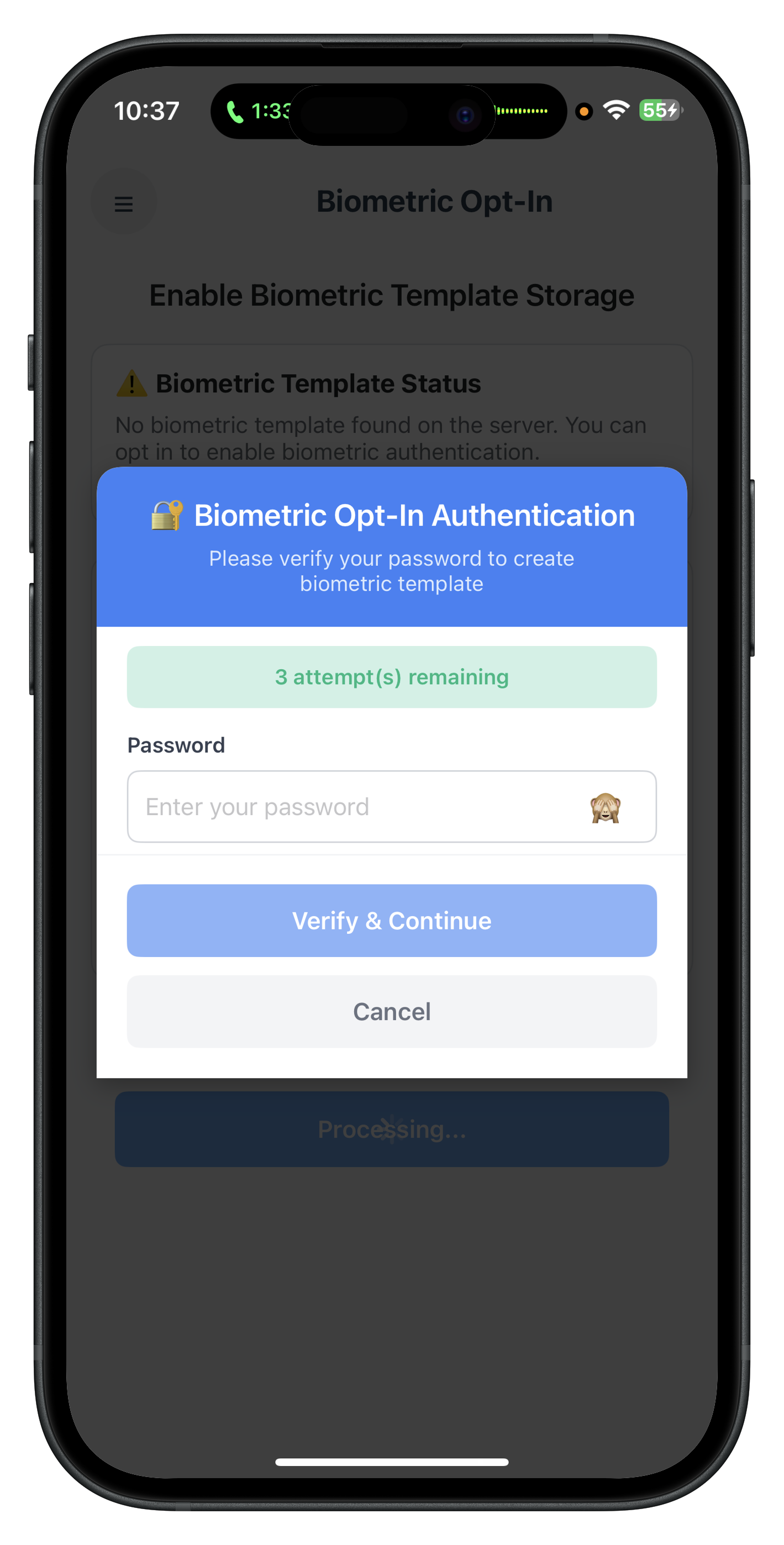
The PasswordValidationDialogViewController displays a modal with password input field, attempts counter with color coding (green/orange/red), error messages, and action buttons for verify and cancel.
Overview
The RDNAIDVService class provides opt-in APIs for biometric template creation with LDA fallback and selfie capture. These methods are already implemented in the iOS reference app.
Opt-In Initiation API
The initiateIDVBiometricOptIn() method starts the opt-in workflow:
// relidcodelab/Sources/Uniken/Services/IDV/RDNAIDVService.swift

/**
 * Initiate IDV Biometric Opt-In
 *
 * Triggers a flow that opts the logged-in user into biometric template storage.
 * Only works on active user sessions (post-login).
 *
 * **Workflow:**
 * 1. User must be logged in (user session established)
 * 2. Call this API to start biometric opt-in
 * 3. SDK requests user authentication:
 *    - If LDA enabled: Native biometric prompt (TouchID/FaceID)
 *    - If LDA disabled: onGetPassword callback (challengeMode: 6)
 * 4. On successful authentication: SDK initiates selfie capture
 * 5. SDK triggers: onIDVOptInCapturedFrameConfirmation callback with captured image
 * 6. Application displays image and calls setIDVBiometricOptInConfirmation(status)
 * 7. SDK triggers: onIDVBiometricOptInStatus callback with final result
 *
 * **Response Validation:**
 * 1. Check error.longErrorCode immediately (synchronous error check)
 * 2. Wait for onIDVOptInCapturedFrameConfirmation callback with captured selfie
 * 3. Application must call setIDVBiometricOptInConfirmation to confirm/recapture/cancel
 * 4. Wait for onIDVBiometricOptInStatus callback for final result
 * 5. In final callback, validate BOTH:
 *    - error.longErrorCode (SDK error)
 *    - status.statusCode (backend error)
 * 6. Success only if: error.longErrorCode == 0 AND statusCode == 100
 *
 * - Returns: RDNAError indicating immediate success or failure (callbacks deliver actual results)
 */
func initiateIDVBiometricOptIn() -> RDNAError {
    print("RDNAIDVService - Initiating IDV biometric opt-in")

    let error = rdna.initiateIDVBiometricOptIn()

    if error.longErrorCode == 0 {
        print("RDNAIDVService - InitiateIDVBiometricOptIn request successful")
        print("  SDK will authenticate user (LDA or password)")
        print("  Awaiting onIDVOptInCapturedFrameConfirmation callback")
    } else {
        print("RDNAIDVService - InitiateIDVBiometricOptIn failed:")
        print("  Error: \(error.errorString ?? "Unknown error")")
        print("  Code: \(error.longErrorCode)")
    }

    return error
}
Opt-In Confirmation API
The setIDVBiometricOptInConfirmation() method submits user's decision on captured selfie:
/**
 * Set IDV Biometric Opt-In Confirmation
 *
 * Submits user's action after viewing the captured selfie image.
 * Must be invoked in response to onIDVOptInCapturedFrameConfirmation callback.
 *
 * **User Actions:**
 * - RDNA_IDV_APPROVED (0): User approves the captured image, SDK proceeds with opt-in
 * - RDNA_IDV_RECAPTURE (1): User wants to recapture the selfie, SDK triggers selfie capture again
 * - RDNA_IDV_CANCEL (2): User cancels the opt-in flow, SDK aborts the process
 *
 * **Workflow:**
 * 1. onIDVOptInCapturedFrameConfirmation fires with captured image (base64)
 * 2. Application displays the image to user for review
 * 3. User selects action (Approve/Recapture/Cancel)
 * 4. Application calls this API with corresponding RDNAIDVStatus enum
 * 5. SDK processes action:
 *    - Approved: Stores biometric template on server
 *    - Recapture: Triggers selfie capture again (onIDVOptInCapturedFrameConfirmation fires again)
 *    - Cancel: Aborts flow
 * 6. SDK triggers onIDVBiometricOptInStatus with final result
 *
 * - Parameter status: User action enum (RDNA_IDV_APPROVED/RDNA_IDV_RECAPTURE/RDNA_IDV_CANCEL)
 * - Returns: RDNAError indicating immediate success or failure
 */
func setIDVBiometricOptInConfirmation(status: RDNAIDVStatus) -> RDNAError {
    let actionName: String
    switch status {
    case .RDNA_IDV_APPROVED:
        actionName = "APPROVED (0)"
    case .RDNA_IDV_RECAPTURE:
        actionName = "RECAPTURE (1)"
    case .RDNA_IDV_CANCEL:
        actionName = "CANCEL (2)"
    @unknown default:
        actionName = "UNKNOWN (\(status.rawValue))"
    }

    print("RDNAIDVService - Setting biometric opt-in confirmation: \(actionName)")

    let error = rdna.setIDVBiometricOptInConfirmation(status)

    if error.longErrorCode == 0 {
        print("RDNAIDVService - SetIDVBiometricOptInConfirmation success")
        if status == .RDNA_IDV_RECAPTURE {
            print("  Awaiting onIDVOptInCapturedFrameConfirmation callback (recapture)")
        } else {
            print("  Awaiting onIDVBiometricOptInStatus callback (final result)")
        }
    } else {
        print("RDNAIDVService - SetIDVBiometricOptInConfirmation failed:")
        print("  Error: \(error.errorString ?? "Unknown error")")
        print("  Code: \(error.longErrorCode)")
    }

    return error
}
Template Status Check API
The checkIDVUserBiometricTemplateStatus() method checks if template exists:
/**
 * Check IDV User Biometric Template Status
 *
 * This API checks if the user biometric template is present on the server.
 * Only works on active user sessions (post-login).
 *
 * After successful API call, the SDK will trigger onIDVCheckUserBiometricTemplateStatus callback
 * with the template status information.
 *
 * Response Validation Logic:
 * 1. Check error.longErrorCode: 0 = success, non-zero = error
 * 2. Check callback status.statusCode: 100 = template exists, 600 = no template
 *
 * - Returns: RDNAError indicating success or failure
 */
func checkIDVUserBiometricTemplateStatus() -> RDNAError {
    print("RDNAIDVService - Checking user biometric template status")

    let error = rdna.checkIDVUserBiometricTemplateStatus()

    if error.longErrorCode == 0 {
        print("RDNAIDVService - CheckIDVUserBiometricTemplateStatus request successful")
        print("  Awaiting onIDVCheckUserBiometricTemplateStatus callback")
    } else {
        print("RDNAIDVService - CheckIDVUserBiometricTemplateStatus failed:")
        print("  Error: \(error.errorString)")
        print("  Code: \(error.longErrorCode)")
    }

    return error
}
Key Points
- Challenge Mode 6: Biometric opt-in identifier
- Workflow IDV_POSTLOGIN_OPTIN: Opt-in selfie capture workflow
- LDA Fallback: SDK automatically handles LDA/password logic
- Confirmation Actions: RDNA_IDV_APPROVED, RDNA_IDV_RECAPTURE, RDNA_IDV_CANCEL
- RDNAError Return: Check longErrorCode for synchronous validation
- Delegate Callbacks: Asynchronous results delivered via delegates
Overview
The RDNAIDVService class provides opt-out APIs for biometric template deletion with LDA fallback (no selfie capture). These methods are already implemented in the iOS reference app.
Opt-Out Initiation API
The initiateIDVBiometricOptOut() method starts the opt-out workflow:
// relidcodelab/Sources/Uniken/Services/IDV/RDNAIDVService.swift

/**
 * Initiate IDV Biometric Opt-Out
 *
 * Triggers a flow that opts the logged-in user out of biometric template storage.
 * Deletes the user's biometric template from the server.
 * Only works on active user sessions (post-login).
 *
 * **Workflow:**
 * 1. User must be logged in (user session established)
 * 2. Call this API to start biometric opt-out
 * 3. SDK requests user authentication:
 *    - If LDA enabled: Native biometric prompt (TouchID/FaceID)
 *    - If LDA disabled: onGetPassword callback (challengeMode: 7)
 * 4. On successful authentication: SDK sends deletion request to server
 * 5. SDK triggers: onIDVBiometricOptOutStatus callback with deletion result
 *
 * **Response Validation:**
 * 1. Check error.longErrorCode immediately (synchronous error check)
 * 2. Wait for onIDVBiometricOptOutStatus callback for final result
 * 3. In callback, validate BOTH:
 *    - error.longErrorCode (SDK error)
 *    - status.statusCode (backend error)
 * 4. Status codes:
 *    - 100: Template deleted successfully
 *    - 400: Unable to process request
 *    - 500: Deletion failed
 *    - 600: Template does not exist (already opted out or never opted in)
 *
 * - Returns: RDNAError indicating immediate success or failure (callback delivers final result)
 */
func initiateIDVBiometricOptOut() -> RDNAError {
    print("RDNAIDVService - Initiating IDV biometric opt-out")

    let error = rdna.initiateIDVBiometricOptOut()

    if error.longErrorCode == 0 {
        print("RDNAIDVService - InitiateIDVBiometricOptOut request successful")
        print("  SDK will authenticate user (LDA or password)")
        print("  Awaiting onIDVBiometricOptOutStatus callback")
    } else {
        print("RDNAIDVService - InitiateIDVBiometricOptOut failed:")
        print("  Error: \(error.errorString ?? "Unknown error")")
        print("  Code: \(error.longErrorCode)")
    }

    return error
}
Key Points
- Challenge Mode 7: Biometric opt-out identifier
- Workflow IDV_POSTLOGIN_OPTOUT: Opt-out workflow (no selfie)
- LDA Fallback: Same as opt-in
- No Selfie Capture: Direct template deletion after authentication
- Simpler Flow: authenticate → delete → status
- Single Callback: Only onIDVBiometricOptOutStatus (no captured frame confirmation)
Overview
The RDNAIDVDelegateManager implements delegate protocols to handle SDK callbacks for opt-in and opt-out flows. These delegates are already implemented in the iOS reference app.
Opt-In & Opt-Out Delegate Handlers
The delegate manager handles all IDV-related callbacks:
// relidcodelab/Sources/Uniken/Services/IDV/RDNAIDVDelegateManager.swift

import Foundation
import RELID

class RDNAIDVDelegateManager: NSObject {

    static let shared = RDNAIDVDelegateManager()

    // MARK: - Callback Closures (Set by View Controllers)

    /// Template status check callback
    var onIDVCheckUserBiometricTemplateStatus: ((_ userID: String, _ idvResponse: String, _ status: RDNARequestStatus, _ error: RDNAError) -> Void)?

    /// Opt-in captured frame callback (base64 image)
    var onIDVOptInCapturedFrameConfirmation: ((_ capturedImage: String) -> Void)?

    /// Opt-in status callback (final result)
    var onIDVBiometricOptInStatus: ((_ userID: String, _ idvResponse: String, _ status: RDNARequestStatus, _ error: RDNAError) -> Void)?

    /// Opt-out status callback (final result)
    var onIDVBiometricOptOutStatus: ((_ userID: String, _ idvResponse: String, _ status: RDNARequestStatus, _ error: RDNAError) -> Void)?

    /// Selfie process start confirmation callback
    var onGetIDVSelfieProcessStartConfirmation: ((_ idvWorkflow: RDNAIDVWorkflow) -> Void)?

    private override init() {
        super.init()
        print("RDNAIDVDelegateManager - Singleton initialized")
    }
}

// MARK: - RDNAIDVBiometricManagementCallbacks

extension RDNAIDVDelegateManager: RDNAIDVBiometricManagementCallbacks {

    /**
     * Template Status Check Callback
     * Triggered after checkIDVUserBiometricTemplateStatus() call
     */
    func onIDVCheckUserBiometricTemplateStatus(
        _ userID: String,
        idvResponse: String,
        status: RDNARequestStatus,
        error: RDNAError
    ) {
        print("RDNAIDVDelegateManager - onIDVCheckUserBiometricTemplateStatus")
        print("  User ID: \(userID)")
        print("  Status Code: \(status.statusCode)")
        print("  Status Message: \(status.statusMessage ?? "N/A")")
        print("  Error Code: \(error.longErrorCode)")

        onIDVCheckUserBiometricTemplateStatus?(userID, idvResponse, status, error)
    }

    /**
     * Opt-In Captured Frame Callback
     * Triggered after successful selfie capture during opt-in
     * Contains base64-encoded image for user review
     */
    func onIDVOptInCapturedFrameConfirmation(_ capturedImage: String) {
        print("RDNAIDVDelegateManager - onIDVOptInCapturedFrameConfirmation")
        print("  Captured image length: \(capturedImage.count) characters")

        onIDVOptInCapturedFrameConfirmation?(capturedImage)
    }

    /**
     * Opt-In Status Callback
     * Triggered after opt-in process completes (challengeMode: 6)
     */
    func onIDVBiometricOptInStatus(
        _ userID: String,
        idvResponse: String,
        status: RDNARequestStatus,
        challengeMode: RDNAChallengeOpMode,
        error: RDNAError
    ) {
        print("RDNAIDVDelegateManager - onIDVBiometricOptInStatus")
        print("  User ID: \(userID)")
        print("  Challenge Mode: \(challengeMode.rawValue)")
        print("  Status Code: \(status.statusCode)")
        print("  Status Message: \(status.statusMessage ?? "N/A")")
        print("  Error Code: \(error.longErrorCode)")

        onIDVBiometricOptInStatus?(userID, idvResponse, status, error)
    }

    /**
     * Opt-Out Status Callback
     * Triggered after opt-out process completes (challengeMode: 7)
     */
    func onIDVBiometricOptOutStatus(
        _ userID: String,
        idvResponse: String,
        status: RDNARequestStatus,
        challengeMode: RDNAChallengeOpMode,
        error: RDNAError
    ) {
        print("RDNAIDVDelegateManager - onIDVBiometricOptOutStatus")
        print("  User ID: \(userID)")
        print("  Challenge Mode: \(challengeMode.rawValue)")
        print("  Status Code: \(status.statusCode)")
        print("  Status Message: \(status.statusMessage ?? "N/A")")
        print("  Error Code: \(error.longErrorCode)")

        onIDVBiometricOptOutStatus?(userID, idvResponse, status, error)
    }
}

// MARK: - RDNAIDVSelfieProcessingCallbacks

extension RDNAIDVDelegateManager: RDNAIDVSelfieProcessingCallbacks {

    /**
     * Selfie Process Start Confirmation Callback
     * Triggered before selfie capture begins
     * Used by opt-in flow (workflow: IDV_POSTLOGIN_OPTIN)
     */
    func getIDVSelfieProcessStartConfirmation(_ idvWorkflow: RDNAIDVWorkflow) {
        print("RDNAIDVDelegateManager - getIDVSelfieProcessStartConfirmation")
        print("  IDV Workflow: \(idvWorkflow.rawValue)")

        onGetIDVSelfieProcessStartConfirmation?(idvWorkflow)
    }
}
Registering Delegates with SDK
The delegates must be registered with the SDK during initialization:
// Called in onInitialized callback

func registerIDVDelegates() {
    let delegateManager = RDNAIDVDelegateManager.shared

    // Register main IDV callback (REQUIRED)
    let _ = RDNAIDVService.shared.setIDVCallback()

    // Register specific delegate protocols
    RDNAIDVService.shared.setIDVBiometricManagementDelegate(delegateManager)
    RDNAIDVService.shared.setIDVSelfieProcessingDelegate(delegateManager)

    print("RDNAIDVDelegateManager - All delegates registered")
}
Key Points
- Singleton Pattern: Single shared instance for all delegates
- Closure-Based: View controllers set closures to receive callbacks
- Protocol Extensions: Clean separation of delegate protocols
- Challenge Mode Routing: Callbacks include challengeMode for flow identification
- Workflow Identification: Callbacks include idvWorkflow enum for proper handling
- Comprehensive Logging: Detailed console output for debugging
Overview
The BiometricOptInViewController implements the complete opt-in flow with template status check, LDA fallback authentication, selfie capture, and frame confirmation. The implementation is already complete in the iOS reference app.
BiometricOptInViewController Structure
Key sections of the view controller:
// relidcodelab/Sources/Tutorial/Screens/IDV/BiometricOptIn/BiometricOptInViewController.swift

import UIKit
import RELID

class BiometricOptInViewController: UIViewController {

    // MARK: - State Properties

    private var isCheckingStatus = false
    private var isOptingIn = false
    private var templateStatus: TemplateStatus = TemplateStatus()
    private var isOptInFlowActive = false // Flow state management

    // Password dialog state
    private var passwordDialog: PasswordValidationDialogViewController?
    private var passwordAttemptsLeft = 3
    private var passwordError: String?
    private var isPasswordSubmitting = false

    // Captured image modal state
    private var capturedImageBase64: String?
    private var capturedImageModal: UIViewController?

    // Original event handlers (for chaining)
    private var originalGetPasswordHandler: ((_ userID: String, _ challengeMode: RDNAChallengeOpMode, _ attemptsLeft: Int, _ response: RDNAChallengeResponse, _ error: RDNAError) -> Void)?
    private var originalGetSelfieStartHandler: ((_ idvWorkflow: RDNAIDVWorkflow) -> Void)?

    // MARK: - Lifecycle

    override func viewDidLoad() {
        super.viewDidLoad()
        setupUI()
        setupEventHandlers()
    }

    override func viewWillAppear(_ animated: Bool) {
        super.viewWillAppear(animated)
        // Check template status on every screen focus
        checkTemplateStatus()
    }

    override func viewWillDisappear(_ animated: Bool) {
        super.viewWillDisappear(animated)

        // Reset flow state when navigating away
        if isMovingFromParent {
            resetOptInFlowState()
        }
    }

    deinit {
        // Cleanup event handlers
        cleanupEventHandlers()
    }

    // MARK: - Event Handler Setup

    private func setupEventHandlers() {
        let delegateManager = RDNAIDVDelegateManager.shared

        // Save original handlers for chaining
        originalGetPasswordHandler = RDNADelegateManager.shared.onGetPassword
        originalGetSelfieStartHandler = delegateManager.onGetIDVSelfieProcessStartConfirmation

        // Register template status check handler
        delegateManager.onIDVCheckUserBiometricTemplateStatus = { [weak self] userID, idvResponse, status, error in
            self?.handleCheckUserBiometricTemplateStatusResponse(userID: userID, status: status, error: error)
        }

        // Register captured frame confirmation handler (opt-in specific)
        delegateManager.onIDVOptInCapturedFrameConfirmation = { [weak self] capturedImage in
            self?.handleOptInCapturedFrameConfirmation(capturedImage: capturedImage)
        }

        // Register opt-in status handler (final result)
        delegateManager.onIDVBiometricOptInStatus = { [weak self] userID, idvResponse, status, error in
            self?.handleBiometricOptInStatusResponse(userID: userID, idvResponse: idvResponse, status: status, error: error)
        }

        // Chain getPassword handler (challengeMode 6 only)
        RDNADelegateManager.shared.onGetPassword = { [weak self] userID, challengeMode, attemptsLeft, response, error in
            // Handle challengeMode 6 (biometric opt-in)
            if challengeMode == RDNAChallengeOpMode(rawValue: 6) {
                self?.handleGetPassword(userID: userID, challengeMode: challengeMode, attemptsLeft: attemptsLeft, response: response, error: error)
            } else {
                // Chain to original handler for other challenge modes
                self?.originalGetPasswordHandler?(userID, challengeMode, attemptsLeft, response, error)
            }
        }

        // Chain GetSelfieProcessStartConfirmation handler (workflow 10)
        delegateManager.onGetIDVSelfieProcessStartConfirmation = { [weak self] idvWorkflow in
            // Handle IDV_POSTLOGIN_OPTIN (10)
            if idvWorkflow == .IDV_POSTLOGIN_OPTIN {
                self?.handleGetSelfieProcessStartConfirmation(idvWorkflow: idvWorkflow)
            } else {
                // Chain to original handler for other workflows
                self?.originalGetSelfieStartHandler?(idvWorkflow)
            }
        }
    }

    // MARK: - Template Status Check

    private func checkTemplateStatus() {
        guard !isCheckingStatus else { return }

        isCheckingStatus = true
        updateButtonState()

        print("BiometricOptInViewController - Checking template status")

        let error = RDNAIDVService.shared.checkIDVUserBiometricTemplateStatus()

        if error.longErrorCode != 0 {
            isCheckingStatus = false
            updateButtonState()
            showAlert(title: "Error", message: "Failed to check template status: \(error.errorString)")
        }
    }

    private func handleCheckUserBiometricTemplateStatusResponse(userID: String, status: RDNARequestStatus, error: RDNAError) {
        print("BiometricOptInViewController - Template status response received")
        print("  Status Code: \(status.statusCode)")
        print("  Status Message: \(status.statusMessage ?? "N/A")")

        isCheckingStatus = false

        templateStatus.checked = true
        templateStatus.statusCode = status.statusCode
        templateStatus.statusMessage = status.statusMessage ?? ""

        // 100 = template exists, 600 = no template
        templateStatus.exists = (status.statusCode == 100)

        updateTemplateStatusUI()
        updateButtonState()
    }

    // MARK: - Start Opt-In Action

    @IBAction func startOptInButtonTapped(_ sender: UIButton) {
        handleStartOptIn()
    }

    private func handleStartOptIn() {
        guard !isOptingIn, !isCheckingStatus, !templateStatus.exists else { return }

        isOptingIn = true
        updateButtonState()

        print("BiometricOptInViewController - Starting biometric opt-in")

        let error = RDNAIDVService.shared.initiateIDVBiometricOptIn()

        if error.longErrorCode != 0 {
            isOptingIn = false
            updateButtonState()
            showAlert(title: "Error", message: "Failed to initiate opt-in: \(error.errorString)")
        }
        // SDK will trigger getPassword (if LDA off) or directly start selfie capture (if LDA on)
    }

    // MARK: - Password Authentication (Challenge Mode 6)

    private func handleGetPassword(userID: String, challengeMode: RDNAChallengeOpMode, attemptsLeft: Int, response: RDNAChallengeResponse, error: RDNAError) {
        print("BiometricOptInViewController - getPassword callback (challengeMode 6)")
        print("  Attempts Left: \(attemptsLeft)")
        print("  Error Code: \(error.longErrorCode)")
        print("  Response Status Code: \(response.status.statusCode)")

        passwordAttemptsLeft = attemptsLeft

        // Check if this is an error response (wrong password)
        if error.longErrorCode != 0 {
            passwordError = error.errorString
        } else if response.status.statusCode != 100 {
            // Password validation failed (status code is not 100)
            passwordError = response.status.statusMessage ?? "Invalid password. Please try again."
        } else {
            passwordError = nil
        }

        showPasswordDialog()
    }

    private func showPasswordDialog() {
        // If password dialog already shown, update it instead of presenting new one
        if let existingDialog = passwordDialog,
           existingDialog.isBeingPresented || existingDialog.presentingViewController != nil {
            existingDialog.attemptsLeft = passwordAttemptsLeft
            existingDialog.errorMessage = passwordError
            existingDialog.isSubmitting = isPasswordSubmitting
            print("BiometricOptInViewController - Updated existing password dialog")
            return
        }

        let dialog = PasswordValidationDialogViewController()
        dialog.titleText = "🔐 Biometric Opt-In Authentication"
        dialog.messageText = "Please verify your password to create biometric template"
        dialog.attemptsLeft = passwordAttemptsLeft
        dialog.errorMessage = passwordError
        dialog.isSubmitting = isPasswordSubmitting

        dialog.onSubmitPassword = { [weak self] password in
            self?.handlePasswordSubmit(password: password)
        }

        dialog.onCancel = { [weak self] in
            self?.handlePasswordCancel()
        }

        dialog.modalPresentationStyle = .overFullScreen
        dialog.modalTransitionStyle = .crossDissolve

        passwordDialog = dialog

        print("BiometricOptInViewController - Presenting password dialog")
        present(dialog, animated: true)
    }

    private func handlePasswordSubmit(password: String) {
        print("BiometricOptInViewController - Submitting password for challengeMode 6")

        isPasswordSubmitting = true
        passwordDialog?.isSubmitting = true

        // Call SDK setPassword with challengeMode 6
        let error = RDNAService.shared.setPassword(password, challengeMode: RDNAChallengeOpMode(rawValue: 6)!)

        isPasswordSubmitting = false
        passwordDialog?.isSubmitting = false

        if error.longErrorCode != 0 {
            passwordError = error.errorString
            passwordDialog?.errorMessage = passwordError
        }
        // SDK will either:
        // 1. Trigger getPassword again if wrong password
        // 2. Trigger GetSelfieProcessStartConfirmation if correct
    }

    // MARK: - Selfie Process Start Confirmation

    private func handleGetSelfieProcessStartConfirmation(idvWorkflow: RDNAIDVWorkflow) {
        print("BiometricOptInViewController - GetSelfieProcessStartConfirmation (workflow 10)")

        // Close password dialog if open
        passwordDialog?.dismiss(animated: true) { [weak self] in
            self?.passwordDialog = nil
        }

        // Mark flow as active to prevent duplicate API calls
        isOptInFlowActive = true

        // Chain to original handler (AppIDVCoordinator) to show selfie start confirmation screen
        originalGetSelfieStartHandler?(idvWorkflow)
    }

    // MARK: - Captured Frame Confirmation

    private func handleOptInCapturedFrameConfirmation(capturedImage: String) {
        print("BiometricOptInViewController - Captured frame received (base64 length: \(capturedImage.count))")

        // Close password dialog if still open
        passwordDialog?.dismiss(animated: true) { [weak self] in
            self?.passwordDialog = nil
        }

        // Mark flow as active
        isOptInFlowActive = true

        // Store captured image
        capturedImageBase64 = capturedImage

        // Show captured image modal
        showCapturedImageModal(imageBase64: capturedImage)
    }

    private func showCapturedImageModal(imageBase64: String) {
        // Check if modal is already shown (recapture scenario)
        if let existingModal = capturedImageModal,
           existingModal.isBeingPresented || existingModal.presentingViewController != nil {
            // Update existing modal's image instead of creating new one
            updateCapturedImageInModal(modal: existingModal, imageBase64: imageBase64)
            return
        }

        // Create new modal with Approve/Recapture/Cancel buttons
        // ... (Full implementation in actual code)
    }

    @objc private func approveImageTapped() {
        handleCapturedFrameAction(status: RDNAIDVStatus.RDNA_IDV_APPROVED)
    }

    @objc private func recaptureImageTapped() {
        handleCapturedFrameAction(status: RDNAIDVStatus.RDNA_IDV_RECAPTURE)
    }

    @objc private func cancelImageTapped() {
        handleCapturedFrameAction(status: RDNAIDVStatus.RDNA_IDV_CANCEL)
    }

    private func handleCapturedFrameAction(status: RDNAIDVStatus) {
        print("BiometricOptInViewController - Captured frame action: \(status.rawValue)")

        let error = RDNAIDVService.shared.setIDVBiometricOptInConfirmation(status: status)

        if error.longErrorCode != 0 {
            showAlert(title: "Error", message: "Failed to submit confirmation: \(error.errorString ?? "Unknown error")")
            return
        }

        if status != RDNAIDVStatus.RDNA_IDV_RECAPTURE {
            capturedImageModal?.dismiss(animated: true) { [weak self] in
                self?.capturedImageModal = nil
            }
        }
    }

    // MARK: - Final Opt-In Status

    private func handleBiometricOptInStatusResponse(userID: String, idvResponse: String, status: RDNARequestStatus, error: RDNAError) {
        print("BiometricOptInViewController - Opt-in status received")
        print("  Status Code: \(status.statusCode)")
        print("  Status Message: \(status.statusMessage)")
        print("  Error Code: \(error.longErrorCode)")

        // Navigate back to this screen (in case we're on a different screen)
        navigationController?.popToViewController(self, animated: true)

        // Reset flow state
        resetOptInFlowState()

        // Close any modals
        capturedImageModal?.dismiss(animated: true) { [weak self] in
            self?.capturedImageModal = nil
        }

        isOptingIn = false
        updateButtonState()

        // Show result with delay to ensure view controller is in hierarchy
        DispatchQueue.main.asyncAfter(deadline: .now() + 0.3) { [weak self] in
            guard let self = self else { return }

            if error.longErrorCode == 0 && status.statusCode == 100 {
                self.showAlert(title: "Success", message: "Biometric template stored successfully! You can now use biometric authentication.") {
                    // Refresh template status
                    self.checkTemplateStatus()
                }
            } else if status.statusCode != 0 && status.statusCode != 100 {
                // Show status message as-is (even if empty)
                self.showAlert(title: "Opt-In Failed", message: status.statusMessage)
            } else {
                self.showAlert(title: "Opt-In Failed", message: error.errorString)
            }
        }
    }

    private func resetOptInFlowState() {
        isOptInFlowActive = false
        capturedImageBase64 = nil
        passwordError = nil
        passwordAttemptsLeft = 3
    }
}

// MARK: - Supporting Types

private struct TemplateStatus {
    var checked: Bool = false
    var exists: Bool = false
    var statusCode: Int32 = 0
    var statusMessage: String = ""
}
Key Implementation Points
- Handler Chaining: Preserves original global handlers for other challenge modes
- Flow State Management: isOptInFlowActive flag prevents duplicate API calls
- Conditional Modal Close: Modal stays open for recapture, closes for approve/cancel
- Template Status Check: Called on viewWillAppear and after opt-in completion
- Password Dialog Reuse: Updates existing dialog instead of presenting new one
- Captured Image Modal: Shows captured selfie with three action buttons
- Comprehensive Reset: All flow state cleared in deinit and navigation events
BiometricOptInViewController UI Preview
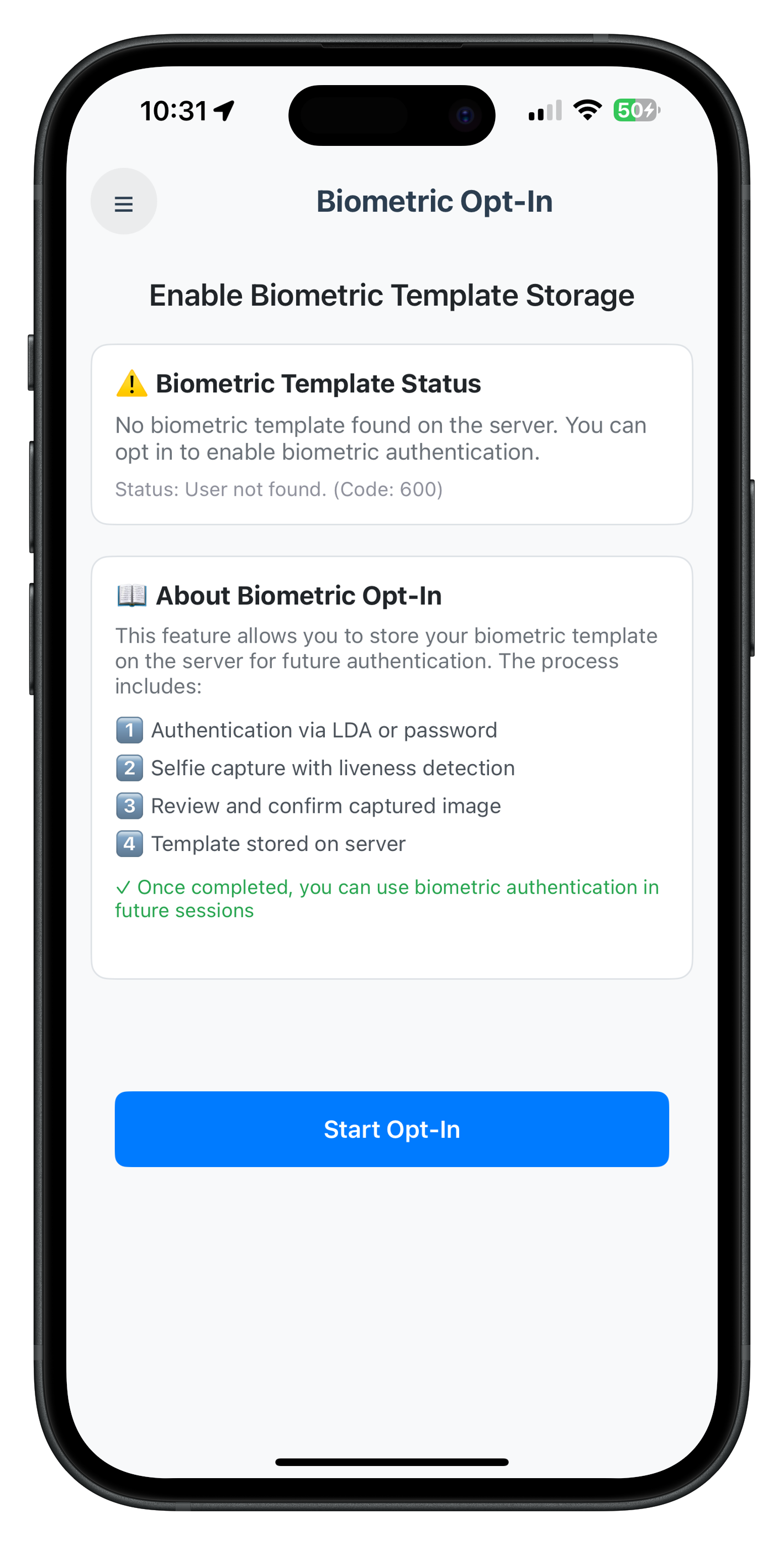
The BiometricOptInViewController displays template status check, opt-in button (enabled when no template exists), and loading states for status check and opt-in process. The UI includes information cards explaining the workflow.
Storyboard Configuration
The view controller UI is defined in Main.storyboard with:
- Scroll view for content
- Template status section (conditionally visible)
- Information cards explaining the process
- Start Opt-In button with activity indicator
- Disabled message label (when template already exists)
Captured Frame Confirmation Modal UI Preview
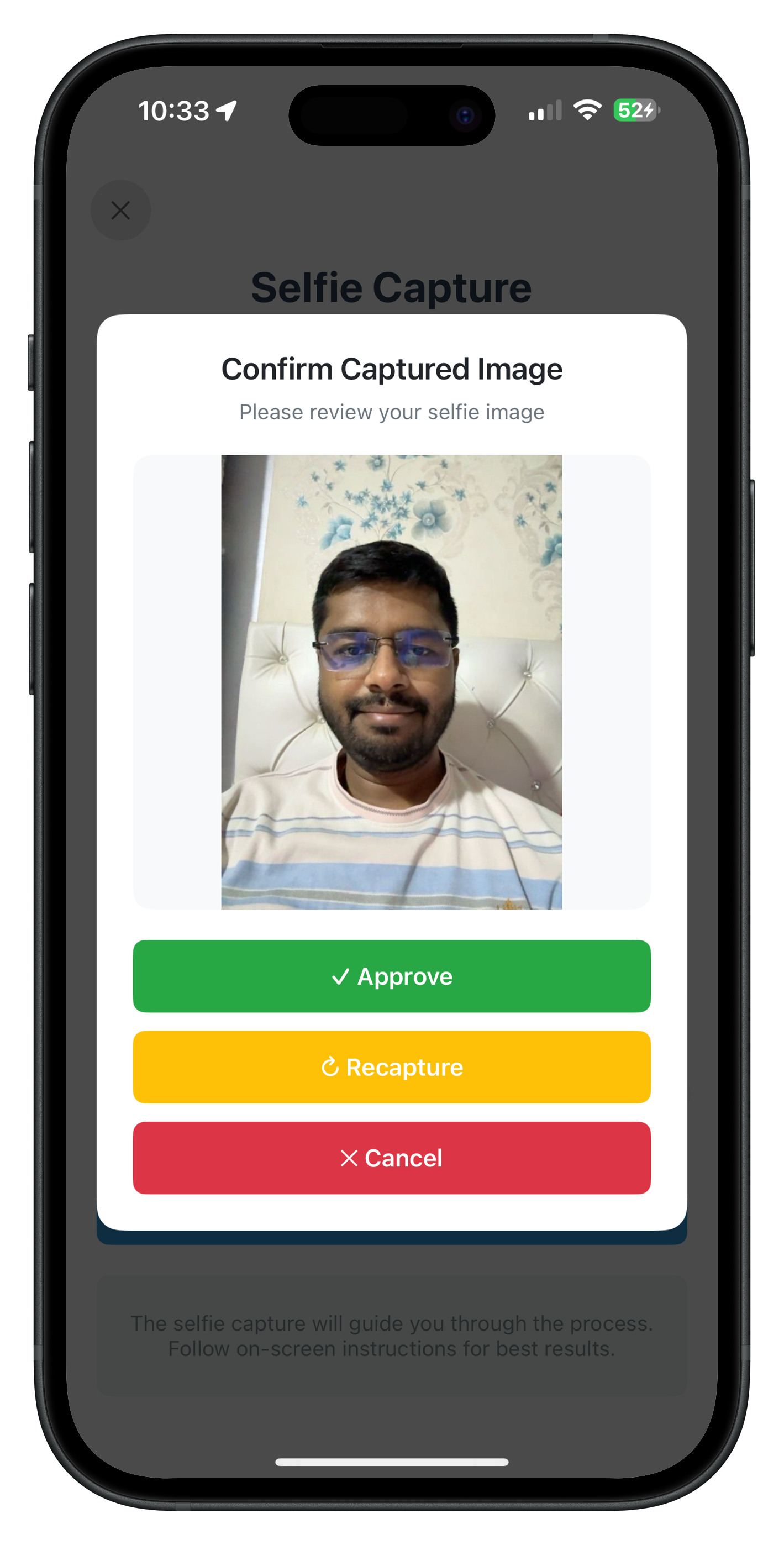
The Captured Frame Confirmation modal displays the captured selfie image with three action buttons: Approve (creates template), Recapture (retakes selfie, modal stays open), and Cancel (aborts flow). The modal uses custom presentation with blur effect.
Overview
The BiometricOptOutViewController implements the opt-out flow with template status check, LDA fallback authentication, and direct template deletion (no selfie). The implementation is already complete in the iOS reference app.
BiometricOptOutViewController Structure
Key sections of the view controller:
// relidcodelab/Sources/Tutorial/Screens/IDV/BiometricOptOut/BiometricOptOutViewController.swift

import UIKit
import RELID

class BiometricOptOutViewController: UIViewController {

    // MARK: - State Properties

    private var isCheckingStatus = false
    private var isOptingOut = false
    private var templateStatus: TemplateStatus = TemplateStatus()

    // Password dialog state
    private var passwordDialog: PasswordValidationDialogViewController?
    private var passwordAttemptsLeft = 3
    private var passwordError: String?
    private var isPasswordSubmitting = false

    // Original event handler (for chaining)
    private var originalGetPasswordHandler: ((_ userID: String, _ challengeMode: RDNAChallengeOpMode, _ attemptsLeft: Int, _ response: RDNAChallengeResponse, _ error: RDNAError) -> Void)?

    // MARK: - Lifecycle

    override func viewDidLoad() {
        super.viewDidLoad()
        setupUI()
        setupEventHandlers()
    }

    override func viewWillAppear(_ animated: Bool) {
        super.viewWillAppear(animated)
        // Check template status on every screen focus
        checkTemplateStatus()
    }

    override func viewWillDisappear(_ animated: Bool) {
        super.viewWillDisappear(animated)

        // Reset state when navigating away
        if isMovingFromParent {
            resetOptOutState()
        }
    }

    deinit {
        // Cleanup event handlers
        cleanupEventHandlers()
    }

    // MARK: - Event Handler Setup

    private func setupEventHandlers() {
        let delegateManager = RDNAIDVDelegateManager.shared

        // Save original handler for chaining
        originalGetPasswordHandler = RDNADelegateManager.shared.onGetPassword

        // Register template status check handler
        delegateManager.onIDVCheckUserBiometricTemplateStatus = { [weak self] userID, idvResponse, status, error in
            self?.handleCheckUserBiometricTemplateStatusResponse(userID: userID, status: status, error: error)
        }

        // Register opt-out status handler (final result)
        delegateManager.onIDVBiometricOptOutStatus = { [weak self] userID, idvResponse, status, error in
            self?.handleBiometricOptOutStatusResponse(userID: userID, idvResponse: idvResponse, status: status, error: error)
        }

        // Chain getPassword handler (challengeMode 7 only)
        RDNADelegateManager.shared.onGetPassword = { [weak self] userID, challengeMode, attemptsLeft, response, error in
            // Handle challengeMode 7 (biometric opt-out)
            if challengeMode == RDNAChallengeOpMode(rawValue: 7) {
                self?.handleGetPassword(userID: userID, challengeMode: challengeMode, attemptsLeft: attemptsLeft, response: response, error: error)
            } else {
                // Chain to original handler for other challenge modes
                self?.originalGetPasswordHandler?(userID, challengeMode, attemptsLeft, response, error)
            }
        }
    }

    // MARK: - Template Status Check

    private func checkTemplateStatus() {
        guard !isCheckingStatus else { return }

        isCheckingStatus = true
        updateButtonState()

        print("BiometricOptOutViewController - Checking template status")

        let error = RDNAIDVService.shared.checkIDVUserBiometricTemplateStatus()

        if error.longErrorCode != 0 {
            isCheckingStatus = false
            updateButtonState()
            showAlert(title: "Error", message: "Failed to check template status: \(error.errorString)")
        }
    }

    private func handleCheckUserBiometricTemplateStatusResponse(userID: String, status: RDNARequestStatus, error: RDNAError) {
        print("BiometricOptOutViewController - Template status response received")
        print("  Status Code: \(status.statusCode)")
        print("  Status Message: \(status.statusMessage ?? "N/A")")

        isCheckingStatus = false

        templateStatus.checked = true
        templateStatus.statusCode = status.statusCode
        templateStatus.statusMessage = status.statusMessage ?? ""

        // 100 = template exists, 600 = no template
        templateStatus.exists = (status.statusCode == 100)

        updateTemplateStatusUI()
        updateButtonState()
    }

    // MARK: - Start Opt-Out Action

    @IBAction func startOptOutButtonTapped(_ sender: UIButton) {
        handleStartOptOut()
    }

    private func handleStartOptOut() {
        guard !isOptingOut, !isCheckingStatus, templateStatus.exists else { return }

        isOptingOut = true
        updateButtonState()

        print("BiometricOptOutViewController - Starting biometric opt-out")

        let error = RDNAIDVService.shared.initiateIDVBiometricOptOut()

        if error.longErrorCode != 0 {
            isOptingOut = false
            updateButtonState()
            showAlert(title: "Error", message: "Failed to initiate opt-out: \(error.errorString)")
        }
        // SDK will trigger getPassword (if LDA off) or directly delete template (if LDA on)
    }

    // MARK: - Password Authentication (Challenge Mode 7)

    private func handleGetPassword(userID: String, challengeMode: RDNAChallengeOpMode, attemptsLeft: Int, response: RDNAChallengeResponse, error: RDNAError) {
        print("BiometricOptOutViewController - getPassword callback (challengeMode 7)")
        print("  Attempts Left: \(attemptsLeft)")
        print("  Error Code: \(error.longErrorCode)")
        print("  Response Status Code: \(response.status.statusCode)")

        passwordAttemptsLeft = attemptsLeft

        // Check if this is an error response (wrong password)
        if error.longErrorCode != 0 {
            passwordError = error.errorString
        } else if response.status.statusCode != 100 {
            // Password validation failed (status code is not 100)
            passwordError = response.status.statusMessage ?? "Invalid password. Please try again."
        } else {
            passwordError = nil
        }

        showPasswordDialog()
    }

    private func showPasswordDialog() {
        // If password dialog already shown, update it instead of presenting new one
        if let existingDialog = passwordDialog,
           existingDialog.isBeingPresented || existingDialog.presentingViewController != nil {
            existingDialog.attemptsLeft = passwordAttemptsLeft
            existingDialog.errorMessage = passwordError
            existingDialog.isSubmitting = isPasswordSubmitting
            print("BiometricOptOutViewController - Updated existing password dialog")
            return
        }

        let dialog = PasswordValidationDialogViewController()
        dialog.titleText = "🔐 Biometric Opt-Out Authentication"
        dialog.messageText = "Please verify your password to delete biometric template"
        dialog.attemptsLeft = passwordAttemptsLeft
        dialog.errorMessage = passwordError
        dialog.isSubmitting = isPasswordSubmitting

        dialog.onSubmitPassword = { [weak self] password in
            self?.handlePasswordSubmit(password: password)
        }

        dialog.onCancel = { [weak self] in
            self?.handlePasswordCancel()
        }

        dialog.modalPresentationStyle = .overFullScreen
        dialog.modalTransitionStyle = .crossDissolve

        passwordDialog = dialog

        print("BiometricOptOutViewController - Presenting password dialog")
        present(dialog, animated: true)
    }

    private func handlePasswordSubmit(password: String) {
        print("BiometricOptOutViewController - Submitting password for challengeMode 7")

        isPasswordSubmitting = true
        passwordDialog?.isSubmitting = true

        // Call SDK setPassword with challengeMode 7
        let error = RDNAService.shared.setPassword(password, challengeMode: RDNAChallengeOpMode(rawValue: 7)!)

        isPasswordSubmitting = false
        passwordDialog?.isSubmitting = false

        if error.longErrorCode != 0 {
            passwordError = error.errorString
            passwordDialog?.errorMessage = passwordError
        }
        // SDK will either:
        // 1. Trigger getPassword again if wrong password
        // 2. Trigger onIDVBiometricOptOutStatus if correct (deletion result)
    }

    // MARK: - Final Opt-Out Status

    private func handleBiometricOptOutStatusResponse(userID: String, idvResponse: String, status: RDNARequestStatus, error: RDNAError) {
        print("BiometricOptOutViewController - Opt-out status received")
        print("  Status Code: \(status.statusCode)")
        print("  Status Message: \(status.statusMessage)")
        print("  Error Code: \(error.longErrorCode)")

        // Navigate back to this screen (in case we're on a different screen)
        navigationController?.popToViewController(self, animated: true)

        // Close password dialog if open
        passwordDialog?.dismiss(animated: true) { [weak self] in
            self?.passwordDialog = nil
        }

        isOptingOut = false
        updateButtonState()

        // Show result with delay to ensure view controller is in hierarchy
        DispatchQueue.main.asyncAfter(deadline: .now() + 0.3) { [weak self] in
            guard let self = self else { return }

            if error.longErrorCode == 0 && status.statusCode == 100 {
                self.showAlert(title: "Success", message: "Biometric template deleted successfully! You have opted out from biometric authentication.") {
                    // Refresh template status
                    self.checkTemplateStatus()
                }
            } else if status.statusCode == 600 {
                self.showAlert(title: "No Template", message: "No biometric template found. You have already opted out or never opted in.") {
                    // Refresh template status
                    self.checkTemplateStatus()
                }
            } else {
                // Show status message as-is (even if empty)
                self.showAlert(title: "Opt-Out Failed", message: status.statusMessage)
            }
        }
    }

    private func updateButtonState() {
        // Opposite of opt-in: enabled when template EXISTS
        let isEnabled = !isOptingOut && !isCheckingStatus && templateStatus.exists
        startOptOutButton.isEnabled = isEnabled
        startOptOutButton.alpha = isEnabled ? 1.0 : 0.6

        if isCheckingStatus {
            startOptOutButton.setTitle("Checking Status...", for: .normal)
            activityIndicator.startAnimating()
        } else if isOptingOut {
            startOptOutButton.setTitle("Processing...", for: .normal)
            activityIndicator.startAnimating()
        } else {
            startOptOutButton.setTitle("Start Opt-Out", for: .normal)
            activityIndicator.stopAnimating()
        }

        // Show/hide disabled message (opposite of opt-in: show when NO template)
        disabledMessageLabel.isHidden = templateStatus.exists || !templateStatus.checked
    }

    private func resetOptOutState() {
        passwordError = nil
        passwordAttemptsLeft = 3
    }
}
Key Implementation Points
- Handler Chaining: Preserves original global handlers for other challenge modes
- Simpler Flow: No selfie capture, no captured frame modal
- Template Status Check: Button enabled only when template exists (opposite of opt-in)
- Password Dialog Reuse: Same PasswordValidationDialogViewController as opt-in
- Status Code 600: Special handling for "no template" response
- Comprehensive Reset: All flow state cleared in deinit and navigation events
BiometricOptOutViewController UI Preview
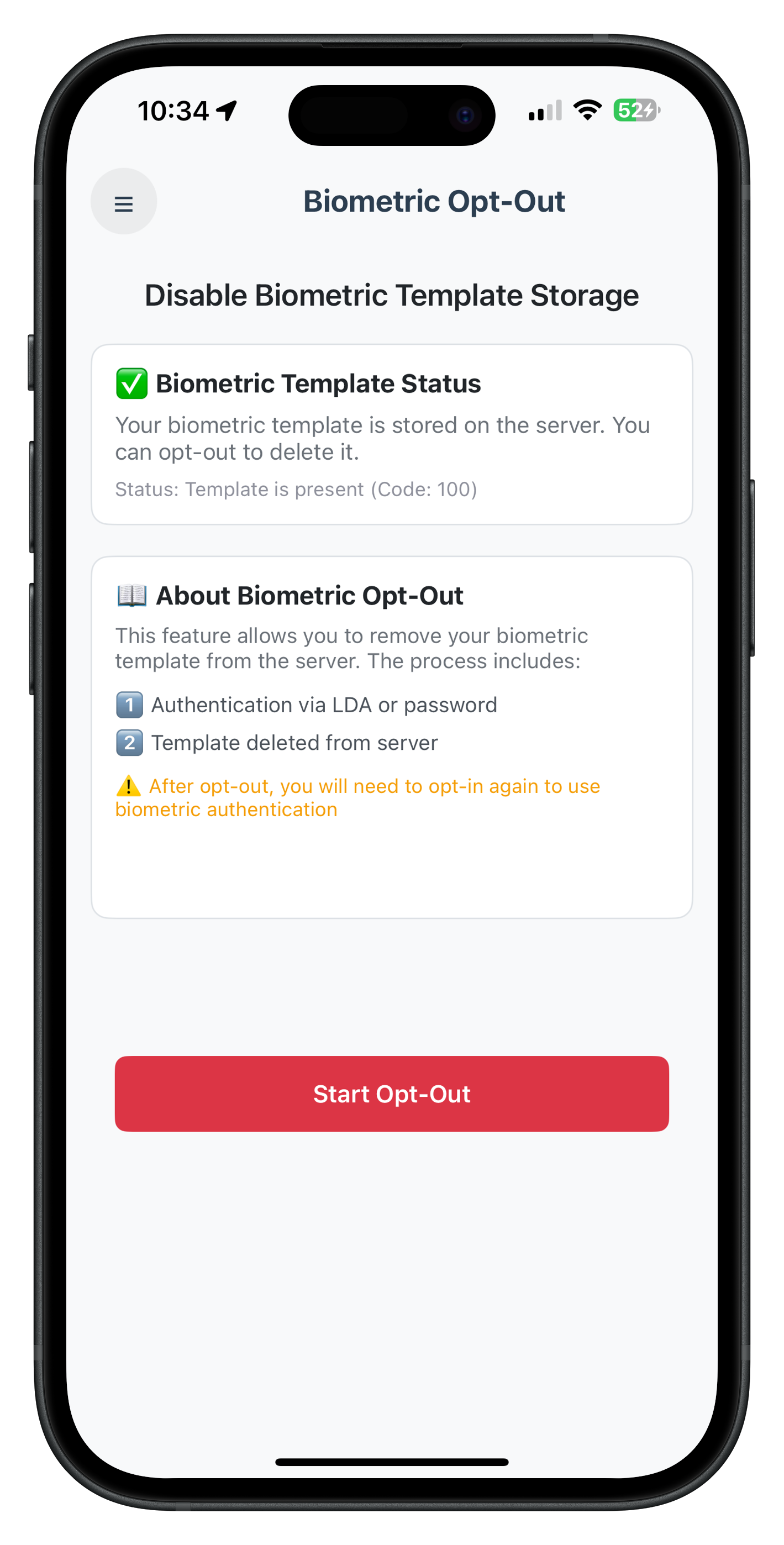
The BiometricOptOutViewController displays template status check, opt-out button (enabled when template exists), and loading states. No selfie capture or modal confirmation is needed - the flow goes directly from authentication to template deletion.
Storyboard Configuration
The view controller UI is defined in Main.storyboard with:
- Scroll view for content
- Template status section (conditionally visible)
- Information cards explaining the opt-out process
- Start Opt-Out button with activity indicator (red background)
- Disabled message label (when no template exists)
Overview
To make the Biometric Opt-In and Opt-Out screens accessible in your app, you need to:
- Add menu items to MenuViewController
- Wire up navigation using AppIDVCoordinator
- Ensure proper view controller instantiation from Storyboard
The MenuViewController uses a SideMenu pattern with centralized navigation handling.
Add Menu Items to MenuViewController
The iOS reference app already includes opt-in and opt-out menu items. Here's how they're configured:
// relidcodelab/Sources/Tutorial/Screens/MFA/MenuViewController.swift

private func setupMenuItems() {
    var items = [
        MenuItem(icon: "🏠", title: "Dashboard", subtitle: nil, action: .dashboard),
        MenuItem(icon: "🔔", title: "Notifications", subtitle: nil, action: .notifications),
        // ... other menu items ...
        MenuItem(icon: "👤", title: "Biometric Authentication", subtitle: nil, action: .serverBiometricAuthentication),
        MenuItem(icon: "✅", title: "Biometric Opt-In", subtitle: nil, action: .biometricOptIn),
        MenuItem(icon: "❌", title: "Biometric Opt-Out", subtitle: nil, action: .biometricOptOut)
    ]

    menuItems = items
}

enum MenuAction {
    case dashboard
    case notifications
    // ... other actions ...
    case biometricOptIn  // IDV POST-LOGIN BIOMETRIC OPT-IN
    case biometricOptOut  // IDV POST-LOGIN BIOMETRIC OPT-OUT
    // ... other actions ...
}
Handle Menu Actions
When a menu item is tapped, the action is handled and navigation is triggered:
// relidcodelab/Sources/Tutorial/Screens/MFA/MenuViewController.swift

private func handleMenuAction(_ action: MenuAction) {
    // Capture navigation controller BEFORE dismissing menu
    guard let sideMenuNav = navigationController?.presentingViewController,
          let navController = (sideMenuNav as? UINavigationController) ?? sideMenuNav.navigationController else {
        dismiss(animated: true)
        return
    }

    // Dismiss menu first, then execute action
    dismiss(animated: true) {
        switch action {
        case .biometricOptIn:
            print("MenuViewController - Navigating to biometric opt-in")
            self.navigateToBiometricOptIn(using: navController)

        case .biometricOptOut:
            print("MenuViewController - Navigating to biometric opt-out")
            self.navigateToBiometricOptOut(using: navController)

        // ... other cases ...
        }
    }
}
Navigation Helper Methods
The navigation methods use AppIDVCoordinator for centralized routing:
// relidcodelab/Sources/Tutorial/Screens/MFA/MenuViewController.swift

private func navigateToBiometricOptIn(using navController: UINavigationController) {
    print("MenuViewController - navigateToBiometricOptIn called")

    // Check if already on Biometric Opt-In screen
    if navController.viewControllers.last is BiometricOptInViewController {
        print("MenuViewController - Already on Biometric Opt-In screen")
        return
    }

    // Navigate using AppIDVCoordinator
    print("MenuViewController - Calling AppIDVCoordinator.showBiometricOptIn")
    AppIDVCoordinator.shared.showBiometricOptIn()
}

private func navigateToBiometricOptOut(using navController: UINavigationController) {
    print("MenuViewController - navigateToBiometricOptOut called")

    // Check if already on Biometric Opt-Out screen
    if navController.viewControllers.last is BiometricOptOutViewController {
        print("MenuViewController - Already on Biometric Opt-Out screen")
        return
    }

    // Navigate using AppIDVCoordinator
    print("MenuViewController - Calling AppIDVCoordinator.showBiometricOptOut")
    AppIDVCoordinator.shared.showBiometricOptOut()
}
AppIDVCoordinator Implementation
The coordinator handles view controller instantiation and navigation:
// relidcodelab/Sources/Tutorial/Navigation/AppIDVCoordinator.swift

/// Navigate to Biometric Opt-In screen (Post-Login)
/// Entry point for biometric template creation and storage workflow
/// Called from menu/dashboard to allow users to opt-in to biometric authentication
func showBiometricOptIn(animated: Bool = true) {
    guard let vc = storyboard.instantiateViewController(
        withIdentifier: "BiometricOptInViewController"
    ) as? BiometricOptInViewController else {
        print("IDVCoordinator - Failed to instantiate BiometricOptInViewController")
        return
    }

    // Navigate
    DispatchQueue.main.async { [weak self] in
        self?.navigationController?.pushViewController(vc, animated: animated)
        print("IDVCoordinator - Navigated to BiometricOptIn")
    }
}

/// Navigate to Biometric Opt-Out screen (Post-Login)
/// Entry point for biometric template deletion workflow
/// Called from menu/dashboard to allow users to opt-out from biometric authentication
func showBiometricOptOut(animated: Bool = true) {
    guard let vc = storyboard.instantiateViewController(
        withIdentifier: "BiometricOptOutViewController"
    ) as? BiometricOptOutViewController else {
        print("IDVCoordinator - Failed to instantiate BiometricOptOutViewController")
        return
    }

    // Navigate
    DispatchQueue.main.async { [weak self] in
        self?.navigationController?.pushViewController(vc, animated: animated)
        print("IDVCoordinator - Navigated to BiometricOptOut")
    }
}
Storyboard Configuration
Both view controllers are defined in Main.storyboard with Storyboard IDs:
BiometricOptInViewController:
- Storyboard ID:
BiometricOptInViewController - Instantiated by AppIDVCoordinator
- Pushed onto navigation stack
BiometricOptOutViewController:
- Storyboard ID:
BiometricOptOutViewController - Instantiated by AppIDVCoordinator
- Pushed onto navigation stack
Present Side Menu
Each screen includes a menu button that presents the side menu:
// In BiometricOptInViewController or BiometricOptOutViewController

@IBAction func menuButtonTapped(_ sender: UIButton) {
    print("BiometricOptInViewController - Menu button tapped")
    MenuViewController.presentMenu(from: self)
}
Menu UI Preview
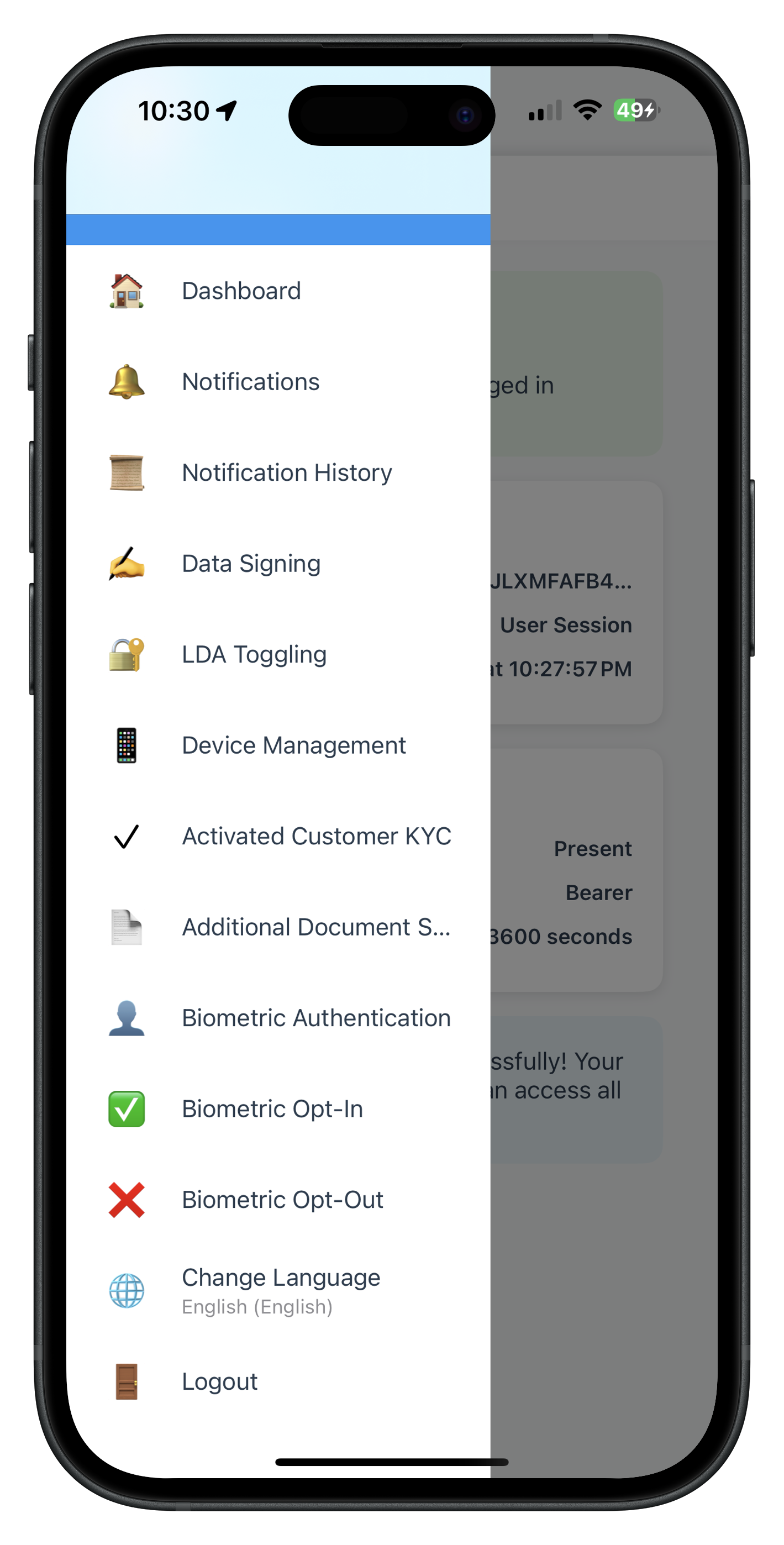
The side menu includes "✅ Biometric Opt-In" and "❌ Biometric Opt-Out" menu items for biometric template management.
After implementing the screens and navigation, let's understand what REL-ID SDK APIs are called and what delegate callbacks are handled for each flow.
Biometric Opt-In Flow
REL-ID SDK APIs Called:
checkIDVUserBiometricTemplateStatus()- When: Screen loads (viewWillAppear)
- Returns: RDNAError (synchronous check)
- Callback:
onIDVCheckUserBiometricTemplateStatus - Purpose: Check if template already exists on server
- Status Codes:
100: Template exists (button disabled)600: No template (button enabled)
initiateIDVBiometricOptIn()- When: User taps "Start Opt-In" button
- Returns: RDNAError (synchronous check)
- Purpose: Initiates opt-in flow with LDA-first authentication
- Triggers: LDA prompt OR onGetPassword callback
setIDVBiometricOptInConfirmation(status:)- When: User reviews captured frame
- Parameters:
status: RDNAIDVStatus enum.RDNA_IDV_APPROVED(0): Approve image.RDNA_IDV_RECAPTURE(1): Retake selfie.RDNA_IDV_CANCEL(2): Cancel flow
- Purpose: Sends user decision to SDK for template creation
Delegate Callbacks Handled:
The callback sequence depends on whether LDA succeeds or falls back to password:
Branch A: LDA Available & Successful
1. onGetIDVSelfieProcessStartConfirmation (idvWorkflow: .IDV_POSTLOGIN_OPTIN)
   - SDK ready to capture selfie (no password needed)
   - Close password dialog if open
   - Native selfie screen appears

2. onIDVOptInCapturedFrameConfirmation (capturedImage: String)
   - Receives captured frame (base64 image)
   - Pop selfie screen from navigation stack
   - Show captured frame modal with Approve/Recapture/Cancel

3. onIDVBiometricOptInStatus (challengeMode: 6)
   - Final template creation result
   - Status code 100 = success
   - Refresh template status
Total: 3 callbacks (GetPassword is skipped when LDA succeeds)
Branch B: LDA Cancelled OR LDA Unavailable
1. onGetPassword (challengeMode: 6, idvWorkflow: .IDV_POSTLOGIN_OPTIN)
   - SDK requests password (LDA failed/cancelled/unavailable)
   - Show PasswordValidationDialogViewController
   - Validate entered password

2. onGetIDVSelfieProcessStartConfirmation (idvWorkflow: .IDV_POSTLOGIN_OPTIN)
   - Password validated, SDK ready to capture selfie
   - Close password dialog
   - Native selfie screen appears

3. onIDVOptInCapturedFrameConfirmation (capturedImage: String)
   - Receives captured frame (base64 image)
   - Pop selfie screen from navigation stack
   - Show captured frame modal

4. onIDVBiometricOptInStatus (challengeMode: 6)
   - Final template creation result
   - Status code 100 = success
Total: 4 callbacks (includes GetPassword for fallback)
Biometric Opt-Out Flow
REL-ID SDK APIs Called:
checkIDVUserBiometricTemplateStatus()- When: Screen loads (viewWillAppear)
- Purpose: Check if template exists before allowing opt-out
- Status Codes:
100: Template exists (button enabled)600: No template (button disabled)
initiateIDVBiometricOptOut()- When: User taps "Start Opt-Out" button
- Returns: RDNAError (synchronous check)
- Purpose: Initiates opt-out flow with LDA-first authentication
- Triggers: LDA prompt OR onGetPassword callback
Delegate Callbacks Handled:
Branch A: LDA Available & Successful
1. onIDVBiometricOptOutStatus (challengeMode: 7)
   - SDK deletes template directly after LDA success
   - Status code 100 = deletion success
   - Status code 600 = no template exists
   - Refresh template status
Total: 1 callback (No password, no selfie capture)
Branch B: LDA Cancelled OR LDA Unavailable
1. onGetPassword (challengeMode: 7, idvWorkflow: .IDV_POSTLOGIN_OPTOUT)
   - SDK requests password (LDA failed/cancelled/unavailable)
   - Show PasswordValidationDialogViewController
   - Validate entered password
   - Close password dialog on success

2. onIDVBiometricOptOutStatus (challengeMode: 7)
   - SDK deletes template after password validation
   - Status code 100 = deletion success
Total: 2 callbacks (includes GetPassword for fallback)
API & Callback Comparison Table
Aspect | Opt-In Flow | Opt-Out Flow |
SDK APIs | 3 APIs | 2 APIs |
Challenge Mode | 6 | 7 |
IDV Workflow | IDV_POSTLOGIN_OPTIN (10) | IDV_POSTLOGIN_OPTOUT (11) |
Callbacks (LDA Success) | 3 callbacks | 1 callback |
Callbacks (Password Fallback) | 4 callbacks | 2 callbacks |
Selfie Capture | ✅ Required | ❌ Not required |
onGetPassword | Only if LDA fails/cancelled | Only if LDA fails/cancelled |
User Interaction | Approve/Recapture/Cancel frame | Just authentication |
Template Operation | Create new template | Delete existing template |
Button Enabled When | No template (600) | Template exists (100) |
Delegate Handler Pattern
Both view controllers follow a consistent pattern for delegate handling:
// Save original handler for chaining
private var originalGetPasswordHandler: ((...) -> Void)?

override func viewDidLoad() {
    super.viewDidLoad()
    setupEventHandlers()
}

private func setupEventHandlers() {
    // Save original handler
    originalGetPasswordHandler = RDNADelegateManager.shared.onGetPassword

    // Register new handler with challenge mode filtering
    RDNADelegateManager.shared.onGetPassword = { [weak self] userID, challengeMode, attemptsLeft, response, error in
        // Handle specific challenge mode (6 for opt-in, 7 for opt-out)
        if challengeMode == RDNAChallengeOpMode(rawValue: 6) { // or 7 for opt-out
            self?.handleGetPassword(...)
        } else {
            // Chain to original handler for other modes
            self?.originalGetPasswordHandler?(...)
        }
    }
}

deinit {
    // Restore original handler on cleanup
    RDNADelegateManager.shared.onGetPassword = originalGetPasswordHandler
}
Quick Reference: Status Codes
Template Status Check:
100: Template exists on server600: No template on server
Opt-In Result:
100: Template created successfully400: Unable to process request500: Liveness check failed- Other codes: Check error message
Opt-Out Result:
100: Template deleted successfully400: Unable to process request600: Template doesn't exist (already deleted)- Other codes: Check error message
Build and Run
- Open the workspace in Xcode:
cd relidcodelab
open relidcodelab.xcworkspace
- Select a simulator or device target
- Build and run (⌘R)
Testing Opt-In Flow
Test Case 1: Template Check on Launch
- Launch the app and navigate to Biometric Opt-In screen
- Expected: SDK checks template status automatically
- Expected: Status section shows "No template" (status code 600)
- Expected: Start Opt-In button is enabled
Test Case 2: Successful Opt-In with LDA
- Ensure LDA is enabled on device (Touch ID/Face ID configured)
- Tap "Start Opt-In" button
- Expected: Native LDA prompt appears (Touch ID/Face ID)
- Authenticate with biometric
- Expected: Password dialog does NOT appear (LDA succeeded)
- Expected: Native selfie capture screen appears
- Capture selfie
- Expected: Captured image modal appears with Approve/Recapture/Cancel
- Tap "Approve"
- Expected: Modal closes
- Expected: Success alert: "Biometric template stored successfully!"
- Expected: Template status refreshes, button becomes disabled
Test Case 3: Opt-In with LDA Cancelled (Password Fallback)
- Ensure LDA is enabled on device
- Tap "Start Opt-In" button
- Expected: Native LDA prompt appears
- Tap "Cancel" on LDA prompt
- Expected: Password dialog appears (fallback)
- Enter correct password and tap "Verify & Continue"
- Expected: Password dialog closes
- Expected: Native selfie capture screen appears
- Capture selfie and approve
- Expected: Success alert: "Biometric template stored successfully!"
Test Case 4: Opt-In with Password Validation (LDA Off)
- Ensure LDA is disabled on device
- Tap "Start Opt-In" button
- Expected: Password dialog appears immediately (no LDA prompt)
- Enter wrong password and tap "Verify & Continue"
- Expected: Error message appears in dialog
- Expected: Attempts counter decreases (2 attempts remaining)
- Enter correct password and tap "Verify & Continue"
- Expected: Password dialog closes
- Expected: Native selfie capture screen appears
- Capture selfie and approve
- Expected: Success alert
Test Case 5: Recapture Selfie
- Complete steps 1-7 from Test Case 2
- Expected: Captured image modal appears
- Tap "Recapture"
- Expected: Modal stays open (does NOT close)
- Expected: Native selfie capture screen appears again
- Capture new selfie
- Expected: Modal updates with new image
- Tap "Approve"
- Expected: Success alert
Test Case 6: Cancel Opt-In Flow
- Start opt-in process
- When captured image modal appears, tap "Cancel"
- Expected: Modal closes
- Expected: Flow aborts, no template created
- Expected: Template status still shows "No template"
Testing Opt-Out Flow
Test Case 7: Template Check Shows Existing Template
- Complete opt-in flow successfully (Test Case 2)
- Navigate to Biometric Opt-Out screen
- Expected: SDK checks template status automatically
- Expected: Status section shows "Template exists" (status code 100)
- Expected: Start Opt-Out button is enabled
Test Case 8: Successful Opt-Out with LDA
- Ensure template exists (complete opt-in first)
- Ensure LDA is enabled on device
- Tap "Start Opt-Out" button
- Expected: Native LDA prompt appears
- Authenticate with biometric
- Expected: Password dialog does NOT appear (LDA succeeded)
- Expected: NO selfie capture (direct deletion)
- Expected: Success alert: "Biometric template deleted successfully!"
- Expected: Template status refreshes, shows "No template"
- Expected: Button becomes disabled
Test Case 9: Opt-Out with Password Fallback
- Ensure template exists
- Ensure LDA is enabled on device
- Tap "Start Opt-Out" button
- Expected: Native LDA prompt appears
- Tap "Cancel" on LDA prompt
- Expected: Password dialog appears (fallback)
- Enter correct password and tap "Verify & Continue"
- Expected: Password dialog closes
- Expected: Success alert: "Biometric template deleted successfully!"
Test Case 10: Opt-Out When No Template Exists
- Ensure template does NOT exist (complete opt-out or never opt in)
- Navigate to Biometric Opt-Out screen
- Expected: Status section shows "No template" (status code 600)
- Expected: Start Opt-Out button is DISABLED
- Expected: Disabled message shown
What You've Learned
Congratulations! You've successfully implemented REL-ID IDV post-login server biometric template management with opt-in and opt-out flows on iOS.
Key Concepts Covered:
✅ Biometric Opt-In Flow
- Template status verification before opt-in
- LDA-first authentication with password fallback
- Selfie capture with liveness detection
- Captured frame confirmation with Approve/Recapture/Cancel
- Template creation on server
✅ Biometric Opt-Out Flow
- Template status verification before opt-out
- Same LDA-first authentication pattern
- Direct template deletion (no selfie)
- Simpler flow compared to opt-in
✅ Reusable Components
- PasswordValidationDialogViewController for both flows
- Attempts counter with color coding
- Error handling and loading states
✅ SDK Integration
- RDNAIDVService API methods
- RDNAIDVDelegateManager for callback handling
- Delegate handler chaining for multiple view controllers
- Proper workflow and challenge mode routing
✅ iOS-Specific Patterns
- UIViewController lifecycle management
- Modal presentation and dismissal
- Keyboard handling
- Auto Layout constraints
- Memory management with weak references
Architecture Benefits
The implementation demonstrates:
- Clean Separation: Service layer (RDNAIDVService) separated from UI (View Controllers)
- Reusability: PasswordValidationDialogViewController used by both flows
- Testability: Clear delegate protocols and service methods
- Maintainability: Comprehensive logging for debugging
- Scalability: Delegate chaining pattern supports multiple flows
Next Steps
Now that you've completed the biometric opt-in/opt-out implementation, you can:
- Explore Advanced IDV Features:
- Activated Customer KYC (post-login document + selfie)
- Additional Document Scan
- Server Biometric Authentication
- Implement Additional Security Features:
- LDA Toggling (enable/disable Local Device Authentication)
- Password Update flows
- Step-Up Authentication
- Production Considerations:
- Error handling strategies
- Offline mode support
- Analytics and monitoring
- User experience optimizations
Additional Resources
- REL-ID iOS SDK Documentation
- REL-ID Initialization Flow Codelab
- REL-ID IDV MFA Activation & Login Flow Codelab
Thank you for completing this codelab! You now have a robust implementation of biometric template management with LDA fallback support on iOS.