This codelab demonstrates how to implement the RELID Initialization flow using the RELID iOS SDK framework. The RELID SDK provides secure identity verification and session management for mobile applications.
What You'll Learn
- How to initialize the RELID SDK in an iOS application
- Closure-based callback architecture for handling initialization events
- Connection profile management and configuration
- Advanced SDK configuration with initOptions (language, permissions, telemetry)
- Error handling and user feedback implementation
What You'll Need
- Xcode 13.0 or later installed
- iOS 13.0+ deployment target
- RELID iOS SDK framework (RELID.xcframework)
- Basic understanding of Swift and UIKit
- Connection profile JSON file from your Uniken Admin or Uniken gateway manager
- Access to the sample app source code for reference
Get the Code from GitHub
The code to get started is stored in a GitHub repository.
You can clone the repository using the following command:
git clone https://github.com/uniken-public/codelab-ios.git
Navigate to the relid-initialize folder in the repository you cloned earlier
Before implementing your own RELID initialization, let's examine the sample app structure to understand the recommended architecture:
Component | Purpose | Sample App Reference |
Connection Profile | Configuration data |
|
Profile Parser | Utility to parse connection data |
|
Delegate Manager | Implements SDK callbacks protocol |
|
RELID Service | Main SDK interface |
|
App Coordinator | Navigation management |
|
View Controllers | User interface screens |
|
Recommended Directory Structure
Create the following directory structure in your iOS project:
YourApp/
├── AppDelegate.swift              # App lifecycle
├── SceneDelegate.swift            # Scene lifecycle (iOS 13+)
├── Sources/
│   ├── Uniken/
│   │   ├── CP/
│   │   │   └── agent_info.json
│   │   ├── Services/
│   │   │   ├── RDNAService.swift
│   │   │   └── RDNADelegateManager.swift
│   │   └── Utils/
│   │       ├── ConnectionProfileParser.swift
│   │       └── ProgressHelper.swift
│   └── Tutorial/
│       ├── Navigation/
│       │   └── AppCoordinator.swift
│       └── Screens/
│           ├── TutorialHomeViewController.swift
│           ├── TutorialSuccessViewController.swift
│           └── TutorialErrorViewController.swift
├── Base.lproj/
│   └── Main.storyboard            # UI interface
├── Assets.xcassets/               # Images and colors
└── sdk/
    └── RELID.xcframework/         # SDK framework
Prerequisites
Ensure you have Xcode installed:
xcode-select --version
You need Xcode 13.0 or later for Swift 5.5+ support and iOS 13.0+ deployment.
Add SDK Framework
The RELID iOS SDK is distributed as an XCFramework that supports both physical devices and simulators.
Option 1: Manual Framework Integration (Used in Sample App)
- Add the
RELID.xcframeworkto your project:- Drag and drop
RELID.xcframeworkinto your Xcode project - Select your target → General → Frameworks, Libraries, and Embedded Content
- Set embed mode to "Embed & Sign"
- Drag and drop
- Verify the framework is linked:
- Build Phases → Link Binary With Libraries should include RELID.xcframework
- Build Phases → Embed Frameworks should include RELID.xcframework
Ensure pod installed:
pod install
agent_info.json
Create your connection profile JSON file in Sources/Uniken/CP/agent_info.json:
{
  "RelIds": [
    {
      "Name": "YourRELIDAgentName",
      "RelId": "your-rel-id-string-here"
    }
  ],
  "Profiles": [
    {
      "Name": "YourRELIDAgentName",
      "Host": "your-gateway-host.com",
      "Port": "443"
    }
  ]
}
Security Considerations
- Never print RelId values to console
- Use environment-specific configuration files
- Add the JSON file to your Xcode target's "Copy Bundle Resources" build phase
Create a parser to load and validate the connection profile from your app bundle:
// Sources/Uniken/Utils/ConnectionProfileParser.swift
import Foundation

// MARK: - Data Structures

struct ConnectionProfile {
    let relId: String
    let host: String
    let port: String  // Keep as String for SDK compatibility
}

// MARK: - JSON Structures (match agent_info.json)

private struct RelId: Decodable {
    let Name: String
    let RelId: String
}

private struct Profile: Decodable {
    let Name: String
    let Host: String
    let Port: String
}

private struct AgentInfo: Decodable {
    let RelIds: [RelId]
    let Profiles: [Profile]
}

// MARK: - Connection Profile Parser

class ConnectionProfileParser {

    /// Load and parse agent_info.json from bundle
    /// - Returns: ConnectionProfile with relId, host, and port
    /// - Throws: Error if parsing fails
    static func loadFromJSON() throws -> ConnectionProfile {

        // Locate agent_info.json in bundle
        guard let url = Bundle.main.url(
            forResource: "agent_info",
            withExtension: "json",
            subdirectory: ""
        ) else {
            throw ParsingError.fileNotFound("agent_info.json not found in bundle")
        }

        // Load JSON data
        let data = try Data(contentsOf: url)

        // Decode JSON
        let decoder = JSONDecoder()
        let agentInfo = try decoder.decode(AgentInfo.self, from: data)

        // Validate structure
        guard !agentInfo.RelIds.isEmpty else {
            throw ParsingError.invalidData("No RelIds found in agent info")
        }

        guard !agentInfo.Profiles.isEmpty else {
            throw ParsingError.invalidData("No Profiles found in agent info")
        }

        // Always pick the first array objects
        let firstRelId = agentInfo.RelIds[0]

        // Find matching profile by Name (1-1 mapping)
        guard let matchingProfile = agentInfo.Profiles.first(where: { $0.Name == firstRelId.Name }) else {
            throw ParsingError.invalidData("No matching profile found for RelId name: \(firstRelId.Name)")
        }

        // Validate required fields
        if firstRelId.RelId.isEmpty {
            throw ParsingError.invalidData("Invalid RelId object - missing RelId")
        }

        if matchingProfile.Host.isEmpty || matchingProfile.Port.isEmpty {
            throw ParsingError.invalidData("Invalid Profile object - missing Host or Port")
        }

        // Return parsed profile
        return ConnectionProfile(
            relId: firstRelId.RelId,
            host: matchingProfile.Host,
            port: matchingProfile.Port
        )
    }

    // MARK: - Error Types

    enum ParsingError: Error, LocalizedError {
        case fileNotFound(String)
        case invalidData(String)

        var errorDescription: String? {
            switch self {
            case .fileNotFound(let message):
                return "File not found: \(message)"
            case .invalidData(let message):
                return "Invalid data: \(message)"
            }
        }
    }
}
Implementation Details:
- Uses
Bundle.mainfor accessing app bundle resources JSONDecoderfor parsing JSON content- Swift structs with
Decodableprotocol for type safety - Comprehensive error handling with custom error types
- Matches RelIds with Profiles by name
The delegate manager implements the SDK's callback protocol using a singleton pattern with closure-based dispatching:
// Sources/Uniken/Services/RDNADelegateManager.swift
import Foundation
import RELID

/// Singleton manager that implements the RDNACallbacks protocol
/// Handles all SDK callbacks with closure-based callback dispatching
class RDNADelegateManager: NSObject, RDNACallbacks {

    // MARK: - Singleton

    static let shared = RDNADelegateManager()

    private override init() {
        super.init()
    }

    // MARK: - Initialize Callback Closures

    /// Closure invoked during SDK initialization progress updates
    var onInitializeProgress: ((RDNAInitProgressStatus) -> Void)?

    /// Closure invoked when SDK initialization encounters an error
    var onInitializeError: ((RDNAError) -> Void)?

    /// Closure invoked when SDK initialization completes successfully
    var onInitialized: ((RDNAChallengeResponse) -> Void)?

    // MARK: - RDNACallbacks Protocol Implementation

    func onInitializeError(_ error: RDNAError) {
        DispatchQueue.main.async { [weak self] in
            self?.onInitializeError?(error)
        }
    }

    func onInitialized(_ response: RDNAChallengeResponse) {
        DispatchQueue.main.async { [weak self] in
            self?.onInitialized?(response)
        }
    }

    func onInitializeProgress(_ state: RDNAInitProgressStatus) {
        DispatchQueue.main.async { [weak self] in
            self?.onInitializeProgress?(state)
        }
    }

    // MARK: Other Protocol Methods (Stubs for future codelabs)

    func getUser(_ userNames: [String], recentlyLoggedInUser: String, response: RDNAChallengeResponse, error: RDNAError) {
       // Not used in this codelab. This may be used in a future one.
    }

    func getPassword(_ userID: String, challenge mode: RDNAChallengeOpMode, attemptsLeft: Int32, response: RDNAChallengeResponse, error: RDNAError) {
       // Not used in this codelab. This may be used in a future one.
    }

    // ... (48 more stub methods - see sample app for complete implementation)
}
Event Handling in iOS:
- SDK events are exposed via the
RDNACallbacksprotocol - Delegate manager implements protocol and dispatches to closures
- All callbacks are dispatched on the main thread for UI updates
- Closures use
weak selfto avoid retain cycles - Singleton pattern ensures consistent event management
Key callback methods:
- onInitializeProgress: Tracks initialization progress through various stages
- onInitializeError: Reports initialization errors with specific error codes
- onInitialized: Confirms successful initialization with session data
The RELID service provides the main interface for SDK operations:
// Sources/Uniken/Services/RDNAService.swift
import Foundation
import RELID

/// RDNAService - Simple wrapper for RELID SDK
/// Focus: SDK integration teaching
class RDNAService {

    // MARK: - Singleton

    static let shared = RDNAService()

    private let rdna = RDNA.sharedInstance()

    private init() {}

    // MARK: - SDK Methods

    /// Get SDK Version
    /// - Returns: SDK version string (e.g., "25.06.03")
    func getSDKVersion() -> String {
        return RDNA.getSDKVersion()
    }

    /// Initialize SDK with advanced configuration options (on background thread)
    /// Loads connection profile automatically from agent_info.json
    /// - Parameters:
    ///   - cipherSpec: Cipher specification (default: "")
    ///   - cipherSalt: Cipher salt (default: "")
    ///   - loggingLevel: SDK logging level (default: .NO_LOGS)
    ///   - initOptions: Optional configuration for language, permissions, and telemetry.
    ///                  If not provided, uses default values suitable for most applications
    ///   - completion: Completion handler called on main thread with RDNAError
    ///
    /// Example usage:
    /// ```swift
    /// // Basic initialization (uses defaults)
    /// RDNAService.shared.initialize { error in
    ///     // handle result
    /// }
    ///
    /// // Advanced initialization with custom configuration
    /// let initOptions = RDNAInitOptions()
    ///
    /// // Language configuration
    /// let langOptions = RDNAinternationalizationOptions()
    /// langOptions.localeCode = "ar"           // ISO 639-1 code: 'en', 'ar', 'es', etc.
    /// langOptions.localeName = "Arabic"       // Display name for the locale
    /// langOptions.languageDirection = .LOCALE_RTL  // RTL for Arabic
    /// initOptions.internationalizationOptions = langOptions
    ///
    /// // Permission configuration
    /// let permOptions = RDNAPermissionOptions()
    /// permOptions.isLocationPermissionRequired = true    // Request location permission
    /// permOptions.isLocationPermissionMandatory = false  // SDK can work without it
    /// initOptions.permissionOptions = permOptions
    ///
    /// // OpenTelemetry configuration
    /// let otelConfig = RDNAOtelConfig()
    /// otelConfig.otelHTTPEndpointURL = ""      // Empty = disabled
    /// otelConfig.enableEncoding = ""
    /// otelConfig.disableTrace = 1              // 1 = disabled, 0 = enabled
    /// otelConfig.otelTraceFlushTimeout = 0
    /// initOptions.otelConfig = otelConfig
    ///
    /// RDNAService.shared.initialize(initOptions: initOptions) { error in
    ///     // handle result
    /// }
    /// ```
    func initialize(
        cipherSpec: String = "",
        cipherSalt: String = "",
        loggingLevel: RDNALoggingLevel = .NO_LOGS,
        initOptions: RDNAInitOptions? = nil,
        completion: @escaping (RDNAError) -> Void
    ) {
        // Run SDK initialization on background thread to avoid blocking UI
        DispatchQueue.global(qos: .userInitiated).async { [weak self] in
            guard let self = self else { return }

            // Load connection profile from agent_info.json
            let profile: ConnectionProfile
            do {
                profile = try ConnectionProfileParser.loadFromJSON()
                print("RDNAService - Connection profile loaded successfully")
                print("RelId: \(profile.relId)")
                print("Host: \(profile.host)")
                print("Port: \(profile.port)")
            } catch {
                // Connection profile parsing failed
                let rdnaError = RDNAError()
                rdnaError.longErrorCode = -1
                rdnaError.errorCode = .ERR_INVALID_AGENT_INFO
                rdnaError.errorString = "Failed to load connection profile: \(error.localizedDescription)"

                // Return error on main thread
                DispatchQueue.main.async {
                    completion(rdnaError)
                }
                return
            }

            // Port conversion: String → UInt16
            guard let portNumber = UInt16(profile.port) else {
                let rdnaError = RDNAError()
                rdnaError.longErrorCode = -1
                rdnaError.errorCode = .ERR_INVALID_PORTNUM
                rdnaError.errorString = "Invalid port number: \(profile.port)"

                // Return error on main thread
                DispatchQueue.main.async {
                    completion(rdnaError)
                }
                return
            }

            // If no initOptions provided, create empty object with SDK defaults
            // SDK will internally set default values:
            // - Language: Empty (SDK defaults to 'en'), LTR direction
            // - Permissions: Location required but not mandatory
            // - Telemetry: Disabled (disableTrace: 1)
            let finalInitOptions: RDNAInitOptions
            if let providedOptions = initOptions {
                finalInitOptions = providedOptions
                print("RDNAService - Using provided initOptions")
            } else {
                // Create empty initOptions - SDK sets defaults internally
                finalInitOptions = RDNAInitOptions()
                print("RDNAService - Using default initOptions (SDK defaults)")
            }

            print("RDNAService - Starting initialization with initOptions")

            // Call SDK initialize with initOptions parameter
            let error = self.rdna.initialize(
                profile.relId,
                callbacks: RDNADelegateManager.shared,
                gatewayHost: profile.host,
                gatewayPort: portNumber,
                cipherSpec: cipherSpec,
                cipherSalt: cipherSalt,
                proxySettings: nil,
                rdnasslCertificate: nil,
                dnsServerList: nil,
                rdnaLoggingLevel: Int32(loggingLevel.rawValue),
                appContext: self,
                rdnaInitOptions: finalInitOptions
            )

            // Return result on main thread
            DispatchQueue.main.async {
                completion(error)
            }
        }
    }
}
Important Implementation Details
Background Thread Execution:
- SDK initialize operations are blocking, so we run them on a background queue
DispatchQueue.global(qos: .userInitiated)provides appropriate priority- Results are always returned on the main thread for UI updates
The
initialize()
call requires specific parameters:
Parameter | Purpose | Example |
| RelId | From connection profile Ex. |
| Callback protocol |
|
| Server hostname | From connection profile Ex. |
| Server port | From connection profile Ex. |
| Logging setting |
|
| SDK configuration (optional) | RDNAInitOptions object with language, permissions, and telemetry settings |
The RELID SDK supports advanced configuration through the initOptions parameter. This allows you to customize language settings, permission requirements, and telemetry options based on your application's needs.
RDNAInitOptions Class Structure
The iOS SDK uses native Objective-C classes that are bridged to Swift. The RDNAInitOptions class is defined in the RELID framework:
// RELID.xcframework/.../Headers/RDNAStruct.h (Swift bridged types)

class RDNAInitOptions {
    var internationalizationOptions: RDNAinternationalizationOptions?
    var permissionOptions: RDNAPermissionOptions?
    var otelConfig: RDNAOtelConfig?
}

class RDNAinternationalizationOptions {
    var localeCode: String         // ISO 639-1 language code (e.g., 'en', 'ar', 'es')
    var localeName: String          // Display name for the locale
    var languageDirection: RDNALanguageDirection  // Enum: .LOCALE_LTR or .LOCALE_RTL
}

class RDNAPermissionOptions {
    var isLocationPermissionRequired: Bool    // Whether location permission is needed
    var isLocationPermissionMandatory: Bool   // If true, SDK fails without permission
}

class RDNAOtelConfig {
    var otelHTTPEndpointURL: String      // OpenTelemetry HTTP endpoint URL
    var enableEncoding: String            // Encoding format for OTel data
    var disableTrace: Int                 // 0 = enable tracing, 1 = disable tracing
    var otelTraceFlushTimeout: Int        // Timeout in milliseconds for flushing traces
}

enum RDNALanguageDirection: Int {
    case LOCALE_LTR = 0  // Left-to-Right
    case LOCALE_RTL = 1  // Right-to-Left
}
Language Options Configuration
Language options control the SDK's display language and text direction (LTR/RTL):
// Example: Arabic (RTL) configuration
let language = "ar"  // Get from your localization system
let languageDirection: RDNALanguageDirection = ["ar", "he", "fa", "ur"].contains(language) ? .LOCALE_RTL : .LOCALE_LTR

let initOptions = RDNAInitOptions()

let langOptions = RDNAinternationalizationOptions()
langOptions.localeCode = language        // ISO 639-1 code: 'ar' for Arabic
langOptions.localeName = "Arabic"         // Display name
langOptions.languageDirection = .LOCALE_RTL  // RTL direction
initOptions.internationalizationOptions = langOptions
RTL Languages: Arabic (ar), Hebrew (he), Persian (fa), Urdu (ur) LTR Languages: All others (default)
Common Use Cases:
- Multi-language applications with i18n support
- Apps targeting specific regions (Middle East, Asia, etc.)
- Dynamic language switching based on user preferences
Permission Options Configuration
Permission options define whether the SDK requires location access and if it's mandatory:
let initOptions = RDNAInitOptions()

let permOptions = RDNAPermissionOptions()
permOptions.isLocationPermissionRequired = true   // Request location permission
permOptions.isLocationPermissionMandatory = false  // SDK works without it (limited functionality)
initOptions.permissionOptions = permOptions
Configuration Scenarios:
Scenario | Required | Mandatory | Behavior |
Location-based features |
|
| SDK requests permission but works without it |
Location required for compliance |
|
| SDK initialization fails without permission |
No location needed |
|
| SDK doesn't request location permission |
Use Cases:
- Fraud Detection: Location helps identify suspicious activity patterns (new device activation)
- Risk Analysis: Geographic data enhances security risk assessment
- Compliance: Some regulations require location tracking for transactions
OpenTelemetry (OTel) Configuration
OpenTelemetry configuration enables enterprise-level monitoring and distributed tracing:
let initOptions = RDNAInitOptions()

let otelConfig = RDNAOtelConfig()
otelConfig.otelHTTPEndpointURL = "https://your-otel-collector.example.com"  // Your OTel endpoint
otelConfig.enableEncoding = ""           // Encoding format (empty for default)
otelConfig.disableTrace = 0              // 0 = enabled, 1 = disabled
otelConfig.otelTraceFlushTimeout = 0      // Flush timeout in milliseconds (0 = default)
initOptions.otelConfig = otelConfig
Default Configuration (Recommended for Most Apps):
let otelConfig = RDNAOtelConfig()
otelConfig.otelHTTPEndpointURL = ""  // Empty = telemetry disabled
otelConfig.enableEncoding = ""
otelConfig.disableTrace = 1          // Tracing disabled
otelConfig.otelTraceFlushTimeout = 0
Use Cases:
- Enterprise applications with centralized monitoring
- Organizations using OpenTelemetry for observability
- Production apps requiring performance tracking and debugging
Complete Configuration Example
Here's a complete example showing all three configuration areas:
// Example: Arabic banking app with location and telemetry
let language = "ar"
let languageDirection: RDNALanguageDirection = .LOCALE_RTL

let requireLocationPermission = true
let locationIsMandatory = false

let enableTelemetry = true

// Build the initOptions configuration object
let initOptions = RDNAInitOptions()

// Language configuration
let langOptions = RDNAinternationalizationOptions()
langOptions.localeCode = language
langOptions.localeName = "Arabic"
langOptions.languageDirection = languageDirection
initOptions.internationalizationOptions = langOptions

// Permission configuration
let permOptions = RDNAPermissionOptions()
permOptions.isLocationPermissionRequired = requireLocationPermission
permOptions.isLocationPermissionMandatory = locationIsMandatory
initOptions.permissionOptions = permOptions

// OpenTelemetry configuration
let otelConfig = RDNAOtelConfig()
otelConfig.otelHTTPEndpointURL = enableTelemetry ? "https://telemetry.yourbank.com" : ""
otelConfig.enableEncoding = ""
otelConfig.disableTrace = enableTelemetry ? 0 : 1
otelConfig.otelTraceFlushTimeout = 5000
initOptions.otelConfig = otelConfig

// Call initialize with custom configuration
RDNAService.shared.initialize(initOptions: initOptions) { error in
    if error.longErrorCode != 0 {
        print("Initialization failed: \(error.errorString)")
    } else {
        print("SDK initialized successfully with custom configuration")
    }
}
Backward Compatibility
The initOptions parameter is optional. Existing code without initOptions continues to work with default values:
// Works with default configuration
RDNAService.shared.initialize { error in
    // handle result
}

// Works with custom configuration
RDNAService.shared.initialize(initOptions: initOptions) { error in
    // handle result
}
How iOS SDKs Work
iOS SDKs are distributed as frameworks that link with your application.
SDK Structure:
- Framework: Pre-compiled code packaged as .framework or .xcframework
- Public API: Swift/Objective-C interfaces you use in your code
- Native Implementation: Compiled binary code (Swift/Objective-C/C++)
Using the RELID iOS SDK
import RELID

// Get SDK instance (singleton)
let rdna = RDNA.sharedInstance()

// Configure via service wrapper
let rdnaService = RDNAService.shared

// Initialize SDK
rdnaService.initialize { error in
    if error.longErrorCode != 0 {
        print("Initialization failed: \(error.errorString)")
    } else {
        print("SDK initialized successfully")
    }
}
iOS Initialization Flow
User Taps Initialize Button
    ↓
RDNAService.initialize() [Main Thread]
    ↓
DispatchQueue.global() [Background Thread]
    ↓
ConnectionProfileParser.loadFromJSON()
    ↓
RDNA.sharedInstance().initialize() [SDK Call]
    ↓
RDNADelegateManager callbacks [Protocol Methods]
    ├─ onInitializeProgress → UI updates
    ├─ onInitializeError → Error screen
    └─ onInitialized → Success screen
    ↓
DispatchQueue.main [Main Thread]
    ↓
UI Updates & Navigation
Create a view controller that handles user interaction and displays progress:
// Sources/Tutorial/Screens/TutorialHomeViewController.swift
import UIKit
import RELID

/// TutorialHomeViewController - Main screen for SDK initialization
class TutorialHomeViewController: UIViewController {

    // MARK: - IBOutlets

    @IBOutlet weak var sdkVersionLabel: UILabel!
    @IBOutlet weak var initializeButton: UIButton!
    @IBOutlet weak var activityIndicator: UIActivityIndicatorView!
    @IBOutlet weak var progressContainerView: UIView!
    @IBOutlet weak var progressLabel: UILabel!

    // MARK: - Properties (View Controller State)

    private var sdkVersion: String = "Loading..." {
        didSet {
            sdkVersionLabel?.text = sdkVersion
        }
    }

    private var isInitializing: Bool = false {
        didSet {
            updateUI()
        }
    }

    private var progressMessage: String = "" {
        didSet {
            progressLabel?.text = progressMessage.isEmpty ? "RDNA initialization in progress..." : progressMessage
        }
    }

    // MARK: - Lifecycle

    override func viewDidLoad() {
        super.viewDidLoad()
        setupUI()
        loadSDKVersion()
        setupCallbackHandlers()
    }

    // MARK: - Setup

    private func setupUI() {
        view.backgroundColor = UIColor(hex: "#f8fafc")

        // Progress container initially hidden
        progressContainerView?.isHidden = true
        progressContainerView?.backgroundColor = UIColor(hex: "#eff6ff")
        progressContainerView?.layer.cornerRadius = 8
        progressContainerView?.layer.borderWidth = 4
        progressContainerView?.layer.borderColor = UIColor(hex: "#2563eb")?.cgColor

        // Initialize button styling
        initializeButton?.backgroundColor = UIColor(hex: "#16a34a")
        initializeButton?.layer.cornerRadius = 8

        // Activity indicator
        activityIndicator?.hidesWhenStopped = true
    }

    private func setupCallbackHandlers() {
        // onInitializeProgress
        RDNADelegateManager.shared.onInitializeProgress = { [weak self] status in
            let message = ProgressHelper.getProgressMessage(from: status)
            self?.progressMessage = message
        }

        // onInitializeError
        RDNADelegateManager.shared.onInitializeError = { [weak self] error in
            print("TutorialHomeViewController - Received initialize error: \(error.errorString)")

            // Update UI
            self?.isInitializing = false
            self?.progressMessage = ""

            // Navigate to error screen
            self?.navigateToErrorScreen(
                shortErrorCode: Int(error.errorCode.rawValue),
                longErrorCode: Int(error.longErrorCode),
                errorString: error.errorString
            )
        }
    }

    private func loadSDKVersion() {
        sdkVersion = RDNAService.shared.getSDKVersion()
    }

    private func updateUI() {
        // Update button and progress visibility based on isInitializing
        if isInitializing {
            initializeButton?.isEnabled = false
            initializeButton?.backgroundColor = UIColor(hex: "#9ca3af")
            activityIndicator?.startAnimating()
            progressContainerView?.isHidden = false
        } else {
            initializeButton?.isEnabled = true
            initializeButton?.backgroundColor = UIColor(hex: "#16a34a")
            activityIndicator?.stopAnimating()
            progressContainerView?.isHidden = true
        }
    }

    // MARK: - Actions

    @IBAction func initializeButtonTapped(_ sender: UIButton) {
        handleInitializePress()
    }

    // MARK: - Business Logic

    private func handleInitializePress() {
        if isInitializing { return }

        isInitializing = true
        progressMessage = "Starting RDNA initialization..."

        print("TutorialHomeViewController - User clicked Initialize - Starting RDNA...")

        // ========================================
        // CONFIGURE SDK INITIALIZATION OPTIONS
        // ========================================
        // Customers: Customize this section based on your application requirements
        // If you don't provide initOptions, the SDK will use default values

        // OPTION 1: Use default configuration (recommended for most apps)
        // Simply call: RDNAService.shared.initialize { error in ... }
        // This uses: localeCode='', languageDirection=LTR, location required but not mandatory, telemetry disabled

        // OPTION 2: Customize configuration for your app needs
        // Example scenarios:

        // Scenario A: Arabic/RTL language support
        // let language = "ar"  // Get from your i18n system (e.g., NSLocalizedString, UserDefaults, Locale.current)
        // let languageDirection: RDNALanguageDirection = ["ar", "he", "fa", "ur"].contains(language) ? .LOCALE_RTL : .LOCALE_LTR

        // Scenario B: English/LTR language support (default)
        let language = "en"  // TODO: Replace with dynamic language from your app's localization system
        let languageDirection: RDNALanguageDirection = .LOCALE_LTR  // 0 = .LOCALE_LTR (Left-to-Right), 1 = .LOCALE_RTL (Right-to-Left)

        // Scenario C: Location permission configuration
        // Set based on your app's requirements for location-based risk analysis
        let requireLocationPermission = true   // Does your app need location for fraud detection?
        let locationIsMandatory = false        // If false, SDK works with limited functionality without location

        // Scenario D: OpenTelemetry (OTel) configuration
        // Enable only if your organization uses OpenTelemetry for distributed tracing
        let enableTelemetry = false  // Set to true for enterprise monitoring and observability

        // Build the initOptions configuration object
        let initOptions = RDNAInitOptions()

        // Language configuration
        let langOptions = RDNAinternationalizationOptions()
        langOptions.localeCode = language               // ISO 639-1 code: 'en', 'ar', 'es', 'fr', etc. (empty string defaults to 'en')
        langOptions.localeName = language               // Display name for the locale
        langOptions.languageDirection = languageDirection  // LTR or RTL
        initOptions.internationalizationOptions = langOptions

        // Permission configuration
        let permOptions = RDNAPermissionOptions()
        permOptions.isLocationPermissionRequired = requireLocationPermission
        permOptions.isLocationPermissionMandatory = locationIsMandatory
        initOptions.permissionOptions = permOptions

        // OpenTelemetry configuration
        let otelConfig = RDNAOtelConfig()
        otelConfig.otelHTTPEndpointURL = enableTelemetry ? "https://your-otel-collector.example.com" : ""
        otelConfig.enableEncoding = ""
        otelConfig.disableTrace = enableTelemetry ? 0 : 1  // 0 = enabled, 1 = disabled
        otelConfig.otelTraceFlushTimeout = 0
        initOptions.otelConfig = otelConfig

        print("TutorialHomeViewController - Initializing with custom options")
        print("Language: \(language), Direction: \(languageDirection.rawValue)")
        print("Location Required: \(requireLocationPermission), Mandatory: \(locationIsMandatory)")

        // Call RDNAService.initialize() with custom configuration
        // Pass initOptions to customize SDK behavior
        // Or call without parameters: RDNAService.shared.initialize { ... } to use defaults
        // Connection profile is loaded automatically inside RDNAService
        // Completion handler is called on main thread automatically
        RDNAService.shared.initialize(initOptions: initOptions) { [weak self] error in
            // This completion is already on main thread (handled by RDNAService)

            // Check error response
            if error.longErrorCode != 0 {
                print("TutorialHomeViewController - RDNA initialization failed")
                print("Error: \(error.errorString), Long: \(error.longErrorCode), Short: \(error.errorCode.rawValue)")

                self?.isInitializing = false
                self?.progressMessage = ""

                // Show alert for specific error codes
                self?.showAlert(
                    title: "Initialization Failed",
                    message: "\(error.errorString)\n\nError Codes:\nLong: \(error.longErrorCode)\nShort: \(error.errorCode.rawValue)"
                )
            } else {
                print("TutorialHomeViewController - RDNA initialization started successfully")
                // Success callback will be handled via RDNADelegateManager.onInitialized
                // (registered in AppCoordinator)
            }
        }
    }

    // MARK: - Navigation

    private func navigateToErrorScreen(shortErrorCode: Int, longErrorCode: Int, errorString: String) {
        AppCoordinator.shared.showTutorialError(
            shortErrorCode: shortErrorCode,
            longErrorCode: longErrorCode,
            errorString: errorString
        )
    }

    // MARK: - Helper Methods

    private func showAlert(title: String, message: String) {
        let alert = UIAlertController(title: title, message: message, preferredStyle: .alert)
        alert.addAction(UIAlertAction(title: "OK", style: .default))
        present(alert, animated: true)
    }

    // MARK: - Deinit (cleanup)

    deinit {
        // Cleanup event handlers
        RDNADelegateManager.shared.onInitializeProgress = nil
        RDNADelegateManager.shared.onInitializeError = nil
    }
}

// MARK: - UIColor Extension (for hex colors)

extension UIColor {
    convenience init?(hex: String) {
        var hexSanitized = hex.trimmingCharacters(in: .whitespacesAndNewlines)
        hexSanitized = hexSanitized.replacingOccurrences(of: "#", with: "")

        var rgb: UInt64 = 0
        guard Scanner(string: hexSanitized).scanHexInt64(&rgb) else { return nil }

        let r = CGFloat((rgb & 0xFF0000) >> 16) / 255.0
        let g = CGFloat((rgb & 0x00FF00) >> 8) / 255.0
        let b = CGFloat(rgb & 0x0000FF) / 255.0

        self.init(red: r, green: g, blue: b, alpha: 1.0)
    }
}
Key Implementation Features
iOS UIKit Architecture:
iOS applications use a view controller-based architecture:
- UIViewController manages a screen's view hierarchy
- View lifecycle handled via
viewDidLoad(),viewWillAppear(),viewDidDisappear() - State management via properties with
didSetobservers - UI updates must occur on main thread
- Navigation via
UINavigationControlleror coordinator pattern - Events handled via closures and delegation
- Memory management via ARC (Automatic Reference Counting)
Completion Handler Pattern:
- Uses closures for clean asynchronous handling
- Matches modern iOS async patterns
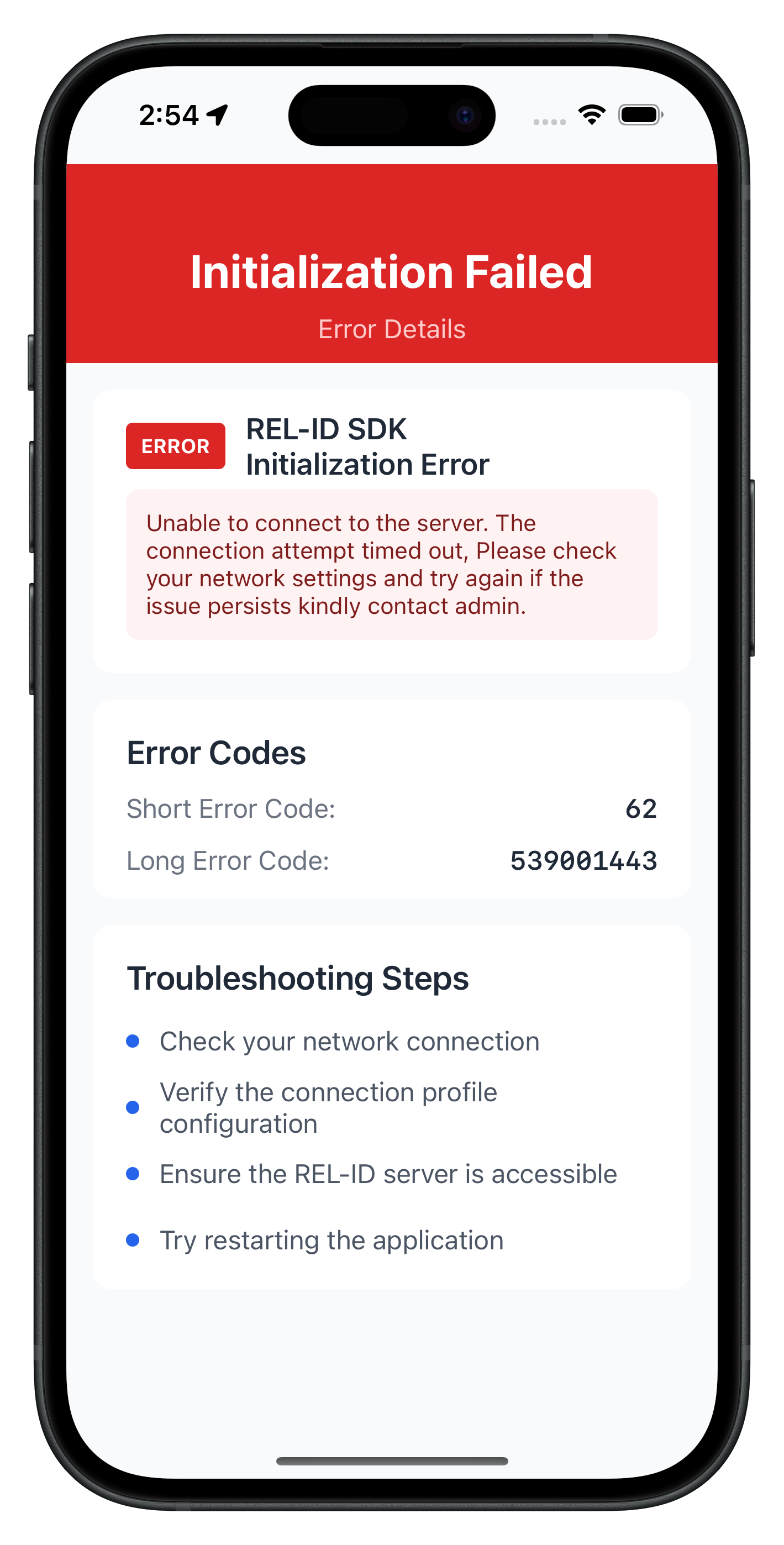
Error Handling:
- Checks
error.longErrorCodeto determine success/failure - Shows user-friendly error messages with specific error codes using
UIAlertController
Progress Tracking:
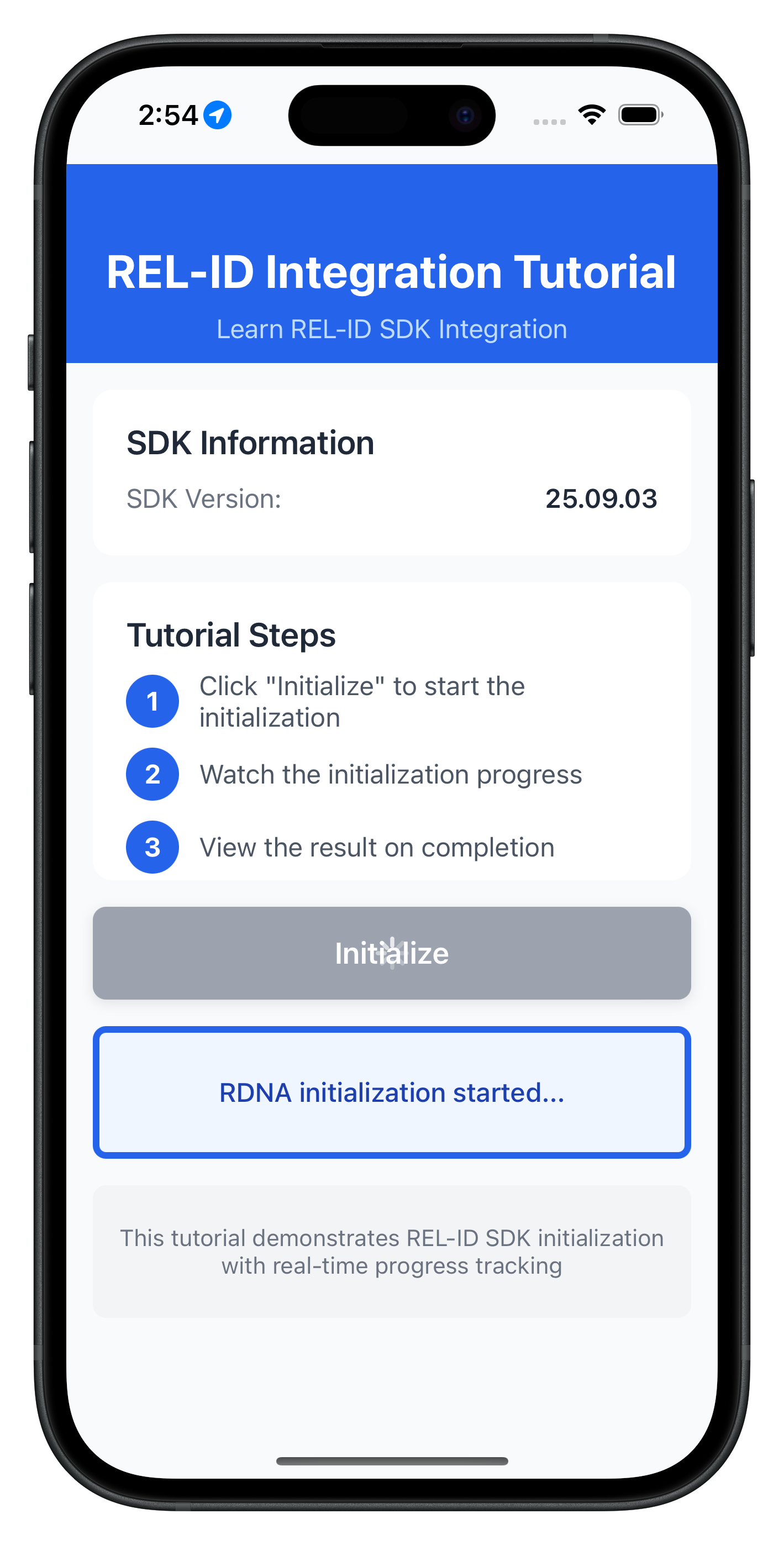
- Real-time progress updates during initialization stages:
- System threat check status
- App threat check status
- Network threat check status
- Overall initialization status
Callback-Driven Architecture:
- Progress updates delivered through the delegate manager system
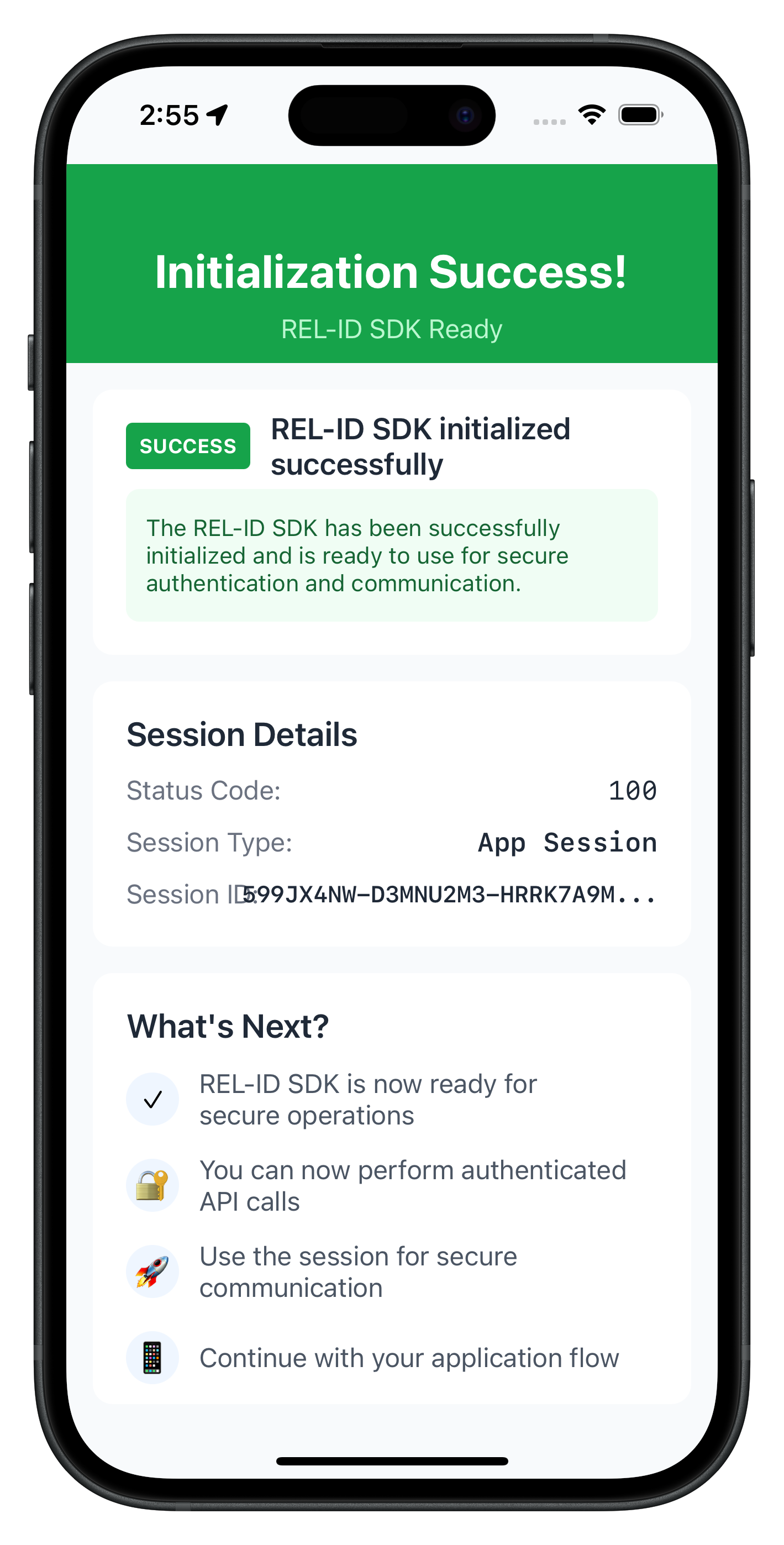
- Success navigation handled by coordinator's onInitialized handler
The following images showcase screens from the sample application:
|
|
|
Build and Run
Using Xcode:
- Open
.xcworkspace(if using CocoaPods) or.xcodeproj - Select target device or simulator
- Press Cmd+R to build and run
Using command line:
# Build
xcodebuild -workspace YourApp.xcworkspace -scheme YourApp -sdk iphonesimulator

# Run on simulator
xcodebuild -workspace YourApp.xcworkspace -scheme YourApp -sdk iphonesimulator -destination 'platform=iOS Simulator,name=iPhone 14'
Debugging
Xcode Debugger: Use breakpoints, LLDB, and View Debugger
Console Output: Use print() or os_log for logging
Instruments: Profile memory, CPU, and network usage
Key Test Scenarios
- Successful Initialization: Verify the complete flow works end-to-end
- Network Errors: Test with invalid host/port configurations
- Invalid Credentials: Test with incorrect RelId values
- Progress Tracking: Verify progress events are properly displayed
- Default Configuration: Test initialization without initOptions parameter
- Custom Language: Test with RTL languages (Arabic, Hebrew, etc.)
- Location Permissions: Test with mandatory and non-mandatory location settings
Verification Steps
Test your implementation with these APIs:
// Test SDK version retrieval
let version = RDNAService.shared.getSDKVersion()
print("SDK Version: \(version)")

// Test basic initialization (with default values)
RDNAService.shared.initialize { error in
    if error.longErrorCode != 0 {
        print("Initialization failed: \(error.errorString)")
    } else {
        print("Initialization successful")
    }
}

// Test initialization with custom initOptions
let initOptions = RDNAInitOptions()

let langOptions = RDNAinternationalizationOptions()
langOptions.localeCode = "ar"
langOptions.localeName = "Arabic"
langOptions.languageDirection = .LOCALE_RTL
initOptions.internationalizationOptions = langOptions

let permOptions = RDNAPermissionOptions()
permOptions.isLocationPermissionRequired = true
permOptions.isLocationPermissionMandatory = false
initOptions.permissionOptions = permOptions

let otelConfig = RDNAOtelConfig()
otelConfig.otelHTTPEndpointURL = ""
otelConfig.enableEncoding = ""
otelConfig.disableTrace = 1
otelConfig.otelTraceFlushTimeout = 0
initOptions.otelConfig = otelConfig

RDNAService.shared.initialize(initOptions: initOptions) { error in
    if error.longErrorCode != 0 {
        print("Custom initialization failed: \(error.errorString)")
    } else {
        print("Custom initialization successful")
    }
}
The sample app includes comprehensive testing patterns in the tutorial screens:
- SDK version verification before initialization
- Progress message formatting and display
- Error handling with user-friendly messages
- Navigation between success and error states
Connection Profile Issues
Error: "No RelIds found in agent info" Solution: Verify your JSON structure matches the sample in Sources/Uniken/CP/agent_info.json
Error: "No matching profile found for RelId name" Solution: Ensure the Name field in RelIds matches the Name field in Profiles
Network Connectivity
Error: Network connection failures Solution: Check host/port values and network accessibility
Error: REL-ID connection issues Solution: Verify the REL-ID server setup and running
SDK Initialization
Error Code 88: SDK already initialized Solution: Terminate the SDK before re-initializing
Error Code 288: SDK detected dynamic attack performed on the app Solution: Terminate the app
Error Code 179: Initialization in progress Solution: Wait for current initialization to complete before retrying
iOS-Specific Issues
"No such module ‘RELID'"
- Framework not properly linked
- Solution: Clean build folder (Cmd+Shift+K), rebuild, or check framework embedding
"Resource not found in bundle"
- Resource not included in target
- Solution: Select file in Xcode, check "Target Membership" in File Inspector
"dyld: Library not loaded"
- Framework not properly embedded
- Solution: Check "Embed Frameworks" in target's build phases
Code signing errors
- Provisioning profile or certificate issues
- Solution: Check Signing & Capabilities in Xcode project settings
Security Considerations
- Use
RDNALoggingLevel.NO_LOGSin production - Never log full RelId values (use partial logging:
relId.prefix(10) + "...") - Store session data securely using Keychain (use Security framework)
- Validate all connection profile data before use
- Enable appropriate app protection: Code signing, entitlements
Memory Management
- Use
weak selfin closures to avoid retain cycles - Clean up observers and delegates in
deinit - Avoid strong reference cycles with delegates (use weak)
// Good: Weak self in closure
RDNADelegateManager.shared.onInitializeProgress = { [weak self] status in
    self?.progressMessage = ProgressHelper.getProgressMessage(from: status)
}

// Good: Cleanup in deinit
deinit {
    RDNADelegateManager.shared.onInitializeProgress = nil
    RDNADelegateManager.shared.onInitializeError = nil
}
Threading
- Always update UI on main thread:
DispatchQueue.main.async { } - Use background queues for heavy operations
- SDK initialize operations are blocking - always run on background thread
// Good: Background thread for SDK operations
DispatchQueue.global(qos: .userInitiated).async {
    let error = rdna.initialize(...)

    // Return to main thread for UI updates
    DispatchQueue.main.async {
        completion(error)
    }
}
Performance
- Lazy load resources and view controllers
- Profile with Instruments regularly
- Cache expensive computations
App Lifecycle
- Save state in
applicationDidEnterBackground - Pause SDK operations when app is backgrounded
- Resume operations in
applicationWillEnterForeground
Congratulations! You've successfully implemented RELID SDK initialization in iOS with:
- ✅ iOS SDK framework integration
- ✅ Bundle resource loading with
Bundle.main - ✅ Closure-based callback architecture
- ✅ Advanced SDK configuration with initOptions (language, permissions, telemetry)
- ✅ UIKit view controller patterns
- ✅ Error handling and debugging
- ✅ Comprehensive testing and troubleshooting
Key iOS Patterns Learned
- Async operations with completion handlers and background threads
- Closures for event handling with proper memory management
- UIViewController lifecycle management (
viewDidLoad,deinit) - Protocol implementation (RDNACallbacks)
- Resource management with Bundle.main
- Main thread UI updates with DispatchQueue
- Singleton pattern for services
Next Steps
- Explore the sample app's MTD (Mobile Threat Detection) implementation