🎯 Learning Path:
- Complete REL-ID Initialization Flow Codelab
- Complete REL-ID Complete Activation & Login Flow Codelab
- You are here → Identity Verification MFA Activation Flow Implementation
Welcome to the REL-ID Identity Verification MFA Activation Flow codelab! This tutorial teaches you how to implement comprehensive identity verification during the user activation process using document scanning, facial recognition, and biometric authentication.
What You'll Build
In this codelab, you'll enhance your existing REL-ID MFA activation flow with integrated identity verification:
- 📱 Enhanced Activation Flow: Seamless IDV integration within MFA activation
- 📄 Document Scan Process: Automated document verification during user onboarding
- 📸 Document Details Confirmation: Interactive review of OCR-extracted identity information
- 🤳 Selfie Capture Process: Live selfie capture with liveness detection
- ✅ Selfie Biometric Verification: Face matching between document and live selfie
- 🔐 Biometric Consent Management: User consent for biometric template storage
- 🔑 Password Setup: Secure password creation after IDV completion
- 📊 Complete Event-Driven Architecture: Event handlers for all IDV workflows
Key Difference: IDV During Activation vs MFA Activation
This codelab demonstrates IDV integrated within MFA activation, where identity verification occurs immediately after the activation code and before password setup:
Standard MFA Activation Flow:
Activation Code → Password Setup → Dashboard

IDV MFA Activation Flow (This Codelab):
Activation Code → IDV (Document → Selfie → Consent) → Password Setup → Dashboard
What You'll Learn
- ✅ How to integrate IDV within MFA activation workflow
- ✅ Implementing REL-ID IDV APIs with proper event handling
- ✅ Document scanning and OCR data validation during onboarding
- ✅ Selfie capture with liveness detection and face matching
- ✅ Handling biometric consent and template storage
- ✅ Managing IDV workflow states and challenge modes
- ✅ Error handling and retry logic for IDV operations
- ✅ Completing activation flow after successful IDV verification
Prerequisites
- Completion of REL-ID Initialization codelab
- Completion of REL-ID MFA Activation & Login codelab
- Basic understanding of React Native and TypeScript
- REL-ID SDK integration credentials
- Document scanning license (Regula)
- Test identity documents for scanning
Technology Stack
- React Native: 0.80.1
- TypeScript: 5.0.4
- REL-ID SDK: react-native-rdna-client (Latest)
- Regula Document Reader: For document scanning and OCR
- Navigation: React Navigation 6.x
IDV MFA Activation Flow Diagram
Understanding the complete flow is crucial before implementation:
1. SDK Initialization
   ↓ (rdnaService.initialize)

2. User Registration
   ↓ (CheckUserScreen → getUser event)

3. Activation Code Verification
   ↓ (ActivationCodeScreen → activation code validated)

4. 📄 IDV Document Scan Process
   ├─ getIDVDocumentScanProcessStartConfirmation event
   │  • challengeMode: 8 (activation)
   │  • idvWorkflow: 0 (RDNAIDVWorkflowActivation)
   ├─ setIDVDocumentScanProcessStartConfirmation(true, 0)
   ├─ Native Document Capture (Regula SDK)
   ├─ getIDVConfirmDocumentDetails event
   │  • challengeMode: 8
   │  • response_data: OCR-extracted document fields
   └─ setIDVConfirmDocumentDetails(true, challengeMode)
   ↓

5. 🤳 IDV Selfie Capture Process
   ├─ getIDVSelfieProcessStartConfirmation event
   │  • idvWorkflow: 0 (RDNAIDVWorkflowActivation)
   ├─ setIDVSelfieProcessStartConfirmation(true, false, 0)
   ├─ Native Selfie Capture (Liveness Detection)
   ├─ getIDVSelfieConfirmation event
   │  • challengeMode: 8
   │  • response_data: Biometric match results
   └─ setIDVSelfieConfirmation("true", challengeMode)
   ↓

6. 🔐 IDV Biometric Consent
   ├─ getIDVBiometricOptInConsent event
   │  • challengeMode: 8
   └─ setIDVBiometricOptInConsent(true, challengeMode)
   ↓

7. 🔑 Password Setup
   ↓ (SetPasswordScreen → getPassword event)

8. ✅ onUserLoggedIn Event
   ↓

9. Dashboard Navigation
IDV Workflow and Challenge Mode Values
For MFA activation flow, you'll use these specific values:
Parameter | Value | Description |
idvWorkflow |
|
|
challengeMode |
| Activation challenge mode |
Before You Begin
Ensure you have completed these requirements:
1. Previous Codelabs Completed
- ✅ REL-ID Initialization Flow
- ✅ REL-ID MFA Activation & Login Flow
2. Development Environment
# Required tools
Node.js >= 16
npm or yarn
React Native CLI
Xcode (for iOS) or Android Studio (for Android)
3. REL-ID SDK Credentials
- Connection profile configuration
- Valid REL-ID SDK license
- Document scanning license (Regula)
Get the Code from GitHub
The code to get started can be found in a GitHub repository.
You can clone the repository using the following command:
git clone https://github.com/uniken-team/relid-codelab-react-native.git
Navigate to the relid-IDV-MFA-activation-flow folder in the repository you cloned earlier:
cd relid-codelab-react-native/relid-IDV-MFA-activation-flow
Project Structure
The IDV MFA Activation codelab follows this structure:
relid-IDV-MFA-activation-flow/
├── src/
│   ├── tutorial/
│   │   ├── screens/
│   │   │   ├── idv/                           # IDV Screens
│   │   │   │   ├── IDVDocumentProcessStartConfirmationScreen.tsx
│   │   │   │   ├── IDVConfirmDocumentDetailsScreen.tsx
│   │   │   │   ├── IDVSelfieProcessStartConfirmationScreen.tsx
│   │   │   │   ├── IDVSelfieConfirmationScreen.tsx
│   │   │   │   ├── IDVBiometricOptInConsentScreen.tsx
│   │   │   │   └── index.ts
│   │   │   └── mfa/                           # MFA Screens
│   │   │       ├── CheckUserScreen.tsx
│   │   │       ├── ActivationCodeScreen.tsx
│   │   │       ├── SetPasswordScreen.tsx
│   │   │       └── index.ts
│   │   └── navigation/
│   │       ├── AppNavigator.tsx               # Main navigator with IDV routes
│   │       └── NavigationService.ts
│   └── uniken/
│       ├── services/
│       │   ├── idv/
│       │   │   ├── rdnaIDVService.ts          # IDV Service Layer
│       │   │   └── rdnaIDVEventManager.ts     # IDV Event Manager
│       │   └── rdnaService.ts                 # Main RDNA Service
│       ├── providers/
│       │   ├── idv/
│       │   │   └── SDKIDVEventProvider.tsx    # IDV Event Provider
│       │   └── SDKEventProvider.tsx           # Main Event Provider
│       └── types/
│           └── idv/
│               └── rdnaIDVEvents.ts           # IDV Type Definitions
└── android/app/src/main/                      # Android IDV Assets
    ├── assets/
    │   └── Regula/
    │       ├── db.dat                         # Document recognition DB (110.5MB)
    │       └── certificates/
    │           └── icaopkd-002-complete-000325.ldif
    └── res/raw/
        └── regula.license                     # Regula license file
└── ios/                                       # iOS IDV Assets
    └── idv-artifacts/
        ├── db.dat                             # Document recognition DB (110.5MB)
        ├── regula.license                     # Regula license file
        └── Certificates.bundle/
            └── icaopkd-002-complete-000325.ldif
Installation
Step 1: Clone and Setup
# Navigate to the codelab folder
cd relid-IDV-MFA-activation-flow

# Place the react-native-rdna-client plugin at root folder
# (Contact REL-ID team for the plugin)

# Install dependencies
npm install
Step 2: iOS Setup (CocoaPods)
cd ios && pod install && cd ..
Step 3: Configure IDV Assets
The following IDV assets need to be configured in your project at the specified paths:
Android Configuration:
Place the following files (provided by Uniken admin team) at these locations:
- 📄 Document Recognition Database:
android/app/src/main/assets/Regula/db.dat - 📄 ICAO PKD Certificates:
android/app/src/main/assets/Regula/certificates/icaopkd-002-complete-000325.ldif - 📄 Regula License:
android/app/src/main/res/raw/regula.license
iOS Configuration:
Place the following files (provided by Uniken admin team) at these locations:
- 📄 Document Recognition Database:
ios/idv-artifacts/db.dat - 📄 Regula License:
ios/idv-artifacts/regula.license - 📄 Certificate Bundle:
ios/idv-artifacts/Certificates.bundle/icaopkd-002-complete-000325.ldif
Step 4: Run the Application
# Android
npx react-native run-android

# iOS
npx react-native run-ios
Architecture Overview: Code Isolation & Single Responsibility
This codelab implements IDV functionality using a clean, isolated architecture that follows single responsibility principles. All IDV-related code is separated into dedicated directories, making the codebase maintainable and scalable.
Key Architectural Benefits
- ✅ Code Isolation: All IDV code is isolated under
idv/subdirectories - ✅ Single Responsibility: Each file has one clear purpose
- ✅ Auto-Initialization: Event listeners registered before native events fire
- ✅ Type Safety: Complete TypeScript type definitions with reusable common types
- ✅ Centralized Event Management: Single source of truth for IDV event handling
Complete IDV File Structure
The IDV implementation consists of 6 core files organized in 3 layers:
src/uniken/
├── services/idv/                          # SERVICE LAYER
│   ├── rdnaIDVService.ts                  # IDV API wrapper (Promise-based)
│   └── rdnaIDVEventManager.ts             # Native event manager (auto-init)
│
├── providers/idv/                         # PROVIDER LAYER
│   └── SDKIDVEventProvider.tsx            # React Context provider
│
└── types/idv/                             # TYPE DEFINITIONS
    └── rdnaIDVEvents.ts                   # Type-safe event interfaces

src/tutorial/
└── screens/idv/                           # UI LAYER
    ├── IDVDocumentProcessStartConfirmationScreen.tsx
    ├── IDVConfirmDocumentDetailsScreen.tsx
    ├── IDVSelfieProcessStartConfirmationScreen.tsx
    ├── IDVSelfieConfirmationScreen.tsx
    ├── IDVBiometricOptInConsentScreen.tsx
    └── index.ts
The 3-Layer Architecture Pattern
The IDV implementation follows a clear 3-layer pattern that separates concerns:
┌─────────────────────────────────────────────────────┐
│  LAYER 3: UI LAYER (React Components)              │
│  • 5 IDV Screens (Document, Selfie, Consent)       │
│  • Display UI, handle user interactions            │
└─────────────────────────────────────────────────────┘
                        ↓
┌─────────────────────────────────────────────────────┐
│  LAYER 2: PROVIDER LAYER (React Context)           │
│  • SDKIDVEventProvider.tsx                          │
│  • Connects events to navigation                   │
│  • Manages IDV state (current workflow)            │
└─────────────────────────────────────────────────────┘
                        ↓
┌─────────────────────────────────────────────────────┐
│  LAYER 1: SERVICE LAYER (Business Logic)           │
│  • rdnaIDVService.ts → API calls (Promise-based)   │
│  • rdnaIDVEventManager.ts → Native event handling  │
│  • rdnaIDVEvents.ts → Type definitions             │
└─────────────────────────────────────────────────────┘
                        ↓
┌─────────────────────────────────────────────────────┐
│  NATIVE LAYER (REL-ID SDK)                          │
│  • react-native-rdna-client                         │
│  • Native document scanner (Regula)                 │
│  • Native selfie capture (Liveness)                │
└─────────────────────────────────────────────────────┘
How the Layers Connect: Event Flow Example
Here's how a document scan event flows through all layers:
// 1️⃣ NATIVE LAYER: SDK fires event
Native SDK → fires 'getIDVDocumentScanProcessStartConfirmation'

// 2️⃣ SERVICE LAYER: Event Manager catches it
RdnaIDVEventManager.onGetDocumentScanStartConfirmation()
  → Parses JSON response
  → Calls registered handler

// 3️⃣ PROVIDER LAYER: Provider handles navigation
SDKIDVEventProvider.handleGetDocumentScanStartConfirmation()
  → Updates state (currentIDVWorkflow)
  → Calls NavigationService.navigate('IDVDocumentScanStart')

// 4️⃣ UI LAYER: Screen displays
IDVDocumentProcessStartConfirmationScreen
  → Shows guidelines
  → User clicks "Scan Document"
  → Calls rdnaIDVService.setIDVDocumentScanProcessStartConfirmation()

// 5️⃣ SERVICE LAYER: API call
rdnaIDVService.setIDVDocumentScanProcessStartConfirmation()
  → Wraps native API in Promise
  → Returns sync response

// 6️⃣ NATIVE LAYER: Opens camera
SDK opens Regula document scanner
  → User captures document
  → SDK fires next event (getIDVConfirmDocumentDetails)
  → Cycle continues...
Key Architectural Patterns
1. Singleton Pattern (Event Manager & Service)
Both the Event Manager and Service use singleton pattern for global state management:
// Event Manager - One instance for all IDV events
class RdnaIDVEventManager {
  private static instance = new RdnaIDVEventManager();

  private constructor() {
    this.registerEventListeners(); // ← Auto-init on module load!
  }

  static getInstance() { return RdnaIDVEventManager.instance; }
}
Why? Ensures event listeners are registered once before any native events fire, preventing race conditions.
2. Context Provider Pattern (Event Provider)
The Event Provider uses React Context to share IDV state across components:
// Provider manages state and navigation
export const SDKIDVEventProvider = ({ children }) => {
  const [currentIDVWorkflow, setCurrentIDVWorkflow] = useState(null);

  const handleEvent = (data) => {
    setCurrentIDVWorkflow(data.idvWorkflow); // Update state
    NavigationService.navigate('IDVScreen');  // Navigate
  };

  useEffect(() => {
    eventManager.setHandler(handleEvent); // Register on mount
    return () => eventManager.setHandler(undefined); // Cleanup
  }, []);

  return <Context.Provider value={{ currentIDVWorkflow }}>...</Context.Provider>;
};
Why? Centralizes navigation logic and provides IDV state to all screens via React Context.
3. Type-Safe Events (TypeScript Interfaces)
All event data uses TypeScript interfaces with reusable common types:
// Reusable common types from base RDNA events
import type { RDNAError, RDNAChallengeResponse } from '../rdnaEvents';

// IDV-specific event data
export interface RDNAIDVGetBiometricOptInConsentData {
  userID: string;
  challengeMode: RDNAChallengeOpMode;
  challengeResponse: RDNAChallengeResponse; // ← Reusable!
  error: RDNAError;                         // ← Reusable!
  // ... IDV-specific fields
}
Why? Type safety catches errors at compile-time, and reusing common types ensures consistency between MFA and IDV.
4. Promise-Based API Wrapper (Service)
The Service wraps callback-based native APIs with Promises for async/await:
// Native SDK uses callbacks
RdnaClient.setIDVDocumentScanProcessStartConfirmation(isConfirm, workflow, callback);

// Service wraps in Promise for async/await
async setIDVDocumentScanProcessStartConfirmation(isConfirm, workflow) {
  return new Promise((resolve, reject) => {
    RdnaClient.setIDVDocumentScanProcessStartConfirmation(isConfirm, workflow, response => {
      response.error.longErrorCode === 0 ? resolve(response) : reject(response);
    });
  });
}

// Screens can use async/await
await rdnaIDVService.setIDVDocumentScanProcessStartConfirmation(true, 0);
Why? Modern async/await syntax is cleaner and easier to handle than nested callbacks.
App Integration: Provider Nesting
The final piece is integrating SDKIDVEventProvider into your App.tsx with proper nesting:
// App.tsx - Provider Nesting Pattern
import { SDKEventProvider } from './src/uniken/providers/SDKEventProvider';
import { SDKIDVEventProvider } from './src/uniken/providers/idv/SDKIDVEventProvider';

const App = () => {
  return (
    <SDKEventProvider>              {/* ← MFA events (outer) */}
      <SDKIDVEventProvider>          {/* ← IDV events (inner) */}
        <AppNavigator />             {/* ← All screens */}
      </SDKIDVEventProvider>
    </SDKEventProvider>
  );
};
Why this nesting order?
<SDKEventProvider>          Handles: getUser, getPassword, onUserLoggedIn, etc.
    ↓
  <SDKIDVEventProvider>     Handles: getIDVDocumentScan, getIDVSelfie, etc.
    ↓
    <AppNavigator>          All screens can access both contexts
Architecture Benefits Summary
1. Code Isolation
✅ All IDV code under idv/ subdirectories
✅ Easy to locate and modify IDV features
✅ No mixing of MFA and IDV code
✅ Clean separation of concerns
2. Single Responsibility
✅ rdnaIDVEventManager.ts → Handles native events only
✅ rdnaIDVService.ts → Handles API calls only
✅ SDKIDVEventProvider.tsx → Handles React integration only
✅ rdnaIDVEvents.ts → Type definitions only
✅ Screen components → UI rendering only
3. Auto-Initialization
✅ Event manager initializes on module load
✅ Listeners registered before native events fire
✅ Prevents race conditions
✅ No manual initialization required
4. Type Safety
✅ Complete TypeScript interfaces for all events
✅ Reusable common types (RDNAError, RDNAChallengeResponse)
✅ SDK type integration (RDNAIDVWorkflow, RDNAChallengeOpMode)
✅ Compile-time type checking
5. Centralized Event Management
✅ All navigation logic in SDKIDVEventProvider
✅ Single source of truth for event handling
✅ Consistent event-to-screen mapping
✅ Easy to trace event flow
Overview
The Event Manager is the foundation of the IDV architecture. It handles all native SDK events using the Singleton pattern with auto-initialization to prevent race conditions.
File Location
src/uniken/services/idv/rdnaIDVEventManager.ts
Key Responsibilities
- ✅ Register Native Listeners: Automatically registers all 5 IDV event listeners on module load
- ✅ Parse Event Data: Converts JSON responses to type-safe interfaces
- ✅ Dispatch to Handlers: Calls registered JavaScript callbacks with parsed data
- ✅ Prevent Race Conditions: Initializes before any native events can fire
- ✅ Cleanup Management: Removes listeners and clears handlers on cleanup
Complete Implementation
Create the file at src/uniken/services/idv/rdnaIDVEventManager.ts:
import { NativeEventEmitter, NativeModules } from 'react-native';
import type { RDNAJsonResponse } from '../../types/rdnaEvents';
import type {
  RDNAIDVGetDocumentScanStartConfirmationData,
  RDNAIDVGetDocumentScanStartConfirmationCallback,
  RDNAIDVGetConfirmDocumentDetailsData,
  RDNAIDVGetConfirmDocumentDetailsCallback,
  RDNAIDVGetSelfieProcessStartConfirmationData,
  RDNAIDVGetSelfieProcessStartConfirmationCallback,
  RDNAIDVGetSelfieConfirmationData,
  RDNAIDVGetSelfieConfirmationCallback,
  RDNAIDVGetBiometricOptInConsentData,
  RDNAIDVGetBiometricOptInConsentCallback,
} from '../../types/idv/rdnaIDVEvents';

/**
 * REL-ID IDV SDK Event Manager
 *
 * Manages Identity Verification (IDV) events in a centralized, type-safe manner.
 * Auto-initializes on module load to prevent race conditions.
 *
 * Supported Events (5 total):
 * - getIDVDocumentScanProcessStartConfirmation
 * - getIDVConfirmDocumentDetails
 * - getIDVSelfieProcessStartConfirmation
 * - getIDVSelfieConfirmation
 * - getIDVBiometricOptInConsent
 */
class RdnaIDVEventManager {
  private static instance: RdnaIDVEventManager = new RdnaIDVEventManager();
  private rdnaEmitter: NativeEventEmitter;
  private listeners: Array<any> = [];

  // Event handler storage (one handler per event type)
  private getDocumentScanStartConfirmationHandler?: RDNAIDVGetDocumentScanStartConfirmationCallback;
  private getConfirmDocumentDetailsHandler?: RDNAIDVGetConfirmDocumentDetailsCallback;
  private getSelfieProcessStartConfirmationHandler?: RDNAIDVGetSelfieProcessStartConfirmationCallback;
  private getSelfieConfirmationHandler?: RDNAIDVGetSelfieConfirmationCallback;
  private getBiometricOptInConsentHandler?: RDNAIDVGetBiometricOptInConsentCallback;

  private constructor() {
    console.log('RdnaIDVEventManager - Auto-initializing on module load');
    this.rdnaEmitter = new NativeEventEmitter(NativeModules.RdnaClient);
    this.registerEventListeners();
  }

  static getInstance(): RdnaIDVEventManager {
    return RdnaIDVEventManager.instance;
  }

  /**
   * Registers all native event listeners
   */
  private registerEventListeners() {
    console.log('RdnaIDVEventManager - Registering native event listeners');

    // Document Scan Events
    this.listeners.push(
      this.rdnaEmitter.addListener(
        'getIDVDocumentScanProcessStartConfirmation',
        this.onGetDocumentScanStartConfirmation.bind(this)
      )
    );

    this.listeners.push(
      this.rdnaEmitter.addListener(
        'getIDVConfirmDocumentDetails',
        this.onGetConfirmDocumentDetails.bind(this)
      )
    );

    // Selfie Capture Events
    this.listeners.push(
      this.rdnaEmitter.addListener(
        'getIDVSelfieProcessStartConfirmation',
        this.onGetSelfieProcessStartConfirmation.bind(this)
      )
    );

    this.listeners.push(
      this.rdnaEmitter.addListener(
        'getIDVSelfieConfirmation',
        this.onGetSelfieConfirmation.bind(this)
      )
    );

    // Biometric Consent Events
    this.listeners.push(
      this.rdnaEmitter.addListener(
        'getIDVBiometricOptInConsent',
        this.onGetBiometricOptInConsent.bind(this)
      )
    );

    console.log('RdnaIDVEventManager - All native event listeners registered');
  }

  // ================================================================
  // EVENT HANDLER IMPLEMENTATIONS
  // ================================================================

  private onGetDocumentScanStartConfirmation(response: RDNAJsonResponse) {
    console.log('RdnaIDVEventManager - Document scan start confirmation event received');
    try {
      const data: RDNAIDVGetDocumentScanStartConfirmationData = JSON.parse(response.response);
      console.log('IDV Workflow:', data.idvWorkflow);

      if (this.getDocumentScanStartConfirmationHandler) {
        this.getDocumentScanStartConfirmationHandler(data);
      }
    } catch (error) {
      console.error('RdnaIDVEventManager - Failed to parse document scan confirmation:', error);
    }
  }

  private onGetConfirmDocumentDetails(response: RDNAJsonResponse) {
    console.log('RdnaIDVEventManager - Document details confirmation event received');
    try {
      const data: RDNAIDVGetConfirmDocumentDetailsData = JSON.parse(response.response);
      console.log('Challenge Mode:', data.challengeMode);

      if (this.getConfirmDocumentDetailsHandler) {
        this.getConfirmDocumentDetailsHandler(data);
      }
    } catch (error) {
      console.error('RdnaIDVEventManager - Failed to parse document details:', error);
    }
  }

  private onGetSelfieProcessStartConfirmation(response: RDNAJsonResponse) {
    console.log('RdnaIDVEventManager - Selfie process start confirmation event received');
    try {
      const data: RDNAIDVGetSelfieProcessStartConfirmationData = JSON.parse(response.response);
      console.log('IDV Workflow:', data.idvWorkflow);

      if (this.getSelfieProcessStartConfirmationHandler) {
        this.getSelfieProcessStartConfirmationHandler(data);
      }
    } catch (error) {
      console.error('RdnaIDVEventManager - Failed to parse selfie confirmation:', error);
    }
  }

  private onGetSelfieConfirmation(response: RDNAJsonResponse) {
    console.log('RdnaIDVEventManager - Selfie confirmation event received');
    try {
      const data: RDNAIDVGetSelfieConfirmationData = JSON.parse(response.response);
      console.log('Challenge Mode:', data.challengeMode);
      console.log('User ID:', data.userID);

      if (this.getSelfieConfirmationHandler) {
        this.getSelfieConfirmationHandler(data);
      }
    } catch (error) {
      console.error('RdnaIDVEventManager - Failed to parse selfie confirmation:', error);
    }
  }

  private onGetBiometricOptInConsent(response: RDNAJsonResponse) {
    console.log('RdnaIDVEventManager - Biometric consent event received');
    try {
      const data: RDNAIDVGetBiometricOptInConsentData = JSON.parse(response.response);
      console.log('Challenge Mode:', data.challengeMode);
      console.log('User ID:', data.userID);

      if (this.getBiometricOptInConsentHandler) {
        this.getBiometricOptInConsentHandler(data);
      }
    } catch (error) {
      console.error('RdnaIDVEventManager - Failed to parse biometric consent:', error);
    }
  }

  // ================================================================
  // PUBLIC API - Handler Setters
  // ================================================================

  public setGetDocumentScanStartConfirmationHandler(
    callback?: RDNAIDVGetDocumentScanStartConfirmationCallback
  ): void {
    this.getDocumentScanStartConfirmationHandler = callback;
  }

  public setGetConfirmDocumentDetailsHandler(
    callback?: RDNAIDVGetConfirmDocumentDetailsCallback
  ): void {
    this.getConfirmDocumentDetailsHandler = callback;
  }

  public setGetSelfieProcessStartConfirmationHandler(
    callback?: RDNAIDVGetSelfieProcessStartConfirmationCallback
  ): void {
    this.getSelfieProcessStartConfirmationHandler = callback;
  }

  public setGetSelfieConfirmationHandler(
    callback?: RDNAIDVGetSelfieConfirmationCallback
  ): void {
    this.getSelfieConfirmationHandler = callback;
  }

  public setGetBiometricOptInConsentHandler(
    callback?: RDNAIDVGetBiometricOptInConsentCallback
  ): void {
    this.getBiometricOptInConsentHandler = callback;
  }

  // ================================================================
  // CLEANUP
  // ================================================================

  public cleanup() {
    console.log('RdnaIDVEventManager - Cleaning up event listeners');

    // Remove native event listeners
    this.listeners.forEach(listener => {
      if (listener && listener.remove) {
        listener.remove();
      }
    });
    this.listeners = [];

    // Clear all handlers
    this.getDocumentScanStartConfirmationHandler = undefined;
    this.getConfirmDocumentDetailsHandler = undefined;
    this.getSelfieProcessStartConfirmationHandler = undefined;
    this.getSelfieConfirmationHandler = undefined;
    this.getBiometricOptInConsentHandler = undefined;

    console.log('RdnaIDVEventManager - Cleanup completed');
  }
}

export default RdnaIDVEventManager;
Key Implementation Details
1. Singleton Pattern
private static instance = new RdnaIDVEventManager(); // Created on module load

private constructor() {
  this.registerEventListeners(); // Auto-registers immediately
}

static getInstance() {
  return RdnaIDVEventManager.instance;
}
2. Event Handler Storage
// One handler per event type (simple, not array-based)
private getDocumentScanStartConfirmationHandler?: Callback;
private getConfirmDocumentDetailsHandler?: Callback;
// ... etc for all 5 events
3. Public API Pattern
// External code calls this to register handlers
public setGetDocumentScanStartConfirmationHandler(callback?: Callback): void {
  this.getDocumentScanStartConfirmationHandler = callback;
}

// When event fires, manager calls the registered callback
private onGetDocumentScanStartConfirmation(response) {
  if (this.getDocumentScanStartConfirmationHandler) {
    this.getDocumentScanStartConfirmationHandler(parsedData);
  }
}
Overview
The Type Definitions file provides complete TypeScript interfaces for all IDV events. It uses reusable common types from the base RDNA events to ensure consistency across MFA and IDV.
File Location
src/uniken/types/idv/rdnaIDVEvents.ts
Key Features
- ✅ Type Safety: Compile-time type checking for all event data
- ✅ Reusable Common Types: Imports
RDNAError,RDNAChallengeResponsefrom../rdnaEvents - ✅ SDK Type Integration: Uses
RDNAIDVWorkflowandRDNAChallengeOpModefrom SDK - ✅ Event-API Mapping: Documents which API to call for each event
- ✅ Callback Types: Type-safe callback function signatures
Complete Implementation
Create the file at src/uniken/types/idv/rdnaIDVEvents.ts:
import { RDNAIDVWorkflow, RDNAChallengeOpMode } from 'react-native-rdna-client/src/index';
import type { RDNAError, RDNAChallengeResponse } from '../rdnaEvents';

// ================================================================
// DOCUMENT SCAN EVENT TYPES
// ================================================================

/**
 * Get IDV Document Scan Process Start Confirmation Event Data
 *
 * Triggered before document scan initiation.
 * Response: Call setIDVDocumentScanProcessStartConfirmation(isConfirm, idvWorkflow)
 */
export interface RDNAIDVGetDocumentScanStartConfirmationData {
  idvWorkflow: RDNAIDVWorkflow;  // For activation: 0 (RDNAIDVWorkflowActivation)
}

/**
 * Get IDV Confirm Document Details Event Data
 *
 * Triggered after document scan with OCR-extracted data.
 * Response: Call setIDVConfirmDocumentDetails(isConfirm, challengeMode)
 */
export interface RDNAIDVGetConfirmDocumentDetailsData {
  challengeMode: RDNAChallengeOpMode;  // For activation: 8
  response_data: Record<string, any>;   // Dynamic OCR structure (varies by document type)
}

// ================================================================
// SELFIE EVENT TYPES
// ================================================================

/**
 * Get IDV Selfie Process Start Confirmation Event Data
 *
 * Triggered before selfie capture.
 * Response: Call setIDVSelfieProcessStartConfirmation(isConfirm, useBackCamera, idvWorkflow)
 */
export interface RDNAIDVGetSelfieProcessStartConfirmationData {
  idvWorkflow: RDNAIDVWorkflow;  // For activation: 0
}

/**
 * Get IDV Selfie Confirmation Event Data
 *
 * Triggered after selfie capture with biometric analysis results.
 * Response: Call setIDVSelfieConfirmation(action, challengeMode)
 */
export interface RDNAIDVGetSelfieConfirmationData {
  userID: string;
  challengeMode: RDNAChallengeOpMode;  // For activation: 8
  response_data: {
    response_data: {
      // Biometric match result
      biometric_result: {
        display_text: string;      // "MATCHED" or "NOT_MATCHED"
        result_criteria: string;
      };
      // Face matching score
      face_matcher_response: {
        score: number;             // 0-1 range (e.g., 0.95 = 95% match)
      };
      // Liveness detection results
      analyze_liveness_response: {
        video: {
          liveness_result: {
            score: number;         // 0-100 range (e.g., 92 = 92% liveness)
          };
          autocapture_result: {
            selfie_image: string;  // Base64 encoded selfie
          };
        };
      };
      // Document photo for comparison
      document_detail: {
        document_info: {
          portrait_image: string;  // Base64 encoded document photo
        };
      };
    };
    // Dynamic action buttons based on match result
    action_buttons: {
      success_button: Array<{ button_text: string; key: string }>;
      failure_button: Array<{ button_text: string; key: string }>;
    };
  };
}

// ================================================================
// BIOMETRIC CONSENT EVENT TYPES
// ================================================================

/**
 * Get IDV Biometric Opt-In Consent Event Data
 *
 * Triggered to request user consent for biometric template storage.
 * Response: Call setIDVBiometricOptInConsent(isOptIn, challengeMode)
 */
export interface RDNAIDVGetBiometricOptInConsentData {
  userID: string;
  attemptsLeft: number;
  challengeMode: RDNAChallengeOpMode;
  idvResponse: string;
  challengeResponse: RDNAChallengeResponse;  // ← Reusable common type
  error: RDNAError;                          // ← Reusable common type
  biometricTemplate?: {
    templateData?: string;
    templateType: string;
  };
}

// ================================================================
// CALLBACK TYPES
// ================================================================

export type RDNAIDVGetDocumentScanStartConfirmationCallback =
  (data: RDNAIDVGetDocumentScanStartConfirmationData) => void;

export type RDNAIDVGetConfirmDocumentDetailsCallback =
  (data: RDNAIDVGetConfirmDocumentDetailsData) => void;

export type RDNAIDVGetSelfieProcessStartConfirmationCallback =
  (data: RDNAIDVGetSelfieProcessStartConfirmationData) => void;

export type RDNAIDVGetSelfieConfirmationCallback =
  (data: RDNAIDVGetSelfieConfirmationData) => void;

export type RDNAIDVGetBiometricOptInConsentCallback =
  (data: RDNAIDVGetBiometricOptInConsentData) => void;

// Re-export SDK types for convenience
export type { RDNAIDVWorkflow, RDNAChallengeOpMode };
Understanding the Type Structure
Event Data Interfaces
Each event has a dedicated interface documenting:
- What fields are included in the event data
- Which API to call in response (documented in comments)
- Expected values for activation flow (e.g.,
challengeMode: 8)
Callback Type Definitions
Callback types ensure type safety when registering event handlers:
// Type-safe callback signature
type RDNAIDVGetDocumentScanStartConfirmationCallback =
  (data: RDNAIDVGetDocumentScanStartConfirmationData) => void;

// Usage in Event Manager
public setGetDocumentScanStartConfirmationHandler(
  callback?: RDNAIDVGetDocumentScanStartConfirmationCallback
): void {
  this.handler = callback; // ← TypeScript validates this
}
SDK Type Integration
SDK-provided types are used directly:
import { RDNAIDVWorkflow, RDNAChallengeOpMode } from 'react-native-rdna-client';

// Used in interfaces
export interface RDNAIDVGetDocumentScanStartConfirmationData {
  idvWorkflow: RDNAIDVWorkflow;  // ← SDK enum type
}
Understanding the IDV Service Architecture
The IDV functionality is implemented using a singleton service pattern that wraps the native RdnaClient IDV APIs with type-safe, Promise-based interfaces.
rdnaIDVService.ts Implementation
Create the IDV service layer at src/uniken/services/idv/rdnaIDVService.ts:
import RdnaClient, { RDNAChallengeOpMode } from 'react-native-rdna-client/src/index';
import RdnaIDVEventManager from './rdnaIDVEventManager';
import type { RDNASyncResponse } from '../../types/rdnaEvents';
import type { RDNAIDVWorkflow } from '../../types/idv/rdnaIDVEvents';

/**
 * REL-ID IDV SDK Service
 *
 * Provides singleton service for Identity Verification (IDV) operations.
 * Wraps native RdnaClient IDV API with type-safe, Promise-based interface.
 *
 * IDV APIs:
 * - setIDVDocumentScanProcessStartConfirmation: Start/cancel document scan
 * - setIDVConfirmDocumentDetails: Confirm/reject document OCR data
 * - setIDVSelfieProcessStartConfirmation: Start/cancel selfie capture
 * - setIDVSelfieConfirmation: Confirm/reject selfie biometric results
 * - setIDVBiometricOptInConsent: User consent for biometric template storage
 *
 * All methods follow sync+async callback pattern:
 * 1. Synchronous response validates request acceptance (error.longErrorCode === 0)
 * 2. Asynchronous events deliver results through event handlers
 * 3. Promise resolves/rejects based on sync response validation
 */
export class RdnaIDVService {
  private static instance: RdnaIDVService = new RdnaIDVService();
  private eventManager: RdnaIDVEventManager;

  private constructor() {
    console.log('RdnaIDVService - Initializing service');
    this.eventManager = RdnaIDVEventManager.getInstance();
  }

  static getInstance(): RdnaIDVService {
    return RdnaIDVService.instance;
  }

  getEventManager(): RdnaIDVEventManager {
    return this.eventManager;
  }

  // =================================================================
  // DOCUMENT SCAN APIs
  // =================================================================

  /**
   * Sets document scan process start confirmation
   *
   * Response to getIDVDocumentScanProcessStartConfirmation event.
   * Initiates or cancels document scan process during IDV workflows.
   *
   * @param isConfirm true to start scan, false to cancel IDV flow
   * @param idvWorkflow IDV workflow enum (0 for activation)
   * @returns Promise<RDNASyncResponse>
   */
  async setIDVDocumentScanProcessStartConfirmation(
    isConfirm: boolean,
    idvWorkflow: RDNAIDVWorkflow
  ): Promise<RDNASyncResponse> {
    return new Promise((resolve, reject) => {
      console.log('RdnaIDVService - Setting document scan confirmation:', {
        isConfirm,
        idvWorkflow,
      });

      RdnaClient.setIDVDocumentScanProcessStartConfirmation(
        isConfirm,
        idvWorkflow,
        response => {
          const result: RDNASyncResponse = response;

          if (result.error && result.error.longErrorCode === 0) {
            console.log('RdnaIDVService - Document scan confirmation success');
            resolve(result);
          } else {
            console.error('RdnaIDVService - Document scan confirmation error:', result);
            reject(result);
          }
        }
      );
    });
  }

  /**
   * Sets document details confirmation
   *
   * Response to getIDVConfirmDocumentDetails event.
   * Confirms or rejects OCR-extracted document information.
   *
   * @param isConfirm true to confirm details, false to reject/rescan
   * @param challengeMode Challenge operation mode from event (8)
   * @returns Promise<RDNASyncResponse>
   */
  async setIDVConfirmDocumentDetails(
    isConfirm: boolean,
    challengeMode: RDNAChallengeOpMode
  ): Promise<RDNASyncResponse> {
    return new Promise((resolve, reject) => {
      console.log('RdnaIDVService - Setting confirm document details:', {
        isConfirm,
        challengeMode,
      });

      RdnaClient.setIDVConfirmDocumentDetails(
        isConfirm,
        challengeMode,
        response => {
          const result: RDNASyncResponse = response;

          if (result.error && result.error.longErrorCode === 0) {
            console.log('RdnaIDVService - Document details confirmation success');
            resolve(result);
          } else {
            console.error('RdnaIDVService - Document details confirmation error:', result);
            reject(result);
          }
        }
      );
    });
  }

  // =================================================================
  // SELFIE CAPTURE APIs
  // =================================================================

  /**
   * Sets selfie process start confirmation
   *
   * Response to getIDVSelfieProcessStartConfirmation event.
   * Initiates or cancels selfie capture process.
   *
   * @param isConfirm true to start capture, false to cancel
   * @param useDeviceBackCamera true for back camera, false for front (default: false)
   * @param idvWorkflow IDV workflow enum (0 for activation)
   * @returns Promise<RDNASyncResponse>
   */
  async setIDVSelfieProcessStartConfirmation(
    isConfirm: boolean,
    useDeviceBackCamera: boolean,
    idvWorkflow: RDNAIDVWorkflow
  ): Promise<RDNASyncResponse> {
    return new Promise((resolve, reject) => {
      console.log('RdnaIDVService - Setting selfie process start confirmation:', {
        isConfirm,
        useDeviceBackCamera,
        idvWorkflow,
      });

      RdnaClient.setIDVSelfieProcessStartConfirmation(
        isConfirm,
        useDeviceBackCamera,
        idvWorkflow,
        response => {
          const result: RDNASyncResponse = response;

          if (result.error && result.error.longErrorCode === 0) {
            console.log('RdnaIDVService - Selfie process start confirmation success');
            resolve(result);
          } else {
            console.error('RdnaIDVService - Selfie process start confirmation error:', result);
            reject(result);
          }
        }
      );
    });
  }

  /**
   * Sets selfie confirmation
   *
   * Response to getIDVSelfieConfirmation event.
   * Confirms or rejects captured selfie and biometric analysis results.
   *
   * @param action User confirmation action ("true" for accept, "false" for reject)
   * @param challengeMode Challenge mode from event (8)
   * @returns Promise<RDNASyncResponse>
   */
  async setIDVSelfieConfirmation(
    action: string,
    challengeMode: RDNAChallengeOpMode
  ): Promise<RDNASyncResponse> {
    return new Promise((resolve, reject) => {
      console.log('RdnaIDVService - Setting selfie confirmation:', {
        action,
        challengeMode,
      });

      RdnaClient.setIDVSelfieConfirmation(
        action,
        challengeMode,
        response => {
          const result: RDNASyncResponse = response;

          if (result.error && result.error.longErrorCode === 0) {
            console.log('RdnaIDVService - Selfie confirmation success');
            resolve(result);
          } else {
            console.error('RdnaIDVService - Selfie confirmation error:', result);
            reject(result);
          }
        }
      );
    });
  }

  // =================================================================
  // BIOMETRIC CONSENT APIs
  // =================================================================

  /**
   * Sets biometric opt-in consent
   *
   * Response to getIDVBiometricOptInConsent event.
   * Submits user's consent for biometric template storage.
   *
   * @param isOptIn true to allow storage, false to deny
   * @param challengeMode Challenge mode from event (8)
   * @returns Promise<RDNASyncResponse>
   */
  async setIDVBiometricOptInConsent(
    isOptIn: boolean,
    challengeMode: RDNAChallengeOpMode
  ): Promise<RDNASyncResponse> {
    return new Promise((resolve, reject) => {
      console.log('RdnaIDVService - Setting biometric opt-in consent:', {
        isOptIn,
        challengeMode,
      });

      RdnaClient.setIDVBiometricOptInConsent(
        isOptIn,
        challengeMode,
        response => {
          const result: RDNASyncResponse = response;

          if (result.error && result.error.longErrorCode === 0) {
            console.log('RdnaIDVService - Biometric consent success');
            resolve(result);
          } else {
            console.error('RdnaIDVService - Biometric consent error:', result);
            reject(result);
          }
        }
      );
    });
  }

  cleanup(): void {
    console.log('RdnaIDVService - Cleaning up service');
    this.eventManager.cleanup();
  }
}

export default RdnaIDVService.getInstance();
Key Service Patterns
- Singleton Pattern: One instance manages all IDV operations
- Promise Wrapper: Converts callback-based SDK to Promise-based for async/await
- Error Handling: Checks
error.longErrorCode === 0for success validation - Type Safety: TypeScript interfaces for all parameters and responses
- Logging: Comprehensive console logging for debugging
SDKIDVEventProvider Setup
The IDV Event Provider manages all IDV event subscriptions and navigation logic. Create src/uniken/providers/idv/SDKIDVEventProvider.tsx:
import React, { createContext, useContext, useEffect, useCallback, ReactNode, useState } from 'react';
import rdnaIDVService from '../../services/idv/rdnaIDVService';
import NavigationService from '../../../tutorial/navigation/NavigationService';
import type {
  RDNAIDVGetDocumentScanStartConfirmationData,
  RDNAIDVGetConfirmDocumentDetailsData,
  RDNAIDVGetSelfieProcessStartConfirmationData,
  RDNAIDVGetSelfieConfirmationData,
  RDNAIDVGetBiometricOptInConsentData,
  RDNAIDVWorkflow,
} from '../../types/idv/rdnaIDVEvents';

/**
 * IDV Event Context Interface
 */
interface SDKIDVEventContextType {
  currentIDVWorkflow: RDNAIDVWorkflow | null;
  clearIDVState: () => void;
}

const SDKIDVEventContext = createContext<SDKIDVEventContextType | undefined>(undefined);

export const useIDVEvents = (): SDKIDVEventContextType => {
  const context = useContext(SDKIDVEventContext);
  if (!context) {
    throw new Error('useIDVEvents must be used within SDKIDVEventProvider');
  }
  return context;
};

interface SDKIDVEventProviderProps {
  children: ReactNode;
}

export const SDKIDVEventProvider: React.FC<SDKIDVEventProviderProps> = ({ children }) => {
  const [currentIDVWorkflow, setCurrentIDVWorkflow] = useState<RDNAIDVWorkflow | null>(null);

  // =================================================================
  // DOCUMENT SCAN EVENT HANDLERS
  // =================================================================

  /**
   * Handles getIDVDocumentScanProcessStartConfirmation event
   * Navigates to document scan start screen
   */
  const handleGetDocumentScanStartConfirmation = useCallback(
    (data: RDNAIDVGetDocumentScanStartConfirmationData) => {
      console.log('SDKIDVEventProvider - Document scan start confirmation requested');
      console.log('IDV Workflow:', data.idvWorkflow);

      setCurrentIDVWorkflow(data.idvWorkflow);

      NavigationService.navigateOrUpdate('IDVDocumentScanStart', {
        idvWorkflow: data.idvWorkflow,
        eventData: data,
      });
    },
    []
  );

  /**
   * Handles getIDVConfirmDocumentDetails event
   * Navigates to confirm document details screen
   */
  const handleGetConfirmDocumentDetails = useCallback(
    (data: RDNAIDVGetConfirmDocumentDetailsData) => {
      console.log('SDKIDVEventProvider - Document details confirmation requested');
      console.log('Challenge Mode:', data.challengeMode);

      NavigationService.navigateOrUpdate('IDVConfirmDocumentDetails', {
        challengeMode: data.challengeMode,
        eventData: data,
      });
    },
    []
  );

  // =================================================================
  // SELFIE CAPTURE EVENT HANDLERS
  // =================================================================

  /**
   * Handles getIDVSelfieProcessStartConfirmation event
   * Navigates to selfie process start screen
   */
  const handleGetSelfieProcessStartConfirmation = useCallback(
    (data: RDNAIDVGetSelfieProcessStartConfirmationData) => {
      console.log('SDKIDVEventProvider - Selfie process start confirmation requested');
      console.log('IDV Workflow:', data.idvWorkflow);

      NavigationService.navigateOrUpdate('IDVSelfieProcessStart', {
        idvWorkflow: data.idvWorkflow,
        eventData: data,
      });
    },
    []
  );

  /**
   * Handles getIDVSelfieConfirmation event
   * Navigates to selfie confirmation screen
   */
  const handleGetSelfieConfirmation = useCallback(
    (data: RDNAIDVGetSelfieConfirmationData) => {
      console.log('SDKIDVEventProvider - Selfie confirmation requested');
      console.log('Challenge Mode:', data.challengeMode);

      NavigationService.navigateOrUpdate('IDVSelfieConfirmation', {
        challengeMode: data.challengeMode,
        eventData: data,
      });
    },
    []
  );

  // =================================================================
  // BIOMETRIC CONSENT EVENT HANDLERS
  // =================================================================

  /**
   * Handles getIDVBiometricOptInConsent event
   * Navigates to biometric consent screen
   */
  const handleGetBiometricOptInConsent = useCallback(
    (data: RDNAIDVGetBiometricOptInConsentData) => {
      console.log('SDKIDVEventProvider - Biometric opt-in consent requested');
      console.log('Challenge Mode:', data.challengeMode);

      NavigationService.navigateOrUpdate('IDVBiometricOptInConsent', {
        challengeMode: data.challengeMode,
        eventData: data,
      });
    },
    []
  );

  // =================================================================
  // HELPER FUNCTIONS
  // =================================================================

  const clearIDVState = useCallback(() => {
    console.log('SDKIDVEventProvider - Clearing IDV state');
    setCurrentIDVWorkflow(null);
  }, []);

  // =================================================================
  // EVENT HANDLER REGISTRATION
  // =================================================================

  useEffect(() => {
    console.log('SDKIDVEventProvider - Registering IDV event handlers');

    const eventManager = rdnaIDVService.getEventManager();

    // Register all event handlers
    eventManager.setGetDocumentScanStartConfirmationHandler(handleGetDocumentScanStartConfirmation);
    eventManager.setGetConfirmDocumentDetailsHandler(handleGetConfirmDocumentDetails);
    eventManager.setGetSelfieProcessStartConfirmationHandler(handleGetSelfieProcessStartConfirmation);
    eventManager.setGetSelfieConfirmationHandler(handleGetSelfieConfirmation);
    eventManager.setGetBiometricOptInConsentHandler(handleGetBiometricOptInConsent);

    // Cleanup
    return () => {
      console.log('SDKIDVEventProvider - Cleaning up IDV event handlers');
      eventManager.setGetDocumentScanStartConfirmationHandler(undefined);
      eventManager.setGetConfirmDocumentDetailsHandler(undefined);
      eventManager.setGetSelfieProcessStartConfirmationHandler(undefined);
      eventManager.setGetSelfieConfirmationHandler(undefined);
      eventManager.setGetBiometricOptInConsentHandler(undefined);
    };
  }, [
    handleGetDocumentScanStartConfirmation,
    handleGetConfirmDocumentDetails,
    handleGetSelfieProcessStartConfirmation,
    handleGetSelfieConfirmation,
    handleGetBiometricOptInConsent
  ]);

  const contextValue: SDKIDVEventContextType = {
    currentIDVWorkflow,
    clearIDVState,
  };

  return (
    <SDKIDVEventContext.Provider value={contextValue}>
      {children}
    </SDKIDVEventContext.Provider>
  );
};

export default SDKIDVEventProvider;
Integrating Event Providers
In your App.tsx, nest the providers correctly:
import { SDKEventProvider } from './src/uniken/providers/SDKEventProvider';
import { SDKIDVEventProvider } from './src/uniken/providers/idv/SDKIDVEventProvider';

const App = () => {
  return (
    <SDKEventProvider>
      <SDKIDVEventProvider>
        <AppNavigator />
      </SDKIDVEventProvider>
    </SDKEventProvider>
  );
};
Step 1: Event - getIDVDocumentScanProcessStartConfirmation
After the activation code is validated, the SDK triggers the getIDVDocumentScanProcessStartConfirmation event with:
{
  idvWorkflow: 0,  // RDNAIDVWorkflowActivation
  // Additional event data
}
The event handler (in SDKIDVEventProvider) automatically navigates to IDVDocumentScanStart screen.
Step 2: Document Scan Start Screen
Create src/tutorial/screens/idv/IDVDocumentProcessStartConfirmationScreen.tsx:
import React, { useState } from 'react';
import { View, Text, StyleSheet, SafeAreaView, ScrollView } from 'react-native';
import { useRoute } from '@react-navigation/native';
import rdnaIDVService from '../../../uniken/services/idv/rdnaIDVService';
import { CloseButton, Button, StatusBanner } from '../components';
import type { RDNAIDVWorkflow } from '../../../uniken/types/idv/rdnaIDVEvents';

const IDVDocumentProcessStartConfirmationScreen: React.FC = () => {
  const route = useRoute();
  const { idvWorkflow, eventData } = route.params || {};

  const [isProcessing, setIsProcessing] = useState(false);
  const [error, setError] = useState('');

  /**
   * Handle Scan Document Button
   * Calls setIDVDocumentScanProcessStartConfirmation with isConfirm=true
   */
  const handleScanDocument = async () => {
    if (!idvWorkflow && idvWorkflow !== 0) {
      setError('Invalid workflow. Unable to start document scan.');
      return;
    }

    setIsProcessing(true);
    setError('');

    try {
      console.log('Starting document scan with idvWorkflow:', idvWorkflow);

      // Call API to start document scan
      await rdnaIDVService.setIDVDocumentScanProcessStartConfirmation(
        true,              // isConfirm = true to start
        idvWorkflow as RDNAIDVWorkflow
      );

      console.log('Document scan started successfully');

      // SDK opens native document scanner
      // Results handled by event provider

    } catch (error) {
      console.error('Failed to start document scan:', error);
      const errorMessage = RDNASyncUtils.getErrorMessage(error);
      setError(errorMessage);
    } finally {
      setIsProcessing(false);
    }
  };

  /**
   * Handle Close Button
   * Calls setIDVDocumentScanProcessStartConfirmation with isConfirm=false
   */
  const handleClose = async () => {
    setIsProcessing(true);
    setError('');

    try {
      await rdnaIDVService.setIDVDocumentScanProcessStartConfirmation(
        false,             // isConfirm = false to cancel
        idvWorkflow as RDNAIDVWorkflow
      );

      console.log('Document scan cancelled');

    } catch (error) {
      console.error('Failed to cancel document scan:', error);
      setError(RDNASyncUtils.getErrorMessage(error));
    } finally {
      setIsProcessing(false);
    }
  };

  return (
    <SafeAreaView style={styles.safeArea}>
      <CloseButton onPress={handleClose} disabled={isProcessing} />

      <ScrollView style={styles.scrollView}>
        <View style={styles.content}>
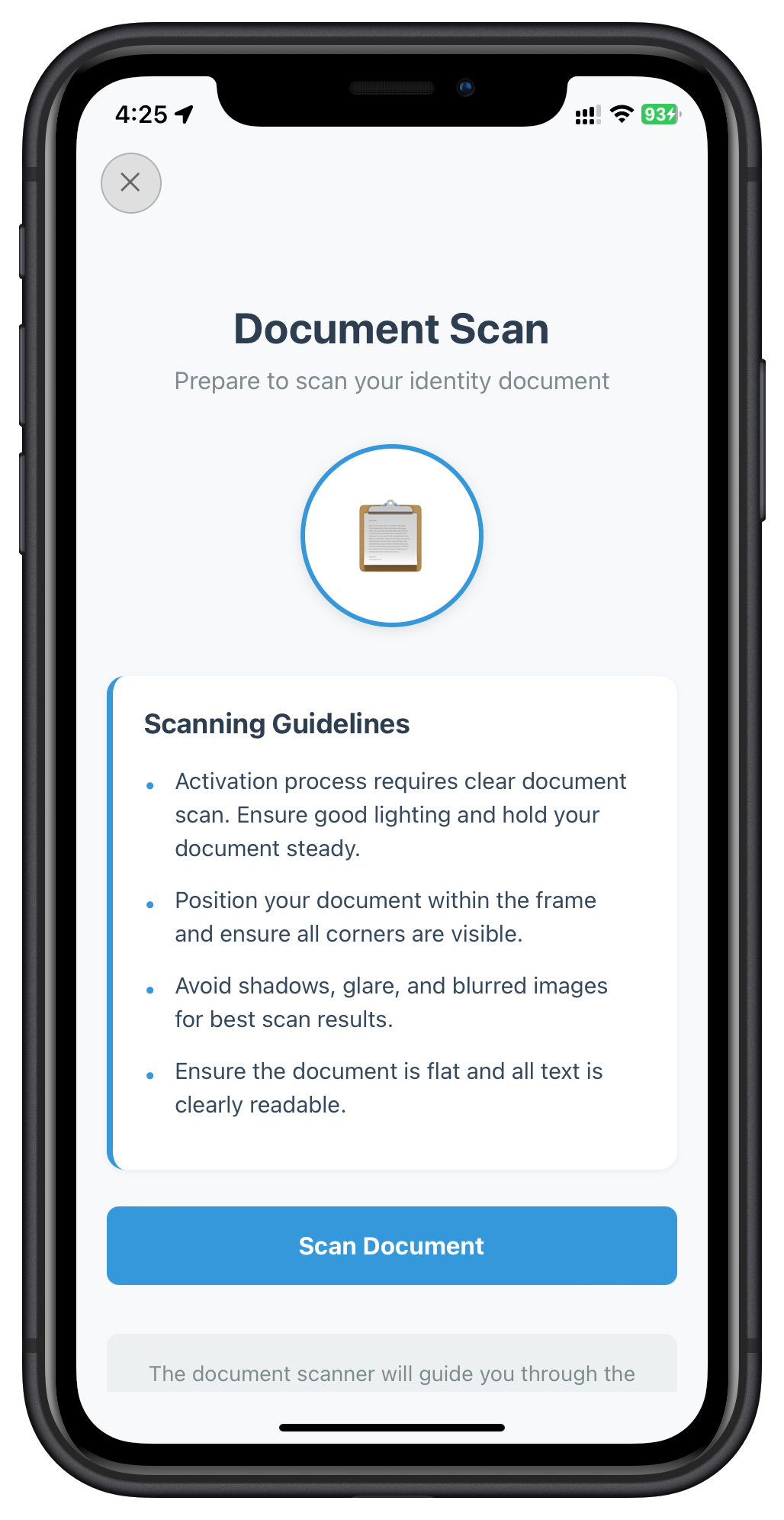
          <Text style={styles.title}>Document Scan</Text>
          <Text style={styles.subtitle}>Prepare to scan your identity document</Text>

          {/* Document Icon */}
          <View style={styles.iconContainer}>
            <Text style={styles.documentIcon}>📋</Text>
          </View>

          {error && <StatusBanner type="error" message={error} />}

          {/* Guidelines */}
          <View style={styles.guidelinesContainer}>
            <Text style={styles.guidelinesTitle}>Scanning Guidelines</Text>
            <Text style={styles.guidelineText}>
              • Position document within frame with all corners visible{'\n'}
              • Avoid shadows, glare, and blurred images{'\n'}
              • Ensure document is flat and text is readable{'\n'}
              • Use good lighting for best results
            </Text>
          </View>

          <Button
            title={isProcessing ? 'Starting Scan...' : 'Scan Document'}
            onPress={handleScanDocument}
            loading={isProcessing}
            disabled={isProcessing}
          />

          <View style={styles.helpContainer}>
            <Text style={styles.helpText}>
              The document scanner will guide you through the process.
              Follow the on-screen instructions for best results.
            </Text>
          </View>
        </View>
      </ScrollView>
    </SafeAreaView>
  );
};

const styles = StyleSheet.create({
  safeArea: { flex: 1, backgroundColor: '#f8f9fa' },
  scrollView: { flex: 1 },
  content: { flex: 1, padding: 20, paddingTop: 80 },
  title: { fontSize: 28, fontWeight: 'bold', color: '#2c3e50', textAlign: 'center', marginBottom: 8 },
  subtitle: { fontSize: 16, color: '#7f8c8d', textAlign: 'center', marginBottom: 32 },
  iconContainer: { alignItems: 'center', marginBottom: 32 },
  documentIcon: { fontSize: 80 },
  guidelinesContainer: { backgroundColor: '#fff', borderRadius: 12, padding: 20, marginBottom: 24 },
  guidelinesTitle: { fontSize: 18, fontWeight: 'bold', marginBottom: 12 },
  guidelineText: { fontSize: 15, lineHeight: 24, color: '#34495e' },
  helpContainer: { marginTop: 20, padding: 16, backgroundColor: '#ecf0f1', borderRadius: 8 },
  helpText: { fontSize: 14, color: '#7f8c8d', textAlign: 'center', lineHeight: 20 },
});

export default IDVDocumentProcessStartConfirmationScreen;
The following image showcases screen from the sample application:
Step 3: Native Document Capture
When setIDVDocumentScanProcessStartConfirmation(true, 0) is called:
- SDK opens native Regula document scanner UI
- User positions document within frame
- Camera captures document image
- Regula SDK performs OCR extraction
- SDK triggers
getIDVConfirmDocumentDetailsevent with extracted data
Step 4: Error Handling
When implementing the Document Scan Start screen, handle the following error code:
Error Code | Message | Handling Strategy |
146 | "IDV identity verification canceled by user" | User clicked close/cancel button. This is expected user behavior. Show cancellation message or navigate back to previous screen. |
Key Implementation Points
- idvWorkflow Parameter: Always use value
0(RDNAIDVWorkflowActivation) from event data - Cancel Flow: Passing
falsecancels IDV and returns to previous workflow - Native UI: SDK handles camera interface - no custom UI needed
- Error Handling: Check sync response for immediate validation errors
Step 1: Event - getIDVConfirmDocumentDetails
After document scan completion, SDK triggers event with OCR-extracted document data:
{
  challengeMode: 8,  // For device activation
  response_data: {
    version: "3.0",
    document_info: {
      // Document metadata, type codes, locale, images (front, back, signature, portrait)
      document_type_code: [/* Internal numeric codes */],
      locale: "en_US",
      front_side_image: "base64_encoded_image",
      // ... more document metadata
    },
    document_status: {
      overall_document_status: "OK",  // or "WARNING" or "ERROR"
      error_list: [/* Array of validation errors */],
      warning_list: [/* Array of warnings */],
      checks_performed: [/* Validation results across categories */]
    },
    identity_data: {
      // Simplified key-value pairs of extracted information
      // name, date_of_birth, document_number, expiry_date, etc.
    },
    identity_data_details: {
      // Locale-specific extraction data with per-field sources and statuses
      // field_sources: M (MRZ), B (Barcode), V (Visual)
    }
  }
}
Complete OCR Data Structure: The response structure is complex and varies by document type. For the full response structure with all fields, validation statuses, field sources, and detailed examples, refer to:
📄 Sample OCR Data v3.0 JSON Documentation
Key Fields to Display on UI
When implementing the document confirmation screen, focus on these critical fields:
identity_data: Extracted information (name, DOB, document number, etc.) - display for user reviewdocument_status.overall_document_status: Overall validation result ("OK", "WARNING", or "ERROR")document_status.error_list: Array of validation errors - display to user if presentdocument_status.warning_list: Array of warnings - display to user if presentdocument_status.checks_performed: Detailed validation results (Data Validation, Document Authenticity, etc.)
Step 2: Confirm Document Details Screen
Create src/tutorial/screens/idv/IDVConfirmDocumentDetailsScreen.tsx:
import React, { useState } from 'react';
import { View, Text, Image, ScrollView, SafeAreaView } from 'react-native';
import { useRoute } from '@react-navigation/native';
import rdnaIDVService from '../../../uniken/services/idv/rdnaIDVService';
import { CloseButton, Button, StatusBanner } from '../components';
import type { RDNAChallengeOpMode } from '../../../uniken/types/idv/rdnaIDVEvents';

const IDVConfirmDocumentDetailsScreen: React.FC = () => {
  const route = useRoute();
  const { challengeMode, eventData } = route.params || {};
  const responseData = eventData?.response_data;

  const [isProcessing, setIsProcessing] = useState(false);
  const [error, setError] = useState('');

  /**
   * Handle Confirm Button
   * Calls setIDVConfirmDocumentDetails with isConfirm=true
   */
  const handleConfirm = async () => {
    if (!challengeMode && challengeMode !== 0) {
      setError('Invalid challenge mode');
      return;
    }

    setIsProcessing(true);
    setError('');

    try {
      console.log('Confirming document details');

      await rdnaIDVService.setIDVConfirmDocumentDetails(
        true,              // isConfirm = true
        challengeMode as RDNAChallengeOpMode
      );

      console.log('Document details confirmed');

      // SDK continues to selfie capture

    } catch (error) {
      console.error('Failed to confirm document:', error);
      setError(RDNASyncUtils.getErrorMessage(error));
    } finally {
      setIsProcessing(false);
    }
  };

  /**
   * Handle Rescan Button
   * Calls setIDVConfirmDocumentDetails with isConfirm=false
   */
  const handleRescan = async () => {
    setIsProcessing(true);
    setError('');

    try {
      await rdnaIDVService.setIDVConfirmDocumentDetails(
        false,             // isConfirm = false to rescan
        challengeMode as RDNAChallengeOpMode
      );

      console.log('Document rescan requested');

    } catch (error) {
      console.error('Failed to request rescan:', error);
      setError(RDNASyncUtils.getErrorMessage(error));
    } finally {
      setIsProcessing(false);
    }
  };

  // Extract document fields
  const documentInfo = responseData?.document_detail?.document_info;
  const validationStatus = responseData?.validation_status;

  /**
   * Render document field with validation status
   */
  const renderField = (label: string, value: any, fieldKey: string) => {
    if (!value) return null;

    const status = validationStatus?.[fieldKey] || 'OK';
    const statusColor =
      status === 'OK' ? '#27ae60' :
      status === 'WARNING' ? '#f39c12' : '#e74c3c';

    return (
      <View style={styles.fieldRow}>
        <View style={styles.fieldInfo}>
          <Text style={styles.fieldLabel}>{label}</Text>
          <Text style={styles.fieldValue}>{value}</Text>
        </View>
        <View style={[styles.statusBadge, { backgroundColor: statusColor }]}>
          <Text style={styles.statusText}>{status}</Text>
        </View>
      </View>
    );
  };

  return (
    <SafeAreaView style={styles.safeArea}>
      <CloseButton onPress={handleClose} disabled={isProcessing} />

      <ScrollView style={styles.scrollView}>
        <View style={styles.content}>
          <Text style={styles.title}>Confirm Document Details</Text>
          <Text style={styles.subtitle}>Review extracted information</Text>

          {/* Document Photo */}
          {documentInfo?.portrait_image && (
            <Image
              source={{ uri: `data:image/jpg;base64,${documentInfo.portrait_image}` }}
              style={styles.documentImage}
            />
          )}

          {error && <StatusBanner type="error" message={error} />}

          {/* Document Fields */}
          <View style={styles.fieldsContainer}>
            {renderField('Full Name', documentInfo?.name, 'name')}
            {renderField('Document Number', documentInfo?.document_number, 'document_number')}
            {renderField('Date of Birth', documentInfo?.date_of_birth, 'date_of_birth')}
            {renderField('Expiry Date', documentInfo?.expiry_date, 'expiry_date')}
            {renderField('Nationality', documentInfo?.nationality, 'nationality')}
          </View>

          {/* Action Buttons */}
          <View style={styles.buttonContainer}>
            <Button
              title={isProcessing ? 'Processing...' : 'Rescan'}
              onPress={handleRescan}
              variant="secondary"
              disabled={isProcessing}
              style={styles.button}
            />
            <Button
              title={isProcessing ? 'Processing...' : 'Confirm'}
              onPress={handleConfirm}
              disabled={isProcessing}
              style={styles.button}
            />
          </View>
        </View>
      </ScrollView>
    </SafeAreaView>
  );
};

export default IDVConfirmDocumentDetailsScreen;
The following images showcase different states of the screen from the sample application:
Document Details Screen |
Document Details Screen |
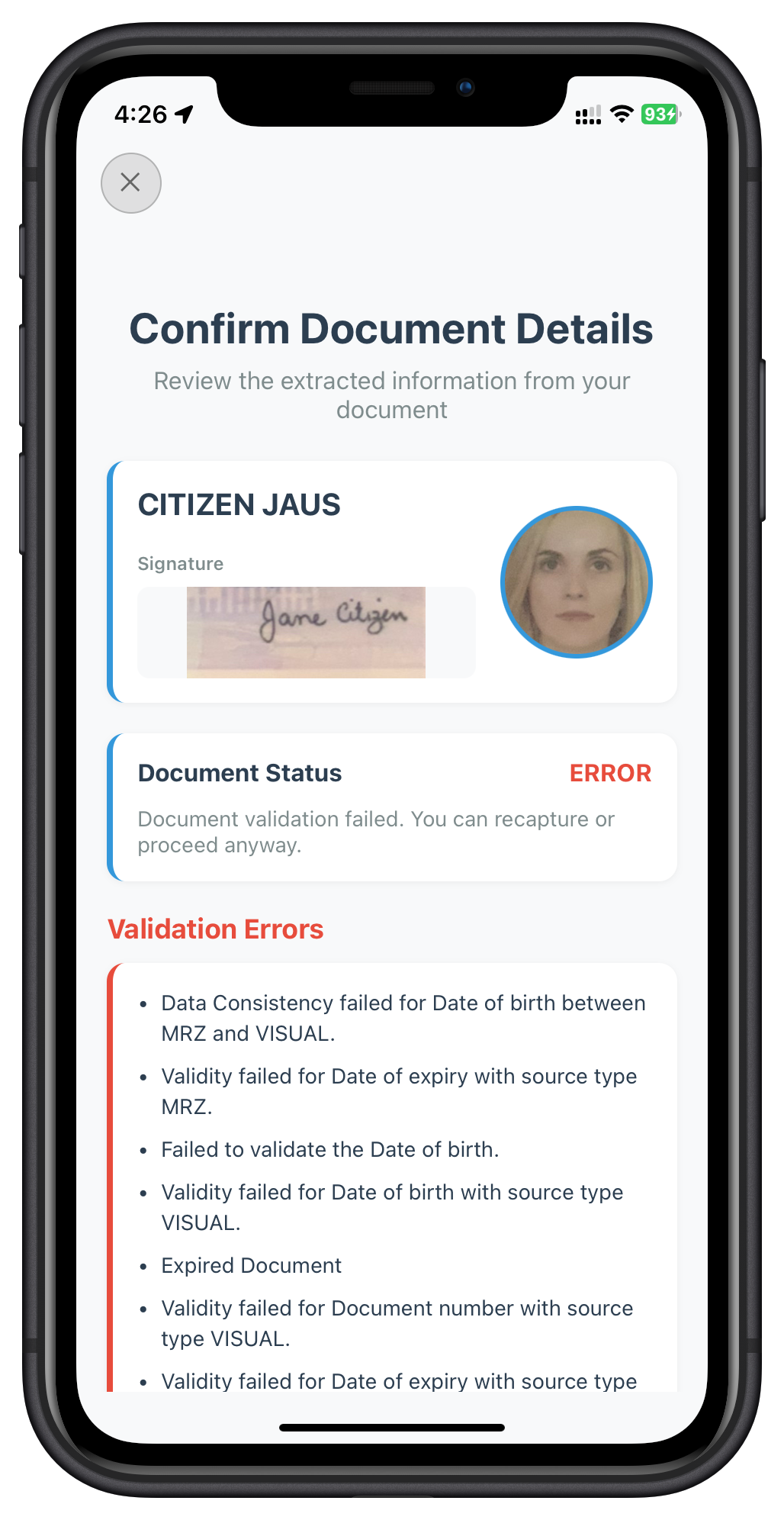
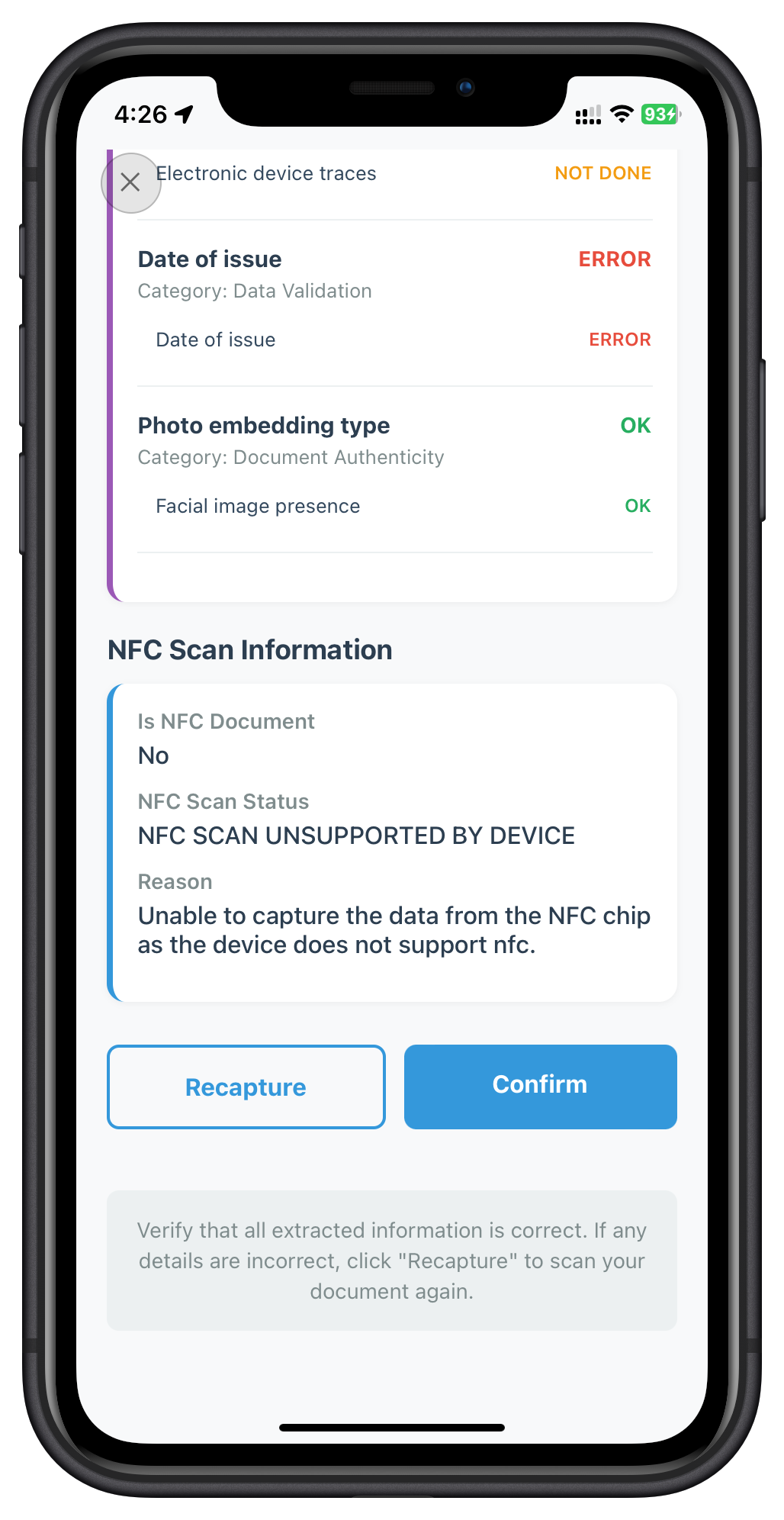
Validation Status Meanings
Status | Description | User Action |
OK | Field extracted and validated successfully | Can proceed |
WARNING | Field extracted but may have minor issues | Review and confirm or rescan |
ERROR | Field failed validation or extraction | Should rescan for better results |
Step 1: Event - getIDVSelfieProcessStartConfirmation
After document confirmation, SDK triggers:
{
  idvWorkflow: 0,  // RDNAIDVWorkflowActivation
  // Additional event data
}
Step 2: Selfie Process Start Screen
Create src/tutorial/screens/idv/IDVSelfieProcessStartConfirmationScreen.tsx:
import React, { useState } from 'react';
import { View, Text, ScrollView, SafeAreaView } from 'react-native';
import { useRoute } from '@react-navigation/native';
import rdnaIDVService from '../../../uniken/services/idv/rdnaIDVService';
import { CloseButton, Button, StatusBanner } from '../components';

const IDVSelfieProcessStartConfirmationScreen: React.FC = () => {
  const route = useRoute();
  const { idvWorkflow, eventData } = route.params || {};

  const [isProcessing, setIsProcessing] = useState(false);
  const [useFrontCamera, setUseFrontCamera] = useState(true);
  const [error, setError] = useState('');

  /**
   * Handle Capture Selfie Button
   * Calls setIDVSelfieProcessStartConfirmation with camera selection
   */
  const handleCaptureSelfie = async () => {
    setIsProcessing(true);
    setError('');

    try {
      console.log('Starting selfie capture with front camera:', useFrontCamera);

      await rdnaIDVService.setIDVSelfieProcessStartConfirmation(
        true,              // isConfirm = true
        !useFrontCamera,   // useDeviceBackCamera (inverted)
        idvWorkflow
      );

      console.log('Selfie capture started');

      // SDK opens native selfie camera with liveness detection

    } catch (error) {
      console.error('Failed to start selfie capture:', error);
      setError(RDNASyncUtils.getErrorMessage(error));
    } finally {
      setIsProcessing(false);
    }
  };

  return (
    <SafeAreaView style={styles.safeArea}>
      <CloseButton onPress={handleClose} disabled={isProcessing} />

      <ScrollView style={styles.scrollView}>
        <View style={styles.content}>
          <Text style={styles.title}>Selfie Capture</Text>
          <Text style={styles.subtitle}>Prepare to capture your selfie</Text>

          {/* Selfie Icon */}
          <View style={styles.iconContainer}>
            <Text style={styles.selfieIcon}>🤳</Text>
          </View>

          {error && <StatusBanner type="error" message={error} />}

          {/* Camera Selection */}
          <View style={styles.cameraSelectionContainer}>
            <Text style={styles.cameraLabel}>Select Camera:</Text>
            <View style={styles.cameraButtons}>
              <Button
                title="Front Camera"
                onPress={() => setUseFrontCamera(true)}
                variant={useFrontCamera ? 'primary' : 'secondary'}
                style={styles.cameraButton}
              />
              <Button
                title="Back Camera"
                onPress={() => setUseFrontCamera(false)}
                variant={!useFrontCamera ? 'primary' : 'secondary'}
                style={styles.cameraButton}
              />
            </View>
          </View>

          {/* Guidelines */}
          <View style={styles.guidelinesContainer}>
            <Text style={styles.guidelinesTitle}>Selfie Guidelines</Text>
            <Text style={styles.guidelineText}>
              • Look directly at the camera{'\n'}
              • Ensure your face is well-lit and clearly visible{'\n'}
              • Remove glasses, hats, or face coverings{'\n'}
              • Keep a neutral expression{'\n'}
              • Follow on-screen liveness detection instructions
            </Text>
          </View>

          <Button
            title={isProcessing ? 'Starting Camera...' : 'Capture Selfie'}
            onPress={handleCaptureSelfie}
            loading={isProcessing}
            disabled={isProcessing}
          />

          <View style={styles.helpContainer}>
            <Text style={styles.helpText}>
              The selfie capture includes liveness detection to ensure security.
              Follow the on-screen instructions during capture.
            </Text>
          </View>
        </View>
      </ScrollView>
    </SafeAreaView>
  );
};

export default IDVSelfieProcessStartConfirmationScreen;
The following image showcases screen from the sample application:
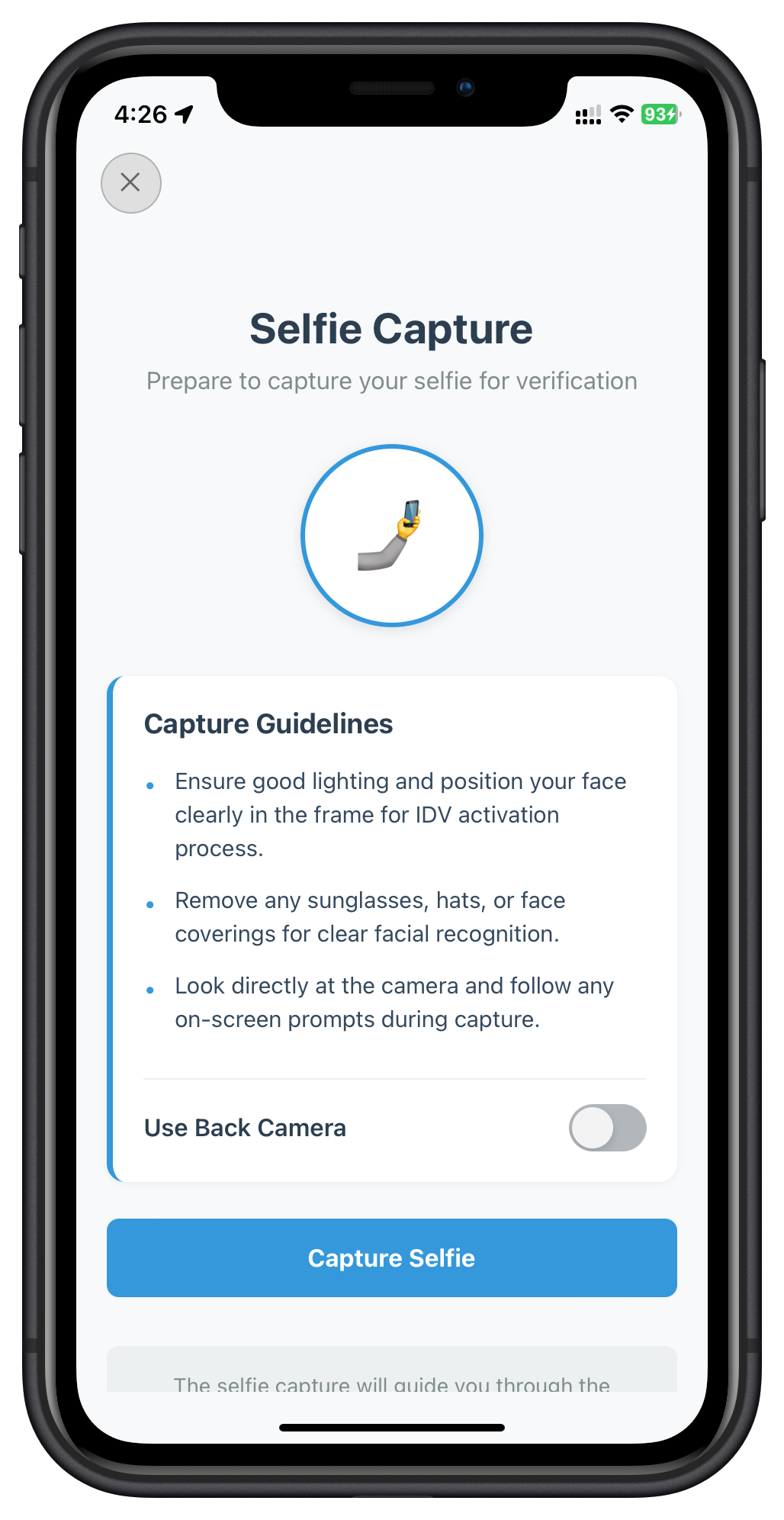
Step 3: Native Selfie Capture
When setIDVSelfieProcessStartConfirmation(true, false, 0) is called:
- SDK opens native camera with specified orientation (front/back)
- Liveness detection guides user through head movements
- Camera captures selfie image
- SDK performs biometric analysis:
- Face matching with document photo
- Liveness score calculation
- SDK triggers
getIDVSelfieConfirmationevent with results
Camera Selection
- Front Camera (default): Most natural for selfies, recommended
- Back Camera: Option for users who prefer or require it
The useDeviceBackCamera parameter:
false= Use front camera (pass!useFrontCamerawhenuseFrontCamera = true)true= Use back camera
Step 1: Event - getIDVSelfieConfirmation
After selfie capture, SDK triggers event with biometric results:
{
  challengeMode: 8,
  response_data: {
    response_data: {
      // Biometric match result
      biometric_result: {
        display_text: "MATCHED",  // or "NOT_MATCHED"
        result_criteria: "FACE_MATCH",
      },

      // Face matching score
      face_matcher_response: {
        score: 0.95,  // 0-1 range (95% match)
      },

      // Liveness detection score
      analyze_liveness_response: {
        video: {
          liveness_result: {
            score: 92,  // 0-100 range (92% liveness)
          },
          autocapture_result: {
            selfie_image: "base64_encoded_selfie"
          }
        }
      },

      // Document photo for comparison
      document_detail: {
        document_info: {
          portrait_image: "base64_encoded_document_photo"
        }
      }
    },

    // Dynamic action buttons (server-controlled)
    action_buttons: {
      success_button: [
        { button_text: "Continue", key: "continue-flow" }
      ],
      failure_button: [
        { button_text: "Continue Anyway", key: "continue-flow" },
        { button_text: "Rescan Document", key: "reinit-idv-document-scan" },
        { button_text: "Recapture Selfie", key: "reinit-idv-selfie" }
      ]
    }
  }
}
Step 2: Selfie Confirmation Screen
The most complex screen - displays comparison and handles dynamic buttons:
import React, { useState } from 'react';
import { View, Text, Image, ScrollView, SafeAreaView } from 'react-native';
import { useRoute } from '@react-navigation/native';
import rdnaIDVService from '../../../uniken/services/idv/rdnaIDVService';
import { CloseButton, Button, StatusBanner } from '../components';

const IDVSelfieConfirmationScreen: React.FC = () => {
  const route = useRoute();
  const { challengeMode, eventData } = route.params || {};
  const responseData = eventData?.response_data;

  const [isProcessing, setIsProcessing] = useState(false);
  const [error, setError] = useState('');

  /**
   * Handle action button click
   * Calls setIDVSelfieConfirmation with action key
   */
  const handleAction = async (actionKey: string) => {
    setIsProcessing(true);
    setError('');

    try {
      console.log('Processing selfie action:', actionKey);

      await rdnaIDVService.setIDVSelfieConfirmation(
        actionKey,         // Action key from button: "continue-flow", "reinit-idv-document-scan", or "reinit-idv-selfie"
        challengeMode
      );

      console.log('Selfie action processed');

    } catch (error) {
      console.error('Failed to process selfie action:', error);
      setError(RDNASyncUtils.getErrorMessage(error));
    } finally {
      setIsProcessing(false);
    }
  };

  // Extract data
  const biometricResult = responseData?.response_data?.biometric_result;
  const faceMatchScore = responseData?.response_data?.face_matcher_response?.score;
  const livenessScore = responseData?.response_data?.analyze_liveness_response?.video?.liveness_result?.score;
  const selfieImage = responseData?.response_data?.analyze_liveness_response?.video?.autocapture_result?.selfie_image;
  const documentPhoto = responseData?.response_data?.document_detail?.document_info?.portrait_image;

  const isMatched = biometricResult?.display_text === 'MATCHED';

  return (
    <SafeAreaView style={styles.safeArea}>
      <CloseButton onPress={handleClose} disabled={isProcessing} />

      <ScrollView style={styles.scrollView}>
        <View style={styles.content}>
          <Text style={styles.title}>Confirm Selfie Details</Text>
          <Text style={styles.subtitle}>Review biometric match result</Text>

          {/* Side-by-Side Image Comparison */}
          <View style={styles.imageComparison}>
            {/* Document Photo */}
            <View style={styles.imageContainer}>
              <Text style={styles.imageLabel}>Document Photo</Text>
              {documentPhoto && (
                <Image
                  source={{ uri: `data:image/jpg;base64,${documentPhoto}` }}
                  style={styles.comparisonImage}
                />
              )}
            </View>

            {/* Selfie Photo */}
            <View style={styles.imageContainer}>
              <Text style={styles.imageLabel}>Selfie Photo</Text>
              {selfieImage && (
                <Image
                  source={{ uri: `data:image/jpg;base64,${selfieImage}` }}
                  style={styles.comparisonImage}
                />
              )}
            </View>
          </View>

          {/* Match Result */}
          <View style={styles.matchResultContainer}>
            <View style={styles.matchHeader}>
              <Text style={[styles.matchIcon, { color: isMatched ? '#27ae60' : '#e74c3c' }]}>
                {isMatched ? '✓' : '✗'}
              </Text>
              <View>
                <Text style={[styles.matchText, { color: isMatched ? '#27ae60' : '#e74c3c' }]}>
                  {isMatched ? 'Selfie matches document' : 'Selfie does not match'}
                </Text>
                <Text style={styles.matchStatus}>Status: {biometricResult?.display_text}</Text>
              </View>
            </View>

            {/* Scores */}
            <View style={styles.scoresContainer}>
              {faceMatchScore !== undefined && (
                <View style={styles.scoreRow}>
                  <Text style={styles.scoreLabel}>Face Match Score:</Text>
                  <Text style={styles.scoreValue}>{(faceMatchScore * 100).toFixed(2)}%</Text>
                </View>
              )}
              {livenessScore !== undefined && (
                <View style={styles.scoreRow}>
                  <Text style={styles.scoreLabel}>Liveness Score:</Text>
                  <Text style={styles.scoreValue}>{livenessScore}%</Text>
                </View>
              )}
            </View>
          </View>

          {error && <StatusBanner type="error" message={error} />}

          <View style={styles.helpContainer}>
            <Text style={styles.helpText}>
              Compare the selfie with your document photo. The biometric analysis
              verifies your identity. If the match quality is poor, you can recapture.
            </Text>
          </View>
        </View>
      </ScrollView>

      {/* Dynamic Action Buttons */}
      {renderActionButtons()}
    </SafeAreaView>
  );

  /**
   * Render action buttons based on match result
   */
  function renderActionButtons() {
    const actionButtons = responseData?.action_buttons;
    if (!actionButtons) return null;

    const buttons = isMatched
      ? actionButtons.success_button
      : actionButtons.failure_button;

    return (
      <View style={styles.buttonContainer}>
        {buttons.map((button, index) => (
          <Button
            key={index}
            title={isProcessing ? 'Processing...' : button.button_text}
            onPress={() => handleAction(button.key)}
            variant={button.button_text.includes('Continue') ? 'primary' : 'secondary'}
            disabled={isProcessing}
            style={styles.button}
          />
        ))}
      </View>
    );
  }
};

export default IDVSelfieConfirmationScreen;
The following image showcases screen from the sample application:
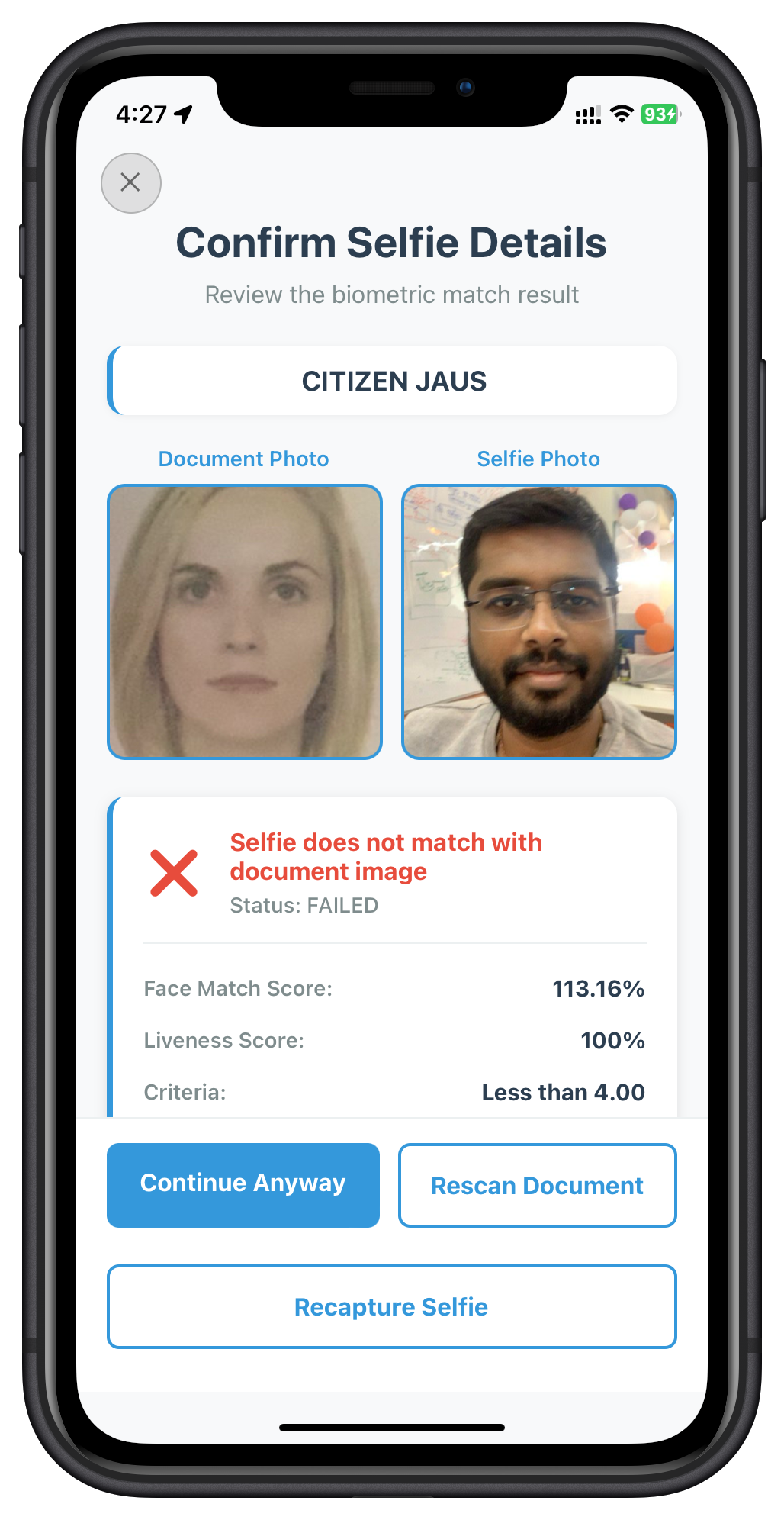
Understanding Action Keys (Critical Concept)
Action keys are string values that control the IDV workflow after selfie confirmation. They are returned in the action_buttons object and must be passed to the setIDVSelfieConfirmation API.
The Three Action Keys
Action Key | SDK Behavior | When to Use |
| Proceeds to next event ( | User accepts selfie match result and wants to continue |
| Triggers document rescan (fires | User believes document scan was poor quality or incorrect |
| Initiates selfie recapture flow | User wants to retake selfie (poor lighting, closed eyes, etc.) |
Server-Driven UI Pattern
The action_buttons object provides server-controlled button configurations:
When Biometric Match SUCCEEDS (display_text: "MATCHED"):
{
  "success_button": [
    {
      "key": "continue-flow",
      "button_text": "Continue"
    }
  ]
}
Only one option: proceed to next step.
When Biometric Match FAILS (display_text: "NOT_MATCHED"):
{
  "failure_button": [
    {
      "key": "continue-flow",
      "button_text": "Continue Anyway"
    },
    {
      "key": "reinit-idv-document-scan",
      "button_text": "Rescan Document"
    },
    {
      "key": "reinit-idv-selfie",
      "button_text": "Recapture Selfie"
    }
  ]
}
Multiple options: user can choose recovery path.
Implementation Flow
1. SDK fires getIDVSelfieConfirmation event
   ↓
2. Event contains biometric_result ("MATCHED" or "NOT_MATCHED")
   ↓
3. Event contains action_buttons (success_button or failure_button arrays)
   ↓
4. App displays buttons based on match result
   ↓
5. User clicks a button
   ↓
6. App calls setIDVSelfieConfirmation(button.key, challengeMode)
   ↓
7. SDK executes the action:
   • "continue-flow" → getIDVBiometricOptInConsent event
   • "reinit-idv-document-scan" → Document rescan flow
   • "reinit-idv-selfie" → Selfie recapture flow
Why This Design Matters
- ✅ Server-Driven: Button options configured by backend, not hardcoded in app
- ✅ Flexible Workflows: Different IDV workflows can show different action options
- ✅ Customizable Text:
button_textallows localization and custom messaging - ✅ User Choice: Failed matches offer multiple recovery paths
- ✅ Graceful Degradation: Screen can provide fallback buttons if
action_buttonsmissing
Code Example: Dynamic Button Rendering
const renderActionButtons = () => {
  const actionButtons = responseData?.action_buttons;
  const biometricResult = responseData?.response_data?.biometric_result;

  // Determine which button array to use based on match result
  const isMatched = biometricResult?.display_text === 'MATCHED';
  const buttons = isMatched
    ? actionButtons.success_button
    : actionButtons.failure_button;

  // Render buttons dynamically
  return buttons.map((button) => (
    <Button
      title={button.button_text}  // ← Server-controlled text
      onPress={() => handleAction(button.key)}  // ← Pass action key to API
      variant={button.button_text.includes('Continue') ? 'primary' : 'secondary'}
    />
  ));
};

const handleAction = async (action: string) => {
  // Pass the action key exactly as received from server
  await rdnaIDVService.setIDVSelfieConfirmation(
    action,  // "continue-flow", "reinit-idv-document-scan", or "reinit-idv-selfie"
    challengeMode
  );
};
Error Handling for Selfie Confirmation
When implementing the Selfie Confirmation screen, handle the following error codes:
Error Code | Message | Handling Strategy |
146 | "Selfie not confirmed" | User rejected selfie or clicked cancel. Prompt for retake or allow user to return to previous screen. This is expected user behavior. |
400 | "Invalid input or state" | Invalid action key or challengeMode passed to API. Verify that action keys come from the |
Step 1: Event - getIDVBiometricOptInConsent
After selfie confirmation, SDK requests user consent for biometric template storage:
{
  userID: "john.doe",
  challengeMode: 8,
  challengeResponse: {
    additionalInfo: {
      currentWorkFlow: "IDV_ACTIVATION"
    }
  }
}
Step 2: Biometric Consent Screen
Create src/tutorial/screens/idv/IDVBiometricOptInConsentScreen.tsx:
import React, { useState } from 'react';
import { View, Text, ScrollView, SafeAreaView } from 'react-native';
import { useRoute } from '@react-navigation/native';
import rdnaIDVService from '../../../uniken/services/idv/rdnaIDVService';
import { CloseButton, Button, StatusBanner } from '../components';

const IDVBiometricOptInConsentScreen: React.FC = () => {
  const route = useRoute();
  const { challengeMode, eventData } = route.params || {};

  const [isProcessing, setIsProcessing] = useState(false);
  const [error, setError] = useState('');

  /**
   * Handle consent action (Approve or Reject)
   */
  const handleConsentAction = async (isOptIn: boolean) => {
    setIsProcessing(true);
    setError('');

    try {
      console.log('Processing biometric consent:', isOptIn);

      await rdnaIDVService.setIDVBiometricOptInConsent(
        isOptIn,           // true = approve, false = reject
        challengeMode
      );

      console.log('Biometric consent processed');

      // SDK continues to password setup (getPassword event)

    } catch (error) {
      console.error('Failed to process consent:', error);
      setError(RDNASyncUtils.getErrorMessage(error));
    } finally {
      setIsProcessing(false);
    }
  };

  /**
   * Get consent description for activation flow (challengeMode 8)
   */
  const getConsentDescription = () => {
    return 'Your selfie biometric template will be securely stored for identity verification. This enables faster authentication and enhanced security for your account.';
  };

  return (
    <SafeAreaView style={styles.safeArea}>
      <CloseButton onPress={handleClose} disabled={isProcessing} />

      <ScrollView style={styles.scrollView}>
        <View style={styles.content}>
          <Text style={styles.title}>Save Template</Text>
          <Text style={styles.subtitle}>Biometric Template Storage Consent</Text>

          {/* Consent Description */}
          <View style={styles.descriptionContainer}>
            <Text style={styles.descriptionTitle}>What you need to know:</Text>
            <Text style={styles.descriptionText}>{getConsentDescription()}</Text>

            <View style={styles.bulletContainer}>
              <Text style={styles.bulletPoint}>
                • Your biometric data will be encrypted and stored securely
              </Text>
              <Text style={styles.bulletPoint}>
                • This enables faster authentication for future sessions
              </Text>
              <Text style={styles.bulletPoint}>
                • You can manage your consent preferences at any time
              </Text>
              <Text style={styles.bulletPoint}>
                • Rejecting will not affect your current authentication
              </Text>
            </View>
          </View>

          {error && <StatusBanner type="error" message={error} />}

          {/* Action Buttons */}
          <View style={styles.buttonContainer}>
            <Button
              title={isProcessing ? 'Processing...' : 'Reject'}
              onPress={() => handleConsentAction(false)}
              variant="secondary"
              disabled={isProcessing}
              style={styles.button}
            />
            <Button
              title={isProcessing ? 'Processing...' : 'Approve'}
              onPress={() => handleConsentAction(true)}
              disabled={isProcessing}
              style={styles.button}
            />
          </View>

          {/* Help Text */}
          <View style={styles.helpContainer}>
            <Text style={styles.helpText}>
              By approving, you consent to the secure storage of your biometric
              template for identity verification purposes.
            </Text>
          </View>
        </View>
      </ScrollView>
    </SafeAreaView>
  );
};

export default IDVBiometricOptInConsentScreen;
The following image showcases screen from the sample application:
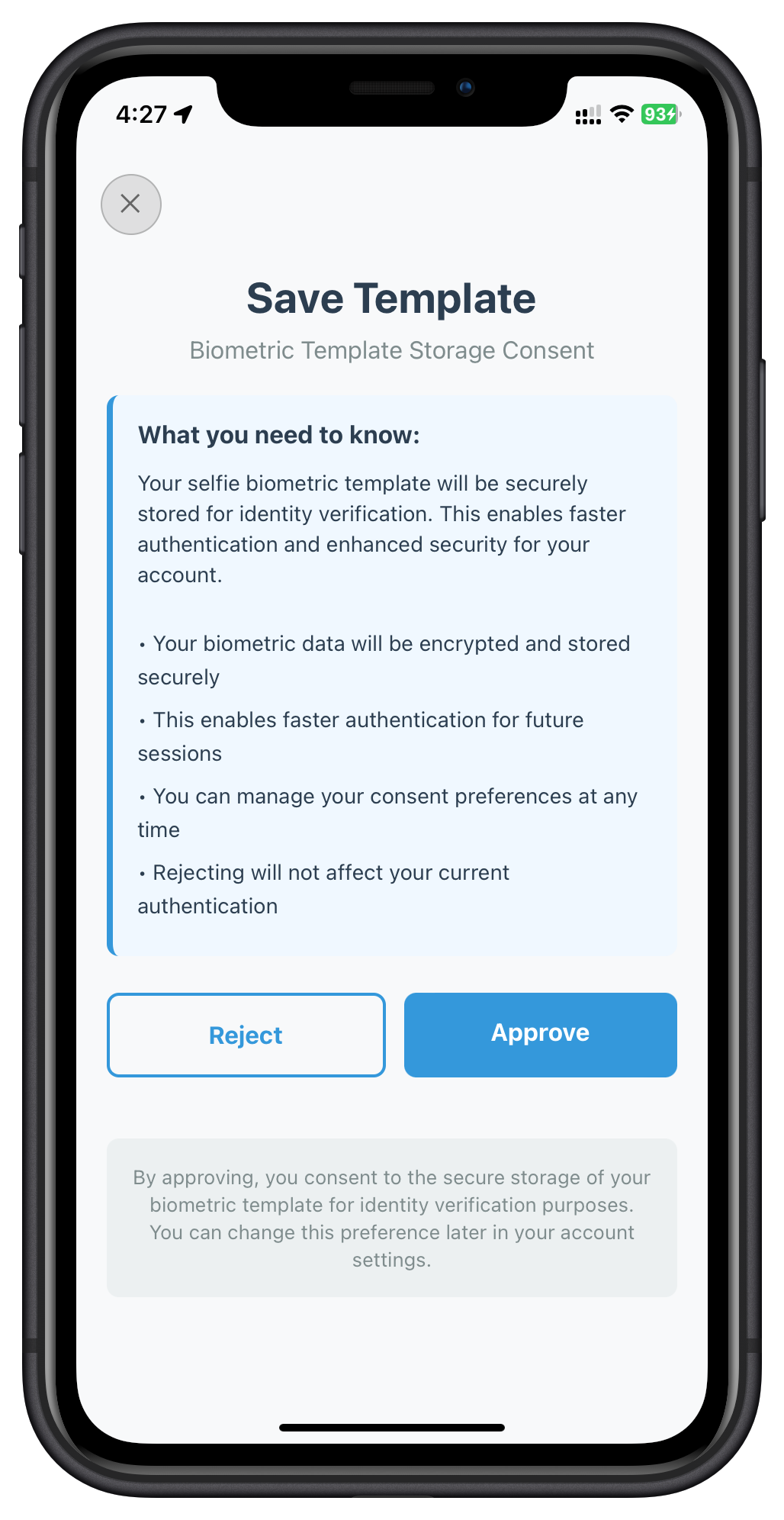
Consent Options Impact
Action | Storage | Impact |
Approve ( | Biometric template stored securely | Faster future authentication, enhanced security |
Reject ( | Template not stored | Standard authentication methods only |
Password Setup After IDV
Once biometric consent is processed, the SDK triggers the standard getPassword event (from MFA flow):
// SDK triggers getPassword event
{
  userID: "john.doe",
  // ... password event data
}
Your existing MFA password screen (from previous codelab) handles this:
// SetPasswordScreen.tsx (from MFA codelab)
const SetPasswordScreen: React.FC = () => {
  // ... existing password setup implementation

  const handleSetPassword = async (password: string) => {
    await rdnaService.setPassword(password, challengeMode);
    // SDK triggers onUserLoggedIn event after password is set
  };
};
Activation Complete - Dashboard Navigation
After password setup, the SDK triggers onUserLoggedIn event:
// In SDKEventProvider.tsx
const handleUserLoggedIn = useCallback((data: RDNAUserLoggedInData) => {
  console.log('User logged in successfully!');

  NavigationService.navigateOrUpdate('DrawerNavigator', {
    screen: 'Dashboard',
    params: {
      userID: data.userID,
      sessionID: data.sessionID,
      sessionType: data.sessionType,
      jwtToken: data.jwtToken,
    },
  });
}, []);
Complete Flow Recap
1. ✅ SDK Initialization
2. ✅ User Registration (CheckUserScreen)
3. ✅ Activation Code Verification
4. ✅ IDV Document Scan → Confirm
5. ✅ IDV Selfie Capture → Confirm
6. ✅ IDV Biometric Consent
7. ✅ Password Setup
8. ✅ onUserLoggedIn Event
9. ✅ Dashboard Navigation
App Navigator Setup
Add IDV routes to your AppNavigator.tsx:
import { IDVDocumentProcessStartConfirmationScreen, IDVConfirmDocumentDetailsScreen, IDVSelfieProcessStartConfirmationScreen, IDVSelfieConfirmationScreen, IDVBiometricOptInConsentScreen } from '../screens/idv';
import type { RDNAIDVWorkflow, RDNAChallengeOpMode } from '../../uniken/types/idv/rdnaIDVEvents';

// IDV Route Parameter Types
interface IDVDocumentScanStartParams {
  idvWorkflow: RDNAIDVWorkflow;
  eventData: RDNAIDVGetDocumentScanStartConfirmationData;
}

interface IDVConfirmDocumentDetailsParams {
  challengeMode: RDNAChallengeOpMode;
  eventData: RDNAIDVGetConfirmDocumentDetailsData;
}

// ... similar for other IDV screens

export type RootStackParamList = {
  // ... existing MFA routes

  // IDV Routes
  IDVDocumentScanStart: IDVDocumentScanStartParams;
  IDVConfirmDocumentDetails: IDVConfirmDocumentDetailsParams;
  IDVSelfieProcessStart: IDVSelfieProcessStartParams;
  IDVSelfieConfirmation: IDVSelfieConfirmationParams;
  IDVBiometricOptInConsent: IDVBiometricOptInConsentParams;
};

const Stack = createNativeStackNavigator<RootStackParamList>();

const AppNavigator = () => {
  return (
    <NavigationContainer ref={navigationRef}>
      <Stack.Navigator screenOptions={{headerShown: false}}>
        {/* ... existing routes ... */}

        {/* IDV Routes */}
        <Stack.Screen
          name="IDVDocumentScanStart"
          component={IDVDocumentProcessStartConfirmationScreen}
          options={{ title: 'Document Scan', headerShown: false }}
        />

        <Stack.Screen
          name="IDVConfirmDocumentDetails"
          component={IDVConfirmDocumentDetailsScreen}
          options={{ title: 'Confirm Document', headerShown: false }}
        />

        <Stack.Screen
          name="IDVSelfieProcessStart"
          component={IDVSelfieProcessStartConfirmationScreen}
          options={{ title: 'Selfie Capture', headerShown: false }}
        />

        <Stack.Screen
          name="IDVSelfieConfirmation"
          component={IDVSelfieConfirmationScreen}
          options={{ title: 'Confirm Selfie', headerShown: false }}
        />

        <Stack.Screen
          name="IDVBiometricOptInConsent"
          component={IDVBiometricOptInConsentScreen}
          options={{ title: 'Biometric Consent', headerShown: false }}
        />
      </Stack.Navigator>
    </NavigationContainer>
  );
};

export default AppNavigator;
End-to-End Testing Checklist
Test the complete IDV MFA activation flow:
1. Prerequisites
- ✅ Valid connection profile configured
- ✅ Test user credentials available
- ✅ Test identity document (passport, driver's license, etc.)
- ✅ Good lighting for document scanning
- ✅ Device camera permissions granted
2. Test Activation Flow
# Run the application
npx react-native run-android
# or
npx react-native run-ios
Step-by-Step Testing:
- ✅ Launch app → SDK initialization success
- ✅ Enter username → Navigate to activation code screen
- ✅ Enter activation code → IDV flow begins
- ✅ Document Scan Start: Guidelines displayed, scan button works
- ✅ Native Scanner: Camera opens, document capture works
- ✅ Document Details: OCR data displayed correctly, validation status shown
- ✅ Confirm Document: Proceed or rescan functionality works
- ✅ Selfie Start: Camera selection works, guidelines clear
- ✅ Native Selfie: Liveness detection guides user, capture successful
- ✅ Selfie Confirmation: Image comparison shown, match result correct
- ✅ Biometric Consent: Approve/reject options work
- ✅ Password Setup: Password creation successful
- ✅ Dashboard: User logged in and navigated to dashboard
3. Test Error Scenarios
- ✅ Cancel document scan (close button)
- ✅ Rescan document with poor quality
- ✅ Cancel selfie capture
- ✅ Recapture selfie on mismatch
- ✅ Reject biometric consent
- ✅ Network errors during API calls
4. Verify Logs
Check console for proper event flow:
# Expected log sequence
RdnaService - Initialize called
SDKIDVEventProvider - Registering IDV event handlers
SDKIDVEventProvider - Document scan start confirmation requested
RdnaIDVService - Setting document scan confirmation: isConfirm=true, idvWorkflow=0
SDKIDVEventProvider - Document details confirmation requested
RdnaIDVService - Setting confirm document details: isConfirm=true, challengeMode=8
SDKIDVEventProvider - Selfie process start confirmation requested
RdnaIDVService - Setting selfie process start: isConfirm=true, idvWorkflow=0
SDKIDVEventProvider - Selfie confirmation requested
RdnaIDVService - Setting selfie confirmation: action=true, challengeMode=8
SDKIDVEventProvider - Biometric opt-in consent requested
RdnaIDVService - Setting biometric consent: isOptIn=true, challengeMode=8
SDKEventProvider - User logged in
Common Issues and Solutions
Issue 1: Document Scanner Not Opening
Symptoms:
setIDVDocumentScanProcessStartConfirmationsucceeds but camera doesn't open- Error: "Document scanner failed to initialize"
Solutions:
# 1. Verify IDV assets are present
# Android
ls -la android/app/src/main/assets/Regula/
ls -la android/app/src/main/res/raw/

# iOS
ls -la ios/idv-artifacts/

# 2. Check file sizes
# db.dat should be ~110.5MB
# regula.license should exist

# 3. Clean and rebuild
cd android && ./gradlew clean && cd ..
npx react-native run-android

# iOS
cd ios && pod install && cd ..
npx react-native run-ios
Issue 2: IDV Events Not Triggering
Symptoms:
- Activation code succeeds but IDV doesn't start
- No navigation to document scan screen
Solutions:
// 1. Verify SDKIDVEventProvider is properly nested in App.tsx
<SDKEventProvider>
  <SDKIDVEventProvider>  {/* Must be inside SDKEventProvider */}
    <AppNavigator />
  </SDKIDVEventProvider>
</SDKEventProvider>

// 2. Check event handler registration
// In SDKIDVEventProvider.tsx, verify useEffect runs:
useEffect(() => {
  console.log('Registering IDV event handlers');  // Should see this log
  // ...
}, []);

// 3. Verify rdnaIDVService is initialized
import rdnaIDVService from '../services/idv/rdnaIDVService';
console.log('IDV Service:', rdnaIDVService);  // Should not be null
Issue 3: Invalid challengeMode or idvWorkflow
Symptoms:
- API calls fail with "Invalid parameter" error
challengeModeoridvWorkflowis undefined
Solutions:
// WRONG: Hardcoding values
await rdnaIDVService.setIDVConfirmDocumentDetails(true, 8);  // ❌

// CORRECT: Use values from event data
const { challengeMode, eventData } = route.params || {};

if (!challengeMode && challengeMode !== 0) {
  console.error('Invalid challengeMode:', challengeMode);
  return;
}

await rdnaIDVService.setIDVConfirmDocumentDetails(
  true,
  challengeMode as RDNAChallengeOpMode  // ✅ From event
);
Issue 4: Biometric Consent Not Proceeding to Password
Symptoms:
- Biometric consent API succeeds but flow stops
- Password screen doesn't appear
Solutions:
// Verify getPassword event handler is registered in SDKEventProvider
const handleGetPassword = useCallback((data: RDNAGetPasswordData) => {
  console.log('Password requested after IDV');  // Should see this log
  NavigationService.navigate('SetPasswordScreen', { eventData: data });
}, []);

// In useEffect, ensure registration:
eventManager.setGetPasswordHandler(handleGetPassword);
Issue 5: Navigation Errors
Symptoms:
- "Cannot navigate to unknown screen" errors
- Screen params type errors
Solutions:
// 1. Verify all IDV screens are registered in AppNavigator.tsx
<Stack.Screen name="IDVDocumentScanStart" component={IDVDocumentProcessStartConfirmationScreen} />
<Stack.Screen name="IDVConfirmDocumentDetails" component={IDVConfirmDocumentDetailsScreen} />
<Stack.Screen name="IDVSelfieProcessStart" component={IDVSelfieProcessStartConfirmationScreen} />
<Stack.Screen name="IDVSelfieConfirmation" component={IDVSelfieConfirmationScreen} />
<Stack.Screen name="IDVBiometricOptInConsent" component={IDVBiometricOptInConsentScreen} />

// 2. Verify type definitions match in RootStackParamList
export type RootStackParamList = {
  IDVDocumentScanStart: IDVDocumentScanStartParams;
  // ... all IDV routes
};
Debugging Tips
- Enable verbose logging:
// In each screen
useEffect(() => {
  console.log('Screen mounted with params:', route.params);
}, [route.params]);
- Check API responses:
try {
  const response = await rdnaIDVService.setIDVConfirmDocumentDetails(true, challengeMode);
  console.log('Full API response:', JSON.stringify(response, null, 2));
} catch (error) {
  console.error('Full error:', JSON.stringify(error, null, 2));
}
- Monitor event flow:
# Use React Native Debugger or Flipper
# Filter logs by "SDKIDVEventProvider" to see event sequence
What You've Accomplished
Congratulations! You've successfully implemented the IDV MFA Activation Flow with REL-ID SDK. You now have:
- ✅ Enhanced Activation: IDV integrated seamlessly within MFA activation
- ✅ Document Verification: Automated scanning and OCR validation
- ✅ Biometric Authentication: Selfie capture with liveness detection and face matching
- ✅ Secure Consent Management: User control over biometric template storage
- ✅ Complete Event Handling: All 5 IDV events properly implemented
- ✅ Production-Ready Flow: Error handling, retry logic, and user feedback
Key Takeaways
- Flow Sequence: IDV occurs after activation code and before password setup
- Event-Driven Architecture: All navigation is triggered by SDK events
- Parameter Usage: Always use
challengeModeandidvWorkflowfrom event data - Native Integration: Regula handles document scanning, SDK handles selfie capture
- User Experience: Clear guidance, validation feedback, and retry options
Architecture Recap
Service Layer (rdnaIDVService)
    ↓
Event Manager (rdnaIDVEventManager)
    ↓
Event Provider (SDKIDVEventProvider)
    ↓
Navigation (NavigationService)
    ↓
UI Screens (5 IDV screens)
    ↓
User Actions → Service APIs → Events → Next Screen
Next Steps
1. Explore Additional IDV Workflows
This codelab covered IDV_ACTIVATION (idvWorkflow: 0). REL-ID SDK supports other workflows:
- IDV_POSTLOGIN_KYC (6): Post-login KYC verification
- IDV_ADDITIONAL_DEVICE (2): Device activation with IDV
- IDV_ACCOUNT_RECOVERY (4/5): Account recovery with identity verification
2. Production Considerations
Before deploying to production:
- ✅ Implement proper error logging and monitoring
- ✅ Add analytics tracking for IDV flow completion rates
- ✅ Test with various document types (passport, license, ID card)
- ✅ Optimize asset delivery (db.dat is 110MB)
- ✅ Implement user privacy policy disclosures
- ✅ Add accessibility features (VoiceOver, TalkBack support)
- ✅ Test on low-end devices and poor network conditions
3. Advanced Customization
Customize the IDV experience:
- Custom UI styling for IDV screens
- Localization for multi-language support
- Custom validation rules for document fields
- Enhanced biometric scoring thresholds
- Custom consent text based on regulations
Resources
Thank you for completing the REL-ID Identity Verification MFA Activation Flow codelab! 🎉
You're now equipped to build secure, identity-verified authentication flows with REL-ID SDK.