🎯 Learning Path:
- Complete REL-ID Initialization Flow Codelab
- Complete REL-ID Complete IDV MFA Activation & Login Flow Codelab
- Optional: Complete other IDV flows if you need to create a biometric template first
- You are here → Post-Login Server Biometric Authentication Implementation
Welcome to the REL-ID IDV Post-Login Server Biometric Authentication Flow codelab! This tutorial teaches you how to implement secure server-side biometric verification using stored biometric templates with liveness detection for activated customers.
What You'll Build
In this codelab, you'll implement a complete post-login server biometric authentication workflow:
- 🔍 Template Status Check: Verify biometric template availability on server
- 🆕 Server Biometric Authentication Screen: Entry point for authentication initiation
- 📸 Selfie Capture Process: Live selfie capture with liveness detection (reused from IDV MFA flow)
- ✅ Authentication Result Display: Comprehensive audit data with success/failure status
- 🔄 Three-Hook Lifecycle Pattern: Persistent event handlers during native UI workflows
- 🔔 Navigate-Back-Before-Modal Pattern: Proper navigation maintaining drawer context
- 🔐 Status Code Validation: Template existence verification (100=exists, 600=no template)
Key Difference: Server Biometric Auth vs KYC Flow
This codelab demonstrates post-login server biometric authentication, which is different from KYC:
KYC Flow (Workflow 6, Challenge Mode 9):
Document Scan → Selfie Capture → Biometric Consent → Complete KYC
(Creates new biometric template)

Server Biometric Auth Flow (Workflow 8, Challenge Mode 25 - This Codelab):
Template Check → Start Authentication → Selfie Capture → View Result
(Uses existing biometric template for verification)
Critical Differences:
- Workflow: 8 (selfie capture) instead of 6 (complete KYC)
- Challenge Mode: 25 (server biometric auth result) instead of 9 (KYC)
- Template Requirement: Requires pre-existing template (status check first)
- Flow Simplicity: Selfie capture only (no document scanning or consent)
- Entry Point: ServerBiometricAuthenticationScreen (drawer menu) instead of KYC screen
- Result Event:
onIDVServerBiometricAuthenticationResultinstead ofonActivatedCustomerKYCResponse - Status Codes: 100=template exists, 600=no template (validation before authentication)
What You'll Learn
- ✅ How to check biometric template status before authentication
- ✅ Using workflow 8 (selfie capture) and challenge mode 25 (server biometric auth)
- ✅ Implementing template status validation with status codes 100/600
- ✅ Handling server biometric authentication result events with audit data
- ✅ Managing drawer menu navigation for biometric authentication access
- ✅ Implementing three-hook lifecycle pattern for persistent event handlers
- ✅ Using navigate-back-before-modal pattern for result display
- ✅ Parsing authentication audit info (status, use case, transaction ID, attempts)
- ✅ Handling error 240 (user cancellation) gracefully
Prerequisites
- Completion of REL-ID Initialization codelab
- Completion of REL-ID IDV MFA Activation & Login codelab
- Biometric template on server (from KYC flow or other biometric opt-in process)
- Basic understanding of React Native and TypeScript
- REL-ID SDK integration credentials
- Understanding of liveness detection concepts
Technology Stack
- React Native: 0.80.1
- TypeScript: 5.0.4
- REL-ID SDK: react-native-rdna-client (Latest)
- Aware FaceCapture: For selfie capture and liveness detection
- Navigation: React Navigation 6.x with Drawer
Post-Login Server Biometric Authentication Flow Diagram
Understanding the complete flow is crucial before implementation:
1. User Login (Activated Customer with Biometric Template)
   ↓ (Existing credentials authenticated)

2. Dashboard → Open Drawer Menu
   ↓ (User navigates to Biometric Authentication option)

3. 🆕 Server Biometric Authentication Screen
   ├─ Screen focused → useFocusEffect triggers
   ├─ Automatic template status check
   ├─ checkIDVUserBiometricTemplateStatus() API called
   └─ Wait for onIDVCheckUserBiometricTemplateStatus event
   ↓

4. Template Status Validation
   ├─ onIDVCheckUserBiometricTemplateStatus event received
   ├─ Screen-level handler processes event
   ├─ Parse status code:
   │  ├─ statusCode === 100: Template exists → Enable button
   │  └─ statusCode === 600: No template → Disable button, show message
   └─ Display template status on screen
   ↓

5. Start Authentication (only if template exists)
   ├─ User clicks "Start Authentication" button
   ├─ initiateIDVServerBiometricAuthentication("Server Biometric Authentication") API called
   └─ SDK initiates server biometric authentication workflow
   ↓

6. 📸 Selfie Capture Process (Reused from IDV MFA Flow)
   ├─ getIDVSelfieProcessStartConfirmation event
   │  • idvWorkFlow: 8 (selfie capture)
   ├─ Navigate to IDVSelfieProcessStartConfirmationScreen
   ├─ User clicks "Start Selfie Capture" OR Close button (X)
   │  ├─ "Start Selfie Capture": setIDVSelfieProcessStartConfirmation(true, 8) → Opens camera
   │  └─ Close button: setIDVSelfieProcessStartConfirmation(false, 8) → Triggers result event with error 240
   └─ Native Selfie Capture (Aware FaceCapture) with liveness detection
   ↓

7. ✅ Server Biometric Authentication Result
   ├─ onIDVServerBiometricAuthenticationResult event triggered
   │  • challengeMode: 25 (server biometric authentication)
   ├─ Screen-level handler receives event (even if on different screen)
   ├─ Navigate back to ServerBiometricAuthentication screen in DrawerNavigator
   │  • navigation.navigate('DrawerNavigator', { screen: 'ServerBiometricAuthentication' })
   ├─ 300ms delay for navigation to complete
   ├─ Parse idvResponse for audit data:
   │  ├─ Authentication Status (SUCCESS/FAILURE from idv_audit_info.status)
   │  ├─ Orchestration Use Case (RDNA_IDV_POSTLOGIN_IDV_SELFIE_BIOMETRIC)
   │  ├─ Transaction ID (idv_audit_transaction_id)
   │  └─ Attempts Left (attempts_left)
   ├─ Display result modal with audit data
   └─ User clicks "Back to Dashboard" or "OK"
   ↓

8. Completion
   ├─ Navigate to Dashboard or stay on screen
   └─ User can perform another authentication (template check happens on focus)
UI Preview: Dashboard Drawer Menu
The biometric authentication flow is accessed from the drawer menu:
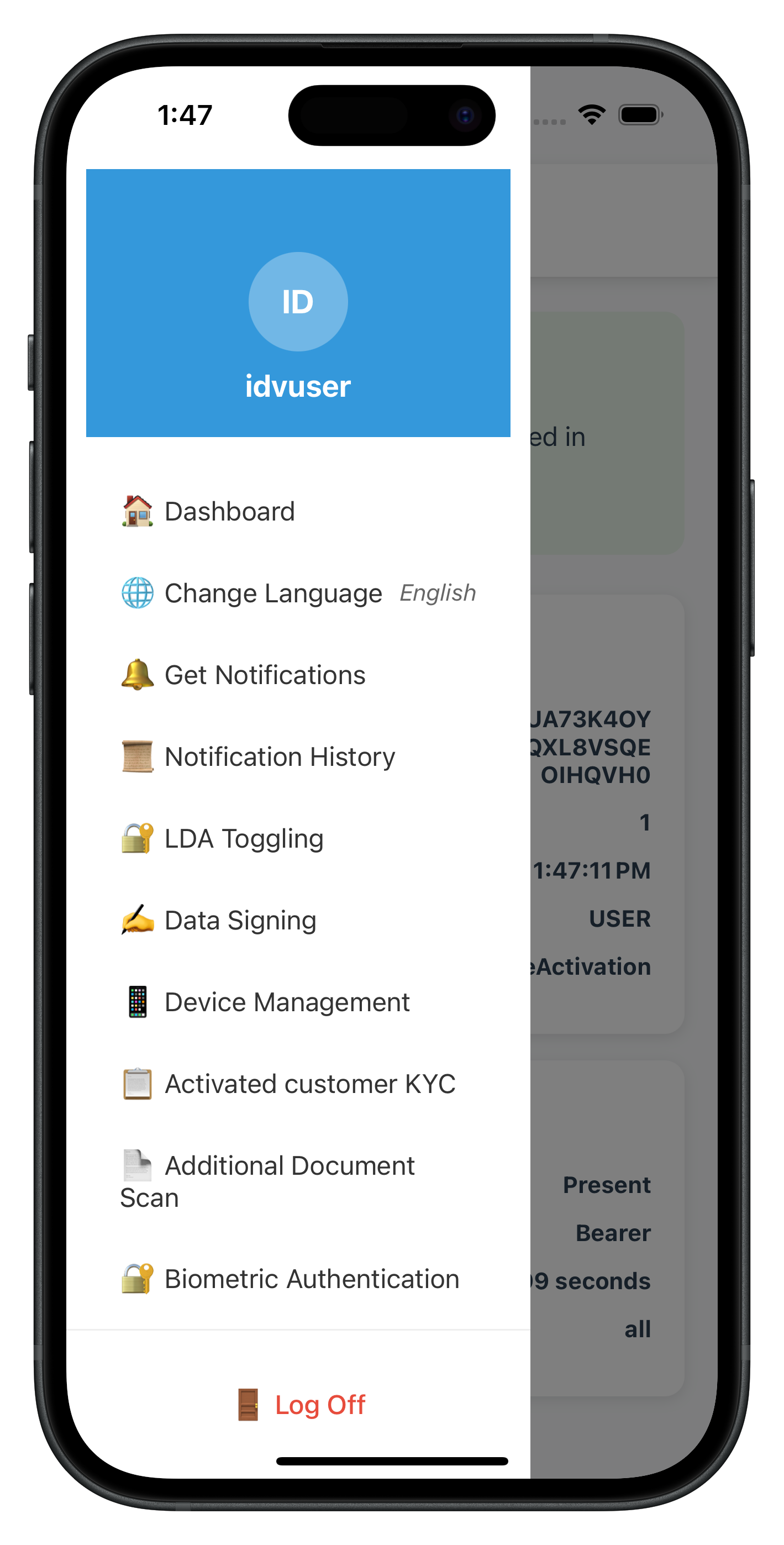
The drawer menu includes a new "🔐 Biometric Authentication" menu item that navigates to the ServerBiometricAuthenticationScreen.
IDV Workflow and Challenge Mode Values
For post-login server biometric authentication, you'll use these specific values:
Parameter | Value | Description |
idvWorkflow |
| Selfie capture for server biometric authentication |
challengeMode |
| Server biometric authentication result event |
Status Codes |
| Template exists / No template |
Comparison with Other IDV Flows:
Aspect | KYC Flow | Additional Document Scan | Server Biometric Auth |
Workflow | 6 | 7 | 8 |
Challenge Mode | 9 | 10 | 25 |
Template Check | No | No | Yes (required) |
Document Scan | Yes | Yes | No |
Selfie Capture | Yes | No | Yes |
Biometric Consent | Yes | No | No |
Template Creation | Yes (new) | No | No (uses existing) |
Entry Point | ActivatedCustomerKYCScreen | AdditionalDocumentScanScreen | ServerBiometricAuthenticationScreen |
API | initiateActivatedCustomerKYC | initiateIDVAdditionalDocumentScan | initiateIDVServerBiometricAuthentication and checkIDVUserBiometricTemplateStatus |
| Result Event | onActivatedCustomerKYCResponse | onIDVAdditionalDocumentScanResult | onIDVServerBiometricAuthenticationResult |
Before You Begin
Ensure you have completed these requirements:
1. Previous Codelabs Completed
- ✅ REL-ID Initialization Flow
- ✅ REL-ID MFA Activation & Login Flow
- ✅ Biometric Template: User must have biometric template on server (from KYC or other IDV flow)
2. Development Environment
# Required tools
Node.js >= 16
npm or yarn
React Native CLI
Xcode (for iOS) or Android Studio (for Android)
3. REL-ID SDK Credentials
- Connection profile configuration
- Valid REL-ID SDK license
- No document scanning license needed (selfie only)
Get the Code from GitHub
The code to get started can be found in a GitHub repository.
You can clone the repository using the following command:
git clone https://github.com/uniken-team/relid-codelab-react-native.git
Navigate to the relid-IDV-post-login-server-biometric-authentication folder:
cd relid-codelab-react-native/relid-IDV-post-login-server-biometric-authentication
Project Structure
The post-login server biometric authentication codelab follows this structure:
relid-IDV-post-login-server-biometric-authentication/
├── src/
│   ├── tutorial/
│   │   ├── screens/
│   │   │   ├── idv/                                        # IDV Screens
│   │   │   │   ├── serverBiometricAuthentication/          # 🆕 Biometric Auth Entry Point
│   │   │   │   │   └── ServerBiometricAuthenticationScreen.tsx
│   │   │   │   ├── IDVSelfieProcessStartConfirmationScreen.tsx  # ♻️ Reused from IDV MFA
│   │   │   │   └── index.ts
│   │   │   ├── mfa/                                        # MFA Screens
│   │   │   │   ├── DashboardScreen.tsx
│   │   │   │   └── ...
│   │   │   └── components/
│   │   │       ├── DrawerContent.tsx                       # 🆕 Biometric Auth menu item
│   │   │       └── ...
│   │   └── navigation/
│   │       ├── AppNavigator.tsx
│   │       └── DrawerNavigator.tsx                         # 🆕 Biometric Auth route
│   └── uniken/
│       ├── services/
│       │   └── idv/
│       │       ├── rdnaIDVService.ts                       # 🆕 Template check + auth APIs
│       │       │                                          # - checkIDVUserBiometricTemplateStatus()
│       │       │                                          # - initiateIDVServerBiometricAuthentication()
│       │       └── rdnaIDVEventManager.ts                  # 🆕 Event handlers
│       │                                                  # - onIDVCheckUserBiometricTemplateStatus
│       │                                                  # - onIDVServerBiometricAuthenticationResult
│       ├── types/
│       │   └── idv/
│       │       └── rdnaIDVEvents.ts                        # 🆕 Type definitions
│       │                                                  # - RDNAIDVCheckUserBiometricTemplateStatusData
│       │                                                  # - RDNAIDVServerBiometricAuthenticationResultData
│       └── providers/
│           └── idv/
│               └── SDKIDVEventProvider.tsx                 # Optional global handlers
└── react-native-rdna-client/                               # REL-ID Native Bridge
    └── (Aware FaceCapture Library embedded)
IDV Assets Configuration
The project includes pre-configured Aware FaceCapture library for biometric authentication:
Required Assets:
- Aware FaceCapture Library - Embedded in react-native-rdna-client plugin
- Native Bridge Configuration - Automatically configured for iOS and Android
NOT Required:
- ❌ Regula Document Reader - Not needed (no document scanning)
- ❌ db.dat - Not needed (no document verification)
- ❌ Document scanning license - Not needed
Overview
Before implementing the authentication screen, you need to add two API methods to the IDV service layer:
checkIDVUserBiometricTemplateStatus()- Check if user has biometric template on serverinitiateIDVServerBiometricAuthentication(reason)- Start authentication workflow
Implement Template Status Check API
Add the following method to rdnaIDVService.ts:
// src/uniken/services/idv/rdnaIDVService.ts

import RdnaClient from 'react-native-rdna-client/src/index';
import type { RDNASyncResponse } from '../../types/rdnaEvents';

class RdnaIDVService {
  // ... existing methods

  /**
   * Check IDV User Biometric Template Status
   *
   * Checks if the user has a biometric template stored on the server.
   * This should be called before allowing server biometric authentication.
   *
   * @returns Promise that resolves with sync response on successful check initiation
   * @throws Promise that rejects with sync response on failure
   *
   * Flow:
   * 1. SDK checks template availability on server
   * 2. SDK triggers onIDVCheckUserBiometricTemplateStatus event with status code:
   *    - 100 = Template present (user can authenticate)
   *    - 600 = Template does not exist (user must complete biometric opt-in first)
   *    - 400/500 = Error
   *
   * Success Response:
   * - error.longErrorCode = 0
   * - Wait for onIDVCheckUserBiometricTemplateStatus event
   *
   * Error Responses:
   * - Sync error: error.longErrorCode !== 0
   */
  async checkIDVUserBiometricTemplateStatus(): Promise<RDNASyncResponse> {
    return new Promise((resolve, reject) => {
      console.log('RdnaIDVService - Checking user biometric template status');

      RdnaClient.checkIDVUserBiometricTemplateStatus(response => {
        console.log('RdnaIDVService - CheckIDVUserBiometricTemplateStatus sync callback received');
        const result: RDNASyncResponse = response;

        if (result.error && result.error.longErrorCode === 0) {
          console.log('RdnaIDVService - CheckIDVUserBiometricTemplateStatus sync response success');
          console.log('RdnaIDVService - Waiting for onIDVCheckUserBiometricTemplateStatus event');
          resolve(result);
        } else {
          console.error('RdnaIDVService - CheckIDVUserBiometricTemplateStatus sync response error:', result);
          reject(result);
        }
      });
    });
  }

  // ... continue with authentication initiation API
}
Implement Server Biometric Authentication Initiation API
Add the following method to rdnaIDVService.ts:
  /**
   * Initiate IDV Server Biometric Authentication
   *
   * Initiates post-login server biometric authentication workflow for already activated
   * customers with stored biometric templates.
   *
   * @param reason - Reason for authentication (e.g., "Server Biometric Authentication")
   * @returns Promise that resolves with sync response on successful initiation
   * @throws Promise that rejects with sync response on failure
   *
   * Flow:
   * 1. SDK initiates server biometric authentication workflow
   *    - workflow: 8 (selfie capture)
   *    - challengeMode: 25 (server biometric auth result)
   * 2. SDK automatically triggers:
   *    - getIDVSelfieProcessStartConfirmation event (idvWorkFlow: 8)
   * 3. After selfie capture, SDK triggers:
   *    - onIDVServerBiometricAuthenticationResult event (challengeMode: 25)
   *
   * Success Response:
   * - error.longErrorCode = 0
   *
   * Error Responses:
   * - Sync error: error.longErrorCode !== 0
   * - Backend error: Received in onIDVServerBiometricAuthenticationResult event
   */
  async initiateIDVServerBiometricAuthentication(
    reason: string
  ): Promise<RDNASyncResponse> {
    return new Promise((resolve, reject) => {
      console.log('RdnaIDVService - Initiating IDV server biometric authentication');
      console.log('RdnaIDVService - Reason:', reason);

      RdnaClient.initiateIDVServerBiometricAuthentication(reason, response => {
        console.log('RdnaIDVService - InitiateIDVServerBiometricAuthentication sync callback received');
        const result: RDNASyncResponse = response;

        if (result.error && result.error.longErrorCode === 0) {
          console.log('RdnaIDVService - InitiateIDVServerBiometricAuthentication sync response success');
          console.log('RdnaIDVService - Waiting for onIDVServerBiometricAuthenticationResult event');
          resolve(result);
        } else {
          console.error('RdnaIDVService - InitiateIDVServerBiometricAuthentication sync response error:', result);
          reject(result);
        }
      });
    });
  }
}

export default new RdnaIDVService();
Key Points
- Template Check First: Always check template status before allowing authentication
- Workflow 8: Authentication uses selfie capture workflow
- Challenge Mode 25: Result event uses server biometric auth challenge mode
- Sync Callback: Immediate response confirming API call accepted
- Async Event: Actual results come via events
- Promise Pattern: Easy async/await usage in screens
Overview
Add TypeScript interfaces for the template status check and authentication result events. These events are triggered by the SDK after the respective API calls.
Implement Template Status Check Event Type
Add the following type definition to rdnaIDVEvents.ts:
// src/uniken/types/idv/rdnaIDVEvents.ts

import type { RDNAError, RDNAStatus } from '../rdnaEvents';
import { RDNAChallengeOpMode } from 'react-native-rdna-client/src/index';

// ... existing IDV event types

// ================================================================================================
// IDV SERVER BIOMETRIC AUTHENTICATION EVENT TYPES
// ================================================================================================

/**
 * RDNA IDV Check User Biometric Template Status Event Data
 * Response event triggered after checkIDVUserBiometricTemplateStatus API call
 *
 * This event is triggered when:
 * 1. Template status check completes successfully
 * 2. Backend returns template availability status
 *
 * Status Codes (in status.statusCode):
 * - 100 = Template present on server (user can authenticate)
 * - 600 = Template does not exist (user must complete biometric opt-in first)
 * - 400/500 = Error codes
 *
 * Response Structure:
 * - error: SDK error information
 *   - longErrorCode: 0 = success, others = SDK errors
 * - status: Backend status information
 *   - statusCode: 100/600/400/500
 *   - statusMessage: Human-readable status message
 * - idvResponse: JSON string containing detailed template info
 *
 * Validation Pattern:
 * 1. Check error.longErrorCode first (0 = OK)
 * 2. Then check status.statusCode (100 = template exists, 600 = no template)
 *
 * Application should:
 * - Parse status code to determine template availability
 * - Enable authentication button only if statusCode === 100
 * - Show helpful message if statusCode === 600
 */
export interface RDNAIDVCheckUserBiometricTemplateStatusData {
  /** User ID */
  userID: string;

  /** Remaining authentication attempts */
  attemptsLeft: number;

  /** Challenge mode (not specific to this operation) */
  challengeMode: RDNAChallengeOpMode;

  /** JSON string - parse to RDNAIDVCheckUserBiometricTemplateStatusResponse */
  idvResponse: string;

  /** Backend status information */
  status: RDNAStatus;

  /** SDK error information */
  error: RDNAError;
}

/**
 * Parsed structure of idvResponse from template status check
 */
export interface RDNAIDVCheckUserBiometricTemplateStatusResponse {
  /** Status code: 100=Template present, 600=No template */
  status_code: number;

  /** Status message */
  status_message: string;

  /** IL status code */
  il_status_code: number | null;

  /** User ID */
  user_id: string | null;

  /** For user ID */
  for_user_id: string | null;

  /** Orchestration use case */
  orchestration_use_case: string | null;

  /** Result: true if template exists */
  result: boolean;

  /** Remaining authentication attempts */
  attempts_left: number;
}
Implement Server Biometric Authentication Result Event Type
Add the following type definition to rdnaIDVEvents.ts:
/**
 * RDNA IDV Server Biometric Authentication Result Event Data
 * Response event triggered after selfie capture completes during server biometric authentication
 *
 * This event is triggered when:
 * 1. Selfie capture completes successfully and server processes authentication
 * 2. User cancels selfie capture (error 240)
 * 3. Backend returns an error during authentication processing
 *
 * Challenge Mode: 25 (server biometric authentication)
 *
 * Response Structure:
 * - error: SDK error information
 *   - longErrorCode: 0 = success, 240 = user cancelled, others = errors
 * - status: Backend status information
 *   - statusCode: 0 = success, others = backend errors
 * - idvResponse: JSON string containing video, audit info, session data
 *
 * Validation Pattern:
 * 1. Check error.longErrorCode first (0 = OK, 240 = user cancelled)
 * 2. Then check status.statusCode (0 = OK)
 * 3. Parse idvResponse to check idv_audit_info.status (SUCCESS/FAILURE)
 *
 * Application should:
 * - Navigate back to ServerBiometricAuthentication screen
 * - Wait 300ms for navigation to complete
 * - Display result modal with audit data
 * - Handle error 240 gracefully (user cancellation)
 */
export interface RDNAIDVServerBiometricAuthenticationResultData {
  /** User ID */
  userID: string;

  /** Remaining authentication attempts */
  attemptsLeft: number;

  /** Challenge mode: 25 (server biometric authentication) */
  challengeMode: RDNAChallengeOpMode;

  /** JSON string - parse to RDNAIDVServerBiometricAuthenticationResponse */
  idvResponse: string;

  /** Backend status information */
  status: RDNAStatus;

  /** SDK error information */
  error: RDNAError;
}

/**
 * Parsed structure of idvResponse from server biometric authentication result
 * Contains video metadata and audit information for authentication verification
 */
export interface RDNAIDVServerBiometricAuthenticationResponse {
  /** Video capture data */
  video: {
    workflow_data: {
      frames: Array<{
        tags: string[];
        data: string;      // Base64 encoded frame data
        timestamp: number;
      }>;
      rotation: number;
      workflow: string;
    };
    meta_data: {
      username: string;
      client_device_model: string;
      client_device_brand: string;
      client_os_version: string;
    };
    client_version: string;
  };

  /** Authentication audit information */
  idv_audit_info: {
    reason: string;
    audit_metrics: {
      start_timestamp: number;
      end_timestamp: number;
      fields_failed_to_extract: string[];
    };
    status: string;                      // "SUCCESS" or "FAILURE"
    scanned_document_type: string;
    idv_audit_transaction_id: string;    // Unique transaction identifier
    orchestration_use_case: string;      // e.g., "RDNA_IDV_POSTLOGIN_IDV_SELFIE_BIOMETRIC"
    idv_json_version: string;
  };

  /** Authentication reason */
  purpose: string;

  /** Number of attempts made */
  attempts: number;

  /** User ID */
  user_id: string;

  /** Application ID */
  app_id: string;

  /** Device UUID */
  device_uuid: string;

  /** Session ID */
  session_id: string;

  /** Application UUID */
  app_uuid: string;

  /** User UUID */
  user_uuid: string;

  /** Remaining authentication attempts */
  attempts_left: number;
}
Key Points
- Status Code 100: Template exists - enable authentication
- Status Code 600: No template - disable authentication, show message
- Challenge Mode 25: Authentication result event identifier
- Audit Status: SUCCESS/FAILURE in
idv_audit_info.status - Error 240: User cancelled (close button on selfie confirmation)
Overview
Implement event listeners and handlers for template status check and authentication result events in the IDV Event Manager.
Implement Template Status Check Event Handler
Add the following to rdnaIDVEventManager.ts:
// src/uniken/services/idv/rdnaIDVEventManager.ts

import { NativeEventEmitter, NativeModules } from 'react-native';
import type {
  RDNAIDVCheckUserBiometricTemplateStatusData,
  RDNAIDVServerBiometricAuthenticationResultData,
} from '../../types/idv/rdnaIDVEvents';

class RdnaIDVEventManager {
  // ... existing properties

  private checkUserBiometricTemplateStatusHandler?:
    (data: RDNAIDVCheckUserBiometricTemplateStatusData) => void;

  private serverBiometricAuthenticationResultHandler?:
    (data: RDNAIDVServerBiometricAuthenticationResultData) => void;

  constructor() {
    // ... existing constructor code

    // Register template status check event listener
    this.listeners.push(
      this.rdnaEmitter.addListener(
        'onIDVCheckUserBiometricTemplateStatus',
        this.onCheckUserBiometricTemplateStatus.bind(this)
      )
    );

    // Register server biometric authentication result event listener
    this.listeners.push(
      this.rdnaEmitter.addListener(
        'onIDVServerBiometricAuthenticationResult',
        this.onServerBiometricAuthenticationResult.bind(this)
      )
    );
  }

  /**
   * Template Status Check Event Handler
   * Triggered after checkIDVUserBiometricTemplateStatus API call
   */
  private onCheckUserBiometricTemplateStatus(response: RDNAJsonResponse) {
    console.log('RdnaIDVEventManager - Check user biometric template status event received');

    try {
      console.log('RdnaIDVEventManager - onCheckUserBiometricTemplateStatus response:', response.response);
      const data: RDNAIDVCheckUserBiometricTemplateStatusData = JSON.parse(response.response);

      console.log('RdnaIDVEventManager - User ID:', data.userID);
      console.log('RdnaIDVEventManager - Attempts Left:', data.attemptsLeft);
      console.log('RdnaIDVEventManager - Challenge Mode:', data.challengeMode);
      console.log('RdnaIDVEventManager - Status Code:', data.status?.statusCode);
      console.log('RdnaIDVEventManager - Status Message:', data.status?.statusMessage);
      console.log('RdnaIDVEventManager - Error Code:', data.error?.longErrorCode);
      console.log('RdnaIDVEventManager - Error String:', data.error?.errorString);
      console.log('RdnaIDVEventManager - IDV Response:', data.idvResponse);

      if (this.checkUserBiometricTemplateStatusHandler) {
        this.checkUserBiometricTemplateStatusHandler(data);
      } else {
        console.warn('RdnaIDVEventManager - No handler registered for check user biometric template status');
      }
    } catch (error) {
      console.error('RdnaIDVEventManager - Failed to parse check user biometric template status:', error);
    }
  }

  /**
   * Server Biometric Authentication Result Event Handler
   * Triggered after selfie capture completes during server biometric authentication
   * Challenge Mode: 25
   */
  private onServerBiometricAuthenticationResult(response: RDNAJsonResponse) {
    console.log('RdnaIDVEventManager - Server biometric authentication result event received');

    try {
      console.log('RdnaIDVEventManager - onServerBiometricAuthenticationResult response:', response.response);
      const data: RDNAIDVServerBiometricAuthenticationResultData = JSON.parse(response.response);

      console.log('RdnaIDVEventManager - User ID:', data.userID);
      console.log('RdnaIDVEventManager - Attempts Left:', data.attemptsLeft);
      console.log('RdnaIDVEventManager - Challenge Mode:', data.challengeMode);
      console.log('RdnaIDVEventManager - Status Code:', data.status?.statusCode);
      console.log('RdnaIDVEventManager - Status Message:', data.status?.statusMessage);
      console.log('RdnaIDVEventManager - Error Code:', data.error?.longErrorCode);
      console.log('RdnaIDVEventManager - Error String:', data.error?.errorString);
      console.log('RdnaIDVEventManager - IDV Response:', data.idvResponse);

      if (this.serverBiometricAuthenticationResultHandler) {
        this.serverBiometricAuthenticationResultHandler(data);
      } else {
        console.warn('RdnaIDVEventManager - No handler registered for server biometric authentication result');
      }
    } catch (error) {
      console.error('RdnaIDVEventManager - Failed to parse server biometric authentication result:', error);
    }
  }

  /**
   * Set handler for template status check event
   */
  setCheckUserBiometricTemplateStatusHandler(
    handler: ((data: RDNAIDVCheckUserBiometricTemplateStatusData) => void) | undefined
  ) {
    console.log('RdnaIDVEventManager - Setting check user biometric template status handler');
    this.checkUserBiometricTemplateStatusHandler = handler;
  }

  /**
   * Set handler for server biometric authentication result event
   */
  setServerBiometricAuthenticationResultHandler(
    handler: ((data: RDNAIDVServerBiometricAuthenticationResultData) => void) | undefined
  ) {
    console.log('RdnaIDVEventManager - Setting server biometric authentication result handler');
    this.serverBiometricAuthenticationResultHandler = handler;
  }

  // ... existing methods
}

export default new RdnaIDVEventManager();
Key Points
- Event Listeners: Registered in constructor for persistent listening
- Handler Setters: Allow screens to register their handlers
- Logging: Comprehensive logging for debugging
- Error Handling: Try-catch for JSON parsing
Overview
Implement the main screen that handles template status check, authentication initiation, and result display. This screen uses the three-hook lifecycle pattern for robust event handling.
Screen Setup and State Management
Create ServerBiometricAuthenticationScreen.tsx:
// src/tutorial/screens/idv/serverBiometricAuthentication/ServerBiometricAuthenticationScreen.tsx

import React, { useState, useCallback, useEffect } from 'react';
import { View, Text, StyleSheet, Alert, ActivityIndicator } from 'react-native';
import { useFocusEffect } from '@react-navigation/native';
import rdnaIDVService from '../../../../uniken/services/idv/rdnaIDVService';
import type { RDNASyncResponse } from '../../../../uniken/types/rdnaEvents';
import type {
  RDNAIDVCheckUserBiometricTemplateStatusData,
  RDNAIDVServerBiometricAuthenticationResultData,
} from '../../../../uniken/types/idv/rdnaIDVEvents';
import { RDNASyncUtils } from '../../../../uniken/types/rdnaEvents';
import { Button } from '../../components/Button';

const ServerBiometricAuthenticationScreen: React.FC<{ navigation: any }> = ({ navigation }) => {
  const [isCheckingStatus, setIsCheckingStatus] = useState(false);
  const [isAuthenticating, setIsAuthenticating] = useState(false);
  const [templateStatus, setTemplateStatus] = useState<{
    checked: boolean;
    exists: boolean;
    statusCode: number;
    statusMessage: string;
  }>({
    checked: false,
    exists: false,
    statusCode: 0,
    statusMessage: '',
  });

  // ... continue with handlers
};
Implement Template Status Check Handler
  /**
   * Handles check user biometric template status response event
   * Status Codes:
   * - 100 = Template present
   * - 600 = Template does not exist
   * - 400/500 = Error
   */
  const handleCheckUserBiometricTemplateStatusResponse = useCallback(
    (data: RDNAIDVCheckUserBiometricTemplateStatusData) => {
      console.log('ServerBiometricAuthenticationScreen - Check user biometric template status response received');

      const errorCode = data.error?.longErrorCode;
      const statusCode = data.status?.statusCode;
      const statusMessage = data.status?.statusMessage || 'Unknown status';

      // First check: error code
      if (errorCode !== 0) {
        setTemplateStatus({
          checked: true,
          exists: false,
          statusCode: statusCode || 0,
          statusMessage: `Error: ${data.error?.errorString}`,
        });
        setIsCheckingStatus(false);
        return;
      }

      // Second check: status code
      if (statusCode === 100) {
        // Template present
        setTemplateStatus({
          checked: true,
          exists: true,
          statusCode: statusCode,
          statusMessage: statusMessage,
        });
      } else if (statusCode === 600) {
        // Template does not exist
        setTemplateStatus({
          checked: true,
          exists: false,
          statusCode: statusCode,
          statusMessage: statusMessage,
        });
      } else {
        // Other status codes (400/500 = error)
        setTemplateStatus({
          checked: true,
          exists: false,
          statusCode: statusCode || 0,
          statusMessage: statusMessage,
        });
      }

      setIsCheckingStatus(false);
    },
    []
  );

  /**
   * Checks if user biometric template exists on server
   */
  const checkTemplateStatus = useCallback(async () => {
    console.log('ServerBiometricAuthenticationScreen - Checking biometric template status');
    setIsCheckingStatus(true);

    try {
      const syncResponse: RDNASyncResponse = await rdnaIDVService.checkIDVUserBiometricTemplateStatus();
      console.log('ServerBiometricAuthenticationScreen - CheckIDVUserBiometricTemplateStatus sync response successful');
      // The actual result will come via onIDVCheckUserBiometricTemplateStatus event
    } catch (error) {
      console.error('ServerBiometricAuthenticationScreen - CheckIDVUserBiometricTemplateStatus sync error:', error);

      const result: RDNASyncResponse = error as RDNASyncResponse;
      const errorMessage = RDNASyncUtils.getErrorMessage(result);

      setTemplateStatus({
        checked: true,
        exists: false,
        statusCode: 0,
        statusMessage: `Error: ${errorMessage}`,
      });
      setIsCheckingStatus(false);

      Alert.alert(
        'Template Status Check Error',
        `Failed to check template status: ${errorMessage}`,
        [{ text: 'OK' }]
      );
    }
  }, []);
Implement Authentication Result Handler
  /**
   * Handles server biometric authentication result event
   * Implements navigate-back-before-modal pattern
   * Challenge Mode: 25
   */
  const handleServerBiometricAuthenticationResultResponse = useCallback(
    (data: RDNAIDVServerBiometricAuthenticationResultData) => {
      console.log('ServerBiometricAuthenticationScreen - Server biometric authentication result received');

      // Reset button state
      setIsAuthenticating(false);

      // Navigate back to ServerBiometricAuthentication screen in DrawerNavigator
      console.log('ServerBiometricAuthenticationScreen - Navigating back to ServerBiometricAuthentication screen');
      (navigation as any).navigate('DrawerNavigator', {
        screen: 'ServerBiometricAuthentication'
      });

      const errorCode = data.error?.longErrorCode;
      const statusCode = data.status?.statusCode;

      // Small delay to ensure navigation completes before showing modal
      setTimeout(() => {
        // First check: error code
        if (errorCode !== 0) {
          console.log('ServerBiometricAuthenticationScreen - Error in authentication:', errorCode);
          Alert.alert(
            'Authentication Error',
            `${data.error?.errorString}\n\nError Code: ${errorCode}`,
            [{ text: 'OK' }]
          );
          return;
        }

        // Second check: status code
        if (statusCode !== 0) {
          console.log('ServerBiometricAuthenticationScreen - Status error:', statusCode);
          Alert.alert(
            'Authentication Failed',
            `Status: ${data.status?.statusMessage}\n\nStatus Code: ${statusCode}`,
            [{ text: 'OK' }]
          );
          return;
        }

        // Success - parse idvResponse to check audit status
        try {
          const idvResponseObj = JSON.parse(data.idvResponse);
          console.log('ServerBiometricAuthenticationScreen - Parsed authentication result:', idvResponseObj);

          const auditStatus = idvResponseObj.idv_audit_info?.status;
          const orchestrationUseCase = idvResponseObj.idv_audit_info?.orchestration_use_case;
          const transactionId = idvResponseObj.idv_audit_info?.idv_audit_transaction_id;
          const attemptsLeft = idvResponseObj.attempts_left;

          if (auditStatus === 'SUCCESS') {
            Alert.alert(
              '✅ Authentication Success',
              `Audit Status: ${auditStatus}\n\n` +
              `Use Case: ${orchestrationUseCase || 'N/A'}\n` +
              `Transaction ID: ${transactionId || 'N/A'}\n` +
              `Attempts Left: ${attemptsLeft}`,
              [
                {
                  text: 'Back to Dashboard',
                  onPress: () => {
                    console.log('ServerBiometricAuthenticationScreen - Success acknowledged, navigating to Dashboard');
                    navigation.navigate('Dashboard');
                  }
                }
              ],
              { cancelable: false }
            );
          } else {
            Alert.alert(
              '❌ Authentication Failed',
              `Audit Status: ${auditStatus || 'Unknown'}\n\n` +
              `Use Case: ${orchestrationUseCase || 'N/A'}\n` +
              `Transaction ID: ${transactionId || 'N/A'}\n` +
              `Attempts Left: ${attemptsLeft}`,
              [{ text: 'OK' }]
            );
          }
        } catch (parseError) {
          console.error('ServerBiometricAuthenticationScreen - Failed to parse idvResponse:', parseError);
          Alert.alert(
            'Parse Error',
            'Failed to parse authentication result',
            [{ text: 'OK' }]
          );
        }
      }, 300);
    },
    [navigation]
  );

  /**
   * Initiates server biometric authentication workflow
   */
  const handleStartAuthentication = async () => {
    console.log('ServerBiometricAuthenticationScreen - Starting server biometric authentication');
    setIsAuthenticating(true);

    try {
      const reason = 'Server Biometric Authentication';
      console.log('ServerBiometricAuthenticationScreen - Calling initiateIDVServerBiometricAuthentication');

      const syncResponse: RDNASyncResponse = await rdnaIDVService.initiateIDVServerBiometricAuthentication(reason);
      console.log('ServerBiometricAuthenticationScreen - InitiateIDVServerBiometricAuthentication sync response successful');

      // Sync success means API accepted the request
      // The authentication result will come via onIDVServerBiometricAuthenticationResult event
      console.log('ServerBiometricAuthenticationScreen - Server biometric authentication initiated, waiting for result event');

    } catch (error) {
      console.error('ServerBiometricAuthenticationScreen - InitiateIDVServerBiometricAuthentication sync error:', error);

      const result: RDNASyncResponse = error as RDNASyncResponse;
      const errorMessage = RDNASyncUtils.getErrorMessage(result);

      Alert.alert(
        'Authentication Error',
        `Failed to initiate authentication: ${errorMessage}`,
        [{ text: 'OK' }]
      );
      setIsAuthenticating(false);
    }
  };
Implement Three-Hook Lifecycle Pattern
  /**
   * THREE-HOOK LIFECYCLE PATTERN
   *
   * Hook 1: useEffect - Persistent handlers during native UI workflows
   * Registers event handlers on component mount and keeps them active.
   * This is critical because native UI (selfie capture) takes focus.
   */
  useEffect(() => {
    console.log('ServerBiometricAuthenticationScreen - Component mounted, registering event handlers');
    const eventManager = rdnaIDVService.getEventManager();
    eventManager.setCheckUserBiometricTemplateStatusHandler(handleCheckUserBiometricTemplateStatusResponse);
    eventManager.setServerBiometricAuthenticationResultHandler(handleServerBiometricAuthenticationResultResponse);

    // Cleanup: remove handlers on unmount
    return () => {
      console.log('ServerBiometricAuthenticationScreen - Component unmounting, cleaning up event handlers');
      eventManager.setCheckUserBiometricTemplateStatusHandler(undefined);
      eventManager.setServerBiometricAuthenticationResultHandler(undefined);
    };
  }, [handleCheckUserBiometricTemplateStatusResponse, handleServerBiometricAuthenticationResultResponse]);

  /**
   * Hook 2: useFocusEffect - Re-register handlers on screen focus
   * Handles drawer navigation where component stays mounted but handlers may need re-registration.
   */
  useFocusEffect(
    useCallback(() => {
      console.log('ServerBiometricAuthenticationScreen - Screen focused, re-registering event handlers');

      const eventManager = rdnaIDVService.getEventManager();
      eventManager.setCheckUserBiometricTemplateStatusHandler(handleCheckUserBiometricTemplateStatusResponse);
      eventManager.setServerBiometricAuthenticationResultHandler(handleServerBiometricAuthenticationResultResponse);
    }, [handleCheckUserBiometricTemplateStatusResponse, handleServerBiometricAuthenticationResultResponse])
  );

  /**
   * Hook 3: useFocusEffect - Reset UI state and check template
   * Runs when user opens screen or navigates back after authentication.
   */
  useFocusEffect(
    useCallback(() => {
      console.log('ServerBiometricAuthenticationScreen - Screen focused, resetting UI state and checking template');

      // Reset button states
      setIsAuthenticating(false);
      setIsCheckingStatus(false);

      // Check template status
      checkTemplateStatus();
    }, [checkTemplateStatus])
  );
Implement UI
  return (
    <View style={styles.container}>
      <Text style={styles.title}>Server Biometric Authentication</Text>
      <Text style={styles.subtitle}>
        Verify your identity using biometric authentication
      </Text>

      {/* Template Status Display */}
      {isCheckingStatus ? (
        <View style={styles.statusContainer}>
          <ActivityIndicator size="large" color="#3498db" />
          <Text style={styles.statusText}>Checking template status...</Text>
        </View>
      ) : templateStatus.checked ? (
        <View style={[
          styles.statusContainer,
          templateStatus.exists ? styles.statusSuccess : styles.statusWarning
        ]}>
          <Text style={styles.statusIcon}>
            {templateStatus.exists ? '✅' : '⚠️'}
          </Text>
          <Text style={styles.statusText}>
            {templateStatus.exists
              ? 'Your biometric template is stored on the server'
              : 'No biometric template found on the server'}
          </Text>
          <Text style={styles.statusMessage}>
            {templateStatus.statusMessage}
          </Text>
          {!templateStatus.exists && (
            <Text style={styles.helpText}>
              Please complete biometric opt-in first (e.g., KYC flow)
            </Text>
          )}
        </View>
      ) : null}

      {/* Authentication Button */}
      <View style={styles.buttonContainer}>
        <Button
          title={isAuthenticating ? 'Authenticating...' : 'Start Authentication'}
          onPress={handleStartAuthentication}
          disabled={!templateStatus.exists || isCheckingStatus || isAuthenticating}
          loading={isAuthenticating}
        />
      </View>

      {/* Info Section */}
      <View style={styles.infoContainer}>
        <Text style={styles.infoTitle}>How it works:</Text>
        <Text style={styles.infoText}>
          1. We check if you have a biometric template on our server
        </Text>
        <Text style={styles.infoText}>
          2. You capture a selfie with liveness detection
        </Text>
        <Text style={styles.infoText}>
          3. We verify your face against the stored template
        </Text>
        <Text style={styles.infoText}>
          4. You receive the authentication result
        </Text>
      </View>
    </View>
  );
};

const styles = StyleSheet.create({
  container: {
    flex: 1,
    padding: 20,
    backgroundColor: '#f5f5f5',
  },
  title: {
    fontSize: 24,
    fontWeight: 'bold',
    color: '#2c3e50',
    marginBottom: 10,
  },
  subtitle: {
    fontSize: 16,
    color: '#7f8c8d',
    marginBottom: 30,
  },
  statusContainer: {
    padding: 20,
    borderRadius: 10,
    marginBottom: 30,
    alignItems: 'center',
  },
  statusSuccess: {
    backgroundColor: '#d4edda',
    borderColor: '#c3e6cb',
    borderWidth: 1,
  },
  statusWarning: {
    backgroundColor: '#fff3cd',
    borderColor: '#ffeeba',
    borderWidth: 1,
  },
  statusIcon: {
    fontSize: 40,
    marginBottom: 10,
  },
  statusText: {
    fontSize: 16,
    fontWeight: '600',
    color: '#2c3e50',
    textAlign: 'center',
    marginBottom: 5,
  },
  statusMessage: {
    fontSize: 14,
    color: '#555',
    textAlign: 'center',
  },
  helpText: {
    fontSize: 12,
    color: '#856404',
    textAlign: 'center',
    marginTop: 10,
    fontStyle: 'italic',
  },
  buttonContainer: {
    marginBottom: 30,
  },
  infoContainer: {
    backgroundColor: '#fff',
    padding: 20,
    borderRadius: 10,
    borderWidth: 1,
    borderColor: '#e0e0e0',
  },
  infoTitle: {
    fontSize: 18,
    fontWeight: 'bold',
    color: '#2c3e50',
    marginBottom: 15,
  },
  infoText: {
    fontSize: 14,
    color: '#555',
    marginBottom: 10,
    lineHeight: 20,
  },
});

export default ServerBiometricAuthenticationScreen;
UI Preview: Server Biometric Authentication Screen
State 1: Template Exists (Status Code 100) - Button Enabled
Biometric Authentication Screen |
Biometric Authentication Screen |
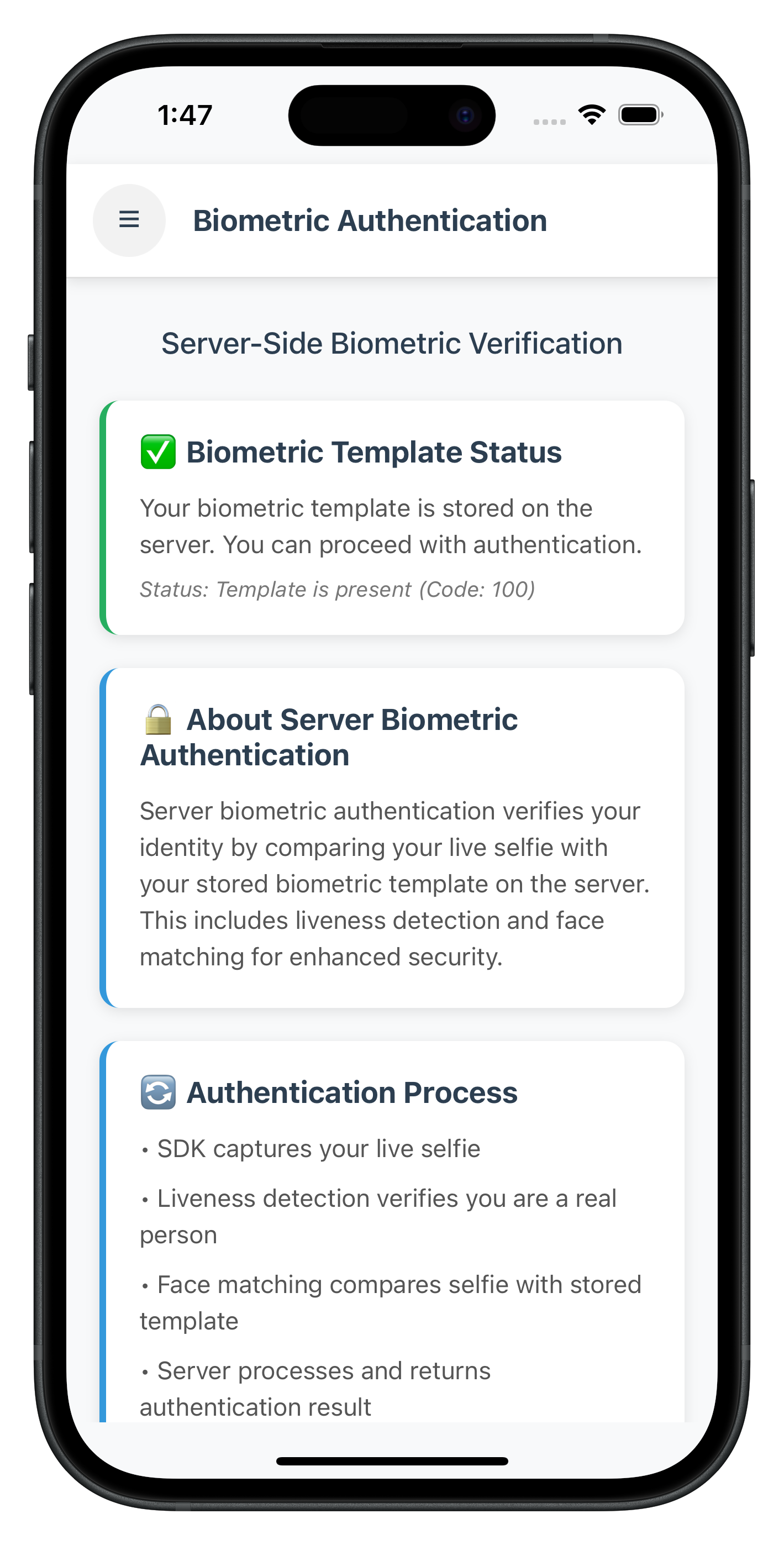
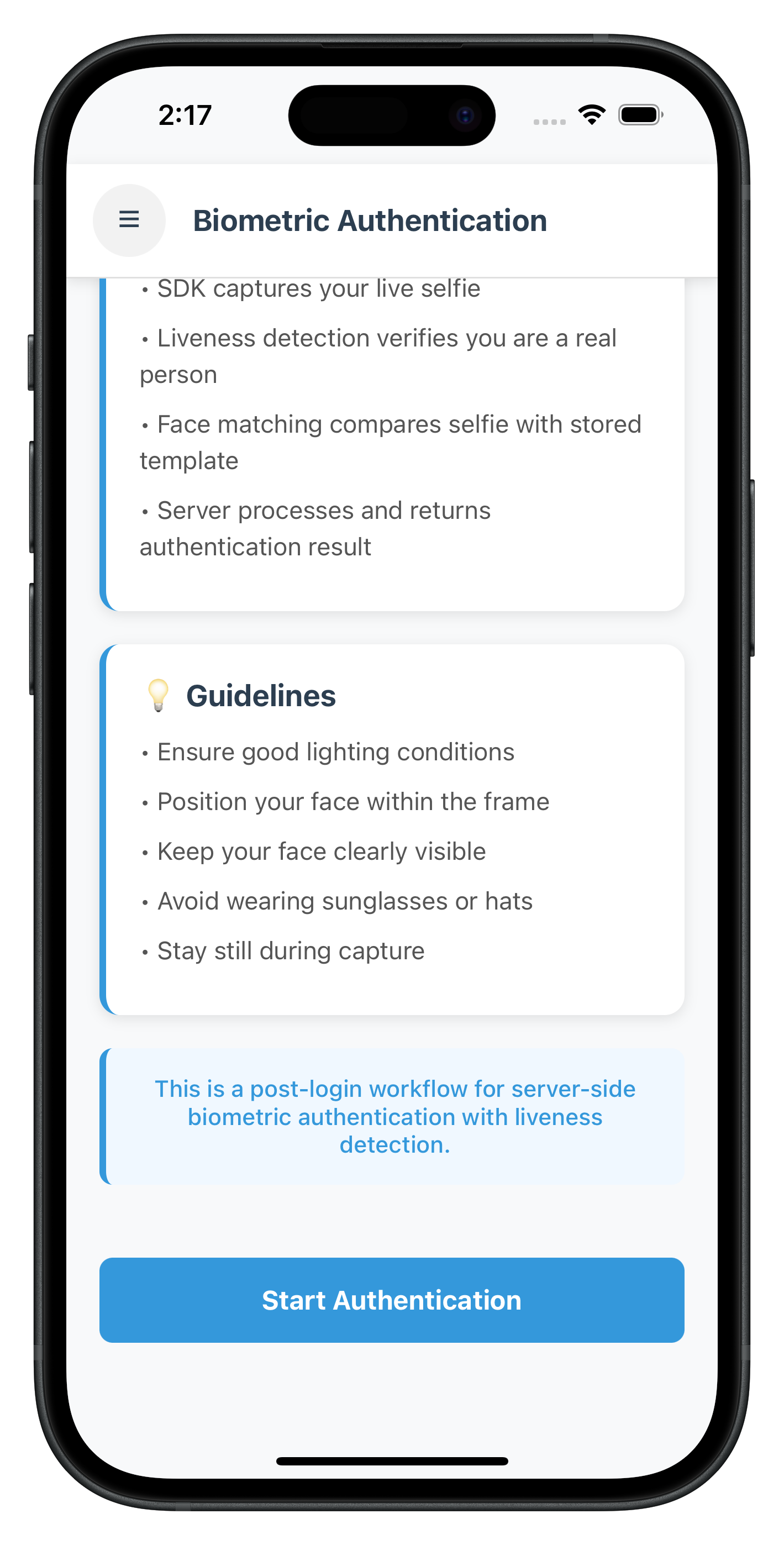
When the template exists (status code 100), a green banner displays "✅ Your biometric template is stored on the server" and the "Start Authentication" button is enabled (blue).
State 2: No Template (Status Code 600) - Button Disabled
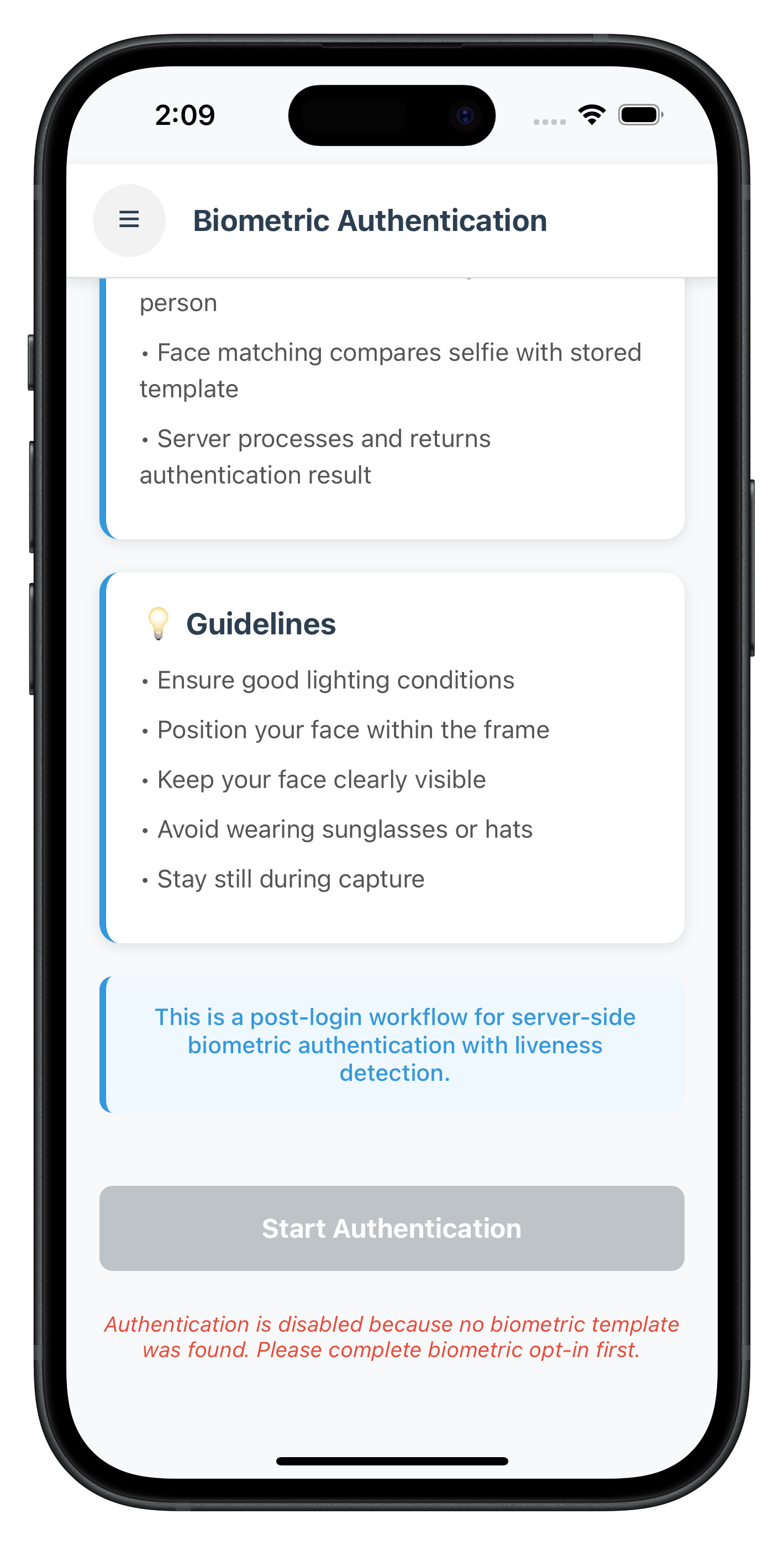
When no template is found (status code 600), a yellow banner displays "⚠️ No biometric template found on the server" with help text, and the "Start Authentication" button is disabled (grey).
Key Points
- Three-Hook Pattern: Ensures handlers persist during native UI and re-register on focus
- Template Check on Focus: Automatic check ensures button state is always correct
- Navigate-Back-Before-Modal: 300ms delay for smooth modal display
- Status Code Validation: 100=enable button, 600=disable with message
- Audit Data Display: Shows status, use case, transaction ID, attempts left
Add Route to Drawer Navigator
Update DrawerNavigator.tsx:
// src/tutorial/navigation/DrawerNavigator.tsx

import { ServerBiometricAuthenticationScreen } from '../screens/idv';

export type DrawerParamList = {
  // ... existing routes
  ServerBiometricAuthentication: undefined;
};

// Inside DrawerNavigator component:
<Drawer.Screen
  name="ServerBiometricAuthentication"
  component={ServerBiometricAuthenticationScreen}
  options={{
    drawerLabel: 'Biometric Authentication',
    drawerItemStyle: { display: 'none' }, // Hide from drawer menu
  }}
/>
Add Menu Item to Drawer Content
Update DrawerContent.tsx:
// src/tutorial/screens/components/DrawerContent.tsx

{/* Server Biometric Authentication Menu Item */}
<TouchableOpacity
  style={styles.menuItem}
  onPress={() => props.navigation.navigate('ServerBiometricAuthentication')}
>
  <Text style={styles.menuText}>🔐 Biometric Authentication</Text>
</TouchableOpacity>
Update Index Exports
Update src/tutorial/screens/idv/index.ts:
export { default as ServerBiometricAuthenticationScreen } from './serverBiometricAuthentication/ServerBiometricAuthenticationScreen';
Complete Flow Walkthrough
Test the complete server biometric authentication flow:
Step 1: Login and Navigate
1. Launch the app
2. Complete user login (activated customer)
3. Navigate to Dashboard
4. Open drawer menu (hamburger icon)
5. Select "🔐 Biometric Authentication"
Step 2: Template Status Check
1. Screen opens and automatically checks template status
2. Observe loading indicator: "Checking template status..."
3. Template status displayed:
   - ✅ If template exists (status code 100):
     - Green banner with "Your biometric template is stored on the server"
     - "Start Authentication" button enabled
   - ⚠️ If no template (status code 600):
     - Yellow banner with "No biometric template found on the server"
     - "Start Authentication" button disabled (grey)
     - Help text: "Please complete biometric opt-in first"
Step 3: Start Authentication (if template exists)
1. Click "Start Authentication" button
2. Button shows loading: "Authenticating..."
3. SDK initiates workflow 8 (selfie capture)
4. Selfie confirmation screen appears (reused from IDV MFA flow)
Step 4: Selfie Capture
1. Click "Start Selfie Capture" button
   → Native camera opens with Aware FaceCapture
   → Liveness detection guides user
   → User captures selfie
   → Camera closes

2. OR Click Close button (X)
   → Error 240 triggered (user cancelled)
   → Result event fires immediately
Step 5: View Authentication Result
1. Navigation back to ServerBiometricAuthentication screen
2. 300ms delay
3. Result modal appears:

   Success Modal (audit status = SUCCESS):
   ✅ Authentication Success
   - Audit Status: SUCCESS
   - Use Case: RDNA_IDV_POSTLOGIN_IDV_SELFIE_BIOMETRIC
   - Transaction ID: [unique ID]
   - Attempts Left: [number]
   - Button: "Back to Dashboard"

   Failure Modal (audit status = FAILURE):
   ❌ Authentication Failed
   - Audit Status: FAILURE
   - Use Case: RDNA_IDV_POSTLOGIN_IDV_SELFIE_BIOMETRIC
   - Transaction ID: [unique ID]
   - Attempts Left: [number]
   - Button: "OK"

   Cancellation (error 240):
   Authentication Error
   - User Cancelled
   - Error Code: 240
   - Button: "OK"
Testing Scenarios
Scenario 1: User with Template (Happy Path)
✅ Template check returns status code 100
✅ Button enabled
✅ User clicks "Start Authentication"
✅ Selfie capture completes
✅ Authentication succeeds (audit status = SUCCESS)
✅ Success modal shown
✅ User clicks "Back to Dashboard"
✅ Navigates to Dashboard
Scenario 2: User Without Template
⚠️ Template check returns status code 600
⚠️ Button disabled (grey color)
⚠️ Yellow banner: "No biometric template found"
⚠️ Help text: "Please complete biometric opt-in first"
⚠️ User cannot proceed with authentication
Scenario 3: User Cancels Selfie Capture
✅ Template check succeeds (status code 100)
✅ User clicks "Start Authentication"
✅ Selfie confirmation screen appears
❌ User clicks Close button (X)
❌ Error 240 triggered
❌ Navigate back to authentication screen
❌ Error modal: "User Cancelled (Error Code: 240)"
✅ User clicks "OK"
✅ Button re-enabled, can retry
Scenario 4: Authentication Failure (Server Rejection)
✅ Template check succeeds
✅ User completes selfie capture
❌ Server determines face doesn't match
❌ Audit status = FAILURE
❌ Navigate back to authentication screen
❌ Failure modal with audit data
✅ User can retry authentication
Scenario 5: Return to Screen After Authentication
✅ User completes authentication (success or failure)
✅ User navigates to Dashboard
✅ User returns to Biometric Authentication from drawer menu
✅ Screen gains focus → useFocusEffect triggers
✅ Template status check runs automatically
✅ UI state reset (isAuthenticating = false)
✅ Template status displayed
✅ User can perform another authentication
Verification Checklist
Use this checklist to verify your implementation:
- [ ] Template status check runs automatically on screen focus
- [ ] Status code 100 enables button with green banner
- [ ] Status code 600 disables button with yellow banner
- [ ] "Start Authentication" button shows loading state
- [ ] Selfie confirmation screen appears (workflow 8)
- [ ] Native camera opens for selfie capture
- [ ] Close button (X) triggers error 240 gracefully
- [ ] Authentication result navigates back to screen
- [ ] 300ms delay before modal appears
- [ ] Success modal shows all audit data correctly
- [ ] Failure modal shows all audit data correctly
- [ ] "Back to Dashboard" button works from success modal
- [ ] Returning to screen re-checks template status
- [ ] Menu button (hamburger) works throughout flow
- [ ] Event handlers persist during native UI (selfie capture)
- [ ] Multiple authentications work correctly
🎉 Congratulations!
You've successfully implemented the REL-ID IDV Post-Login Server Biometric Authentication Flow in your React Native application!
What You've Accomplished
✅ Template Status Validation: Implemented automatic biometric template checking with status codes 100/600
✅ Server Biometric Authentication: Built complete authentication workflow with workflow 8 and challenge mode 25
✅ Three-Hook Lifecycle Pattern: Mastered persistent event handlers during native UI workflows
✅ Navigate-Back-Before-Modal Pattern: Implemented proper navigation for result display
✅ Audit Data Display: Parsed and displayed comprehensive authentication audit information
✅ Error Handling: Gracefully handled error 240 (user cancellation) and authentication failures
✅ Production-Ready Implementation: Built robust, user-friendly biometric verification experience
Key Takeaways
- Template Check First: Always verify template existence before allowing authentication
- Workflow 8: Server biometric authentication uses selfie capture only
- Challenge Mode 25: Authentication result event identifier
- Three-Hook Pattern: Critical for persistent handlers during native UI
- Status Codes Matter: 100=enable, 600=disable with clear messaging
- Audit Data: Parse
idv_audit_info.statusfor SUCCESS/FAILURE validation
Next Steps
Now that you've mastered server biometric authentication, consider:
- Explore Other IDV Flows: KYC flow, Additional Document Scan flow
- Implement Error Analytics: Track authentication success rates
- Add Biometric Settings: Allow users to manage their biometric templates
- Optimize UX: Add animations, better messaging, retry logic
- Security Enhancements: Implement attempt limits, lockout policies
Resources
🔐 Thank you for completing the REL-ID IDV Post-Login Server Biometric Authentication Flow codelab!
You're now equipped to implement production-ready server-side biometric verification for activated customers with stored templates, providing secure and convenient identity verification with liveness detection and comprehensive audit trails.